






A note on what this is. This is not a ranked tool list and not a futurist thesis. It is a concrete, staged playbook, Memory, then Intelligence, then Execution, then Compounding, for building a company that improves itself. If you want the why behind the architecture, read AI-native vs AI-bolted-on first. If you want to watch the end state, read software that runs itself. This page is the how. Start building free →
What Is a Self-Improving AI-Native Company?
A self-improving AI-native company is one built as a set of feedback loops instead of a fixed org chart, where every process captures its own outcome and feeds it back as input. YC partner Tom Blomfield frames it bluntly in his 2026 talk: AI is not a productivity tool bolted onto the side, it is the operating system the company runs on, and "the real constraint won't be the number of employees, but token usage." Some YC companies, he notes, now show five times higher revenue per employee than 18 months ago. The shift is structural, not cosmetic.
The plain-English version: a traditional company is a stack of disconnected tools and a row of people copying data between them. An AI-native company is one living workspace where projects hold the memory, agents do the thinking, and automations do the work, and the result of every run makes the next run better. You don't add a person to grow. You close a loop.
This playbook builds that company in four stages. Each stage maps to one part of Workspace DNA, Taskade's name for the self-reinforcing triad of Memory, Intelligence, and Execution (the ▲ ■ ● signature). Get the stages in order and the company starts compounding on its own.
That dotted line back to Stage 1 is the entire game. A company without it does the same work twice. A company with it does each task once, then never starts from zero again.
Try It Live: The Surface Where a Company Sees Itself Compound
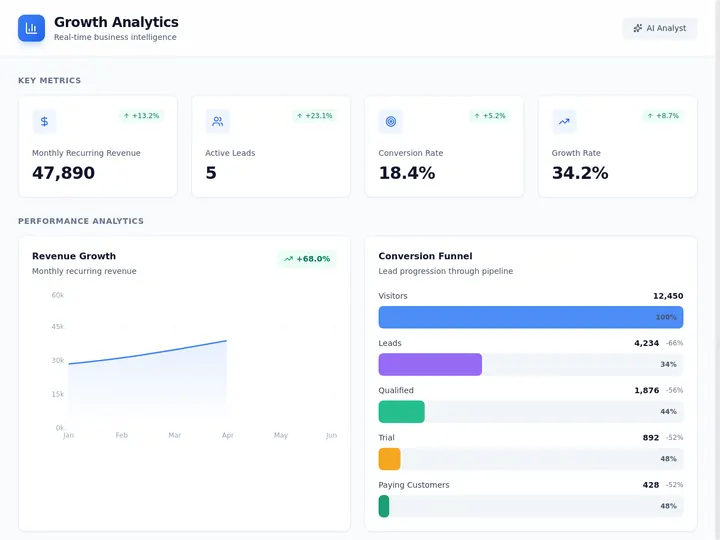
You can watch the loop before you build it. The growth dashboard below was generated from one prompt in Taskade Genesis: it pulls live numbers, surfaces what's moving, and gives a founder a single surface to see the whole company at a glance, the place where a self-improving company watches itself improve. Click it, clone it, and swap in your own metrics.
Watch multi-agent orchestration build and run a living app from one instruction:
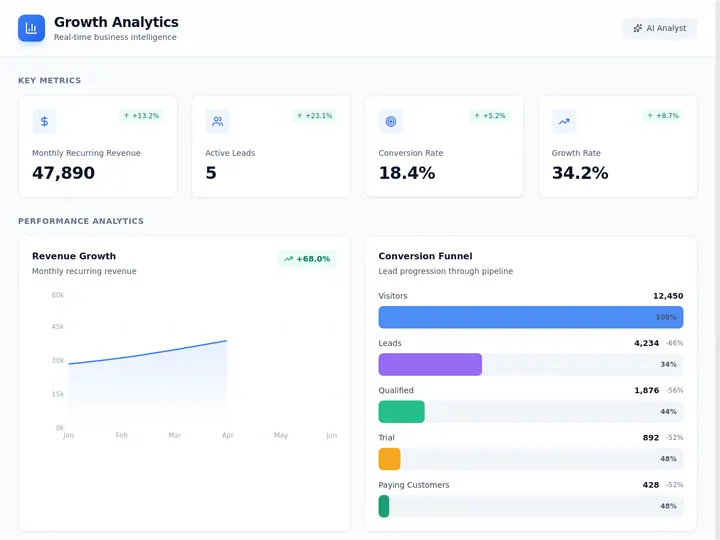
This dashboard is one node in the loop, not the whole thing. The rest of this playbook builds the loop around it, the memory it reads from, the agents that update it, and the automations that act on what it shows. Clone it and start your own →
AI-Native vs AI-Bolted-On: The Architectural Fork
AI-native and AI-bolted-on are not two flavors of the same thing. They are different architectures with different ceilings. Bolted-on AI adds a chatbot or a copilot to tools and workflows that were designed for humans, so the AI sits on the surface and nothing compounds. AI-native means the workspace itself is the system: agents are teammates, automations are execution, and outcomes loop back into memory. Bolted-on AI saves you minutes today. AI-native architecture compounds capability over months.
Here is the same distinction as a side-by-side you can hold against your own company:
| Dimension | Traditional / AI-bolted-on | AI-native (self-improving) |
|---|---|---|
| Core unit | A person doing a task | A loop capturing an outcome |
| AI's role | A copilot on the surface | A teammate inside the work |
| How you grow | Add headcount | Close another loop |
| Where context lives | Scattered across tools | One living workspace |
| What a finished task leaves | A file, then silence | Memory the next run starts from |
| Execution | Manual handoffs | Automations that branch and act |
| The constraint | Hiring and coordination | Tokens and loop design |
| Capability over time | Flat — same effort, same output | Compounding — each run sharpens the next |
The right-hand column is the whole reason to read on. The left column scales linearly: twice the output needs roughly twice the people. The right column scales differently, once a loop closes, it keeps paying without a new hire. For the conceptual deep-dive on why the architecture matters, see AI-native vs AI-bolted-on and the Workspace DNA explainer.
Why "Self-Improving" Is the Whole Point
The compounding loop is what separates a fast company from a self-improving one, because it turns every outcome into input for the next run. Blomfield's clearest example: at YC, a monitoring agent watches what the system does, and when a query fails, "the AI completed the loop itself, finding a way to self-improve". It writes the fix, opens a merge request, a second agent reviews it overnight, and it ships. The company improves while everyone sleeps. That is not automation. That is a closed loop.
The same principle scales down to a one-person company. Solo-founded ventures were roughly 36% of new startups in early 2026, and operators like Midjourney reach over $18M in revenue per employee with a team you can count on two hands. The mechanism is identical: instead of hiring, the founder orchestrates a coding agent, a marketing agent, a support agent, and an analytics agent, and every run those agents complete feeds back into the workspace they share. Sequoia now underwrites this directly, calling it agentic leverage: "the best new investments are not the companies with the most employees. They are the ones with the fewest."
In The Nvidia Way, Tae Kim documents the operating instinct behind one of the longest-running compounding machines in tech. NVIDIA CEO Jensen Huang's standing line is that "Nvidia's worst enemy is not the competition, but itself" — complacency, not a rival, is what kills a company. A self-improving loop is the structural answer to that warning: it forces the company to learn from its own output every cycle instead of coasting on a past win. (For more on how Jensen Huang runs NVIDIA, see NVIDIA's operating playbook.)
The plain-English takeaway: a company without this loop pays full price for every task, forever. A company with it pays once, then collects interest. The four stages below are how you build the loop, in order, starting from nothing.
The Playbook at a Glance
Before the detail, here is the whole build in one table. Each stage adds one layer of Workspace DNA, ships a concrete artifact, and earns a compounding benefit you keep. Build them in order, Intelligence is useless without Memory to read, and Execution is dangerous without Intelligence to direct it.
| Stage | DNA layer | What you build | The artifact you ship | What compounds |
|---|---|---|---|---|
| 1. Memory | ▲ Memory | One workspace holding real work | Projects + a growth dashboard | Context stops scattering across tools |
| 2. Intelligence | ■ Intelligence | Agents pointed at that memory | A team of AI agents with built-in tools | Decisions and drafts, in your voice |
| 3. Execution | ● Execution | Automations on agent decisions | Workflows across 100+ integrations | Work happens without you babysitting |
| 4. Compounding | ▲■● loop | The feedback wiring | Outcomes routed back to Memory | Every run makes the next one smarter |
The rows are sequential, but the value is cumulative, by Stage 4 you are not running four features, you are running one loop. Read each stage below as a build step you can do this week.
Stage 1: Memory: Make the Company Readable
Start with Memory, because an agent can only act as well as the context it can read. The first move in building a self-improving company is to put your real work, clients, projects, decisions, knowledge, into one workspace so context lives in a single readable place instead of leaking across a doc tool, a tracker, a chat app, and four inboxes. Blomfield's rule is exact: "everything that happens, if it's recorded, it happened for the AI." An unreadable company cannot improve itself, because there is nothing for the loop to learn from.
In Taskade, Memory is your projects, and a project is not a static doc. It is a live surface with multiple project views (List, Board, Calendar, Table, Mind Map, Gantt, Org Chart, with the Timeline inside Gantt), so the same knowledge shows up as a board for a pipeline, a calendar for deadlines, or a mind map for strategy. Put the real work here. The growth dashboard above is a Memory surface: it is where the company's state is recorded so everything downstream can read it.
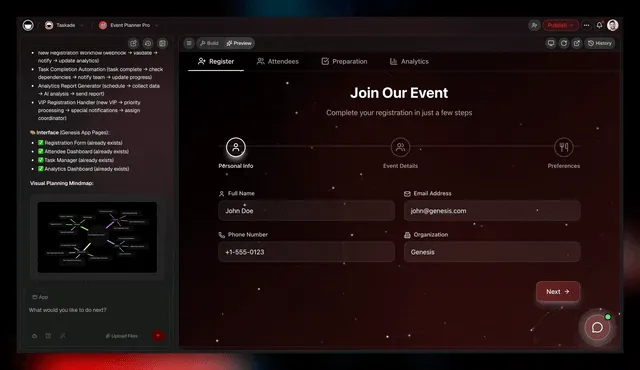
Workspace DNA in motion: every project you add to Memory makes the next agent decision and automation run a little smarter.
  STAGE 1 — MEMORY (make the company readable)
  ────────────────────────────────────────────
  BEFORE                          AFTER
  ──────                          ─────
  Docs in Tool A                  ┌─ ONE WORKSPACE ──────────────┐
  Tasks in Tool B                 │  projects (7 views)          │
  Chat in Tool C        ──────►   │  clients · decisions · knol. │
  Automations in Tool D           │  one shared, readable memory │
  (context leaks between them)    └──────────────────────────────┘
                                     ↑ agents read from here
Do this now: open one workspace, create a project for each part of the business that matters (sales, delivery, marketing, ops), and move the real work in. Don't perfect it, make it readable. For the conceptual model behind this, see the Workspace DNA explainer; for a guided start, the Taskade Genesis overview. The compounding benefit you just earned: context stops scattering, so everything you build next can see the whole company.
Stage 2: Intelligence: Give the Company a Brain
Add Intelligence second, by pointing agents at the memory you just built. An agent is a teammate, not a button. It reads the workspace, decides, drafts, and acts. Taskade AI Agents v2 ship built-in tools (web search, code, file analysis, custom slash commands), plus persistent memory, multi-agent collaboration, public embedding, and multi-model routing across 15+ frontier models from OpenAI, Anthropic, Google, and open-weight providers, auto-routed, so you never pick a model. Point one at your sales project and it qualifies leads; point one at delivery and it drafts the next milestone. EVE, the Taskade Genesis meta-agent, orchestrates the whole team from a single instruction.
This is the layer the multi-agent research is about: agents run a Goal → Reason → Act → Reflect loop, navigating toward an objective rather than following a fixed script. The solo-founder pattern is to stand up four specialists instead of four hires, a coding agent that knows the codebase, a marketing agent that tests campaigns, a support agent with full product context, and an analytics agent that surfaces anomalies, all reading the same Stage 1 memory.
Do this now: create one agent, give it access to a Stage 1 project, and assign it a real recurring decision (qualify this lead, triage this ticket, summarize this week). Then add a second agent and let EVE coordinate them. The compounding benefit: the company now has a brain that reads its own memory, and gets sharper as that memory grows. Learn the teammate model in what are AI agents and compare orchestration approaches in best multi-agent platforms.
Stage 3: Execution: Let the Company Act on Its Own
Add Execution third, by wiring automations to the decisions your agents make. Intelligence that can't act is just advice. Execution is the layer that turns a decision into a done thing without anyone babysitting it, Taskade runs reliable automation workflows that branch, loop, and filter across 100+ bidirectional integrations, where triggers pull events in (a form submitted, a payment cleared, a lead created) and actions push data out (update the CRM, send the contract, post to Slack). A signed proposal kicks off onboarding; a won deal becomes an invoice; a stalled ticket escalates itself.

Execution in action: wire one trigger to one action and the company starts doing the work without you in the loop.
This is where the company stops needing a human in every loop. Order matters: you build Execution after Intelligence because an automation acting on a bad decision just makes the wrong thing happen faster. With agents directing them, automations become the hands of the company brain.
Notice the "route to a human" branch. That is deliberate. The novel and high-stakes calls still belong to a person; automation handles the high-volume, well-understood path. Do this now: take one decision an agent already makes and wire the action that should follow it. Start with one trigger and one action, then add branches. The compounding benefit: work now happens without you, and every run leaves a recorded outcome, which is exactly what Stage 4 needs. Go deeper in software that runs itself and automations.
Stage 4: Compounding: Close the Loop
The final stage is the one that makes the company self-improving: route every outcome back into Memory so the next run starts smarter. Stages 1 through 3 give you a company that reads, thinks, and acts. Stage 4 wires the result of every action back to the project it came from, so a closed deal teaches the sales agent, a resolved ticket teaches the support agent, and a winning campaign teaches the marketing agent. This is Workspace DNA completing its circuit: Memory feeds Intelligence, Intelligence triggers Execution, and Execution creates new Memory.
This is the dotted line from the very first diagram, now made real. Without it, you have a fast company. With it, you have one that gets more capable every day on its own, the YC monitoring-agent pattern, applied to your whole business.
Do this now: for one workflow, add the final step that writes the outcome back, tag the deal won in the project, log the resolution, record the campaign result, and give the relevant agent access to that history. You have just closed your first loop. The compounding benefit is the whole point of the playbook: from here, the workspace sharpens itself without you. For the conceptual model of this cycle, see the Genesis Loop.
The Tool Stack: One Workspace, Four Layers
A self-improving company needs four capabilities, and the trap is buying four tools that don't share memory. The whole thesis collapses if your projects live in one app, your agents in another, and your automations in a third, because context leaks at every seam and nothing compounds. The point of an AI-native stack is that the four layers share one memory. Here is the stack mapped to the playbook, with where each layer lives in Taskade Genesis.
| Layer | What it does | Why it must share memory | In Taskade |
|---|---|---|---|
| Memory | Holds the company's state | Agents act on what they can read | Projects · multiple views |
| Intelligence | Decides and drafts | Bad context = bad decisions | AI Agents v2 · built-in tools · EVE |
| Execution | Turns decisions into action | Acting on stale data fails silently | Automations · 100+ integrations |
| Interface | Where you and clients see it | One surface, no copy-paste | Taskade Genesis apps · Community |
| Models | The reasoning underneath | Auto-routed, no model-picking | 15+ frontier models, auto-routed |
The single most important column is the middle one: why it must share memory. This is the difference between an AI-native company and a pile of AI tools. In Taskade Genesis, all four layers read and write the same workspace, so closing the loop is the default, not a custom integration project. The plain-English version: you describe what you want, and the workspace is the backend, the team, and the execution layer at once.
A Real Operator Already Runs On This
This isn't a roadmap promise, operators already run the loop in production. Taskade's first self-serve Enterprise customer — an IT program manager with no engineering team — built a production field-service dashboard on Taskade Genesis, a real, running app his team uses every day. His take: "What I accomplished in a few weeks would have taken a team of 40+ people 18 months in a Fortune 500." He didn't generate a folder of files. He built a workspace that reads, thinks, acts, and compounds, exactly the four stages above. The growth dashboard on this page is the same idea, ready for you to clone.
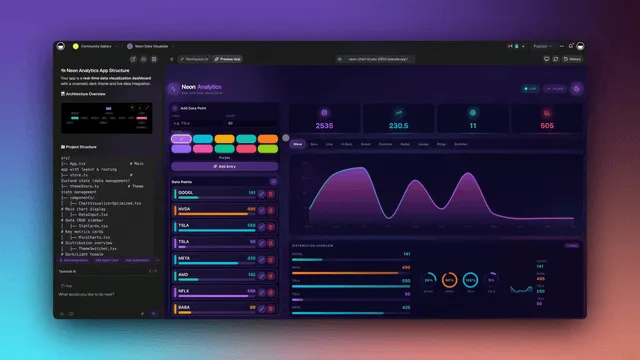
App analytics give you the single surface to see the whole company at a glance, the place where every closed loop shows up as growth.
That is what agentic leverage looks like from the inside: one person, one workspace, the output of a team. Browse more live, cloneable apps in the Community Gallery, or start your own with a free AI app builder.
Risks and Guardrails: Building the Loop Responsibly
A self-improving company has three failure modes, and all three are governable. The loop is powerful precisely because it acts on its own, so the discipline is making sure it acts well. None of these are reasons not to build. They are the guardrails that keep the build sound.
| Risk | What goes wrong | The guardrail |
|---|---|---|
| Unreadable context | Agents act on messy or scattered memory and produce bad output | Do Stage 1 first — one clean, readable workspace before any agent |
| Ungoverned agents | An agent acts where it shouldn't, or escalates a wrong call | Use the role model (Owner to Viewer) to scope who and what can act |
| Silent drift | The loop optimizes toward the wrong thing, quietly | Keep humans on novel and high-stakes branches; every run is recorded for review |
The throughline: the same shared workspace that makes the loop powerful also makes it auditable. Because everything is recorded, every agent decision and automation run leaves a trail. So when something drifts, you can see it and correct the loop. Blomfield's framing holds: human roles concentrate at "the edge of the company brain," handling the novel and high-risk calls, while the loop handles the high-volume known path. You are not removing judgment. You are putting it where it counts — the same shift covered in the execution-layer thesis.
Decision Flow: Where to Start Building Today
The plain-English version: find the first "No" going down, and that is your starting stage. Most companies are at Stage 1 or 2, their work is in tools but not readable, or readable but no agent reads it. Wherever you land, the next move is one workspace away.
Start Building Your Self-Improving Company
A self-improving AI-native company is not a someday idea. It is four build steps you can start this week, in one workspace. Put your work into Memory, point Intelligence at it, wire Execution to the decisions, and close the loop so every outcome compounds. You don't grow it by hiring. You grow it by closing another loop. Taskade Genesis is the stack that holds all four layers in one place, so the loop is the default instead of an integration project, and it starts on the Free Forever plan ($0), then Pro $10 (the Popular tier ★), Business $25, Max $100, and Enterprise $250 per month on annual billing.
The operators who design their company around this from day one build organizations that get more capable every single day without adding a single person. That is the whole promise of Workspace DNA, Memory feeds Intelligence, Intelligence triggers Execution, Execution creates Memory, a company that improves itself. Clone the live growth dashboard and build the first loop today.
▲ ■ ●
Sources: Tom Blomfield / Y Combinator, How to Build an AI-Native Company, The One-Person Unicorn: Solo Founder AI Economics 2026 (NxCode), AI-Native Companies: Building Self-Improving Organizations (StartupHub.ai).
Frequently Asked Questions
What is an AI-native company?
An AI-native company is built around AI from day one rather than bolting it onto old processes. Work happens inside a living workspace where agents act as teammates, automations run execution, and every project feeds the next. The structure is a set of self-improving feedback loops, not a fixed org chart, so the company gets more capable each day without adding headcount.
What makes a company self-improving?
A company is self-improving when its core processes capture their own outcomes and feed them back as input. Each closed deal, shipped project, and resolved ticket becomes memory the next run starts from. In Taskade that loop is Workspace DNA: Memory remembers, Intelligence drafts and decides, Execution acts, and every result sharpens the next cycle automatically.
What is the difference between AI-native and AI-bolted-on?
AI-bolted-on adds a chatbot or a copilot to tools and workflows designed for humans, so the AI sits on the surface and nothing compounds. AI-native means the workspace itself is the system: agents are teammates, automations are execution, and outcomes loop back into memory. Bolted-on AI saves minutes. AI-native architecture compounds capability over months.
Can one person run an AI-native company?
Yes. Solo-founded ventures were roughly 36 percent of new startups in early 2026, and operators like Midjourney reach over 18 million dollars of revenue per employee. A single founder orchestrates a coding agent, a marketing agent, a support agent, and an analytics agent instead of hiring four people. Taskade Genesis gives that founder the stack: prompt to app, agents, and automations in one workspace.
What is the compounding loop in an AI-native company?
The compounding loop is the cycle where Memory, Intelligence, and Execution feed each other. A project captures knowledge, an agent uses that knowledge to decide and draft, an automation executes the decision, and the outcome returns to the project as new memory. Each clone, each automation, and each captured result makes the next cycle faster and smarter, so leverage builds over time.
What does the living workspace replace?
A living workspace replaces the stack of disconnected tools a traditional company runs: a doc tool, a project tracker, a chatbot, a separate automation service, and the manual copy-paste between them. In Taskade, projects, agents, and automations share one memory, so context never leaks between apps. One workspace becomes the backend, the team, and the execution layer at once.
Where do agents fit in a self-improving company?
Agents are the Intelligence layer and act as teammates, not buttons. Taskade AI Agents v2 ship built-in tools including web search, code, and file analysis, plus persistent memory, multi-agent collaboration, and public embedding. You point one at a workflow and it drafts, decides, and follows up, with EVE, the Taskade Genesis meta-agent, orchestrating the whole team from a single instruction.
Where do automations fit in a self-improving company?
Automations are the Execution layer that turns decisions into action without anyone babysitting them. Taskade runs reliable automation workflows that branch, loop, and filter across 100-plus bidirectional integrations: triggers pull events in, actions push data out. A signed proposal kicks off onboarding, a new lead updates the CRM, and a captured outcome flows back into the workspace as memory.
How do I start building an AI-native company?
Start with Memory: put your real work into one workspace so context lives in a single place. Then add Intelligence by giving agents access to that memory. Then add Execution by wiring automations to the decisions agents make. Then close the loop so outcomes feed back. In Taskade Genesis you can do all four stages in one workspace, beginning on the Free Forever plan.
What are the risks of an AI-native company?
The main risks are unreadable context, ungoverned agents, and silent drift. Agents need clean memory to act well, so messy or scattered context produces bad output. Give agents clear scopes, use the role model to control who and what can act, and keep humans on novel or high-stakes decisions. A shared workspace with version history reduces drift because every run is recorded.
What tools do I need to build a self-improving company?
You need four capabilities in one place: a memory layer for projects and knowledge, an intelligence layer of agents, an execution layer of automations, and integrations to the outside world. Taskade Genesis combines all four with multiple project views, agent tools, reliable automation workflows, 100-plus integrations, and 15-plus frontier models, starting on the Free Forever plan.
How does Taskade fit a self-improving company?
Taskade is the workspace where the loop lives. Taskade Genesis turns a prompt into a running app, agents act as teammates, automations execute, and Workspace DNA keeps Memory, Intelligence, and Execution feeding each other. Pricing starts free, then Pro 10 dollars (the Popular tier), Business 25 dollars, Max 100 dollars, and Enterprise 250 dollars per month on annual billing.