






You can now create tags and templates for your workspaces!
TL;DR: Tags and custom templates landed in 2019 to automate repetitive workflows. Today Taskade has multiple project views, frontier AI models, 100+ integrations, and a full library of templates — plus Taskade Genesis which generates whole apps from a single prompt.
| Capability | 2019 | Today (2026) |
|---|---|---|
| Templates | Static custom templates | AI-generated templates from prompt |
| Sharing | Workspace members only | Public Community Gallery |
| Tags | Manual labels | Manual + AI auto-tagging |
| Discovery | Workspace tab | Curated Gallery + search |
| Build a new project | Pick a template | Prompt Taskade Genesis for a living app |
Then → Now: 2019 custom templates → today's Workspace DNA: Memory + Intelligence + Execution with AI agents and automations running across every workspace.
  Workspace
    │
    ├── #urgent ───┐
    ├── #design   ├─▶ filter ▶ Project list
    ├── #q2-launch┘
    │
    └── Templates ─▶ New Project ─▶ AI Agent ─▶ Automation
- Use tags to organize and prioritize your task lists.
- Create templates to automate repetitive workflows.
- Tags and templates are shared with all workspace members.
Tags
Add tags to organize and prioritize your task lists in each workspaces.


Click on Add Tag in the task list or workspace to select, create and delete tags.
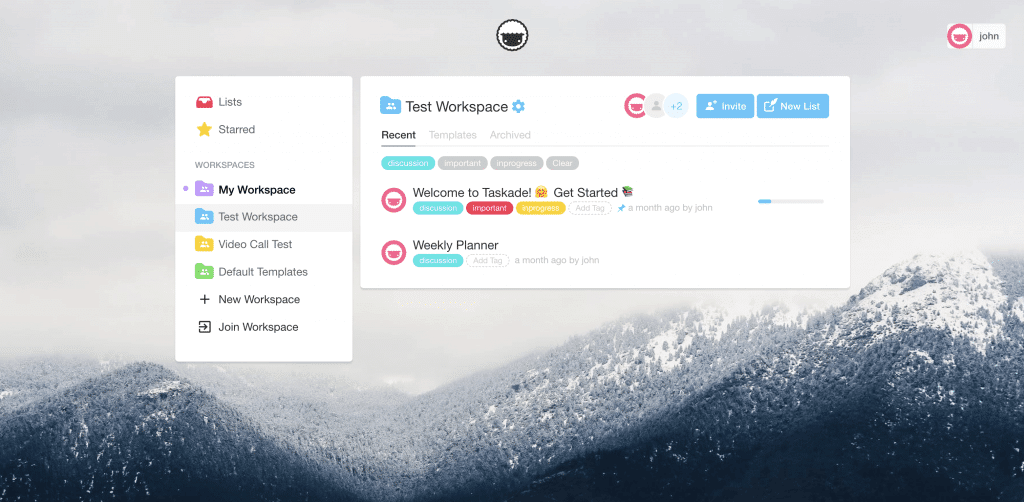
Click a on a tag to search and filter it in the Workspace. You can also select multiple tags
Templates
Create templates to automate tasks and workflows for you and your team.

1. Select a Workspace and go to the Templates tab and press New Templates.

2. Start typing to create the template. You are now in Edit Template mode.

3. When you or your teammate create a New List, custom templates will now appear.

You can also select from many existing templates when creating a new list on Taskade.
Frequently Asked Questions
How do tags work in Taskade?
Taskade tags let you categorize and label projects within a workspace for quick filtering and organization. Add tags by clicking 'Add Tag' on any project or from the workspace view. You can create custom tags, assign multiple tags per project, and click any tag to filter the workspace to show only matching projects.
Can I create custom templates in Taskade?
Yes. Taskade lets you create custom workspace templates from any project. Go to the Templates tab in your workspace, click New Template, and build your reusable structure. Custom templates appear alongside Taskade's built-in templates whenever anyone in the workspace creates a new project, saving time on repetitive workflows.
Are Taskade tags and templates shared with team members?
Yes. Both tags and custom templates are shared with all members of the workspace. When you create a tag or template, every workspace member can use it — tags for filtering and organizing projects, and templates as starting points for new projects. This keeps team workflows consistent without manual duplication.
How do I filter projects by tag in Taskade?
Click on any tag in your Taskade workspace to instantly filter and display only projects with that tag. You can also select multiple tags to narrow results further. Tag filtering works in the workspace sidebar view, making it easy to find specific project categories like 'urgent,' 'in-progress,' or any custom label your team creates.