

TL;DR: TRAE is ByteDance's AI coding tool with an Agent mode and an IDE mode, from $3/mo (verified October 2026). Taskade Genesis builds live apps from a prompt, with AI agents, automations and hosting included, and no IDE. Free Forever, Pro $10/mo billed annually for up to 10 seats. Try Taskade Genesis free →
See the alternative working — clone in 60 seconds
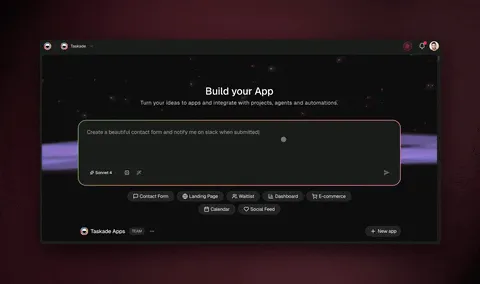
No credit card needed. Open any app in the Community Gallery and clone it into your own workspace.
The fundamental difference
TRAE and Taskade Genesis both start from a prompt, but they end in different places. TRAE ends in code. Its agents plan the change, edit files, run commands and hand a developer a diff to review. Taskade Genesis ends in a running app. It builds the interface, connects it to workspace data, adds AI agents and automations, and puts it online at a URL.
TRAE asks: "What should this code do?" Taskade Genesis asks: "What app should exist, and who uses it?"
That difference decides who on the team can build. TRAE gives developers a faster way to work in a repository. Taskade Genesis gives everyone else a way to ship the internal tool, client portal or dashboard without opening a repository at all.
What is TRAE?
TRAE is the AI coding product from ByteDance, sold internationally at trae.ai with an enterprise edition through BytePlus. Its 2026 product line moved fast:
- February 24, 2026: TRAE switched to token-based membership with four tiers: Lite, Pro, Pro+ and Ultra.
- May 2026: TRAE merged its Builder agents into one Agent and renamed SOLO Coder to SOLO Agent.
- June 2026: TRAE Work launched as a general work assistant, and TRAE Enterprise launched.
- October 8, 2026: TRAE v3.6.0 added the Agent window, an agent-centric workspace for running multiple agents across projects, with cloud tasks and scheduled tasks.
TRAE's documentation now describes "the all-new TRAE": TraeCode and TraeWork merged into one product with two modes. Agent mode takes a task from idea to delivery and can orchestrate several agents in parallel. IDE mode is a full AI-powered development environment for editing and debugging. The same work follows you across desktop, web and mobile.
TRAE at a glance (verified October 2026): ByteDance's AI coding tool. Agent mode plus IDE mode on desktop, web and mobile. Automation for repeatable agent tasks, a Marketplace of plugins and skills, and My Artifacts for deliverables. Paid plans: Lite $3/mo, Pro $10/mo, Pro+ $30/mo, Ultra $100/mo, monthly auto-renew. Enterprise through BytePlus.
TRAE does well:
- A low-cost entry into AI coding, with Lite at $3 per month
- An IDE mode for line-by-line editing and debugging, next to an Agent mode for larger tasks
- Multiple agents across several projects in one window, including remote hosts over SSH
- Hooks, slash commands, subagents and skills that let developers customize agent behavior
- Unlimited autocomplete on every paid plan
Where teams hit limits: TRAE is built for the person who reads the code. Product managers, operators and clients cannot review a diff, and a generated codebase still needs hosting, a database, sign-in, and a plan for maintenance. Approvals, backlog grooming and stakeholder updates usually live in a separate tool.
What is Taskade Genesis?
Taskade Genesis is the AI app builder inside the Taskade workspace. You describe the app in plain language, and Taskade Genesis returns a live app at a shareable URL. The app reads and writes your workspace data, so the app and your team's projects stay in sync.
Taskade is built on Workspace DNA, a loop of three layers:
- Memory (Projects): documents, tasks and structured data in multiple project views: List, Board, Table, Mind Map, Docs (Beta), Gantt Chart, Calendar, Actionsheet and Org Chart.
- Intelligence (Agents): custom AI agents with built-in tools such as web search and file analysis, trained on your documents.
- Execution (Automations): automations with triggers and actions across 100+ integrations, including GitHub, Slack, Gmail and Stripe.
Feature-by-feature comparison
Who can build
- TRAE assumes you can read and review code. Its Agent mode lowers the bar for beginners, but the output is still a codebase.
- Taskade Genesis assumes nothing about code. A marketer, an operator or a founder can describe a client portal and share the live link the same day.
What you ship
- TRAE produces code changes and artifacts such as HTML files, slide decks, documents and reports. Deployment runs through your own hosting or a deploy skill.
- Taskade Genesis produces a deployed app with GenesisAuth email-and-password sign-in on every plan, password protection on Pro and above, and custom domains on Pro and above.
AI agents
- TRAE agents are coding agents. They plan, edit files, run commands and report progress.
- Taskade agents are teammates inside the workspace and inside apps. They answer customers, triage requests, summarize projects and update tasks. You can embed an agent in a Taskade Genesis app for public use.
Automations
- TRAE Automation runs repeatable agent tasks, such as routine checks, test summaries and project reports.
- Taskade automations connect business events to actions across 100+ integrations: a new form entry creates a task, a moved card posts to Slack, a new Stripe payment updates a customer table. Webhooks are available on Pro and above.
Team collaboration
- TRAE organizes agent work by project and task for the developer.
- Taskade gives the whole team real-time editing, comments, chat and video, with role-based access from Owner to Viewer.
A "use both" workflow for product teams
Many teams run TRAE and Taskade side by side. Here is a setup that works for a small product team:
- Spec and backlog in Taskade. Keep feature specs, user stories and the release checklist in a Taskade project with Board view.
- Developers build in TRAE. A developer opens the task, and a TRAE agent implements it in the repository.
- Connect over MCP. On paid Taskade plans, MCP-capable coding tools can connect to Taskade's hosted MCP server to read projects and tasks, so the agent sees the same spec the team approved.
- Ship notes automatically. When a card moves to Done, a Taskade automation posts the release note to Slack and updates a changelog project.
- Internal tools without a sprint. The ops team builds its own dashboards and request portals in Taskade Genesis, so developers stay on the core product.
Pricing comparison
| Plan | Taskade | TRAE (verified October 2026) |
|---|---|---|
| Free | Free Forever: unlimited projects, 2 members, 1 agent, 3 Taskade Genesis apps | 14-day Pro trial for new users who add a payment method, then a Free plan option |
| Entry | Pro $10/mo billed annually ($20 monthly), up to 10 seats | Lite $3/mo, $5 basic usage |
| Mid | Business $25/mo billed annually ($50 monthly) | Pro $10/mo, $20 basic usage |
| High | Max $100/mo billed annually ($200 monthly) | Pro+ $30/mo, 3.5x Pro usage |
| Top | Enterprise $250/mo billed annually ($500 monthly) | Ultra $100/mo, 20x Pro usage, model early access |
TRAE prices each plan per user and bills AI usage by tokens, with on-demand usage at API rates when the allowance runs out. Taskade prices per workspace: Pro covers up to 10 seats, and the plan includes hosted apps, agents and automations. See trae.ai/pricing for current TRAE rates and the Taskade pricing page for ours.
Choose TRAE if
- You are a developer who wants an AI-native IDE, with an Agent mode for big tasks and an IDE mode for careful debugging.
- You want a very low entry price for AI coding, starting at $3 per month for Lite.
- You need agents that work across several repositories or on remote machines over SSH.
Choose Taskade Genesis if
| You need | Taskade Genesis gives you |
|---|---|
| A working app without code | A live app at a shareable URL from one prompt |
| Sign-in and hosting included | GenesisAuth on every plan, custom domains on Pro+ |
| AI that serves customers and staff | Custom agents embedded in apps and projects |
| Business automations | Triggers and actions across 100+ integrations |
| One place for the team | Projects, chat, video and role-based access |
Teams choose Taskade when the people who need the tool are not the people who write code. TRAE remains a strong pick for developers.
Frequently asked questions
Can Taskade Genesis export code like TRAE?
Taskade Genesis apps run inside Taskade. On Pro and above you can export an app bundle, including the full Code tab and Export to GitHub, so developers can continue in a tool such as TRAE.
Is Taskade Genesis good for prototypes?
Taskade Genesis builds live apps, not mockups. Teams use them in production as portals, dashboards, CRMs and request forms.
Does TRAE have a free plan?
TRAE's February 2026 membership post describes a Free plan that users can switch to after the 14-day Pro trial. The October 2026 pricing page lists the four paid tiers.
Which is better for non-developers?
Taskade Genesis. It needs no code editor, no hosting setup and no deployment step.
Can a Taskade Genesis app talk to a backend I built in TRAE?
Yes. Taskade automations can call your own API with the generic HTTP action, and webhooks on Pro and above let your service push events into Taskade. A service your developers build in TRAE and a Taskade Genesis front office can work together.
Is TRAE available in China?
Yes. TRAE runs a separate China site at trae.cn, linked from the international site. On the international site, TRAE routes enterprise inquiries through BytePlus.
Where does TRAE fit next to Taskade?
| Job | Best tool |
|---|---|
| Write, refactor and debug product code | TRAE |
| Plan the backlog and approve specs | Taskade projects |
| Build an internal tool or client portal | Taskade Genesis |
| Answer customers with AI | Taskade agents |
| Post release notes and alerts | Taskade automations |
Ship the app, not the repo
TRAE makes developers faster in the codebase. Taskade Genesis lets the rest of the team ship the tools they need, with agents and automations already connected. ▲ Memory ■ Intelligence ● Execution.
- Build your first Taskade Genesis app →
- Browse the Community Gallery — Clone apps other builders shipped
- Best vibe coding tools — AI coding and app builders compared
Related comparisons
- Free Cursor Alternative — AI IDE versus live apps
- Free Windsurf Alternative — Another AI IDE compared
- Free Claude Code Alternative — Terminal coding agent versus Taskade Genesis
- Free Replit Alternative — Cloud IDE versus Taskade Genesis
- Free Doubao Alternative — ByteDance's AI assistant versus a team workspace
Explore Taskade Genesis
- AI App Builder — Build complete apps from one prompt
- Vibe Coding — Natural-language app creation
- AI Agents — Digital teammates that work 24/7
- App Templates — Start from a ready structure
- AI App Generator — Full apps from prompts