






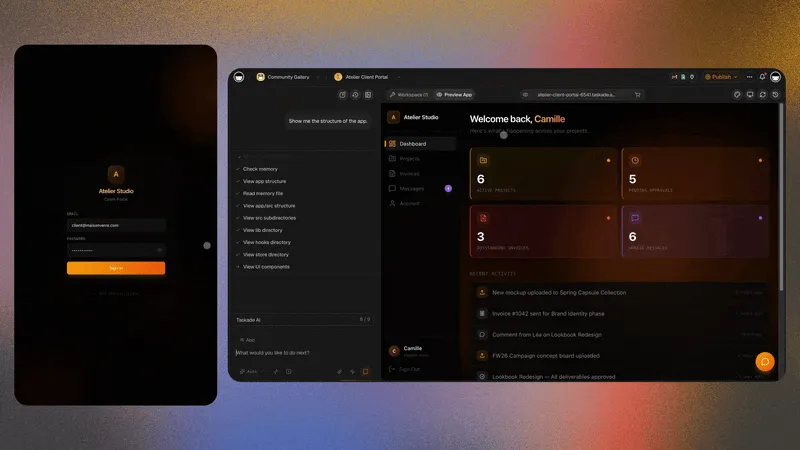
Every freelancer has been told the same thing: build a portfolio website. So they open wix.com, framer.com, or visme.co, spend a weekend picking fonts, and ship a page that looks great and does nothing. The visitor admires the work, then leaves, because the page was a brochure, not a business. The win in 2026 is not a prettier brochure. It is a portfolio that is the front door of a connected freelance operating system, where the same workspace that shows your work also lands the client, writes the proposal, tracks the hours, and sends the invoice.
TL;DR: A website builder makes a static page and stops. An AI portfolio builder makes a live page wired to a CRM, proposals, time tracking, and invoicing in one workspace. So each finished job becomes proof that wins the next contract. Freelancers on connected systems quote faster and chase fewer invoices because the data already lives in one place. Build your portfolio from a prompt.
What is the real difference between a portfolio builder and a website builder?
A website builder produces a static marketing page; an AI portfolio builder produces a live page wired to a working business. Wix, Visme, and Framer stop at presentation, beautiful layouts that look identical the day after launch as they did on day one. Taskade Genesis keeps going: the portfolio it builds is connected to a client CRM, a proposal generator, and an invoice generator in the same workspace, so the page does work after the visitor lands.
The distinction matters because a freelancer does not get paid for having a website. They get paid for what happens after someone sees the work, the reply, the call, the proposal, the signed scope, the invoice. A static site treats that funnel as someone else's problem and hands it off to a pile of disconnected apps. A connected portfolio treats the page as step one of a system it already owns.
The loop in the second box is the whole argument. On a website builder, the arrow stops at "Leaves." On a connected portfolio, the arrow curls back, every finished project re-enters the system as proof, and proof is what wins the next job.
How does a connected portfolio actually win the next contract?
Finished work is the strongest evidence a freelancer owns, and a connected portfolio turns each delivered project into a case study, a proposal template, and a referral asset without extra work. Because the project data already lives in the workspace, scope, deliverables, hours, screenshots, Taskade can clone that structure into the next pitch, so the next proposal is most of the way written before you open a blank page.
This is the David thread. David is a contractor who self-served onto a paid plan and built an internal ops dashboard to run a real business, not because he wanted software, but because he wanted to stop losing the thread between "job finished" and "next job won." The lesson he learned is the one most freelancers miss: the portfolio is not the finish line, it is the raw material. Every completed job is a unit of proof. The question is whether your tools let you reuse it or force you to rebuild it.
Here is the difference in plain terms:
| You just finished a project | On a website builder | In a connected portfolio |
|---|---|---|
| Add it to your portfolio | Manually export, crop, write copy, re-upload | The project is already in the workspace — publish it |
| Write the next proposal | Start from a blank doc or generic template | Clone the delivered project and swap details |
| Show ROI to the next client | Hope you remember the numbers | The time tracker already has the hours |
| Ask for a referral | Send a cold email and hope | The CRM reminds you at the right moment |
| Bill the work | Open a separate invoicing tool | The invoice reads the logged hours |
The right-hand column compounds. The left-hand column resets to zero after every project. That is the real reason David's dashboard out-earned his old website: it remembered.
Where do website builders genuinely win?
Website builders earn their reputation on design control, and that strength is real. framer.com ships some of the best animation and layout tooling on the market, wix.com has the deepest template library and a forgiving editor for non-designers, and visme.co is excellent for infographic-heavy presentations and pitch decks. If your single goal is a pixel-perfect, heavily-animated static page and nothing else, these tools are purpose-built for it.
We are not here to attack them, picking the right tool means being honest about what each one does best. The table below is a fair read.
| Capability | Wix | Framer | Visme | Taskade Genesis |
|---|---|---|---|---|
| Visual design control | Excellent | Best-in-class | Strong (decks) | Good |
| Template library breadth | Largest | Curated | Large (graphics) | App-shaped |
| Built from a plain-language prompt | Partial (AI site) | Partial (AI) | Partial | Yes, end to end |
| Built-in client CRM | No | No | No | Yes |
| Proposals + invoicing in same tool | No | No | No | Yes |
The pattern is clear. Website builders dominate the left three rows; the connected workspace dominates the bottom two. The choice is not "which makes a nicer page". It is "do I want a page, or do I want a business behind the page." For many freelancers the honest answer is both, which is why some run a Framer landing page and point its contact button into a Taskade workspace that handles everything after the click.
What does the "connected freelance operating system" include?
A connected freelance operating system is the portfolio plus the four functions that turn a visitor into paid work: client management, proposals, time tracking, and invoicing, all in one workspace. In Taskade each of those is a generator you can spin up from a description, and because they share the same workspace, data flows between them with no copy-paste and no integration glue.
Think of the portfolio as the lobby and the rest as the floors above it:
Each node below is a real generator you can start from a prompt today.
The portfolio: your public proof
The portfolio builder is the front door. Describe your services, your niche, and your best three projects, and it builds a live, custom-domain-ready page, not a template you fill in by hand. Because it is an app and not a flat file, the contact form can capture leads straight into your CRM instead of dumping them into an inbox you forget to check.
The client CRM: never lose a lead again
The client CRM holds every lead and relationship in one place, with stages from "first contact" to "repeat client." Viewed as a Board it is a pipeline; viewed as a Table it is a database; viewed as a Calendar it is your follow-up schedule. Same data, multiple project views, zero re-entry.
Proposals: written before you start
The project proposal generator turns a short brief into a structured proposal with scope, deliverables, timeline, and pricing. Pair it with the AI prompt generator to tune the tone for each client, and clone a past winning proposal to skip the blank page entirely.
Time tracking: proof of the hours
The AI time tracker for freelancers logs hours against each client and project. Those hours are not trapped in a separate stopwatch app. They live in the workspace, which means the invoice reads them directly and your next quote is grounded in what the last job actually took.
Invoicing: bill what you tracked
The invoice generator produces a clean, branded invoice from the logged hours. No copy-paste between a timer and a billing tool, no "wait, how many hours was that", the bill that goes out matches the work that was done, because both live in the same place.
How do you build the whole thing from a prompt?
You build it the way David did, by describing the outcome in plain language and letting Taskade Genesis generate the structure. No code, no template wrangling, no stitching five SaaS tools together with brittle integrations. You describe the business you want to run, and the workspace that runs it appears.
Here is the decision tree most freelancers should walk:
START: "I need a portfolio."
  |
  +-- Do you only want a static, design-heavy page and nothing else?
  |     |
  |     +-- YES --> Use Wix / Framer / Visme. Beautiful page, done.
  |     |
  |     +-- NO, I want the page to DO something
  |           |
  |           +-- Should the page capture leads into a CRM?
  |           |     +-- YES --> /generate/freelancing/client-crm
  |           |
  |           +-- Should finished jobs become new proposals?
  |           |     +-- YES --> /generate/freelancing/portfolio-builder + clone-and-own
  |           |
  |           +-- Should it track hours and invoice automatically?
  |                 +-- YES --> /generate/freelancing/ai-time-tracker-freelancers
  |                              --> /generate/freelancing/invoice
  |
  +-- Want all of the above in ONE workspace?
        +-- YES --> Build it from a prompt: /create
The build itself is four steps:
- Describe your service. "I am a freelance brand designer. I work with early-stage startups. Here are my three best projects." Taskade generates the portfolio from that.
- Connect the back office. Add the CRM, proposals, time tracker, and invoicing, all in the same workspace.
- Set the daily rhythm. Use the daily schedule generator and an AI calendar template so leads, deadlines, and invoices never fall through.
- Publish and point your domain. On Business and above, attach your own domain so the portfolio lives on your brand.
For freelancers who work with a small team or subcontractors, layer in a remote team coordination template and a project management agent to keep delivery on track without micromanaging.
What can AI agents do for a freelance portfolio specifically?
Taskade ships built-in agent tools and 15+ frontier models from OpenAI, Anthropic, Google, and open-weight providers, which means the same AI that drafts your portfolio copy also runs the work behind it. A static website builder gives you an AI that writes one page and then leaves; a connected workspace gives you agents that keep working, summarizing client calls, drafting follow-ups, and flagging overdue invoices.
Concretely, for a freelance operation, agents can:
| Job to be done | What the agent does | Linked generator |
|---|---|---|
| Triage new leads | Read inbound form fills, score fit, route to a CRM stage | Client CRM |
| Draft proposals | Turn a brief into a structured scope and price | Project proposals |
| Summarize calls | Convert notes into action items and a follow-up | AI prompt |
| Build a status report | Roll up hours and deliverables for the client | AI dashboard |
| Chase invoices | Flag overdue bills and draft a polite nudge | Invoice |
You can also chain these into a hands-off pipeline. An AI content pipeline automation can publish case studies from finished projects, while a budget-vs-actuals report keeps your freelance finances honest. The point is not that the AI is clever. It is that the AI lives where your business already lives, so it acts on real data instead of guessing.
How is this different from "just adding integrations"?
The difference is that a connected workspace shares one underlying data layer, while a stack of integrations shares brittle pipes between separate databases. When your portfolio, CRM, time tracker, and invoicing each live in a different app, you are responsible for keeping five copies of the truth in sync. In Taskade there is one copy, seen through multiple views, List, Board, Calendar, Table, Mind Map, Gantt, and Org Chart. So the "sync problem" simply does not exist.
This is the trap that catches freelancers who outgrow a website builder. They start with a Wix page, add a separate CRM, then a separate proposal tool, then a separate invoicing app, then a Zapier subscription to glue them together. Six months later they are paying for five tools and a maintenance habit. The connected approach skips the glue because the parts were never separate.
A few practical wins that fall out of "one data layer":
- One source of hours. The time tracker feeds the invoice directly, no export, no reconciliation.
- One client record. A lead in the CRM becomes a proposal, a project, and an invoice without re-typing their details five times.
- One place to look. David's ops dashboard reads from all of it, so "how is the business doing" is one screen, not five tabs.
If you are migrating notes, briefs, or old proposals into the system, Taskade's converters help: turn a PDF into notes, a block of text into a flowchart of your delivery process, or sketch a data flow diagram of how a lead moves through your pipeline.
Who should still pick a pure website builder?
You should pick a pure website builder when the page itself is the product and nothing needs to happen after the visit. A photographer showcasing a gallery, an artist with a single landing page, or a designer who wants total animation control and already runs their business elsewhere will be well served by framer.com or wix.com. There is no shame in a brochure when a brochure is all you need.
Choose the connected portfolio when the page is the start of the work, not the end of it. Use this quick gut-check:
- You lose track of leads after they contact you → you need a CRM, so go connected.
- You rewrite proposals from scratch every time → you need clone-and-own, so go connected.
- You bill from memory or a spreadsheet → you need time-tracked invoicing, so go connected.
- You only need a beautiful static page → a website builder is fine.
Most freelancers who are trying to grow, not just exist online, fall into the connected column. That is the whole reason this category exists: the freelancers who treated their portfolio as a business front door, not a digital business card, are the ones who stopped chasing work and started compounding it.
How do you start today?
Start with the portfolio builder and let it generate your front door from a description, then add the back office one generator at a time. You do not have to build the whole operating system on day one. You can launch the portfolio first and wire in the CRM, proposals, time tracker, and invoicing as each becomes the next bottleneck.
A sensible first-week path:
- Day 1: Generate the portfolio and publish it.
- Day 2: Add the client CRM and point your contact form at it.
- Day 3: Set up the proposal generator and clone your best past project as a template.
- Day 4: Turn on time tracking and the invoice generator.
- Day 5: Build an ops dashboard so you can see the whole business on one screen.
Pricing is friendly to a one-person business. Taskade starts Free, then Pro at $10 (the popular tier), Business at $25, Max at $100, and Enterprise at $250, all billed annually, see the full pricing breakdown. Most solo freelancers run portfolio-to-invoice on Pro; custom domains kick in at Business. Browse the community to see live freelance apps other operators have built, or open the automation and agents hubs to see what the back office can do once it is running.
If you want the bigger picture of running an entire business out of a single workspace, read business in one workspace and the clone-and-own playbook. They are the operating manual for the system this portfolio plugs into. And if you are weighing AI app builders more broadly, free AI app builders and the AI prompt generators guide cover the toolkit underneath. For freelancers expanding into adjacent work, the AI agent stack explains the automation layer in depth.
A website builder hands you a beautiful door with no house behind it. A connected portfolio gives you the door and the rooms, the place where leads become clients, work becomes proof, and proof becomes your next contract. That is the difference between a page that looks like a business and a workspace that is one: Memory + Intelligence + Execution, the self-reinforcing loop where ▲ your work is remembered, ■ your agents do the thinking, and ● your operating system runs the business. Build yours from a prompt and turn your finished work into your next paid client.
Frequently Asked Questions
What is the difference between an AI portfolio builder and a website builder?
A website builder like Wix or Framer produces a static marketing page and stops there. An AI portfolio builder like Taskade Genesis produces a live portfolio that is wired to a working freelance operating system, client CRM, proposals, time tracking, and invoicing in the same workspace. Taskade gives you multiple project views (List, Board, Calendar, Table, Mind Map, Gantt, Org Chart) so the work behind the portfolio is real, not just a screenshot.
Can I build a freelance portfolio from a prompt?
Yes. With Taskade Genesis you describe your services and past work in plain language and it generates a live portfolio app, not a template you have to fill in by hand. The portfolio builder at /generate/freelancing/portfolio-builder is the starting point, and it connects to invoicing and client CRM so the same workspace runs the business that the portfolio advertises.
Do I need to know how to code to build a portfolio website?
No. Taskade Genesis builds the portfolio and the back office from a description, with no code required. The same plain-language approach that David, a contractor, used to build an internal ops dashboard works for a public portfolio. You can start free and move to Pro at $10 per month annually, the popular tier, when you need more.
Is Wix or Framer better than Taskade for a portfolio?
Wix and Framer are excellent at visual design and pixel-level layout control, and Framer in particular ships beautiful animations. Taskade wins when the portfolio needs to do work after the visitor lands, capture the lead, generate a proposal, track the project, and send the invoice. Taskade gives you a portfolio plus a client CRM, proposal generator, and invoice generator in one connected workspace rather than five disconnected tools.
How does a portfolio win the next freelance contract?
Finished work is the strongest proof a freelancer has. A connected portfolio turns a delivered project into a case study, a proposal template, and a referral asset automatically because the project data already lives in the workspace. Taskade lets you clone a winning project structure into the next proposal, so each delivered job makes the next pitch faster to write and easier to win.
Can a portfolio and an invoice live in the same tool?
Yes. Taskade keeps the portfolio, client CRM, project proposals, time tracking, and invoicing in one workspace. The invoice generator at /generate/freelancing/invoice reads the hours you logged with the AI time tracker, so the bill that goes out matches the work that was done with no copy-paste between apps.
What does Taskade Genesis cost for freelancers?
Taskade has a Free tier to start, then Pro at $10 per month, which is the popular tier, Business at $25, Max at $100, and Enterprise at $250, all billed annually. Most solo freelancers run their entire portfolio-to-invoice operation on Pro, which unlocks the full AI agent toolset; custom domains arrive on Business.
How many AI models and tools does Taskade include?
Taskade includes 15+ frontier models from OpenAI, Anthropic, Google, and open-weight providers, plus built-in agent tools covering web search, file analysis, custom commands, and persistent memory. For a freelancer, that means the AI that drafts your portfolio copy is the same AI that writes proposals, summarizes client calls, and chases unpaid invoices.
Can I use a custom domain for my Taskade portfolio?
Yes. Custom domains are available on the Business plan and above, so your portfolio can live on your own brand at your-name.com instead of a platform subdomain. The portfolio still connects back to the client CRM and invoicing in the same workspace, which a standalone domain on a website builder cannot do.
What is the fastest way to turn a finished project into a new pitch?
Clone it. In Taskade you clone the delivered project's structure, swap the client details, and the proposal is 80 percent written before you start. This clone-and-own loop, covered at /blog/clone-and-own, is why a connected portfolio compounds, every job you finish becomes the template for the next one you win.
Does an AI portfolio builder replace my website?
It can be your website, or it can sit alongside one. The portfolio app Taskade Genesis builds is a public, shareable, custom-domain-ready site. The difference is that it is also a working application, visitors who land on it can be captured into your CRM and routed into a proposal, which a static website built on Wix or Visme cannot do without bolting on three more tools.