






Think about the last time you wished you had an extra pair of hands. Now imagine a team of personalized assistants conducting research, reviewing code, and handling other mundane tasks while you focus on what truly matters — getting creative or… just enjoying a better work-life balance. Building AI teams can make this a reality, and we’ll teach you how to create yours in 5 minutes.
In this article, we’ll show you how to build, fine-tune, and deploy autonomous AI teams in your Taskade workspace. You’ll also learn how to connect agents to all the tools and services you’re already using.
Without further ado, let’s get started! 🧑🚀

TL;DR (2026): A production AI agent team is three things — specialized roles, shared memory, and a routing layer that picks the right agent per task. Get any one wrong and the team drifts. In Taskade Genesis each AI agent has its own knowledge, 34 built-in tools, and system prompt, yet they all read and write from the same Project memory — and orchestration mode lets a manager agent plan steps and delegate to specialists with a review step. That's how a solo operator runs what looks like a 5-person team. 150,000+ apps have been built on Taskade Genesis since launch. Companion reads: Multi-Agent Teams, Agent Orchestration, AI Agent Teams, Training AI Agents Like Employees, The 2026 Productivity Playbook.
▲ ■ ● Role. Memory. Route.
🐑🤖 Understanding AI Agents in Taskade
So, what are AI agents?
On a purely technical level, agents are software entities that use a large language model (LLM) like OpenAI GPT (frontier models) to perform a variety of tasks. And the best part? They do so in self-directed loops.
(read: AI agents can get stuff done without you needing to explain things 27 times).
Similar to “organic” teams, agents can take on distinct roles: a project manager, a content creator, a marketer... In short, whatever you need help with, there's an agent for that.
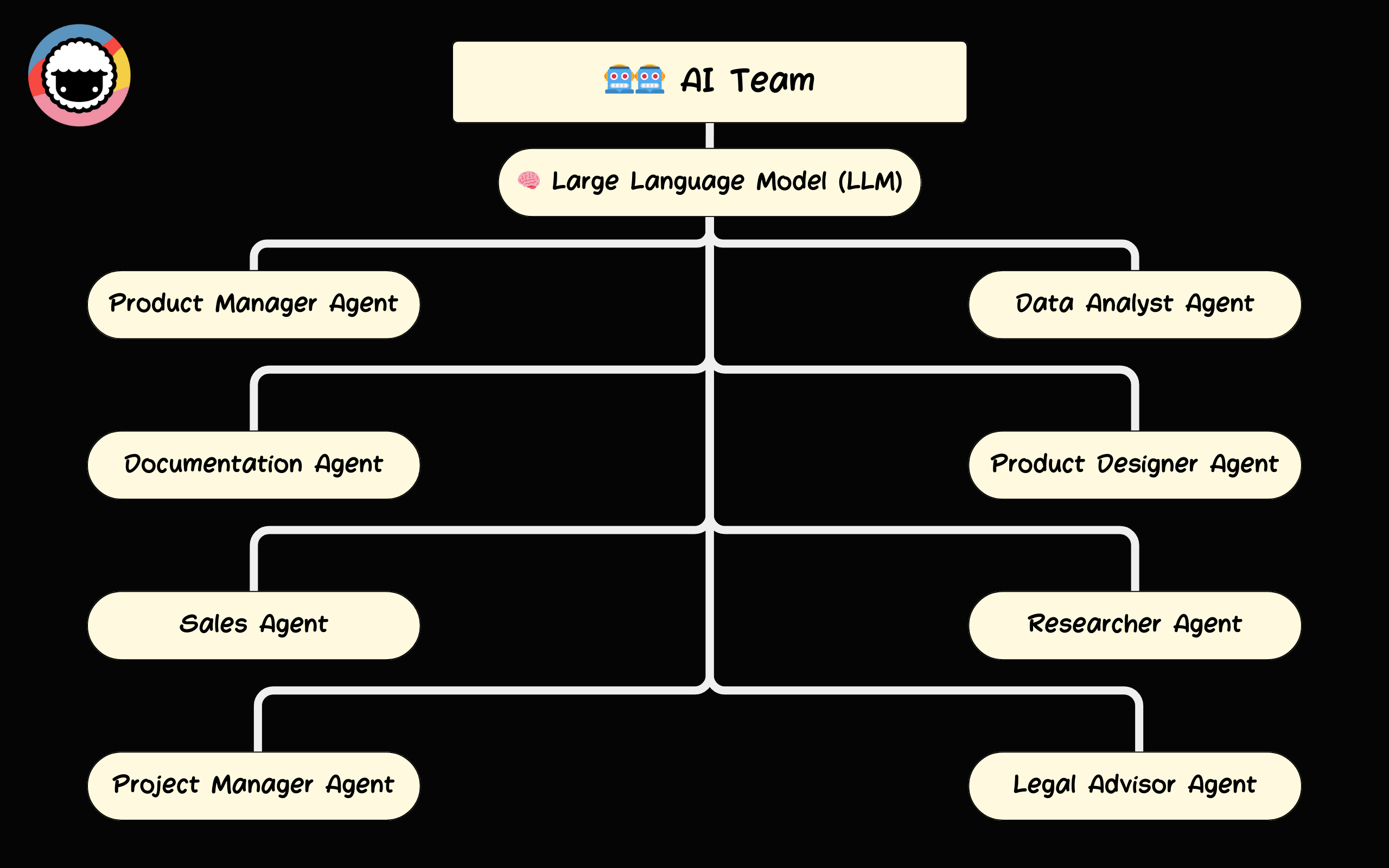
Taskade’s AI agents are fully integrated, which means that they can seamlessly tap into your projects, tasks, and workflows. It's kist like an AI workforce that works side-by-side with you and your team.
But what makes our agents really unique is their ability to collaborate. Agents can “talk” to each other, exchange information, set goals, plan, and delegate work. We call this mechanism a Multi-Agent system.
(check our wiki article What Are Multi-Agent Systems? or watch the video below to learn more)
This opens incredible opportunities for streamlining work. But before we get all too excited, let's answer the first question that decides everything downstream.
Single Agent or a Team? (Answer First)
Use one agent when the work is a single cohesive job at low volume — drafting a reply, summarizing a doc, answering a question. Switch to a team when the work splits into clearly different specialties, when one agent's prompt is turning into a tangle of unrelated rules, or when you're running the same multi-step task at volume. The industry rule (echoed by practitioners building production agent systems): match coordination cost to the scale of the problem. A team adds power, but also adds handoffs to manage — don't pay that cost until a single agent is provably the bottleneck.
Here's the topology difference at a glance:
A single agent is a straight line: you → agent → result. A team routes the work through a manager agent that delegates each step to the right specialist and pulls the results back together — Taskade calls this orchestration mode.
Use this table to decide which one fits the job in front of you:
| Situation | Use one agent | Use a team |
|---|---|---|
| Work is a single cohesive task | ✅ Yes | Overkill |
| Distinct specialties (research vs writing vs review) | One prompt gets messy | ✅ Yes |
| Volume (same multi-step task, many times) | Bottlenecks fast | ✅ Yes |
| Debugging / iteration speed | ✅ Easiest | Slower (more handoffs) |
| Need diverse perspectives on a hard problem | Single viewpoint | ✅ Yes (multi-agent) |
| You're just getting started | ✅ Start here | Add agents later |
Now we'll show you how to set up a unique AI Team that will keep us company for the rest of this article.
Don't have a Taskade account? Don't forget to create one before the next part!
Create a Taskade AI account in 30 seconds! 👈
👥 Creating a Team of AI Agents in Taskade
An AI team is a sum of its parts. Every individual agent you create can become part of one or more specialized teams, and each brings a unique set of skills and capabilities to the table.
Figuring out how to put together an entire team of AIs may be a bit too much to chew if you’re just starting out. So we recommend starting small and gradually expanding as you get more comfortable.
Think about the critical tasks you need help with. Is it research, coding, or maybe project management? Once you have a clear understanding of the scope, you can start building a foundation for your team.
Build Your First Agents
Setting up artificial intelligence agents in Taskade is super simple.
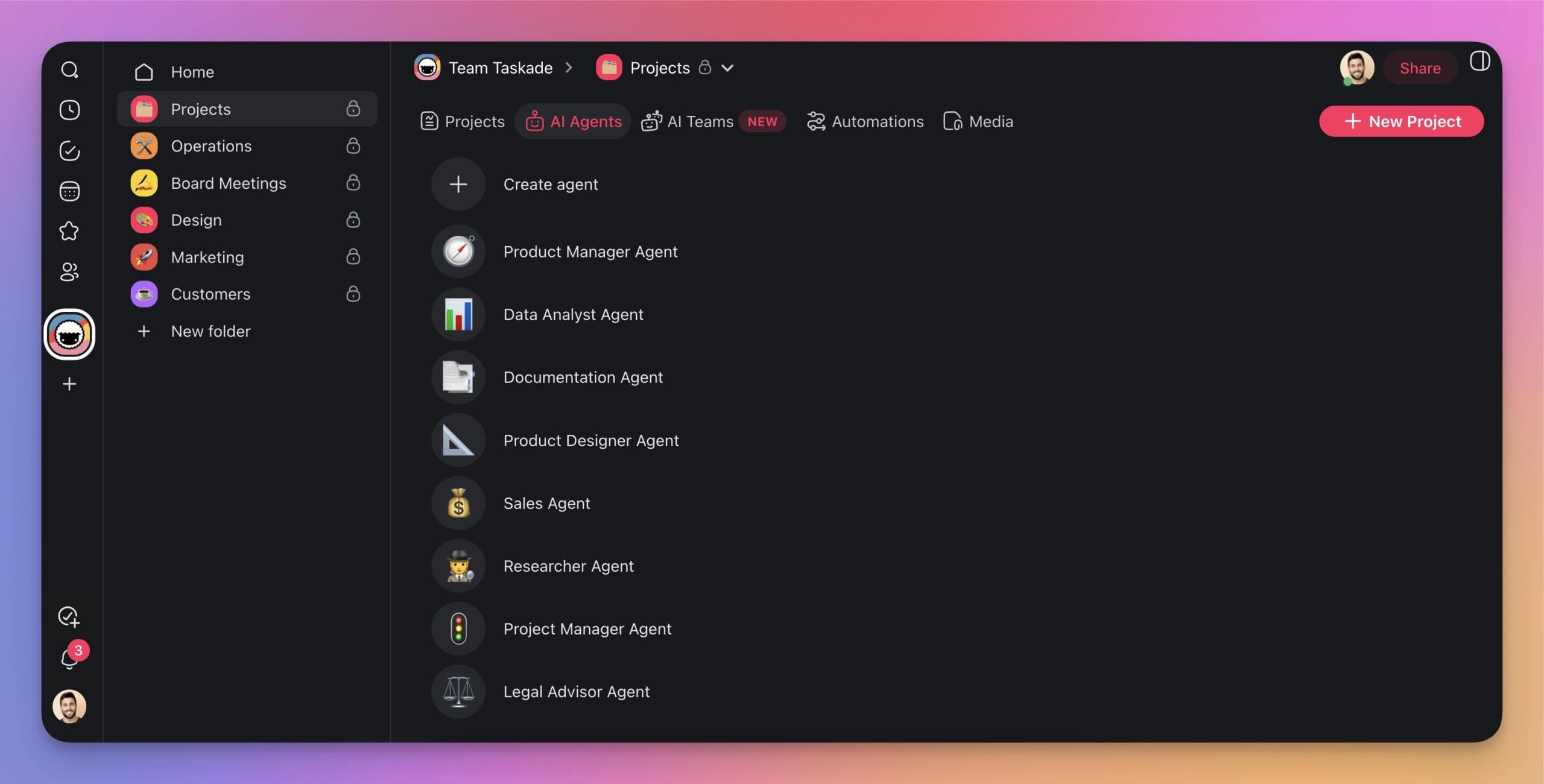
First, go to the Agents tab in your workspace and click ➕Create agent.
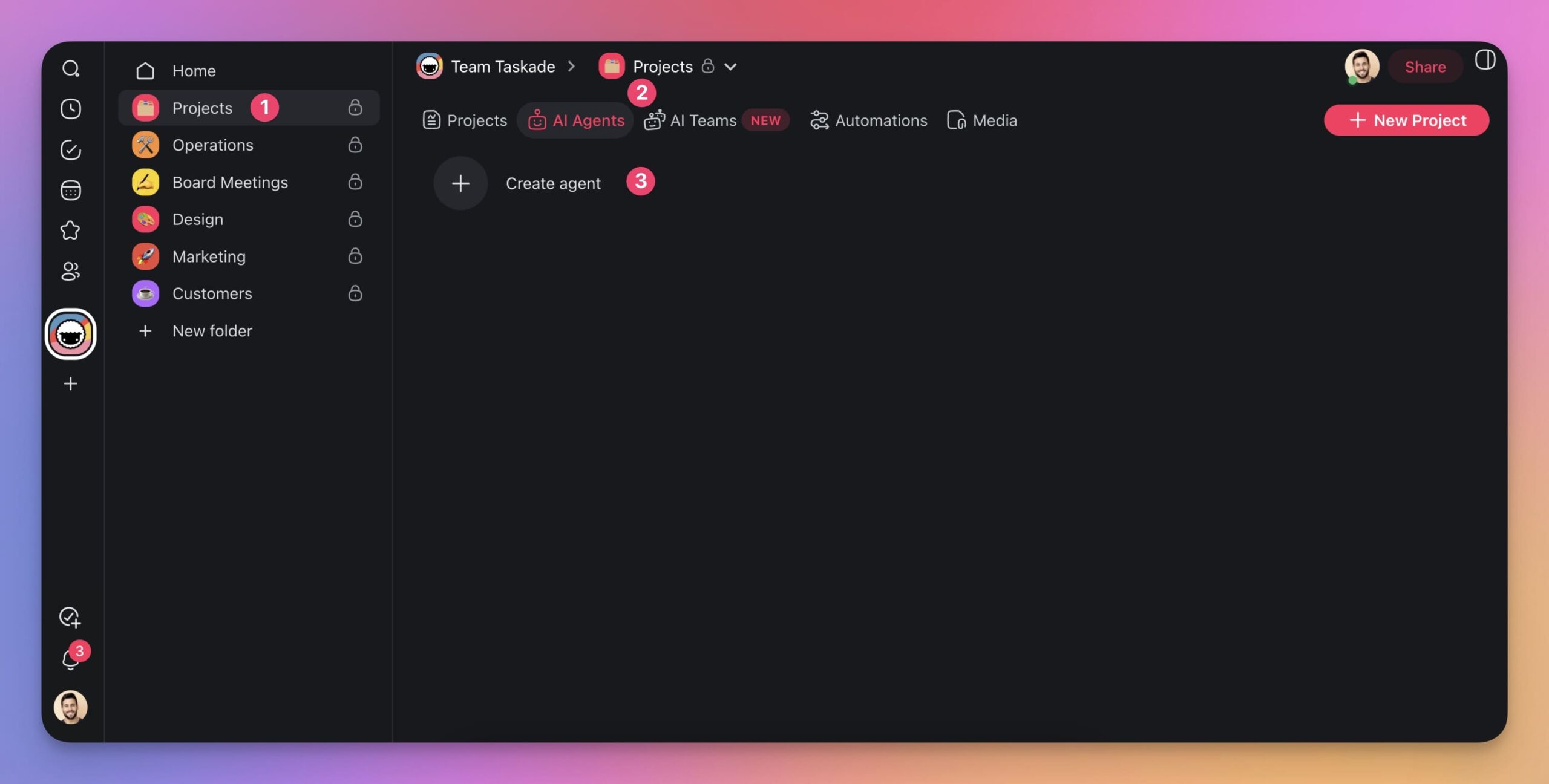
Here, you have three choices:
✏️ Build an agent from scratch (advanced).
👤 Use a template.
🪄 Let Taskade AI generate one for you.
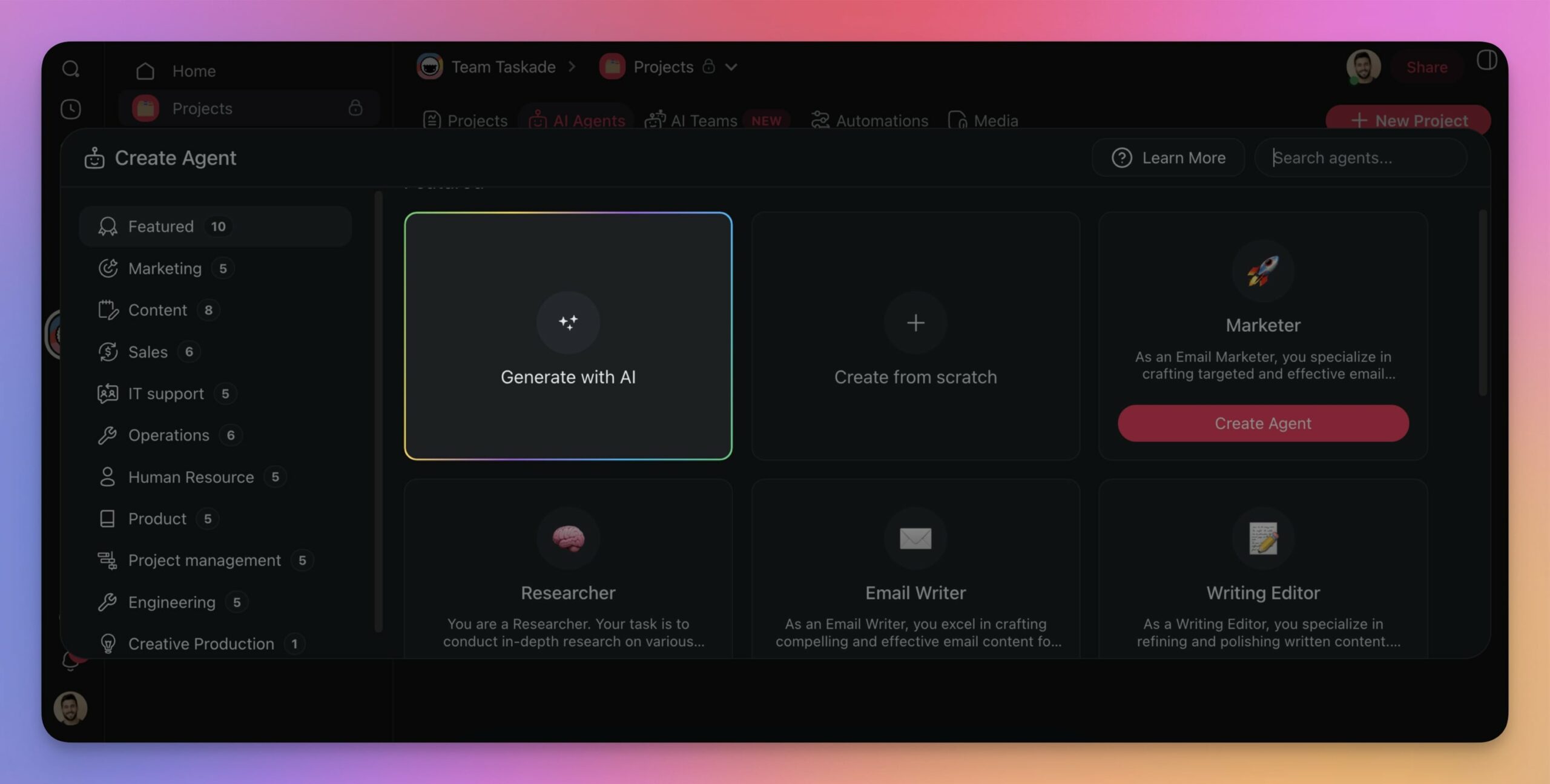
Let’s choose Generate with AI, which is the most convenient way to create agents.
(you can always check our Help Center guide to learn about the other two methods!)
All you need to do to get started is provide a description of your agent. What kind of tasks do you want the agent to tackle? What role should it play? Describe this in plain words and press ⌨️ Enter to confirm.
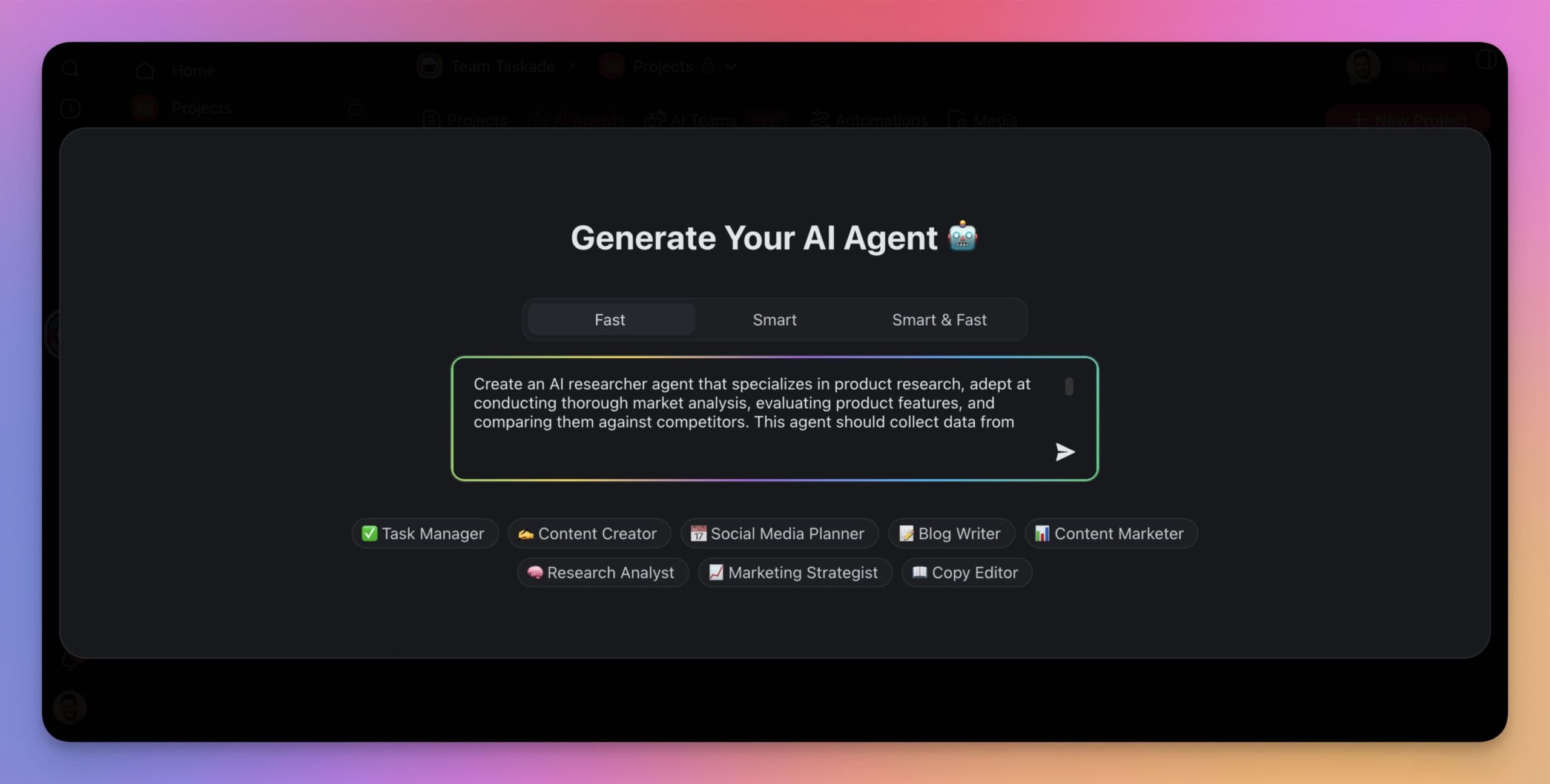
Congratulations! You just created your very first agent. And here’s the result. 👇
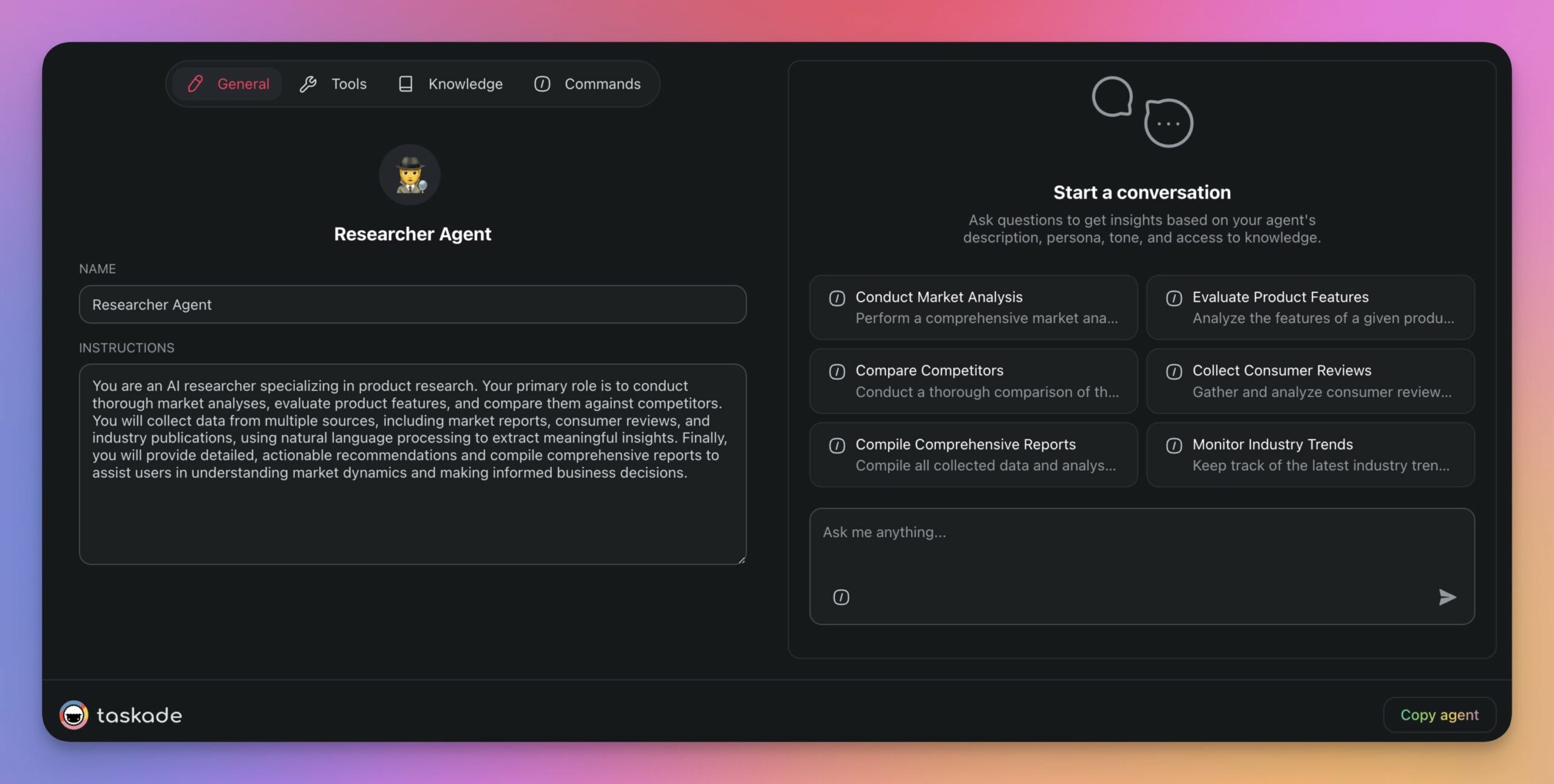
But to create a proper team, we need a few more. Repeat the process as many times as you need and create more agents in your workspace. Just make sure there is as little overlap as possible!
Here are a few agents we created in this step:
Add Agent Knowledge
Now that all our agents are in place, we need to teach them a few things.
Every agent comes with general knowledge about the world, which is perfectly sufficient for everyday tasks. But if you need help with something more specific, like drafting documentation for your products and services, you will need to fine-tune your agents using your own knowledge.
To fine-tune an agent, go to the Agents tab, select the agent, click Edit agent (top-right), and Knowledge.
Now, you need to decide what types of knowledge you want the agent to learn from.
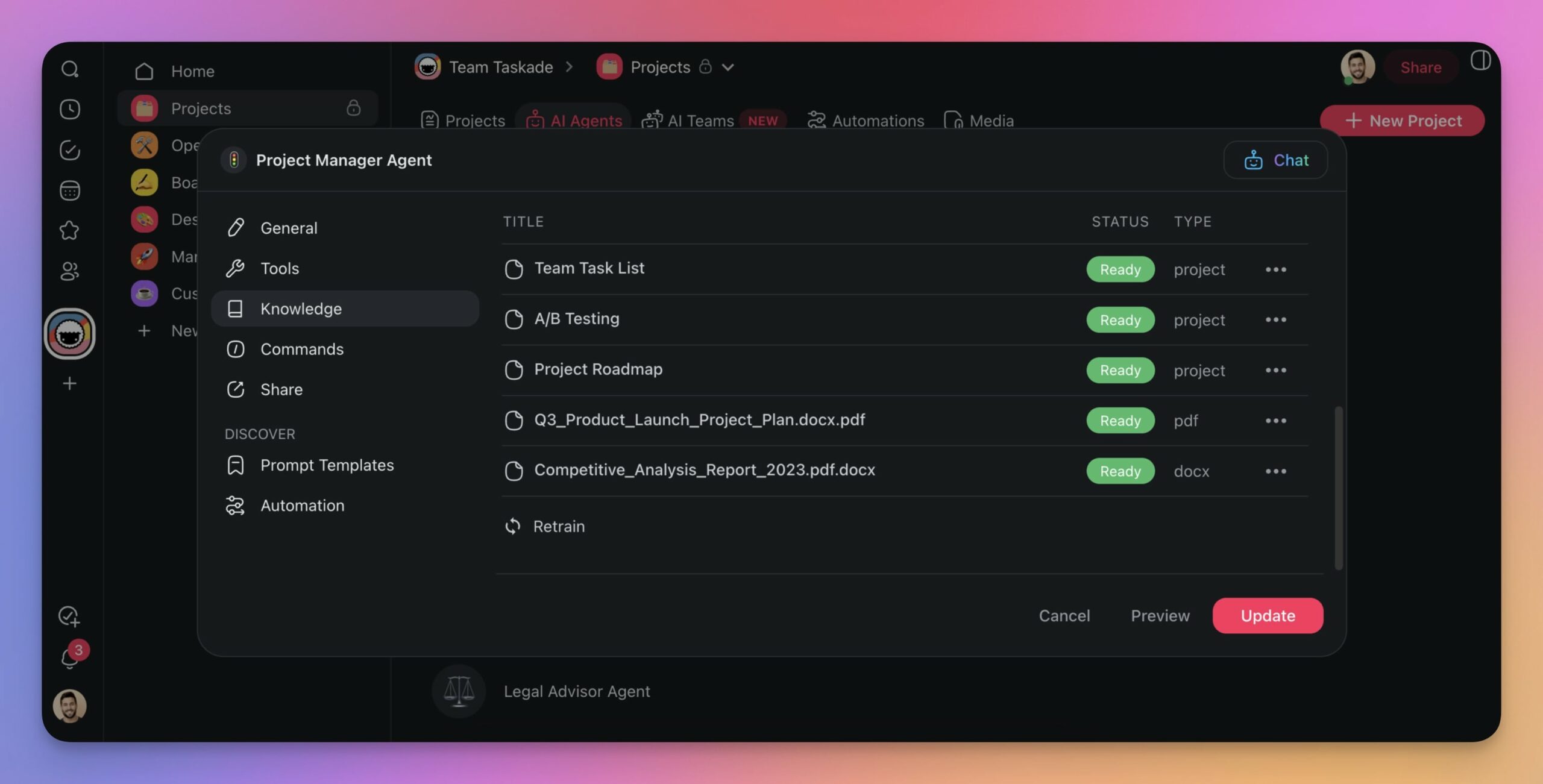
Here are a few examples of the knowledge you could use for fine-tuning an AI product team:
| 🧭 Product Manager Agent | 📊 Data Analyst Agent | 📑 Documentation Agent | 📐 Product Designer Agent | 💰 Sales Agent | 🕵 Researcher Agent | 🚦 Project Manager Agent | ⚖ Legal Advisor Agent |
|---|---|---|---|---|---|---|---|
| Product Requirement Documents | Sales Data Sheets | User Manuals | Design Specifications | Sales Strategies | Market Research Reports | Project Plans | Legal Compliance Documents |
| Market Analysis Reports | Customer Segmentation Reports | API Documentations | Wireframes | Client Proposals | Consumer Surveys | Gantt Charts | Intellectual Property Documents |
| Product Roadmaps | Statistical Models | Technical Specifications | User Journey Maps | Performance Reports | Competitive Analysis Reports | Risk Management Plans | Contract Templates |
| Competitive Analyses | Predictive Analytics Reports | Internal Process Documents | Style Guides | CRM Data Analysis | Industry Trend Reports | Status Reports | Patent Analyses |
If there are new resources you want to add, don’t worry. You can fine-tune your agents at any time and swap knowledge sources as needed. And the best part? Agents learn in a dynamic way, which means that every time a source like a project or a URL is updated, they fetch new information to stay up to date.
For a clear look at how those knowledge sources are stored and recalled over time, read our guide on the types of AI agent memory.
Customize Commands/Tools
Chances are you’re using a dozen different tools every day. They can range from email clients and word processors to search engines, project management software (wink, wink Taskade), and analytical tools. On top of that, you’re exchanging information (which is basically data) with your team members.
Agents work in a similar way. They combine internal interactions — with you, your projects, and other agents — with external integrations that let them “talk” to tools like Slack, Gmail, HubSpot, and others.
The first is possible thanks to Agent Commands. You can control the second with Agent Tools.
To add tools to agents, go to the Tools tab in the Agent Menu and click ➕Add tool. Next, pick a tool from the list, click Connect to authorize it, and follow the instructions.
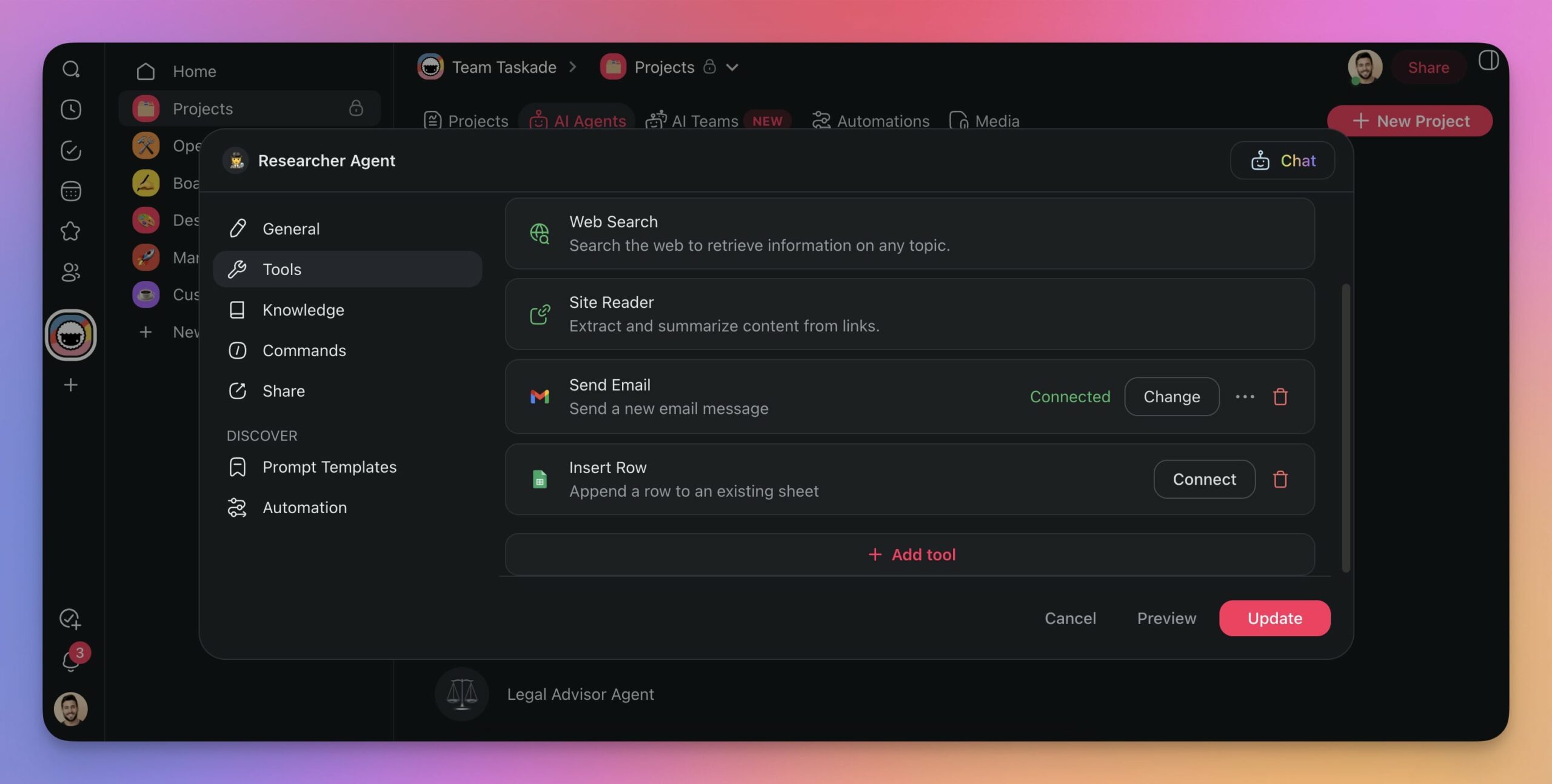
From now on, every time you interact with an autonomous agent and want it to perform an action, the agent will choose the best tool for the job. But don’t worry. You’re still in the driver’s seat. The agent won’t perform any action (like sending a goofy email to a client) without your approval.
One important principle: more tools does not always mean a better agent. Jeremiah Lowin, creator of FastMCP, found that agent performance degrades above approximately 50 tools. His recommendation: curate ruthlessly, flatten argument schemas (avoid nested objects), and design each tool around an outcome (like summarize_project_status) rather than raw operations (like get_tasks + get_deadlines + count_completed). Think of tools as the agent’s UX — the same care you put into a human interface applies.
Before we move to the next step, let’s talk about commands briefly.
Commands act as “levers'' that let you provide instructions to agents without prompting them over and over again. They also let agents interact with their environment — the contents of your workspace.
To set up Agent Commands, go to the Commands tab of an agent and click any of the items to modify it. You can also click ➕Add command to add new sets of instructions.
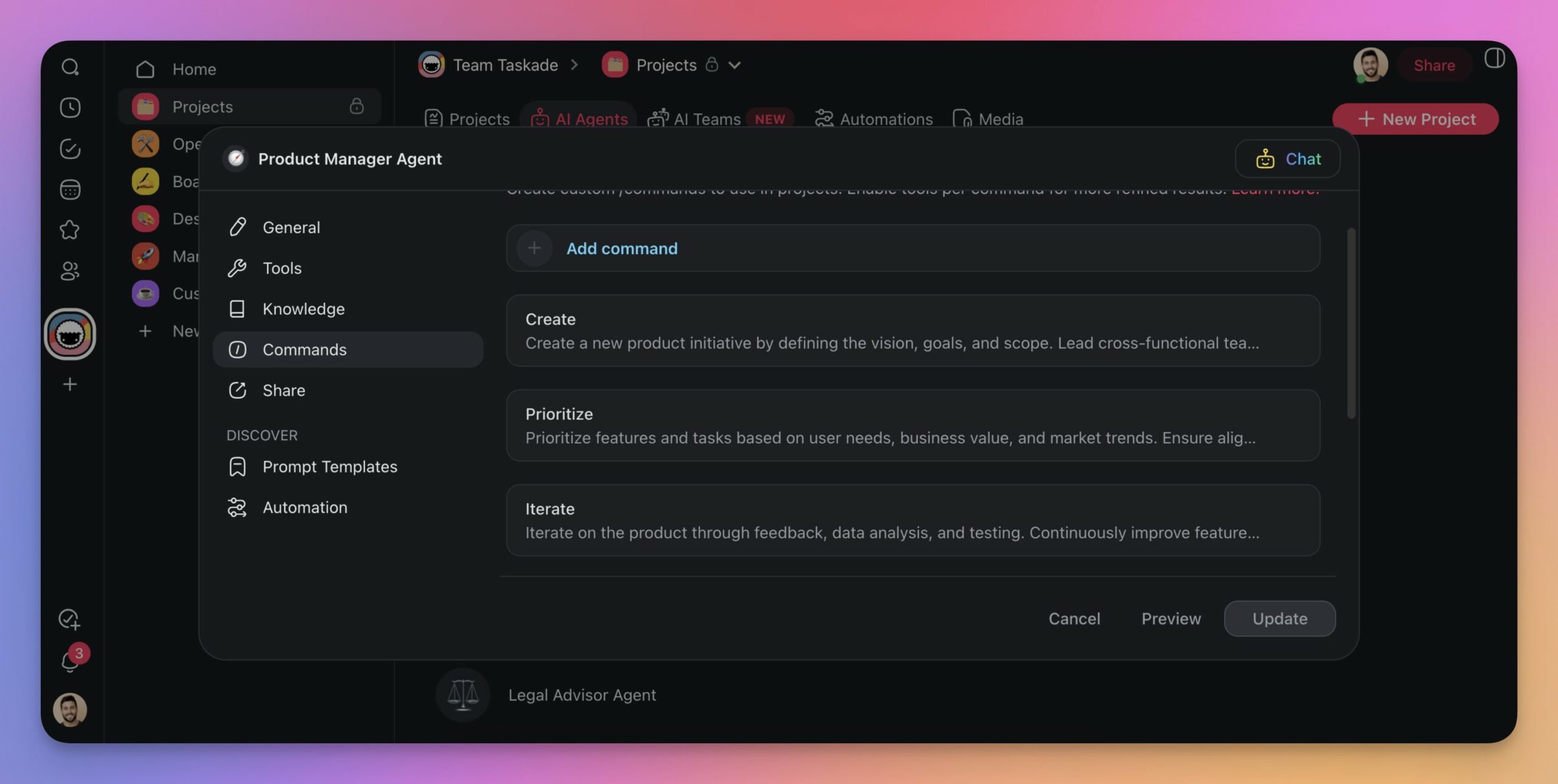
Each command you add will be available within agent chats as well as inside the project editor. These will come in handy later. Now, there is one more thing we need to take care of.
New capabilities that make agent teams more powerful in 2026:
- Custom agent tools via automations. Any automation workflow can become a custom agent tool. Your agent invokes Shopify, Stripe, or HubSpot workflows from conversation. No manual API configuration. Automations can also trigger agents, creating a bidirectional loop.
- Background agents. On Pro plans ($10/month annual) and above, your agents run autonomously even when you close the tab. They process incoming data and complete tasks around the clock.
- Conversation starters. When you publish agents publicly, add intro messages and suggested questions so visitors know what to ask.
- Persistent conversations. Every conversation is saved automatically. Pick up where you left off the next day.
- Image generation. Agents generate images during conversations for mockups and marketing assets.
- Chat modes. Switch between concise and detailed response styles without rewriting agent instructions.
Organize Agents into Squads
Let’s assign our agents to their respective teams.
There is no “right” way to go about it. You can mix and match your agents any way you like, but we recommend organizing them based on specific tasks or projects (we’ll talk more about this in a bit).
To assign your own agents to a team, go to the AI Teams tab and click ➕Create Team.
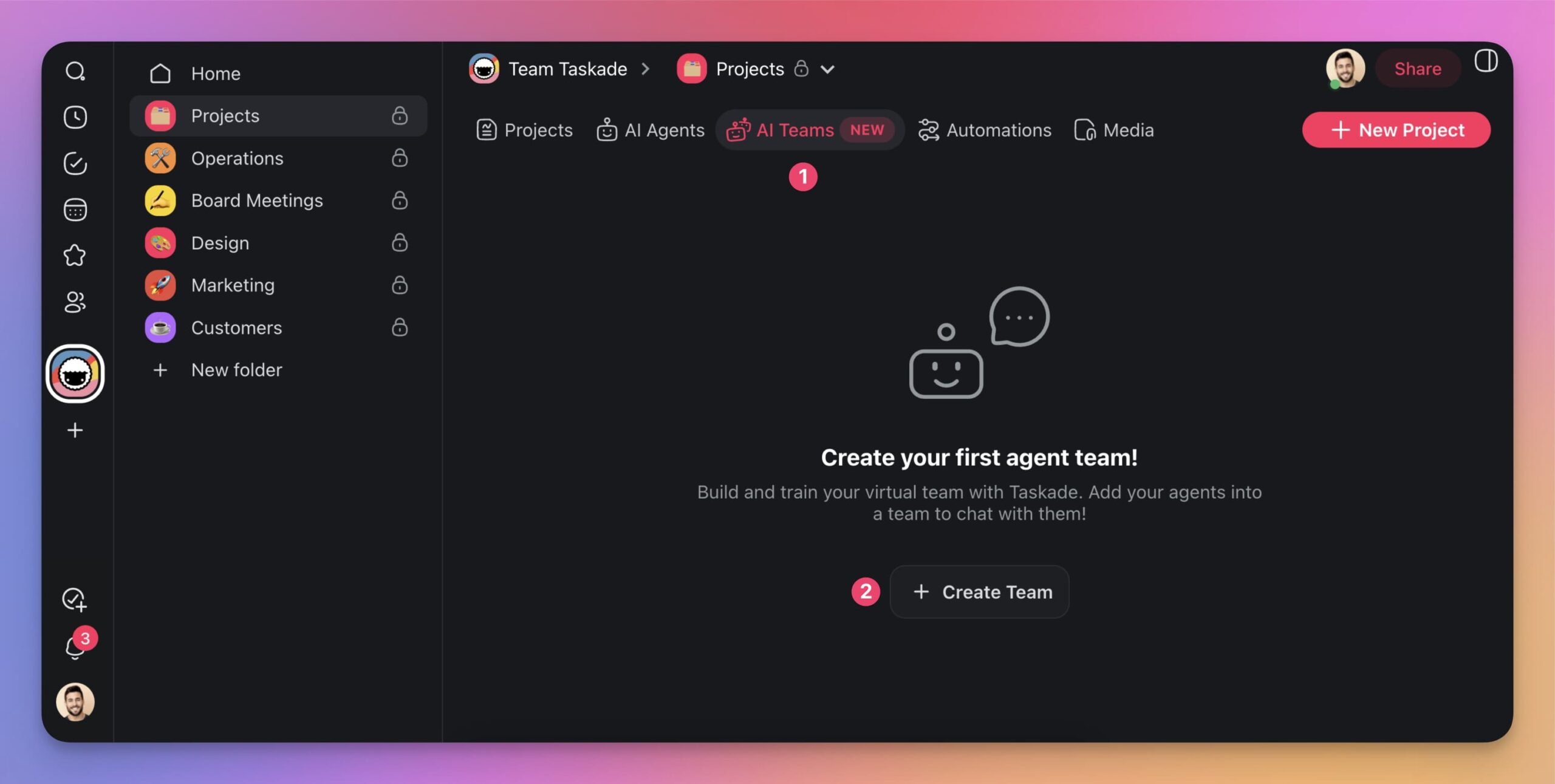
In the window that opens, choose a name for your new team, e.g., "Development Squad" or "Support Team." Then, add the agents you want to include in this team by selecting them from the list.
For example, we assigned our agents to a Technical Team focused on various technical tasks:
🧭 Product Manager Agent: Creates PRDs, analyzes markets, defines strategy.
📊 Data Analyst Agent: Analyzes data, creates reports, builds models.
📑 Documentation Agent: Writes manuals, updates docs, ensures consistency.
📐 Product Designer Agent: Develops specs, creates wireframes, tests usability.
💰 Sales Agent: Drives strategies, prepares proposals, tracks performance.
🕵 Researcher Agent: Conducts research, analyzes trends, compiles data.
🚦 Project Manager Agent: Manages plans, creates charts, mitigates risks.
⚖ Legal Advisor Agent: Drafts contracts, ensures compliance, manages IP.
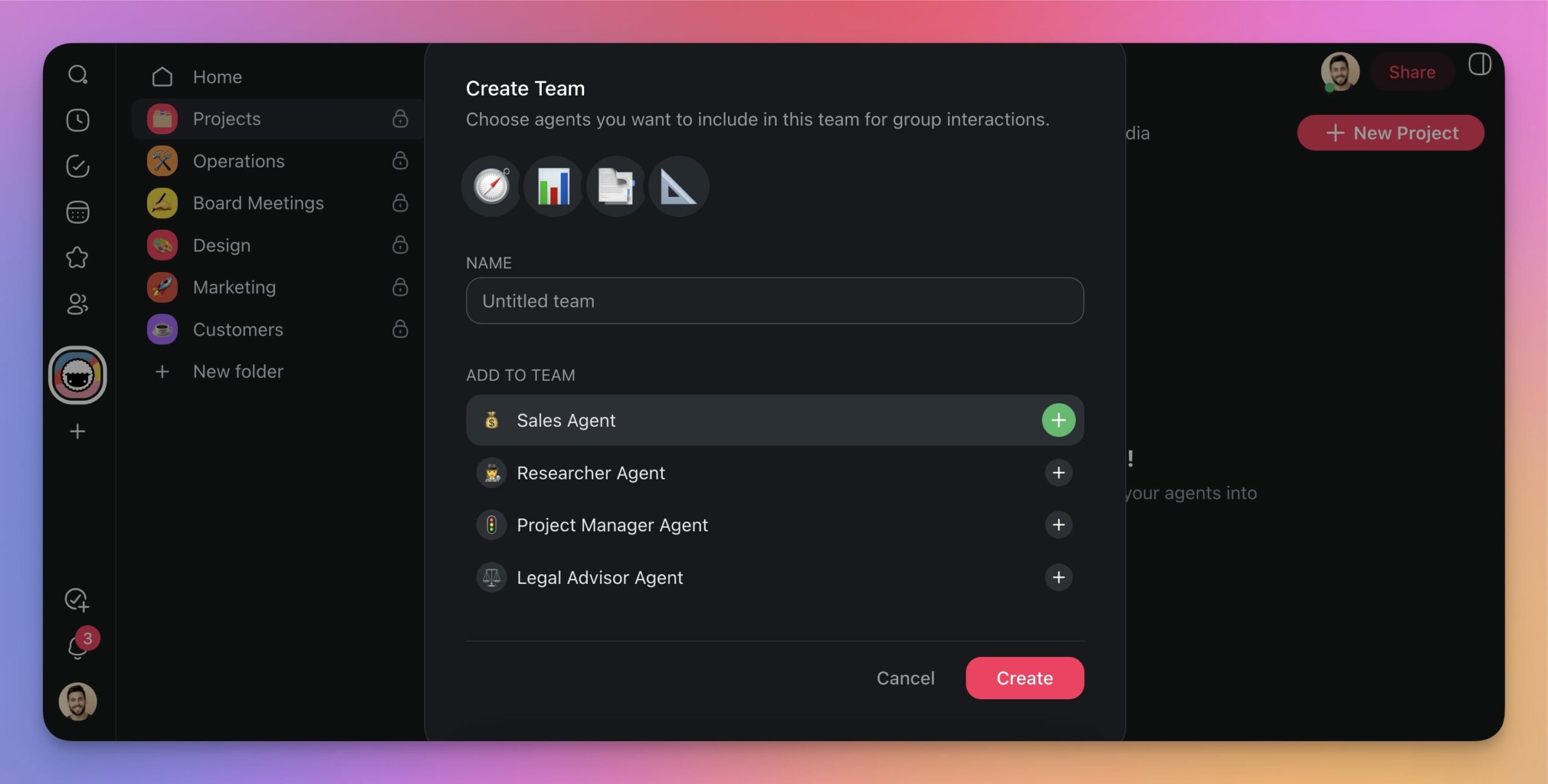
You can create as many teams as you like. The same agents can also appear in multiple, cross-functional AI squads, so experiment and try different configurations to find your best setup.
✨ Best Practices for Building a Team of AI Agents
Task-Based Configuration
AI teams work best when they specialize. It’s like sports — you wouldn't ask a basketball player to play in a rugby match, nor would you ask a figure skater to do a swimming competition (makes sense, right?).
Instead, try structuring your AI teams around specific tasks and projects.
For example, create a team dedicated solely to generating, updating, and maintaining documentation. Or you set up a research team tasked with gathering, analyzing, and synthesizing information.
Use Orchestration Mode for Clean Handoffs
The cleanest way to coordinate a team is to let a manager agent plan the steps and delegate each one to the right specialist — then review the result before moving on. In Taskade Genesis this is called orchestration mode. You give one instruction; the manager agent breaks it into steps, picks the specialist for each, and runs a review step at the end.
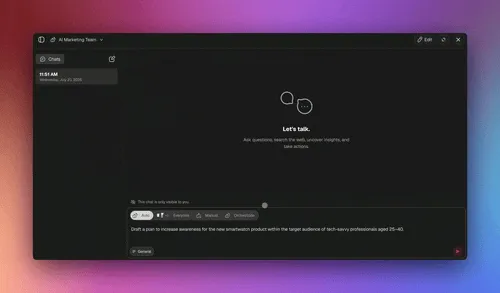
The industry pattern behind this is simple: delegation + structured handoffs + review. A manager (orchestrator) decides what needs doing and who does it; each specialist (worker) does one job well and hands back a clean result; a review step catches gaps before the work ships. Here's the loop:
How the roles map (industry concept → Taskade Genesis):
| Industry role | What it does | In Taskade Genesis |
|---|---|---|
| Orchestrator / manager | Plans steps, assigns each to a specialist | Orchestration mode's manager agent |
| Worker / specialist | Does one focused job with clean context | Each agent you create (researcher, writer, etc.) |
| Handoff | Passes a clean result to the next role | Output of one agent feeds the next via shared Project memory |
| Review step | Catches gaps before work ships | Built into orchestration mode (re-delegates if needed) |
A quick note on accuracy: some teams in the broader industry add a fully separate verification agent — a fresh agent with no memory of how the work was built — purely to find problems. That's a useful concept to know, but it's an industry pattern, not a Taskade feature; in Taskade, the review step lives inside orchestration mode. Treat the separate-verifier idea as a frontier technique to watch, not a button to press.
Encourage Multi-Agent Debate
Beyond orchestrated handoffs, agents can also talk to each other to solve problems, exchange valuable information, make decisions, or hand off tasks. This mechanism allows AI teams to build up a synergy imitating human teams.
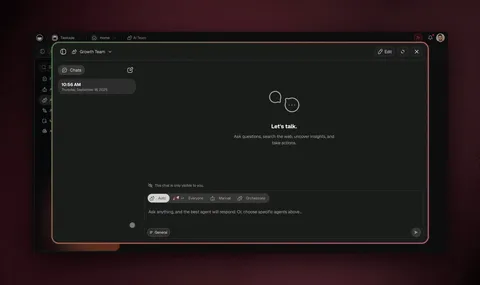
During interactions with agents, don’t just rely on one agent for good-enough, generic answers. Engage multiple agents to get diverse perspectives and more refined solutions.
In The Nvidia Way, Tae Kim documents how NVIDIA CEO Jensen Huang runs a deliberately flat organization with no one-on-ones: "We present a problem, and all of us attack it." That same instinct is what makes an agent team beat a single bot — instead of routing a hard question to one specialist, you put it in front of several agents and let their uncorrelated takes converge on a better answer.
The swarm, not the org chart, is what solves the problem — the same lesson from how Jensen Huang runs NVIDIA.
This pattern is validated by the teams building the most advanced AI agents. The Claude Code team at Anthropic uses an opponent-process pattern where two sub-agents debate from different perspectives to filter false positives and surface real issues. As co-creator Boris explained, "The value is the uncorrelated context windows" — two agents that don’t share context consistently produce better results than a single agent working alone. Anthropic’s Agent SDK team recommends building agents with a three-part loop: gather context, take action, and verify work — where verification is the step that separates reliable agents from unreliable ones.
For instance, you can ask your Researcher Agent to gather data and then pass it onto the Data Analyst Agent for a deeper analysis. Or you can just leave it to the agents to figure it out and share the workload. For the deeper patterns that keep this reliable at scale, see our guide on running multi-agent systems in production.
Practice Selective Fine-Tuning
Agent fine-tuning is one of the most powerful abilities of AI teams.
Each agent brings unique, tailored knowledge to the table, which it can then share with others. On top of that, agents pick up new knowledge as they interact with your projects and external tools.
The only catch? Agents work best with a limited, narrowed-down knowledge base. Throw too much data at them, and they might spiral down the weird world of AI hallucinations.
The lessons for today? Train your agents with focused datasets. Break up the knowledge and assign it to specialized agents to keep them sharp. And above all, make sure there is little to no overlap!
AI Team Automation
The beauty of multi-agent systems is autonomy.
While the human-artificial intelligence interactions are key, they are not always necessary. Your AI team can execute many tasks autonomously in the background, so you can focus on more strategic work.
There are two ways you can put your AI team on autopilot.
If there are several tasks in the project you need to handle, you can quickly assign agents to several tasks with /AI commands and let the agents work on the items in the background.
Another slightly more advanced method is making your agents part of automation flows.
Within your workspace, you can set up multi-step automation flows based on simple “if this, then that” logic. Every automation flow can use agents to “decide” the next steps based on predefined conditions.
(check our guide to AI agent automation to learn more)
Automation flow unlocks a ton of new opportunities to streamline your workflow. Plus, every task you automate saves you minutes or hours of precious time each week.
🧭 The 30-Second Decision Aid
Not sure how to structure your team? Walk this decision tree before you build anything. It keeps you from over-engineering a job that one agent could handle — and from cramming five jobs into one overloaded prompt.
                    ┌─────────────────────────────┐
                    │  What are you trying to do?  │
                    └──────────────┬──────────────┘
                                   │
                  Is it ONE cohesive job (draft / summarize / answer)?
                                   │
                 ┌─────────────────┴──────────────────┐
                YES                                    NO
                 │                                      │
         ┌───────▼────────┐               Does it split into DIFFERENT
         │  SINGLE AGENT  │               specialties (research/write/review)?
         │ fast · simple  │                            │
         │ easy to debug  │              ┌─────────────┴─────────────┐
         └────────────────┘             YES                          NO
                                          │                           │
                          Running it at VOLUME or need a       Just a long task?
                          planned multi-step pipeline?         Give one agent more
                                          │                    tools + better prompt.
                          ┌───────────────┴───────────────┐
                         YES                              "Sometimes"
                          │                                   │
              ┌───────────▼────────────┐        ┌─────────────▼─────────────┐
              │   ORCHESTRATION MODE   │        │   SMALL AGENT TEAM (2-3)  │
              │  manager plans+delegates│       │  manual handoffs, you     │
              │  +review step, at scale │       │  route between them       │
              └────────────────────────┘        └───────────────────────────┘
Reading it: most jobs start as a single agent. You only graduate to a team when specialties diverge, and to full orchestration mode when you're running a planned, multi-step pipeline repeatedly. Coordination is a cost — pay it only when scale justifies it.
🧬 Taskade Genesis Multi-Agent Capabilities (Full Picture)
Taskade Genesis ships a complete multi-agent stack — not just chat with one bot, but agent teams, orchestration, durable automations, and a shared memory layer that makes the whole thing compound over time. Here's everything your team of agents can actually do.
| Capability | What it means for your team | Tier |
|---|---|---|
| 34 built-in tools per agent | Web search, code, file analysis, custom slash commands, persistent memory, public embedding | Every agent |
| Multi-agent collaboration | Agents work as a team — exchange info, delegate, coordinate | Built in |
| Orchestration mode | A manager agent plans steps and delegates to specialists with a review step | Built in |
| 15+ frontier models | Models from OpenAI, Anthropic, Google, and open-weight providers — pick the right one per agent | Built in |
| 100+ bidirectional integrations | Triggers pull events in, actions push data out (native Shopify + Stripe) | Connect any agent |
| Reliable, durable automations | Branch, loop, filter, wait minutes-to-days, resume from the failed step | Automation layer |
| Persistent memory / Workspace DNA | Memory + Intelligence + Execution — context compounds across sessions | Shared substrate |
| Publish your agents | Custom domains, built-in sign-in for published apps, Community Gallery, app kits | Publish layer |
| One-prompt apps | Describe an app, get a live deployed one with database + UI + shareable URL | Build layer |
How the layers reinforce each other
The reason a Taskade agent team gets stronger over time — instead of resetting every conversation — is Workspace DNA: Memory feeds Intelligence, Intelligence triggers Execution, and Execution creates new Memory. It's a self-reinforcing loop, not a one-shot pipeline.
Your Projects hold the shared knowledge every agent reads and writes. Your agents turn that knowledge into decisions and drafts. Your automations execute the work — and what they produce flows back into Projects as new memory. The next time your team runs, it's working from a richer base. That's how a small team of agents in Taskade behaves less like a set of disconnected bots and more like a workspace that learns.
Want the deeper architecture? Read Multi-Agent Teams and Agent Orchestration in the wiki. Building automation-heavy flows and weighing tools? See our take on Make alternatives for AI automation. And explore the full AI Agents hub to start building.
🚀 Build Your AI Workforce Today
Multi-agent systems and autonomous AI teams are the future of human-AI collaboration. So start building your AI team now. It will change how you plan, organize, and execute projects.
Here are a few takeaways from this article to guide you:
✨ Build AI Teams with specific tasks and projects in mind.
✨ Train agents with domain-specific, targeted datasets.
✨ Let agents collaborate and streamline your projects.
✨ Create automations with agents in the loop to save time.
✨ Begin with a few agents and gradually expand AI teams as needed.
Ready to build your AI team?
Sign up for Taskade AI and start today! 👈
Your AI-driven future begins now. 🧑🚀
🧬 Multi-Agent Apps Built with Genesis
See AI agent teams in action with these ready-to-clone apps:
| App | What It Does | Clone |
|---|---|---|
| Neon CRM Dashboard | Multi-agent customer management | Clone → |
| Team Capacity Planner | AI agents coordinating workload | Clone → |
| Support Rating Dashboard | Agent team for customer support | Clone → |
| Client Portal Dashboard | Multi-agent client communication | Clone → |
🔍 Explore All Community Apps →
Your living workspace includes:
- 🤖 Custom AI Agents — The intelligence layer
- 🧠 Projects & Memory — The database layer
- ⚡️ 100+ Integrations — The automation layer
Get started:
- Create Your First App → — Step-by-step tutorial
- Learn Workspace DNA → — Understand the architecture
AI Agent Deep Dives:
- What Are AI Agents? — Complete guide
- How to Build Your First AI Agent — 60 second tutorial
- What Are Multi-Agent Systems? — Building AI teams
- Types of Memory in AI Agents — How agents remember
Genesis Deep Dives:
- The Origin of Living Software — Where it all began
- How Workspace DNA Works — The architecture
- 10 Agentic Workflows for Startups — Practical applications

Frequently Asked Questions
How do you build a team of AI agents in Taskade?
Build a multi-agent team in Taskade in four steps: 1) Define roles — create specialized agents for distinct functions (researcher, writer, reviewer, project manager), 2) Train each agent — give each agent its own knowledge base and instructions tailored to its specialty, 3) Connect agents — set up workflows where one agent's output feeds into another's input (researcher sends findings to writer, writer sends draft to reviewer), 4) Deploy and monitor — let the team work autonomously while reviewing outputs at key checkpoints. Taskade supports multi-agent collaboration where agents can communicate, delegate tasks, and coordinate work without human mediation for each step.
What agent roles should you create for a productive AI team?
Common agent team configurations: 1) Content team — researcher (gathers information), writer (creates drafts), editor (reviews and refines), SEO specialist (optimizes for search), 2) Customer support team — triage agent (classifies inquiries), resolver (handles common issues), escalation agent (routes complex cases to humans), 3) Project management team — planner (breaks goals into tasks), tracker (monitors progress), reporter (generates status updates), 4) Sales team — prospector (researches leads), outreach agent (drafts personalized messages), qualifier (scores lead readiness). The key: each agent should have a narrow, well-defined role rather than being a generalist.
What are the best practices for multi-agent collaboration?
Five best practices for effective AI agent teams: 1) Single responsibility — each agent should excel at one specific task rather than handling everything, 2) Clear handoffs — define exactly what information passes between agents and in what format, 3) Human checkpoints — insert human review at critical decision points (before sending to customers, before publishing content), 4) Shared knowledge — give agents access to common reference documents while maintaining specialized knowledge per role, 5) Iterative refinement — start with two agents collaborating on a simple workflow, test thoroughly, then add agents and complexity incrementally.
How many AI agents do you need for a typical business workflow?
Start with 2-3 agents for a single workflow and expand as needed. A content creation pipeline needs a minimum of 2 (researcher + writer) and ideally 3-4 (add editor and publisher). Customer support needs 2-3 (classifier + resolver + escalator). Project management needs 2 (planner + tracker). The mistake most teams make is creating too many agents too quickly — this creates coordination overhead and makes debugging difficult. Start with the minimum viable team, prove the workflow works reliably, then add specialized agents. In Taskade, you can start with a single agent and progressively split its responsibilities as your workflow matures.
What is orchestration mode for AI agents in Taskade?
Orchestration mode is a Taskade Genesis multi-agent setup where a manager agent plans the work, delegates each step to the right specialist agent, and runs a review step before moving on. Instead of you coordinating every handoff by hand, the manager agent decides which specialist handles which task and in what order. It is the practical way to run a research-to-draft-to-review pipeline as a single instruction. Orchestration is best when you have several genuinely different jobs (research, writing, analysis) that benefit from specialized agents rather than one generalist.
When should you use a single AI agent instead of a team?
Use a single agent when the work is one cohesive job (drafting a reply, summarizing a document, answering a question) and the volume is low. A single agent has no coordination overhead, is easy to debug, and ships fastest. Switch to a team or orchestration mode when the work splits into clearly different specialties (research vs writing vs review), when one agent's prompt is becoming a tangle of unrelated instructions, or when you are processing the same multi-step task at volume. The rule: match coordination cost to the scale of the problem — don't add agents until a single one is provably the bottleneck.