






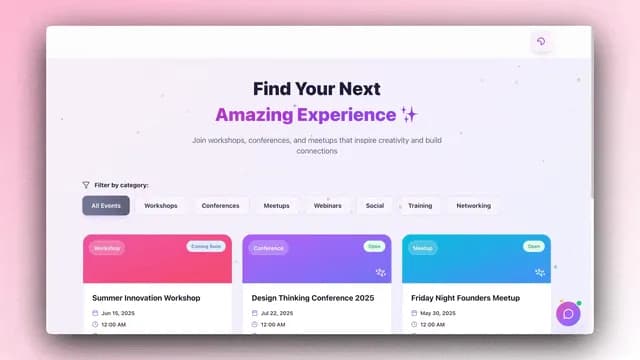
TL;DR: Taskade Genesis ships three free cloneable event templates with an AI concierge that enriches attendees, optimizes seating, fires day-of Slack alerts, and drafts follow-ups the next morning. Flat $10/mo Pro for ten seats vs Cvent's $20K/year. Clone the Event Portal now →
A founder hosts a dinner for twelve. Six investors, four operators, two journalists. The Luma page goes out. RSVPs trickle in. The day-of, three people no-show, two ask to bring a plus-one, and the founder spends the cocktail hour re-doing the seating chart in their head. The dinner itself is brilliant. The follow-up is a half-written Notion page that never sends.
Eighty percent of the dinner value just evaporated.
The B2B marketing newsletter mkt1 calls executive dinners "the new trade shows", the highest-yield surface for relationship-led GTM in 2026, and explicitly flags the missing piece: "a system to track invites, RSVPs, attendance, and follow-up that plugs directly into your CRM." Most operators today bolt that system onto Attio with custom objects, Zapier hops, and a manual writeup the next morning. The Event Portal collapses all four layers into a single workspace with the agent layer already wired.
This is the gap every founder dinner, fund event, accelerator cohort night, and partner roundtable lives in, the space between the event tool (Luma, Partiful, Eventbrite) and the relationships the event was supposed to create. The event tool ships the landing page. It does not run the workflow that turns one well-attended dinner into a quarter's worth of warm-intro pipeline.
The 2026 shift is to treat every curated event as a CRM event, not a logistics event. The list of attendees is the Memory layer. The agent that enriches them and drafts the follow-up is the Intelligence layer. The Slack alerts, calendar invites, and personalized emails are the Execution layer. Workspace DNA, Memory + Intelligence + Execution, on top of whichever public RSVP page you already love.
This post embeds three live Taskade Genesis event templates. Clone any of them in one click and run your next dinner as a CRM workflow instead of a Google Sheet.
Why Every Founder Dinner Is a CRM Problem
The orthodox founder dinner stack: a Luma page for the invitation, a Google Sheet for the guest list (because Luma doesn't track relationship context), a Notion doc for the agenda, a Slack channel for day-of, and Gmail for the follow-up that the founder writes from scratch the next morning if they remember. Five tools. Three logins. Zero compounding memory across dinners.
The problem is not any single tool, Luma is beautiful, Partiful is free, Sheets are universal. The problem is that the relationship layer lives nowhere. After ten dinners, the founder has hosted roughly a hundred and twenty people. They cannot tell you who came to which dinner, who sat next to whom, what was discussed, who followed up, or which guest converted into an investor / customer / hire over the next six months. The event tool throws that data away the moment the event ends.
The CRM model treats every dinner as a node in a relationship graph. The Event Portal captures the RSVP, enriches the attendee with public LinkedIn / fund / press signals, runs day-of coordination through Slack alerts, and drafts personalized follow-up emails the next morning that reference what actually happened. The guest list compounds across every event. After ten dinners, the Guests Project is a high-value CRM that no Luma or Partiful page can replicate.
┌──────────────────────────────────────────────────────────────────┐
│  ▲ MEMORY              ■ INTELLIGENCE         ● EXECUTION         │
│  Events Project        Concierge Agent         Invite send         │
│  Guests Project        Enrichment Agent        RSVP confirm        │
│  Seating charts        Seating Optimizer       Reminder cadence    │
│  Notes & quotes        Follow-Up Drafter       Day-of Slack alert  │
│  Photos & artifacts    Relationship Scorer     Next-morning email  │
└──────────────────────────────────────────────────────────────────┘
The Workspace DNA loop, Memory feeds Intelligence, Intelligence triggers Execution, Execution writes back to Memory, runs inside every Event Portal below. When an investor confirms via the public Luma page, the webhook writes them into Memory. The Enrichment Agent reads the row and pulls public signals. The Seating Optimizer reads enriched guests and drafts the table. Day-of Slack alerts fire from the seating chart. Next-morning emails reference the seating chart and the host's dinner notes. Every event's data writes back as the next event's starting context.
For founders running an AI Founder OS, the Event Portal is the event-layer companion. For GTM teams running customer dinners, it pairs with the GTM Engineering System. For fund managers running portfolio events, it stacks on top of the AI Investor CRM.
The Three Live Event Templates: Embedded Right Here
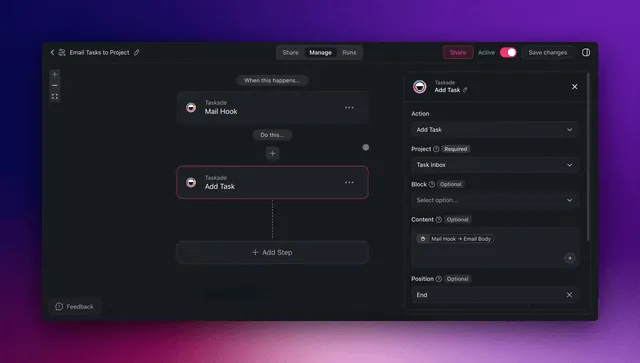
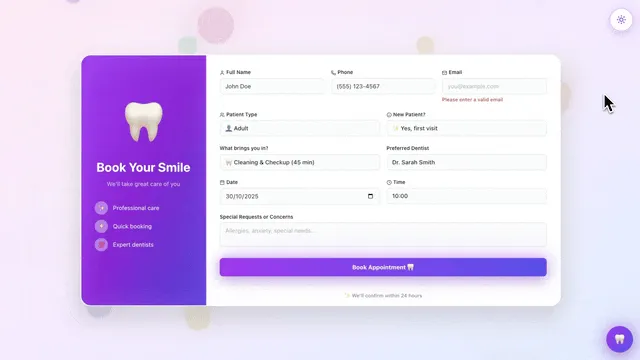
Each screenshot below links to a real Taskade Genesis app. Click through to the live share page, hit "Use this app," clone into your free workspace, run your next dinner.
1. Event Management Portal: the canonical hub
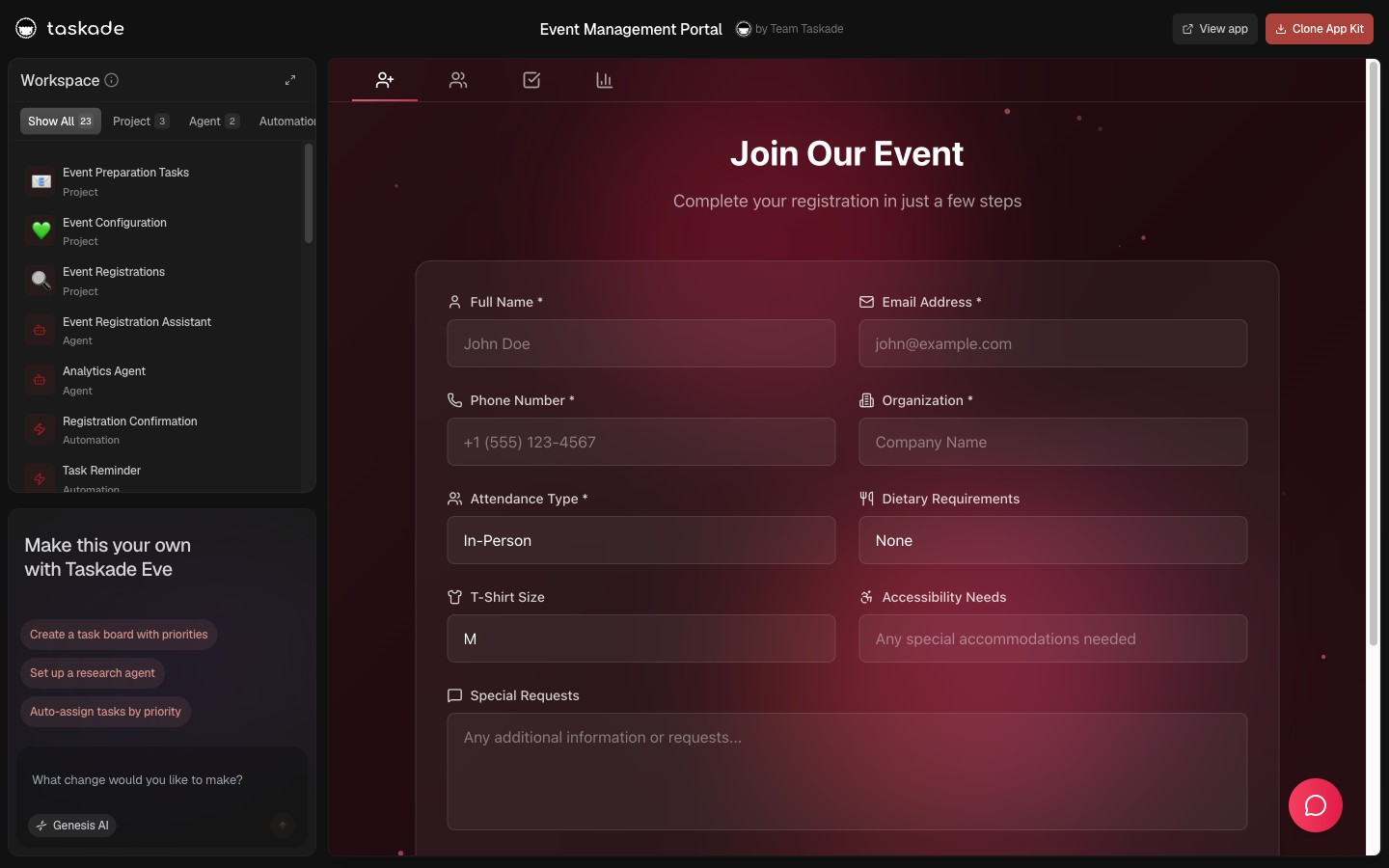
▲ ■ ● This is live. Click the screenshot above to open the live share page, then hit "Use this app" to clone Event Management Portal (Events Project · Guests Project · Concierge Agent · 7 automations) into your workspace.
The Event Management Portal is the canonical hub, the workspace that runs every curated event your team hosts from invite list through follow-up. It ships with three projects: an Events Project that catalogs every dinner with date, venue, host, theme, and capacity; a Guests Project that compounds every attendee across every event with role, fund / company, dietary preferences, attendance history, and relationship score; and a Logistics Project that stores the venue contacts, vendor invoices, and the day-of runbook.
The Concierge Agent reads all three projects and runs the event lifecycle. Before the event it enriches every attendee row with a one-paragraph brief: current role, fund or company stage, recent public posts or press, mutual connections to other guests, and a single conversation hook the host can use as a warm opener. Day-of it monitors RSVP changes and fires Slack alerts when confirmed guests cancel inside the four-hour window, with a suggested waitlist replacement pulled from the Guests Project. The morning after, it drafts personalized follow-up emails for every attendee that reference a specific conversation moment.
The seven automations cover the full lifecycle from invite to T-plus-seven follow-up. The full sequence runs on its own. The founder reviews drafts and approves with one click, total host time per dinner drops from roughly six hours of logistics and follow-up to about forty-five minutes of high-leverage review.
2. Meeting Scheduler: pre-event 1:1 booking
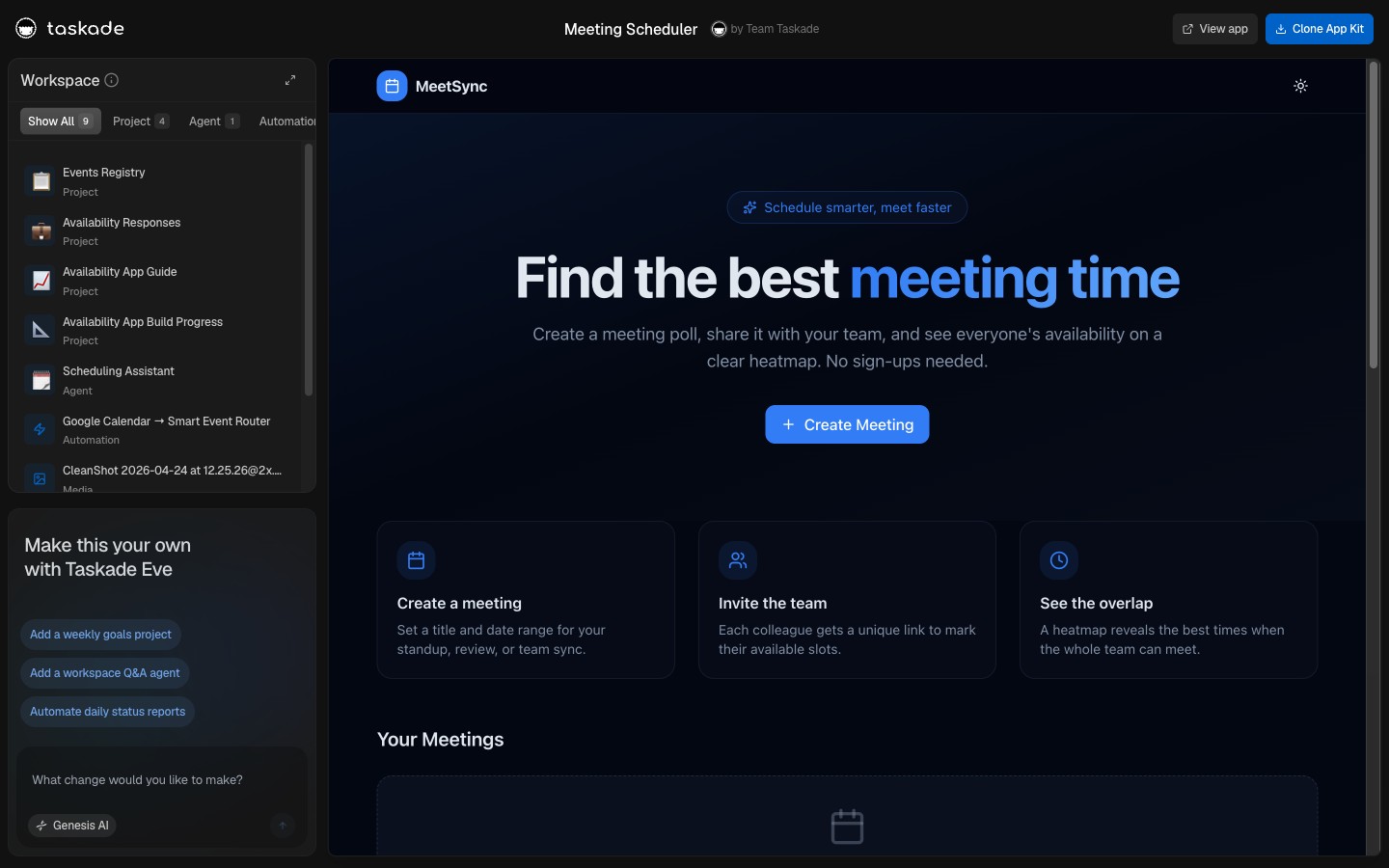
▲ ■ ● This is live. Click the screenshot above to open the live share page, then hit "Use this app" to clone Meeting Scheduler (Scheduler Project · Slots Project · Booking Agent · 4 automations) into your workspace.
The Meeting Scheduler is the pre-event 1:1 booking layer. Most curated dinners include a pre-dinner cocktail hour or a morning-after breakfast where the host wants to spend twenty minutes one-on-one with three or four high-priority attendees, typically the lead investor at a portfolio event, the keynote at a roundtable, or a target customer at a partner dinner. Coordinating those slots in email costs the founder two hours of back-and-forth per dinner.
The Scheduler ships a Slots Project (the host's open windows around the dinner), a Booking Project (the actual confirmed 1:1s), and a Booking Agent that reads attendee priority from the Guests Project, surfaces the top three to five candidates for 1:1 time, and drafts personalized booking emails. The recipient clicks a link, picks a slot, and the automation creates the calendar invite, blocks the host's calendar, and writes the meeting context back to the Guests Project.
The Booking Agent is intelligent. It reads the attendee's enriched brief from the Concierge Agent's prior work and suggests a meeting agenda based on what the attendee likely cares about. For an investor: "Three questions to expect, two updates to share, one ask to make." For a customer: "Their current usage, the expansion opportunity, the renewal timeline." The host shows up to the 1:1 with the agenda already written.
3. Day-Of Calendar: schedule + rooms (Broker Calendar repurposed)
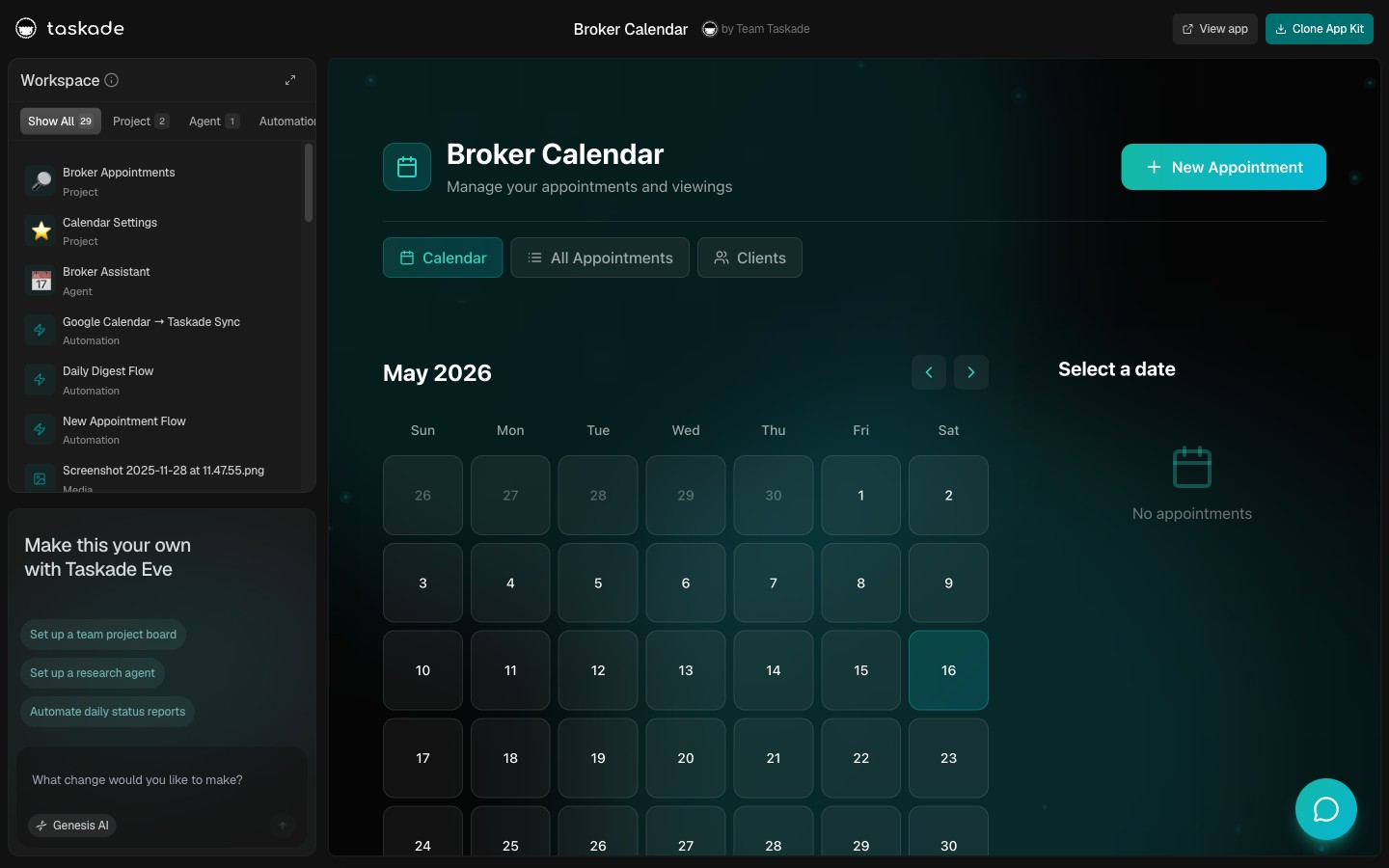
▲ ■ ● This is live. Click the screenshot above to open the live share page, then hit "Use this app" to clone Day-Of Calendar (Calendar Project · Rooms Project · Day-Of Coordinator Agent · 3 automations) into your workspace.
The Day-Of Calendar is the operations layer for the dinner itself, and for multi-session events where the dinner is one of several touchpoints across the day. Originally built as a Broker Calendar for real estate showings, the same architecture maps cleanly to event day-of coordination: time slots, rooms / venues, attendees, and a coordinator agent that keeps the day on schedule.
The Calendar Project shows the day's flow in Calendar view: cocktail hour, seated dinner, dessert and digestifs, post-dinner small-group conversations, optional after-party. The Rooms Project tracks venue spaces, the main dining room, the private room for the lead investor's 1:1, the lounge for the post-dinner small group. The Day-Of Coordinator Agent monitors the timeline and fires Slack alerts when transitions are due, when a vendor is late, or when a guest is missing from a scheduled segment.
This template is built for the more elaborate format, investor summits, customer advisory boards, accelerator demo nights, fund LP days, where the founder dinner is the centerpiece of a longer day with multiple coordinated segments. For a simple dinner, the Event Management Portal alone is sufficient.
The AI Concierge Agent: What It Actually Does
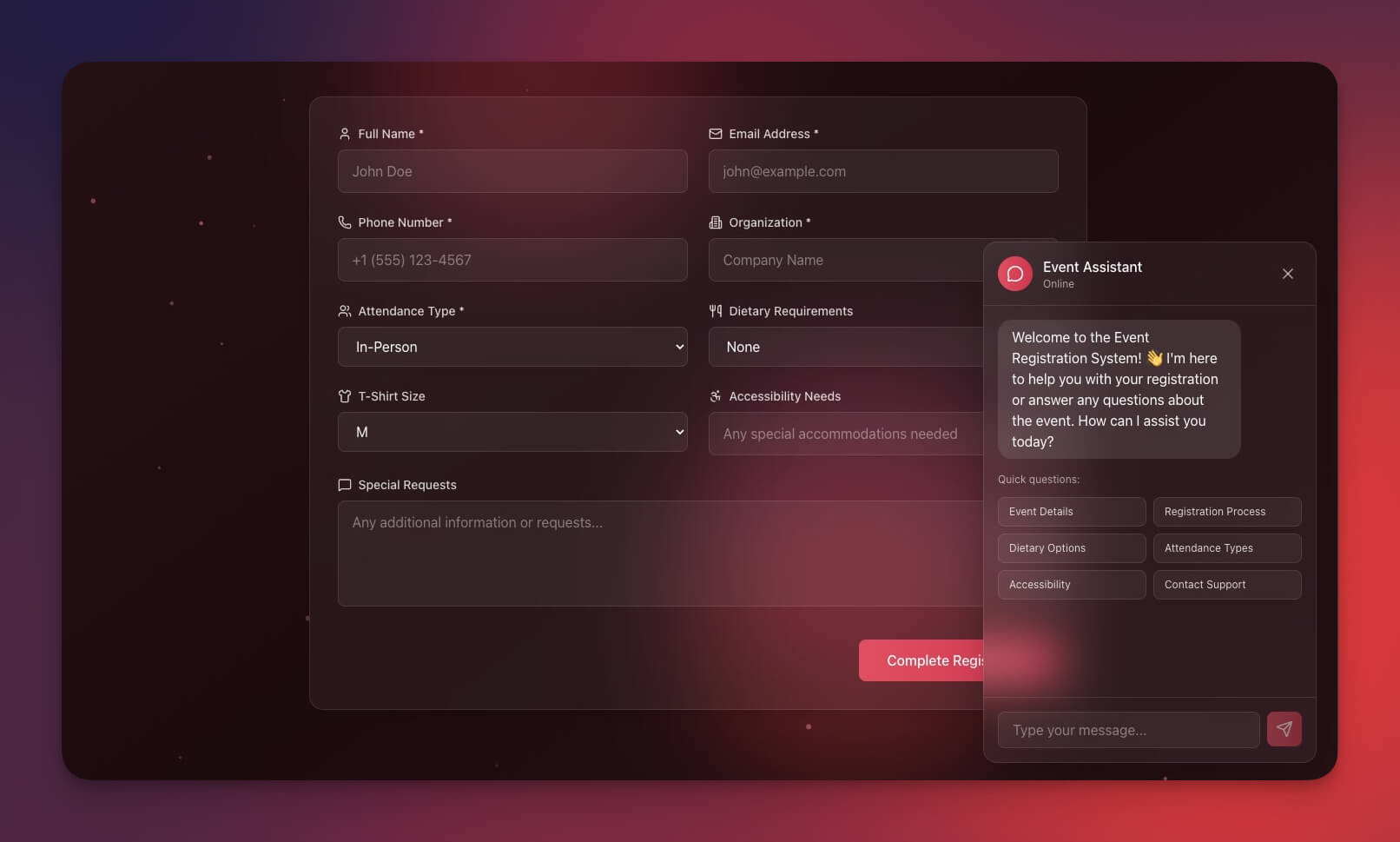
The Concierge Agent is the single highest-leverage component of the Event Portal because it does the work the founder would otherwise skip. Most founders do not enrich attendees, do not optimize seating, and do not draft personalized follow-ups. The Concierge Agent does all three. Persistently. Every event.
Job 1: Pre-event enrichment. Twenty-four to forty-eight hours before the dinner, the agent reads every confirmed attendee row and writes a one-paragraph brief: current role and tenure, fund or company stage, recent public posts (LinkedIn, Substack, X), press mentions, mutual connections to other confirmed attendees, and a single conversation hook. For a venture investor: "Lead at Fund X (3rd year). Recent post on agent infrastructure referenced your customer Y. Co-invested with Investor Z (also attending) in three companies. Hook: ask about the thesis shift toward developer tools."
Job 2: Seating optimization. Twenty-four hours before the dinner, the agent drafts a seating chart that pairs attendees by mutual interests and avoids seating direct competitors next to each other. The chart factors in host priorities ("I want the most time with Investor A and Customer B") and pet peeves ("Founder C and Founder D are competitors, separate"). The host approves in five minutes instead of spending forty-five mapping it manually.
Job 3: Day-of monitoring. During the four hours before the dinner, the agent watches RSVP changes. When a confirmed guest cancels, it fires a Slack alert with the empty seat, the seating-chart impact, and a suggested waitlist replacement from the Guests Project, typically someone who attended a prior dinner, is in town this week, and has high relationship score.
Job 4: Next-morning follow-up. Between 7 AM and 9 AM the morning after the dinner, the agent reads three sources, the attendee briefs, the final seating chart, and any notes the host added during or after the dinner (a voice memo or three lines of text is enough). It drafts a personalized follow-up for every attended guest that names the person they sat next to, references a specific conversation moment, and proposes a concrete next step. Drafts queue in the Follow-Up Project for one-click approval, then fire via Gmail.
The Concierge Agent uses persistent memory stored as Taskade Projects, which means every event gets smarter than the last. The agent remembers that Investor A's fund was pausing new investments until Q3, that Founder B is hiring a head of growth, that Journalist C is writing a piece on agent infrastructure. Three dinners later, those threads resurface as context. The difference between a stateless writing assistant and a stateful operator.
For step-by-step setup of custom agent instructions, see /learn/agents/custom-agents. For automation wiring, see /learn/automation/automations-execution.
The Full Event Lifecycle: Mermaid Sequence
The diagram below shows the canonical event lifecycle from invite list through T-plus-seven follow-up. Every box is a real surface in the Event Portal; every arrow is a real agent call or automation.
The "forty-five minutes per dinner instead of six hours" target is the difference between a founder who hosts one dinner a quarter because it's too much work and a founder who hosts one a month because the workflow runs itself. Compounded over twelve months, that's eleven additional dinners, roughly a hundred and thirty additional curated relationships built without the host paying the logistics tax for each one.
The RSVP Automation Flow: Mermaid Flowchart
Below: the RSVP automation flow from public-page submission through Guests Project write-back. The flow handles three sources (Luma webhook, Partiful copy-in, Taskade Genesis-hosted form) and converges to a single Guests Project row.
The decisive design choice is the convergence at step F, every RSVP source normalizes to a single Guests Project row. This is what makes the Guests Project a compounding asset across dinners. The first dinner has twelve rows. The second dinner has eighteen rows (twelve from the first plus six new). By the tenth dinner, the project is a working CRM of every founder, investor, journalist, and partner you've ever hosted, with attendance history, conversation context, follow-up status, and relationship score on every row.
The Attendee State Machine: Mermaid State Diagram
Every attendee moves through a six-state lifecycle. The state diagram below shows the canonical transitions; the state is stored on the attendee row in the Guests Project and updated by the Concierge Agent and the host together.
The persistence model is the magic. Every state transition writes back to the Guests Project. The host can sort by state to answer questions like "who has attended three dinners in a row?" (relationship score: high), "who has declined four invites in a row?" (relationship score: cold, drop from list), "who attended but never received the follow-up?" (drafting failure, fix the agent), "who followed up with a meaningful reply?" (relationship score: high, prioritize next dinner). Compare this to a Luma page where the guest list resets every event and the host has no longitudinal view. The state machine is the CRM.
For the underlying primitive, see Workspace DNA: Context Engineering Blueprint. For the Taskade Genesis app architecture, see /learn/genesis/faq.
How Many People to Invite (The Headcount Math)
A great founder dinner seats 12 to 20. Hitting that number is not luck. It's a predictable ratio you can plan against. Here's the math experienced hosts use:
| You want at the table | Invite this many | Why |
|---|---|---|
| 8 guests | ~14–16 | Even curated, high-intent lists see 25–35% melt |
| 12 guests | ~18–22 | The sweet spot for real conversation |
| 20 guests | ~30–34 | Above 20, send a waitlist instead of over-inviting |
Three rules that make the ratio hold:
- Over-invite by ~50%. Even warm, hand-picked guests no-show or cancel last-minute. Plan for it instead of scrambling the day-of.
- Set the RSVP deadline 2–3 weeks out. Long enough that calendars aren't locked, close enough that people can actually commit. Fire the reminder automation 5 days before the deadline.
- Track the funnel, not just the yes count. Invited → Opened → RSVP'd → Confirmed → Attended. The drop between RSVP'd and Attended is where dinners quietly fail.
The Event Portal works this ratio for you: the Guests Project tracks every stage, the AI Concierge drafts the personalized invite and the 5-day reminder, and the automation flags anyone who RSVP'd but hasn't confirmed 48 hours out. You set the target headcount; the workspace manages the fill. That's the difference between a spreadsheet that records RSVPs and a workspace that manages the turnout.
Comparison: Luma vs Partiful vs Cvent vs Taskade Genesis Event Portal
Verified May-2026 pricing across the fourteen most-evaluated event and event-adjacent tools. The decisive columns: AI concierge for attendee enrichment, post-event follow-up workflow, and compounding guest CRM, the three capabilities that turn dinners into long-term pipeline.
| Tool | May-2026 entry | Specialty | AI concierge for attendee enrichment | Follow-up workflow | Compounding CRM |
|---|---|---|---|---|---|
| Taskade Genesis | $10/mo Pro flat | AI-first event CRM with concierge | Yes | Yes | Yes |
| Luma (lu.ma) | Free / $59/mo Plus | Beautiful event landing pages | No | No | No |
| Partiful | Free | Animated invites, RSVPs | No | No | No |
| Eventbrite | 3.7% + $1.79 per paid ticket | Ticketed public events | No | No | No |
| Cvent | $19,550/yr median | Trade shows, conferences | No | No | No |
| Bizzabo | $499/user/mo (3-user min) | Enterprise event ops | No | No | No |
| Whova | ~$3,000/event entry | Academic / association conferences | No | No | No |
| Pheedloop | Custom (dynamic per-user) | Conference + virtual events | No | No | No |
| RingCentral Events (Hopin) | ~$99/organizer/mo | Virtual conferences | No | No | No |
| Splash | Custom (typically annual) | Marketing-driven events | No | No | No |
| Posh | Transaction fees | Nightlife / social events | No | No | No |
| RSVPify | $89/mo Plus | RSVP management + Salesforce | Partial (chat agent) | No | No |
| Sessions.us | Free / paid tiers | Webinar + workshop | No | No | No |
| Attio (CRM, not event tool) | $34/seat/mo Pro | General-purpose B2B CRM | No (user wires it) | Manual | Yes (if user builds) |
| Vendelux | ~$25K/yr/seat est. | VC attendee intel for public conferences | Yes (conference-level) | No | No |
The table highlights the structural difference: every competitor in the table treats the event as the product. Luma ships the landing page. Eventbrite ships the ticketing. Cvent ships the trade show. Taskade Genesis ships the workflow around the event, the enrichment before, the coordination during, the follow-up after, and the compounding relationship CRM that lives across every event you host.
This isn't an argument for replacing Luma or Partiful, both are excellent at what they do, and Luma in particular has the best event landing page in the category. The argument is that the landing page is one-twentieth of the work. Use Luma for the public invite if you want. Use Taskade Genesis for the CRM layer behind it.
For founders who already run a Notion Founder OS, the Event Portal slots in as the events module. For GTM teams running customer dinners, see GTM Engineering System. For agencies running client events, the Agency Client Portal Templates cluster pairs with this Portal.
The Real Cost of a Patchwork Event Stack (ASCII)
The stack creep compounds with event volume. Below: monthly cost for the orthodox event stack at three event-program stages, vs. flat Taskade Genesis. Each █ = $50/mo of burn.
                              SOLO FOUNDER       FUND OR ACCELERATOR    ENTERPRISE TRADE SHOWS
                              (4 dinners/yr)     (24 events/yr)         (50+ events/yr)
                              ─────────────────  ─────────────────────  ──────────────────────
Luma Plus                     $59  ▓             $59  ▓                  —
Partiful                      $0                 $0                      —
Eventbrite fees (avg $20 tix) $0                 ~$200/event             ~$500/event
RingCentral Events            —                  $99  ▓▓                 $299  ▓▓▓▓▓▓
Splash (estimated)            —                  $300 ▓▓▓▓▓▓             $1,500 ▓▓▓▓▓▓▓▓▓▓▓▓▓▓▓▓▓▓▓▓▓▓▓▓▓▓▓▓
Bizzabo                       —                  —                       $1,500 ▓▓▓▓▓▓▓▓▓▓▓▓▓▓▓▓▓▓▓▓▓▓▓▓▓▓▓▓
Cvent (median)                —                  —                       $1,629 ▓▓▓▓▓▓▓▓▓▓▓▓▓▓▓▓▓▓▓▓▓▓▓▓▓▓▓▓▓▓▓
RSVPify Plus                  —                  $89  ▓▓                 $89   ▓▓
Notion + Sheets + Gmail       $0                 $0                      $0
                              ─────────────────  ─────────────────────  ──────────────────────
LEGACY STACK TOTAL            $59  /mo           $458 + per-event fees  $5,517 + per-event fees
                              ▓                  █████████              ████████████████████████████████████TASKADE GENESIS Pro           $10  ▌ (10 seats)  $25  █ (Business)      $25   █ (Business)
─────────────────────────────────────────────────────────────────
SAVINGS                       $49/mo             $433/mo                ~$5,492/mo
ANNUAL SAVINGS                $588/yr            $5,196/yr              ~$65,904/yr
A fund running twenty-four portfolio dinners a year on the orthodox stack pays roughly $5K/yr for what one Pro Taskade workspace covers at $120/year. A corp-dev team running enterprise trade shows pays roughly $65K/yr for the operating-tool layer alone, before per-event fees, badge printing, and venue tech. The compounding-CRM capability is not in any of the legacy tools at any price point. Cvent median pricing verified against docket.io research and vendr.com marketplace data on May 22, 2026.
TODAY                                              ON TASKADE GENESIS
──────────────────────────────────────────         ──────────────────────────────
Luma + Sheet + Slack + Gmail + Notion              Event Portal (single workspace)
─────────────                                      ─────────────
5 tools · $59+/mo · 5 logins · 0 agents            1 workspace · $10/mo · 1 login
0 enrichment · 0 seating opt · manual follow-up    AI concierge across full lifecycle
─────────────                                      ─────────────
~6 hrs/dinner · CRM = guesswork                    ~45 min/dinner · CRM = compounds
The consolidation isn't about cutting tools for its own sake. It's about making the relationship layer first-class, turning every dinner into a permanent node in a relationship graph instead of a Google Sheet row that gets forgotten by the next quarter.
The Post-Event Follow-Up Gap: Why 80% of Dinner ROI Evaporates
Roughly eighty percent of a curated dinner's pipeline value lives in the seventy-two hours after the event ends, not in the dinner itself, a pattern confirmed in field reports from both relationship-led GTM teams (mkt1) and the wider event-tech research base, where ad-hoc tracking and untimely follow-up are repeatedly cited as the biggest sources of leakage (Cvent attendee tracking, Bizzabo pipeline integration). The pattern is consistent: the relationship was formed, the conversation was fresh, the goodwill was at its peak. And almost nobody follows up well.
The orthodox follow-up workflow: the host wakes up the next morning, opens Gmail, types "Hey [name], great to see you last night, let's stay in touch," sends to twelve people, and considers it done. The recipient receives a generic message indistinguishable from the ten other "great to see you last night" emails in their inbox. They reply "yes, definitely!" and the relationship dies.
The Concierge Agent's follow-up draft is different. It reads the seating chart, the host's dinner notes (a voice memo or three lines of text is enough), and the attendee's enriched brief. For each attendee it drafts an email with four specific elements:
- Named context. "Sitting next to Investor A turned out well, the agent-infrastructure thread you two got into was the highlight of the dinner for me."
- Specific conversation reference. "Your point about pricing-as-onboarding for technical buyers is going to stick with me for a while."
- Concrete next step. "I'd love to make the intro to Founder C we discussed. She's building exactly the data-layer piece you mentioned. Want me to send a double-opt-in?"
- Forward-looking invitation. "We're doing the next one in eight weeks with a slightly different crowd, happy to add you to the list if it makes sense."
Four elements, four sentences, three minutes for the host to review. The drafts queue in the Follow-Up Project for one-click approval, then fire via Gmail. Total host time for a twelve-person dinner follow-up batch: about ten minutes instead of two hours of writing from scratch (which usually means zero hours because the host never gets to it).
The retention math is loud. A founder hosting one dinner a quarter with no structured follow-up converts maybe one in twenty attendees into a real ongoing relationship, call it five high-value relationships per year from twenty dinner attendees. The same founder running the Concierge Agent's follow-up workflow converts roughly one in four, twenty-five high-value relationships per year from the same twenty attendees. Five times the relationship yield from the same dinner. That's not a productivity win. That's a fundraising / customer-acquisition / hiring multiplier.
The follow-up workflow maps cleanly onto Workspace DNA. The ASCII box below shows the post-event flow as Memory + Intelligence + Execution, every layer is a real surface in the cloned Event Portal:
┌────────────────────────────────────────────────────────────────────┐
│  ▲ MEMORY                ■ INTELLIGENCE        ● EXECUTION          │
│  Final seating chart     Follow-Up Drafter     Gmail send (batched) │
│  Host dinner notes       Relationship Scorer   Slack notify host    │
│  Attendee briefs         Next-Touchpoint Bot   Calendar invite next │
│  Past attendance log     Intro Matcher         Taskade Genesis form: re-RSVP│
│  Conversation timeline   Sentiment Reader      T+7 cadence trigger  │
└────────────────────────────────────────────────────────────────────┘
The compounding piece is the conversation timeline. After five dinners, the agent has memory of which guests discussed which topics with which other guests. The next intro it suggests is informed by the entire relationship graph, not just the last dinner. The Concierge Agent gets smarter every dinner because it reads its own history.
For the broader CRM model, see AI Sales Pipeline Template. For the investor-specific version of the follow-up workflow, see AI Investor CRM and Fundraising Tracker.
The 30-Day Event Portal Migration Playbook
You don't need to migrate to run your first dinner on Taskade Genesis. Clone the Event Portal today and run your next dinner through it. The four-week playbook below is for teams running a recurring event series on a patchwork stack who want to consolidate without losing in-flight events.
Week 1, Memory layer. Clone the Event Management Portal. Import your last twelve months of attendee data from Luma exports or Eventbrite CSVs. Map every guest to a Guests Project row with name, email, role, fund / company, attendance count, and last-attended date. Keep using Luma or Partiful for new event landing pages, Taskade Genesis handles the CRM, not the public invite.
Week 2, Intelligence layer. Wire the Concierge Agent. Run it on your next event's guest list as a dry run, review enrichment quality, edit instructions to match your house tone, run the seating optimizer on a real dinner you've already planned. Adjust the prompt until suggestions consistently match your judgment.
Week 3, Execution layer. Add the seven automations one at a time, invite send and RSVP webhook, T-minus-24h reminder, day-of Slack channel, late-cancel detection, next-morning follow-up drafter. Run one full dinner end-to-end with all automations live.
Week 4, Consolidate. Cancel redundant subscriptions (seat-based RSVP tools, standalone schedulers, the abandoned Google Sheet). Keep Luma or Partiful for the public landing page if your audience prefers it. Typical month-4 result: $300–500/mo in operating-tool savings and the first dinner where the CRM compounds into the next.
Long-Tail Wedges: Where the Event Portal Wins SERPs
| Long-tail keyword | Event Portal advantage |
|---|---|
| "founder dinner CRM template" | Luma / Partiful are landing pages, not CRMs; Event Portal compounds across dinners |
| "VC event tracker with attendee enrichment" | Cvent enriches nothing; Concierge Agent ships enrichment as a default |
| "private event RSVP automation with follow-up" | Eventbrite handles RSVP; nothing handles structured follow-up |
| "free event management template with AI" | Luma free has no AI; Partiful has no AI; Event Portal is free-cloneable |
| "AI seating chart optimizer for dinners" | Cvent / Bizzabo charge enterprise for this; Concierge Agent ships it free |
| "post-event follow-up email automation" | The gap nobody fills — Concierge Agent's morning-after drafter |
| "founder events CRM that compounds across dinners" | No competitor — Luma resets per event; Guests Project compounds |
| "Luma alternative with built-in CRM" | Luma Plus is $59/mo for the page; Taskade Genesis Pro $10/mo for the full workflow |
| "Partiful alternative for high-stakes events" | Partiful is free but stateless; Taskade Genesis is $10/mo and stateful |
| "Cvent alternative for small curated events" | Cvent is $20K/yr median; Taskade Genesis is $120/yr flat |
| "accelerator cohort event tracker" | The Day-Of Calendar template ships cohort-day coordination |
| "fund LP day event coordinator" | The Day-Of Calendar runs multi-session days for fund teams |
| "customer roundtable RSVP and follow-up tool" | GTM teams running customer dinners — Concierge Agent fits exactly |
| "AI concierge for private dinners" | New category — no incumbent owns this term yet |
| "event CRM that integrates with Slack and Gmail" | 100+ bidirectional integrations native; nobody else ships this stack |
| "operator dinner CRM" | Mkt1 names "executive dinners as the new trade shows" — Event Portal is the workflow layer |
| "supper club tracker software" | Recurring supper-club hosts need a compounding guest list — Guests Project ships that by default |
| "Attio event tracking alternative" | Attio requires custom objects + Zapier; Event Portal ships the agent + automations pre-wired |
| "AI seating chart generator for private dinners" | Seating Optimizer reads enriched briefs + host priorities; not in any incumbent at this price |
| "founder dinner follow-up email template" | Concierge drafter generates per-guest follow-ups in ten minutes, not two hours |
When to Clone vs Build From Scratch
Clone when: Your event format is a founder dinner, VC portfolio dinner, customer roundtable, accelerator cohort night, or fund LP day. The three templates cover the canonical formats.
Customize when: Your event involves segments the templates don't cover (workshops, hackathons, multi-day retreats). Clone the closest template and add segment-specific projects.
Build from scratch when: Your architecture is fundamentally different, a multi-city tour, a year-long mastermind, a regulated industry event. Open Taskade Genesis, describe what you need to EVE in one prompt, and the workspace scaffolds in under two minutes.
Volume guide: Under 5 events/yr → Free plan covers it. 5–24/yr → Pro at $10/mo flat, ten seats. 25+/yr → Business at $25/mo unlimited seats, master template with auto-clone on each new event creation.
FAQ
What is a founder dinner CRM?
A founder dinner CRM is a workspace that runs the full lifecycle of a curated private event, invite list, RSVP tracking, attendee enrichment, day-of coordination, and post-event follow-up, as a single source of truth instead of three scattered tools. Most founders manage dinners across a Google Sheet for the list, a Luma page for RSVPs, and a half-remembered Notion page for follow-ups. Taskade Genesis ships three free cloneable event templates that combine all three layers, invite list, schedule, and AI concierge, with automation that fires Slack alerts day-of and personalized follow-up emails the next morning. Pro is ten dollars a month flat for up to ten seats. Clone the Event Portal now →
How is Taskade Genesis different from Luma or Partiful for founder events?
Luma and Partiful are excellent event landing pages and RSVP tools. They do not run the workflow around the event, investor enrichment before the dinner, seating optimization based on who confirms, day-of Slack alerts when guests arrive, or personalized follow-up emails the next morning. Luma Plus is fifty-nine dollars per month for the platform-fee-free tier with API access. Partiful is free with no premium tier. Taskade Genesis Pro is ten dollars a month flat and ships an Event Portal that captures the RSVP, runs an AI concierge agent that enriches every attendee, fires automation chains across 100+ bidirectional integrations, and stores every guest as a Project row that compounds across every dinner you host.
Can Taskade Genesis replace Cvent for enterprise event management?
For curated dinners and small private events, yes. Cvent contracts typically start around twenty thousand dollars a year at the median and scale to seventy-nine thousand dollars or more for full enterprise implementations, with per-registrant fees of seven to twelve dollars per attendee per event. Cvent is built for trade shows and large conferences with onsite check-in hardware, badge printing, and venue sourcing. Taskade Genesis is built for the founder dinner, VC event, customer roundtable, and partner summit format where the value is in the AI concierge, the day-of coordination, and the post-event follow-up workflow.
Does the Event Portal include an AI concierge?
Yes. The Event Portal ships with a Concierge Agent that runs four jobs across the event lifecycle. Before the event it enriches every attendee row with role, recent posts, mutual connections, and a one-sentence conversation hook. Twenty-four hours before the dinner it drafts a seating chart that pairs attendees by mutual interests and avoids seating direct competitors next to each other. Day-of it fires Slack alerts when confirmed guests cancel within the four-hour window. The morning after it drafts personalized follow-up emails with one-click founder approval.
What automations are built into the Event Portal template?
Seven automations across the event lifecycle. RSVP confirmation fires an email with venue address and dietary preference form. T-minus-seven-days reminder pulls dietary preferences and shares them with the venue. T-minus-twenty-four-hours fires a confirmation text and triggers the seating chart draft. Day-of-event opens a dedicated Slack channel and posts the live guest list with arrival status. Late-cancel detection fires a Slack alert with the empty seat and a suggested waitlist replacement. Next-morning follow-up drafts personalized emails for every attended guest. T-plus-seven-days fires a relationship-deepening prompt.
How does the post-event follow-up workflow work?
The morning after the dinner, the Concierge Agent reads three sources, the attendee Project rows, the seating chart, and any notes the host added during or after the dinner. It drafts a personalized follow-up email for every guest that references a specific conversation moment, names the person they sat next to, and proposes a concrete next step (intro, follow-up call, resource, next-dinner invite). The drafts queue in a Follow-Up Project for one-click founder approval, then fire via Gmail. Average host time per follow-up batch: ten minutes for twelve guests instead of two hours.
Can I run multiple dinners in the same workspace?
Yes. One workspace handles unlimited events using a separate Event row per dinner inside the Events Project, plus a single Guests Project that compounds across every event you host. The role-based access system (Owner to Viewer) keeps event-specific data scoped while the Guests Project gives you a longitudinal view of every founder, investor, and partner who has ever attended.
How much does the Event Portal cost compared to other event tools?
Taskade Genesis Pro is ten dollars a month flat for up to ten seats with the Event Portal template, the AI concierge layer, and 100+ integrations included. The Free plan includes 11,000 one-time AI credits (1,000 when you verify your email + 10,000 on your first build) and 3 Genesis apps. Comparable tools: Luma Plus is fifty-nine dollars per month, Partiful is free with no AI layer, Eventbrite charges three-point-seven percent plus one-seventy-nine per paid ticket, Cvent starts around twenty thousand dollars per year median, Bizzabo starts at four hundred ninety-nine dollars per user per month with a three-user minimum, RingCentral Events starts around ninety-nine dollars per organizer per month, RSVPify Plus is eighty-nine dollars per month.
Can I white-label the Event Portal for my fund or accelerator?
Yes. Taskade Genesis apps support custom domains (dinners.yourfund.com), password protection for private invite-only events, and Taskade Genesis Auth (built-in OIDC/SSO) for enterprise clients. Password protection ships on the Pro plan at ten dollars a month flat for up to ten seats; Taskade Genesis Auth and full white-labeling with a custom domain are on the Business plan at twenty-five dollars a month with unlimited seats.
How does the Event Portal integrate with Slack, Gmail, and Calendly?
The portal uses 100+ bidirectional integrations with reliable workflow execution. Triggers pull events in (Calendly RSVP, webhook from a registration form, Gmail reply from an invitee) and actions push data out (Slack channel creation and message posts, Gmail personalized sends, Calendar event invites). A typical Event Portal connects to Gmail for the invite and follow-up sends, Slack for the day-of coordination channel, Google Calendar for the founder host calendar, and a webhook from whichever public RSVP page you choose (Luma, Partiful, or a Taskade Genesis-hosted form).
Is the Event Portal cloneable today?
Yes. The three event templates linked in this post are all live and cloneable in one click, click any screenshot above to open its share page, then hit "Use this app". No credit card required. Free plan includes 11,000 one-time AI credits and 3 Genesis apps cloneable from the Community Gallery. Pro is ten dollars a month flat for up to ten seats.
How does the seating chart AI actually work?
The Seating Optimizer reads the enriched attendee briefs the Concierge Agent has already written and drafts a seating chart against four constraints, pair attendees by mutual interests (shared portfolio, similar stage, overlapping target market), avoid seating direct competitors next to each other, honor host priorities (the lead investor next to the host, the keynote near the founder being introduced), and balance the room (no all-investor table, no all-engineer corner). The draft posts to the host Slack as a labeled chart with a one-sentence rationale per seat. Host approval takes about five minutes for a twelve-person dinner instead of forty-five minutes of manual mapping. The constraints are editable inline in the agent instructions, and the optimizer remembers prior dinners' chart performance.
How is the Event Portal different from Attio, Vendelux, or Whova?
Attio is a general-purpose CRM that many operators bolt event tracking onto with custom objects and Zapier, powerful for relationship data, but the user wires up enrichment, day-of coordination, and follow-up themselves. Vendelux is VC-specific attendee enrichment for large public conferences (Money 20/20, SaaStr, Web Summit) priced at roughly twenty-five thousand dollars per year per seat. It surfaces who is attending which conference, not who is coming to your dinner. Whova is best-in-class for academic and association conferences with badge scanning and session tracking, overkill for a twelve-person founder dinner. The Event Portal sits in the gap none of these fill.
Is investor enrichment compliant with GDPR and CCPA?
The Concierge Agent enriches attendee rows using only publicly available signals, LinkedIn profile, fund website, recent public posts, press mentions, which falls under legitimate interest processing under GDPR Article 6(1)(f) for B2B relationship management. The agent does not scrape private databases, harvest emails behind paywalls, or store sensitive personal data. For CCPA compliance, every Guests Project row supports one-click data export and deletion via the standard Taskade workspace controls. For enterprise teams running events with EU attendees, the recommended pattern is to add a one-line consent notice to the RSVP page and keep enrichment briefs to public-source data only.
Clone Your Event Portal Today
Three templates, three workflows, all live and free:
- Event Management Portal, the canonical hub, Concierge Agent + 7 automations
- Meeting Scheduler, pre-event 1:1 booking, Booking Agent + 4 automations
- Day-Of Calendar, schedule + rooms, Day-Of Coordinator + 3 automations
All three templates live in the Taskade Genesis Community Gallery. Browse 150,000+ apps built by founders, fund managers, and teams worldwide.
Need an event workflow that isn't on this list? Open Taskade Genesis → and describe your ideal event flow to EVE, the format you host, the guests you invite, the segments you run, the follow-up workflow you want. EVE scaffolds the full architecture from your description in under two minutes.
Read the rest of the cluster:
- AI Founder Operating System, the workspace the event portal slots into
- AI Investor CRM and Fundraising Tracker, investor-specific CRM layer
- GTM Engineering System (Clay Alternative), for GTM teams running customer dinners
- Agency Client Portal Templates, agency-flavor relationship CRM
- AI Sales Pipeline Template, for the outbound layer behind the events
- AI Customer Onboarding Templates, for what happens after the relationship is real
- SaaS Metrics Dashboard Templates, the metrics surface for fund and corp-dev teams
- AI Recruiting Pipeline Templates, for hiring dinners specifically
- Taskade Genesis vs Bolt vs Lovable vs v0, the broader code-generator showdown
See also:
- /agents, full agent catalog
- /automate, 100+ integration automations
- /apps, 150,000+ live cloneable Taskade Genesis apps
- /templates/event-management, event management template hub
- /learn/agents/custom-agents, agent customization walkthrough
- /learn/automation/automations-execution, automation setup
- /learn/genesis/faq, Taskade Genesis FAQ
The patchwork event stack was the bug. The Event Portal with AI Concierge is the answer. Try it free →