

TL;DR: Taskade Genesis ships a live, shareable app in the browser with AI agents and 100+ integrations. Kimi Work from Moonshot AI is a desktop agent that runs automations on your machine, free to download, with Kimi Membership from $15/mo billed annually ($19 monthly). Taskade Pro is $10/mo billed annually. Try Taskade Genesis free →
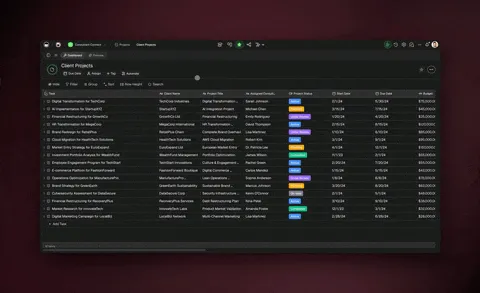
See the alternative working: clone in 60 seconds
No signup, no credit card.
| Capability | Kimi Work | Taskade Genesis |
|---|---|---|
| Pricing (starting) | Free download; Plus $15/mo billed annually ($19 monthly) | $0 Free · $10/mo Pro billed annually (10 seats) |
| Cloneable live demo | ❌ | ✅ |
| Built-in AI agents | Agent Swarm, up to ~300 sub-agents | ✅ built-in tools |
| Automation engine | Scheduler (laptop must stay on) | ✅ Durable runtime, 100+ integrations |
| Workspace DNA loop | ❌ | ✅ ▲ Memory · ■ Intelligence · ● Execution |
These two tools sit at different altitudes. Kimi Work is a power-user's desktop robot that automates a technical person's tasks on their own machine. Taskade Genesis turns one plain-English prompt into a living app that other people open and use. If you want to hand a working tool to a team or a client, Taskade Genesis is the fit.
What is Taskade Genesis?
Taskade Genesis is an AI app generator that turns a plain-English prompt into a live, shareable application. Describe an ops dashboard, a client portal, a CRM, or an intake form, and Taskade Genesis deploys it with its own real URL in minutes. There is no install, no server to manage, and no laptop that has to stay powered on. Your whole team and your clients open the app from any browser, any time.
Every Taskade Genesis app is powered by Workspace DNA, a three-pillar loop:
- Memory: your projects are the structured database behind the app, viewable across multiple views (List, Board, Table, Mind Map, Docs (Beta), Gantt Chart, Calendar, Actionsheet, Org Chart).
- Intelligence: AI Agents v2 with built-in tools draft content, route work, and answer questions inside the app. Taskade EVE, the Taskade Genesis meta-agent, orchestrates the build.
- Execution: automations connect triggers to actions across 100+ bidirectional integrations, so the app responds to events without anyone touching it.
Because the app lives in the cloud, it keeps working when your computer is closed. App sign-in is on every plan, including Free, so you can hand a secured product to a client and let their team log in; Pro and above add custom domains so the product runs on your own brand.
What is Kimi Work?
Kimi Work is a local-first desktop AI agent from Moonshot AI, the Beijing-based startup behind the Kimi brand. It is a free download for macOS Apple Silicon and Windows, launched around June 2026 and currently in beta / internal testing. It runs on Moonshot AI's Kimi models, and reporting on the exact shipping model version is still catching up, so we do not pin a specific version here.
Kimi Work installs on your own machine and, with per-action permission, does work locally on your behalf. Its headline capabilities, as reported by Decrypt, MarkTechPost, and CryptoBriefing, include:
- Agent Swarm: up to roughly 300 parallel specialized sub-agents coordinating across a multi-step run. This large-scale local parallelism is the marquee differentiator.
- WebBridge browser automation: drives your real, logged-in Chrome or Edge locally, keeping cookies and sessions on your device and sidestepping anti-bot detection.
- Local file access: mounts local directories with explicit per-action authorization, an "ask before acting" safeguard.
- Built-in scheduler: runs LLM, Python, and shell jobs on a schedule, but only while the machine is powered on.
- Office document generation: turns research into PowerPoint decks and Excel sheets, edits PDFs, organizes folders, and emails reports.
- Long-context processing: handles entire codebases and book-length documents, with up to 1M tokens of context on the Max and Ultra plans, plus Kimi Code and Deep Research.
- Pre-integrated financial market data: A-shares, Hong Kong stocks, and US equities out of the box.
Kimi Work is framed as a digital workstation for multi-step automation on your own hardware, not a chatbot. It is built for a technical, single-operator audience: developers, financial analysts, and researchers running repetitive workflows who want automation on their own machine with local file and authenticated-browser access.
The core difference: a robot for your desk vs. an app for your team
The simplest way to hold these two apart:
 KIMI WORK                              TASKADE GENESIS
 ---------                              ---------------
 [ Your laptop ]                        [ One prompt ]
      |                                       |
      v                                       v
 Installs an app                        Deploys a live app
      |                                       |
      v                                       v
 Reads local files +                    Cloud-hosted, own URL
 drives your browser                    + custom domain + sign-in
      |                                       |
      v                                       v
 Runs YOUR tasks                        Your whole TEAM + clients
 (one operator,                         open it 24/7 from any
  laptop must stay on)                  browser, no install
      |                                       |
      v                                       v
 Produces work products                 Ships a product other
 (decks, scripts, reports)              people use every day
Kimi Work is a robot that operates your computer. It reads your files, drives your logged-in browser, and produces work products like decks, spreadsheets, and scripts. That work stops when your laptop closes, and it serves one operator on one device.
Taskade Genesis is the opposite altitude. From one prompt it produces a product other people use: a living app with a real URL that runs in the cloud, that a whole team or a set of clients open from any browser, around the clock, with no install and no machine that has to stay on.
Choose Moonshot AI If...
Kimi Work is a genuinely novel product, and there are real reasons a technical operator would reach for it.
- ✅ You want massive local parallelism. The Agent Swarm running up to ~300 sub-agents across many coordinated steps is a real capability most tools do not offer. If you have a heavy, multi-step optimization or research job to grind through, this parallel compute is a legitimate draw.
- ✅ You want local-first privacy and authenticated-browser access. Because Kimi Work drives your real browser and reads files on your own device, your cookies, credentials, and page content stay local rather than routing through a vendor's cloud. It also cleanly gets past anti-bot walls on data portals that block traditional scrapers.
- ✅ You want strong long-context work at a low price point. Reddit users on r/ChatGPTCoding and r/LocalLLaMA praise the underlying Kimi models for whole-repository code understanding and long-document coherence at a fraction of frontier-API cost, and the open-weight Kimi lineage enables self-hosting and customization that closed rivals do not allow. For no-code tools that run these open-weight models in the cloud, see AI builders that run open-weight models.
If you are a developer, analyst, or researcher who wants a private, single-operator automation robot on your own machine, Kimi Work is worth a look. Just remember it is still beta, and, as Decrypt notes, its biggest structural limit is that tasks stop when your laptop closes.
Why Teams Choose Taskade
Taskade Genesis builds a deployed, always-on app that your whole team and your clients can open from any browser, while Kimi Work automates one technical person's tasks on one machine that has to stay powered on. Taskade Genesis ships living software with AI Agents v2, built-in automations, 100+ integrations, and app sign-in on every plan, with a custom domain on Pro and up, so a non-coder can build it and hand it to others. There are no local installs, no risky cookie or credential automation, and no laptop that must stay on for the work to keep running. Taskade is free to start, with paid plans from $10 per month billed annually.
Pricing comparison
Kimi Work is a free download, but meaningful agent features require a Kimi Membership. Moonshot AI publishes a tempo-named ladder on kimi.com/membership/pricing: the free tier is called Adagio, and the paid tiers are Plus, Pro, Max, and Ultra. Prices below were verified in October 2026.
| Plan | Kimi Membership (verified October 2026) | Taskade |
|---|---|---|
| Free | Adagio, $0 — 1 concurrent agent task, 2 scheduled tasks | Free - start building live apps (3 Taskade Genesis apps), no credit card |
| Entry paid | Plus $15/mo billed annually ($180/yr) or $19 monthly — more agent credits, website deployment | Pro $10/mo (billed annually) - 10 users, unlimited apps, up to 10 custom domains |
| Mid | Pro $31/mo billed annually ($372/yr) or $39 monthly — 2x agent credits, Goal mode, Kimi Claw | Business $25/mo (billed annually) - workspace SSO |
| High | Max $79/mo billed annually ($948/yr) or $99 monthly — 5x agent credits, up to 1M tokens of context | Max $100/mo (billed annually) - maximum AI capacity |
| Top | Ultra $159/mo billed annually ($1,908/yr) or $199 monthly — 10x agent credits | Enterprise $250/mo (billed annually) - SCIM, custom SLA |
A few honest caveats on the Kimi column. Kimi Membership covers the whole Kimi product, not only the Kimi Work desktop app, and agent credits, not the dollar price, set how much agent work each tier buys. We do not claim which tier delivers the full ~300-agent swarm reported for Kimi Work, because the membership page lists swarm subtasks per tier rather than a single swarm size.
With Taskade the AI allowance comes with the plan. You start free, and Pro is a flat $10 per month billed annually for a team of 10, with unlimited apps and 50,000 credits a month. The app you build keeps running in the cloud whether or not anyone's computer is on.
When each tool wins
- Reach for Kimi Work when you personally need to grind through a heavy local job: refactor a whole repo overnight, pull authenticated data from a portal that blocks bots, or generate a batch of decks and spreadsheets on your own machine, and you are comfortable with a beta tool and with the laptop staying on.
- Reach for Taskade Genesis when the output needs to be a tool other people use: a client portal, an ops dashboard, an intake form, or a CRM that your team logs into every day from any device, with agents and automations running in the background 24/7.
Kimi Work automates a technical person's tasks locally. Taskade Genesis ships a shareable, always-on operational app that a non-coder can build and hand to others.
Frequently Asked Questions
Is Kimi Work free?
The Kimi Work desktop app is a free download for macOS Apple Silicon and Windows, and Moonshot AI offers a free tier for basic chat, uploads, and web search. Meaningful agent features require a Kimi Membership: Plus is $15 per month billed annually or $19 monthly, Pro is $31 billed annually or $39 monthly, Max is $79 or $99, and Ultra is $159 or $199 (verified October 2026). Taskade is also free to start, and its paid plans begin at $10 per month billed annually.
What is the difference between Kimi Work and Taskade Genesis?
Kimi Work is a local desktop agent that automates tasks on your own machine for one operator, running only while that machine is powered on. Taskade Genesis turns a prompt into a live, cloud-hosted app with its own URL that your whole team and clients open from any browser, 24/7, with no install.
Can Taskade Genesis run 300 parallel agents like Kimi Work's Agent Swarm?
No, and it is not trying to. Kimi Work's Agent Swarm is built for massive local parallel compute on a technical operator's machine. Taskade Genesis competes on a different axis: shipping a deployed, shareable business app that non-technical teams actually run, powered by AI Agents v2 with built-in tools.
Does Kimi Work keep running when my laptop is closed?
No. Because Kimi Work executes locally, its scheduled jobs and agents stop when the machine is off, as Decrypt reports. Taskade Genesis apps are cloud-hosted, so they keep running and stay open to your team around the clock regardless of whether any machine is on.
Which AI model does Kimi Work use?
Kimi Work runs on Moonshot AI's Kimi models. Public reporting on the exact shipping model version is still catching up and sources disagree, so we do not pin a specific version number here. If the precise model matters for your workflow, check Moonshot AI's own documentation for the current answer.
Do I need coding skills to use either tool?
Kimi Work is aimed at technical power users: developers, analysts, and researchers comfortable granting an app local file and browser access. Taskade Genesis is designed for non-technical operators who describe what they want in plain English and get a working app back.
Can I share what I build with my team or clients?
With Taskade Genesis, yes: every app has a real URL, and app sign-in works on every plan so clients can log in, with a custom domain on Pro and up for a branded product. Kimi Work produces work products and runs automations for a single operator on one device. Separately, Kimi Membership plans include website deployment with database support, and Kimi Claw is Moonshot AI's cloud agent for always-on work.
Is Kimi Work safe to give file and browser access?
Kimi Work includes an "ask before acting" mode that requests per-action authorization before touching local files or driving your browser. Reviewers still flag autonomous-action risk in a beta tool that inherits your logged-in sessions, so treat access grants carefully. Taskade Genesis avoids this class of risk entirely by never touching your local machine or credentials.
What do real users say about Kimi?
Sentiment on the underlying Kimi models is positive: Reddit developers praise their whole-repository code understanding and long-document coherence at low API cost. Coverage adds caveats: benchmark scores do not always translate to everyday quality, Kimi Work itself is beta with execution stability still improving, and the local-only design means tasks stop when the laptop closes. There is no dedicated G2 review corpus for Kimi Work yet.
Does Taskade have AI agents and automations built in?
Yes. Every Taskade Genesis app can include AI Agents v2 with built-in tools plus automations that connect triggers to actions across 100+ bidirectional integrations. Together with your projects as the database, this is the Workspace DNA loop of Memory, Intelligence, and Execution.
Can I try Taskade Genesis without installing anything?
Yes. Taskade Genesis runs entirely in the browser, so there is nothing to download. Start building a live app free, describe what you want in plain English, and get a shareable URL in minutes.
The bottom line
Kimi Work is a genuinely novel desktop robot for technical operators who want private, high-parallelism automation on their own machine, and its Agent Swarm and local-first design are real strengths. But it automates one person's tasks, on one device, only while that device is on.
Taskade Genesis solves a different problem: it turns a prompt into a living, cloud-hosted app that a whole team and their clients open every day, with AI agents, automations, 100+ integrations, and custom domains with sign-in. Kimi Work drives your computer. Taskade Genesis builds the app your whole team runs. ▲ Memory · ■ Intelligence · ● Execution.
Verify the comparison yourself
- Kimi Work overview: kimi.com
- Kimi pricing: kimi.com/membership/pricing
Compare Taskade to other AI tools
- Taskade vs Cursor - AI coding assistant comparison
- Taskade vs Replit - browser-based IDE alternative
- Taskade vs Bolt.new - AI app builder comparison
- Taskade vs Lovable.dev - no credit drain alternative
- Taskade vs V0 - ship full apps, not just UI
- Taskade vs Simular - Sai operates desktop software, Taskade Genesis ships a cloud app
Explore Taskade Genesis
- Team ops command board - clone a cloud workspace your team opens 24/7
- AI App Builder - build complete apps without code
- AI Agent Platform - digital teammates that work 24/7
- AI Automation Platform - workflow automation without code
- Automation workflow library - ready-made workflows across 100+ integrations
- TSK-1 hub - dated benchmark evidence, including the Kimi family profile
- Browse Community Apps - clone and customize live apps