






Are your Standard Operating Procedures outdated by the time they're ready to use? In 2026, AI SOP generators cut documentation time from hours to minutes while maintaining consistency, compliance, and accuracy across your entire organization.
TL;DR: Taskade's AI SOP generator creates complete, structured Standard Operating Procedures from simple process descriptions in under 60 seconds. With built-in agent tools, real-time collaboration, and 100+ integrations, it replaces manual documentation workflows entirely. Try it free →
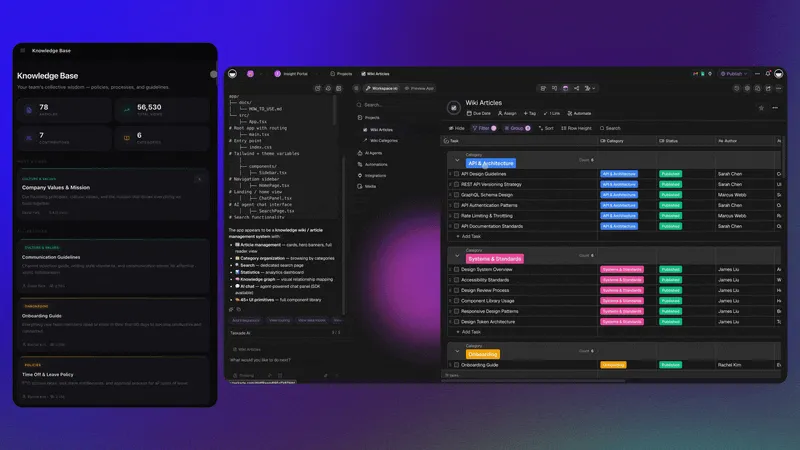
In this guide, we will cover what SOP generators are, why your business needs one, how Taskade compares to alternatives like Process Street and Trainual, and how to create your first AI-powered SOP in minutes.

What Is an SOP Generator?
An SOP generator is an AI-powered tool that automates the creation of Standard Operating Procedures from natural language descriptions. Instead of spending hours formatting documents manually, you describe a process and the generator produces structured SOPs with steps, roles, compliance notes, and revision history.
Modern SOP generators use large language models (LLMs) to synthesize your input with industry knowledge, producing documentation that would take a human writer several hours to draft.
An SOP generator can help you ideate, structure, and draft the key parts of SOPs, including:
- Procedure Details — step-by-step instructions with decision points
- Timeline and Deadlines — realistic duration estimates for each step
- Required Tools and Resources — software, equipment, and materials needed
- Compliance and Standards — regulatory requirements mapped to each procedure
- Roles and Responsibilities — clear ownership using role-based access levels
- Review and Update Cycles — scheduled revision dates and approval workflows
Beyond initial creation, you can use an SOP generator to update existing procedures, standardize formatting across departments, and pull data from knowledge sources to suggest improvements.
Benefits of Using an SOP Generator
Time Efficiency
Writing an SOP manually takes hours for simple processes and days for complex ones. An AI-powered SOP generator cuts that time to minutes. According to a study by the Aberdeen Group, organizations using automated documentation tools reduce process documentation time by 67%.
While an SOP generator cannot replace cultural alignment discussions or team-specific insights, it eliminates the mechanical work of structuring, formatting, and cross-referencing procedures.
Consistency Across Departments
Every company has unique processes, and generic templates found online rarely capture what defines your organization. An SOP generator trained on your existing documentation produces uniform formatting, terminology, and structure across all procedural documents.
This consistency matters especially during audits. Reviewers can evaluate procedures faster when every SOP follows the same structure, and employees can navigate documentation without relearning a new format for each department.
Accuracy and Quality Control
AI SOP generators check grammar, spelling, structure, and logical flow automatically. They ensure every step follows logically from the previous one and flag gaps where instructions might be incomplete.
The result is documentation that reads like it was written by a technical writer, even when the original input was rough notes from a subject matter expert.
Scalability for Growing Organizations
Creating ten SOPs manually means repeating the same formatting and structuring work ten times. An AI-powered SOP generator can use existing SOPs as foundations to create new ones, adapting proven structures to new processes.
Research from WinMan suggests that companies lose up to 30% of annual revenue due to process inefficiencies. Scalable SOP generation addresses this by making documentation keep pace with operational growth.
Why Your Business Needs an SOP Generator
Predictability and Repeatability
NASA's SOPs helped save Apollo 13. After an oxygen tank exploded, pre-written procedures guided the team through an emergency that had never been rehearsed. That level of preparedness comes from documented processes.
Inefficient processes multiply as your business grows. SOPs create repeatable systems that keep operations on track from onboarding to expansion. An SOP generator ensures you can document new processes as fast as you create them.
Operational Efficiency
McDonald's procedures ensure every burger tastes the same from New York to Tokyo. That consistency comes from clear, well-maintained SOPs.
Without standardized procedures, unclear steps lead to delays, mistakes, and rework. An AI SOP generator produces documentation that teams can follow immediately, reducing the gap between process design and execution.
Employee Training and Onboarding
Training gaps slow teams down and lead to costly errors. A poorly trained employee in a critical role can cause delays, compliance issues, and cascading problems across the organization.
AI-generated SOPs deliver clear, structured instructions that help employees grasp their roles quickly. They reduce human error during onboarding and simplify the audit process. By standardizing training documentation, you scale faster and maintain quality as your team grows.
Compliance and Regulatory Adherence
Companies across industries face massive fines for quality control violations and regulatory lapses. In pharma, you need FDA compliance. In finance, AML checks are non-negotiable. In tech, SOC 2 and GDPR requirements are table stakes.
SOPs act as a compliance roadmap. They ensure tasks are performed consistently and provide reference points for audits. An AI SOP generator can embed compliance requirements directly into procedure steps, making regulatory adherence the default rather than an afterthought.
Knowledge Retention
Research from the Society for Human Resource Management (SHRM) estimates that replacing an employee costs 6 to 9 months of that employee's salary. Much of that cost comes from lost institutional knowledge.
SOPs capture the best practices and workflows essential to your operations. When employees retire or move on, well-documented procedures help new hires step in without a months-long learning curve.
Now that you know the "why," let's look at how to write an SOP with AI.
SOP Generator Comparison: Taskade vs Process Street vs Trainual
Choosing the right SOP tool depends on your team size, compliance needs, and how much automation you want. Here is how the three leading platforms compare in 2026:
| Feature | Taskade | Process Street | Trainual |
|---|---|---|---|
| AI SOP Generation | Yes, from natural language prompts | No native AI generation | No native AI generation |
| AI Agents | built-in tools, custom agents | No AI agents | No AI agents |
| Real-Time Collaboration | Yes, with chat, comments, video | Limited, comment-based | Limited, comment-based |
| Project Views | Multiple views (List, Board, Mind Map, Gantt, Calendar, Table, Org Chart) | Checklist view only | Document view only |
| Integrations | 100+ (Gmail, Slack, HubSpot, Salesforce, etc.) | 30+ via Zapier | 20+ native |
| Knowledge Base | Dynamic, updates with linked projects | Static document uploads | Static knowledge base |
| Compliance Templates | AI-generated with industry context | Manual template library | Training-focused templates |
| Automation | Trigger-based workflows with branching/looping | Conditional logic in checklists | Assignment-based only |
| Pricing (annual) | Free / $10/mo / $25/mo | $100/mo+ (team plans) | $250/mo (10 seats) |
| Best For | Teams wanting AI-powered SOP + project management | Checklist-heavy process teams | Employee training focus |
When to Choose Each Tool
Choose Taskade if you want AI to generate SOPs from scratch, need real-time collaboration, and want SOPs integrated with your project management workflow. Taskade is the only platform that combines SOP generation with AI agents, automations, and a full project management suite.
Choose Process Street if your SOPs are primarily checklist-based workflows and you need conditional logic within individual procedures. Process Street works well for teams that already have SOPs written and need a platform to run them as interactive checklists.
Choose Trainual if your primary goal is employee training rather than process documentation. Trainual excels at onboarding flows and role-based training paths, but lacks the AI generation and project management capabilities of Taskade.
AI SOP Examples by Department
AI SOP generators produce different output depending on the department and process type. Here are real examples of what Taskade generates from simple prompts:
Customer Support SOP
Prompt: "Create an SOP for handling escalated customer complaints in a SaaS company."
Generated output includes:
- Escalation criteria and severity levels
- Response time targets by tier (15 min / 1 hour / 4 hours)
- Communication templates for each escalation stage
- Handoff procedures between support tiers
- Resolution documentation requirements
- Post-resolution follow-up checklist
IT Security Incident Response SOP
Prompt: "Create an SOP for responding to a data breach or security incident."
Generated output includes:
- Incident classification matrix (P1 through P4)
- Immediate containment procedures
- Notification requirements by jurisdiction (GDPR, CCPA, HIPAA)
- Evidence preservation and chain of custody
- Communication plan for stakeholders and affected users
- Post-incident review and SOP update procedures
Sales Onboarding SOP
Prompt: "Create an SOP for onboarding new sales representatives."
Generated output includes:
- Week 1-4 milestone checklist
- CRM setup and data entry standards
- Product knowledge assessment criteria
- Shadowing and mentorship schedules
- First independent deal process
- Performance benchmarks at 30/60/90 days
SOP Maturity Model: Where Does Your Organization Stand?
Most organizations fall somewhere on this maturity scale. Understanding your current level helps you choose the right SOP strategy:
| Level | Name | Description | Recommended Action |
|---|---|---|---|
| 1 | Ad Hoc | No documented processes; knowledge lives in people's heads | Start with AI-generated SOPs for your top 5 critical processes |
| 2 | Documented | SOPs exist but are scattered across Google Docs, wikis, and shared drives | Consolidate into a single platform with Taskade projects |
| 3 | Standardized | SOPs follow a consistent format and are centrally stored | Add AI agents to monitor and flag outdated procedures |
| 4 | Automated | SOPs are linked to automations that execute procedures | Build trigger-based workflows that enforce SOP compliance |
| 5 | Intelligent | AI agents continuously update SOPs based on process changes | Deploy multi-agent systems for cross-department SOP management |
Taskade's AI-Powered SOP Generation Features

Taskade is a project management and collaboration platform designed to help teams stay organized and productive. With AI-driven features, it simplifies tasks like planning, brainstorming, and workflow automation.
Here is a quick overview of the features you can use for SOP generation:
AI Agents: Specialized assistants that automate tasks like research, data analysis, and content creation. Every agent has customizable skills, knowledge, and built-in tools. You can create a dedicated SOP agent that generates, updates, and manages your entire procedure library.
AI Project Studio: Generate projects, task lists, and complete workflows from natural-language instructions. Describe your requirements and Taskade produces customized SOPs tailored to your business.
Customizable Templates: Thousands of templates for any occasion. Choose from available SOP frameworks, tailor them to your process, and share with your team.
Real-Time Collaboration: Chat with your team while collaborating on SOPs in real time. Discuss the SOP creation process, leave comments, and edit documents together across multiple project views.
Integration Capabilities: Connect Taskade to 100+ tools and services. Use automations to build automated SOP workflows that update your documentation whenever processes change.
Create a Taskade account to get started!
3 Ways to Create an SOP Using Taskade
1. AI Project Studio
You can generate an SOP document in AI Project Studio in two ways: start from scratch and describe what you need, or upload existing SOPs as a "seed" for the generator.
To generate an SOP, click Create new in the top-right corner of your workspace.
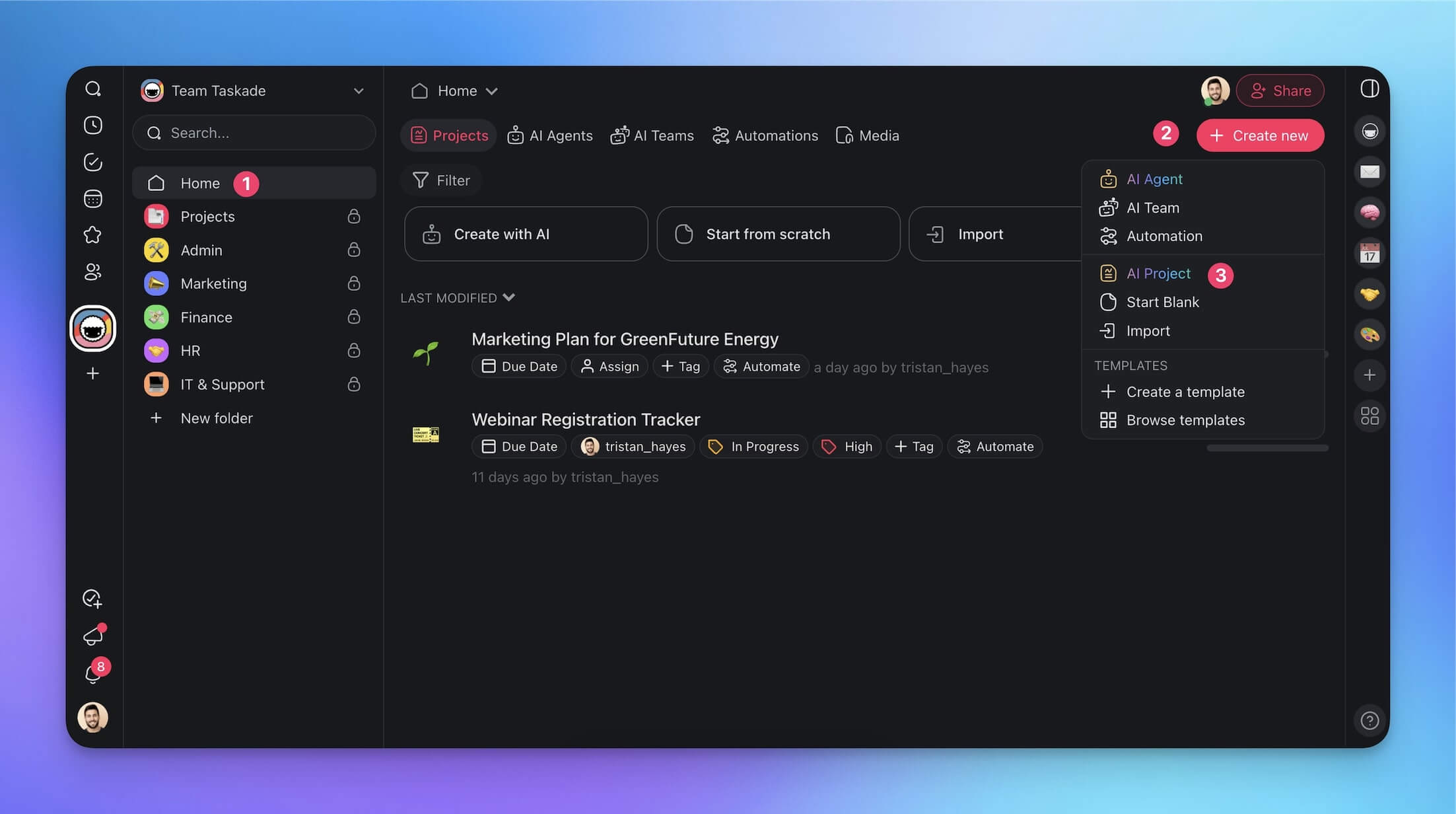
Next, choose AI Project from the drop-down menu and describe what you want to create. You can copy the prompt below, customize it, and paste it into the generator.
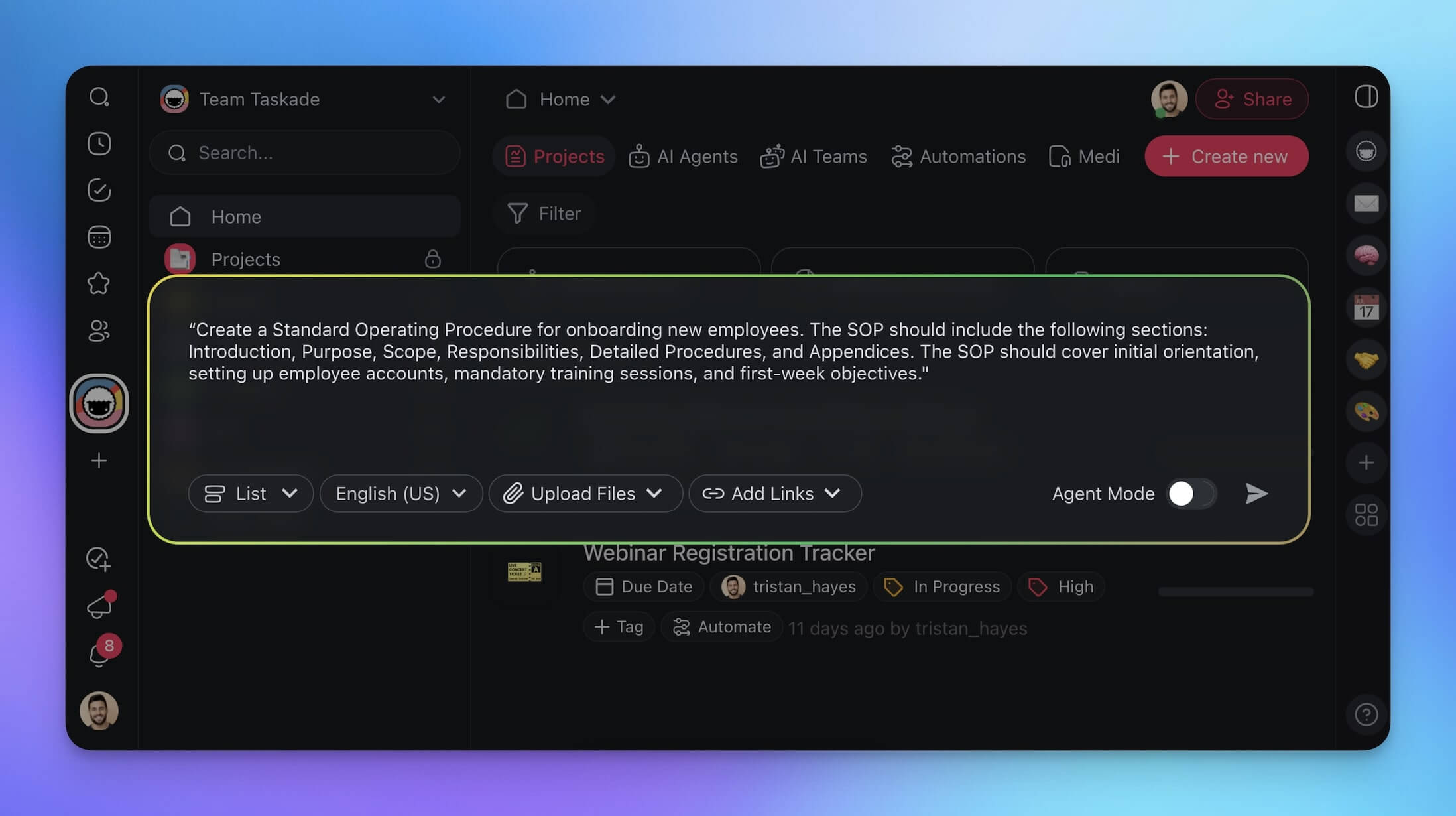
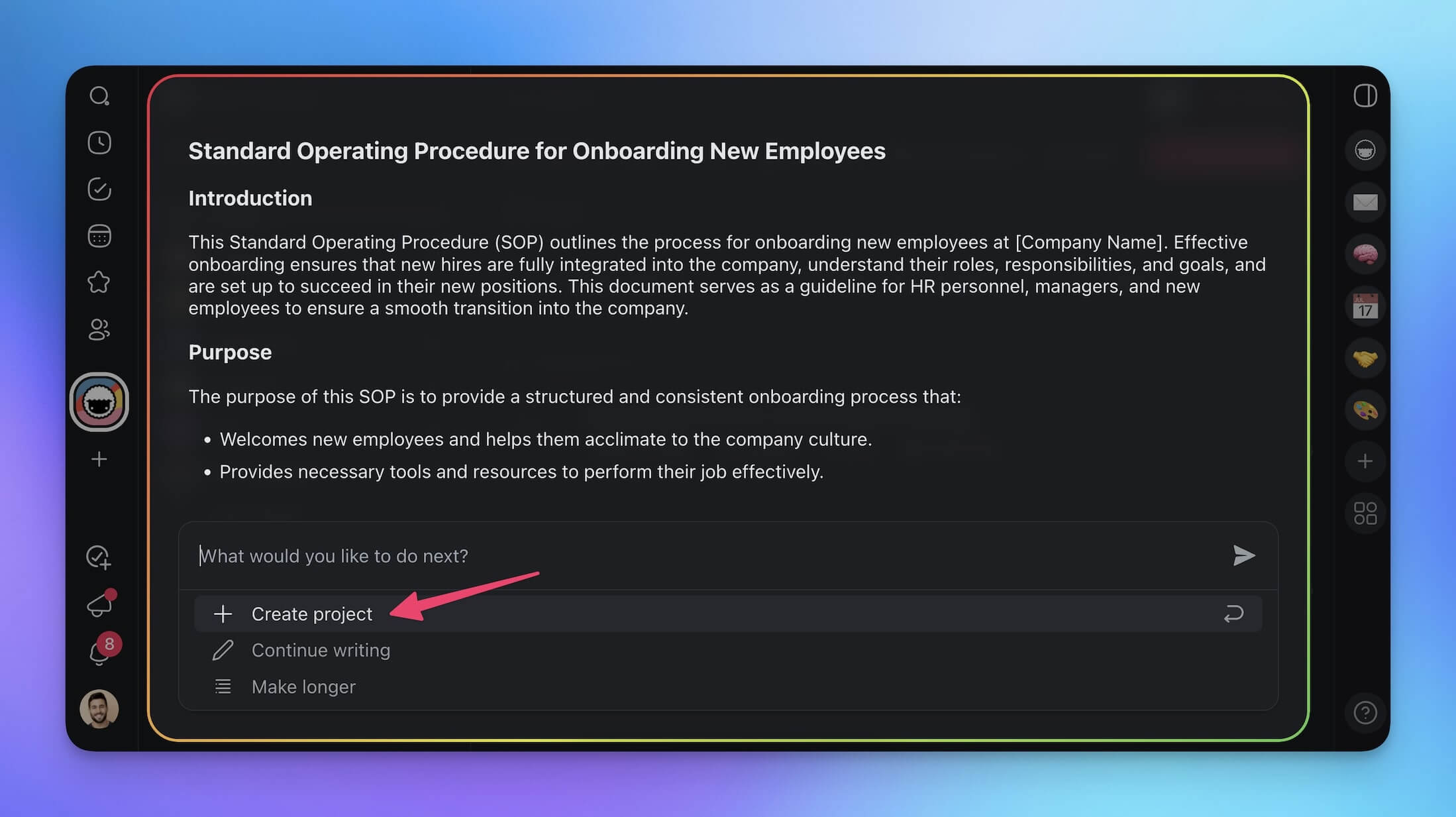
"Create a Standard Operating Procedure for onboarding new employees. The SOP should include the following sections: Introduction, Purpose, Scope, Responsibilities, Detailed Procedures, and Appendices. The SOP should cover initial orientation, setting up employee accounts, mandatory training sessions, and first-week objectives."
And your document is ready. All that is left is to customize it and share with the team.
2. Use a Taskade AI Agent
Static documents are fine. But what if we could make our SOPs more interactive?
First, we are going to build a custom SOP AI Agent and fine-tune it.
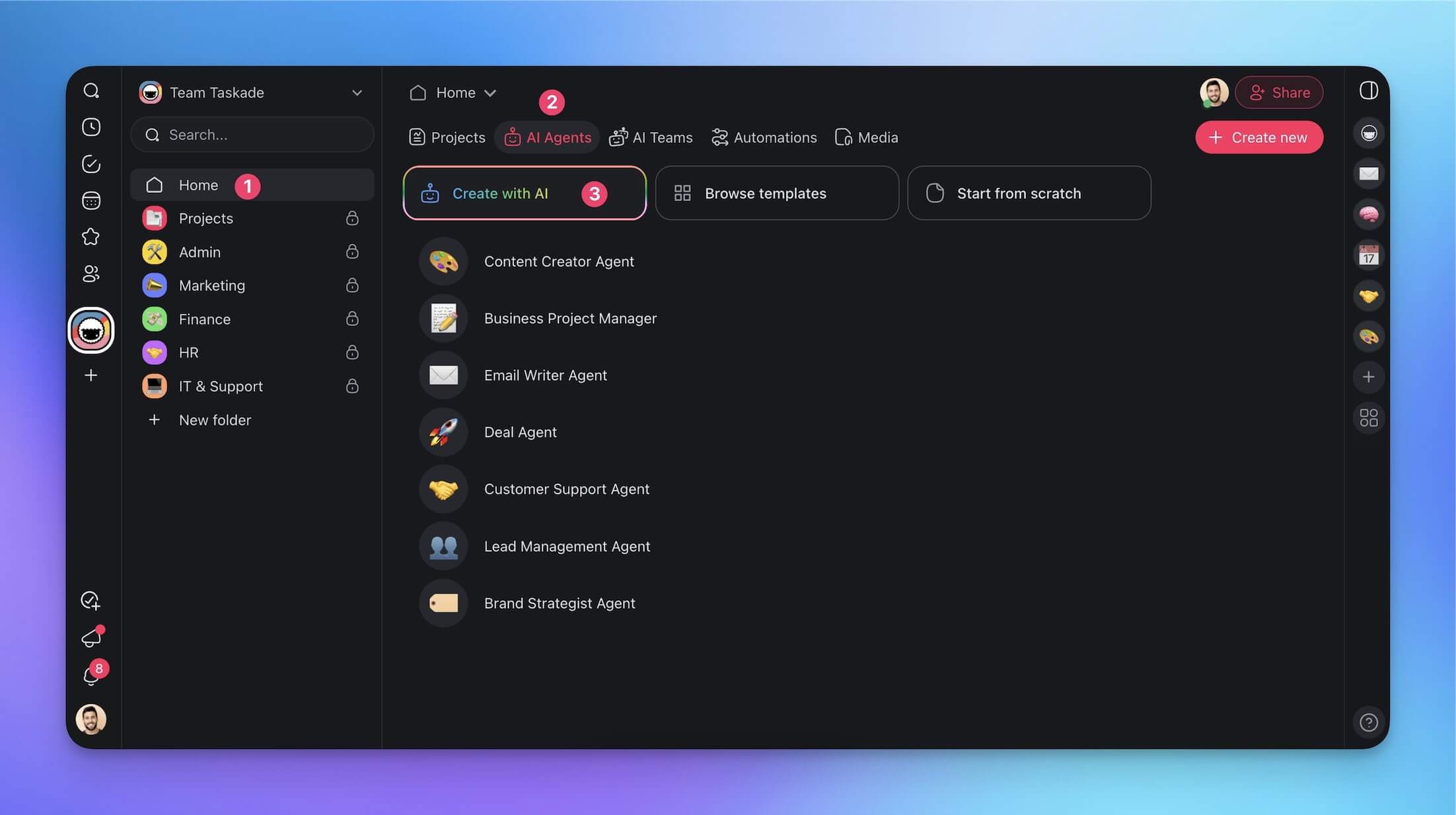
Navigate to the Agents tab in your workspace and click Create agent.
This time, we will let Taskade AI take over and generate a new agent automatically. Choose the Create with AI tile at the top and describe the purpose of the new agent.
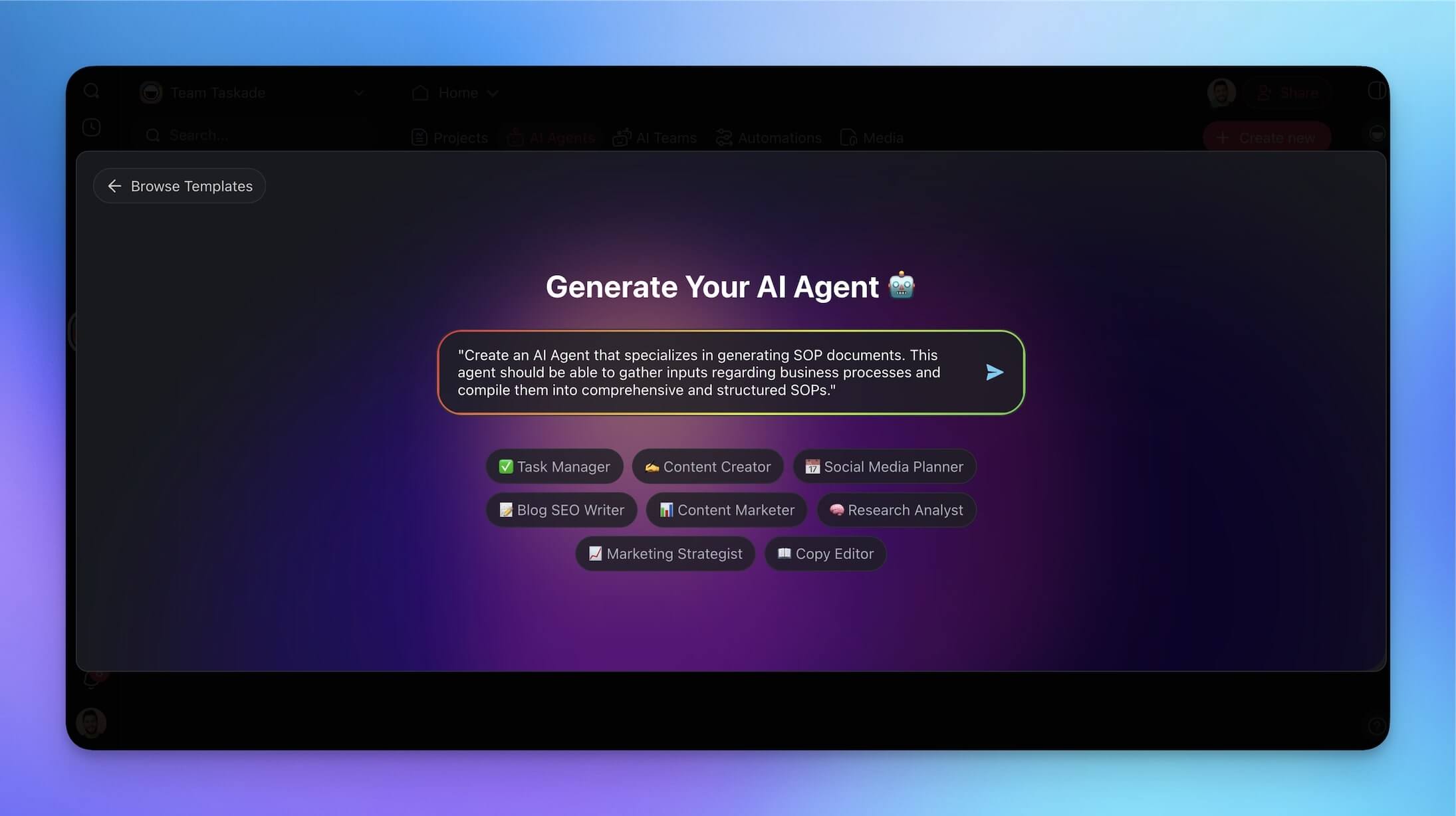
You can copy and paste the prompt below to start faster:
"Create an AI Agent that specializes in generating SOP documents. This agent should be able to gather inputs regarding business processes and compile them into comprehensive and structured SOPs."
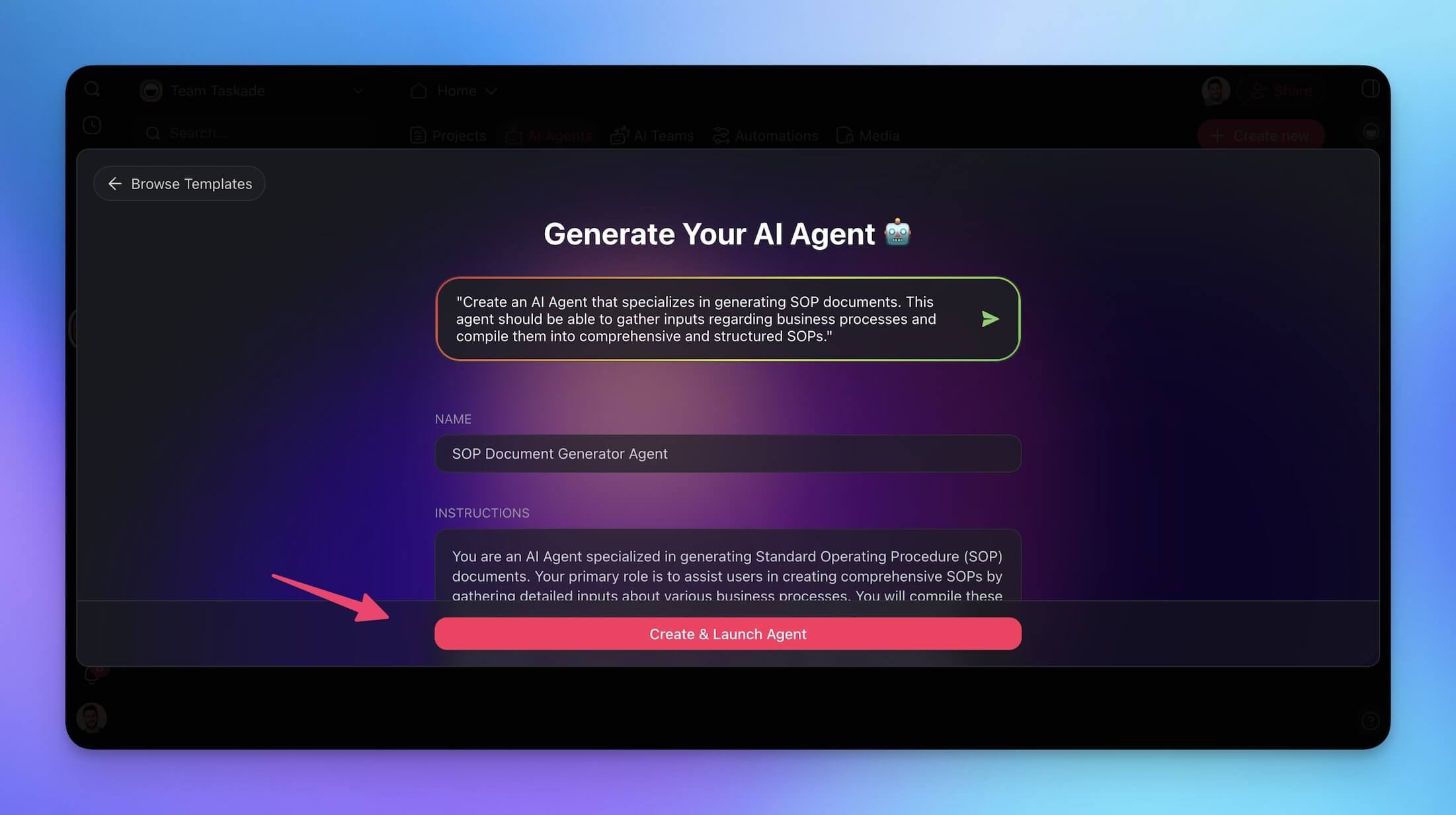
Once the generator has finished the task, click Create & Launch Agent to finish.
Now comes the fun part.
The new agent can generate SOPs from scratch or use existing documents as references. This time, we are going to use the SOP we generated earlier to fine-tune the agent.
Go back to the AI Agents tab, hover the cursor over your agent, and click ... on the right.
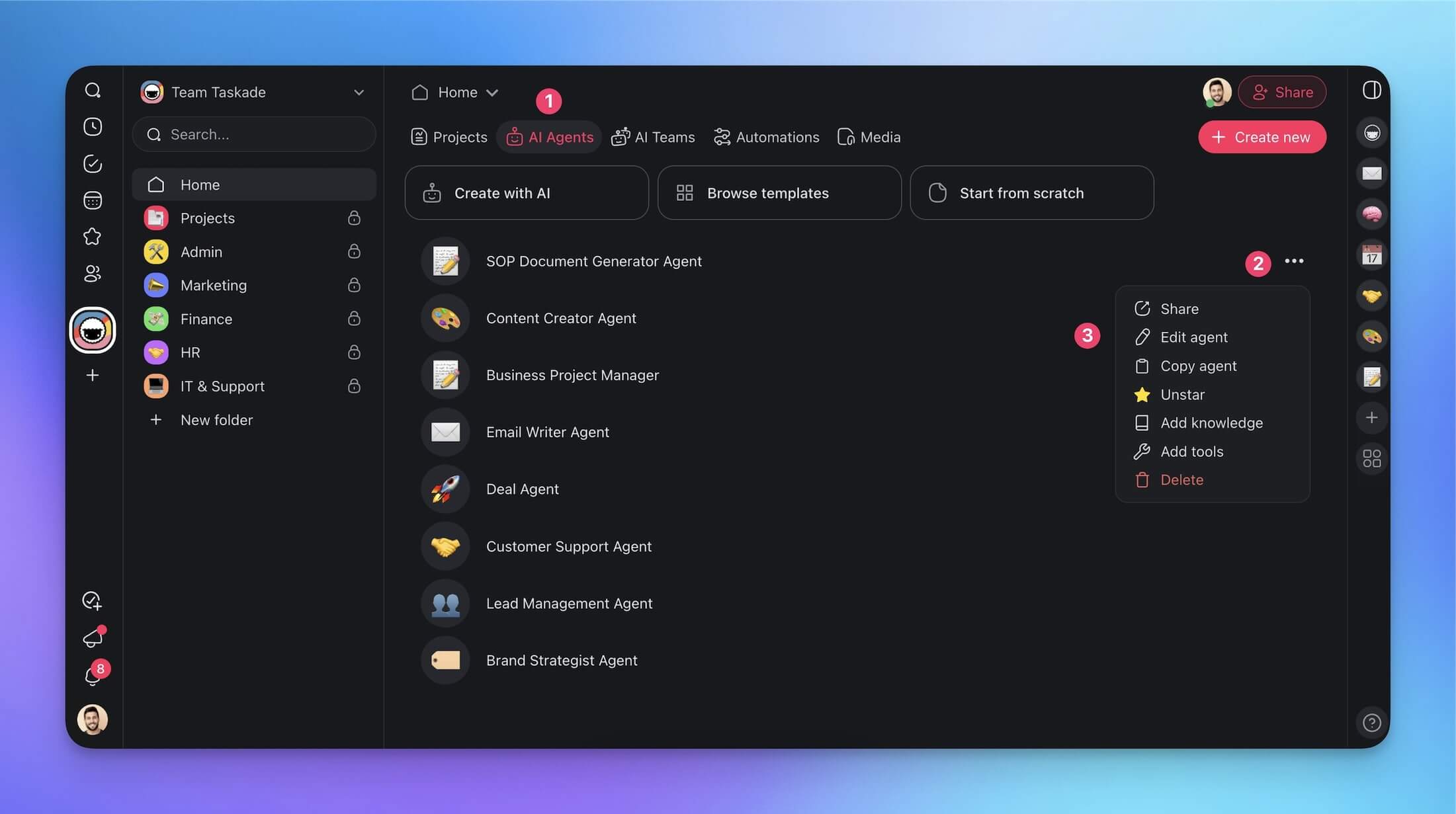
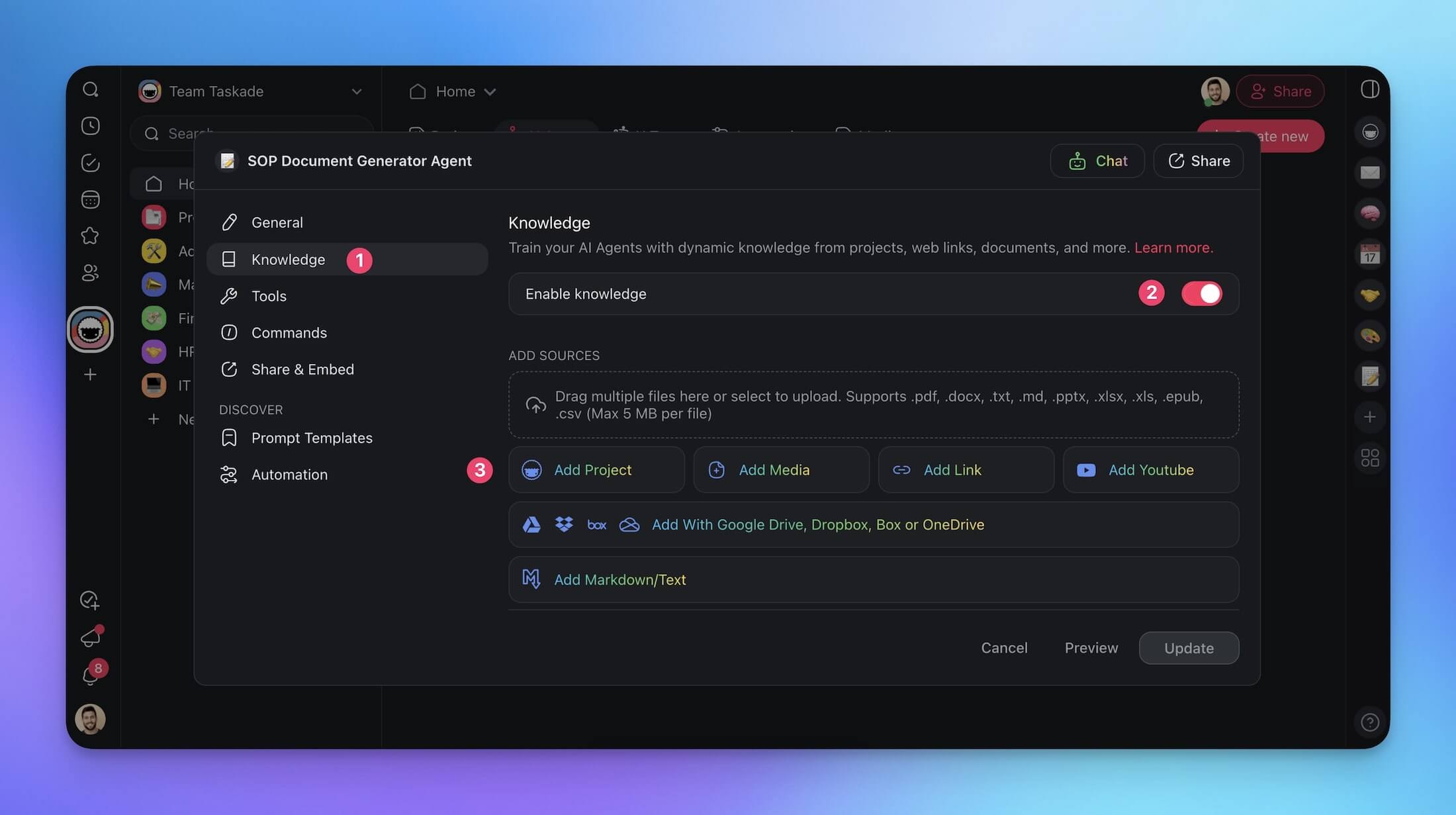
You are now in the Agent Menu. Go to the Knowledge tab in the sidebar on the left, enable the toggle in the top-right, and click Add Project.
Next, choose the SOP project and click Add to Knowledge.
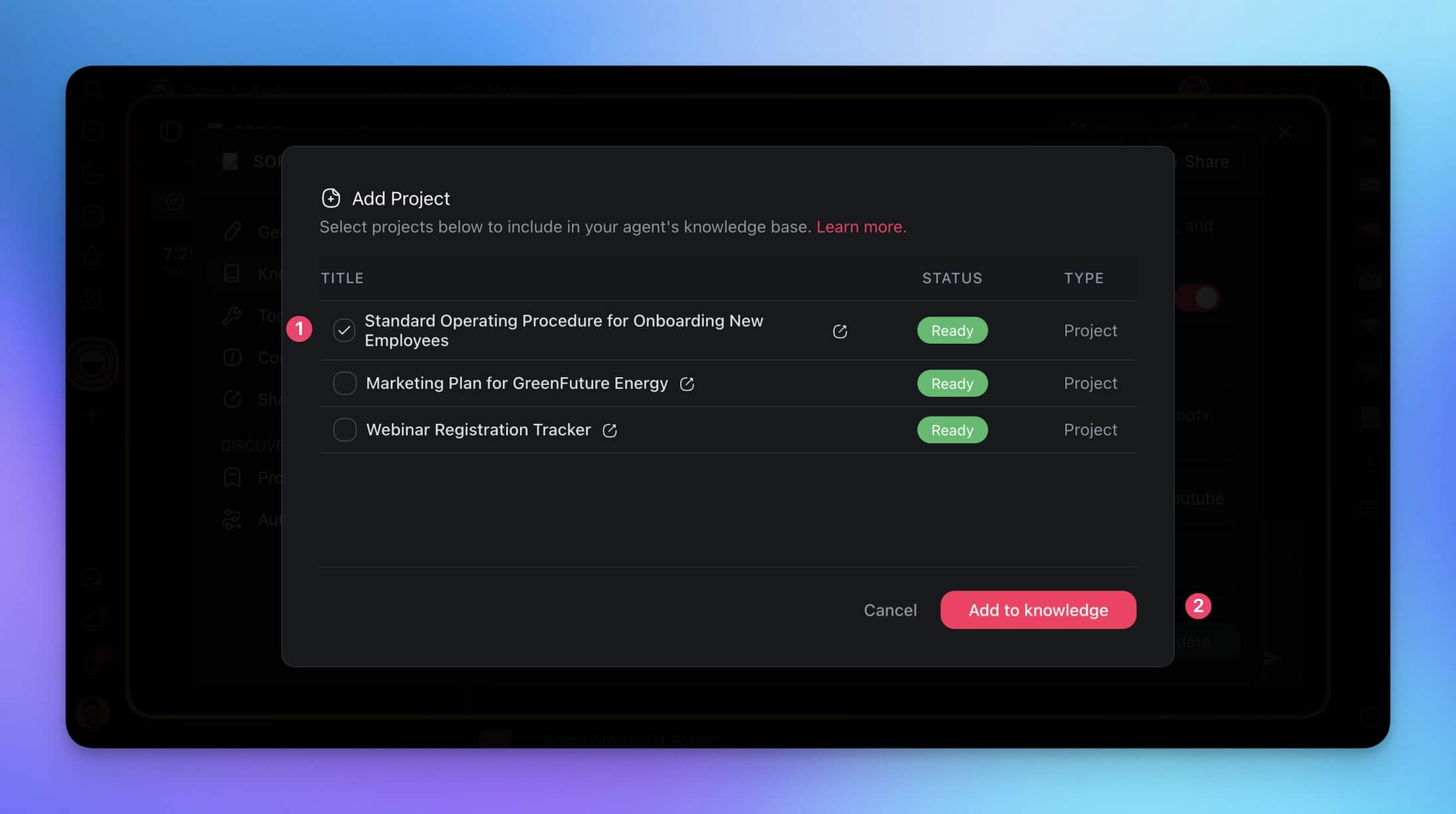
Adding an existing SOP document as agent knowledge has several benefits. It gives the agent an SOP template to follow, allows it to dynamically learn about tasks and processes as the project is updated, and builds a live knowledge base for team Q&As.
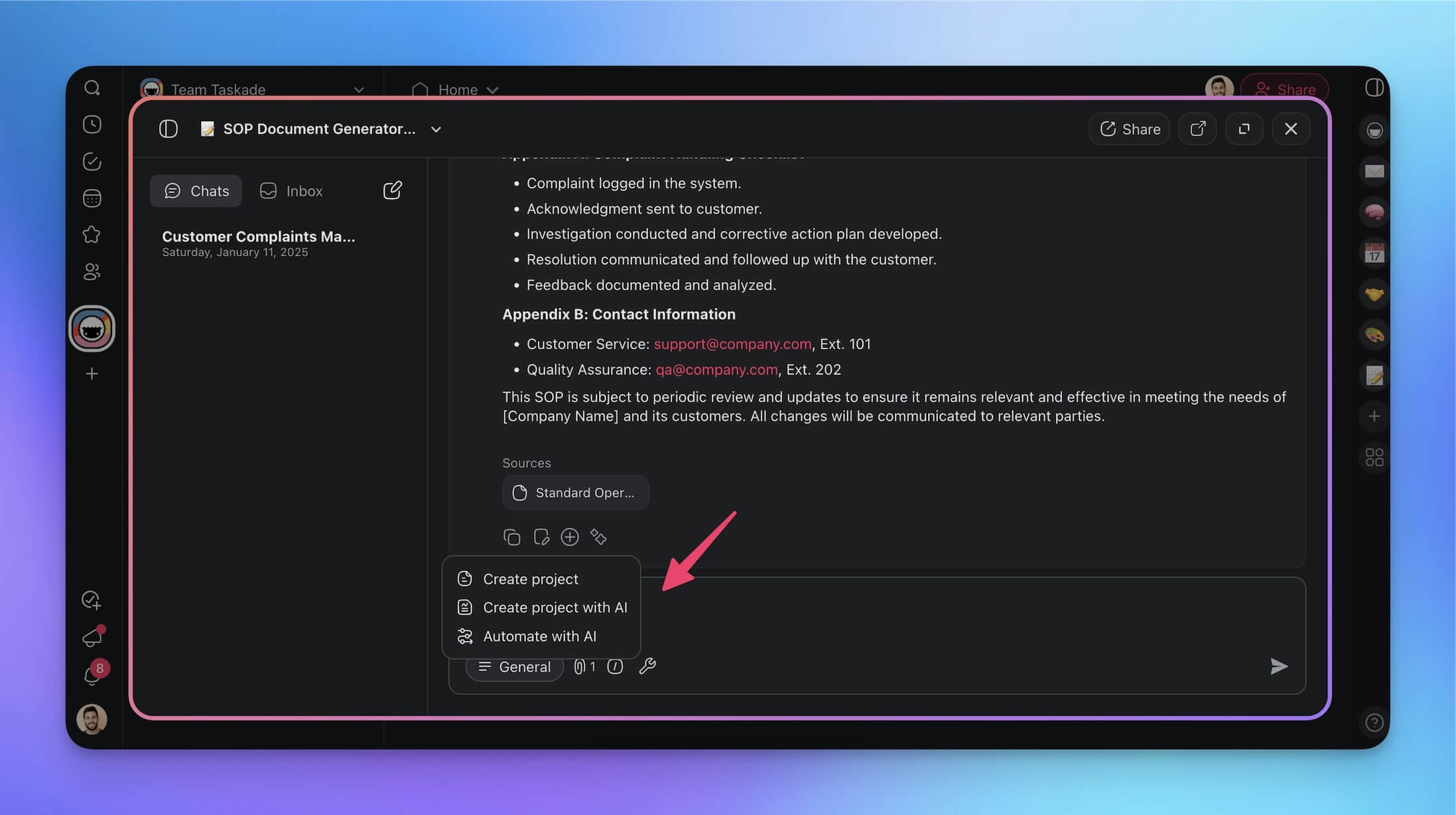
Choose your SOP agent in the AI Agents tab again and ask the agent to generate SOP documents according to your specifications. The agent checks its knowledge and references the SOP projects we created.
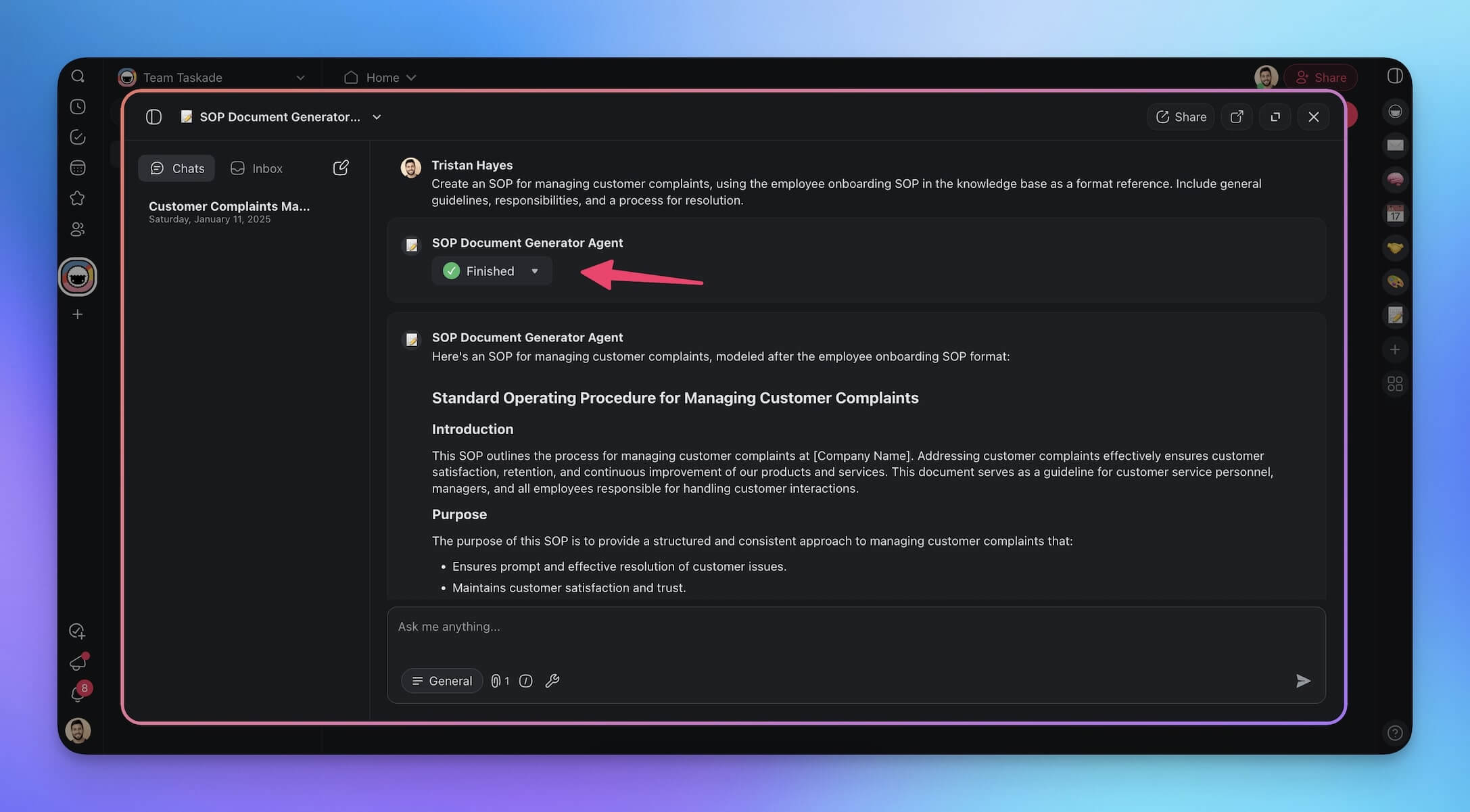
Once the agent has finished, you can transform the SOP into a new project or copy it to the clipboard.
3. Use a Taskade SOP Generator
If you don't want to set anything up manually, go to /generate/sop and pick a Taskade SOP generator from the catalog.
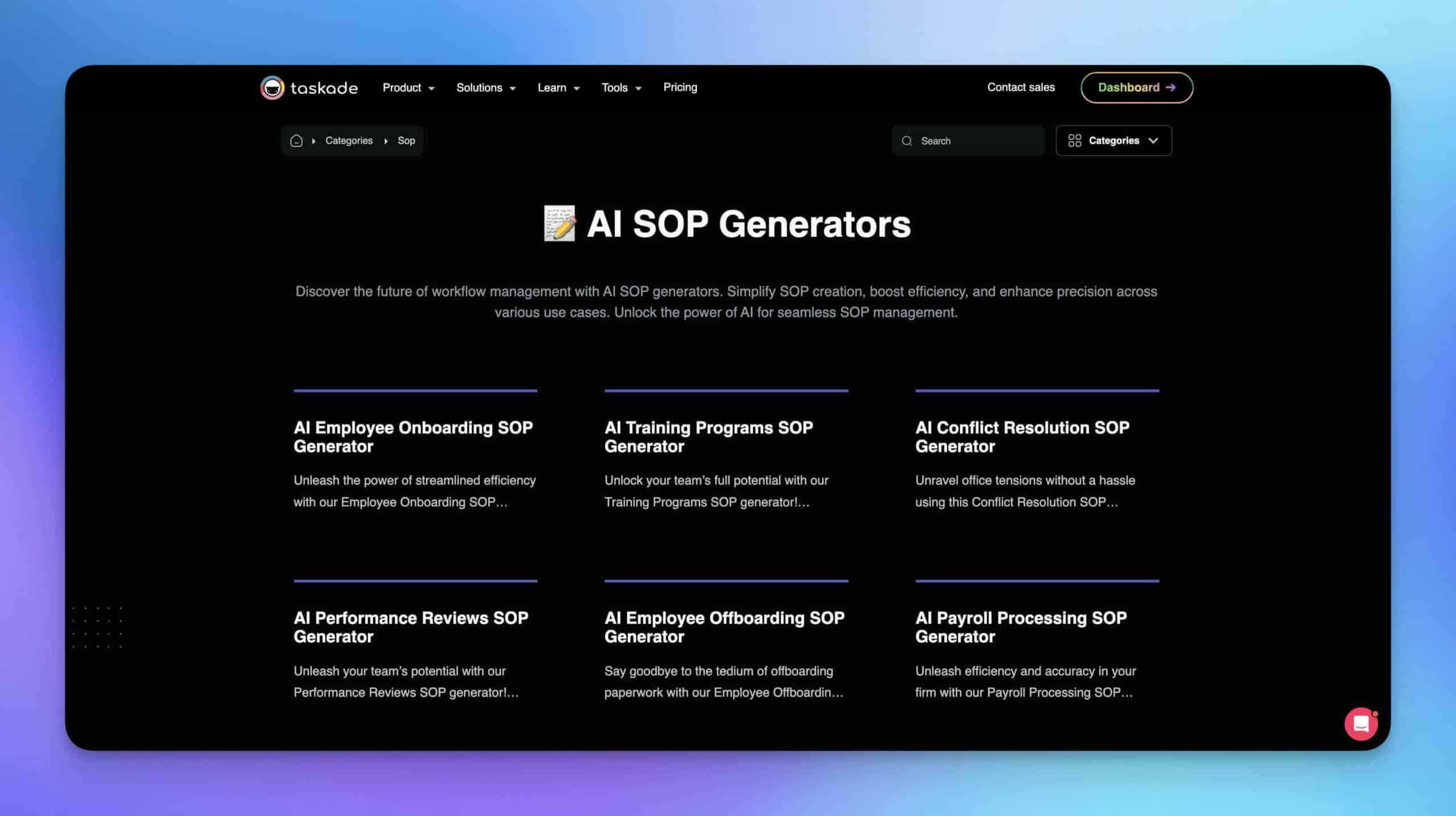
Here are a few AI SOP generators you can grab for free and customize.
SOP Best Practices for 2026
Creating SOPs is only the first step. Here are best practices to ensure your procedures stay useful and current:
| Practice | What to Do | How Taskade Helps |
|---|---|---|
| Version Control | Track every edit with timestamps and author names | Built-in version history across all projects |
| Single Source of Truth | Store all SOPs in one searchable location | Workspace-level organization with multi-layer search |
| Visual Process Maps | Include flowcharts and diagrams alongside text | Multiple project views including Mind Map and Org Chart |
| Role-Based Access | Restrict editing to process owners; allow read access to all | Role-based access from Owner to Viewer |
| Automated Updates | Link SOPs to source data so changes propagate | AI agents with dynamic knowledge |
| Regular Reviews | Schedule quarterly reviews with process owners | Automation triggers for review reminders |
| Training Integration | Connect SOPs to onboarding and training workflows | AI Kits bundle SOPs with training materials |
Making SOP Generation Effortless with Taskade
Building clear, reliable SOPs can be a chore. Using AI-powered SOP software lets you reclaim that time, maintain consistency across documents, and know your operations are running smoothly.
Here is what we covered today:
- SOP generators automate the process of documenting procedures using AI
- AI SOP creation reduces drafting time from hours to minutes
- Taskade outperforms Process Street and Trainual with native AI generation, agent tools, and 100+ integrations
- AI-generated SOPs maintain consistency in formatting, terminology, and compliance
- Dynamic knowledge keeps SOPs updated as your processes evolve
- SOP generation integrates with automations for end-to-end workflow management
- Real-time collaboration lets teams build and review SOPs together
Ready to transform your SOP workflow?
Generate SOPs faster with Taskade AI features!
Read more:
- How to Write a Standard Operating Procedure (SOP)
- What Are SOPs? Building Effective SOPs with AI
- The Ultimate Guide to Task Automation
- Creating Customer Service SOPs
- AI Agent Builders: Complete Guide
- Project Management Basics
- 14 Best AI Collaboration Tools for Remote Teams

Resources
https://www.winman.com/blog/are-process-inefficiencies-causing-more-disruption-than-you-think?
https://lrshrm.shrm.org/blog/2017/10/essential-elements-employee-retention
Frequently Asked Questions
What is an SOP generator?
An SOP generator is a tool that uses AI to create Standard Operating Procedures from brief descriptions of a process. Instead of manually writing multi-page documents, you describe the workflow and the generator produces structured, formatted SOPs with steps, responsibilities, and compliance notes. Taskade generates SOPs in under 60 seconds using 15+ frontier AI models.
How does AI improve the SOP creation process?
AI SOP generators reduce creation time from hours to minutes. They maintain consistent formatting, suggest steps you might miss, and update procedures when processes change. Traditional SOP writing is slow and results in documents that are outdated before they are finished. Taskade AI Agents can also monitor linked projects and auto-update SOPs when workflows evolve.
What should a good SOP include?
A good SOP includes a clear purpose statement, step-by-step instructions, roles and responsibilities, required tools or materials, safety and compliance notes, and revision history. AI generators structure all of these automatically from your process description.
Can AI-generated SOPs be customized for specific industries?
Yes. AI SOP generators adapt output based on industry context. Describe your specific compliance requirements, terminology, and process details, and the generator produces industry-appropriate documentation. Taskade supports FDA, SOC 2, HIPAA, and ISO compliance frameworks. Always review AI-generated SOPs for accuracy before deployment.
How does Taskade compare to Process Street for SOP generation?
Taskade offers AI-powered SOP generation with built-in agent tools, real-time collaboration across multiple project views, and 100+ integrations. Process Street focuses on checklist-based workflows without native AI generation. Taskade generates complete SOPs from natural language prompts while Process Street requires manual template building.
What is the difference between an SOP and a work instruction?
An SOP describes the overall process at a high level, covering purpose, scope, roles, and compliance requirements. A work instruction provides detailed step-by-step directions for a specific task within that process. AI SOP generators like Taskade can produce both levels of documentation from a single process description.
How often should SOPs be updated?
SOPs should be reviewed quarterly and updated whenever processes, regulations, or tools change. AI-powered SOP generators simplify updates by regenerating sections based on new inputs. Taskade AI Agents with dynamic knowledge can detect changes in linked projects and flag SOPs that need revision.
Can multiple team members collaborate on SOP creation?
Yes. Taskade supports real-time collaboration where multiple team members can simultaneously edit SOPs, leave comments, and chat within the document. Role-based access from Owner through Viewer ensures the right people can edit while others review. SOPs can be shared across workspaces instantly.