







ChatGPT is one of the most capable AI models available. It generates content, answers complex questions, writes code, and handles creative tasks. The one thing it cannot do is automate itself. There is no built-in way to trigger ChatGPT on a schedule, connect it to your tools, or chain its outputs into multi-step workflows.
Taskade solves this by letting you build AI agents powered by frontier models, including OpenAI's models, and connect them to trigger-based automation flows with 100+ integrations. Here is everything you need to know to get started.
TL;DR: ChatGPT has no native automation. Taskade lets you build AI agents powered by the same models (plus models from other top AI labs) and run them automatically with triggers, schedules, and 100+ integrations. No coding required. Free plan available, paid plans from $10/month billed annually. Build your first automation


Why ChatGPT Cannot Automate Itself
ChatGPT operates on a request-response model. You type a prompt, it generates a response, and the conversation ends until you type again. This creates several bottlenecks for teams that need AI to work continuously.
| ChatGPT Limitation | Impact on Workflows | Taskade Solution |
|---|---|---|
| No triggers or scheduling | Cannot run without human input | Event triggers + scheduled automation |
| No native integrations | Cannot connect to email, CRM, or tools | 100+ integrations (Gmail, Slack, HubSpot, etc.) |
| No persistent project context | Forgets context between sessions | Persistent agent memory + project knowledge |
| Single-user interaction | No team collaboration on AI output | Real-time multi-user AI chat |
| Single model only | Locked to OpenAI models | Frontier models from top AI labs |
| No task management | Cannot create, assign, or track tasks | Multiple project views with AI-powered management |
The solution is not to hack ChatGPT with third-party middleware. It is to use a platform that provides the same AI intelligence with native automation built in.
ChatGPT Automation Use Cases
Before we build, here are the most common workflows teams automate. Each of these is impossible with standalone ChatGPT but straightforward with Taskade.
- Content generation at scale: Schedule agents to generate blog drafts, social media posts, or marketing copy automatically. Chain outputs into review workflows and publish to platforms like WordPress.
- Email processing and response: Trigger AI agents when new emails arrive. Agents analyze content, extract action items, draft responses, and create tasks, all without manual prompting.
- Meeting summarization: Automate meeting follow-ups by having agents summarize notes, generate action items, and distribute them to participants via email or Slack.
- Project management updates: Schedule agents to scan for project changes, aggregate updates into reports, and send them to stakeholders at regular intervals.
- Customer support triage: Route incoming support requests to specialized agents that classify issues, generate initial responses, and escalate complex cases to human team members.
- Data analysis and reporting: Trigger agents when new data arrives in spreadsheets. Agents analyze trends, generate reports, and distribute findings via email or Slack.
- Lead qualification: Connect forms to agents that score incoming leads, send personalized follow-ups, and update your CRM automatically.
What Makes Taskade the Best Platform for ChatGPT Automation
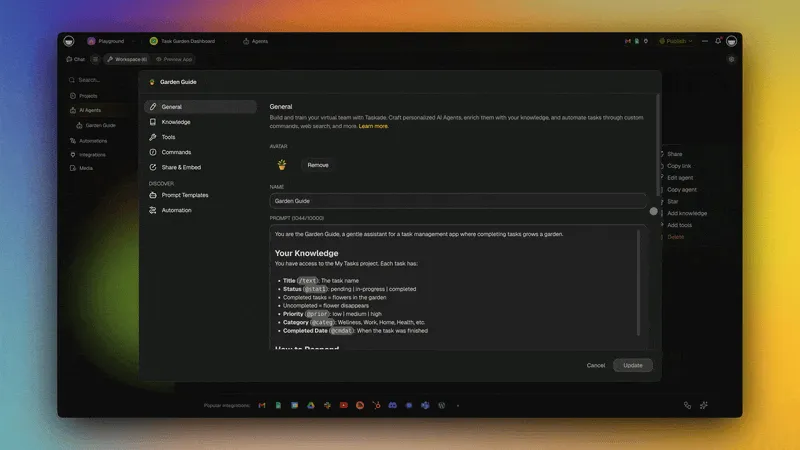
Taskade combines the AI intelligence you expect from ChatGPT with the automation infrastructure you need to run AI workflows at scale.
Multi-Model AI Agents
Taskade AI agents are autonomous assistants powered by frontier models from top AI labs. Unlike ChatGPT's Custom GPTs, Taskade agents are fully integrated into your workspace with persistent memory, built-in tools, and custom slash commands.
Each agent can perform a variety of roles:
- Project managers that track progress and assign tasks
- Marketing specialists that generate and schedule content
- Customer support agents that triage and respond to inquiries
- Data analysts that process information and generate reports
- Sales agents that qualify leads and draft personalized outreach
- Email assistants that process, categorize, and respond to messages
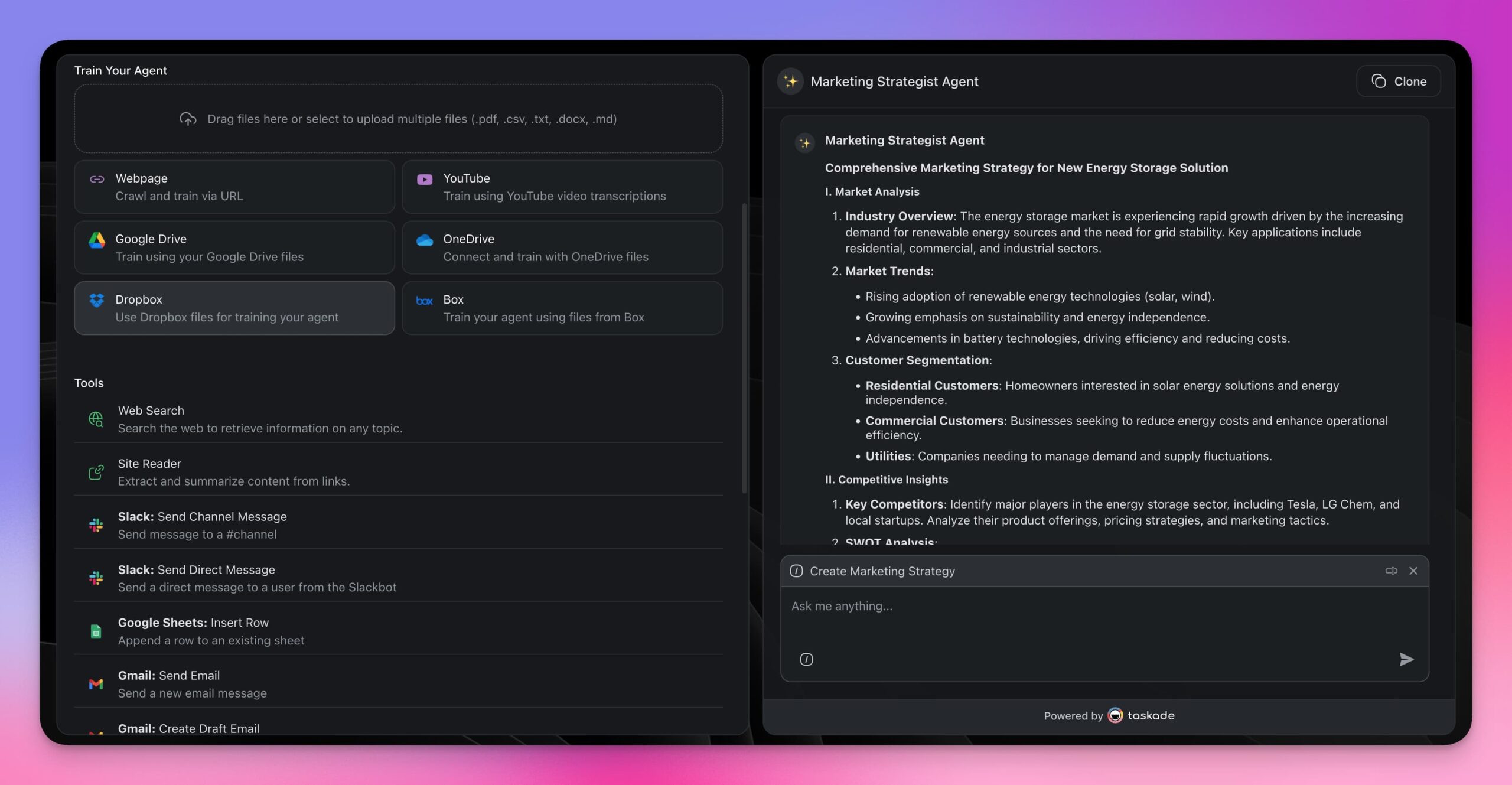
Learn more in the custom AI agents guide.
Workflow Automation Engine
Taskade automations connect your agents to triggers and actions that follow the "if this, then that" pattern. Triggers start automations when specific conditions are met. Actions execute the steps that follow.
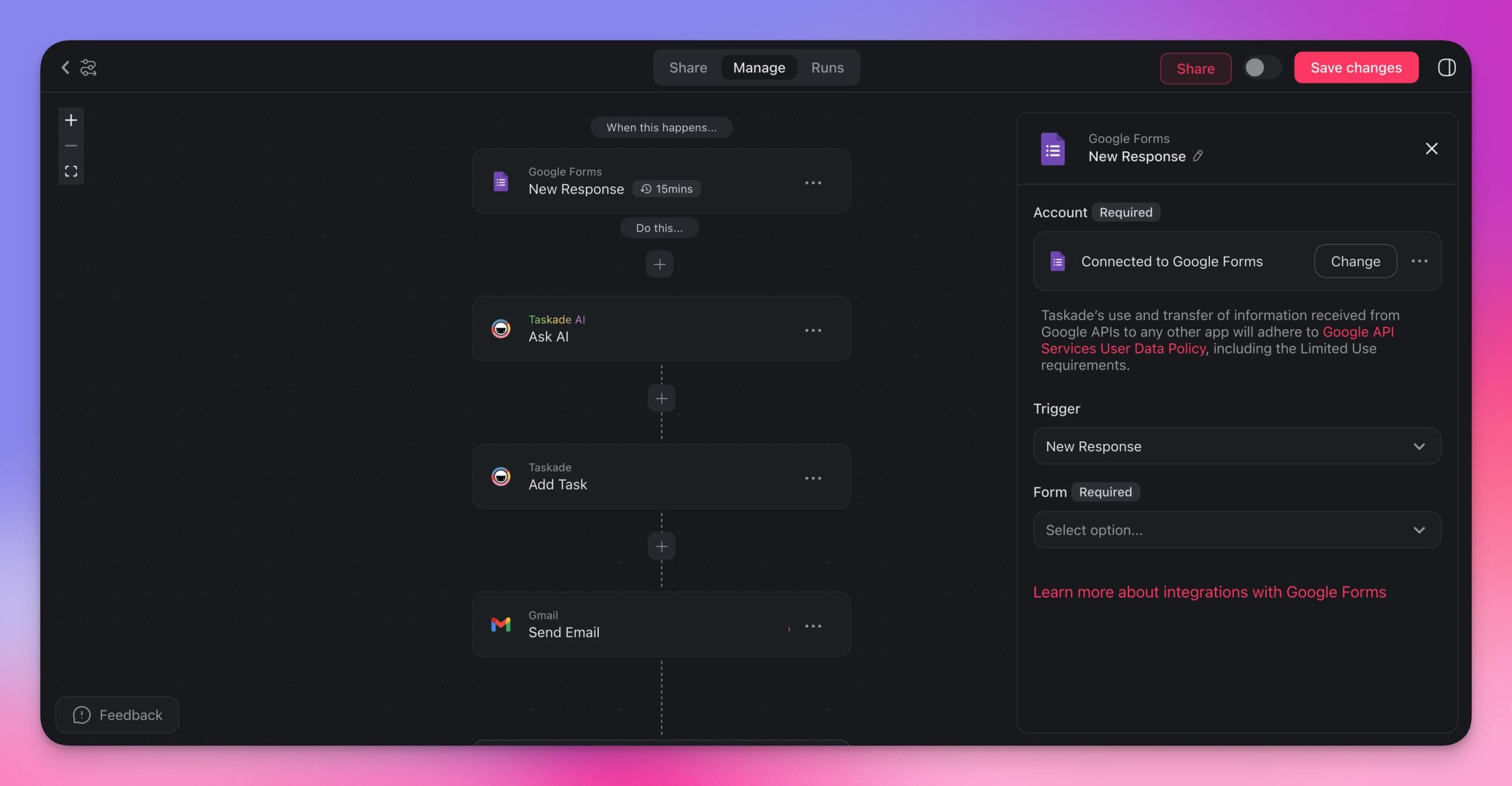
This is what makes Taskade different from middleware tools like Zapier or Make. Automation is native. Your agents, projects, and integrations all live in the same workspace. No external connectors needed.
Learn more in the automation getting started guide.
Real-Time Team Collaboration
Taskade collaboration works on two levels: between team members, and between your team and AI agents. Multiple people can interact with the same agent simultaneously, brainstorm ideas, and refine AI output together.
All collaboration happens within workspaces protected by role-based access (Owner to Viewer).
Visit the AI chat guide to learn more.
100+ Integrations
Your AI workflows need to connect to the tools you already use. Taskade integrates with 100+ platforms across 10 categories.
| Category | Example Integrations |
|---|---|
| Communication | Slack, Microsoft Teams, Discord |
| Gmail, Outlook | |
| CRM | HubSpot, Salesforce |
| Productivity | Google Sheets, Google Docs, Notion |
| Storage | Google Drive, Dropbox |
| Development | GitHub, GitLab |
| Calendar | Google Calendar |
| Social Media | Twitter/X, LinkedIn |
| E-commerce | Shopify |
| Forms | Google Forms, Typeform |
Browse the full list in the integrations directory.
Step-by-Step: Setting Up Your First ChatGPT-Style Automation
Step 1: Create a Custom AI Agent
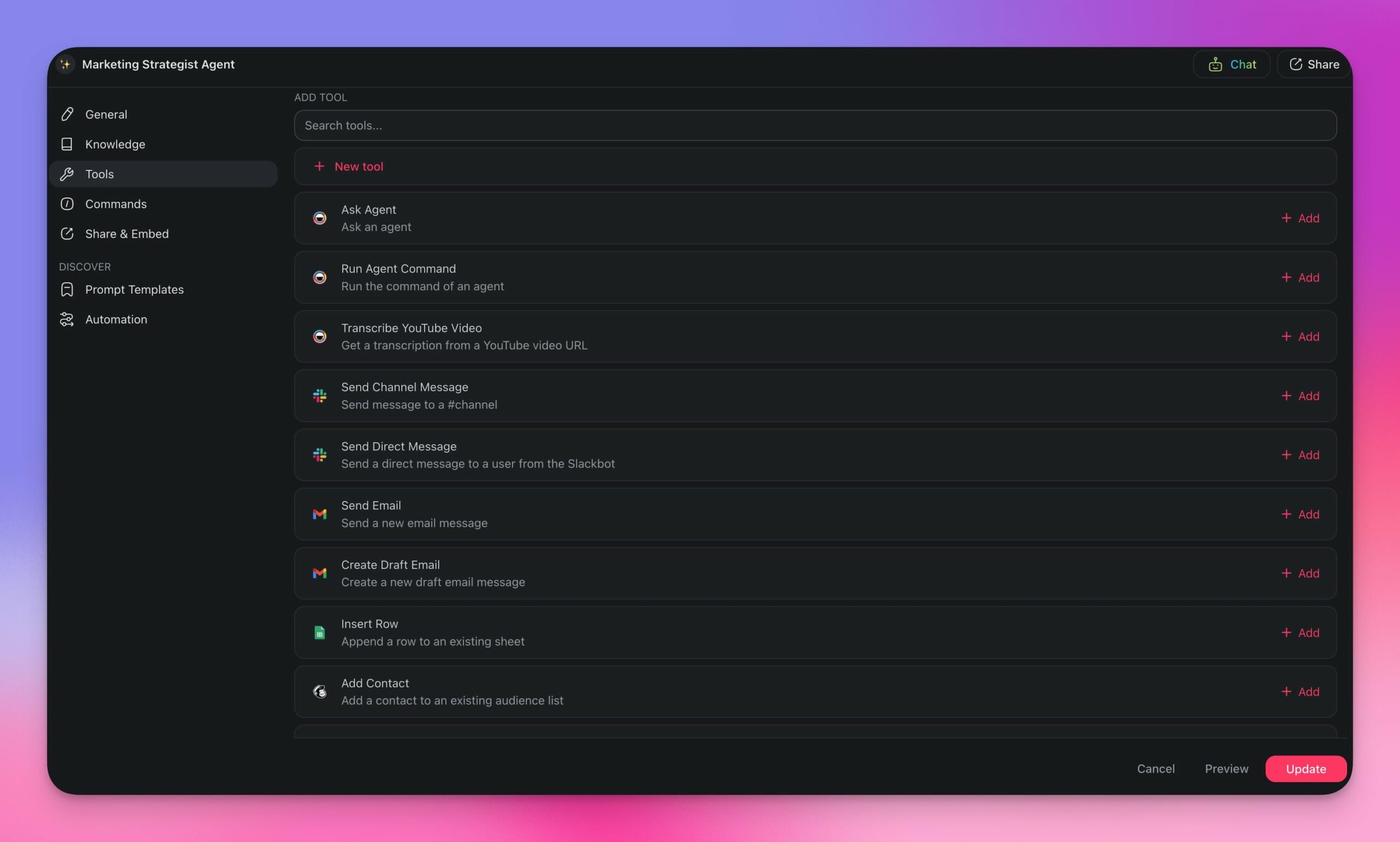
AI agents are the decision-making engine behind every automation. They determine how your workflows adapt and respond to new information.
Let us build a Lead Processing agent as an example.
- Navigate to the Agents tab in your workspace and click Create agent.
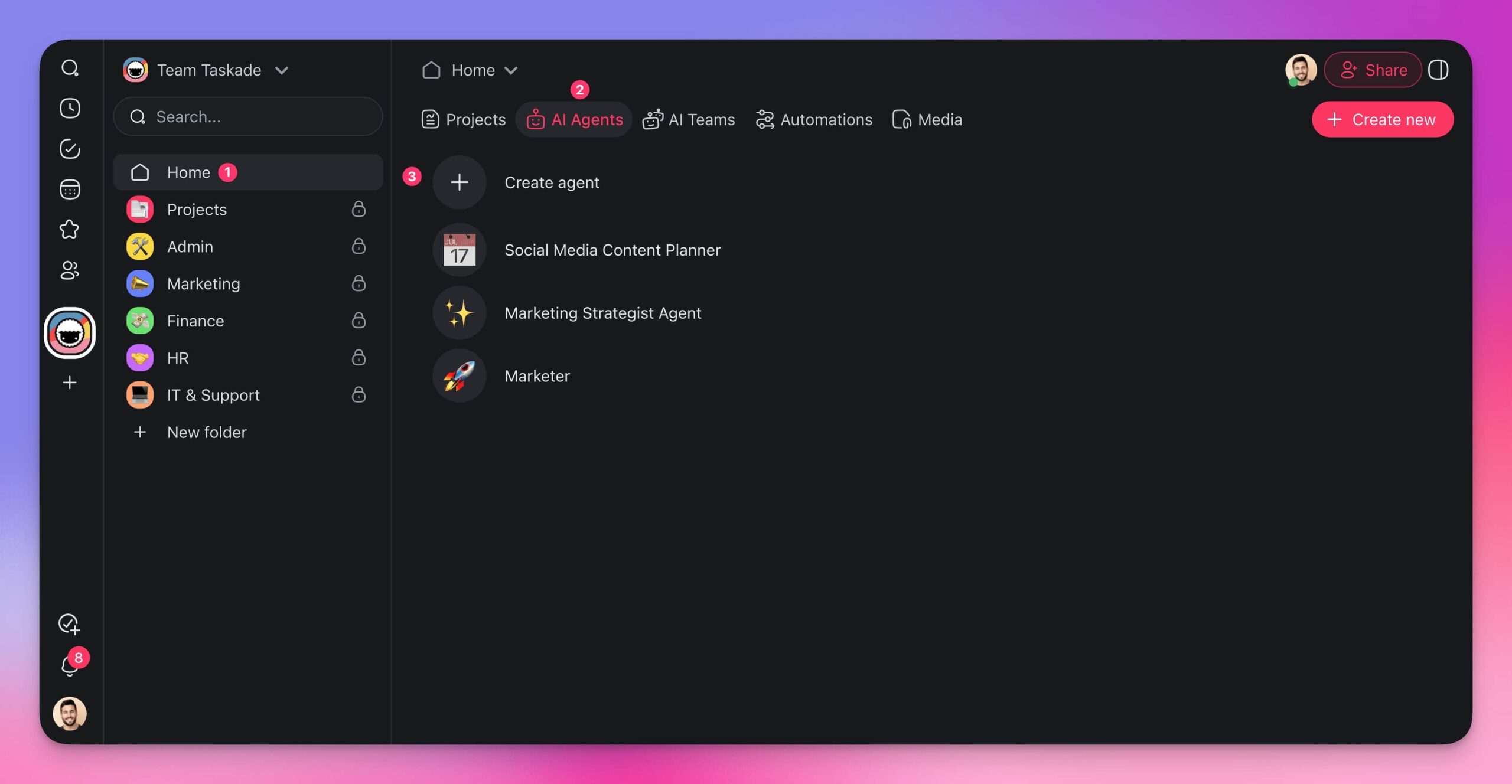
- Describe what you need:
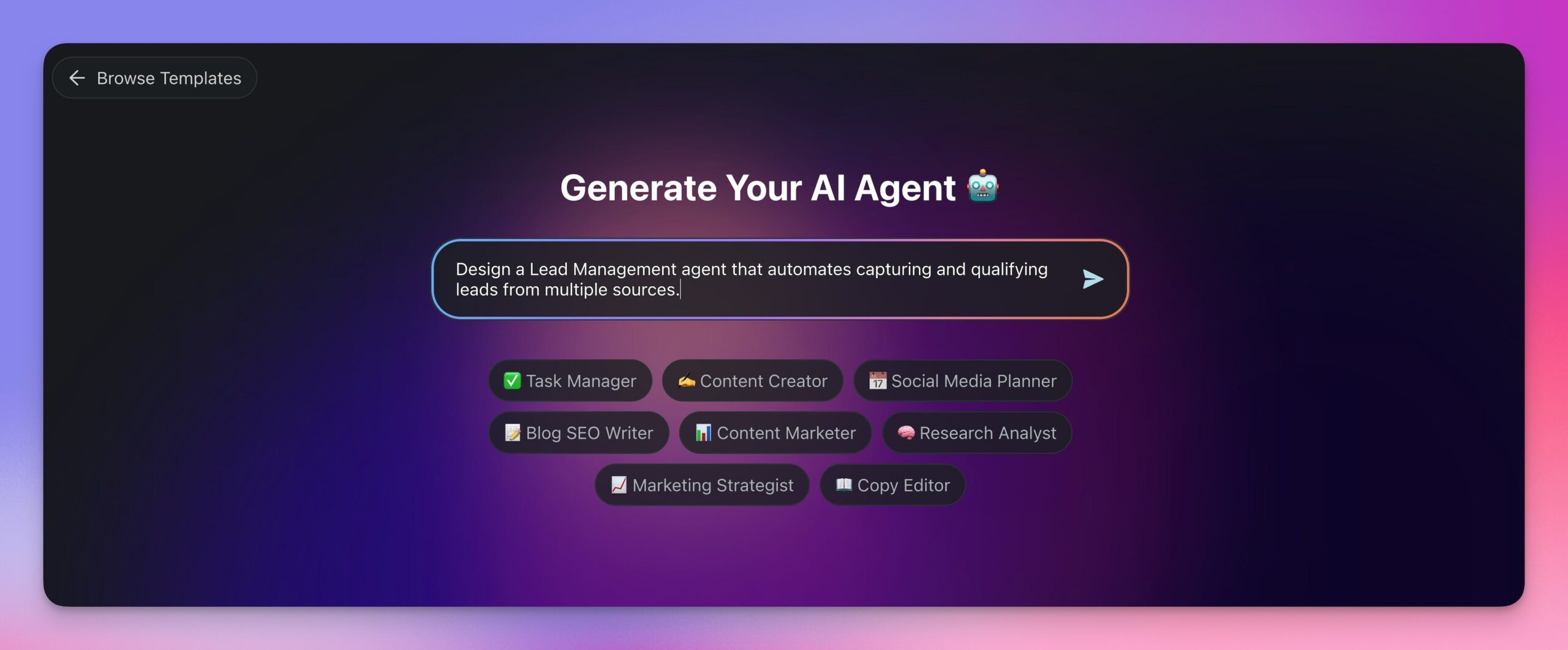
Create a Lead management agent to automate capturing and qualifying leads from multiple sources.
- Press Enter and wait for the generator to finish.
- Your agent is ready. You can customize its knowledge, commands, and tools.
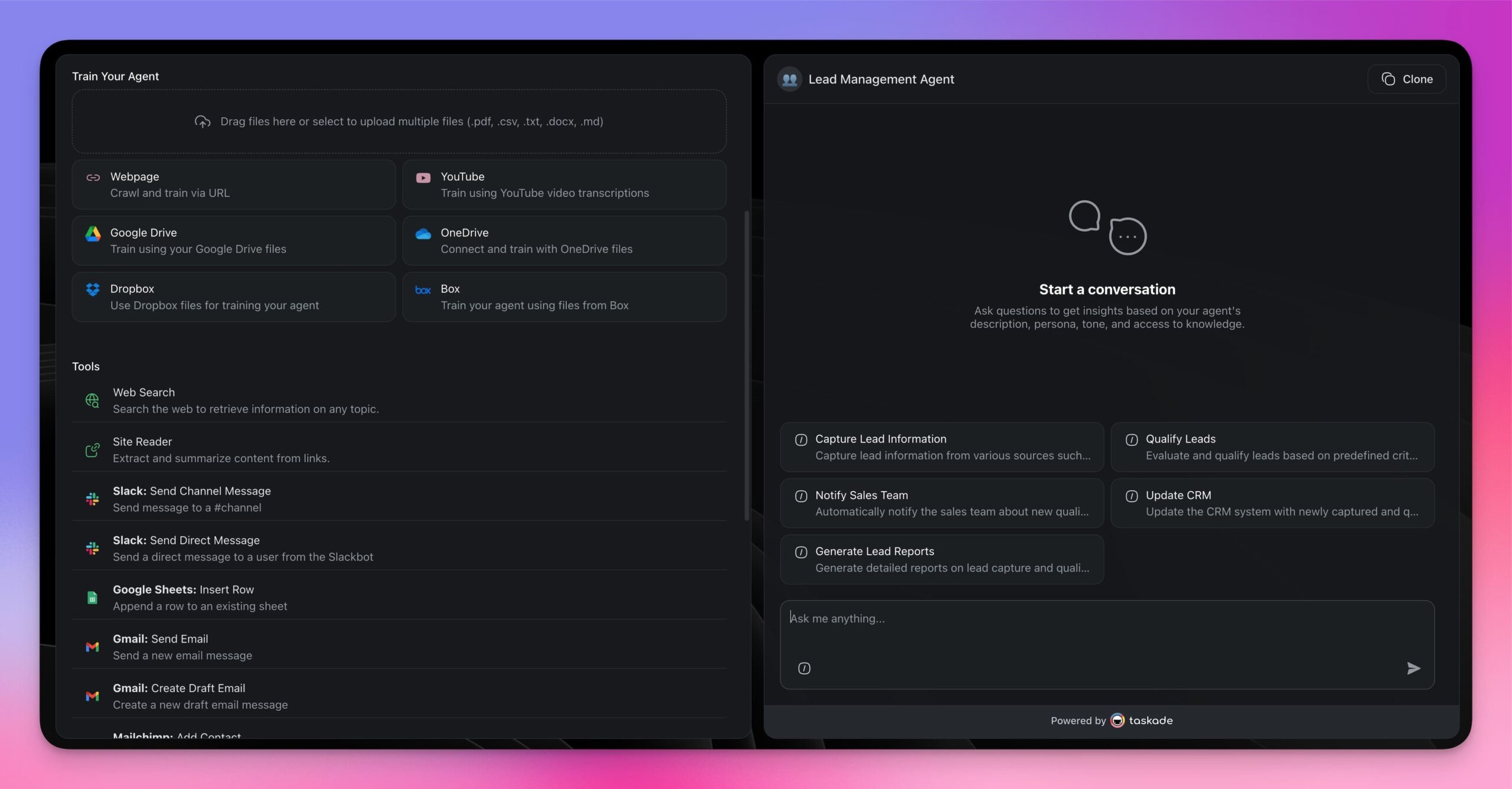
Step 2: Build the Automation Flow
Now connect your agent to a trigger-based automation.
- Go to the Automations tab in your workspace and click Create automation.
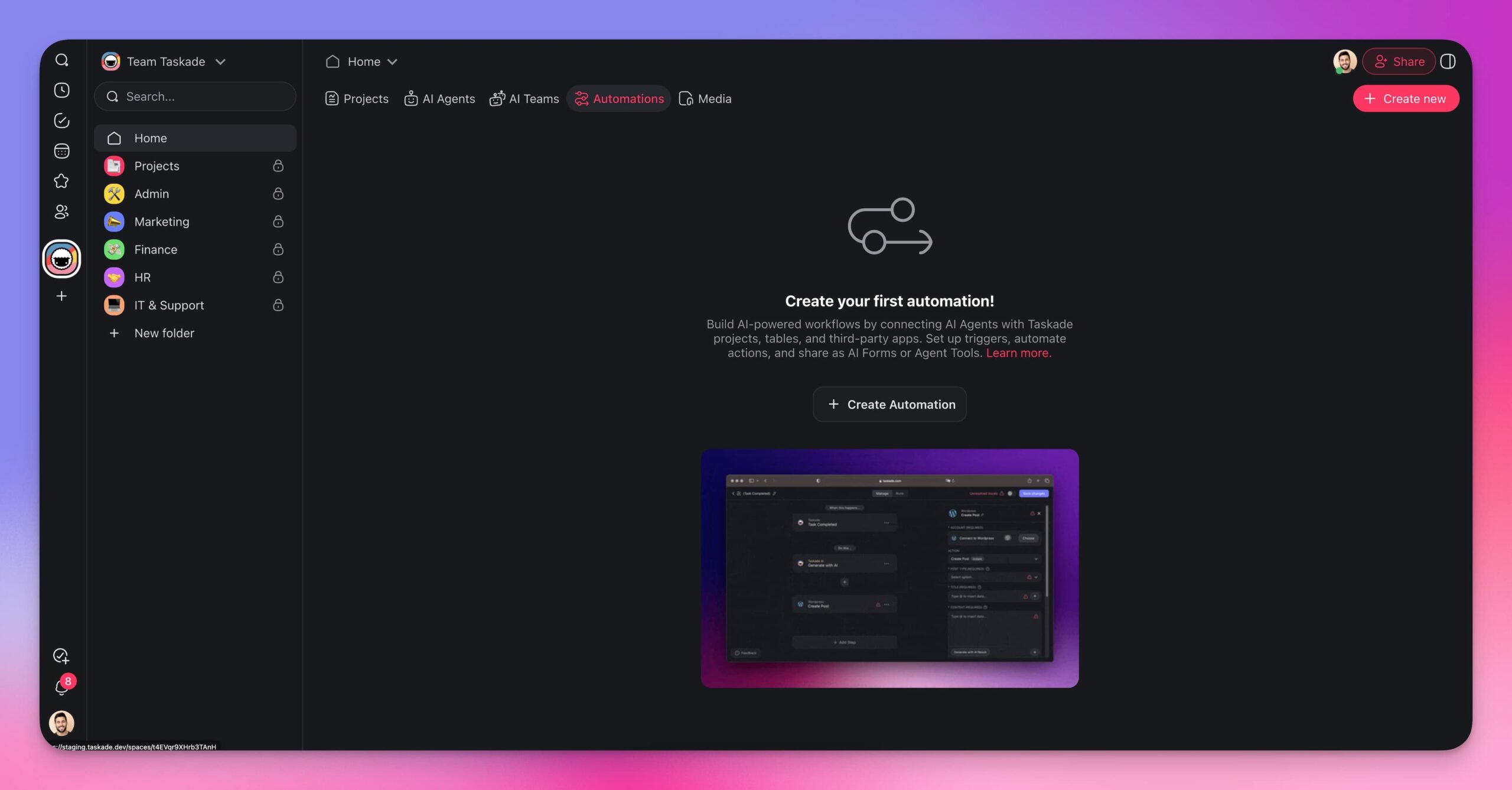
- Define your trigger and actions:
- Click Add Trigger and choose what starts the automation (new email, form submission, schedule, etc.)
- Click Add Step to define each action in sequence
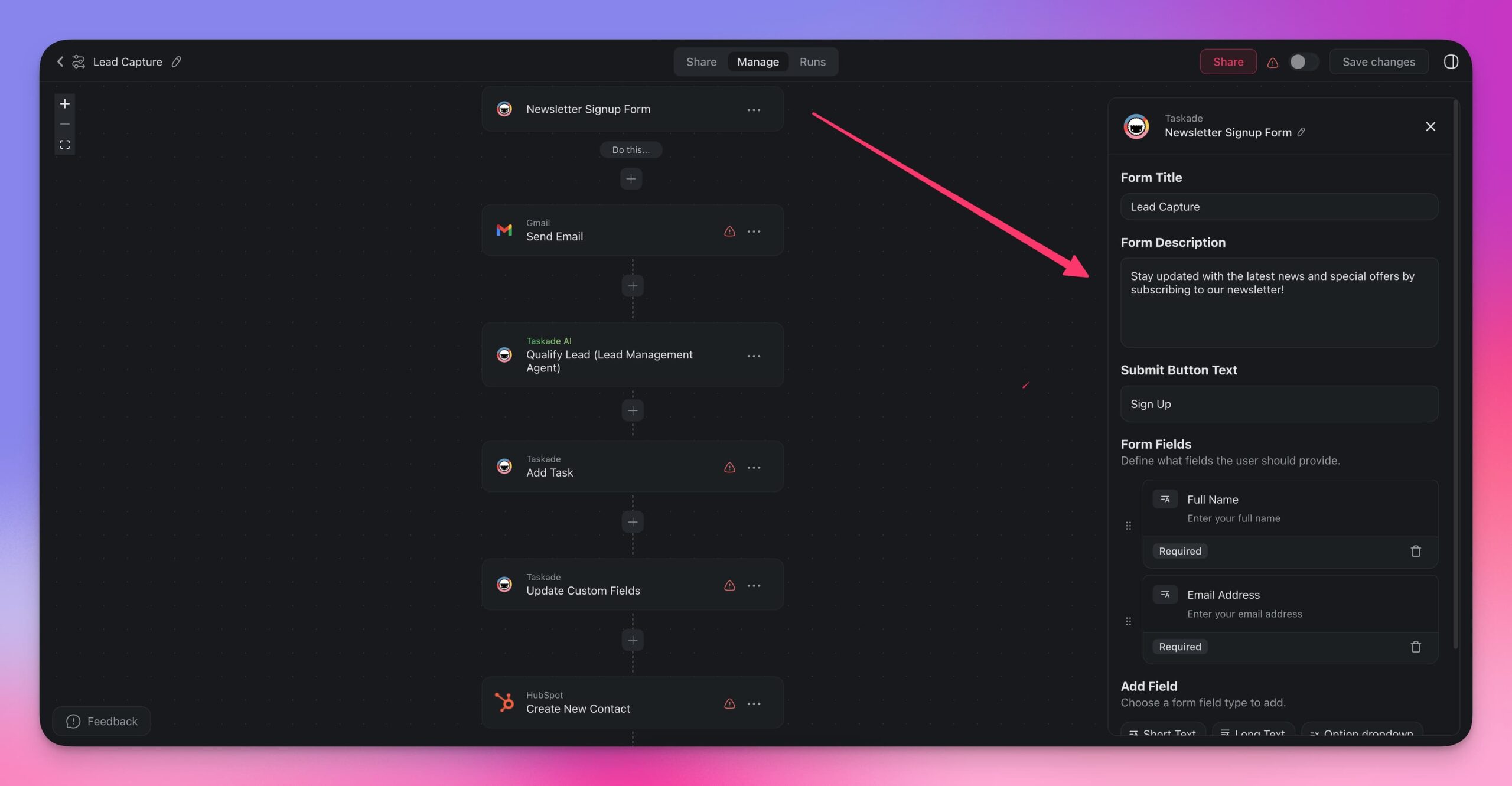
Here is an example lead capture flow:
| Step | Type | Action |
|---|---|---|
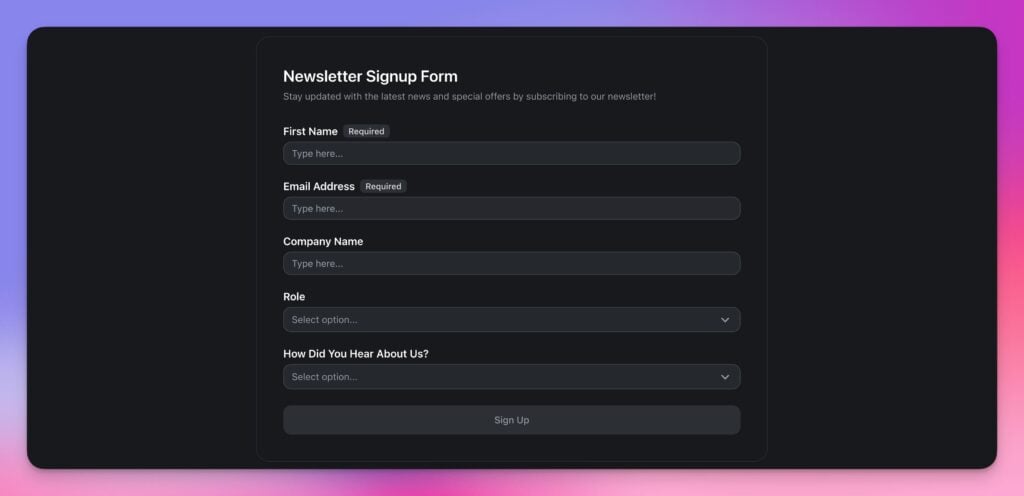
| 1 | Trigger | New form response (Newsletter Signup) |
| 2 | Action | Send welcome email via Gmail |
| 3 | Action | Run Lead Management agent to qualify lead |
| 4 | Action | Add contact to Lead Tracker project in Taskade |
| 5 | Action | Update custom fields with agent analysis |
| 6 | Action | Add new contact to HubSpot CRM |
| 7 | Action | Notify sales team via Slack |
| 8 | Action | Assign lead to team member |
- Toggle the automation on. You can preview forms in the Share tab.
Step 3: Connect External Tools
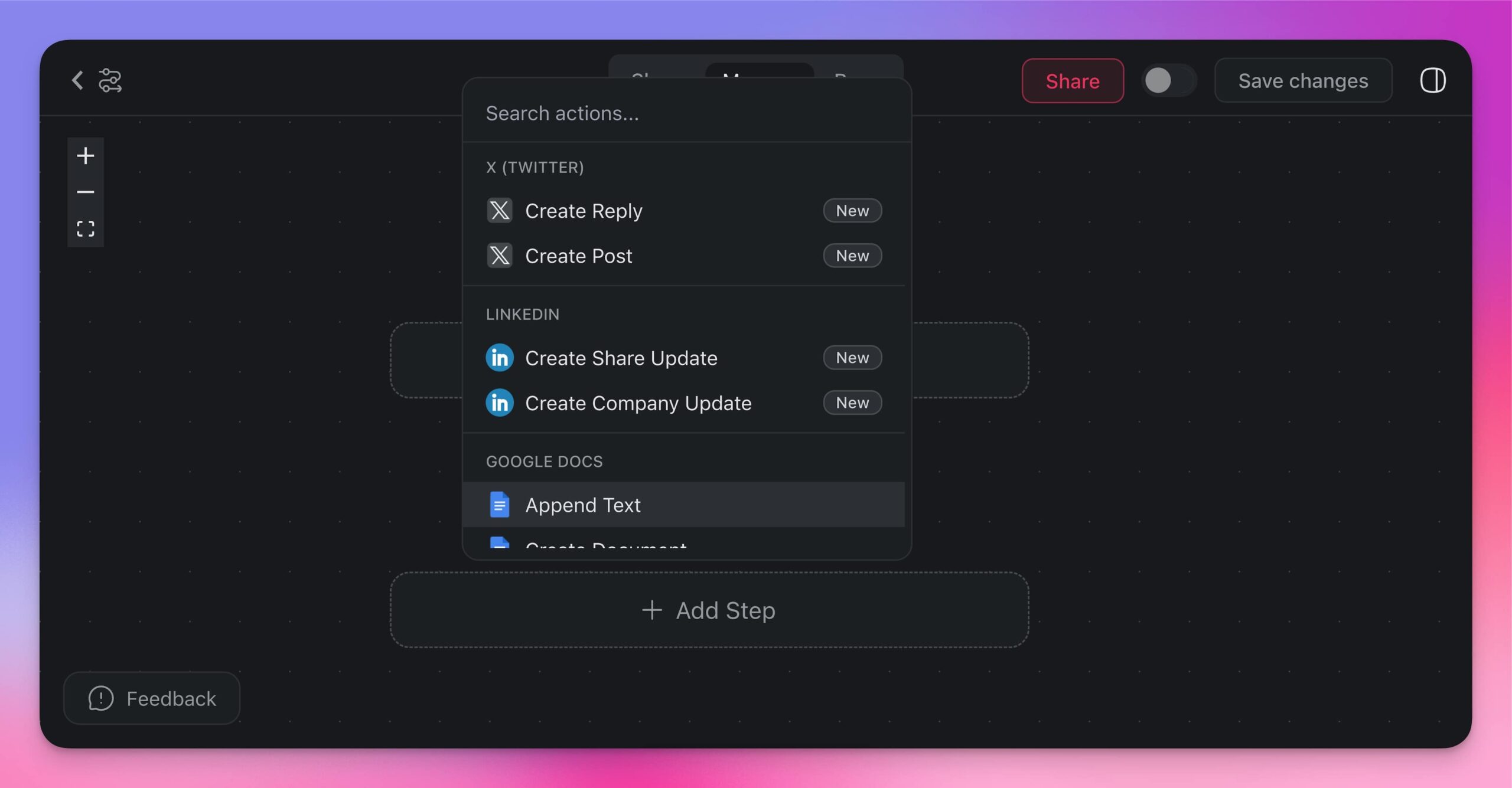
Every automation can integrate with external platforms. In the example above, we used HubSpot, Gmail, and Slack. Add additional tools using the Action Step button.
Visit automation actions and automation triggers for the full list of available connectors.
Multi-Model Workflow Examples
The advantage of Taskade over standalone ChatGPT is multi-model flexibility. Here are practical workflow examples that leverage different models for different tasks.
Automated Content Pipeline
Build a content production workflow that runs end-to-end without manual prompting:
- Trigger: Task assigned with topic in a content calendar project
- Agent action: Research agent gathers information using web search tools
- Agent action: Writing agent generates a draft using the research output
- Action: Draft added to a review project for team editing
- Action: Notification sent to editor via Slack
- Action: After approval, content published to WordPress
This workflow replaces the manual process of prompting ChatGPT, copying output, formatting, reviewing, and publishing.
Intelligent Email Processing
Convert your inbox into an automated action center:
- Trigger: New email received in Gmail
- Agent action: Email Analysis agent categorizes the message (support, sales, internal, spam)
- Agent action: For support emails, Support agent drafts a response based on knowledge base
- Action: Response queued for review or auto-sent based on confidence level
- Action: Action items extracted and added as tasks to relevant projects
- Action: Priority emails flagged and team notified via Slack
Customer Support Triage
Handle support requests automatically with escalation logic:
- Trigger: New form submission from support page
- Agent action: Triage agent classifies severity and category
- Agent action: For common questions, agent generates response from knowledge base
- Action: Response sent via email
- Action: Ticket created in support project with classification tags
- Agent action: For complex issues, escalation agent routes to appropriate team member
- Action: Team member notified with full context summary
Scheduled Reporting
Automate regular business reports:
- Trigger: Weekly schedule (every Monday at 9 AM)
- Agent action: Data analyst agent pulls updates from connected projects
- Agent action: Agent generates summary report with metrics and trends
- Action: Report added to team project as a new document
- Action: Summary emailed to stakeholders via Gmail
- Action: Key metrics posted to team Slack channel
Best Practices for AI Automation
Start Small and Iterate
Begin with a single automation that addresses your biggest time sink. A simple "new email triggers AI draft response" workflow takes five minutes to set up and saves hours weekly. Expand once you see results.
Train Agents with Context
The quality of automated output depends on the context your agents have. Upload relevant documents to agent knowledge bases, write clear system prompts, and define specific commands for repeatable tasks.
Use Clear, Specific Instructions
Automation amplifies both good and bad instructions. Use prompt engineering best practices when defining agent prompts. Be specific about output format, tone, length, and criteria. Browse the prompt template gallery for tested starting points.
Review and Refine Regularly
Check your automation outputs periodically. Agent performance improves as you refine their instructions, expand their knowledge bases, and adjust workflow logic based on real results. Leaner flows often produce more reliable outcomes.
Leverage Multi-Agent Collaboration
Complex workflows benefit from specialized agents working together. A research agent feeds information to a writing agent, which passes output to an editing agent. Each agent focuses on what it does best, and the automation flow orchestrates their collaboration.
Taskade vs. ChatGPT vs. Zapier: Which Should You Use?
| Capability | ChatGPT | Zapier + ChatGPT | Taskade |
|---|---|---|---|
| AI models | OpenAI only | OpenAI only | Frontier models from top AI labs |
| Native automation | No | Yes (external middleware) | Yes (built-in) |
| Project management | No | No | Yes (multiple views) |
| Team collaboration | No | No | Yes (real-time) |
| Persistent agent memory | Limited | No | Yes |
| Custom agent tools | Custom GPTs (limited) | No | built-in + custom tools |
| Integrations | Plugins | 5,000+ (via middleware) | 100+ native |
| Pricing | Free / $20/mo | Free / $20-$750/mo | Free / $10-$25/mo |
| Middleware required | N/A | Yes (Zapier itself) | No |
ChatGPT excels at individual AI conversations. Zapier excels at connecting apps. Taskade combines both with native AI agents, project management, and team collaboration in one platform, eliminating the need for middleware.
Key Takeaways
Automating ChatGPT-style AI workflows does not require hacking together middleware solutions. Taskade provides everything you need in a single platform.
- ChatGPT has no native automation, triggers, or integration layer
- Taskade AI agents use the same frontier models plus models from other top AI labs
- Automation flows connect agents to 100+ integrations with trigger-based execution
- Multi-model support lets you choose the best model for each task within the same workflow
- All automation runs within a collaborative workspace with multiple project views and access control
Ready to automate your AI workflows?
Sign up for Taskade and build your first automation
Explore More:
- Custom AI Agents — Build autonomous agents with built-in tools
- Automation Getting Started — Set up your first workflow
- Automation Actions — Browse available connectors
- Prompt Engineering Guide — Write better agent instructions
- Prompt Template Library — Ready-made prompts for every use case
- Integrations Directory — 100+ connected platforms
- Ecosystem Map — everything Taskade connects to in one view
- Document Converter — Transform files between formats
- Community Gallery — Explore and clone AI apps
- Taskade Pricing — Free, Pro $10/mo, Business $25/mo
- Agentic Workflows — Self-running AI systems

Frequently Asked Questions
Can you automate ChatGPT responses and workflows?
ChatGPT itself has no built-in automation engine. It responds to one prompt at a time with no triggers, scheduling, or integration layer. Taskade solves this by letting you build AI agents powered by frontier models from top AI labs that run automatically on schedules, event triggers, or incoming data from 100+ connected apps. You get ChatGPT-level intelligence with full workflow automation.
How does Taskade automate ChatGPT-style AI workflows?
Create a custom AI agent in Taskade, choose your preferred model, and connect it to an automation flow. Agents can trigger on events like new emails, form submissions, or task assignments, then generate content, draft replies, create projects, update spreadsheets, and post to external services automatically. No coding required, and agents maintain persistent memory across runs.
What are the limitations of using ChatGPT without automation?
Standalone ChatGPT requires manual prompting for every interaction, cannot trigger actions in external apps, has no persistent project context, and cannot run in the background on a schedule. It also lacks native task management, team collaboration, and multi-agent coordination. Taskade addresses all of these gaps by embedding AI agents directly into your project workflow with triggers, tools, and 100+ integrations.
What ChatGPT tasks can be automated with Taskade?
Common automations include auto-replying to emails with AI-generated responses, converting incoming messages into tasks and projects, summarizing documents on a schedule, processing form submissions with personalized follow-ups, generating blog drafts from assigned topics, and routing customer inquiries to specialized AI agents. All run autonomously without manual prompting.
Can Taskade use multiple AI models beyond ChatGPT?
Yes. Taskade supports frontier AI models from top AI labs. You can choose the best model for each task. A coding task might use one model while creative writing uses another. All models work within the same agents and automation flows, giving you multi-model flexibility without switching platforms.
How does Taskade compare to Zapier for ChatGPT automation?
Zapier connects ChatGPT to other apps but requires external middleware and per-task pricing. Taskade embeds AI agents natively within your workspace alongside project management, multiple project views, and team collaboration. Agents have persistent memory, built-in tools, and run within automation flows that connect to 100+ integrations. No middleware required.
What is multi-model AI automation?
Multi-model AI automation means using different AI models from different providers within the same workflow based on task requirements. Taskade supports this natively with frontier models from top AI labs. For example, one automation step might use a reasoning-focused model for analysis while another step uses a creative model for content generation.
How do I get started with AI automation in Taskade?
Sign up for a free Taskade account, create a workspace, and navigate to the Agents tab to build your first AI agent. Then go to the Automations tab to create a trigger-based workflow that uses your agent. Connect your email, CRM, or other tools, toggle the automation on, and it runs autonomously. The automation getting started guide at taskade.com/learn covers each step in detail.