







I spent two years building compilers for human-written code before joining Taskade. Traditional compilers have a clean mental model: source code goes in, an executable comes out. The input is precise. The output is deterministic. Every computer science textbook covers the pipeline — lexing, parsing, optimization, code generation.
Then we started building Taskade Genesis, and I realized that the entire model needed to be inverted. The input is not source code. It is a natural language prompt — ambiguous, incomplete, sometimes contradictory. The output is not an executable file. It is a living system — a deployed application with AI agents that reason, automation workflows that execute, and workspace databases that persist.
Most AI app builders generate code. Taskade Genesis compiles living software. That distinction is the subject of this post.
TL;DR: Code generators produce files. Taskade Genesis produces deployed systems. This post walks through the 5-stage compilation pipeline that turns a single prompt into a live app with embedded AI agents, automation workflows, and workspace databases. 150,000+ apps built since launch. Try it free ->
For the philosophical case behind this approach, read our code vs runtime manifesto. For the broader landscape of AI development tools, see our agentic engineering platforms comparison. To understand the transformer architecture powering the models behind Taskade Genesis, see how LLMs actually work.
What "Living Software" Actually Means
The term gets thrown around loosely in the industry. Let me be precise about what we mean.
A living app is a deployed application that maintains a persistent, bidirectional connection to its workspace backend. It is not a static bundle served from a CDN. It is not a prototype that needs manual wiring to a database. It is a running system where three layers work together continuously:
Projects (Memory): The app reads from and writes to workspace projects as its primary data store. A CRM dashboard built with Taskade Genesis does not need a separate Supabase instance or a Postgres database. The workspace is the database. When a user updates a contact record in the app, that change persists in the workspace project — and when another team member edits the same project from the Taskade workspace, the app reflects the change.
Agents (Intelligence): The app embeds AI agents that can reason about the data, answer questions, generate content, and take actions. These are not static chatbot widgets bolted onto a frontend. They are custom agents with built-in tools, persistent memory, and access to the workspace knowledge graph. An agent inside a Genesis app can query project data, search across connected knowledge sources, and invoke other agents.
Automations (Execution): The app triggers automation workflows that connect to 100+ integrations — Slack, Salesforce, Notion, Stripe, Shopify, Google Calendar, and more. A form submission inside a Genesis app can trigger a workflow that sends a Slack notification, creates a CRM record, and schedules a follow-up email. These are not API calls you wire up manually. They are pre-configured flows that the compilation pipeline provisions automatically.
This is what we call Workspace DNA — the self-reinforcing loop where Memory feeds Intelligence, Intelligence triggers Execution, and Execution creates Memory. Every Genesis app inherits this architecture by default.
This is why we use the word "compilation" rather than "generation." A code generator produces files. A compiler produces a running system. Taskade Genesis outputs a deployed, intelligent application — not a zip file of React components that you need to deploy yourself.
The 5-Stage Compilation Pipeline
Every Genesis app goes through five stages between the moment you type a prompt and the moment you get a live URL. The pipeline is sequential — each stage depends on the output of the previous one — and it runs entirely in the cloud. No local environment. No CLI. No terminal.
Here is what happens at each stage.
| Stage | What Happens | Input | Output |
|---|---|---|---|
| 1. Template Parse | Prompt analyzed, starter template selected and scaffolded | Natural language prompt | Initial file scaffold (intermediate representation) |
| 2. Workspace Provisioning | Projects, agents, knowledge, and automations created in strict order | Parsed intent + workspace context | Live backend resources (database, agents, workflows) |
| 3. Code Generation | React app files generated with workspace API bindings | Backend resource references + scaffold | Complete intermediate representation with all app files |
| 4. Bundle & Build | esbuild compiles the intermediate representation into a production bundle | Complete file tree (JSONB) | Optimized JS/CSS production bundle |
| 5. Deploy | Bundle pushed to edge infrastructure with live URL, optional custom domain | Production bundle + deployment config | Live URL accessible globally |
Let me walk through each stage in detail.
Stage 1: Template Parse
The user provides a natural language prompt. "Build me a CRM dashboard for my sales team." "Create a project tracker with Kanban boards and AI summaries." "I need a customer feedback portal with sentiment analysis."
EVE — the orchestration agent behind Genesis app building — analyzes the prompt against a library of starter templates. These templates are not boilerplate code. They are structured scaffolds that define the shape of the app: which UI patterns to use (dashboard, form, portal, kanban), which data models to create, and which integrations to wire up.
The output of this stage is an intermediate representation — a JSONB data structure that represents the entire app as a nested tree of directories and files. Think of it as an abstract syntax tree, but for applications instead of programs. Each node in the tree is either a directory (containing child nodes) or a file (containing a content string). This structure serves as the contract between every subsequent stage of the pipeline.
Json
{
  "src/": {
    "directory": {
      "App.tsx":    { "file": { "contents": "// scaffold..." } },
      "index.tsx":  { "file": { "contents": "// entry point..." } },
      "components/": {
        "directory": {
          "Dashboard.tsx": { "file": { "contents": "// layout..." } }
        }
      }
    }
  },
  "package.json": { "file": { "contents": "{...}" } }
}
This intermediate representation is the key architectural decision that separates Taskade Genesis from every code generator I have used. The AI does not write to a filesystem. It writes to a data structure. That data structure can be validated, diffed, rolled back, and transformed before it ever reaches the build system. It is the same principle that makes compilers reliable: separate the representation from the execution.
Stage 2: Workspace Provisioning
This is where Taskade Genesis diverges most sharply from every other AI app builder on the market. Before generating a single line of UI code, the pipeline provisions the entire backend.
The ordering is strict and intentional:
Projects first — Create the data tables and content sources the app needs. A CRM dashboard gets a Contacts project, a Deals project, and an Activity Log project. These are real workspace projects with structured data, not mock JSON files.
Agents second — Create AI agents and configure them with the right capabilities. The CRM app might get a Lead Scoring agent that analyzes deal probability, and a Meeting Prep agent that summarizes contact history before calls.
Connect Knowledge — Wire the agents to workspace data so they can query projects, search documents, and access the knowledge graph. An agent that cannot read the data it serves is useless.
Flows third — Create automation workflows with triggers, actions, and integration connections. The CRM app might get a flow that sends a Slack notification when a deal moves to "Closed Won," and another flow that creates a follow-up task when a new lead is added.
Interface last — Only now does the pipeline generate the React components that make up the UI. By this point, every API binding, every data source, and every automation trigger already exists. The UI code does not need to guess at endpoints or mock data — it calls real workspace APIs that return real data.
Why this order? Because if you generate the UI first — which is what every code generator does — you get a beautiful shell with no backend. The user sees a polished dashboard with placeholder data and thinks the app is done. Then they try to save a record and nothing happens. They ask the AI assistant a question and get a generic response. They expect a notification and the integration is not wired up.
Our protocol ensures that every compiled app has functioning memory, intelligence, and execution before the interface exists. The UI is the last layer, not the first. This is counterintuitive for developers who are trained to prototype visually, but it produces dramatically better results when the builder is an AI agent rather than a human.
Stage 3: Code Generation
With the backend provisioned and the intermediate representation scaffolded, EVE generates the React component files that make up the application. Each file is written into the JSONB structure created in Stage 1.
The generated code is not generic React. It includes direct API bindings to the workspace resources created in Stage 2:
- Data calls that read from and write to workspace projects — no REST endpoint configuration required
- Agent invocations that query the AI agents provisioned for this specific app
- Automation triggers that invoke the workflows set up in Stage 2
- Real-time subscriptions that update the UI when workspace data changes
The code generation stage also handles error boundaries, loading states, responsive layouts, and accessibility basics. These are not afterthoughts bolted on during review. They are part of the template patterns that EVE applies consistently across every app.
One important detail: the generated code is optimized for the build system, not for human readability. This is a deliberate choice. Code generators like Cursor and Bolt.new produce code that developers are expected to read, review, and maintain. Taskade Genesis produces code that the build system is expected to compile. The priorities are different. Consistency and correctness matter more than elegance and style.
Stage 4: Bundle and Build
The complete intermediate representation — now populated with all component files, styles, configuration, and workspace API bindings — is passed to the build pipeline.
This is where esbuild enters the picture. The build system reads the JSONB tree, resolves imports, tree-shakes unused code, and produces a production-ready JavaScript and CSS bundle. The entire process runs in a sandboxed cloud environment — not on the user's machine, not on our primary infrastructure.
I will explain our choice of esbuild over webpack in the next section. The short version: speed and determinism.
The build output is a set of static assets — JavaScript bundles, CSS files, and any referenced media — ready for deployment. If the build fails (and it does fail sometimes, because AI-generated code is not always syntactically perfect), the error is fed back to EVE for self-correction. The agent reads the error message, identifies the broken file in the intermediate representation, writes a fix, and the build runs again. Most self-correction loops resolve in one or two iterations.
Stage 5: Deploy
The compiled bundle is deployed to edge infrastructure for global delivery. The app gets a live URL immediately — no DNS configuration, no hosting setup, no CI/CD pipeline. Users can also configure custom domains with automatic SSL provisioning, and set up password protection for private apps.
The deployed app is not a static site. It maintains a live connection to the workspace backend. When a user interacts with the app — submitting a form, querying an AI agent, triggering an automation — those requests flow through the workspace API layer in real time. The app is a frontend window into a living workspace.
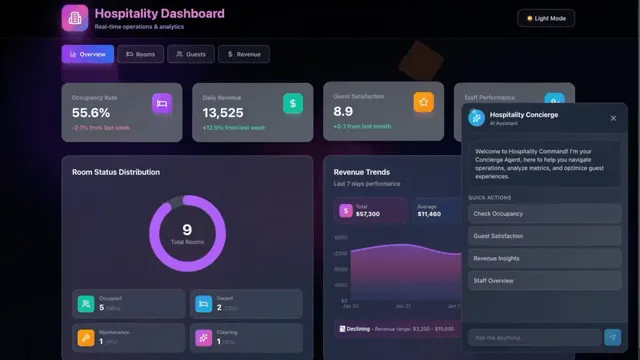
The entire pipeline — from prompt to live URL — runs in minutes. Not hours, not days. The user types a description of what they want, and they get a deployed application with a real backend, real AI agents, and real automation workflows. 150,000+ apps have been built this way since launch.
The Intermediate Representation: Why a Data Structure, Not a Filesystem
In classical compiler design, the intermediate representation (IR) is the data structure that sits between the frontend (parsing) and the backend (code generation). LLVM has its IR. The JVM has bytecode. GCC has GIMPLE and RTL. The IR is where optimization happens, where analysis runs, and where the messy details of the source language are abstracted away before the clean output is produced.
Our intermediate representation is the JSONB tree I described in Stage 1. It serves the same purpose in the Taskade Genesis compilation pipeline that LLVM IR serves in a C++ compiler: it is the canonical representation of the program between parsing and output.
Why a JSONB tree instead of actual files on a filesystem? Three reasons:
1. Programmatic manipulation. AI agents need to read and write app files as part of a tool-calling loop. A JSONB structure is a first-class data object that can be passed to an agent, diffed against a previous version, validated against a schema, and transformed in memory. A filesystem requires I/O operations, path resolution, and permission management — none of which add value when the "developer" is an AI agent operating in a sandboxed environment.
2. Atomic operations. When EVE writes a component file, the write is an atomic update to a JSONB field. There is no partial write, no race condition, no corrupted file. If the code generation stage fails halfway through, the intermediate representation can be rolled back to its last consistent state. This is harder to guarantee with filesystem operations, especially in a concurrent environment where multiple agents might be writing files simultaneously.
3. Build system integration. esbuild can consume the JSONB tree directly through a virtual filesystem plugin. The build system never touches disk for source files. This eliminates an entire class of bugs related to file encoding, line endings, path separators, and temporary file cleanup. The input to the build system is a pure data structure, and the output is a pure bundle. No side effects.
The design is inspired by StackBlitz's WebContainers, which pioneered the idea of running Node.js in the browser using an in-memory filesystem. We took a similar approach but optimized for a different constraint: our "developer" is an AI agent, not a human typing in an editor. The intermediate representation is designed for machine manipulation, not human navigation.
Why esbuild, Not Webpack
We tried webpack first. I want to be transparent about this because the decision to switch was not obvious at the time.
Webpack is the industry standard. It has the largest plugin ecosystem. It handles every edge case. For human-written code, webpack's flexibility is a strength. But for AI-generated code, three properties of esbuild made it the clear winner:
Speed
esbuild compiles in milliseconds, not seconds. When every app build runs on shared cloud infrastructure and you are compiling thousands of apps per day, the difference between a 200-millisecond build and a 5-second build is not a minor optimization. It is the difference between a responsive user experience and a loading spinner.
With webpack, we observed build times ranging from 2 seconds to 30 seconds for apps of similar complexity. The variance was the real problem. A 5-second build is acceptable. A 30-second build — triggered by a specific combination of dynamic imports and CSS modules that webpack's resolver handled poorly — makes the product feel broken. esbuild eliminated this variance entirely.
Determinism
Same input, same output. Always. This property sounds trivial — of course a build tool should be deterministic — but webpack's plugin system introduces nondeterminism in subtle ways. Module IDs can change based on resolution order. CSS extraction plugins can reorder rules. Chunk splitting decisions depend on the module graph, which can vary based on the order files are processed.
For human-written code, these variations are invisible. The app works the same way regardless of chunk boundaries. But for AI-generated code, we need to verify that a build is correct by comparing it to a known-good output. If the build tool introduces variation, verification becomes unreliable. esbuild's deterministic output means we can hash the bundle and compare it across builds with confidence.
Simplicity
esbuild has a minimal configuration surface. There are no loaders to configure, no plugin chains to debug, no resolve alias trees to maintain. For AI-generated code — which follows consistent patterns by design — the reduced configuration surface eliminates an entire category of "works on my machine" failures.
When esbuild cannot handle a specific pattern (certain CSS-in-JS libraries, complex dynamic imports), we have an alternative build path available. But for the vast majority of Genesis apps — React components with standard imports, CSS modules, and workspace API bindings — esbuild handles everything we need.
| Property | esbuild | Webpack |
|---|---|---|
| Typical build time | 50-200ms | 2-30s |
| Deterministic output | Yes (always) | Depends on plugin configuration |
| Configuration surface | Minimal (single config object) | Extensive (loaders, plugins, resolve, optimization) |
| Error messages | Precise line/column | Sometimes vague, depends on loader |
| Tree shaking | Built-in, aggressive | Requires configuration (sideEffects, usedExports) |
| Suitability for AI-generated code | Excellent (consistent patterns) | Good but unpredictable edge cases |
The Competitor Comparison: Files vs Systems
I want to frame this comparison carefully. The tools I am about to compare are good products built by talented teams. They solve real problems for real developers. The distinction I am drawing is not about quality — it is about what the output actually is.
What Code Generators Actually Produce
Bolt.new generates React files, a Supabase database schema, and hosting configuration. You get a running preview in the browser. But the app has no AI agents. It has no automation workflows. If you want intelligence, you wire up an API yourself. If you want integrations, you write the glue code. The coding problem is solved. The software problem is not.
Lovable generates a React app connected to a Supabase backend. It handles authentication and basic CRUD. But the same gap applies: no embedded intelligence, no automation layer, no integration ecosystem. You get an app with a database. You do not get a system.
Cursor is an AI-powered code editor. It generates excellent code — arguably the best code generation of any tool on this list. But the output lives in your editor. You deploy it yourself. You set up the database yourself. You integrate external services yourself. Cursor solves the coding problem exceptionally well. It does not attempt to solve the software problem.
V0 by Vercel generates UI components. Beautiful, well-structured React components with Tailwind CSS. But they are components, not applications. No backend. No data layer. No deployment. V0 solves the design problem.
Replit provides a hosted development environment with AI assistance. You can build and deploy from the browser. But the AI assists your coding — it does not compile a system. You are still the developer. Replit solves the environment problem.
What Taskade Genesis Produces
A deployed application with a live URL. Connected to workspace projects as its database. Embedded AI agents that can be queried by end users. Automation workflows that trigger on events and connect to 100+ integrations. Custom domain support with automatic SSL. Password protection for private apps. Built-in authentication for end-user management.
The output is not code to review. It is a running system to use.
| Capability | Bolt.new | Lovable | Cursor | V0 | Taskade Genesis |
|---|---|---|---|---|---|
| Deployed app with live URL | Preview only | Preview only | No (manual deploy) | No (components only) | Yes |
| Workspace database | Supabase (separate) | Supabase (separate) | Manual setup | No | Built-in (Projects) |
| Embedded AI agents | No | No | No | No | Yes (custom agents) |
| Automation workflows | No | No | No | No | Yes (100+ integrations) |
| Custom domains + SSL | No | No | Manual | No | Yes (automatic) |
| Self-healing on errors | Limited | Limited | No | No | Yes (compilation loop) |
| End-user authentication | Manual setup | Basic auth | Manual | No | Built-in (SSO/OIDC) |
The key insight: code generators solve the coding problem. Taskade Genesis solves the software problem. Software is code + data + intelligence + execution + deployment. Generating code is one step. Compiling a living system covers all five.
Production Challenges (Honest Engineering)
The pipeline I described sounds clean on paper. In production, it is messier. Here are the real engineering challenges we face daily.
Build Reliability
AI-generated code sometimes has syntax errors. Missing closing brackets. Undefined variables. Circular imports. The models have gotten dramatically better at producing valid code over the past year, but "dramatically better" still means a non-trivial percentage of first-pass builds fail.
Our answer is the self-correction loop. When esbuild reports an error, the error message — including the exact file, line, and column — is fed back to EVE. The agent reads the error, locates the issue in the intermediate representation, writes a fix, and the build runs again. Most issues resolve in one or two iterations. The build stage has a retry budget, and if correction fails within that budget, the user sees the error with a clear explanation.
This loop is only possible because of two earlier design decisions: the intermediate representation (which makes targeted edits cheap) and esbuild (which makes rebuilds fast). If each rebuild took 10 seconds instead of 200 milliseconds, the self-correction loop would be too slow to feel interactive.
Bundle Size
AI agents tend to over-import. If you ask a model to generate a chart component, it might import the entire charting library when a single function would suffice. Multiply this across twenty components and the production bundle balloons.
We address this at two levels. First, esbuild's tree-shaking is aggressive — unused exports are eliminated from the bundle even if they were imported. Second, the template scaffolds constrain the dependency choices available to the code generation stage. The available libraries are curated and tested. An open-ended "import whatever you want" approach produces smaller, faster bundles than you might expect when the library whitelist is carefully maintained.
Security Sandboxing
Every Genesis app runs in isolation. Generated code cannot access other users' data, cannot make arbitrary network requests to our infrastructure, and cannot escalate privileges. The sandboxing happens at the deployment layer — each app runs in its own isolated execution context on edge infrastructure.
This is a non-negotiable constraint that shapes the entire pipeline. The intermediate representation includes a validation pass that checks for known-dangerous patterns before the bundle is compiled. The deployment infrastructure enforces network-level isolation after the bundle is deployed. Defense in depth.
Real-Time Preview
Users expect to see their app take shape in real time as EVE writes code. This requires a preview infrastructure that updates incrementally as files are added to the intermediate representation.
The preview system uses a pub/sub mechanism to push changes from the code generation stage to the user's browser. When EVE writes a new component file into the JSONB tree, the preview rebuilds with the updated file and the user sees the change within seconds. This creates a "watching the app being built" experience that is essential for trust — users need to see progress to believe the compilation is working.
Custom Domains
Offering custom domain support for generated apps adds a layer of infrastructure complexity that goes beyond serving static files. DNS propagation, SSL certificate provisioning, domain verification, and renewal — all of these need to work automatically for apps that might be created and deleted within the same day.
The domain management system handles this transparently. Users point their domain, the system verifies ownership, provisions an SSL certificate, and configures routing. But the engineering behind "transparently" involves careful coordination between DNS resolution, certificate authorities, and edge routing configuration.
The Compiler Metaphor, Taken Seriously
I have been using the word "compiler" deliberately throughout this post, and I want to address whether it is accurate or just a marketing metaphor.
A compiler has four defining characteristics:
It takes a high-level input and produces a lower-level output. Taskade Genesis takes natural language (the highest-level "language" there is) and produces deployed infrastructure (the lowest-level output a developer cares about).
It uses an intermediate representation. Taskade Genesis uses the JSONB file tree as its IR, just as LLVM uses LLVM IR and the JVM uses bytecode.
It performs optimization passes. The template selection stage optimizes for the right starting scaffold. The build stage tree-shakes unused code. The deployment stage optimizes asset delivery for edge performance.
The output is executable. Not source code to be compiled later. Not a project to be deployed manually. A running application accessible via URL.
By these criteria, Taskade Genesis is genuinely a compiler. The input language is English (or any natural language). The target architecture is the web platform + Workspace DNA. The intermediate representation is a JSONB tree. The optimization passes include template selection, dependency pruning, and tree-shaking. The output is executable — a deployed, living application.
The one property Taskade Genesis does not share with traditional compilers is determinism. The same prompt can produce different apps on different runs because the language model introduces controlled randomness. This is a fundamental difference — and an honest limitation. We mitigate it through the strict ordering of the provisioning stage (which constrains the space of possible outputs) and through the template system (which provides consistent structural patterns). But two compilations of the same prompt will not produce identical bytecode. This is the tradeoff of using natural language as the source language.
🔗 Connecting to the Category — App Builder vs Workspace Builder
The whole pipeline above only makes sense if you accept a category premise: Taskade Genesis is a workspace builder, not an app builder. That is a real category split, not marketing.
| What app builders ship | What workspace builders ship |
|---|---|
| Code files (Lovable, Bolt, v0, Cursor) | Configured workspace (Projects + Agents + Automations + Integrations) |
| Deployed URL with you as backend owner | Deployed URL backed by the workspace itself |
| No native memory across sessions | Persistent memory in projects/memories/ |
| No team RBAC unless you add it | RBAC by default (Owner to Viewer) |
| Integrations via NPM or Supabase | 100+ native integrations across 10 categories |
Read the long-form argument in AI App Builders vs AI Workspace Builders: The Category Split Defining 2026. The TL;DR: code generators make files, Taskade Genesis compiles living software.
🎛️ Every Taskade Genesis Capability the Compilation Pipeline Unlocks
The compilation pipeline is pipelining a lot of primitives in the background. Here is the full feature surface users get the moment a Genesis app deploys.
| Capability | What the user sees |
|---|---|
| EVE chat (the Genesis meta-agent) | 4 modes: genesis, projects, agents, automations |
| Ask-Questions tool (v6.150) | EVE pauses and asks during generation if input is ambiguous |
| Semantic auth detection (v6.144+) | "Does this app need login?" — EVE decides and wires GenesisAuth automatically |
| Self-planning todos | EVE publishes its internal todo list so you can watch progress |
| Four chat modes | Taskade Genesis (default), Projects, Agents, Automations — each with its own context policy |
| Persistent memory | projects/memories/ as real Taskade Projects, inspectable and editable |
| MCP Server (v6.148) | taskade.com/mcp — Claude Desktop, Cursor, VS Code can call your workspace |
| MCP tools exposed | list_spaces, inspect_space, list_tasks, write_file — on every paid plan |
| Clone creator credits (v6.150) | Earn credits when your published app is cloned |
| Auto top-up billing (v6.150) | Set a threshold, credits auto-purchase |
| App Users beta (v6.150) | First-class end-user management for published apps |
| Stripe checkout action (v6.149) | Sell access to your app directly |
| GitHub export + PR (v6.149) | Export app definition to an existing repo with a branch + PR |
| Custom domain + SSL | Your branded URL with auto-SSL |
| App analytics | Built-in usage and conversion metrics |
| V8 pricing (annual billing) | Free, Pro ★ $10/mo, Business $25/mo, Max $100/mo, Enterprise $250/mo |
Every item above is live in the product as of April 2026. None of these are on the roadmap — they are shipped.
What We Learned: 150,000 Apps in 90 Days
Taskade Genesis went from zero to 150,000+ apps in roughly 90 days. Some of those apps are simple — a to-do list with an AI assistant, a meeting notes dashboard, a team directory. Some are complex — multi-page CRM systems, customer feedback portals with sentiment analysis, project management tools with Kanban boards and Gantt charts.
Here is what we learned from compiling 150,000 applications:
Backend-first ordering works. The strict provisioning sequence — projects, then agents, then knowledge, then automations, then interface — produces better apps than any other ordering we tested. When the backend exists before the UI, the generated frontend code makes real API calls and displays real data from the first render. When the UI is generated first, the code is littered with placeholder data and TODO comments that the backend stage has to reconcile later.
The intermediate representation is the right abstraction. Every feature we have built since launch — version history, multi-file editing, real-time preview, rollback — was made easier by the decision to represent apps as data structures rather than filesystems. The JSONB tree is the single best architectural decision in the Taskade Genesis pipeline.
esbuild's speed enables self-correction. If builds took 10 seconds, the self-correction loop would break the user experience. At 200 milliseconds per build, we can run 2-3 correction iterations and still deliver the app in under a minute. Speed is not a nice-to-have. It is a prerequisite for the compilation model to work.
Templates are compilation targets. Our 195+ Genesis app templates are not starting points that users customize. They are compilation targets that the pipeline uses to constrain the output space. A "CRM Dashboard" template defines the data models, the agent capabilities, and the automation patterns that a CRM should have. The user's prompt customizes within those constraints. This is why Genesis apps of the same category feel consistent — they share a compilation target.
What Is Next
The compilation pipeline described in this post is the foundation. Here is what we are building on top of it.
Multi-page apps with routing. Today, most Genesis apps are single-page applications. We are extending the intermediate representation to support multi-page apps with client-side routing, shared layouts, and page-level data loading. The IR already supports nested directories — the extension is in the build system and deployment layer.
App-to-app communication. Genesis apps that share a workspace can communicate through workspace projects. An inventory management app can trigger a restock workflow that updates a supplier portal app. The workspace is the message bus. We are building first-class primitives for this pattern so that users can create ecosystems of apps, not just individual tools.
Community Gallery as distribution. The Community Gallery already hosts thousands of published Genesis apps. We are expanding it into a full distribution platform where users can discover, fork, and customize apps built by other creators. Every published app is a compilation target that others can build on.
Mobile-native Genesis apps. Genesis apps are currently web applications optimized for mobile browsers. We are working on compilation targets that produce mobile-native experiences — same prompt, same pipeline, different output target. The intermediate representation is platform-agnostic by design, which makes this extension natural.
For a deeper look at the living software philosophy behind Taskade Genesis, how it fits into the broader AI-native architecture movement, and what the press is saying about the platform, explore the links throughout this post.
Start Building
The compilation pipeline is running. 150,000+ apps have been through it. The average time from prompt to deployed app is measured in minutes, not days.
If you have read this far, you probably want to see it work. Open Taskade Genesis and type a prompt. Describe the app you need — a dashboard, a portal, a tool, a form. Watch the 5-stage pipeline run. Get a live URL.
That is what compilation looks like when the source language is English and the target architecture is a living workspace.
Build your first app with Taskade Genesis ->
Companion Reads — The 2026 Operator Cluster
- How to Win With AI in 2026: The Workflow-First Operator's Playbook — the operator pillar
- BYOA: The $1M-Per-Employee Era — why compiled Genesis apps become portable stacks
- From Roles to Workflows: The AI Org Chart — compiled apps as the surface layer of the new chart
- Training AI Agents Like Employees — training the Intelligence that Genesis compilation embeds
Stan Chang is CTO and Co-founder of Taskade. He previously worked on compiler infrastructure and has spent the last seven years building the Workspace DNA platform that makes Taskade Genesis possible. You can explore the Community Gallery to see what 150,000+ compiled apps look like, or read the code vs runtime manifesto for the philosophical case behind living software. Follow Taskade on Twitter/X for engineering updates.
Frequently Asked Questions
What is living software and how is it different from a regular app?
Living software is a deployed application that stays connected to its workspace backend after compilation. Unlike a static code bundle, a living app reads and writes to workspace projects as its database, embeds AI agents that reason and respond, and triggers automation workflows across 100+ integrations. The app evolves as the workspace data changes — it is never a frozen snapshot.
What are the 5 stages of the Taskade Genesis compilation pipeline?
The five stages are: (1) Template Parse — the user prompt is analyzed and matched to a starter scaffold. (2) Workspace Provisioning — projects, agents, knowledge, and automations are created in strict backend-first order. (3) Code Generation — React component files are written into an intermediate representation. (4) Bundle and Build — esbuild compiles the intermediate representation into a production bundle. (5) Deploy — the bundle is pushed to edge infrastructure and a live URL is issued.
What is the difference between AI code generation and Genesis app compilation?
AI code generators like Bolt.new, Lovable, and Cursor produce source code files that still need deployment, database setup, and integration work. Taskade Genesis compiles living software — deployed apps with embedded AI agents, automation workflows, and workspace databases, all from a single prompt. 150,000+ apps have been built with Taskade Genesis since launch.
Why does Taskade Genesis use esbuild instead of webpack?
esbuild compiles in milliseconds rather than seconds, which matters when every app build runs in the cloud on shared infrastructure. It also produces deterministic output — the same input files always yield the same bundle — which is critical for AI-generated code where outputs can vary between runs. Webpack's configurable plugin chain introduced unpredictable build times ranging from 2 to 30 seconds for equivalent inputs.
How does Taskade Genesis provision the backend before generating the UI?
Taskade Genesis follows a strict ordering: create workspace projects (the database layer) first, then create AI agents and connect them to knowledge sources, then set up automation workflows with triggers and integrations, and only then generate the interface. This ensures every compiled app has a functioning backend before a single React component is written.
What is the intermediate representation in the Taskade Genesis build pipeline?
The intermediate representation is a JSONB data structure that represents an entire app as a nested tree of directories and files. It acts as the contract between the AI code generation stage and the build system. AI agents write files into this structure programmatically, and esbuild consumes it to produce a production bundle — no filesystem access required.
Can Genesis apps connect to external services and APIs?
Yes. Genesis apps are wired to Taskade Workspace DNA, which includes 100+ integrations across communication, email, CRM, payments, development, and more. Apps can also embed AI agents that access external knowledge and trigger automation workflows that connect to third-party services like Slack, Salesforce, Notion, Stripe, and Shopify.
How does Taskade Genesis deploy apps to production?
Taskade Genesis compiles React apps using esbuild into optimized bundles, then deploys them to edge infrastructure for global delivery. Apps get a live URL immediately, with optional custom domain support, password protection, and built-in authentication. The entire pipeline from prompt to deployed app runs without any user infrastructure setup.
How many apps have been built with Taskade Genesis?
Over 150,000 Genesis apps have been built since launch. The platform went from zero to 150,000 apps in roughly 90 days, driven by the one-prompt compilation model. Apps range from CRM dashboards and project trackers to customer portals, internal tools, and AI-powered forms — all deployed with live URLs and connected to workspace data.