The AI agent market fragmented in 2025. Over 120 tools now compete across 11 categories, from no-code builders to enterprise orchestration frameworks. StackOne's 2026 landscape report maps the explosion. Gartner predicts 40% of enterprise applications will feature task-specific AI agents by end of 2026.
The problem is not finding an agent platform. The problem is finding the right one for your team, your budget, and your use case — before you spend three months building on the wrong foundation.
TL;DR: Taskade Genesis is the only platform that combines no-code agent building, multi-agent collaboration, built-in tools, 100+ integrations, and multi-model AI (OpenAI, Anthropic, and open-weight providers) in a single workspace — with a free plan and paid plans from $10/month billed annually. For Python developers, CrewAI and LangGraph lead. For enterprise, n8n and LangGraph Cloud. Build your first agent free →
This guide ranks the 12 best AI agent platforms in 2026, tests each one against real workflows, and gives you the decision framework to pick the right tool on the first try.
Compare with: building a custom agent from scratch? See how to build a custom AI agent from scratch. Want a ready-made agent instead? See the best individual AI agents ranked, from Devin to Genspark.
What Makes a Good AI Agent Platform?
Before comparing tools, you need to know what to evaluate. An AI agent platform is not a chatbot with extra steps. It is infrastructure for building autonomous systems that plan, act, and learn.
Here are the six criteria we used to rank every platform on this list:
| Criterion | What It Measures | Why It Matters |
|---|---|---|
| Agent autonomy | Can agents plan multi-step tasks, use tools, and act without prompting? | Determines whether you get a chatbot or a worker |
| Multi-agent support | Can multiple agents collaborate, delegate, and share context? | Complex workflows require specialization |
| Memory & persistence | Do agents remember across sessions, projects, and conversations? | Stateless agents forget everything and start over |
| Tool ecosystem | How many tools, APIs, and integrations are available out of the box? | Every missing integration is a custom build |
| Deployment model | Cloud, self-hosted, or hybrid? | Affects cost, security, and operational burden |
| Pricing transparency | Flat-rate, per-seat, per-execution, or per-token? | Hidden costs kill ROI at scale |
How We Evaluated These Platforms
We scored every platform against a weighted rubric, then sanity-checked each score against real workflows a non-technical operator would actually run. The weights reflect what matters when you are running a business on one tool: can the agent do the work, does it plug into what you already use, and can you trust it in front of customers — without hiring a developer to keep it alive.
| Criterion | Weight | What a 5/5 Looks Like |
|---|---|---|
| Autonomy | 25% | Agents plan multi-step work, call tools, and finish a task end-to-end without you re-prompting at every step |
| Integrations | 20% | Connects to the apps you already run — CRM, email, docs, payments — with events flowing both in and out |
| Deployment | 15% | Publish in minutes: a live URL, an embed, or a published app — no servers, no API keys to wrangle |
| Governance | 15% | Role-based permissions, human-in-the-loop review, and an audit trail so an agent never acts unchecked |
| Non-code accessibility | 15% | A non-developer can build, test, and ship an agent by describing it in plain English |
| Production track record | 10% | Proven at scale in real companies, with stable uptime and a clear support path when something breaks |
A few notes on how to read the rankings:
- Autonomy carries the most weight because a tool that only answers questions is a chatbot, not an agent. The whole point is delegated work.
- Non-code accessibility and deployment together (30%) decide whether you can ship an agent or whether you need to file a ticket with engineering. For the operator running one business on one app, that gap is the whole ballgame.
- Governance is non-negotiable above a small scale. An agent that emails customers or edits a database needs permission limits and a review step. Capability without control is a liability — see the Klarna case below.
Quick Comparison: 12 AI Agent Platforms at a Glance
| # | Platform | Starting Price | Deployment | Best For | Agent Type |
|---|---|---|---|---|---|
| 1 | Taskade Genesis | Free / $10/mo | Cloud | Teams, no-code, all-in-one | Workspace-native |
| 2 | CrewAI | Free / $99/mo cloud | Self-hosted + Cloud | Python devs, role-based crews | Framework |
| 3 | LangGraph | Free / $39/seat/mo | Self-hosted + Cloud | Complex state machines | Framework |
| 4 | n8n | Free / EUR 24/mo | Self-hosted + Cloud | Workflow + AI hybrid | Visual builder |
| 5 | Relevance AI | Free (200 actions) | Cloud | No-code, BYO-LLM | SaaS builder |
| 6 | Lindy AI | Free (400 credits) | Cloud | Pre-built templates | SaaS builder |
| 7 | AutoGen | Free | Self-hosted | Microsoft ecosystem, research | Framework |
| 8 | Flowise | Free / $35/mo | Self-hosted + Cloud | Visual LangChain/LlamaIndex | Visual builder |
| 9 | Botpress | Free / usage-based | Self-hosted + Cloud | Conversational agents | Chatbot platform |
| 10 | Voiceflow | $60/mo | Cloud | Voice + chat agents | Design canvas |
| 11 | AgentGPT | Free / Pro | Cloud (browser) | Quick prototyping | Browser agent |
| 12 | SuperAGI | Free | Self-hosted | Dev-first, dashboard | Framework |
1. Taskade Genesis — The AI Workspace That Orchestrates Agents
Taskade Genesis is the only platform on this list where AI agents are not a standalone feature — they are part of a complete workspace with projects, databases, automations, and multiple project views (List, Board, Calendar, Table, Mind Map, Gantt, Org Chart).
This matters because agents need context. A CrewAI crew runs in a vacuum unless you wire up external data stores. A LangGraph pipeline needs custom state management. In Taskade, agents read from the same projects your team works in, write back to the same databases, and trigger the same automations — without configuration.
Workspace DNA is the architecture:
Memory feeds Intelligence. Intelligence triggers Execution. Execution creates new Memory. The loop is self-reinforcing — every action makes the workspace smarter.
Where the field stands: According to Gartner, agentic AI will be built into roughly 33% of enterprise software by 2028, up from less than 1% in 2024 — and about 15% of day-to-day work decisions will be made autonomously by agents in that time. The platforms below are the on-ramps to that shift. The question for most teams is not whether to adopt agents, but which platform lets a non-developer ship one this week.
What agents can do in Taskade:
- Custom tools and slash commands for domain-specific actions
- Persistent memory that survives across sessions and projects
- Multi-agent collaboration where agents delegate to each other
- Public embedding so agents serve external users
- Multi-model support — 15+ frontier models from OpenAI, Anthropic, and open-weight providers
- RBAC (Owner to Viewer)
Pricing: Free plan available. Pro $10/mo, Business $25/mo, Max $100/mo, Enterprise $250/mo (annual billing). Agents included on all plans.
Best for: Teams that want agents, automations, and project management in one platform without stitching together frameworks.
Limitation: No self-hosted option.
2. CrewAI — Role-Based Agent Crews for Python Developers
CrewAI is a Python framework that organizes agents into "crews" — teams with defined roles, goals, and collaboration patterns. Think of it as casting a movie: you assign a researcher, a writer, and an editor, define their interactions, and let them execute.
The visual Studio builder (launched 2025) lets you design crew workflows without writing Python, but the real power is in the framework. CrewAI supports sequential, hierarchical, and consensus-based orchestration patterns.
Key features:
- Role-based agent design with backstory, goal, and tool assignments
- Visual Studio for drag-and-drop crew building
- Process types: sequential, hierarchical, and custom routing
- Integration with LangChain tools and custom Python functions
- Memory systems (short-term, long-term, entity memory)
Pricing: Free open-source. CrewAI Cloud starts at $99/mo (50 executions included). Enterprise scales to $6K-$120K/year.
Best for: Python developers building structured multi-agent pipelines.
Limitation: 50 executions per month on the cheapest cloud tier. Self-hosting requires DevOps.
3. LangGraph — State Machine Orchestration for Complex Workflows
LangGraph (by LangChain) treats agent workflows as explicit state machines. You define nodes (functions), edges (transitions), and state — giving you deterministic control over every step. Where CrewAI abstracts orchestration into roles, LangGraph makes every transition explicit.
This granularity matters for production systems where you need guaranteed execution order, retry logic, and branching based on intermediate results.
Key features:
- Graph-based workflow definition with nodes and conditional edges
- Human-in-the-loop checkpoints at any node
- Streaming support for real-time agent output
- LangGraph Cloud for managed deployment
- Deep integration with LangSmith for observability
Pricing: Free open-source. LangSmith Plus at $39/seat/month. LangGraph Cloud adds per-node and per-run charges ($0.001/node + $0.005/run).
Best for: Teams building production pipelines requiring deterministic flow control and observability.
Limitation: Steep learning curve. No visual builder for non-developers.
4. n8n — Workflow Automation Meets AI Agents
n8n is a workflow automation platform that added AI agent nodes in 2025. With 400+ app connectors and a visual builder, it bridges the gap between traditional automation (Zapier-style) and AI agent orchestration.
The key insight: most real-world agent workflows need to talk to existing business systems — CRMs, email, databases, payment processors. n8n has those connectors built in.
Key features:
- Visual workflow builder with AI agent nodes
- 400+ pre-built integrations (Slack, HubSpot, Stripe, Google, etc.)
- Self-hosted option for data sovereignty
- Execution-based billing (not per-seat)
- Community library of shared workflows
Pricing: Free self-hosted. Cloud starts at EUR 24/month. Business with SSO at EUR 800/month.
Best for: Teams that need AI agents integrated into existing business workflows.
Limitation: AI agents are workflow nodes, not standalone entities. Limited agent memory across workflow runs.
5. Relevance AI — No-Code Agent Builder with BYO-LLM
Relevance AI offers a no-code interface for building AI agents with a split billing model: actions (tool calls) and credits (LLM usage) are billed separately. Paid plans let you bring your own LLM API keys, which can dramatically reduce costs.
Key features:
- No-code agent builder with visual tool chain
- BYO-LLM support on paid plans (use your own OpenAI/Anthropic keys)
- Action + credit split billing for cost control
- Knowledge base integration
- API for embedding agents in external apps
Pricing: Free (200 actions/month). Pro $19/month. Team $234/month.
Best for: Non-technical teams that want cost control through BYO-LLM.
Limitation: 200 actions per month on free tier is very limited. Team pricing jumps significantly.
6. Lindy AI — Pre-Built Agent Templates for Business Tasks
Lindy AI focuses on ready-made agent templates for common business tasks — email management, meeting scheduling, CRM updates, phone calls. Instead of building agents from scratch, you pick a template and customize.
Key features:
- Pre-built agent templates (email, meetings, CRM, phone)
- Phone call agents with voice synthesis
- Zapier-like trigger system
- Template marketplace
- Multi-step workflow chains
Pricing: Free (400 credits). Pro $49.99/month. Extra credits at $10 per 1,000.
Best for: Business users who want pre-built agents for email, scheduling, and CRM.
Limitation: Credit-based model burns fast on complex tasks. No self-hosting.
7. AutoGen (Microsoft Agent Framework) — Research-Grade Multi-Agent Conversations
AutoGen (now part of the Microsoft Agent Framework) pioneered conversational multi-agent patterns — agents that talk to each other to solve problems. In February 2026, AutoGen merged with Semantic Kernel, unifying Microsoft's agent stack.
Key features:
- Conversational multi-agent patterns (agents debate and converge)
- Integration with Azure AI and Semantic Kernel
- Research-grade documentation and papers
- Flexible agent topology (star, mesh, sequential)
- Tool use and code execution in sandboxed environments
Pricing: Free open-source.
Best for: Research teams and Microsoft ecosystem shops.
Limitation: No managed cloud. Requires significant DevOps to productionize. Microsoft-ecosystem pull.
8. Flowise — Visual LangChain Builder
Flowise provides a drag-and-drop interface for building LangChain and LlamaIndex pipelines. It democratizes access to these powerful frameworks without requiring Python expertise.
Note: Workday acquired Flowise in August 2025, which may shift the roadmap toward HR and finance use cases.
Key features:
- Drag-and-drop LangChain/LlamaIndex pipeline builder
- Agent flows with tool integration
- Marketplace for shared flows
- Self-hosted with Docker
- API endpoints for each flow
Pricing: Free self-hosted. Flowise Cloud at $35/month.
Best for: Teams wanting LangChain power without writing Python.
Limitation: Acquired by Workday — future roadmap uncertain. Limited native integrations compared to n8n.
9. Botpress — Conversational AI at Scale
Botpress has over a decade in conversational AI, with 1M+ bots deployed. Its 2025 LLM integration added agent capabilities to what was already the most mature chatbot platform.
Key features:
- LLM-agnostic conversational design
- 1M+ deployed bots (proven scale)
- Visual conversation flow builder
- Knowledge base with RAG
- Multi-channel deployment (web, WhatsApp, Slack, etc.)
Pricing: Free self-hosted. Cloud is usage-based.
Best for: Customer-facing conversational agents at scale.
Limitation: Primarily chatbot-focused. Not designed for general-purpose agent orchestration.
10. Voiceflow — Voice and Chat Agent Design Canvas
Voiceflow provides a design canvas for building conversational agents with strong voice capabilities. It is the go-to platform for teams building voice-first experiences.
Key features:
- Visual conversation design canvas
- Voice + chat agent support
- Knowledge base with entity extraction
- API integration layer
- Team collaboration on agent design
Pricing: Pro $60/month. Business $150/month. Additional editors at $50/seat.
Best for: Teams building voice-first conversational agents.
Limitation: Credits cap hard — agents stop when depleted. Voice billed separately. High per-seat cost for teams.
11. AgentGPT — Browser-Based Autonomous Agents
AgentGPT runs autonomous agents directly in your browser — no setup, no API keys (for the free tier). Describe a goal, and the agent plans and executes steps. It was one of the earliest demos of what autonomous agents could look like.
Key features:
- Zero-setup browser-based agents
- Goal-oriented autonomous planning
- Step-by-step execution with visible reasoning
- GPT-4 powered
- Web search and task decomposition
Pricing: Free tier. Pro and Enterprise available.
Best for: Quick prototyping and demos.
Limitation: Limited to OpenAI models. Shallow tool integrations. No persistent memory across sessions.
12. SuperAGI — Developer-First Agent Framework
SuperAGI is an open-source framework with a built-in agent dashboard, memory systems, and tool marketplace. It targets developers who want more structure than raw LangChain but less abstraction than CrewAI.
Key features:
- Agent dashboard with run monitoring
- Multiple memory backends (Pinecone, Weaviate, Qdrant)
- Tool marketplace
- Concurrent agent execution
- Resource manager for cost control
Pricing: Free open-source.
Best for: Developers wanting a structured agent framework with built-in monitoring.
Limitation: Community-maintained. No managed cloud. Requires significant DevOps to productionize.
Platform Architecture Comparison
Different platforms serve different layers of the AI agent stack. This diagram shows where each tool fits:
The 4 Types of AI Agent Platform (A Clean Taxonomy)
Most "best AI agent platform" lists mix four fundamentally different kinds of product into one ranking, which is why they read as confusing. There are really only four buckets: code frameworks, managed enterprise platforms, no-code/visual builders, and orchestration layers. Each answers a different question, and the right pick depends on which bucket fits your team — not on a raw feature count.
The diagram below is the split the SERP muddles — four clean buckets with representative names in each, so you can place any tool the moment you hear its name:
- Code frameworks — Python (or TypeScript) libraries you assemble yourself. Maximum control, maximum DevOps. CrewAI, LangGraph, AutoGen.
- Managed enterprise platforms — the same power wrapped in governance, SSO, audit logs, and a support contract. You trade flexibility for compliance. LangGraph Cloud, the hyperscaler agent runtimes.
- No-code / visual builders — describe the agent in plain English and ship it. The category where a non-developer can move. Taskade Genesis, Lindy AI, Relevance AI.
- Orchestration layers — these don't build agents so much as route between them and your existing apps. n8n and Flowise live here.
One freshness note worth carrying: Microsoft's Agent Framework reached general availability in 2026, merging AutoGen and Semantic Kernel into one stack. So any "AutoGen vs Semantic Kernel" framing you find in older guides is now dated — they are the same product family. Treat AutoGen as the research lineage inside that managed Microsoft bucket.

The Three Orchestration Patterns Every Platform Implements
Underneath the marketing, every multi-agent platform implements one of three coordination patterns: single-agent, multi-agent (peer), or supervisor/hierarchical. Competitors describe these in prose; the picture makes the trade-off obvious. Single-agent is simplest and most predictable. Peer multi-agent parallelizes but can drift. Supervisor adds a coordinator that delegates and merges — the pattern Taskade EVE uses to assemble agent teams.
The diagram below visualizes all three side by side so you can match a pattern to your workload before you pick a tool:
- Single-agent — one agent, one tool belt, one job. Best for narrow, well-scoped tasks where predictability beats breadth.
- Multi-agent (peer) — specialists run in parallel and their outputs merge. Fast and broad, but without a coordinator the results can conflict.
- Supervisor / hierarchical — a coordinator delegates to specialists, reviews their work, and merges it. This is what production teams converge on, and the pattern Taskade Genesis exposes through the Taskade EVE meta-agent, which assembles and coordinates agent teams from a single prompt.
Which Platform Type Fits You? (Decision Tree)
The fastest way to narrow four buckets to one is to ask four questions in order. The decision tree below routes you from your situation to a platform type — start at the top and take the first branch that matches:
The split that decides most cases is the third question. If you are non-technical and you want agents that read and write your own projects, documents, and databases — not a generic chatbot bolted to an API — you are in the no-code-on-your-data lane, and that is exactly where Taskade Genesis sits.
Scoring the Platform Types on Durable Dimensions
Specific prices and benchmarks go stale within a quarter. The dimensions that don't move are: can a non-developer build it, does it run multiple agents, how rich are the integrations, how does it deploy, and who it's genuinely for. Scoring the four types (not individual tools) on those durable axes is the comparison that ages well.
| Platform type | No-code? | Multi-agent? | Integrations | Best-for-persona |
|---|---|---|---|---|
| No-code (Taskade Genesis) | Yes | Yes — supervisor teams | 100+ bidirectional | Operators on their own data |
| Code frameworks | No | Yes | BYO via code | Engineers who want control |
| Managed enterprise | Partial | Yes | Enterprise connectors | Regulated, governance-first |
| Orchestration layers | Mostly visual | Limited | Hundreds of app connectors | Teams wiring existing apps |
Taskade Genesis is the row that combines no-code + on-your-data + multi-agent in one place: agents read and write the same projects your team already works in, coordinate as supervisor-led teams, and reach 100+ bidirectional integrations — without anyone writing Python or standing up a server.
Platform Lock-In and Portability
The dimension almost no agent-platform list scores is the one that bites hardest 18 months in: can you leave? Lock-in lives in three places — your data, your tool definitions, and your orchestration logic. A platform that owns all three is a platform you cannot exit without a rebuild.
The hedge is open protocols. MCP (the Model Context Protocol) is now the de facto standard for connecting agents to tools — write a tool server once and any MCP-compatible client can use it, so your integrations survive a platform switch. A companion standard, A2A (agent-to-agent), is emerging for cross-platform agent communication. Together they turn tool and agent logic into portable assets instead of platform hostages.
Two portability questions to ask any vendor:
- Data export — can you take your projects, documents, and agent knowledge out in an open format, on demand?
- Protocol support — does the platform speak MCP (and ideally A2A), so your tools and agents aren't trapped behind a proprietary connector format?
Taskade Genesis ships a hosted MCP server on every paid plan (Starter and up) — so your workspace serves any MCP-compatible client, and the agent logic you build here stays reachable from whatever tool you switch to next. It runs the outbound direction too: the MCP Client step in an automation calls tools on third-party MCP servers, on every plan including Free, with an agent handing off the call rather than making it itself. Combined with open data export, both directions keep the exit door open by design.
   PLATFORM TYPE          NON-DEV CAN SHIP?     LOCK-IN HEDGE
   ─────────────────────  ──────────────────    ─────────────────────
   No-code (Taskade)      ##########  high       MCP server + export
   Orchestration (n8n)    #######...  med-high   many connectors
   Managed enterprise     ####......  low-med    contract + connectors
   Code frameworks        #.........  none        you own the code
   ─────────────────────  ──────────────────    ─────────────────────
   Rule of thumb: the easier it is to SHIP without a dev,
   the more the LOCK-IN HEDGE has to come from open protocols
   (MCP / A2A) and clean data export — not from owning the code.
Full Taskade Genesis Platform Capabilities — and Where It's Going
Taskade Genesis is the no-code + on-your-data row of the taxonomy, built so one prompt becomes a live app with an agent team behind it. Here is the full capability surface in one table:
| Capability | What it does |
|---|---|
| One-prompt-to-app | Live apps in minutes; custom domains, built-in login, Community Gallery |
| Workspace DNA | Memory + Intelligence + Execution self-reinforcing loop |
| Taskade EVE | Meta-agent assembles + coordinates agent teams from one prompt |
| AI Agents v2 | built-in tools incl. code, web search, file analysis, persistent memory |
| Multi-agent teams | Orchestrated delegation across specialized agents |
| AI models | 15+ frontier models from OpenAI, Anthropic, and open-weight providers |
| Integrations | 100+ bidirectional |
Where it's going is a single idea: the workspace itself becomes the runtime. Your workspace is the backend. Your agents are the team. Your automations are the execution. You don't wire an agent to an external database, a separate vector store, and a third automation tool — they're already one system, and every action makes the next one smarter through Workspace DNA.
That's also the durable moat against the code-generator category: apps clone; workspaces compound. Anyone can regenerate a one-off app from a prompt. A workspace that remembers your projects, runs your agent teams, and executes your automations gets more valuable every week you use it.

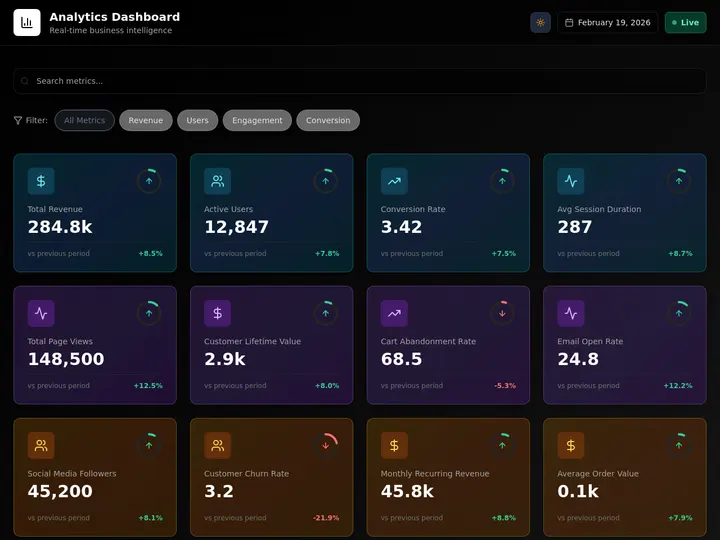
You can see the pattern in the wild on the Community Gallery — real apps people built and published from a prompt, from dashboards to internal tools:
Pricing Deep Dive: What Does Each Platform Actually Cost?
Hidden costs kill agent projects. Here is what a team of 5 building 20 agent workflows per month actually pays:
| Platform | Base Cost | Per-Execution | Infrastructure | Total (5 users, 20 workflows/mo) |
|---|---|---|---|---|
| Taskade Genesis | $10/mo flat, up to 10 users (billed annually) | Included | Included | $10/mo |
| CrewAI Cloud | $99/mo | 50 included, then usage | Included | $150-300/mo |
| LangGraph Cloud | $39/seat/mo | $0.001/node + $0.005/run | Included | $200-400/mo |
| n8n Cloud | EUR 24/mo base | Per-execution on higher tiers | Included | $50-200/mo |
| Relevance AI | $19-234/mo | 200 actions free, then usage | Included | $100-300/mo |
| Lindy AI | $49.99/mo | Credit-based ($10/1K credits) | Included | $100-250/mo |
| Self-hosted (CrewAI/LangGraph/AutoGen) | $0 | $0 | $50-200/mo (VPS, GPUs, monitoring) | $50-200/mo |
Decision Framework: Which Platform Is Right for You?
What Top Companies Are Building with AI Agents
AI agents are not a research project anymore. Here is what production deployments look like in 2026:
| Company | Agent Use Case | Platform | Result |
|---|---|---|---|
| Monday.com | Replaced 100 SDR seats with AI agents for lead qualification | Custom | 90% seat compression |
| Block | Payment fraud detection agents | MCP + custom | Reduced false positives 40% |
| Engineering workflow automation | MCP servers | Deployed in production (April 2026) | |
| Klarna | Customer service — 2.3M conversations resolved | Custom | Efficiency up, but customer satisfaction dropped (intent alignment lesson) |
| Bloomberg | Financial data analysis agents | MCP + enterprise | Enterprise-scale deployment |
The Klarna case is instructive. Their agents resolved 2.3 million conversations efficiently — but destroyed customer relationships because speed was the wrong optimization target. The lesson: agent capability without intent alignment is a liability. Platforms that enforce human-in-the-loop review (like Taskade's RBAC) prevent this failure mode.
The Market Is Consolidating
The 120+ tools in the agent landscape are collapsing into three tiers:
Tier 1: All-in-one platforms — Agents + workspace + automations in one product. Taskade Genesis leads this category.
Tier 2: Developer frameworks — Open-source tools that require assembly. CrewAI, LangGraph, and AutoGen compete here, with CrewAI and AutoGen/Semantic Kernel converging toward managed offerings.
Tier 3: Vertical specialists — Tools optimized for specific use cases (Botpress for conversational AI, Voiceflow for voice, Lindy for business tasks). These will either expand or get acquired.
Notable M&A signals:
- Workday acquired Flowise (August 2025) — pulling agent builders into HR/finance
- AutoGen merged with Semantic Kernel (February 2026) — Microsoft consolidating its agent stack
- The Agentic AI Foundation (AAIF) formed under the Linux Foundation (December 2025) — standardizing agent protocols across companies
The consolidation pattern is clear: agents are becoming infrastructure, not standalone products. The winners will be platforms where agents are native to the workflow — not bolted on.
Get Started: Build Your First AI Agent
You do not need to pick a framework, configure a vector database, or deploy a server. With Taskade Genesis, describe what you want and the system builds it:
- Go to taskade.com/agents and create a new agent
- Define the agent's role, tools, and knowledge — train it on your documents, connect built-in tools
- Set up automations — trigger agents on schedule, on events, or on demand via 100+ integrations
- Deploy — publish agents publicly, embed them in your site, or keep them internal with RBAC
Build your first AI agent free →
FAQ
What exactly is an AI agent platform?
An AI agent platform provides the infrastructure for building, deploying, and managing autonomous AI agents. Unlike chatbots that only respond to prompts, agents can plan multi-step tasks, use tools to interact with external systems, maintain memory across sessions, and collaborate with other agents. Platforms range from no-code builders like Taskade Genesis to developer frameworks like CrewAI and LangGraph.
How do I choose between a no-code platform and a developer framework?
If your team includes Python developers who need fine-grained control over agent behavior, LangGraph or CrewAI give you that control. If your team needs agents integrated into an existing workspace with projects, tasks, and automations, Taskade Genesis eliminates the integration overhead. Most teams start with a no-code platform and only move to frameworks when they hit specific limitations.
Can I switch platforms later?
This depends on how tightly your agents are coupled to platform-specific features. Agents built on open protocols like MCP are more portable than agents locked to proprietary tool ecosystems. Taskade Genesis runs both sides of MCP: any MCP client can read the workspace your agents live in, and the MCP Client automation step calls out to external MCP servers on every plan. The outbound call lives in the automation rather than in the agent itself.
What is the Agentic AI Foundation?
The Agentic AI Foundation (AAIF) was formed under the Linux Foundation in December 2025 with founding contributions from Anthropic (MCP), Block (goose), and OpenAI (AGENTS.md). Platinum members include AWS, Google, Microsoft, and Bloomberg. It provides a neutral foundation for open agent standards, ensuring the agent ecosystem does not fracture into incompatible silos.
How do AI agents connect to external tools?
Most platforms use the Model Context Protocol (MCP) — an open standard that lets AI clients talk to any tool via structured JSON-RPC messages. Think of MCP as USB-C for AI: write a tool server once, and any MCP-compatible client can use it. Taskade Genesis sits on both sides of that split: clients connect into the workspace on every paid plan, and an MCP Client automation step calls out to other servers on every plan. Over 10,000 public MCP servers exist as of April 2026.
Are AI agents safe?
Safety depends on the platform and deployment. Key safeguards include human-in-the-loop review at critical decision points, RBAC permissions (Taskade offers role-based access from Owner to Viewer), audit logging, and rate limiting. The OWASP MCP Top 10 published in 2026 identifies common vulnerabilities including prompt injection, tool poisoning, and cost amplification. Responsible platforms enforce these controls by default.
What are the main types of AI agent platforms?
There are four types. Code frameworks like CrewAI, LangGraph, and the Microsoft Agent Framework give developers full control. Managed enterprise platforms add governance, SSO, and audit logs. No-code and visual builders like Taskade Genesis, Lindy AI, and Relevance AI let non-developers describe agents in plain English. Orchestration layers like n8n route between agents and existing apps. The right type depends on whether you have engineers on staff, need compliance, or want to ship without code.
What is the difference between single-agent and multi-agent orchestration?
Single-agent uses one agent with one tool belt for a narrow task, prioritizing predictability. Multi-agent peer orchestration runs specialists in parallel and merges their output for speed and breadth. Supervisor (hierarchical) orchestration adds a coordinator that delegates to specialists, reviews their work, and merges results — the pattern production teams converge on. Taskade Genesis exposes the supervisor pattern through the Taskade EVE meta-agent, which assembles and coordinates agent teams from a single prompt.
How do I avoid lock-in with an AI agent platform?
Lock-in lives in your data, your tool definitions, and your orchestration logic. Hedge it with open protocols and clean data export. MCP, the Model Context Protocol, is now the standard for connecting agents to tools, so MCP-based tools survive a platform switch. Taskade Genesis ships a hosted MCP server on every paid plan from Starter up, so any client can keep reading your workspace after a switch. Always confirm you can export projects and agent knowledge in an open format on demand.
Related Reading
- How to Build a Custom AI Agent From Scratch — the DIY-builder sibling of this ranking
- The Best Individual AI Agents Ranked — ready-made agents, from Devin to Genspark
- Multi-Agent Orchestration Platforms for Teams — when a single agent platform isn't enough
- Free AI Agent Builders — free tiers verified, for builders on a budget
- What AI Agent Builders Are and How to Choose One — the conceptual primer behind this ranking
- What Is Agentic AI? — Complete guide to autonomous agents and frameworks
- What Is Agentic Engineering? — Karpathy's framework for directing AI agents
- Best MCP Servers 2026 — The protocol powering agent tool use
- Best AI Workspace Tools 2026 — Where agents meet productivity
- Best Vibe Coding Tools 2026 — AI app builders compared
- What Are Multi-Agent Systems? — Building autonomous AI teams
- Best Agentic Engineering Platforms — Tools for orchestrating AI agent teams
- AI Agents Taxonomy — A complete classification of AI agent types