







Notion defined the "all-in-one workspace" category in 2019. Seven years later, the category has fractured. Notion bolted AI onto a document database. ClickUp bolted AI onto a project management tool. Monday.com bolted AI onto a visual spreadsheet. None of them started with AI as the foundation.
The next generation of workspace tools treats AI as architecture, not accessory. Agents that work alongside you. Automations that execute without oversight. Multi-model intelligence that learns from your entire workspace. This is the post-Notion era — and 2026 is the year the category gets redefined.
TL;DR: Taskade is the only AI-native workspace where agents, automations, and multiple project views are core architecture, not add-ons. 150,000+ Genesis apps built, 500,000+ agents deployed, 100+ integrations. It is the workspace the post-Notion era demands. See how living apps change productivity. Try it free -->
This guide ranks the 13 best AI workspace tools in 2026, evaluates what separates AI-native platforms from AI-augmented ones, and gives you a migration playbook for leaving legacy tools behind.
What Is an AI Workspace?
An AI workspace is a productivity platform where artificial intelligence is embedded in every layer of the product — projects, notes, tasks, collaboration, search, and automation — rather than added as a bolt-on feature or chatbot sidebar.
The distinction matters. In a traditional workspace with AI, you type a prompt, get a response, and then manually paste it into your project. In an AI workspace, agents operate inside your projects. They read your context, trigger automations, update tasks, and collaborate in real time alongside human teammates. The AI does not sit in a chat window waiting to be asked. It participates.
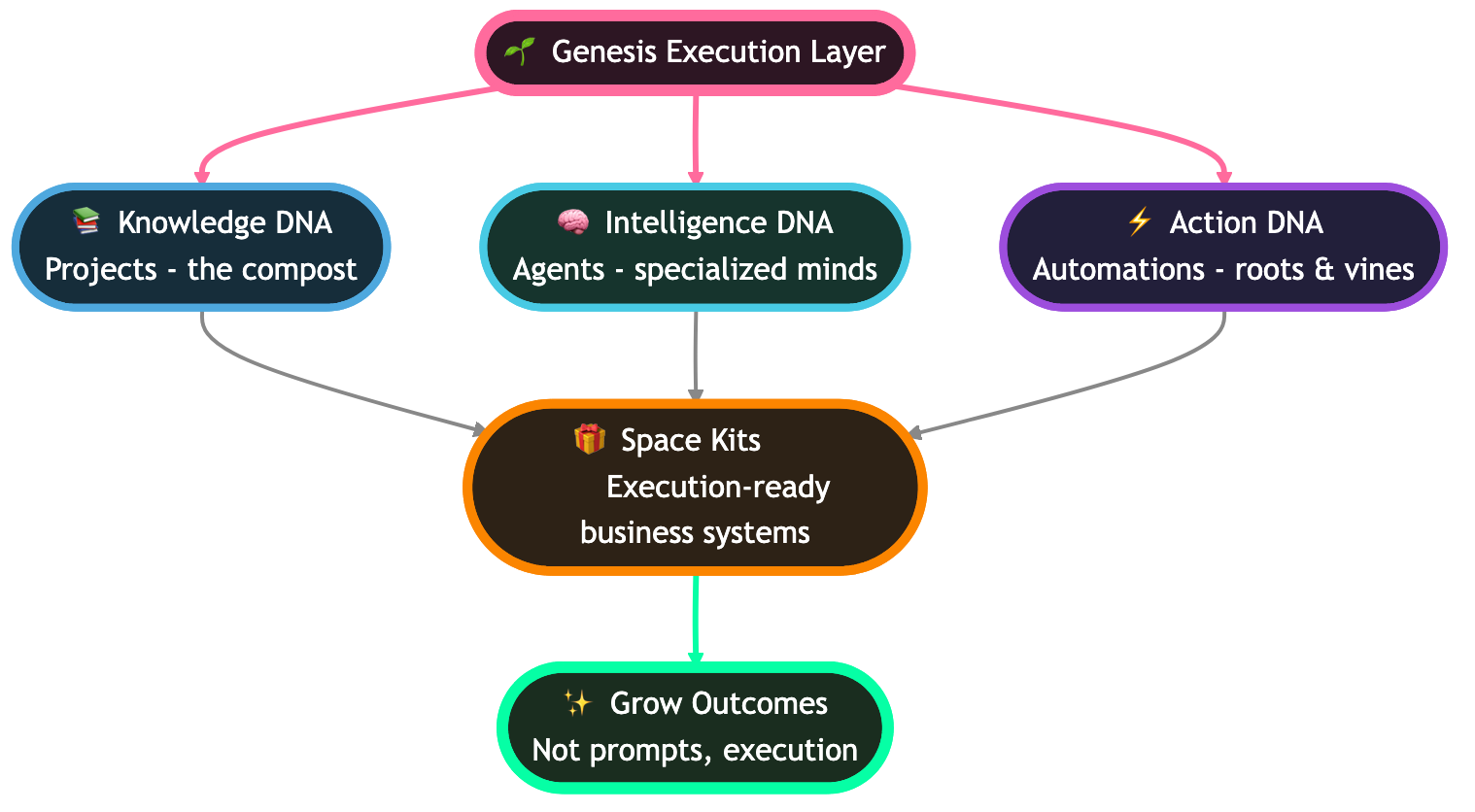
Taskade coined the term Workspace DNA to describe this architecture: Memory (projects, notes, knowledge) feeds Intelligence (AI agents with built-in tools), which triggers Execution (automations across 100+ integrations), which creates new Memory. The loop is self-reinforcing. Every action makes the workspace smarter.
This is what separates a workspace that happens to have AI from a workspace that is built on AI.
The All-in-One Era vs the AI-Native Era
The "all-in-one workspace" label dominated from 2019 to 2024. Notion, Coda, and ClickUp competed on surface area — how many features you could cram into one product. The value proposition was consolidation: replace five tools with one.
That era is over. Consolidation is table stakes. The new question is not "how many features does this tool have?" but "how intelligent is the platform itself?"
Here is how the two eras compare:
| Dimension | All-in-One Era (2019-2024) | AI-Native Era (2025+) |
|---|---|---|
| Core value | Feature consolidation | Intelligent execution |
| AI role | Bolt-on chatbot or autocomplete | Embedded agents, multi-model backbone |
| Agent capability | None or single-prompt Q&A | Autonomous agents with tools, memory, collaboration |
| Memory | Static docs and databases | Contextual knowledge that agents read and update |
| Automation | Zapier-style triggers (external) | Native workflows with 100+ integrations |
| Views | 3-5 (list, board, calendar) | 7 (List, Board, Calendar, Table, Mind Map, Gantt, Org Chart) |
| Search | Keyword full-text | Multi-layer (full-text + semantic HNSW + file OCR) |
| Publishing | Export to PDF | Live apps with custom domains, password protection |
| Pricing model | Per-user, feature-gated | Team-based, capabilities-gated |
| Collaboration model | Human-to-human real-time editing | Human-to-human + human-to-agent + agent-to-agent |
| Permissions | 3-4 roles (admin, editor, viewer) | RBAC (Owner to Viewer) |
| Exemplar | Notion | Taskade |
The shift is structural, not cosmetic. You cannot make an all-in-one tool AI-native by adding a chatbot. The architecture has to be rebuilt around intelligence as the core primitive.
Gartner projects AI agents will disrupt $58 billion in productivity software by 2027. The consensus across 2026 industry roundups: the all-in-one workspace era is over — the AI-native era has begun.
AI Cost Comparison: What AI Actually Costs Per Platform
The hidden cost of "AI workspace" tools is the AI add-on itself. Here is what a 10-person team actually pays for AI features:
| Platform | Base (10 users) | AI Add-on | Total with AI |
|---|---|---|---|
| Taskade | $10/mo (Pro, 10 seats included) | Included | $10/mo |
| Notion | $100/mo (Plus) | $80/mo ($8/user) | $180/mo |
| ClickUp | $120/mo (Business) | $50-90/mo ($5-9/user) | $170-210/mo |
| Monday.com | $160/mo (Standard, 3-seat min) | $200/mo (credit packs) | $360/mo |
| Asana | $249/mo (Advanced) | Bundled (AI Studio credits) | $249/mo |
| Coda | $300/mo (Team) | Included | $300/mo |
Taskade is the only platform where AI agents, multi-model support, and 100+ integrations are included in the base price — not gated behind add-ons or credit packs.
How We Ranked
Every tool on this list was evaluated against six criteria. These reflect what matters for teams choosing an AI workspace in 2026, not what mattered in 2022.
1. AI depth. Does the platform have AI agents with tools, persistent memory, and multi-model support? Or is it a single-prompt chatbot layered on top of a document editor?
2. Workspace completeness. Can it replace notes, tasks, projects, wiki, chat, and dashboards? Or do you still need three other tools?
3. Automation and integrations. Can the platform trigger actions across external tools without leaving the workspace? How many integrations ship natively?
4. Collaboration model. Does the platform support real-time multiplayer editing, role-based access control, and shared agent context? Or is it a single-player tool with sharing bolted on?
5. Publishing and output. Can you turn workspace content into live apps, public pages, or embedded widgets? Or is the output limited to PDFs and static exports?
6. Pricing fairness. Does the pricing scale with team size without punishing small teams? Are AI features included in the base plan or gated behind expensive add-ons?
+------------------------------------------------------+
|                  SCORING FRAMEWORK                   |
|------------------------------------------------------|
|  AI Depth           [==============================] |
|  Workspace Scope    [==============================] |
|  Automations        [==============================] |
|  Collaboration      [==============================] |
|  Publishing         [==============================] |
|  Pricing Fairness   [==============================] |
+------------------------------------------------------+
|  Each bar: 0 (empty) to 10 (full). Max score = 60.   |
+------------------------------------------------------+
Tools that score high across all six dimensions earn a spot near the top of the list. Tools that dominate one or two dimensions but leave gaps in others are ranked lower but still included for teams with specific needs.
The 13 Best AI Workspaces in 2026
1. Taskade — The AI-Native Workspace
Taskade is the workspace where AI is not a feature — it is the architecture. Every project, note, and task lives inside a system where AI agents operate as teammates, automations run as background processes, and the entire workspace learns from itself.
Workspace DNA is the core framework. Memory (projects, notes, documents, databases) feeds Intelligence (AI agents with built-in tools, custom agent tools since v6.99, multi-model support across 15+ frontier models from OpenAI, Anthropic, and Google). Intelligence triggers Execution (automations across 100+ integrations added in v6.97). Execution creates new Memory. The loop is self-reinforcing — every action makes the workspace smarter.
The project views — List, Board, Calendar, Table, Mind Map, Gantt, and Org Chart — mean you never need a separate tool for Kanban boards, sprint planning, timeline visualization, or mind mapping. Switch between views instantly on the same underlying data.
Multi-layer search combines full-text indexing, semantic search (HNSW, 1536-dimensional vectors), and file content OCR. You can find a PDF attachment by searching for text inside the PDF. You can find a related project by searching semantically for concepts, not just keywords.
AI Agents v2 go beyond chat. Each agent has persistent memory, slash commands, and access to built-in tools. Custom Agent Tools (v6.99) let you extend agents with your own capabilities. Agents collaborate with each other in multi-agent workflows. You can embed agents publicly and share them via the Community Gallery — 130,000+ apps and 500,000+ agents already live.
Taskade Genesis turns natural-language prompts into live apps — CRM dashboards, intake portals, knowledge bases, client-facing tools. Custom domains, password protection, and one-click publishing. Over 150,000 Genesis apps have been built since launch.
Role-based access (Owner to Viewer) gives you granular control over who sees what and who can do what. This is not "admin/editor/viewer" — it is enterprise-grade permissions with a distinct level for every kind of collaborator.
| Plan | Price (Annual) | Users | Highlights |
|---|---|---|---|
| Free | $0 | Unlimited | AI agents, basic views, 11,000 credits |
| Pro | $10/mo | 10 included | Multi-agent, advanced automations |
| Business | $25/mo | Unlimited | Custom domains, priority support |
| Enterprise | Custom | Custom | SSO, audit logs, dedicated support |
Best for: Teams that want one AI-native platform replacing notes, tasks, projects, wiki, chat, dashboards, and automations. Start free at taskade.com/create.
2. Notion AI — Design-First Workspace with AI Add-On
Notion defined the all-in-one workspace category. Its block-based editor remains the most flexible document system on the market. Notion AI, launched in 2023, adds Q&A over your workspace, AI writing assistance, and autofill for databases.
Notion's strength is design flexibility. The block system lets you build beautiful pages with nested databases, toggle lists, callouts, and embedded content. For teams that care about how their workspace looks, Notion is hard to beat.
The limitation is architectural. Notion AI is a layer on top of a document database. It does not have autonomous agents, native automation workflows, or multi-model support. AI actions are prompt-and-response — you ask, it answers, you paste. There is no self-reinforcing loop.
Notion recently added Notion Projects for project management, but it still lacks Gantt charts, org charts, timeline views, and mind maps. The free plan does not include AI features — those require the $10/user/month AI add-on on top of the base plan.
Pricing: Free (no AI), Plus $10/user/mo, Business $18/user/mo, AI add-on $10/user/mo extra. A 10-person team with AI costs $200-280/month.
Best for: Teams that prioritize beautiful documentation and wiki pages over AI-native execution.
3. Coda AI — Document-Centric Workspace
Coda blurs the line between documents and applications. Its "doc as app" philosophy lets you build interactive tools with formulas, buttons, and automations — all inside a document. Coda AI adds an AI column type, AI-powered writing, and natural-language formula generation.
Coda excels when your workflow is document-heavy. Meeting notes that auto-generate tasks. Product specs that calculate launch timelines. Customer feedback docs that categorize and prioritize automatically. The formula language (similar to spreadsheet formulas) gives power users deep customization.
The trade-off is complexity. Coda's learning curve is steeper than Notion or Taskade. The AI features are limited to document-level operations — no autonomous agents, no persistent agent memory, no multi-agent collaboration. Automation is formula-driven, not integration-driven (limited native integrations compared to Taskade's 100+).
Pricing: Free (limited), Pro $12/user/mo, Team $36/user/mo, Enterprise custom. A 10-person team costs $120-360/month.
Best for: Teams that want documents to behave like lightweight applications with formula-driven logic.
4. Mem — AI-Native Capture
Mem is built around a single idea: capture first, organize never. You dump notes, meetings, ideas, and links into Mem, and the AI organizes everything automatically using semantic similarity and temporal context.
Mem's self-organizing knowledge base genuinely reduces the overhead of note management. You do not create folders or tags. The AI surfaces related notes when you need them, clusters content by topic, and generates summaries across your knowledge base.
The limitation is scope. Mem is a note-taking tool, not a workspace. It has no task management, no project views, no team collaboration features, no automations, and no integrations beyond basic calendar sync. If your workflow extends beyond capturing and retrieving knowledge, you need additional tools.
Mem recently added Mem Chat for conversational Q&A over your notes, which is genuinely useful for personal knowledge retrieval. But it remains a single-player tool optimized for individual knowledge workers.
Pricing: Free (limited), Pro $14.99/month (individual only). No team plan.
Best for: Solo knowledge workers who want zero-friction note capture with AI-powered retrieval and do not need project management.
5. ClickUp AI (ClickUp Brain) — PM-Heavy Workspace
ClickUp is the project management platform that tried hardest to become an all-in-one workspace. ClickUp Brain, launched in 2024, adds AI across tasks, docs, and dashboards. AI can generate tasks from meeting notes, summarize projects, and suggest automations.
ClickUp's strength is project management depth. Multiple views (list, board, timeline, Gantt, calendar), custom fields, time tracking, goals, portfolios, and sprint management. For teams with complex project management needs, ClickUp delivers more granularity than most competitors.
ClickUp Brain operates as an AI assistant inside the existing PM framework. It can answer questions about your projects, generate updates, and draft documents. But it lacks autonomous agent capabilities, multi-model support, custom agent tools, and the agent-to-agent collaboration that Taskade offers.
The platform's complexity is both its strength and weakness. ClickUp has more features than most teams need, and the learning curve reflects that. The AI capabilities, while useful, feel like an overlay on an already-complex system rather than a native part of the architecture.
Pricing: Free (limited), Unlimited $7/user/mo, Business $12/user/mo, Enterprise custom. ClickUp Brain is an add-on. A 10-person Business team costs $120/month plus AI add-on.
Best for: Teams with complex project management needs (sprints, portfolios, time tracking) who want AI assistance layered on top. See also: Best ClickUp AI Alternatives.
6. Monday.com + AI — Visual Work Management
Monday.com is a visual work management platform where everything is a board. Monday AI assistants can generate formulas, compose updates, summarize items, and build automations from natural language.
Monday's strength is visual approachability. The colorful board interface is easier to learn than ClickUp or Coda. Non-technical teams — marketing, HR, operations — can build workflows without training. The automation builder is drag-and-drop with hundreds of pre-built recipes.
The AI features are board-level — AI can operate on items within a board but does not have cross-workspace intelligence, agent memory, or autonomous execution. Monday's pricing scales per user and per product (Work Management, CRM, Dev), which gets expensive fast for teams that need multiple products.
Pricing: Free (2 users), Basic $9/seat/mo, Standard $12/seat/mo, Pro $19/seat/mo, Enterprise custom. A 10-person Pro team costs $190/month.
Best for: Non-technical teams that want a visual, approachable project board with basic AI assistance and drag-and-drop automations.
7. Airtable + AI — Database-First Workspace
Airtable is a spreadsheet-database hybrid that added AI features in 2024. AI Field generates content in any column, AI-powered search finds records semantically, and AI-generated automations translate natural language into trigger-action workflows.
Airtable's foundation is the relational database. Unlike document-based workspaces (Notion, Coda), Airtable thinks in rows, columns, and relationships. This makes it powerful for structured data: CRM records, inventory management, content calendars, and applicant tracking.
The AI capabilities are record-level. AI can populate fields, classify records, and summarize data within a table. But there are no AI agents, no persistent agent memory, and no multi-model support. Airtable's automation engine is competent but limited to trigger-action pairs without the branching, looping, and filtering that Taskade automations offer.
Pricing: Free (limited), Team $20/seat/mo, Business $45/seat/mo, Enterprise custom. A 10-person Business team costs $450/month.
Best for: Teams with structured, relational data workflows who want AI-augmented database operations.
8. Craft — Apple-Native Workspace
Craft is a document and note-taking app designed for the Apple ecosystem. It uses native macOS and iOS frameworks for a buttery-smooth editing experience. Craft AI assists with writing, summarization, and Q&A over your documents.
Craft's strength is polish on Apple platforms. The native rendering (not web-based like most competitors) makes it the fastest, smoothest workspace on Mac and iPad. Document linking, backlinks, and the daily notes feature create a lightweight personal knowledge system.
The trade-off is platform lock-in and feature scope. Craft has no project management views (no Gantt, no board, no timeline), no automations, no integrations beyond basic import/export, and limited team collaboration features. AI is writing-focused — no agents, no autonomous execution.
Pricing: Free (limited), Pro $5/month (individual), Business $10/user/mo. A 10-person team costs $100/month.
Best for: Apple-first individuals and small teams who want beautiful document creation with lightweight AI writing assistance.
9. Tana — Supertag Knowledge System
Tana is built around supertags — a system where every node in your workspace can be typed, structured, and queried like a database record. It is the most data-model-savvy tool on this list.
Tana AI integrates into the supertag system. AI can auto-tag content, generate structured data from unstructured notes, and run AI commands across your knowledge graph. The "AI command" system lets you build reusable AI workflows that operate on specific supertag types.
The limitation is maturity and accessibility. Tana is still in limited availability (invite-based) with a steep learning curve. Teams need to invest significant time designing their supertag ontology before the system pays off. No mobile app, no automation integrations, and limited collaboration features compared to full workspaces.
Pricing: Free (limited), Tana Pro $10/month (individual). Team pricing not publicly available.
Best for: Power users and knowledge workers who want to build a highly structured personal knowledge system with AI-powered data modeling.
10. Saga — Multiplayer AI Workspace
Saga focuses on real-time multiplayer collaboration with AI. The editor supports simultaneous editing, AI writing assistance, and an AI assistant that answers questions across your entire workspace.
Saga's differentiator is simplicity. It does not try to be everything — it is a clean, fast, multiplayer document workspace with AI. The auto-linking feature connects related pages automatically, and the search indexes content across all workspace pages.
The limitation is depth. No task management beyond basic to-do lists, no project views, no automations, no integrations. Saga is great for collaborative writing and knowledge sharing but requires other tools for project execution.
Pricing: Free (limited), Pro $10/user/mo. A 10-person team costs $100/month.
Best for: Small teams that want a clean, fast multiplayer document workspace with AI writing and search without the complexity of full project management.
11. Capacities — Object-Based Knowledge System
Capacities organizes knowledge around objects — people, books, meetings, projects — rather than pages or folders. Each object type has its own properties, views, and relationships.
Capacities AI can generate content, summarize objects, and answer questions across your knowledge base. The object model makes AI interactions more structured than in page-based tools — you can ask AI about all meetings with a specific person, or all books related to a topic.
The limitation is workspace scope. Capacities is a personal knowledge management tool, not a team workspace. No team collaboration, no project management views, no automations, no integrations. It serves a specific niche well but cannot replace a full workspace.
Pricing: Free (limited), Pro $9.99/month (individual). No team plan.
Best for: Individual knowledge workers who think in objects and relationships rather than documents and folders.
12. Anytype — Local-First Knowledge Platform
Anytype is a local-first, privacy-focused knowledge platform. All data is stored on your device and synced peer-to-peer using encryption. No server sees your content.
Anytype uses a graph-based data model with types and relations (similar to Capacities). The platform is open-source and community-driven. AI features are emerging — basic AI assistance for writing and Q&A — but the platform's primary appeal is privacy and data ownership.
The trade-off is feature maturity. Anytype is younger than most tools on this list. Team collaboration is basic, project management features are minimal, and the automation system is still in development. If privacy is your top priority and you are willing to accept fewer features, Anytype is the strongest option.
Pricing: Free (current beta), Explorer free, Builder $99/year. No per-user pricing.
Best for: Privacy-conscious users and teams who want local-first, encrypted knowledge management and are willing to trade feature depth for data sovereignty.
13. Fibery AI — Product Team Workspace
Fibery is an AI workspace built specifically for product teams. It combines product management (roadmaps, backlogs, user stories), knowledge management (docs, wikis), and data analysis (reports, charts) with AI across all layers.
Fibery AI can generate user stories from feedback, summarize customer interviews, draft PRDs, and highlight patterns across qualitative data. The formula system and custom entity types let product teams model their specific workflow without forcing them into a generic framework.
The limitation is target audience. Fibery is purpose-built for product and engineering teams. If your team does not do product management, most of Fibery's value goes unused. The learning curve is moderate, and the interface is denser than consumer-friendly tools like Notion or Monday.com.
Pricing: Free (limited), Standard $10/user/mo, Pro $17/user/mo. A 10-person Pro team costs $170/month.
Best for: Product and engineering teams that want an integrated workspace for roadmaps, backlogs, customer feedback analysis, and product documentation with AI assistance.
Mega Comparison Matrix
| Feature | Taskade | Notion AI | Coda AI | Mem | ClickUp Brain | Monday AI | Airtable AI | Craft | Tana | Saga | Capacities | Anytype | Fibery AI |
|---|---|---|---|---|---|---|---|---|---|---|---|---|---|
| AI Agents | built-in tools, multi-agent | Q&A assistant | AI columns | AI chat | Brain assistant | AI assist | AI Field | AI writer | AI commands | AI assistant | AI assist | Basic AI | AI assist |
| Autonomous Execution | Yes | No | No | No | Limited | No | No | No | Limited | No | No | No | No |
| Multi-Model | 15+ models | 1 provider | 1 provider | 1 provider | 1 provider | 1 provider | 1 provider | 1 provider | 1 provider | 1 provider | 1 provider | Varies | 1 provider |
| Project Views | 8 | 5 | 2 | 0 | 6+ | 4 | 6 | 1 | 1 | 1 | 1 | 3 | 4 |
| Native Automations | 100+ integrations | Limited | Formula-based | None | Yes | Yes (recipes) | Yes | None | None | None | None | Emerging | Yes |
| Live App Publishing | Genesis (custom domains) | No | No | No | No | No | No | No | No | No | No | No | No |
| Real-Time Collab | Multiplayer + agents | Multiplayer | Multiplayer | Single-player | Multiplayer | Multiplayer | Multiplayer | Limited | Limited | Multiplayer | Single-player | P2P sync | Multiplayer |
| Semantic Search | Full-text + HNSW + OCR | AI Q&A | Doc search | Semantic | Keyword | Keyword | AI search | Basic | Graph | Cross-page | Object-based | Local | Keyword |
| RBAC | Owner to Viewer | 4-tier | 3-tier | N/A | 4-tier | 4-tier | 4-tier | 3-tier | N/A | 3-tier | N/A | N/A | 4-tier |
| Free Tier AI | Yes (11,000 credits) | No (paid add-on) | Limited | Limited | No (add-on) | No (add-on) | Limited | Limited | Limited | Limited | Limited | Emerging | Limited |
AI Workspace Features That Matter
Semantic Search vs Keyword Search
Keyword search finds the word you typed. Semantic search finds the meaning you intended. The difference is the gap between "find every document containing 'budget'" and "find everything related to Q3 financial planning."
Taskade's multi-layer search combines three approaches: full-text indexing for exact matches, semantic HNSW search (1,536-dimensional vectors) for conceptual similarity, and file content OCR for text inside PDFs, images, and attachments. The three layers merge and rank results so you get exact matches when you want precision and conceptual matches when you want breadth.
Most competitors offer keyword search only. Notion AI adds Q&A that can answer questions about your workspace, but it is a separate interaction — you ask the AI, it answers, and you navigate manually. Mem uses semantic similarity for note surfacing, which is strong for personal knowledge but does not extend to team-wide project search.
Search quality directly determines workspace utility. A workspace with 10,000 documents is only useful if you can find the right one in seconds. Multi-layer search is what makes large workspaces usable.
AI Agents with Tools and Memory
An AI agent is not a chatbot. A chatbot responds to prompts. An agent operates inside your workspace with tools, memory, and the ability to take actions without waiting for instructions.
Taskade AI Agents v2 ship with built-in tools — reading and writing project content, managing tasks, searching the workspace, and executing multi-step workflows. Custom Agent Tools (v6.99) let you extend agents with your own capabilities. Agents retain persistent memory across conversations, so they learn your preferences, project context, and team patterns over time.
Multi-agent collaboration means agents can work together. A research agent gathers data, passes it to an analysis agent, which summarizes findings and routes action items to a task management agent. This is not theoretical — 500,000+ agents are live in the Community Gallery, and teams deploy multi-agent workflows daily.
Most competitors offer single-prompt AI assistance. ClickUp Brain and Monday AI can answer questions about your projects but cannot take autonomous actions. Notion AI generates text but does not have agent memory or tools.
Automation Beyond Zapier
Traditional automation is trigger-action: "when X happens, do Y." This works for simple workflows but breaks down for anything with conditions, loops, or error handling.
Taskade automations support branching (if-then-else logic), looping (repeat until condition is met), and filtering (process only items matching criteria). With 100+ native integrations across communication, email, CRM, payments, development, productivity, content, analytics, storage, and e-commerce, automations connect your workspace to every tool your team uses.
The key difference is that automations run inside the workspace context. An automation triggered by a project update has access to the full project history, agent insights, and team activity. External automation tools like Zapier operate in a vacuum — they move data between tools but do not understand the context of that data. See also: Best Zapier Alternatives.
Multi-Model Intelligence
Relying on a single AI model is a single point of failure. Different models excel at different tasks — one model might be stronger at code generation, another at creative writing, a third at data analysis.
Taskade supports 15+ frontier models from OpenAI, Anthropic, and Google. You can assign different models to different agents based on the task. A coding agent might use one model while a writing agent uses another. Model switching is per-agent, not per-workspace, giving you fine-grained control.
Most competitors are locked into a single AI provider. Notion uses one provider. ClickUp Brain uses one provider. This means your workspace intelligence is constrained by the strengths and weaknesses of a single model.
Multi-model support also future-proofs your workspace. When a new model launches with better capabilities for a specific task, you can switch without migrating your workspace.
Publishing Living Apps
A workspace that can only produce documents is a workspace that creates work for other tools. When your project plan lives in one tool and the client-facing dashboard lives in another, you are maintaining two copies of the same information.
Taskade Genesis closes this gap. Describe what you need in natural language — a CRM dashboard, an intake portal, a knowledge base, a client-facing status page — and Genesis builds it as a live app inside your workspace. Custom domains, password protection, and one-click publishing mean your workspace output goes directly to stakeholders without manual export or rebuilding.
Over 150,000 Genesis apps have been built. The Community Gallery hosts 130,000+ published apps that anyone can clone and customize. This is not prototyping — these are live, production applications with real users. Learn more about how this paradigm changes productivity in The Living App Movement.
No other workspace on this list can publish live applications from workspace content.
The Workspace DNA Difference
Workspace DNA is not a marketing term. It is the architectural principle that separates Taskade from every other tool on this list.
Here is the same loop in text form:
+----------------+         +-------------------+         +------------------+
|    MEMORY      |  feeds  |   INTELLIGENCE    | triggers|    EXECUTION     |
|----------------|-------->|-------------------|-------->|------------------|
| Projects       |         | AI Agents (33     |         | Automations      |
| Notes          |         |   built-in tools) |         | 100+ Integrations|
| Documents      |         | Multi-model (15+) |         | Branching/Looping|
| Databases      |         | Persistent Memory |         | Cross-workspace  |
| Knowledge Base |         | Custom Tools      |         | Reliable Workflows|
+----------------+         +-------------------+         +------------------+
        ^                                                         |
        |                     creates new                         |
        +---------------------------------------------------------+
Memory is everything your team produces: projects, notes, documents, databases, chat history, file attachments. In a traditional workspace, this content is static. In Taskade, it is the fuel that powers intelligence.
Intelligence is the AI agent layer. Agents with built-in tools and custom agent tools (v6.99) read your workspace memory, understand context, and take actions. Multi-model support (15+ frontier models from OpenAI, Anthropic, and Google) means each agent uses the best model for its task. Persistent memory means agents get smarter over time — they remember past conversations, learn your preferences, and build contextual understanding.
Execution is the automation layer. When intelligence produces an insight or decision, execution makes it real. Automations across 100+ integrations move data, trigger workflows, update external tools, and create new workspace content. Branching, looping, and filtering make automations handle real-world complexity, not just simple trigger-action pairs.
The critical insight is the feedback loop. Execution creates new Memory (a completed automation produces a report, updates a project, or logs results). New Memory feeds new Intelligence (agents see the updated context and adjust their recommendations). New Intelligence triggers new Execution. The workspace gets smarter with every cycle.
This is why Taskade is not "Notion with AI" or "ClickUp with agents." The architecture is fundamentally different. In other tools, AI is a feature you invoke. In Taskade, AI is a participant that operates continuously inside the workspace loop.
Every Genesis app is built on this loop. Every agent participates in it. Every automation feeds back into it. This is Workspace DNA.
Choose Your Workspace
Not every team needs the same tool. This decision tree helps you find the right fit based on your primary need.
If your primary need is AI-native execution — agents that work alongside you, automations that run in the background, and a workspace that learns from itself — Taskade is the answer. For specific verticals (beautiful docs, complex PM, relational databases), the specialized tools may serve you better, but you will still need additional tools to fill the gaps.
Free Tier Comparison
How much AI capability do you get for free? This chart scores each platform's free tier on AI feature depth (0-10 scale):
Taskade's free tier stands out because it includes AI agents, basic project views, and 11,000 credits for AI operations. Notion gates all AI features behind a paid add-on. ClickUp and Monday gate AI behind add-ons. Coda, Airtable, and Fibery offer limited AI in free plans but restrict usage heavily.
For teams evaluating AI workspaces, the free tier is the best test. Start with Taskade free and test agents, automations, and basic views before committing to a paid plan.
Migration Playbook: From Notion to Taskade
Most teams migrating to an AI workspace are coming from Notion. Here is the step-by-step process:
Step 1: Export from Notion. Use Notion's built-in export (Settings > Export > Markdown & CSV). This creates a ZIP file with all your pages and databases. Notion databases export as CSV files with all properties preserved.
Step 2: Import to Taskade. Taskade supports importing Notion pages and databases. Upload the exported files and Taskade converts them to projects. Most migrations take under an hour for teams of 10. Pages become projects, inline databases become structured content.
Step 3: Map databases to views. Notion databases are essentially tables with views. Taskade's views (List, Board, Calendar, Table, Mind Map, Gantt, Org Chart) give you more visualization options. A Notion kanban board maps to Board view. A Notion calendar database maps to Calendar view. A Notion table stays a Table view. You gain Mind Map, Gantt, and Org Chart views that Notion does not offer.
Step 4: Wire AI agents. This is where the real upgrade happens. Create agents for your most common workflows — meeting summarization, task extraction, project status updates, customer feedback analysis. Each agent gets persistent memory and access to built-in tools. Assign different models to different agents based on the task.
Step 5: Build automations. Connect your workspace to the tools your team uses via 100+ integrations. Set up automations with branching logic, loops, and filters. Replace the Zapier/Make workflows you were using to connect Notion to other tools — Taskade automations run natively inside the workspace with full context.
Step 6: Decommission old tools. Once your workspace is running with agents and automations, cancel the subscriptions you no longer need. Most teams report canceling 3-5 tools after migrating to Taskade.
What Gets Replaced
When you move to a full AI workspace, other tools become redundant. Here is what each workspace replaces:
| Category | Tool Being Replaced | Taskade | Notion | ClickUp | Monday | Coda |
|---|---|---|---|---|---|---|
| Notes | Google Docs, Apple Notes | Yes | Yes | Yes | No | Yes |
| Tasks | Todoist, Things 3 | Yes | Partial | Yes | Yes | Partial |
| Projects | Asana, Basecamp | Yes | Partial | Yes | Yes | Partial |
| Wiki | Confluence, GitBook | Yes | Yes | Yes | No | Yes |
| Chat | Slack (for project context) | Yes | No | Yes | No | No |
| Dashboards | Looker, Retool | Yes (Genesis) | No | Limited | Limited | No |
| Automations | Zapier, Make | Yes (100+) | No | Yes | Yes (recipes) | Limited |
| AI Agents | ChatGPT Teams, custom bots | Yes (500K+ live) | Partial | Partial | No | No |
| App Builder | Bubble, Retool, Webflow | Yes (Genesis) | No | No | No | No |
| Knowledge Graph | Obsidian, Roam | Yes | Partial | No | No | No |
Taskade replaces the most categories because Workspace DNA treats all these functions as interconnected parts of the same system. Notes feed agents. Agents trigger automations. Automations update projects. Projects inform dashboards. Dashboards drive decisions. Decisions create new notes. The loop continues.
Related Reading
Explore the broader AI workspace and productivity landscape:
Sprint siblings:
- The Living App Movement: Why Software Is Becoming Alive — The philosophical shift behind AI-native workspaces
- Best AI Agent Builders — Build autonomous agents for your workspace
- AI Agents Taxonomy — Understanding agent types and capabilities
- Best AI Dashboard Builders — Turn workspace data into live dashboards
- Best AI CRM Builders — CRM systems built from prompts
- Best Zapier Alternatives — Native automations vs external connectors
- Best AI Prompt Generators — Craft better prompts for workspace agents
- Community Gallery SEO — How published apps drive discovery
- Taskade Genesis vs ChatGPT Custom GPTs — Workspace apps vs standalone bots
Existing comparisons:
- Best Genspark Alternatives: AI Workspace Tools — Head-to-head with the fastest-growing competitor
- Best ClickUp AI Alternatives — When PM-first is not enough
- Free AI App Builders — Build workspace apps without paying
Hub pages:
- Taskade Genesis — Build live apps from prompts
- AI Agents — Deploy workspace agents
- Community Gallery — 130,000+ published apps
- Automations — 100+ integrations
Verdict
The "all-in-one workspace" category that Notion defined in 2019 is dead. Every tool on this list consolidates features. That is no longer a differentiator.
The question for 2026 is not "how many features does this tool have?" but "how intelligent is the platform itself?" Does AI sit in a sidebar waiting to be asked, or does it operate as a teammate inside your projects?
Taskade is the only platform on this list where AI is architecture, not accessory. Workspace DNA — Memory feeding Intelligence feeding Execution feeding Memory — creates a self-reinforcing loop that gets smarter with every action. No other tool has this loop. No other tool publishes live apps from workspace content. No other tool deploys 500,000+ agents with persistent memory and custom tools.
For teams that want the post-Notion workspace — one where AI does not just assist but participates — start building with Taskade Genesis.
The Workspace DNA Loop (Signature Architecture)
Every other tool on this list treats AI as a feature. Taskade treats it as a feedback loop. The Workspace DNA model is the single most important concept in this entire guide — it is what separates "workspace with AI" from "AI workspace."
Memory is every project, document, table, task, and file in your workspace. Intelligence is the agent layer that reads Memory and acts on it. Execution is the automation layer that triggers integrations and creates new artifacts, which become new Memory. The loop closes, and the next cycle starts smarter than the last. Read the full living app manifesto for the philosophical case behind this architecture.
+--------------------------------------------------------------+
|                    WORKSPACE DNA STACK                       |
+--------------------------------------------------------------+
|  LAYER 4  PUBLISHING    Genesis apps, custom domains, embeds |
|  LAYER 3  EXECUTION     100+ integrations, reliable automation workflow |
|  LAYER 2  INTELLIGENCE  Agents v2, 34 tools, custom tools   |
|  LAYER 1  MEMORY        Projects, 7 views, semantic search   |
|  LAYER 0  COLLABORATION Owner-to-Viewer RBAC, multiplayer    |
+--------------------------------------------------------------+
| DNA Component | What It Stores / Does | Concrete Example |
|---|---|---|
| Memory | Projects, notes, files, embeddings | A sales team's pipeline table + customer notes |
| Intelligence | Agents with tools + persistent memory | "Weekly pipeline agent" reads table, ranks leads |
| Execution | Automations across integrations | Agent triggers Slack DM + HubSpot update + calendar hold |
| Loop Back | Results write to Memory as new rows | Outcomes append to the pipeline table, training next run |
The Post-Notion Timeline
Category creation rarely happens by accident. Netlify coined "Jamstack" in 2016 to reframe static sites. Vercel coined "Serverless" to reframe edge compute. Cloudflare coined "Edge" to reframe CDN. In 2026, Taskade is coining AI Workspace — and the timeline that got us here explains why.
| Category | Coined By | Year | Reframed |
|---|---|---|---|
| Jamstack | Netlify | 2016 | Static site generators |
| Serverless | Vercel / AWS | 2018 | Edge compute |
| Edge | Cloudflare | 2020 | CDN |
| AI Workspace | Taskade | 2026 | All-in-one productivity |
The Project Views (With Use Cases)
Notion ships three views. ClickUp ships five. Taskade ships eight, and each maps to a concrete team workflow. See the full breakdown in our AI dashboard builders roundup and the AI tools for teachers guide for classroom board patterns.
| View | Best Use Case | Related Guide |
|---|---|---|
| List | Meeting notes, docs, outlines | AI second brain tools |
| Board | Sprint planning, CRM pipelines | AI CRM builders |
| Calendar | Editorial calendar, schedules | AI schedule makers |
| Table | Structured records, datasets | AI form builders |
| Mind Map | Brainstorming, knowledge maps | AI flowchart makers |
| Gantt | Project timelines, dependencies | AI project report generators |
| Org Chart | Team hierarchies, process trees | AI wiki tools |
| Timeline | Historical sequences, audit logs | AI dashboard builders |
The Role-Based Access Control Model
Every other workspace tool ships three roles: admin, editor, viewer. Taskade runs a full ladder from Owner to Viewer, and the granularity matters for regulated industries, agencies, and cross-functional teams. No other tool on this list lets you grant task-level access that works assigned items without edit rights across the workspace.
+------------------------------------------------------------+
|              8 VIEWS x ROLES MATRIX (P = permitted)        |
+------------------------------------------------------------+
| View       | Own | Mgt | Edt | Chk | Vwr                   |
|------------|-----|-----|-----|-----|-----------------------|
| List       |  P  |  P  |  P  |  P  |  P                    |
| Board      |  P  |  P  |  P  |  P  |  P                    |
| Calendar   |  P  |  P  |  P  |  P  |  P                    |
| Table      |  P  |  P  |  P  |  P  |  P                    |
| Mind Map   |  P  |  P  |  P  |  P  |  P                    |
| Gantt      |  P  |  P  |  P  |  P  |  P                    |
| Org Chart  |  P  |  P  |  P  |  P  |  P                    |
| Timeline   |  P  |  P  |  P  |  P  |  P                    |
+------------------------------------------------------------+
All views inherit the same permission model.
Notion vs Taskade: A New Document
The clearest way to see the architectural difference is to watch what happens when a new document is created. In Notion, nothing happens until you type. In Taskade, agents and automations can react immediately because the document is part of a live system.
Multi-Layer Search
Workspace search is a solved problem for keywords and an unsolved problem for meaning. Taskade ships a three-layer stack that handles all three cases — exact match, semantic similarity, and content inside attached files.
Agent-Workspace Integration
Most "AI assistant" features are stateless chatbots in a sidebar. Taskade agents are stateful participants with access to the full workspace context, custom tools, and the ability to write back into Memory. See the full AI agent builders roundup and the agent taxonomy guide for the underlying framework.
The Subscription Replacement Map
The real reason teams migrate to AI workspaces is financial. Consolidation is the feature. When you switch to Taskade, the following subscriptions become redundant. Most teams save $30 to $80 per user per month.

| Replaced Tool Category | Typical Monthly Cost | Taskade Equivalent |
|---|---|---|
| Notes (Evernote Pro) | $15/mo | List view + Mind Map |
| Tasks (Todoist Pro) | $5/mo | Board + List views |
| PM (Asana Premium) | $13/mo | Gantt + Board + Timeline |
| Wiki (Confluence) | $6/mo | Built-in knowledge base |
| Dashboards (Retool) | $15/mo | Genesis apps |
| Automation (Zapier Pro) | $20/mo | Native automations |
| Chat context (Slack Pro) | $8/mo | Project comments |
| AI (ChatGPT Teams) | $25/mo | 15+ model access |
| TOTAL REPLACED | $107/mo | $10/mo (Pro) |
+------------------------------------------------------------+
|                TOOL REPLACEMENT CALCULATOR                 |
+------------------------------------------------------------+
|  Current stack cost        :  $107/user/mo                 |
|  Taskade Pro (annual)      :  $10/mo flat (10 seats)       |
|  -----------------------   :  ---------                    |
|  Monthly savings (10 users):  $1,060/mo                    |
|  Annual savings (1 user)   :  $1,164                       |
|  Annual savings (10 users) :  $12,720                      |
|  Annual savings (50 users) :  $63,900 (Business)           |
+------------------------------------------------------------+
Migration Flow From Notion
Migrations are where category switches die. Export friction alone has kept thousands of teams stuck on Notion despite better alternatives. Taskade's Notion importer handles the 80% case in one click — see the import guide.
| Source Tool | Migration Effort | Direct Importer | Notes |
|---|---|---|---|
| Notion | Low (1 hour / 10 users) | Yes | Best-supported path |
| Evernote | Low | Via ENEX export | Notes → List view |
| Google Docs | Medium | Via Markdown | Manual folder mapping |
| Asana | Medium | Via CSV | Tasks → Board view |
| ClickUp | Medium | Via CSV | Lists → projects |
| Trello | Low | Via JSON | Boards → Board view |
| Airtable | Medium-High | Via CSV | Tables → Table view |
| Monday.com | High | Via CSV | Boards → Board + Table |
Free Tier & Tool Count Comparisons
Data beats assertions. The charts below show where Taskade wins on the two measurements that matter most for teams evaluating a free trial: how generous the free plan is, and how many native agent tools ship in the box.
| Tool | Free Plan AI | Free Users | Free Projects | Free Integrations |
|---|---|---|---|---|
| Taskade | Agents + 11,000 credits | 2 | Unlimited | 100+ |
| Notion | Limited Q&A | Unlimited | Unlimited | Limited |
| ClickUp | No (Brain is paid) | Unlimited | Unlimited | Limited |
| Coda | Limited | 1 doc maker | Unlimited | Limited |
| Mem | Limited | 1 | Unlimited | Minimal |
| Airtable | Limited | 5 | Unlimited | Limited |
Genesis Deep Dive: Why Taskade Ranks #1
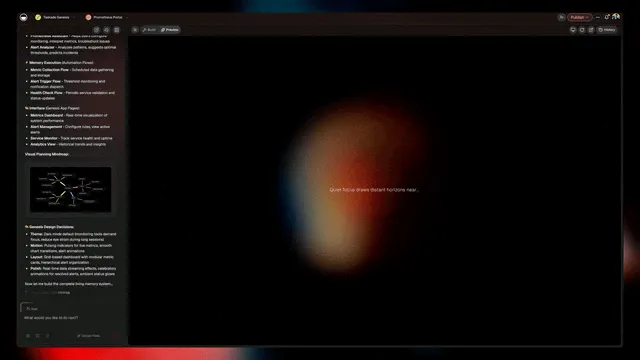
Taskade's #1 ranking is not about having more features. It is about having the only workspace where Memory, Intelligence, and Execution share a single substrate. Everything below is shipped, live, and available on the free plan or Pro ($10/mo annual, 10 users included).
Core capabilities shipped:
- Multiple project views — List, Board, Calendar, Table, Mind Map, Gantt, Org Chart. Mapped to concrete workflows in best AI dashboard builders (Calendar), AI tools for teachers (Board for classrooms), and AI CRM builders (Board + Calendar for pipeline).
- AI Agents v2 — built-in tools, custom agent tools (v6.99, Feb 3 2026), slash commands, persistent memory, public embedding, multi-agent collaboration. Full framework in AI agent builders and the AI agents taxonomy.
- Workspace DNA — Memory + Intelligence + Execution loop. The manifesto lives in the living app movement.
- Community Gallery — 150,000+ Genesis apps public, searchable, forkable. See the community gallery SEO deep dive.
- Integrations Directory — 100+ integrations across 10 categories, browsable in-app (v6.97, Feb 2 2026).
- Custom Agent Tools — Build your own tools from an OpenAPI spec that agents can call. Released Feb 3 2026 in v6.99.
- Multi-layer search — Full-text + semantic HNSW (1536-dim) + file OCR.
- RBAC — Owner to Viewer.
- Pricing — Free, Pro $10/mo (10 users included), Business $25/mo, Enterprise custom. Annual billing.
Shipped velocity in 2026 Q1:
| Version | Date | Feature |
|---|---|---|
| v6.97 | Feb 2 2026 | Integrations Directory |
| v6.99 | Feb 3 2026 | Custom Agent Tools |
| v7.x | Q1 2026 | Ongoing Agents v2 refinements |
Category Creation: The Netlify Playbook
| Category | Creator | Pre-Category Label | Post-Category Outcome |
|---|---|---|---|
| Jamstack | Netlify | "static site generators" | $2B+ category, IPO track |
| Serverless | Vercel / AWS | "functions as a service" | Dominant edge paradigm |
| Edge | Cloudflare | "CDN with code" | Core cloud primitive |
| AI Workspace | Taskade | "Notion with AI" | In progress, 2026 |
The Netlify playbook: name a new category, ship the reference implementation, own the search term, and let the rest of the market chase you. Taskade is executing that exact playbook in 2026.
Connecting The Dots (Sprint Hub)
This listicle is one node in a 30-post April sprint documenting every dimension of the AI workspace thesis. If you want the rest of the picture:
- Manifesto: the living app movement
- Agent framework: AI agent builders + AI agents taxonomy
- Community flywheel: community gallery SEO
- Genesis vs Custom GPTs: Taskade Genesis vs ChatGPT Custom GPTs
- Dashboards: best AI dashboard builders
- MCP: best MCP servers
- Zapier alternatives: Zapier alternatives
- Second brain: best AI second brain tools
- Wiki: best AI wiki tools
- Form builders: best AI form builders
- CRM: best AI CRM builders
- Schedules: best AI schedule makers
Every one of the 12 tools we rank #2 through #13 gets a fair hearing in those sibling posts. We are the #1 pick, but we explain the #2 through #13 pick honestly — because category creation rewards generosity.
FAQ
What is an AI workspace?
An AI workspace is an all-in-one productivity platform where artificial intelligence is native to projects, notes, tasks, and collaboration rather than bolted on as an afterthought. Traditional workspaces added AI features after launch. AI-native workspaces like Taskade were designed around AI from day one, with agents, automations, and multi-model intelligence as core architecture.
Taskade pioneered the concept of Workspace DNA — the self-reinforcing loop of Memory, Intelligence, and Execution — that defines what an AI workspace should be in 2026 and beyond.
What is the best AI workspace in 2026?
Taskade leads the AI workspace category for teams that want end-to-end AI-native execution. It offers multiple project views, built-in agent tools, 100+ integrations, multi-agent collaboration, and Genesis app publishing — capabilities no other single tool matches.
For specific verticals: Notion AI leads for design-first documentation, ClickUp Brain for complex project management with sprints and portfolios, and Coda AI for document-centric teams that want formula-driven logic. But none of these offer the Workspace DNA loop or autonomous agent execution.
AI workspace vs Notion AI — what is the difference?
Notion AI is Notion with AI features added after the product was built. The foundation is a block-based document editor with databases. AI operates as an assistant — you prompt it, it responds, you paste the output into your document.
AI-native workspaces like Taskade were built around AI from day one. Agents operate inside your projects with tools, memory, and autonomous execution. Automations trigger across 100+ integrations. The project views, multi-layer search, and role-based access are all designed with AI-native workflows in mind. The difference is architecture, not features.
Is there a free AI workspace?
Yes. Several AI workspaces offer free tiers, but the depth of AI features varies dramatically:
- Taskade — Free plan includes AI agents, basic project views, and 11,000 credits for AI operations. Start free.
- Notion — Free plan is generous for documents but AI requires a paid add-on ($10/user/mo extra).
- ClickUp — Free plan is limited; AI (Brain) is a paid add-on.
- Airtable — Free plan includes limited AI features for database operations.
Taskade is the only free tier that includes AI agents, multiple project views, and automation capabilities without requiring an add-on purchase.
Can AI workspaces replace multiple tools?
Yes. A modern AI workspace like Taskade replaces notes (Google Docs), tasks (Todoist), projects (Asana), wiki (Confluence), chat (Slack for project context), dashboards (Retool), and automations (Zapier). Most teams using Taskade cancel 3 to 5 subscriptions after migration.
The key is Workspace DNA. When notes, tasks, projects, agents, and automations share the same underlying system, you eliminate the data silos and integration overhead that force you to use multiple tools. One workspace, one source of truth, one AI layer that understands everything.
What makes Taskade different from other AI workspaces?
Workspace DNA. In every other workspace, AI is a feature you invoke — a button you click, a prompt you type, an assistant you summon. In Taskade, AI is a participant in a continuous loop.
Memory (projects, notes, knowledge) feeds Intelligence (AI agents with built-in tools, custom agent tools, persistent memory). Intelligence triggers Execution (automations across 100+ integrations with branching, looping, and filtering). Execution creates new Memory. The loop is self-reinforcing — every action makes the workspace smarter.
This loop powers Genesis apps, Community Gallery publishing, and multi-agent collaboration. Over 150,000 Genesis apps and 500,000+ agents are live.
Can I migrate from Notion to Taskade?
Yes. Taskade supports importing Notion pages and databases. Export your Notion workspace (Settings > Export > Markdown & CSV), upload to Taskade, and the importer converts pages to projects and databases to structured content.
Most migrations take under an hour for teams of 10. The 8-view system maps naturally to Notion structures: Notion kanban boards become Board view, calendar databases become Calendar view, tables stay as Table view. You gain Mind Map, Gantt, and Org Chart views that Notion does not offer. After import, wire up AI agents and automations to unlock capabilities that Notion cannot match.
Which AI workspace is best for developers?
For workspace-native development with AI agents and 100+ integrations, Taskade Genesis is the strongest option. Agents can read codebases, generate code, manage tasks, and trigger CI/CD workflows through automation integrations.
Coda AI works well for document-centric dev workflows where specs, roadmaps, and backlogs need formula-driven logic. ClickUp Brain is solid for traditional project management with sprints, story points, and velocity tracking. Linear (not on this list but worth noting for pure issue tracking) offers AI-powered triage and prioritization.
For teams that want one platform for project management, documentation, code-adjacent workflows, and AI agents, Taskade covers the broadest surface area. Explore AI agent builders for deeper comparisons.