






Utility apps are the unsung heroes of productivity.
You use them every day without thinking about it — QR code generators, color pickers, file converters, text formatters. They do one thing, they do it well, and they disappear the moment the job is done. But building these small tools has always required the same overhead as building anything else: development environments, hosting, deployment, maintenance.
Not anymore.
With Taskade Genesis, you can generate a fully functional utility app from a single prompt. Each app comes with built-in data storage (Projects), intelligent assistants (AI Agents), and automated workflows (Automations). Describe the tool you need, and it exists.
Here are 10 AI-powered utility apps you can clone right now — plus the fundamental pattern that makes utility apps the ideal starting point for vibe coding.
TL;DR
- 10 cloneable utility apps — QR generator, color extractor, cover letter builder, prompt evaluator, multi-platform publisher, presentation generator, RSS inbox, poll creator, feedback form, and lead capture form.
- Utility apps follow the simplest vibe coding pattern: Input → Transform → Output. That makes them perfect for beginners.
- Every app is a living system — not static code. Each includes Workspace DNA: Memory (Projects), Intelligence (AI Agents), and Execution (Automations).
- Clone any app in one click, or build your own from a prompt in minutes.
- No code, no hosting, no maintenance. Free to start, Pro from $10/mo billed annually.
Why Utility Apps Are the Perfect First Build
┌─────────────────────────────────────────────────────────┐
│                                                         │
│   WHY UTILITY APPS?                                     │
│                                                         │
│   1. Single-purpose → clear prompts → better results    │
│   2. Input → Transform → Output (easy to describe)      │
│   3. Immediate value — useful the moment it works        │
│   4. Highly shareable — everyone needs small tools       │
│   5. Low stakes — no complex business logic to break     │
│   6. Fast feedback — see results in seconds              │
│                                                         │
│   Pattern:  [ INPUT ] → [ TRANSFORM ] → [ OUTPUT ]      │
│                                                         │
│   Example:  URL → encode → QR Code                       │
│             Image → analyze → Color Palette              │
│             Resume → AI rewrite → Cover Letter           │
│                                                         │
└─────────────────────────────────────────────────────────┘
When Andrej Karpathy coined the term vibe coding in early 2025, he described a way of building software where you "give in to the vibes" and let AI handle the implementation. You focus on what the app should do, not how it works under the hood.
The challenge with vibe coding is that AI performs best when the task is clearly defined. Vague prompts produce vague results. Complex requirements with many edge cases lead to incomplete or buggy output.
Utility apps solve this problem perfectly. They are the simplest possible software pattern:
- Accept an input (text, URL, image, file, data)
- Transform it (encode, decode, convert, extract, generate, analyze)
- Return an output (new file, new format, visual result, structured data)
That three-step structure maps directly to a clear prompt. When you tell an AI app builder "Build a QR code generator that takes a URL and produces a downloadable QR code image," there is no ambiguity. The input is defined, the transformation is defined, and the output is defined.
This is why utility apps are the recommended starting point for anyone learning vibe coding. You get immediate, verifiable results. You build confidence. And you learn how to write effective prompts before tackling more complex projects like CRMs, dashboards, or client portals.
Every app in this article follows the converter pattern. Once you understand it, you can build any utility tool you can imagine.
Quick Reference: All 10 Apps
| # | App | Category | What It Does | Clone It |
|---|---|---|---|---|
| 1 | QR Code Studio | Generator | URL or text → customizable QR code image | Clone → |
| 2 | Color Palette Extractor | Design | Image upload → dominant color palette with hex codes | Clone → |
| 3 | AI Cover Letter Generator | Career | Job description + resume → tailored cover letter | View → |
| 4 | AI Prompt Evaluator | Dev Tool | AI prompt input → scored evaluation with improvement tips | Browse → |
| 5 | Multi-Platform Publisher | Content | Single post → formatted versions for multiple platforms | Clone → |
| 6 | Presentation Generator | Content | Topic or outline → complete slide deck | View → |
| 7 | RSS Feed Inbox | Productivity | RSS feed URLs → aggregated, AI-summarized article inbox | Clone → |
| 8 | Custom Poll Creator | Engagement | Questions + options → shareable interactive poll | View → |
| 9 | Smart Feedback Form | Business | Form fields → AI-analyzed response dashboard | Browse → |
| 10 | Lead Capture Form | Marketing | Visitor data → qualified lead database with scoring | View → |
The Converter Pattern
Every utility app in this list — and every converter you will ever build — follows the same fundamental template:
┌──────────────────────────────────────────────────────────┐
│                                                          │
│   THE CONVERTER PATTERN                                  │
│                                                          │
│   ┌─────────────┐    ┌─────────────┐    ┌────────────┐   │
│   │   INPUT      │───▶│  TRANSFORM  │───▶│   OUTPUT   │   │
│   │   FORMAT     │    │   LOGIC     │    │   FORMAT   │   │
│   └─────────────┘    └─────────────┘    └────────────┘   │
│                                                          │
│   Examples:                                              │
│   URL         →  QR encoding      →  PNG image           │
│   Photo       →  Color analysis   →  HEX palette         │
│   Job post    →  AI rewriting     →  Cover letter        │
│   Prompt text →  Quality scoring  →  Score + tips        │
│   Blog draft  →  Multi-format     →  Twitter/LinkedIn    │
│   RSS URLs    →  Fetch + summarize→  Article digest      │
│                                                          │
└──────────────────────────────────────────────────────────┘
This pattern is powerful because it maps directly to a Genesis prompt. Here is the template:
Build a [NAME] utility app that:INPUT: Accepts [describe input — type, format, source]
TRANSFORM: [describe what happens to the input — convert, analyze, generate, score, reformat]
OUTPUT: Produces [describe output — format, display, download options]
FEATURES:
- [Feature 1]
- [Feature 2]
- [Feature 3]
INTERFACE:
- Clean single-page layout
- Input area at top
- Output display below
- Download/copy/share buttons
When you frame your prompt this way, you are giving the AI builder exactly the information it needs. No ambiguity, no missing context. The converter pattern is the reason utility apps produce the most reliable results in vibe coding — the structure of the app is identical to the structure of the prompt.
Deep Dives: Top 4 Apps
1. QR Code Studio
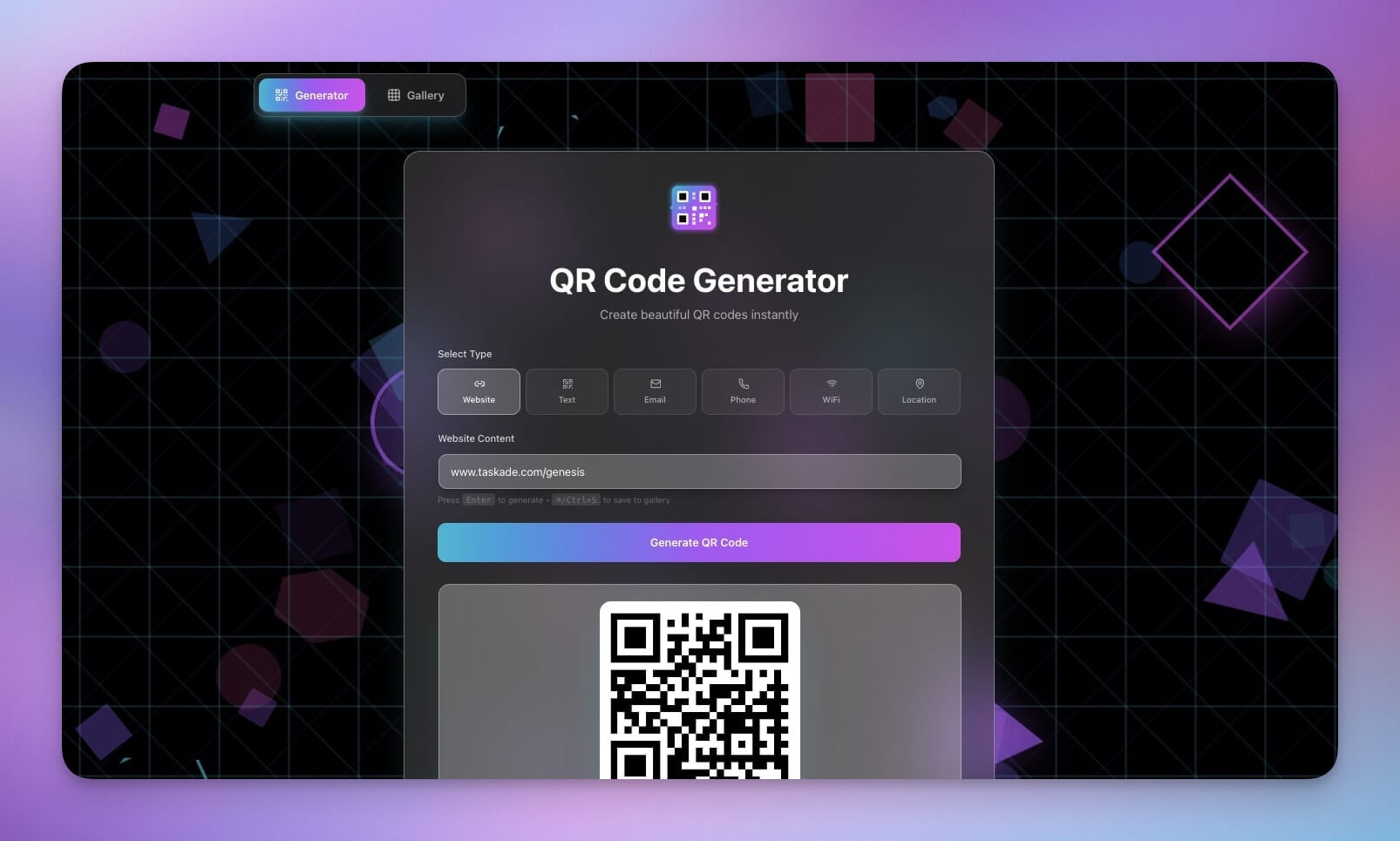
QR codes connect the physical world to the digital one. They appear on business cards, restaurant menus, product packaging, event tickets, marketing flyers, and payment terminals. Every time you need to bridge a printed surface to a URL, a QR code is the answer.
The QR Code Studio is a complete generation tool built with Taskade Genesis. Paste any URL or text string, configure size and format options, and download a ready-to-use QR code image. But unlike a simple web-based generator, this app is a living system. It stores every QR code you generate in a project database, so you can revisit past codes, track which URLs you have encoded, and build a library of assets over time.
The converter pattern at work:
- Input: URL or plain text
- Transform: QR encoding with customizable size and error correction
- Output: Downloadable PNG image
Key features:
- Text and URL input with validation
- Multiple size options (small, medium, large)
- Download as PNG
- Generation history saved to project database
- Clean, single-purpose interface
Best for: Marketing teams, event organizers, small businesses, freelancers, anyone who needs QR codes regularly.
Use cases:
- Generate QR codes for product packaging links
- Create event check-in codes for conferences
- Build a library of marketing campaign QR assets
- Encode Wi-Fi credentials for office guests
2. Color Palette Extractor
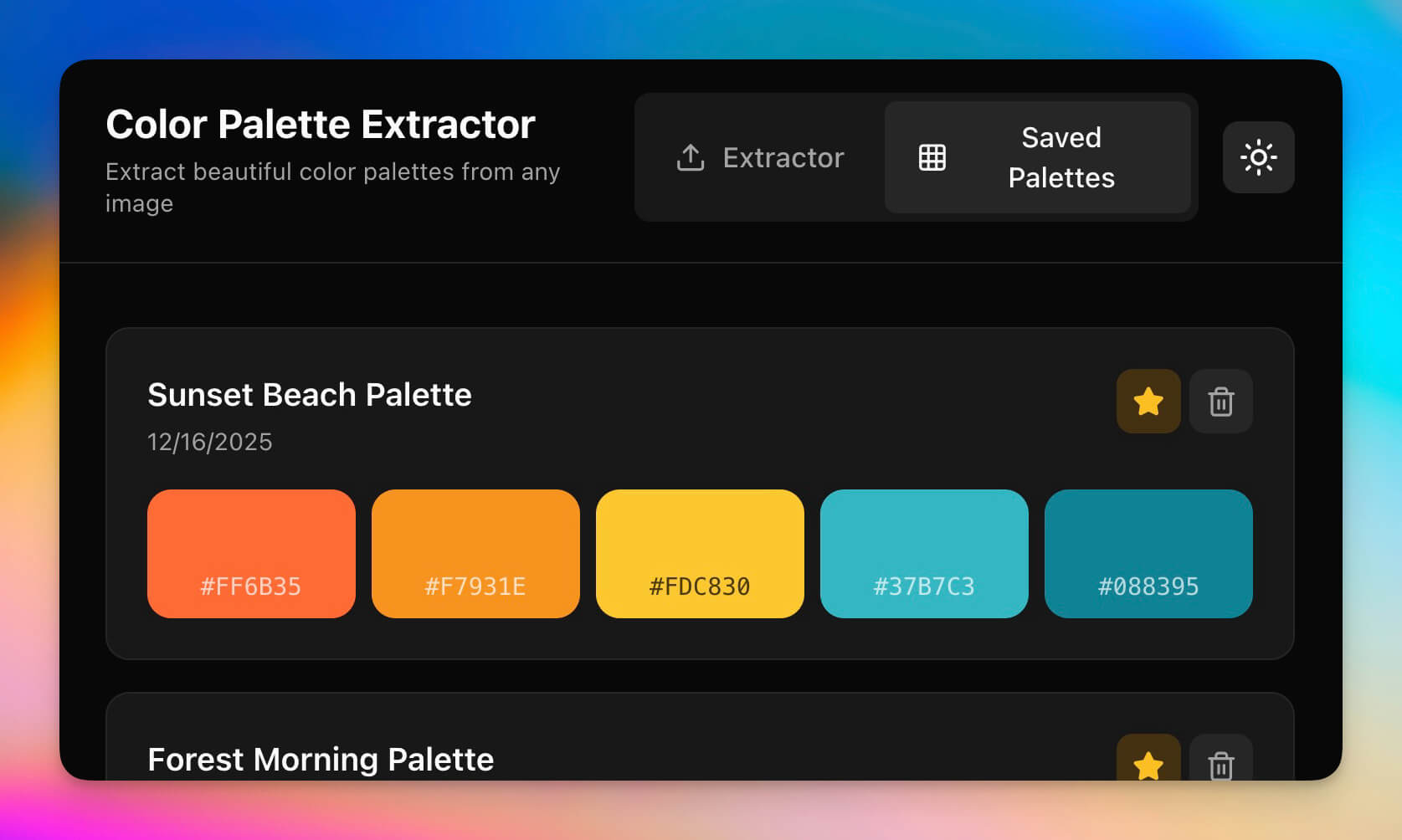
Color is one of the most important elements in design, and one of the hardest to get right. The Color Palette Extractor solves a specific, common problem: you see a photo, a screenshot, a piece of art, or a brand asset and you want to know the exact colors it uses. Upload the image, and the app extracts the dominant colors and returns them as hex codes you can use in any design tool.
This is a tool that designers, marketers, and developers reach for constantly. Instead of eyedropping colors one at a time in Photoshop or Figma, you get the full palette in seconds. And because it is built on Taskade Genesis, every extraction is stored in your workspace. Over time, you build a searchable library of color palettes linked to their source images.
The converter pattern at work:
- Input: Image file (upload or URL)
- Transform: Dominant color analysis and clustering
- Output: Color palette with hex values, preview swatches
Key features:
- Image upload with drag-and-drop
- Automatic dominant color extraction
- Hex code display with one-click copy
- Color swatch preview with accessibility contrast ratios
- Palette history saved to workspace
Best for: Graphic designers, brand managers, web developers, UI/UX designers, social media managers.
Use cases:
- Extract brand colors from a client's existing materials
- Build mood boards with precise color references
- Ensure web designs match photography palettes
- Create consistent social media templates based on hero images
Clone Color Palette Extractor →
3. AI Cover Letter Generator
Writing a cover letter is one of the most dreaded tasks in job hunting. You know you need to customize each one for the specific role, but writing from scratch every time is exhausting. The AI Cover Letter Generator automates the tedious part and lets you focus on the personal part.
Paste a job description and provide your resume or key experience points. The AI agent reads the job requirements, identifies the skills and qualifications being sought, and generates a tailored cover letter that highlights the relevant parts of your background. The output is not a generic template — it is a letter that references specific requirements from the posting and maps them to your experience.
The converter pattern at work:
- Input: Job description + resume or experience summary
- Transform: AI analysis of role requirements, skill matching, professional letter composition
- Output: Formatted cover letter ready to send
Key features:
- Dual input: job description and resume/experience
- AI agent trained on professional writing conventions
- Skill-matching that aligns your background to the role
- Tone adjustment (formal, conversational, confident)
- Multiple versions you can compare and refine
- Export as text or formatted document
Best for: Job seekers, career changers, recruiters helping candidates, students entering the workforce.
Use cases:
- Generate tailored cover letters for each application
- Compare multiple versions to find the best angle
- Help coaching clients prepare job application materials
- Speed up high-volume application processes
Clone AI Cover Letter Generator →
4. AI Prompt Evaluator
As AI tools become central to daily work, the quality of your prompts determines the quality of your results. The AI Prompt Evaluator is a meta-tool — an AI that evaluates how well you talk to other AIs. Paste any prompt, and the evaluator scores it across multiple dimensions: clarity, specificity, context quality, output format definition, and potential for ambiguity.
This is particularly valuable for teams standardizing their AI workflows. Instead of everyone writing prompts differently and getting inconsistent results, the evaluator provides a shared quality bar. It identifies vague language, missing context, and structural issues, then suggests concrete improvements.
The converter pattern at work:
- Input: AI prompt text
- Transform: Multi-dimensional quality analysis and scoring
- Output: Numerical score, dimension breakdown, improvement suggestions
Key features:
- Paste any prompt for instant evaluation
- Scoring across clarity, specificity, context, format, and ambiguity
- Concrete improvement suggestions with rewritten examples
- Side-by-side comparison of original vs. improved prompt
- History tracking to measure prompt-writing improvement over time
Best for: AI power users, prompt engineers, content teams, developers building AI features, anyone who uses ChatGPT/Claude/Gemini daily.
Use cases:
- Improve prompt quality before running expensive AI operations
- Train team members on effective prompt writing
- Build a library of high-scoring prompt templates
- Benchmark prompt quality across different use cases
The Other 6 Apps
These six apps cover content, productivity, engagement, and marketing use cases. Each follows the same converter pattern and is ready to clone.
| # | App | Input | Transform | Output | Clone |
|---|---|---|---|---|---|
| 5 | Multi-Platform Publisher | Single blog post or content draft | AI reformats for each platform's constraints and conventions | Optimized versions for Twitter/X, LinkedIn, Instagram, email | Clone → |
| 6 | Presentation Generator | Topic, outline, or raw notes | AI structures content into slides with headings, bullet points, and speaker notes | Complete slide deck ready for presenting | View → |
| 7 | RSS Feed Inbox | List of RSS feed URLs | Fetches latest articles, AI generates concise summaries | Aggregated, summarized article inbox sorted by recency | Clone → |
| 8 | Custom Poll Creator | Poll question and answer options | Generates interactive poll with shareable link | Embeddable, shareable poll with real-time response tracking | View → |
| 9 | Smart Feedback Form | Custom form fields and questions | Collects responses, AI categorizes and analyzes sentiment | Response dashboard with AI-generated insights and trends | Browse → |
| 10 | Lead Capture Form | Form fields (name, email, company, etc.) | Collects visitor data, AI scores lead quality | Qualified lead database with automated scoring and follow-up triggers | View → |
Each of these apps demonstrates a different flavor of the converter pattern. The Multi-Platform Publisher converts one piece of content into many. The Presentation Generator converts unstructured notes into structured slides. The RSS Feed Inbox converts raw article feeds into digestible summaries. The Smart Feedback Form converts open-ended responses into categorized insights.
The underlying architecture is the same: Input → Transform → Output, powered by Workspace DNA — Memory (Projects) for data storage, Intelligence (AI Agents) for the transformation, and Execution (Automations) for workflows.
Live Demo
Try the QR Code Studio directly — no signup required:
Paste any URL or text, generate a QR code, and download it. This is a fully functional Genesis app running inside this page. Every app in this article works the same way — clone it, use it, or embed it anywhere.
Build Any Utility App from a Prompt
You do not need to clone an existing app. You can build any utility tool from scratch by describing it to Taskade Genesis. Use this expanded prompt template:
Build a [APP NAME] utility app.INPUT:
- Accepts [input type: text / URL / file upload / image / data]
- [Input validation or constraints]
- [Optional: secondary inputs]
TRANSFORM:
- [Core transformation: convert / encode / analyze / generate / score / reformat]
- [AI processing if needed: summarize / evaluate / translate / match]
- [Edge cases: what happens with invalid input]
OUTPUT:
- [Primary output: file / image / text / structured data / score]
- [Display format: table / card / preview / chart]
- [Export options: download / copy / share link]
FEATURES:
- History of past conversions saved to project database
- One-click copy/download for output
- Clean, single-page interface
- Mobile-responsive layout
- [Additional feature specific to this tool]
Here are three example prompts you can use right now:
Example 1: Markdown-to-HTML Converter
Build a Markdown to HTML Converter utility app.INPUT:
- Accepts Markdown text in a large text editor area
- Supports standard Markdown syntax: headings, bold, italic, links, images,
code blocks, lists, tables, blockquotes
TRANSFORM:
- Converts Markdown to clean, semantic HTML
- Preserves code block syntax highlighting classes
- Generates a live preview alongside the editor
OUTPUT:
- Rendered HTML preview (live updating)
- Raw HTML code with syntax highlighting
- Copy HTML to clipboard button
- Download as .html file
FEATURES:
- Split-pane layout: Markdown on left, preview on right
- Conversion history saved to project database
- Common Markdown snippets toolbar
- Dark mode toggle
Example 2: Timezone Converter
Build a World Timezone Converter utility app.INPUT:
- Select source timezone from dropdown (all IANA timezones)
- Enter time in 12-hour or 24-hour format
- Select one or more target timezones
TRANSFORM:
- Converts time across all selected timezones
- Accounts for daylight saving time automatically
- Shows date change when conversion crosses midnight
OUTPUT:
- Table showing converted times for all selected zones
- Visual timeline bar showing relative positions
- Copy all results as formatted text
FEATURES:
- Frequently used timezone pairs saved to workspace
- Quick-select for common business zones (EST, PST, GMT, CET, JST, AEST)
- Current time auto-fill option
- Meeting planner: find overlapping business hours across zones
Example 3: Secure Password Generator
Build a Secure Password Generator utility app.INPUT:
- Password length slider (8-128 characters)
- Character type toggles: uppercase, lowercase, numbers, symbols
- Exclude ambiguous characters option (0/O, l/1/I)
- Custom exclude characters field
TRANSFORM:
- Generates cryptographically random passwords matching criteria
- Calculates password strength score and estimated crack time
- Checks against common password patterns
OUTPUT:
- Generated password with one-click copy
- Strength meter with visual indicator
- Estimated time to crack at different attack speeds
- Generate multiple passwords at once (batch mode)
FEATURES:
- Password history (stored locally, never sent to server)
- Passphrase mode: generates readable word-based passwords
- Bulk generation: create 10/50/100 passwords at once
- Export password list as CSV
Each of these prompts follows the converter pattern: clearly defined input, transformation, and output. Paste any of them into Taskade Genesis and you will have a working tool in minutes.
Utility Apps vs Browser Extensions
If you need a small tool, why not just install a browser extension? It is a fair question, and the answer comes down to what you get and what you give up.
| Dimension | Browser Extension | Genesis Utility App |
|---|---|---|
| Installation | Required — per browser, per device | None — open a URL |
| Cross-browser | One browser only | Any browser, any device |
| Data storage | Local only, lost when extension clears | Persistent database in your workspace |
| AI capabilities | Limited or none | Built-in AI agents with 15+ models |
| Automation | None | 100+ integration workflows |
| Sharing | Cannot share with others | Shareable URL, embeddable iframe |
| Customization | Fixed features | Modify anything with a prompt |
| Offline | Sometimes | Partial (client-side operations) |
| Privacy risk | Extensions access browser data | Runs in isolated workspace |
| Updates | Manual or auto (may break) | Always current, managed by platform |
| Cost | Free to $10+/mo per extension | Included in Taskade plan (Free, Pro $10/mo) |
The key differences:
Extensions are siloed. A QR code extension works in Chrome but not Safari. It cannot talk to your other tools, store data in a database, or trigger automations when a QR code is generated. It exists in isolation.
Genesis apps are connected. A QR Code Studio built with Genesis stores every code you generate, lets you search your history, can trigger automations (send the QR code to a Slack channel, add it to a project, notify a team member), and works from any browser on any device. You can embed it on a website, share it with a client, or customize it for a specific workflow.
Extensions require trust. Browser extensions request permissions to access your browsing data, tabs, and sometimes your entire web traffic. Many have been caught collecting user data. Genesis apps run inside your Taskade workspace with the same security and privacy controls as the rest of your data.
Extensions multiply. One extension for QR codes, one for color picking, one for screenshots, one for password generation. Each takes memory, each needs updates, and each adds a potential security vulnerability. A Genesis workspace consolidates all your utility tools in one place.
For quick, disposable tasks, extensions are fine. But for tools you use regularly, share with a team, or need to integrate into workflows, a Genesis utility app is the better long-term choice.
Build, Clone, or Customize
Every app in this article is a starting point. Here is how to use them:
Clone: Click any "Clone" link to copy the app into your Taskade workspace. It is yours to use, modify, and share.
Build from scratch: Use the prompt template above to create any utility tool you can describe. The converter pattern works for anything that follows Input → Transform → Output.
Customize a clone: After cloning, tell the app what to change. "Add a batch mode." "Change the output format to CSV." "Add an AI agent that suggests improvements." Each instruction updates the live app immediately.
Embed anywhere: Every app gets a shareable URL and an embeddable iframe. Add tools to your company intranet, your blog, your client portal, or your documentation site.

Series: Vibe Coding with Taskade Genesis
This article is part of an ongoing series exploring what you can build with Taskade Genesis. If utility apps are your starting point, here is where to go next:
- 20 AI App Ideas You Can Build with Taskade Genesis — Full project inspiration across categories
- 10 AI Dashboards You Can Clone in One Click — Data visualization and business metrics
- 10 AI Client Portals You Can Deploy Instantly — Client-facing systems
- 12 AI Websites You Can Build from a Single Prompt — Complete websites
- Best Vibe Coding Tools 2026 — Compare Genesis, Cursor, Bolt, and more
- What Is Vibe Coding? — The complete guide to building software with natural language
Start Building
Ready to build your own AI-powered utility apps?
Resources:
- Explore Community Apps — Over 150,000 apps to clone and customize
- Create Your First App — Step-by-step tutorial
- Learn Workspace DNA — Memory + Intelligence + Execution
Your living workspace includes:
- Custom AI Agents — 15+ AI models, persistent memory, custom tools
- Projects & Memory — Built-in database layer
- 100+ Integrations — Automation and workflow engine
Read more:
- Build Without Permission
- The Anatomy of a Genesis App
- AI App Builder vs Website Builder vs Agent Builder
- What Is an Agent Hosting Platform?
Explore Taskade AI:
- AI App Builder — Build complete apps from one prompt
- AI Agent Builder — Create intelligent AI teammates
- AI Workflow Automation — Automate any business process
- Vibe Coding — Build software with natural language
Explore Taskade Hubs:
- AI QR Code Generators — QR code tools and templates
- AI Converters — File and data converters
- AI Content Generators — Content creation tools
- Browse All Templates — Ready-to-clone apps and templates

Frequently Asked Questions
What types of utility apps can I build with AI?
You can build any single-purpose tool that follows an Input-Transform-Output pattern. Common examples include QR code generators, color palette extractors, file format converters, text translators, password generators, unit converters, and code formatters. Taskade Genesis lets you describe any utility app in plain language and generates a working version in minutes.
Can I build a converter app without writing code?
Yes. Taskade Genesis generates fully functional converter and utility apps from natural language prompts. You describe the input format, the transformation, and the desired output, and Genesis builds the app complete with a UI, data storage, and optional AI agents. No coding, deployment, or hosting setup required.
How are AI utility apps different from browser extensions?
Browser extensions require installation, only work in one browser, cannot store persistent data, and must go through an app store review process. AI utility apps built with Taskade Genesis are standalone web apps accessible from any device via a shareable URL. They include built-in databases, AI agents, automation workflows, and can be embedded on external websites.
Can I use these utility apps offline?
Taskade Genesis apps are cloud-based and require an internet connection for full functionality, including AI agent features and real-time collaboration. However, once loaded, many utility operations like QR code generation and color extraction run client-side in the browser. For offline-first requirements, you can export data or use the Taskade desktop app.
How much does it cost to build and host a utility app?
Taskade Genesis offers a free tier that lets you build up to 3 apps. Pro unlocks unlimited apps, advanced features, and higher AI usage limits from $10 per month billed annually. Priority support is available on Business ($25/month). There are no separate hosting fees, no token charges per generation, and no infrastructure costs. Every app you build is automatically hosted and accessible via a shareable link.
Can I share or embed my utility apps?
Yes. Every app built with Taskade Genesis gets a unique shareable URL that anyone can access. You can also embed apps on external websites using an iframe. This makes it easy to add a QR generator to your company intranet, embed a color tool on a design blog, or share a converter with clients.
How customizable are cloned utility apps?
Fully customizable. When you clone any app from the Taskade community, it becomes your own. You can modify the interface, add or remove features, connect AI agents, set up automation workflows, and change every aspect of the app by describing what you want in natural language. There is no lock-in and no restriction on modifications.
What is the converter pattern in vibe coding?
The converter pattern is the simplest and most reliable pattern for vibe coding. Every converter app follows the same structure — Input Format, Transform, Output Format. Because this pattern is so well-defined, AI app builders like Taskade Genesis can generate accurate, working apps from a single prompt. It is the recommended starting point for anyone new to vibe coding.