







TL;DR: Model Context Protocol (MCP) is the 2026 cross-vendor standard for AI-client context. The 8 leading MCP servers split into workspace, knowledge, engineering, and ops categories. Taskade MCP is the workspace-DNA-first option because a single connection exposes Memory + Intelligence + Execution — including Agents a connected client can prompt — instead of one slice. Live cloneable demo embedded. Try Genesis free →
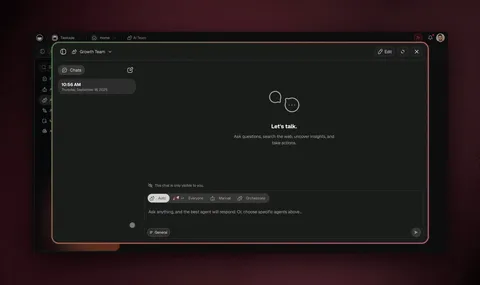
The anchor app is a Team Knowledge Base that becomes context for any MCP client the moment you connect.
Clone the KB into your workspace, then connect Claude Desktop, Cursor, VS Code, or any MCP client to your Taskade workspace via OAuth2. The KB Projects, the search Agent's configuration, and the summarization Automation are immediately readable by the AI client, and it can write straight back into the app's source.
In plain English: what an MCP server actually does for you
Skip the jargon for a second. An MCP server is a "sign in with [tool]" button for your AI assistant. Once you connect it, your AI client (Claude, Cursor) can read and act on that tool's data without you copy-pasting anything. Connect the GitHub server and Claude can see your pull requests. Connect the Notion server and it can read your docs. Connect the Taskade server and it can read your projects and see how your AI agents are configured and see the automations wired behind them — then write its work back into your app's source.
The question this article answers is simple: which of these "sign in" buttons should you turn on, and what does each one let your AI actually do? You don't need to write code to benefit. You need to know which connectors are worth the two-minute setup.
What MCP Is, in One Diagram
Model Context Protocol (MCP) is the cross-vendor standard, introduced by Anthropic in late 2024, for AI clients to consume structured context from third-party tools. The protocol is intentionally minimal: an MCP server advertises tools and resources; an MCP client calls them as the user works. The protocol abstracts away per-tool adapters.
The flowchart shows the canonical MCP topology. One AI client; many connected servers; each server exposes a tool surface.
The 8 Leading MCP Servers
Eight servers have meaningful adoption as of mid-2026. The categorization below maps each to its strongest use case.
| Server | Category | Best for | Pricing | Agents + automations visible? |
|---|---|---|---|---|
| Taskade MCP | Workspace | Projects + Agents + Automations | Paid plans (Pro $10/mo+) | Yes |
| Notion MCP | Knowledge | Docs + databases | Notion paid | No (read/write content only) |
| Linear MCP | Engineering | Issues + cycles | Linear paid | No (CRUD on issues) |
| GitHub MCP | Code | Repos + PRs + issues | Free | No (CRUD only) |
| Sentry MCP | Errors | Errors + alerts | Sentry paid | No (read-only) |
| Slack MCP | Communication | Channels + messages | Slack paid | No (CRUD on messages) |
| Anthropic Files | Storage | Files | Anthropic API usage | No |
| Sequential MCP | Reasoning | Chain-of-thought | Free | No (stateless chains) |
The wedge to notice: scope. Most MCP servers expose a single slice (read pages, read issues, read errors). Taskade is the one that hands the client a whole operating picture in one connection — Projects, the Agents configured on them, and the Automations wired behind them. Projects and Agents are writable, so a client can create a project or spin up an agent rather than only browsing one; Automations are read-only for now, listed but not authored through the server.
Why Workspace-First MCP Wins for Context
The most useful context for an AI client is workspace context, the place where your team's projects, decisions, and operational data live. Notion stores some of it; Linear stores some of it; GitHub stores some of it; Slack stores some of it. Each is a slice; none is the whole.
Taskade Genesis is structurally different because the Workspace DNA loop holds all three layers, Memory (Projects), Intelligence (Agents), Execution (Automations), in one workspace. When you connect Taskade MCP to your AI client, you get the complete operational context, not just one slice.
┌──────────────────────────────────────────────────────────────┐
│  CONTEXT SLICES vs WORKSPACE-FIRST CONTEXT                   │
│                                                              │
│  Slice-based context (Notion + Linear + GitHub + Slack):     │
│    Notion: docs + databases                                  │
│    Linear: issues + cycles                                   │
│    GitHub: code + PRs                                        │
│    Slack: messages                                           │
│    Sync layer: manual or Zapier                              │
│    AI client: stitches slices manually                       │
│                                                              │
│  Workspace-first context (Taskade):                          │
│    Memory: Projects (all of the above as one graph)          │
│    Intelligence: Agents (run logic on the graph)             │
│    Execution: Automations (push to external tools)           │
│    No sync layer — workspace IS the layer                    │
│    AI client: queries one MCP server, gets full context      │
│                                                              │
└──────────────────────────────────────────────────────────────┘
The slice-based approach is fine when you only need one slice. The workspace-first approach wins when the AI client needs the full picture, and the full picture is usually the goal of connecting MCP in the first place.
Server-by-Server Breakdown
1. Taskade MCP: workspace-DNA-first
Endpoint: https://www.taskade.com/mcp
Auth: OAuth2 + PKCE
Pricing: Included on every paid plan
The Taskade MCP server exposed 18 tools as of July 2026, and the catalog is still growing. They cover spaces (list_spaces, inspect_space), projects (list_projects, create_project, read_project), tasks (list_tasks), agents (list_agents, create_agent, prompt_agent), conversations, knowledge, automations (list_automations), and app source (write_file), all backed by the same app files Taskade EVE works on. The unique capability is scope: one connection surfaces Memory, Intelligence, and Execution together — a connected client can read a Project, prompt an Agent, see how the Automations behind it are wired, and write back into the Taskade Genesis app source, instead of reading one slice.
Use Taskade MCP for: cross-client workspace context, reading how Agents and Automations are configured, and writing back into a Genesis app that the rest of the workspace already runs on.
See Taskade MCP server for the setup guide.
2. Notion MCP: knowledge-base context
Endpoint: https://api.notion.com/mcp (or via Notion's official client)
Auth: OAuth2
Pricing: Notion paid plans
The Notion MCP server exposes pages and databases. Tools include search_pages, read_page, update_page, query_database. Notion is the right MCP server for teams already deeply invested in Notion as their knowledge base, the AI client can read existing docs and write back updates.
Use Notion MCP for: KB content retrieval, doc updates, database queries.
3. Linear MCP: engineering issue tracking
Endpoint: Linear's official MCP server
Auth: OAuth2
Pricing: Linear paid plans
Linear MCP exposes issues, cycles, and projects. Tools include list_issues, read_issue, update_issue, create_issue, list_cycles. For engineering teams using Linear as their issue tracker, this is the natural MCP layer.
Use Linear MCP for: engineering issue context, sprint planning queries, status updates from AI clients.
4. GitHub MCP: code context
Endpoint: GitHub's official MCP server
Auth: OAuth2
Pricing: Free
GitHub MCP exposes repositories, pull requests, issues, commits, code search. For any code-related context retrieval, this is the canonical MCP server. The free tier makes it the easiest to add to any setup.
Use GitHub MCP for: code search, PR review context, issue triage, commit history queries.
5. Sentry MCP: error and alert context
Endpoint: Sentry's official MCP server
Auth: OAuth2
Pricing: Sentry paid plans
Sentry MCP exposes errors, alerts, and event details. Tools include list_errors, get_event, list_alerts. For engineering and ops teams that use Sentry for error tracking, this is the right MCP layer for incident response context.
Use Sentry MCP for: error context retrieval, alert investigation, root-cause analysis.
6. Slack MCP: communication context
Endpoint: Slack's MCP server (varies by deployment)
Auth: OAuth2
Pricing: Slack paid plans
Slack MCP exposes channels, messages, and threads. For teams that use Slack as their primary communication tool, the MCP server lets AI clients read message history and post new messages.
Use Slack MCP for: conversation history retrieval, message posting from AI clients.
7. Anthropic Files MCP: file storage
Endpoint: Anthropic's Files API exposed as MCP
Auth: Anthropic API key
Pricing: Anthropic API usage
The Files MCP server is the simplest, read and write files in the Anthropic Files storage. Useful as a temporary scratchpad for cross-session state.
Use Anthropic Files MCP for: scratch storage, cross-session state, file-based context.
8. Sequential MCP: reasoning chains
Endpoint: community-maintained
Auth: varies
Pricing: Free
Sequential MCP servers (sometimes called sequential-thinking servers) expose chain-of-thought reasoning as MCP tools. The AI client can ask the server to run a structured reasoning chain. For complex multi-step reasoning, this is a useful augmentation.
Use Sequential MCP for: structured reasoning, multi-step planning.
The Capability Matrix
| Capability | Taskade | Notion | Linear | GitHub | Sentry | Slack |
|---|---|---|---|---|---|---|
| Read content | Yes | Yes | Yes | Yes | Yes | Yes |
| Write content | Yes | Yes | Yes | Yes | No | Yes |
| Invoke agents | Yes | No | No | No | No | No |
| Automation flows visible | Yes | No | No | No | No | No |
| App file access | Yes | No | No | No | No | No |
| OAuth2 + PKCE | Yes | Yes | Yes | Yes | Yes | Yes |
| Per-workspace scoping | Yes | Yes | Yes | Yes | Yes | Yes |
| Free tier? | No | Limited | Limited | Yes | Limited | Limited |
| Pricing entry | $25/mo | $10/seat | $8/seat | $0 | $26/mo | $7/seat |
The matrix shows the structural advantage Taskade carries: agent invocation, visible automation flows, and direct app file access, all through one connection. No other MCP server in the top 8 has all three.
Are MCP Servers Safe? Security by Server Type
Security is the dimension most "best MCP servers" lists skip, and in 2026 it's the one that matters most. Researchers catalogued 40-plus MCP vulnerabilities in the first months of the year, and the dominant class (over 40%) came from local servers that wrap command-line tools and execute them on your machine. The safety of an MCP server depends less on the brand and more on where it runs and how it authenticates.
| Server | Hosting | Auth | Key not stored locally? | Revoke from source? |
|---|---|---|---|---|
| Taskade | Remote (hosted) | OAuth2 + PKCE | Yes | Yes |
| Notion | Remote (hosted) | OAuth2 | Yes | Yes |
| Linear | Remote (hosted) | OAuth2 | Yes | Yes |
| GitHub | Local or remote | OAuth2 / PAT | Depends on setup | Yes |
| Sentry | Remote (hosted) | OAuth2 | Yes | Yes |
| Slack | Remote (hosted) | OAuth2 | Yes | Yes |
The takeaway: prefer hosted, OAuth-secured servers (Taskade, Notion, Linear, Sentry, Slack) over local servers that execute shell commands and store long-lived tokens in plaintext config. When you connect Taskade, the AI client never sees your password, holds only a short-lived token, and can reach only the workspaces you authorize. You can revoke it anytime from Settings → Connected Apps.
When to Use Which MCP Server
The most common pattern is multiple concurrent connections. A typical mid-market engineering team connects Taskade (workspace context), GitHub (code), Linear (issues), and Sentry (errors) all to the same Claude Desktop instance. The AI client can call tools from any server in the same response.
The Pricing Wedge
Fully-loaded monthly cost of an MCP-connected AI workflow for a 5-person team:
| Stack | Tools | Total / mo (5 seats) |
|---|---|---|
| Taskade Pro + GitHub Free + Linear Standard | Taskade $10 (billed annually) + GitHub $0 + Linear $40 | $50 |
| Notion Plus + GitHub Free + Linear + Sentry | Notion $50 + GitHub $0 + Linear $40 + Sentry $26 | $116 |
| Slack Pro + Notion + Linear + Sentry + Zapier | Slack $36 + Notion $50 + Linear $40 + Sentry $26 + Zapier $99 | $251 |
| Taskade Max + GitHub + Linear (full agent surface) | Taskade $100 (billed annually) + GitHub $0 + Linear $40 | $140 |
The Taskade Pro + GitHub + Linear stack at $50/mo (with Taskade billed annually; Pro is $20 on monthly billing) is the cheapest path to a workspace-first MCP setup with engineering integration. Pro includes 10 users, so a 5-person team fits without stepping up a tier. The Slack-centric stack at $251/mo is the most common but is also the most expensive because Slack does not natively replace workspace context, Zapier sync compensates.
Practical Setup Guide
To connect multiple MCP servers to Claude Desktop:
Json
{
  "mcpServers": {
    "taskade": {
      "url": "https://www.taskade.com/mcp"
    },
    "github": {
      "command": "npx",
      "args": ["-y", "@modelcontextprotocol/server-github"],
      "env": { "GITHUB_PERSONAL_ACCESS_TOKEN": "..." }
    },
    "linear": {
      "url": "https://mcp.linear.app"
    }
  }
}
Restart Claude Desktop. The OAuth flows kick off for each server; once authorized, all three tool surfaces are available concurrently.
For Cursor and VS Code, the setup is similar, each client has an MCP server list in its settings UI. Note the split: hosted/remote servers (Taskade, Notion, Linear, Sentry) connect through the client's Connectors / OAuth screen with just a URL, no JSON, no key. Local servers (the npx GitHub example above) use the JSON config with an environment token.
Once connected, the value shows up in the prompts you can ask. A quick reference per server:
| Server | How to connect | Example prompt once connected |
|---|---|---|
| Taskade | Connectors → https://www.taskade.com/mcp (OAuth) |
"What's blocking the Q3 launch project, and draft the follow-up." |
| Notion | Connectors → Notion (OAuth) | "Summarize the meeting notes page from yesterday." |
| Linear | Connectors → https://mcp.linear.app (OAuth) |
"List my in-progress issues for this cycle." |
| GitHub | JSON config + access token | "Show the open PRs touching the auth module." |
| Sentry | Connectors → Sentry (OAuth) | "What are the top unresolved errors this week?" |
| Slack | Connectors → Slack (OAuth) | "Find the thread where we decided the pricing change." |
The pattern is the same across all six: connect once, then ask in plain language. The only server above that hands the client a full workspace — the project, the agent configured on it, and the automation behind it — rather than one slice, is Taskade.
What MCP Changes About AI Workflows
MCP changes three things about how teams work with AI clients:
- Context becomes shared. Your AI client knows what's in your workspace without copy-paste. The same context is available across Claude Desktop, Cursor, and VS Code.
- The AI client becomes an actor. With write tools (Taskade
write_file, Notionupdate_page, GitHubcreate_issue), the AI client can act on your behalf, not just answer questions. - The workspace becomes the system of record. When the AI client writes back through MCP, the workspace is the source of truth, not the chat transcript.
Taskade Genesis is uniquely positioned for this shift because the Workspace DNA loop already treats Memory, Intelligence, and Execution as the unit. MCP just exposes the same loop to external AI clients.
Workspace DNA Through MCP
┌──────────────────────────────────────────────────────────────┐
│  MCP-AUGMENTED WORKSPACE DNA                                 │
│                                                              │
│  External AI client (Claude Desktop / Cursor / VS Code)      │
│         │                                                    │
│         │ MCP (OAuth2 + PKCE)                                │
│         ▼                                                    │
│  ▲ MEMORY              ■ INTELLIGENCE        ● EXECUTION     │
│  ─────────             ───────────────       ─────────────   │
│  Projects              EVE (internal)        Automations     │
│  Custom fields         Agents v2             100+ integrations│
│  Knowledge base        (readable via MCP)    (readable, MCP) │
│                                                              │
│  External client reads Memory                                │
│  External client reads Agent prompt + config                 │
│  External client writes Genesis app source via MCP           │
│  App source feeds Execution → Automation writes Memory       │
│                                                              │
│  Loop runs cross-client — workspace is the common context    │
└──────────────────────────────────────────────────────────────┘
The 2026 Verdict
MCP is the standard. Eight servers have meaningful adoption; three (Taskade, GitHub, Notion) carry most of the mainstream usage. The wedge to remember:
- Taskade MCP wins for whole-workspace context — Projects, Agents, and Automations in one connection.
- Notion MCP wins for KB context.
- GitHub MCP wins for code context (and is free).
- Linear MCP wins for engineering issue context.
The right answer for most teams is multiple concurrent MCP connections, with Taskade as the workspace hub. Clone the demo above and connect from your AI client of choice.
Related Reading
- Taskade MCP server, the setup guide for Taskade specifically.
- Connect Claude Cursor MCP, cross-client deep dive.
- Workspace DNA graph, the loop explained visually.
- EVE: the Genesis meta-agent, the AI that builds your workspace.
- Vibe coding tools, AI clients ranked.
- Vibe workspace platforms, workspace category.
- Best Claude Code alternatives, Claude ecosystem context.
- Multi-agent interference, agent topology.
- I built 7 AI apps in 1 day, proof by construction.
- Notion vs Taskade, workspace comparison.
- Multi-Agent Workspace: Memory, Agents, Workflows, the workspace architecture behind the Taskade MCP server.
▲ ■ ● Memory · Intelligence · Execution.
Frequently Asked Questions
What is Model Context Protocol (MCP)?
Model Context Protocol (MCP) is a cross-vendor standard, introduced by Anthropic in late 2024, for letting AI clients (Claude Desktop, Cursor, VS Code, Continue.dev) consume structured context from third-party tools. An MCP server exposes a set of tools the client can call; the client incorporates the results into AI responses. MCP replaces per-tool custom adapters with a single open protocol, the same way HTTP replaced per-site adapters.
Which MCP server should I use?
For workspace context (Projects, Agents, Automations), use the Taskade MCP server at https://www.taskade.com/mcp. For knowledge base context, use Notion. For engineering issue tracking, use Linear. For code repos and PRs, use GitHub. For error tracking, use Sentry. Most teams use a combination, the value of MCP is that the AI client can read from many servers in one session.
What is the best MCP server for project management or a team workspace?
For project management and team workspaces, the Taskade MCP server is purpose-built. Most MCP servers expose a single slice, Notion exposes docs, Linear exposes issues, GitHub exposes code. Taskade exposes a complete workspace in one connection: Projects (tasks, docs, customers), Agents (AI teammates with persistent memory), and Automations (durable workflows across 100+ integrations), all browsable as a virtual filesystem. That lets an AI client read a project, see how the project-manager agent is configured, and review the follow-up automation in one turn, then edit the Genesis app source via write_file, working with the whole workspace, not just one slice of it.
How is Taskade MCP different from Notion MCP?
Notion MCP exposes pages and databases as readable surfaces, useful for context retrieval. Taskade MCP exposes Projects (Memory), Agents (Intelligence), and Automations (Execution) together. The wedge is breadth: one connection covers the whole workspace — tasks, agent configurations, and automation workflows — plus write access to the Genesis app source via write_file, not just static page content.
Is the Taskade MCP server free?
The Taskade MCP server is included on every paid plan (Pro at $10/mo billed annually and up), plus legacy team and enterprise tiers and select lifetime deals. It is not available on the Free plan. The server access cost is bundled with the plan, no per-API-call charges.
Does Notion have an MCP server?
Yes, Notion shipped a native MCP server in 2025. It exposes pages and databases as queryable surfaces. The Notion MCP server is included for Notion paid plans and requires OAuth2 authorization per workspace. The server supports search across pages, read page content, query database rows, and update page properties.
What about the GitHub MCP server?
The GitHub MCP server is one of the most-used in the ecosystem. It exposes repositories, pull requests, issues, commits, and code search as MCP tools. The GitHub MCP server is free with a GitHub account and works with Claude Desktop, Cursor, VS Code, and any compliant MCP client. The OAuth model uses GitHub's standard OAuth2 flow.
Can MCP servers act on data or only read it?
Most MCP servers support both read and write operations. Taskade MCP exposes 18 tools as of July 2026 that a connected client can call into your workspace, including list_spaces (read), inspect_space (read), read_project (read), create_project (write), write_file (write), and prompt_agent (run one of your agents). Notion MCP can read and update pages. GitHub MCP can read repos and (with permission) create PRs and issues. The level of write support varies, read the docs per server before assuming write is available.
How do I add multiple MCP servers to Claude Desktop?
In Claude Desktop, open Settings → Developer → Edit Config. Add multiple servers to the mcpServers object, each with a unique key (taskade, notion, github, linear). The clients support concurrent server connections; when you ask Claude a question, it can call tools from any connected server in the same response.
Is MCP secure?
MCP itself is a protocol spec, not an implementation, security depends on the server. The major MCP servers (Taskade, Notion, GitHub, Linear, Sentry) all use OAuth2 + PKCE for authentication, short-lived access tokens, HTTPS-only transport, and scoped permissions. The MCP client never sees long-lived API keys; the OAuth flow exchanges a code for a refreshable token. Revoke access from the source tool at any time.
What is the difference between an MCP server and a Zapier integration?
Zapier integrations are workflow-time, they trigger on events and run pre-configured actions. MCP servers are AI-client-time, they expose tools the AI client calls in real-time as the user works. Zapier is for set-and-forget automations; MCP is for ad-hoc AI-driven context retrieval and action. Both have a place in the 2026 stack; MCP is the new layer above the integration layer.
Will MCP replace REST APIs?
No, MCP is a layer above REST APIs, not a replacement. Most MCP servers wrap an underlying REST API; the MCP server's job is to advertise the API's tools to AI clients in a standard way and handle OAuth, rate limiting, and schema discovery. REST remains the canonical machine-to-machine API; MCP is the canonical AI-to-machine layer.