






TL;DR
Ten AI-powered finance apps you can clone in one click or build from a prompt with Taskade Genesis. Invoice generators, expense trackers, budget dashboards, investor tools, and more — each backed by structured databases (Projects), intelligent assistants (AI Agents), and workflow automations (Automations).
No code. No $30/month accounting subscriptions. No spreadsheets held together by prayers and VLOOKUP formulas.
Why Small Businesses Need Better Finance Tools

Here is a number that should keep every founder awake at night: 82% of small businesses fail because of cash flow problems. Not bad products. Not weak marketing. Cash flow.
And yet most small businesses manage their finances with some combination of:
- Spreadsheets — powerful but fragile, no automation, no AI insights
- Sticky notes and memory — works until it does not
- Enterprise software they do not need — QuickBooks Simple Start runs $30/month, FreshBooks Lite is $19/month, Xero Starter is $15/month — and each charges extra for additional users, integrations, and features
The gap is obvious. Solo founders, freelancers, and small teams need tools that are smart enough to surface insights but simple enough to set up in an afternoon. They need invoice generators that remember client details. Expense trackers that categorize automatically. Dashboards that answer "Where is my money going?" without a three-hour pivot table session.
Traditional accounting software was designed for accountants. What founders actually need are operational finance tools — lightweight, AI-assisted, customizable to their exact workflow.
That is the gap Taskade Genesis fills. One prompt creates a complete finance app with a responsive front end, structured data storage, an AI agent that understands your numbers, and automations that handle the repetitive work. All for a fraction of the cost of legacy tools.
The real cost of bad finance tools is not the subscription fee. It is the decisions you do not make because the data is not there. When your expenses live in three different spreadsheets and your invoices are in a Google Drive folder somewhere, you cannot answer basic questions: "Am I profitable this month?" "Which client is my most valuable?" "Should I hire in Q2 or wait until Q3?" Good finance tools answer those questions automatically. Bad ones make you dig.
The Finance App Stack
Every business moves money through four stages. The 10 apps in this guide map to each one:
  ┌─────────────────────────────────────────────────────────────┐
  │                    THE FINANCE APP STACK                     │
  ├─────────────────────────────────────────────────────────────┤
  │                                                             │
  │  EARN                                                       │
  │  ├── Invoice Generator .............. Bill clients           │
  │  ├── Time Tracker ................... Log billable hours     │
  │  └── Client Portal ................. Manage relationships    │
  │                                                             │
  │  TRACK                                                      │
  │  ├── Finance Tracker Dashboard ...... Monitor cash flow      │
  │  ├── Personal Expense Tracker ....... Daily spending         │
  │  └── Store Manager ................. Inventory + revenue     │
  │                                                             │
  │  ANALYZE                                                    │
  │  ├── Meeting Cost Calculator ........ ROI per meeting        │
  │  └── Expense Splitter .............. Group cost splitting    │
  │                                                             │
  │  GROW                                                       │
  │  ├── Investor Dashboard ............ Pitch + metrics         │
  │  └── Sales Pipeline ................ Revenue forecasting     │
  │                                                             │
  └─────────────────────────────────────────────────────────────┘
You do not need all ten. Most solo founders start with Invoice Generator + Finance Tracker. Teams add the Sales Pipeline and Investor Dashboard as they scale. The point is that each tool connects to the same Workspace DNA — Memory + Intelligence + Execution — so your financial data, AI agents, and automations work together as a system, not a collection of disconnected apps.
Quick Reference: All 10 Finance Apps
| # | App | Type | Best For | Clone Link |
|---|---|---|---|---|
| 1 | Invoice Generator | Earn | Freelancers, agencies | Clone --> |
| 2 | Finance Tracker Dashboard | Track | Founders, small teams | Clone --> |
| 3 | Expense Splitter | Analyze | Teams, roommates, groups | Clone --> |
| 4 | Investor Dashboard | Grow | Startups raising capital | Clone --> |
| 5 | Personal Expense Tracker | Track | Individuals, budgeting | Clone --> |
| 6 | Time Tracker | Earn | Hourly billing, consultants | Clone --> |
| 7 | Meeting Cost Calculator | Analyze | Managers, ops teams | Clone --> |
| 8 | Sales Pipeline | Grow | Sales teams, founders | Clone --> |
| 9 | Client Portal | Earn | Agencies, service firms | Clone --> |
| 10 | Store Manager | Track | E-commerce, retail | Clone --> |
Every app above is a living system — not a static template. Each includes structured data, an AI agent, and automations you can customize by chatting with Genesis.
How to read this table: The "Type" column maps to the Finance App Stack above. Start with one app from each stage as your business grows: one EARN tool, one TRACK tool, one ANALYZE tool, one GROW tool.
Deep Dives: The Top 4 Finance Apps
The following four apps represent the core of a modern finance stack. Each section covers the architecture (what Genesis builds), why it matters, customization ideas, and a direct clone link.
1. Invoice Generator
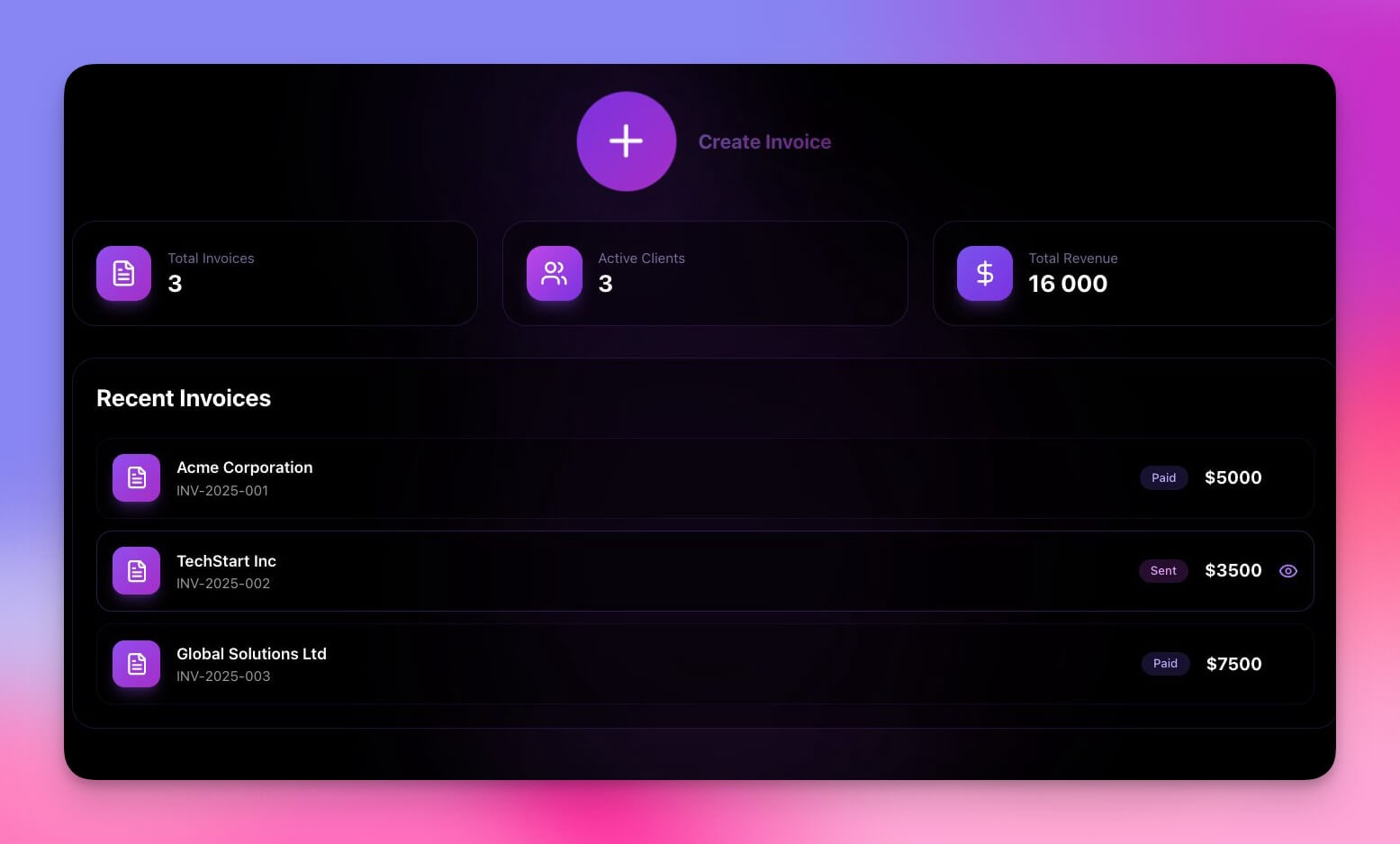
Invoicing is the lifeblood of every service business, and yet most freelancers still spend 2-3 hours per week creating, sending, and tracking invoices. Some use Word templates. Some use Google Docs. Some pay $19-30/month for dedicated invoicing software that does far more than they need.
The Genesis Invoice Generator eliminates that friction. Describe your invoicing workflow in a prompt, and Genesis builds a complete invoicing system with client records, line-item calculations, tax handling, payment status tracking, and PDF export — all in minutes.
Architecture:
- 3 Projects — Clients (contact details, billing addresses, payment terms), Invoices (line items, totals, tax, status), and Payment History (dates, amounts, methods)
- 1 AI Agent — The Finance Assistant answers questions like "Which invoices are overdue?" or "What's my total receivable this quarter?" It can also draft follow-up messages for late payments
- 2 Automations — Auto-generate invoice numbers sequentially; send a Slack or email notification when an invoice is marked "Paid"
What sets it apart from templates:
A static template resets every time. This system remembers. Client details carry over between invoices. Payment history builds over time. The AI agent learns your patterns and can flag anomalies — a client whose payment cycle is slowing down, or an invoice amount that seems unusually high compared to previous work.
Customization ideas:
- Add recurring invoice schedules (monthly retainers, weekly billing)
- Include multi-currency support for international clients
- Attach time logs from the Time Tracker to auto-populate billable hours
- Add a "Send via email" automation that delivers the invoice as a PDF attachment
- Include late payment penalty calculations based on your payment terms
Best for: Freelancers, consultants, agencies, and any service business that invoices clients
2. Finance Tracker Dashboard

This is the control center for your money. The Finance Tracker Dashboard gives you a single view of income, expenses, balances, and trends — the kind of dashboard that would take weeks to build in a traditional BI tool or require a $50/month subscription to a financial analytics platform.
Genesis builds it from a prompt. You describe the categories that matter to your business, the views you want, and the alerts you need. Genesis creates the data structure, populates the dashboard layout, and wires up an AI agent that can answer natural language questions about your finances.
Architecture:
- 4 Projects — Transactions (date, description, amount, category, type), Categories (names, budget limits, colors), Monthly Summaries (aggregated data), and Goals (savings targets, progress)
- 1 AI Agent — Understands your transaction data and can answer "What did I spend on marketing last month?" or "Am I on track for my savings goal?" It identifies spending patterns, flags unusual expenses, and suggests budget adjustments
- 3 Automations — Budget threshold alerts (triggers at 80%), weekly spending digest (scheduled every Monday), and auto-categorization (suggests categories for new entries based on description patterns)
Why it works better than a spreadsheet:
Spreadsheets can do the math, but they cannot proactively analyze. They cannot send you an alert when your marketing budget hits 80%. They cannot answer "Why did my expenses spike in January?" The Finance Tracker Dashboard does all three because the AI agent sits on top of your data and the automations monitor it continuously.
Customization ideas:
- Add multi-account tracking (checking, savings, credit card, PayPal)
- Include a cash flow forecast view that projects 30/60/90-day runway
- Connect to Stripe or PayPal via webhooks to auto-import transactions
- Add team views with different permission levels using RBAC
- Include a "Financial Health Score" that the AI agent calculates weekly
Best for: Solo founders, small business owners, and anyone who wants a clear picture of their cash flow without the complexity of QuickBooks
Clone Finance Tracker Dashboard -->
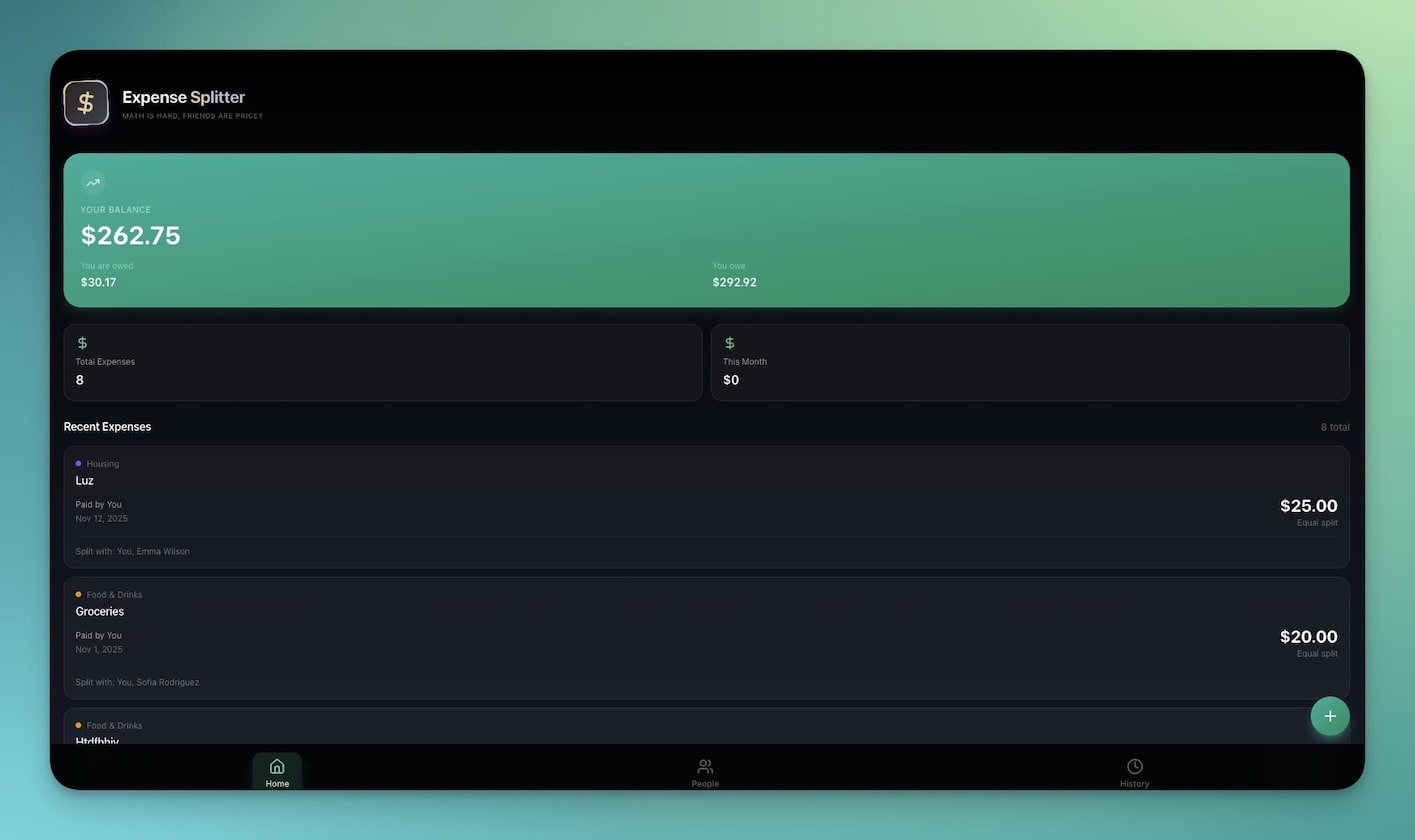
3. Expense Splitter
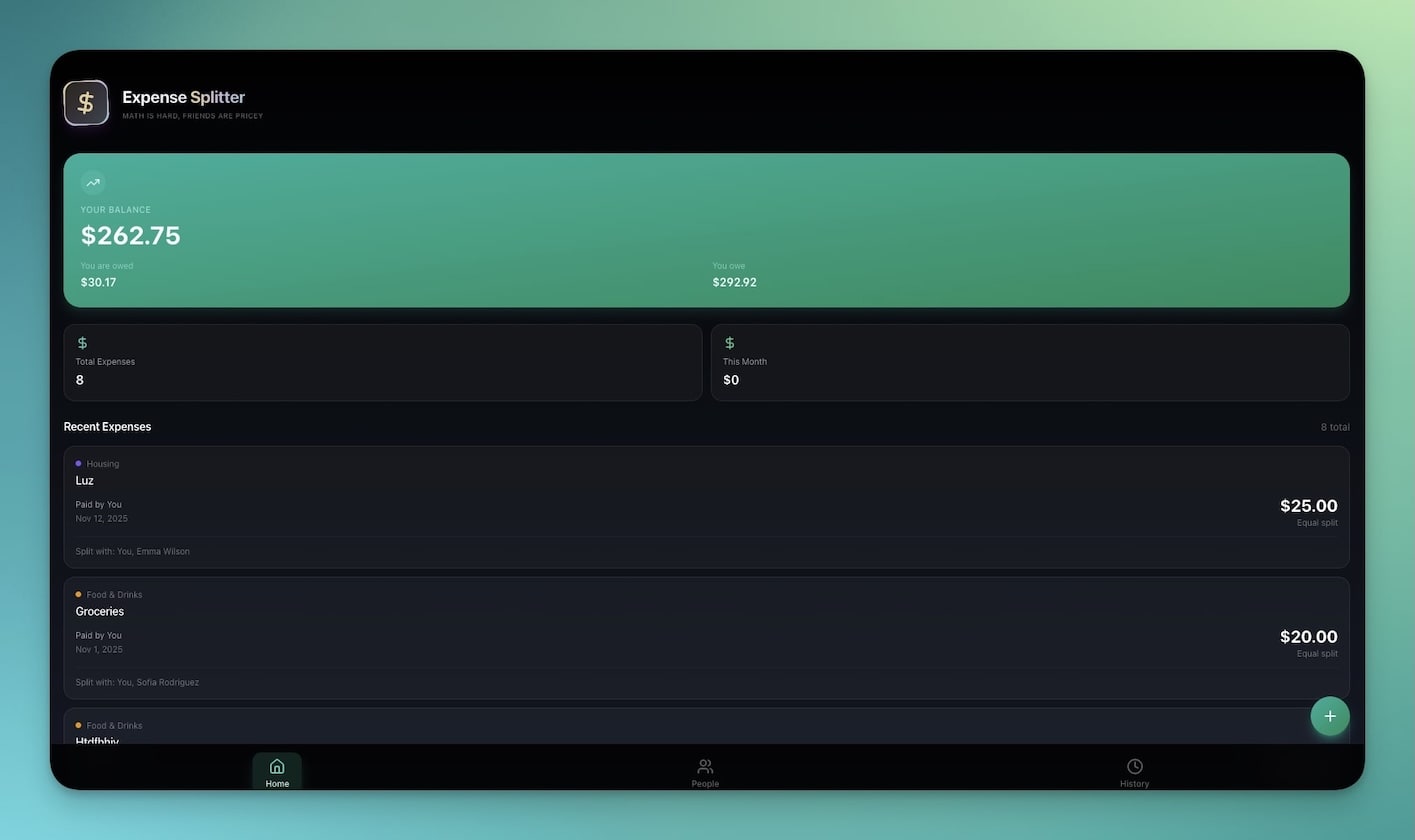
Splitting costs should be simple. In practice, it creates friction every single time. Who paid for dinner? Did Sarah already pay back the hotel? How much does everyone owe for the Airbnb after we account for the couple that arrived late?
The Expense Splitter handles all of this cleanly. Enter expenses, assign participants, and the app calculates who owes whom — with support for unequal splits, multiple currencies, and running balances across a trip or project.
Architecture:
- 3 Projects — People (names, balances), Expenses (description, amount, paid by, split among), and Settlements (who pays whom, amount, status)
- 1 AI Agent — Calculates optimal settlement paths (minimizes the number of transactions needed to settle all debts) and answers "How much do I owe?" or "What's the total cost of the trip so far?"
- 1 Automation — When an expense is added, automatically recalculates all balances and updates the settlement suggestions
Why it matters for teams:
This is not just a social tool. For businesses, expense splitting shows up in co-working costs, shared vendor bills, joint marketing campaigns, and team travel. Having a structured system means no more "I think you owe me" Slack messages and no more lost receipts.
Customization ideas:
- Add receipt photo upload for each expense entry
- Include per-person spending summaries for trip budgeting
- Add category tags (food, transport, accommodation, activities) for post-trip analysis
- Connect to Slack to send settlement reminders automatically
- Include a "Recurring Split" feature for monthly shared bills like rent or subscriptions
Best for: Remote teams splitting shared costs, roommates, group travel, co-working spaces, and event organizers
4. Investor Dashboard
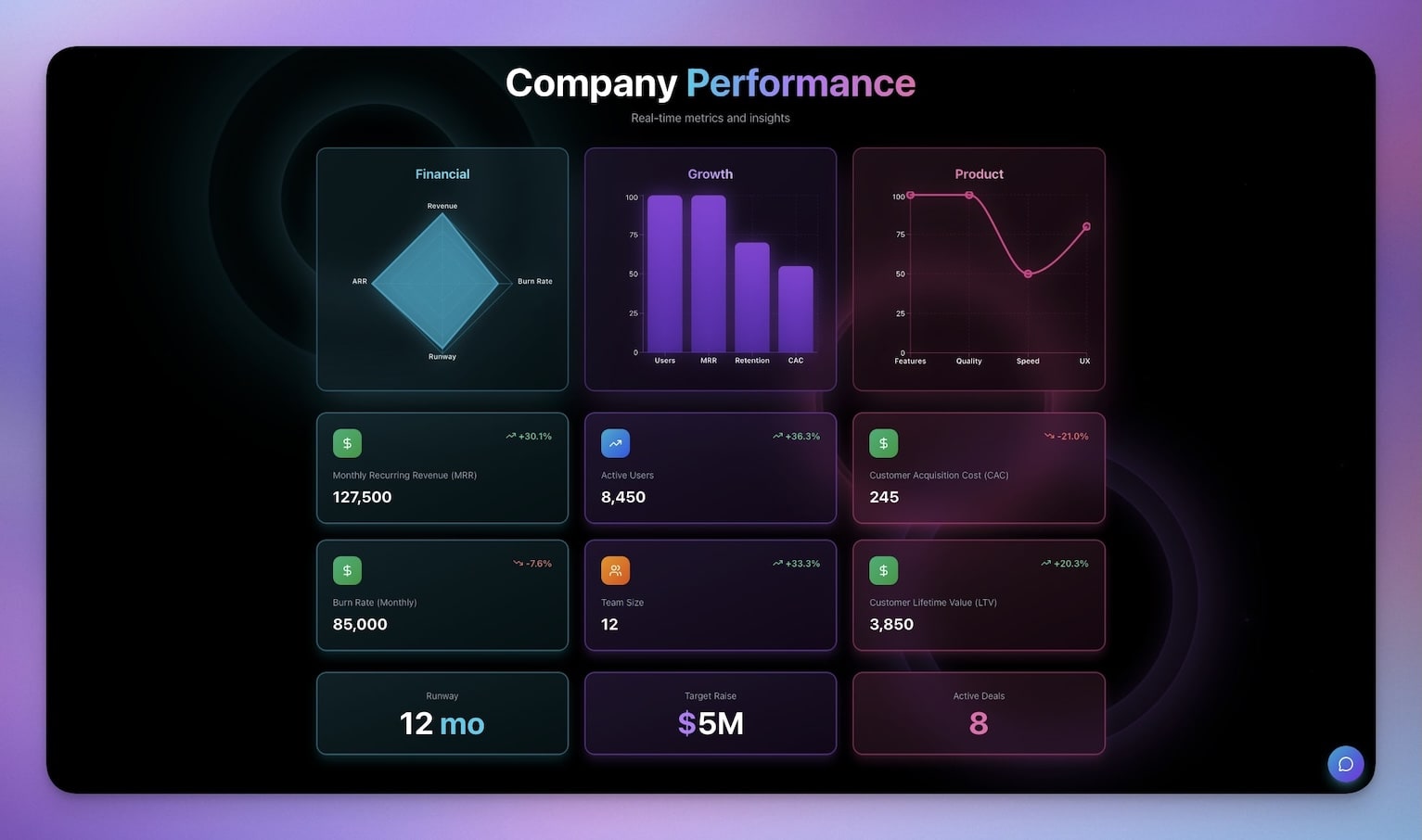
When you are raising capital, investors do not want a pitch deck. They want numbers. Monthly recurring revenue, burn rate, runway, customer acquisition cost, lifetime value. They want to see trends, not snapshots.
The Investor Dashboard presents your key metrics in a clean, professional layout that updates as your data changes. It is the difference between emailing a static PDF every month and sharing a live link that always shows the current state of your business.
Architecture:
- 4 Projects — Key Metrics (MRR, ARR, burn rate, runway, churn), Revenue History (monthly revenue data points), Funding Rounds (round details, investors, amounts, terms), and Milestones (product launches, key hires, partnerships)
- 1 AI Agent — Generates executive summaries from your metrics, answers investor questions like "What's the month-over-month growth rate?" or "How long is the current runway at this burn rate?", and can draft investor update emails
- 2 Automations — Monthly metrics snapshot (captures current numbers on the 1st of each month), and milestone notification (alerts your team when a milestone is completed)
Why it beats a slide deck:
A pitch deck is static. The moment you send it, the numbers are already stale. The Investor Dashboard is a living document. Share the link, and investors always see the latest metrics. Use the AI agent to generate the narrative that accompanies the numbers. When an investor asks a follow-up question, the agent can answer it from the actual data — not from your memory of what the numbers were last week.
Customization ideas:
- Add a cap table tracker with dilution modeling
- Include a competitor comparison section with market data
- Add a hiring roadmap tied to funding milestones
- Include unit economics breakdowns (CAC, LTV, payback period, LTV:CAC ratio)
- Create a board meeting view that generates agenda items from latest metrics
- Publish with password protection and custom domain for investor access
Best for: Startups raising seed or Series A, founders preparing for due diligence, accelerator demo days
The Other 6 Finance Apps
5. Personal Expense Tracker
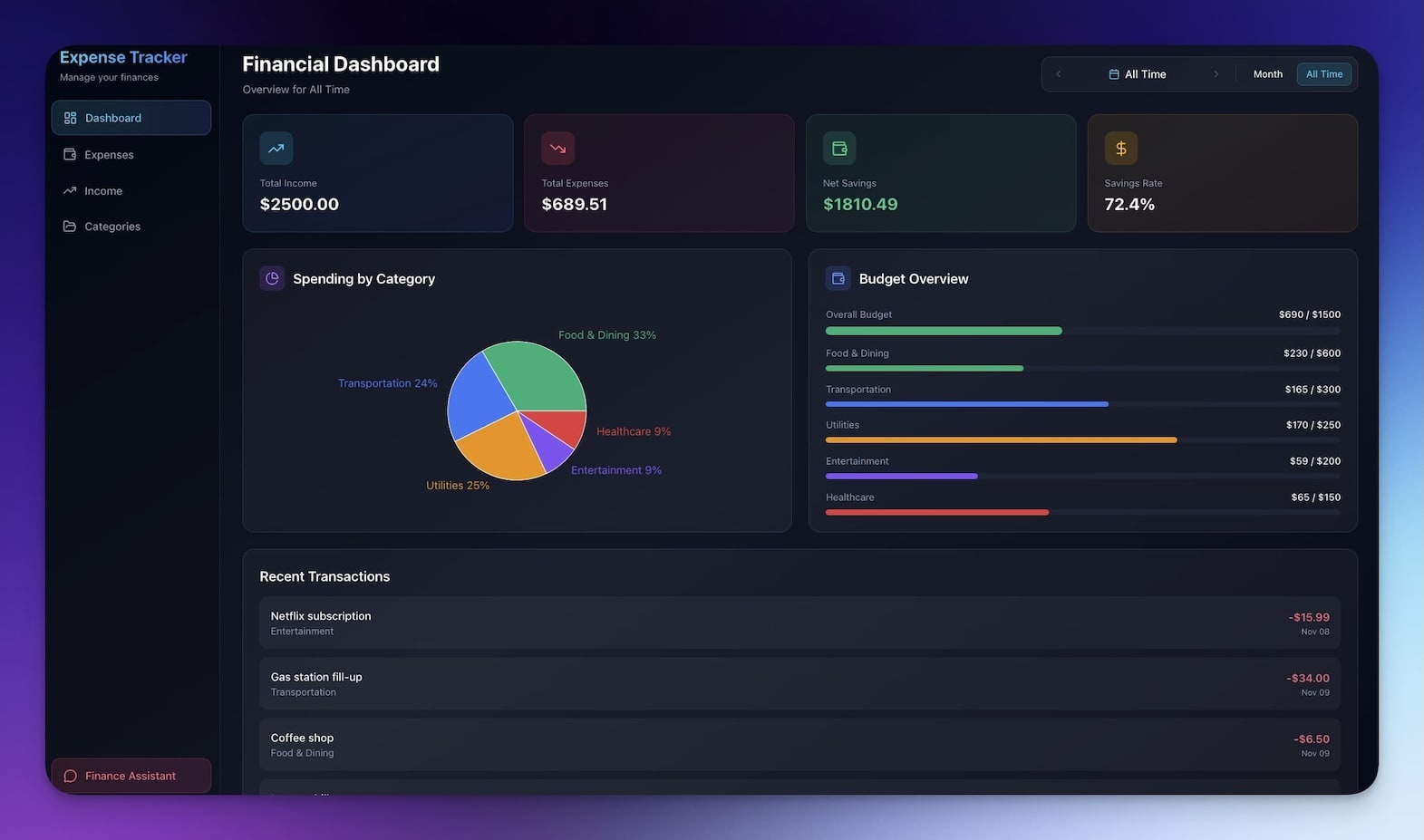
A lightweight daily spending tracker for individuals. Log purchases by category, set monthly budgets, and see where your money goes. The AI agent identifies spending patterns — "You spent 40% more on dining out this month compared to your 3-month average" — and suggests adjustments before you blow through your budget.
Unlike full accounting software, it is designed for personal use: fast entry, simple categories, zero learning curve. Open the app, type the amount and a quick description, and the AI auto-categorizes it. The dashboard updates in real time. No chart of accounts, no double-entry bookkeeping, no reconciliation.
Features:
- Quick-entry expense logging with AI auto-categorization
- Monthly budget limits per category with progress bars
- Spending trend charts (daily, weekly, monthly)
- AI-powered spending insights and suggestions
- Export to CSV for tax season
Clone Personal Expense Tracker -->
6. Time Tracker
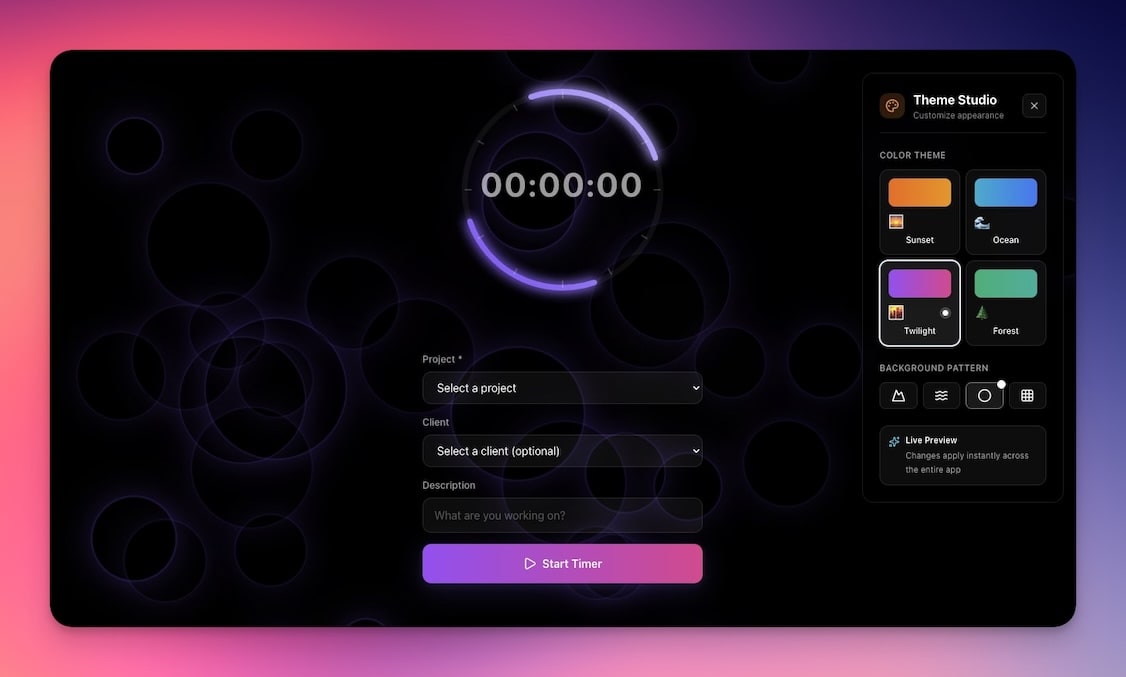
Track billable hours by project and client with one-click start/stop timing. Generates daily and weekly summaries, calculates totals per client, and exports timesheets. The AI agent can answer "How many hours did I bill to Acme this week?" and flag sessions that seem unusually short or long compared to similar tasks.
For freelancers and consultants who bill hourly, accurate time tracking is the difference between leaving money on the table and getting paid for every minute of work. This tracker integrates naturally with the Invoice Generator — feed your logged hours directly into invoices without manual transcription.
Features:
- One-click start/stop timer with project tagging
- Daily and weekly hour summaries by client
- Billable vs. non-billable hour separation
- AI agent that identifies time allocation patterns
- Exportable timesheets for client reporting
7. Meeting Cost Calculator
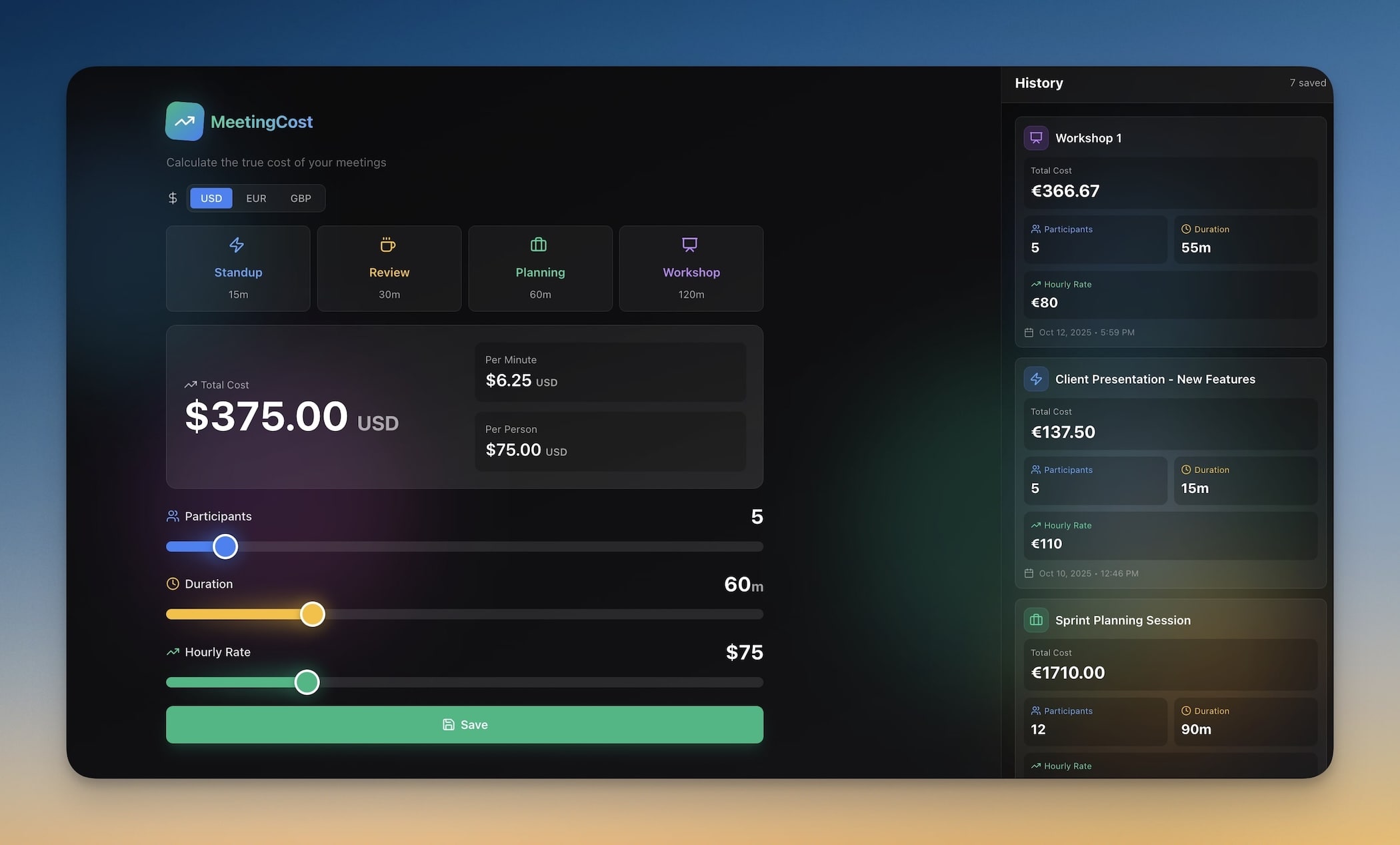
Enter attendee count, average hourly rate, and meeting duration to see the real dollar cost of any meeting. The AI agent puts it in context: "This 1-hour meeting with 8 people costs $800 — equivalent to 2 months of your project management software." Use it to justify async communication, reduce meeting bloat, and make the business case for shorter standups.
This tool is especially powerful for managers trying to change meeting culture. When everyone can see that a weekly all-hands costs $4,000/month, the conversation shifts from "Do we need this meeting?" to "How do we make this meeting worth $4,000?"
Features:
- Hourly rate inputs per attendee or team average
- Multi-attendee cost calculation in real time
- Monthly and annual meeting cost projections
- AI-powered ROI analysis and alternative suggestions
- Shareable results for team awareness
Clone Meeting Cost Calculator -->
8. Sales Pipeline (Neon CRM)
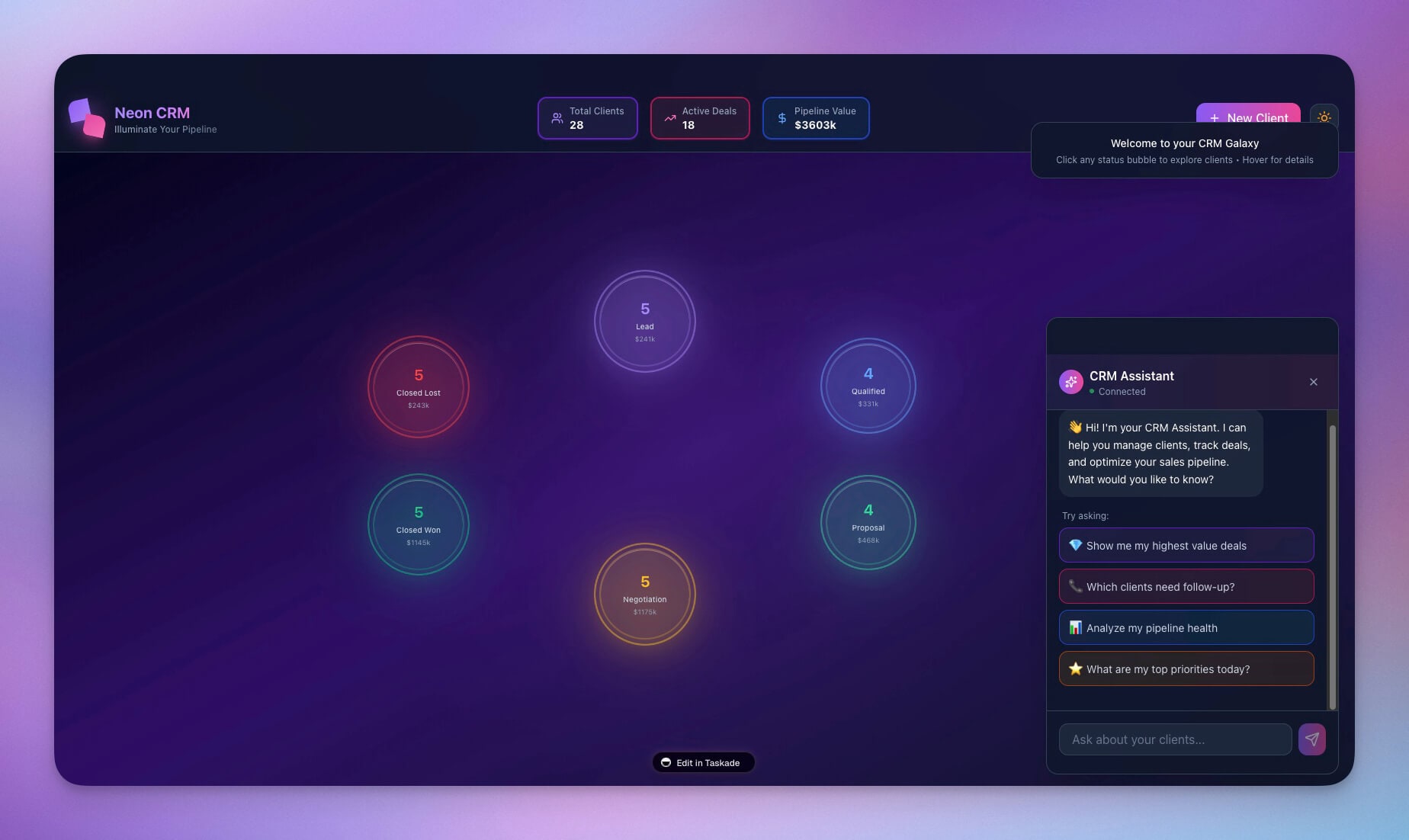
A visual CRM dashboard for tracking deals from lead to close. Manage contacts, deal stages, expected revenue, and win probabilities. The AI agent forecasts monthly revenue based on pipeline data and flags deals that have been stalled for too long — the silent killers of sales momentum.
Automations move deals between stages based on activity and send follow-up reminders when a deal goes quiet. The neon-styled UI is not just aesthetic — it makes pipeline status immediately visible at a glance, which matters when you are reviewing 50+ deals in a weekly sales meeting.
Features:
- Visual deal pipeline with drag-and-drop stages
- Contact management with communication history
- Revenue forecasting with AI-powered probability scoring
- Stale deal alerts and follow-up automations
- Win/loss analysis for improving close rates
9. Client Portal

A professional client-facing dashboard where clients can view project status, access deliverables, review invoices, and communicate with your team. Reduces back-and-forth emails by giving clients self-service access to everything they need.
The AI agent can answer client questions about project timelines and deliverable status — "When is the next milestone due?" or "What's the status of the homepage redesign?" — without your team needing to respond manually. Customizable branding lets you match your agency identity, so the portal feels like an extension of your firm, not a third-party tool.
Features:
- Project status dashboard with milestone tracking
- Deliverable access and file sharing
- Invoice viewing and payment status
- AI-powered client Q&A assistant
- Custom branding (logo, colors, domain on Business+ plans)
10. Store Manager
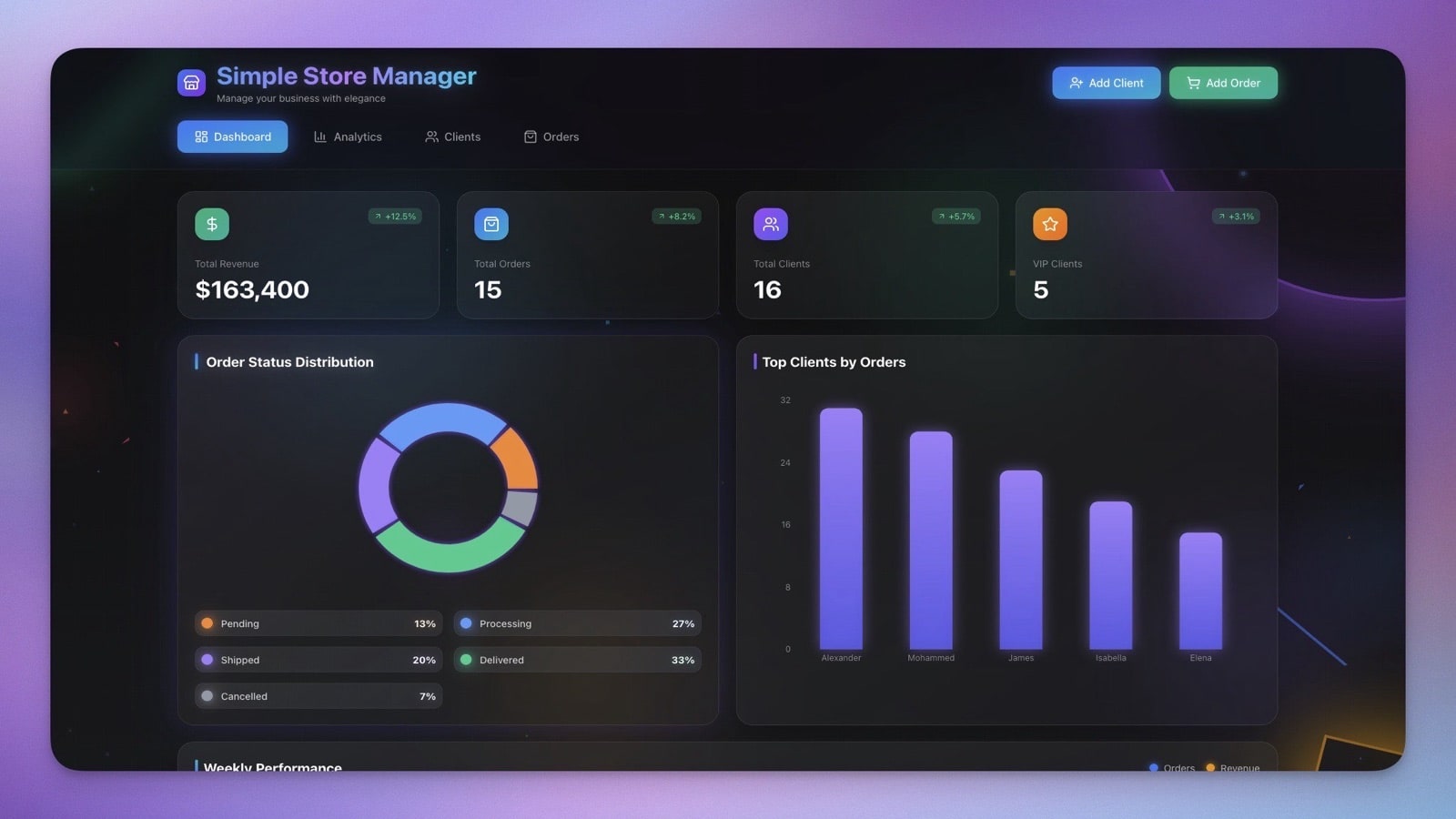
Inventory, sales, and revenue tracking for small retail and e-commerce operations. Add products, track stock levels, log sales, and monitor revenue by category. The AI agent identifies top sellers, flags low-stock items, and suggests reorder quantities based on sales velocity.
Automations trigger low-stock alerts and generate weekly sales reports. For small operators who do not need the full weight of Shopify analytics or a dedicated ERP system, the Store Manager provides the essentials — what is selling, what is running low, and where the revenue is coming from.
Features:
- Product catalog with pricing, stock levels, and categories
- Sales logging with automatic revenue calculations
- Low-stock alerts via automation
- AI-powered top seller identification and reorder suggestions
- Weekly sales reports delivered via email or Slack
Live Demo: Finance Tracker Dashboard
See the Finance Tracker Dashboard in action below. Enter sample transactions, ask the AI agent questions about your spending, and explore the different dashboard views — all without leaving this page:
Try this: Ask the AI agent "What are my top 3 spending categories?" or "Am I over budget this month?" to see how natural language analysis works on financial data.
Genesis vs. Traditional Finance Tools
How does building finance apps with Genesis compare to the legacy options?
| Feature | Taskade Genesis | QuickBooks | Wave | FreshBooks | Xero |
|---|---|---|---|---|---|
| Price | Free, Pro $10/mo | $30/mo | Free (ads) | $19/mo | $15/mo |
| Invoicing | AI-generated, customizable | Template-based | Template-based | Template-based | Template-based |
| Expense Tracking | AI categorization + alerts | Manual + rules | Manual + OCR | Manual entry | Bank feed rules |
| AI Insights | Natural language Q&A on your data | Limited reports | None | None | Basic analytics |
| Custom Automations | 104 actions, branching, looping | Limited (QuickBooks-only) | None | Limited | Limited |
| Custom App Building | Unlimited apps from prompts | None | None | None | None |
| Collaboration | Real-time multiplayer, RBAC | Multi-user (paid add-on) | Limited sharing | Team plans extra | Multi-user (paid) |
| Integrations | 100+ (Stripe, Slack, Gmail, etc.) | 750+ (accounting ecosystem) | Limited | 100+ | 1000+ |
| Learning Curve | Minutes (describe what you need) | Days to weeks | Hours | Hours | Days |
| Tax Filing | No (use alongside tax software) | Yes (US, CA) | Yes (US, CA) | No | Yes (global) |
| Payroll | No | Add-on ($45/mo+) | No | No | Add-on |
| CPA Audit Trail | No (operational, not compliance) | Yes | Yes | Limited | Yes |
The key distinction: QuickBooks, Wave, FreshBooks, and Xero are accounting software designed for compliance, tax preparation, and CPA workflows. Genesis builds operational finance tools — the dashboards, trackers, calculators, and client-facing apps that help you run your business day to day. They are complementary, not competitive. Use Genesis for the operational layer and connect it to your accounting software via automations.
The Economics: What Finance Tools Actually Cost
  ┌──────────────────────────────────────────────────────────┐
  │              TRADITIONAL FINANCE STACK                    │
  │                                                          │
  │  QuickBooks Simple Start .............. $30/mo           │
  │  Zapier (automation) .................. $20/mo           │
  │  Spreadsheet time (4h/mo x $50/hr) ... $200/mo          │
  │  FreshBooks (invoicing add-on) ........ $19/mo           │
  │  Dashboard tool (Geckoboard, etc.) .... $25/mo           │
  │                                                          │
  │  ─────────────────────────────────────────────           │
  │  EFFECTIVE MONTHLY COST ............... $294/mo          │
  │  ANNUAL COST .......................... $3,528/yr        │
  │                                                          │
  ├──────────────────────────────────────────────────────────┤
  │              GENESIS FINANCE STACK                        │
  │                                                          │
  │  Taskade Pro plan .............................. $10/mo  │
  │  Invoice Generator .................... included         │
  │  Finance Tracker Dashboard ............ included         │
  │  Expense Splitter .................... included          │
  │  All 10 apps .......................... included         │
  │  AI agents (analysis, Q&A) ............ included         │
  │  Automations (alerts, reports) ........ included         │
  │  Spreadsheet time saved ............... 4h/mo reclaimed  │
  │                                                          │
  │  ─────────────────────────────────────────────           │
  │  EFFECTIVE MONTHLY COST ........................ $10/mo  │
  │  ANNUAL COST .................................. $120/yr  │
  │  ANNUAL SAVINGS ............................. $3,408/yr  │
  └──────────────────────────────────────────────────────────┘
The math is not subtle. Even if you only use two or three of these apps, the cost savings are significant. And the time savings are even larger — those 4 hours per month of spreadsheet wrangling add up to 48 hours per year of work that an AI agent can do in seconds.
But the biggest saving is not dollars or hours — it is cognitive load. When your finance tools are intelligent and automated, you stop carrying the mental burden of "Did I send that invoice?" and "Am I over budget this month?" The system handles it. You focus on growing the business.
For teams, the economics multiply. Three people sharing a QuickBooks account adds $15/user/month. Add Zapier seats, spreadsheet collaboration tools, and the coordination overhead of keeping everyone on the same page. With Genesis, every team member accesses the same living apps with real-time collaboration and RBAC — all included in the same $10/month Pro plan.
Build a Custom Finance Tool in 5 Minutes
Watch: Build a live AI app from a single prompt with Taskade Genesis.
None of the 10 apps above fit your exact needs? Build your own. Here is a prompt template you can customize:
Prompt
Build a [TYPE OF FINANCE TOOL] with:DATA:
- [Table 1]: [field 1], [field 2], [field 3], [field 4]
- [Table 2]: [field 1], [field 2], [field 3]
- [Table 3]: [field 1], [field 2]
VIEWS:
- Dashboard showing [metric 1], [metric 2], and [metric 3]
- [List/Table] view with filters for [field] and [field]
- [Chart type] showing [trend or breakdown]
INTELLIGENCE:
- AI assistant that can answer questions about [domain]
- Automatically [classify/categorize/tag] new entries
- Identify [patterns/anomalies/trends] in the data
AUTOMATION:
- Alert when [threshold condition]
- [Weekly/Daily/Monthly] summary [via email/Slack/in-app]
- Auto-[calculate/generate/update] [output] when [trigger]
Example prompts for specific industries:
SaaS founder:
Prompt
Build an MRR dashboard that tracks monthly recurring revenue,
churn rate, customer lifetime value, and expansion revenue.
Include an AI agent that forecasts next quarter's revenue
and alerts me when churn exceeds 5%.
Real estate agent:
Prompt
Build a commission tracker for real estate transactions.
Track properties, sale prices, commission percentages,
closing dates, and split details. Show YTD earnings
and pipeline value. Alert when a closing date is within 7 days.
Restaurant owner:
Prompt
Build a food cost calculator that tracks ingredient costs,
menu item prices, and profit margins. The AI should flag
items where food cost exceeds 35% and suggest price adjustments.
Include a weekly cost report automation.
When NOT to Build with Taskade Genesis
Taskade Genesis is an operational finance tool builder. It is not a replacement for everything. Do not use Genesis if you need:
- CPA-grade audit trails — For compliance and auditing, use QuickBooks, Xero, or your accountant's preferred platform. Genesis does not maintain the type of immutable ledger that tax authorities require.
- Tax filing integration — Genesis does not file taxes. Use it alongside TurboTax, H&R Block, or your accountant. You can export data from Genesis to feed into tax preparation workflows.
- Payroll processing — Payroll involves legal compliance, tax withholding, and direct deposits. Use Gusto, Rippling, or ADP. Genesis can track payroll-adjacent data (headcount, compensation planning) but should not process paychecks.
- Bank-grade security certifications — If your regulatory environment requires PCI DSS Level 1 or FFIEC compliance, Genesis is not the right tool for handling raw payment card data. Use certified payment processors and connect them to Genesis via webhooks.
- Multi-entity consolidation — If you run multiple legal entities and need consolidated financial statements, you need proper accounting software with multi-entity support.
The right approach: Use Genesis for the daily operational layer — tracking, invoicing, analysis, dashboards — and connect it to your compliance tools via 100+ integrations. Genesis handles the 80% of finance work that does not require a CPA license. Your accounting software handles the 20% that does.
How Genesis Finance Apps Work Under the Hood
Every Genesis finance app runs on Workspace DNA — the three-pillar architecture that powers all Taskade applications:
Memory (Projects & Databases)
Your financial data lives in structured Projects — tables with typed fields, relations between tables, and multiple views. An invoice app might have three Projects: Clients, Invoices, and Payments. Each Project can be viewed as a List, Board, Calendar, Table, Mind Map, Gantt, or Org Chart — all 7 project views from the same underlying data.
Intelligence (AI Agents)
Each app includes one or more AI Agents trained on your financial data. Agents use 15+ AI models from OpenAI, Anthropic, and Google. They answer natural language questions ("What's my burn rate?"), perform analysis ("Which expense category grew fastest?"), generate documents (monthly reports, investor updates), and take actions (categorize transactions, draft follow-up emails).
Agents in AI Agents v2 come with custom tools, slash commands, built-in tools, persistent memory, and multi-model support. They learn continuously from your workspace data.
Execution (Automations)
Automations handle the repetitive work. Budget threshold alerts, weekly summaries, auto-categorization, overdue invoice reminders — all run on durable execution infrastructure with branching, looping, and filtering. Connect to 100+ external services to push data to Slack, Gmail, Google Sheets, Stripe, and more.
The combination of these three pillars is what makes Genesis finance apps different from static templates or basic spreadsheets. Your data is structured. Your AI understands it. Your automations act on it. Together, they create a system that improves as you use it.
From Spreadsheet to Living Finance System
Most businesses start with a spreadsheet. Here is what the migration path looks like:
| Stage | Tool | Capability | Limitation |
|---|---|---|---|
| 1 | Google Sheets | Flexible, familiar | No automation, no AI, breaks at scale |
| 2 | QuickBooks/Xero | Accounting compliance | Rigid, expensive, poor UX for non-accountants |
| 3 | Genesis Finance Apps | AI analysis, automation, custom views | Not compliance/tax software |
| 4 | Genesis + Accounting Software | Full stack: operations + compliance | Requires two systems (connected via automations) |
The ideal setup for most small businesses is Stage 4: Genesis for the daily operational layer (tracking, invoicing, dashboards, analysis) connected to QuickBooks or Xero for the compliance layer (tax filing, audit trails, payroll). Automations sync data between the two, so you get the best of both worlds without double entry.
Getting Started: 3 Paths
Path 1: Clone and customize
Pick any app from the Quick Reference Table above, click "Clone," and start using it immediately. The app appears in your Taskade workspace with all Projects, AI Agents, and Automations pre-configured.
Then customize by chatting with Genesis:
- "Add a currency field to support EUR and GBP"
- "Change the categories to match my business: Consulting, Retainers, Projects"
- "Add a weekly email report sent every Friday at 5pm"
- "Include a 'Notes' column in the transactions table"
Each customization takes seconds. No need to rebuild from scratch.
Path 2: Build from a prompt
Open Taskade Genesis and describe the finance tool you need. Use the prompt template from the section above or write your own from scratch. Genesis builds the complete app — UI, database, AI agent, automations — in 2-5 minutes.
Tips for better prompts:
- Be specific about the data fields you need
- Name the views you want (dashboard, list, chart, calendar)
- Describe what the AI agent should know and do
- Specify automation triggers and actions
- Use the "Enhance Prompt" button to let Genesis suggest improvements
Path 3: Combine multiple apps
Clone the Invoice Generator and the Finance Tracker Dashboard. Connect them within your Taskade workspace so that completed invoices automatically update your revenue tracking. Add the Time Tracker to feed billable hours into your invoicing workflow. Add the Client Portal for client-facing access. Build a complete finance stack from modular pieces that share the same Workspace DNA.
This modular approach means you start small and grow. You do not pay for features you do not use. You add tools as your business complexity increases. And because every app draws from the same workspace data, there is no duplicate entry and no data silos.
Related Guides
Vibe Coding App Series:
- 50+ AI Apps You Can Clone — Complete gallery
- 12 AI Micro-Apps & Widgets — Small tools, big impact
- 10 AI Tools for Freelancers — Invoice, time, CRM
- 10 AI Design & Branding Tools — Palettes, gradients, portfolios
- 7 AI Education Portals & Study Tools — Learning systems
- 10 AI Apps for Students & Educators — School tools
Finance tutorials:
- How We Built the Finance Dashboard in 10 Minutes — Step-by-step
- What Is Vibe Coding? — The new era of app creation
- The Ultimate Guide to Taskade Genesis — Everything you need to know
Explore Taskade:
- AI App Builder — Build complete applications
- AI Dashboard Builder — Generate dashboards
- Browse Community Apps — 150,000+ apps to clone
- Browse Agent Templates — AI agents for every use case
Ready to build your finance stack?
Build a custom finance tool -->

Frequently Asked Questions
Can I build a finance app without writing code?
Yes. Taskade Genesis lets you build complete finance apps — invoice generators, expense trackers, budget dashboards — from a plain English prompt. No coding, no frameworks, no deployment steps. Describe what you need and Genesis creates the UI, database, AI agents, and automations in minutes.
How is an AI invoice generator different from a static template?
A static template is a blank form you fill in manually every time. An AI invoice generator built with Genesis stores client data, auto-calculates totals and tax, tracks payment status, and can trigger follow-up reminders through automations. The AI agent can answer questions like "Which invoices are overdue?" or "What was my total revenue last quarter?"
What AI models power Taskade Genesis finance apps?
Taskade supports 15+ frontier AI models from 3 providers — OpenAI, Anthropic Claude, and Google Gemini. You choose which model powers each agent inside your app. Models are continuously updated to the latest releases so your finance tools always use the best available AI.
Can I connect my Genesis finance app to Stripe or QuickBooks?
Taskade supports 100+ integrations including Stripe, QuickBooks, Xero, Google Sheets, Slack, Gmail, and 40+ more services. Use automations to push invoice data to your accounting system, trigger Slack alerts on overdue payments, or sync transactions with Google Sheets.
Is my financial data secure in Taskade?
Yes. Taskade uses AES-256 encryption at rest, TLS 1.3 in transit, and SOC 2 Type II compliant infrastructure. Workspaces support RBAC (Owner to Viewer) so you control exactly who sees financial data. SAML SSO starts on Business; Enterprise plans add SCIM and audit logs.
How much does it cost to build finance apps with Genesis?
Genesis is included in all Taskade plans. The Free plan includes 11,000 AI credits, enough to build and iterate on several finance apps, and Pro unlocks higher usage limits from $10/month billed annually. Published apps run without consuming additional credits, so your tools can serve your team at no extra cost.
Can my team collaborate on the same finance app in real time?
Yes. Taskade supports real-time multiplayer collaboration across multiple project views — List, Board, Calendar, Table, Mind Map, Gantt, and Org Chart. Multiple team members can enter transactions, review budgets, and interact with AI agents simultaneously.
Can I export data from my Genesis finance app?
Yes. Taskade projects support export to CSV, JSON, Markdown, and PDF. You can also use automations to push data to Google Sheets, Airtable, or any webhook endpoint on a schedule. This makes it easy to feed data into external accounting or tax software.
Are Genesis finance apps compliant for tax or audit purposes?
Genesis finance apps are operational tools for tracking, analysis, and invoicing — not certified accounting software. They do not replace CPA-grade audit trails, tax filing systems, or payroll processors. For compliance-critical workflows, use Genesis alongside dedicated accounting software like QuickBooks or Xero and connect them via automations.
Can I build a custom finance tool for my specific industry?
Absolutely. Genesis builds apps from your description, so you can create tools tailored to any industry — real estate commission trackers, restaurant food-cost calculators, SaaS MRR dashboards, or construction bid estimators. Train the AI agent on your own financial data and terminology for even more relevant results.