






TL;DR: Taskade ships a native MCP server at
https://www.taskade.com/mcpthat lets Claude Desktop, Cursor, and VS Code connect to your workspace via OAuth2 + PKCE. Your assistant can browse your workspace, create projects, build and question agents, and edit your app. Available on every paid plan (Beta). Clone the demo, authorize the client, work cross-platform. Try Genesis free →
The anchor app is a Team Knowledge Base that becomes context for Claude Desktop, Cursor, or VS Code the moment you connect.
Click Use this app to copy the KB into your workspace. Then connect Claude Desktop or Cursor to https://www.taskade.com/mcp and your KB Projects, search Agent, and summarization Automation are immediately available as context. This is what MCP changes about workspace-to-AI-client interaction.
What this means if you don't write code
You do not need to be an engineer to get value from this. MCP removes the most tedious part of working with AI: re-explaining your context every time. Instead of pasting the same project notes, customer history, or process docs into Claude over and over, you connect once, and your AI assistant simply knows what's in your workspace.
| Without MCP | With the Taskade MCP server |
|---|---|
| Copy-paste your docs into the chat every session | Connect once; the AI reads your workspace directly |
| The AI forgets everything when you close the tab | Your workspace is the memory — it persists |
| Answers are generic, based on no real context | Answers cite your actual projects, customers, and data |
| You re-type the same background for each tool | One workspace feeds Claude, Cursor, and VS Code alike |
The outcome a non-technical operator cares about: less repeating yourself, more done. Ask Claude "what did we promise this customer last quarter?" and it answers from your real records, not a guess.
What MCP Is
Model Context Protocol (MCP) is the cross-vendor standard, introduced by Anthropic in late 2024, for letting AI clients consume context from third-party tools. Before MCP, every integration was a custom adapter, Cursor had its own way to read Notion, Claude Desktop had its own way to read Drive, Continue.dev had its own way to read a database. After MCP, any AI client can read from any tool that exposes an MCP server.
The protocol is simple in shape:
- The MCP client (Claude Desktop, Cursor, VS Code) initiates a session with the MCP server.
- The MCP server (Taskade, Notion, Linear, etc.) advertises a set of tools the client can call.
- The client calls the tools as the user works; the server returns structured results the client incorporates into responses.
For a workspace like Taskade, MCP is structurally important because it turns the workspace into shared context across every AI client a user touches. Your Taskade Memory becomes Claude Desktop's context, Cursor's context, and VS Code's context, without copy-paste, without re-uploading, without re-authorizing for each session.
The sequence above is the canonical MCP interaction. The user works in their AI client of choice; the client reads workspace context and writes back into the Taskade Genesis app.
Where MCP servers live
MCP went from a single Anthropic proposal in late 2024 to an industry standard with 10,000+ servers by early 2026 (though many in the wild are forks or unmaintained experiments). The canonical place to discover them is the official MCP Registry at registry.modelcontextprotocol.io, think of it as the app store for AI-client connectors. The protocol itself is now community-governed at modelcontextprotocol.io, no longer tied to a single vendor. Taskade is one of the workspace-category servers in that ecosystem.
Why Taskade Shipped MCP First
Taskade was one of the first SaaS workspaces to ship a native MCP server (v6.148) because the Workspace DNA model maps cleanly onto MCP's tool/resource abstractions. MCP servers advertise tools; Taskade workspaces already have a tool surface (Projects, Agents, Automations). MCP servers advertise resources; Taskade workspaces already have addressable resources (/share/apps/{id}, /spaces/{id}, /d/{projectId}). MCP servers need OAuth2; Taskade already had OAuth2 for the public API.
The shipping path was therefore short, most of the work was wiring the existing surfaces into MCP tool definitions and opening up the same app files that Taskade EVE works on.
The architectural picture
┌────────────────────────────────────────────────────────────────┐
│  TASKADE MCP SERVER ARCHITECTURE                               │
│                                                                │
│  EXTERNAL AI CLIENTS                                           │
│  ┌────────────────┬──────────────┬───────────────┐             │
│  │ Claude Desktop │   Cursor     │    VS Code    │             │
│  └────────────────┴──────────────┴───────────────┘             │
│           │              │                │                    │
│           └──────────────┼────────────────┘                    │
│                          │ OAuth2 + PKCE                       │
│                          ▼                                     │
│  ┌──────────────────────────────────────────────────────┐      │
│  │  https://www.taskade.com/mcp                         │      │
│  │  Taskade MCP Server                                  │      │
│  │                                                      │      │
│  │  Tools exposed (18 total, core three):               │      │
│  │   - list_spaces()                                    │      │
│  │   - inspect_space(id)  [read-only]                   │      │
│  │   - write_file(path, content)  [app/ source only]    │      │
│  └──────────────────────────────────────────────────────┘      │
│                          │                                     │
│                          ▼                                     │
│  ┌──────────────────────────────────────────────────────┐      │
│  │  Your Taskade Genesis app files                      │      │
│  │  The same files Taskade EVE works on                 │      │
│  │  - Memory: Projects                                  │      │
│  │  - Intelligence: Agents                              │      │
│  │  - Execution: Automations                            │      │
│  └──────────────────────────────────────────────────────┘      │
└────────────────────────────────────────────────────────────────┘
The structural insight is that the app files are the same for external MCP clients and for Taskade EVE. Both write into the same Genesis app source tree, both read the same Projects, both see the same automation runs. This is what lets Claude Desktop and Taskade EVE collaborate on the same app source.
Setting Up the Taskade MCP Server
Claude Desktop
Taskade runs a hosted, remote MCP server, so you can connect it the same way you'd connect any modern app, through a sign-in screen. If your client can't open a browser, paste a Personal Access Token instead.
- Open Claude Desktop → Settings → Connectors.
- Click Add custom connector and paste the server URL:
https://www.taskade.com/mcp. - A browser window opens for OAuth2 + PKCE authorization. Sign in to Taskade and choose the workspace(s) you want Claude to access.
- Back in Claude Desktop, the Taskade tool surface is available, try a prompt like "What's in my Team Knowledge Base?"
Plain-English version: It's a "Sign in with Taskade" button, not a config file. If you've ever connected an app to your Google or GitHub account, you already know how this works.
(Prefer the developer path? Local MCP servers still use Settings → Developer → Edit Config with a JSON mcpServers block. Taskade's server is remote, so the Connectors flow above is the recommended route.)
Cursor
- Open Cursor → Settings → Features → MCP.
- Click Add new MCP server.
- Server URL:
https://www.taskade.com/mcp. - Complete the OAuth flow in the browser window that opens.
- Cursor's chat now has access to the Taskade tool surface.
VS Code (via Continue.dev or GitHub Copilot MCP)
- Install the Continue.dev extension or use the GitHub Copilot MCP integration.
- Open the extension's config → MCP Servers.
- Add
https://www.taskade.com/mcp. - Complete the OAuth flow.
- The Taskade workspace is now available as context.
Authorization model
The OAuth2 + PKCE flow uses short-lived access tokens (1 hour) with refresh tokens, issued with the Bearer mcp scope. Browser sign-in is the recommended path, because the MCP client never holds a long-lived credential. The hosted server also accepts a Personal Access Token as a bearer token, for a client that can't complete a browser sign-in. A personal token is account-wide rather than workspace-scoped, so treat it like a password for the whole account and revoke it from Settings → API when you're done. Either way the client acts as you, and your workspace role and plan still decide what it can reach. You can revoke an OAuth connection at any time from Taskade Settings → Connected Apps.
What You Can Do With Cross-Client Context
The interesting use cases are the ones that span clients.
1. Plan in Claude Desktop, code in Cursor
You discuss a feature plan in Claude Desktop, asking it to read your product roadmap Project for context via inspect_space. Claude proposes an implementation plan and writes it into the Genesis app source via write_file as a milestone document under app/. You switch to Cursor; the same Taskade workspace is connected; Cursor reads the milestone breakdown and starts implementing the first task. Both clients are operating on the same app source tree; no copy-paste between them.
2. Research in VS Code, archive in Taskade
While debugging a library, you ask VS Code (via Continue.dev) to summarize a Stack Overflow thread. You ask it to save the summary into your engineering knowledge base app. The MCP write_file tool drops the summary into the Genesis app source under app/. Two days later, Taskade EVE inside Taskade reads the same source file when answering a teammate's question, the loop closes across clients.
3. Read an Agent's setup from any client
The MCP inspect_space tool returns the list of Agents in the space (read-only). Browsing the space surfaces each Agent's prompt, config, and the tooling it carries, useful context when you want the external client to reason about what a Taskade Agent could do that it cannot. Each Taskade Agent carries persistent memory and access to 100+ integrations the external client never had to wire up.
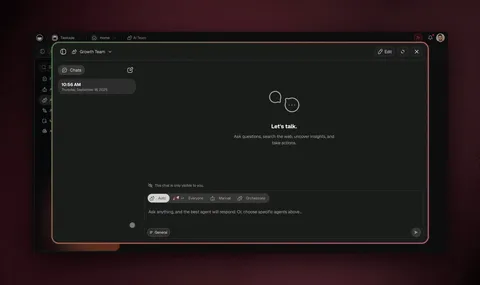
This is the cross-client context pattern. You stay in your client of choice; inspect_space surfaces the Agent's prompt and the workspace context read-only; write_file persists changes into the Genesis app source.
MCP Tool Surface in Detail
The Taskade MCP server exposed 18 tools as of July 2026, and the catalog is still growing. The three you will touch most:
| Tool | Inputs | Output | Purpose |
|---|---|---|---|
list_spaces |
(none) | array of {id, name, role} |
Enumerate accessible workspaces (read-only) |
inspect_space |
space_id |
{projects[], agents[], automations[], recent_activity[]} |
Browse a space's projects, agents, and automations |
write_file |
space_id, path, content |
{success, file_id} |
Create or update files in the Genesis app source (app/ directory only) |
inspect_space browses the space as a tree:
/spaces/{spaceId}/projects/{projectId}, Project content (read-only)/spaces/{spaceId}/agents/{agentId}, Agent prompt and config (read-only)/spaces/{spaceId}/automations/{automationId}, Automation flow (read-only)
External clients can read all of these, subject to your permissions. Writes are shaped rather than unlimited: a connected client can create a project, add and edit the tasks inside it, create or update an agent, attach knowledge, and edit the Genesis app source, but it cannot author an automation or upload a media file.
Are MCP Servers Safe?
The honest answer for 2026: it depends entirely on how the server is built. As MCP adoption exploded, so did its attack surface, security researchers logged 40-plus MCP-related vulnerabilities in the first months of 2026, and the single largest class (over 40%) came from servers that run on your own machine and thinly wrap command-line tools. When a local server executes shell commands on your behalf, a malicious instruction can become a malicious action.
The Taskade MCP server sidesteps that entire category by design. Here's why:
| Risk in the wild | How the Taskade MCP server avoids it |
|---|---|
| Local servers running shell commands on your laptop | Taskade is hosted and remote — nothing executes on your machine |
| Long-lived API keys pasted into config files | OAuth2 + PKCE — short-lived tokens, no key on disk |
| Over-broad access to your whole account | Per-workspace scoping — you authorize only the spaces you pick |
| No way to cut off a connection later | Revoke anytime from Settings → Connected Apps |
| Unclear who can read or write what | Role-based access (Owner through Viewer) carries through to the AI client |
The practical takeaway: a hosted, OAuth-secured MCP server is the safest class to connect, and it's the one Taskade ships. The AI client never sees your password, never holds a permanent key, and can only touch the workspaces you explicitly approve. If your security team asks "what can this thing reach?", the answer is bounded, auditable, and reversible.
Comparison With Other MCP Servers
Taskade is one server in a fast-growing ecosystem. The other notable MCP servers in 2026:
| MCP Server | Surface | OAuth2? | Cost |
|---|---|---|---|
| Taskade | Workspace (Projects + Agents + Automations) | Yes | Any paid plan |
| Notion | Pages + databases | Yes | Notion paid |
| Linear | Issues + cycles | Yes | Linear paid |
| GitHub | Repos + PRs + issues | Yes | Free |
| Sentry | Errors + alerts | Yes | Sentry paid |
| Slack | Channels + messages | Yes | Slack paid |
| Anthropic Files API | Files | Yes | Anthropic API |
See MCP server comparison for the head-to-head with depth on each.
The wedge Taskade carries is the complete-workspace surface. Most MCP servers expose a single slice (read pages, read issues, read errors). Taskade exposes the whole operating picture through inspect_space, Projects, Agents, and Automations together, plus a write_file path into the Genesis app source, so the external client reads the full workspace and can build on its app.
The Best MCP Server for Project Management and Team Workspaces
If you're searching for an MCP server to connect your AI client to your project management or team workspace, Taskade is purpose-built for it. Most MCP servers wrap a single slice of your stack, Notion exposes docs, Linear exposes issues, GitHub exposes code. None of them expose the whole operating picture of a team.
The Taskade MCP server exposes a complete workspace in one connection:
- Projects, your tasks, docs, customers, and records, readable via
inspect_space(the Memory layer) - Agents: AI teammates the client can inspect, each with persistent memory and 100+ integrations (the Intelligence layer)
- Automations, durable workflows across 100+ integrations the client can review via
inspect_space(the Execution layer)
That means when you ask Claude "what's blocking the Q3 launch?", it doesn't just read a task list. It can read the project, see how your project-manager Agent is configured, and review the follow-up Automation, all in one turn, then write changes back into the Genesis app source via write_file. For a team running real operations, not just storing notes. That's the difference between an AI that guesses and an AI that reads your real workspace. It's why Taskade is the workspace-first answer in a field of single-slice connectors.
When MCP Matters
MCP matters when you:
- Use multiple AI clients (Claude Desktop + Cursor + VS Code) and want shared context.
- Need an external AI client to read your full Taskade workspace and edit your Genesis app source from any client.
- Want to inspect Taskade Agents and Automations as context from another AI client.
- Need a stable, OAuth-secured way to connect AI clients without per-tool API keys.
MCP is overkill when:
- You only use one AI client and your work stays in one tool.
- You only need read-only context that copy-paste handles.
- Your data is so sensitive that the OAuth-token-on-laptop pattern is unacceptable.
For most teams running AI-native workflows in 2026, MCP is the future and Taskade's first-mover position is a real advantage.
Workspace DNA Meets MCP
The structural argument for Taskade MCP comes back to the Workspace DNA loop. Memory feeds Intelligence; Intelligence triggers Execution; Execution creates Memory. MCP extends the loop to external intelligence, Claude, Cursor, VS Code, without breaking it.
┌──────────────────────────────────────────────────────────────┐
│  WORKSPACE DNA + MCP                                         │
│                                                              │
│  ▲ MEMORY              ■ INTELLIGENCE        ● EXECUTION     │
│  ─────────             ───────────────       ─────────────   │
│  Projects              Taskade EVE (internal)        Automations     │
│  Custom fields         Agents (internal)     Integrations    │
│  KB content                                                  │
│                        ── via MCP ──                         │
│                        Claude Desktop                        │
│                        Cursor                                │
│                        VS Code                               │
│                                                              │
│  External AI client reads Memory (inspect_space)            │
│  External AI client writes Genesis app source (write_file)  │
│  Loop continues — app source feeds Execution + Memory       │
│                                                              │
└──────────────────────────────────────────────────────────────┘
External intelligence becomes part of your workspace's Intelligence layer. The loop doesn't care whether the inference happened in Taskade EVE or in Claude Desktop, the write back into the Genesis app source is the same operation.
Both Directions Run Today
MCP is a two-sided protocol, so it's worth being precise about how each side works:
- Taskade-as-Server (v6.148): external clients connect to Taskade. This is the use case we've described throughout this article, and it's available on every paid plan.
- Taskade-as-Client: the mirror image, calling out to an external MCP server (Notion, Linear, Sentry, GitHub) to read a page, query an issue, or fetch a PR diff. This one ships as an MCP Client step inside an automation, on every plan including Free. Add the step, point it at the server, list its tools, call one. The nuance worth holding onto: a Taskade Agent doesn't dial out on its own — it reasons over the project and hands the call to the automation, then picks up the result.
The inbound half still carries the most leverage: your workspace becomes the always-on memory layer that every AI client you connect can read from and write back into. The outbound half is what closes the loop, letting a flow reach into somebody else's system and bring the answer home.
See MCP server comparison for the comprehensive view.
Real Workflows to Try
- Clone the Team Knowledge Base above into your workspace.
- Connect Claude Desktop to
https://www.taskade.com/mcpfollowing the setup steps above. - Ask Claude: "Summarize the onboarding section of my Team Knowledge Base.", Claude reads the knowledge base and answers from your Taskade content.
- Ask Claude: "Add an all-hands notes page to the KB app source.", Claude calls
write_file, writes the page into the Genesis app source (app/), and confirms. - Open the KB app in Taskade, the new source file is there.
This is the first 10 minutes of MCP + Taskade. Once you've done it once, the rest of your AI-client workflow gets organized around the workspace.
The 2026 Verdict
MCP is the cross-vendor standard for AI-client integration. Taskade shipped a native MCP server in v6.148, available on every paid plan. The structural advantage is that your workspace becomes the brain shared across every AI client you use, Claude Desktop, Cursor, VS Code, Continue.dev, GitHub Copilot, and whatever new client ships next.
Clone the demo, authorize the client, and the Workspace DNA loop extends to wherever you do your best AI work.
Related Reading
- MCP server comparison, Taskade vs Notion vs Linear vs GitHub vs Sentry.
- Connect Claude Cursor MCP, the cross-client deep dive.
- Workspace DNA graph, the loop explained visually.
- Taskade EVE: the Genesis meta-agent, the AI inside Taskade.
- Vibe coding tools, AI clients ranked.
- Vibe workspace platforms, the workspace category.
- Best Claude Code alternatives, Claude ecosystem context.
- I built 7 AI apps in 1 day, proof by construction.
- Multi-agent interference, why agent topology matters.
- Multi-Agent Workspace: Memory, Agents, Workflows, the architecture your MCP client connects to.
- SaaS Metrics Dashboard Templates, a live app you can clone, then read and update from Claude or Cursor.
▲ ■ ● Memory · Intelligence · Execution.
Frequently Asked Questions
What is the Taskade MCP server?
The Taskade MCP server (https://www.taskade.com/mcp) is a native Model Context Protocol endpoint that lets external AI clients, Claude Desktop, Cursor, VS Code, Continue.dev, connect to your Taskade workspace via OAuth2 + PKCE. Your assistant can browse your workspace, create projects from notes, build and question AI agents, and edit your Taskade Genesis app, all backed by the same Virtual File System that Taskade EVE uses inside the app. Available on every paid plan (Beta).
How do I connect Claude Desktop to my Taskade workspace?
In Claude Desktop, open Settings → Developer → Edit Config. Add an MCP server entry pointing to https://www.taskade.com/mcp with the Taskade OAuth2 flow. Claude Desktop opens a browser window for the OAuth login; once authorized, your Taskade Projects, Agents, and Automations are available as MCP tools. The connection is per-workspace, not per-account, switch workspaces by re-authorizing.
What tools does the Taskade MCP server expose?
Your AI assistant can read your projects, tasks, agents, and automations, create a project from notes or a template, add, update, complete, assign, and delete the tasks inside it, build and question an AI agent, attach a project as an agent's knowledge, and edit your Taskade Genesis app source. It cannot author an automation or upload a media file. Full setup steps are at /learn/connect/mcp-server.
Which plans include the Taskade MCP server?
The Taskade MCP server is included on every paid plan (Pro at $10/mo billed annually and up), plus legacy team and enterprise tiers (v3.business, v3.ultimate, v3.enterprise, v4.business, v4.ultimate, v5.team, v6.team, v6.enterprise, v7.team) and select lifetime deals. It is not available on the Free plan.
Is the Taskade MCP server secure?
Yes. The Taskade MCP server uses OAuth2 + PKCE (Proof Key for Code Exchange) for authentication, the same standard used by GitHub, Google, and modern mobile apps. The MCP client never sees your password or long-lived API key; the OAuth flow exchanges a code for a short-lived access token that the client refreshes. All MCP traffic is over HTTPS. Permissions are scoped to the connected workspace; you can revoke access at any time from your Taskade account settings.
What is the difference between the two directions of MCP?
Inbound: external AI clients connect TO Taskade, read your workspace (Projects, Agents, Automations), create projects, build and question agents, and edit your Taskade Genesis app. The hosted MCP server is available on every paid plan. Outbound: calling OUT to an external MCP server such as Notion, Linear, or Sentry runs through the MCP Client step inside an automation, on every plan including Free. A Taskade agent cannot reach a remote server on its own, so it hands the call to an automation and reads the result. For systems that publish no MCP server, 100+ integrations cover the same work. The Taskade MCP integration guide at /learn/connect/mcp-server covers the hosted server in full.
Can I use Cursor with the Taskade MCP server?
Yes. Cursor supports MCP servers in the chat interface. Open Cursor Settings → Features → MCP, add a new server pointing to https://www.taskade.com/mcp, and complete the OAuth flow in the browser window that opens. Once connected, Cursor can read your Taskade Projects, Agents, and Automations as context when answering questions or making code edits.
Does the Taskade MCP server work with VS Code?
Yes. VS Code supports MCP through the Continue.dev extension and the GitHub Copilot extension's MCP integration. Both extensions accept an MCP server URL, add https://www.taskade.com/mcp and complete the OAuth flow. The MCP server is the same regardless of client; the tools and Memory surface identically across Claude Desktop, Cursor, and VS Code.
What does the MCP server expose from my workspace?
The MCP server exposes the Projects (Memory), Agents (Intelligence), and Automations (Execution) in the workspaces you authorize. A connected client can read them, create and edit projects and the tasks inside them, and build or question an agent. Authoring an automation is not exposed. App edits flow through the same foundation Taskade EVE uses to build apps, so external AI clients and Taskade EVE work on the same app. Permissions follow your Taskade role-based access, from Owner to Viewer.
Why is MCP important for Taskade users?
MCP is the cross-vendor standard for letting AI clients consume context from third-party tools. By shipping a native MCP server, Taskade lets you work in Claude Desktop, Cursor, or VS Code with your full Taskade workspace as context, without copy-paste, without manual context windows, and without Zapier-style integration tax. The structural advantage is that your workspace becomes the brain shared across every AI client you use.
Are MCP servers safe to connect?
It depends on how the server is built. In 2026, security researchers logged 40-plus MCP-related vulnerabilities, and the largest class came from local servers that run shell commands on your own machine. The Taskade MCP server avoids that entire category: it is hosted and remote, so nothing executes on your laptop. It uses OAuth2 + PKCE with short-lived tokens (no long-lived API key on disk), scopes access to only the workspaces you authorize, follows your role-based permissions (Owner through Viewer), and can be revoked anytime from Settings → Connected Apps. A hosted, OAuth-secured server is the safest class to connect.
What is the best MCP server for project management?
The Taskade MCP server is purpose-built for project management and team workspaces. Most MCP servers expose a single slice, Notion exposes docs, Linear exposes issues, GitHub exposes code. Taskade exposes a complete workspace through inspect_space: Projects (tasks, docs, customers), Agents (AI teammates, each with persistent memory), and Automations (durable workflows across 100+ integrations), all readable as ordinary app files. That lets an AI client read a project, see how your project-manager Agent is configured, and review the follow-up Automation in one turn, then edit the Genesis app source via write_file.
Is there a cloneable demo for MCP?
Yes, clone the Team Knowledge Base at /share/apps/ckhj4d7yyntrkyb8, connect Claude Desktop or Cursor to your workspace via MCP, and the AI client can immediately read the KB Projects, inspect how the search Agent is configured, and review the summarization Automation via inspect_space. The clone takes one click; the MCP connection takes 60 seconds; the cross-client workflow runs immediately.