






You can automate roughly 99% of your sales process with AI agents in 2026, and the 1% you keep is the part that actually closes deals: the live conversation, the negotiation, and the relationship judgment. Reps today spend up to ~70% of their week on non-selling admin, researching prospects, enriching records, updating the CRM, and writing follow-ups. AI agents now set a goal, plan the steps, execute across your inbox and pipeline, check the result, and adjust without asking you at every turn. Because reply speed is one of the strongest predictors of win rate, the fastest path to more revenue is to stop wiring tools together and instead describe the sales system you want. Then let it build itself.
TL;DR: Sales reps lose up to ~70% of their week to non-selling admin. AI agents reclaim it by scoring leads, researching prospects, writing personalized outreach, sequencing follow-ups, and keeping the pipeline clean, in one connected app. Describe the outcome and let Taskade Genesis build the agents and automations. Clone the working sales-ops app below →
See it live: clone a working sales-ops app
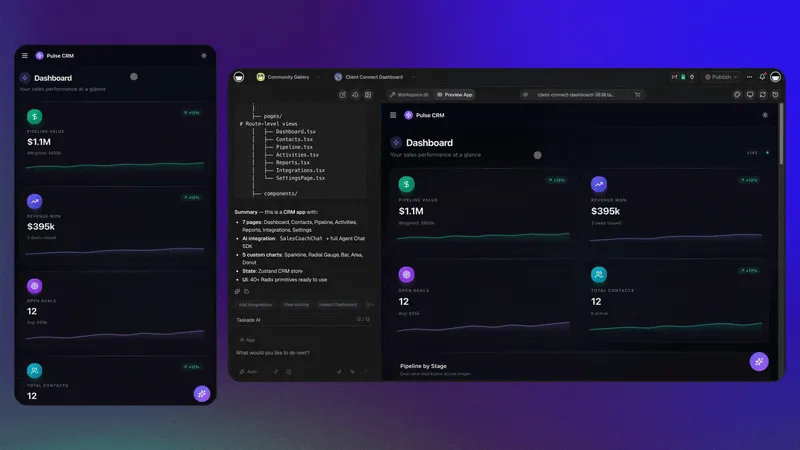
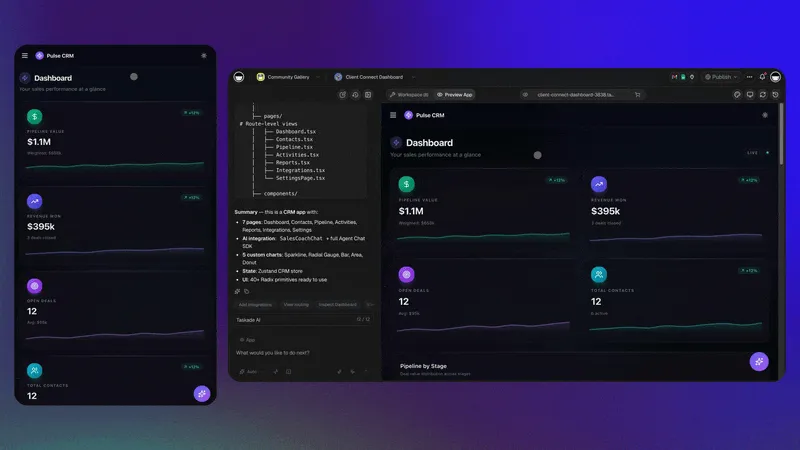
You do not have to imagine this. The app below was built from a single prompt and runs in your browser right now. Clone it in about 30 seconds and it lands in your own workspace, ready to connect to your CRM and inbox.
That is the whole point of agentic sales: the output is not a flowchart, it is software that works. You describe the sales job, and you get a real app with a pipeline database, AI agents, and automations, no canvas to wire, no server to host. Browse more cloneable sales and ops apps or start your own from a prompt.
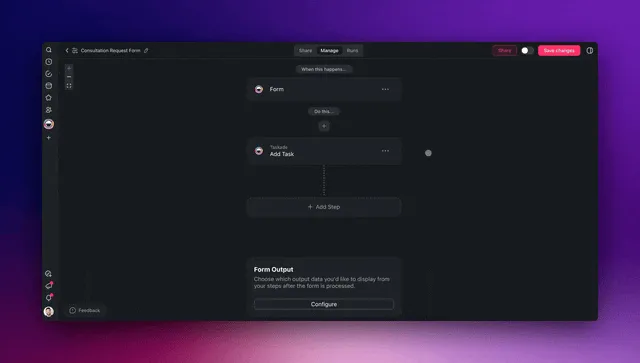
This is not a guide to building one pipeline tracker. If you want that, read build an AI sales pipeline. It walks through standing up a single pipeline app. For the no-code mechanics of the builder itself, see the AI pipeline builder guide. This guide is different. It is the full sales-ops operating system, every agent, every automation, and the connected app that runs lead-to-close while your reps focus on conversations. By the end you will know exactly what to automate first, which agents to build, and how to wire them into one living workspace.
What does it mean to automate your sales process with AI agents?
Automating sales with AI agents means handing each repeatable job to software that reasons instead of software that just follows rules. An AI sales agent sets a goal, plans the steps, executes across your CRM and inbox, evaluates the outcome, and adjusts, without a human approving each step. That is the line between old automation and 2026 automation: a classic sequencer fires a pre-wired email; an agent decides what to research, what to say, and when to follow up based on the actual lead in front of it.
Here is the difference in one picture. Classic sales automation is a straight pipe. An AI sales agent is a loop that learns.
The practical payoff: a rep who used to spend Monday morning researching ten accounts now opens an inbox where the research, the score, and a first-draft reply are already waiting. The built-in tools that ship with each Taskade agent, web search, file analysis, code execution, and more, are what let a single agent do all of that in one run instead of bouncing between five tabs.
How much of the sales week is actually admin?
Sales reps spend up to roughly 70% of their week on non-selling work, research, data entry, CRM hygiene, and writing follow-ups, leaving only about a third of their time for the conversations that close deals. That is the single largest, most automatable block in the entire revenue org. Reclaiming even half of it gives every rep back more than a full day of selling per week.
Here is where the hours go, and what an AI agent absorbs.
| Time sink | Share of week (typical) | Agent that absorbs it | Selling time reclaimed |
|---|---|---|---|
| Prospect research | ~15% | Prospect-research agent | High |
| CRM data entry & hygiene | ~14% | Pipeline-hygiene agent | High |
| Lead qualification & scoring | ~12% | Lead-scoring agent | High |
| Writing outreach & follow-ups | ~13% | Outreach + sequencer agents | High |
| Internal reporting | ~8% | Reporting agent | Medium |
| Actual selling conversations | ~33% | Human (the 1% that matters) | — |
The math is simple. If admin is ~70% of the week and agents reliably handle the repeatable portion, a rep's selling capacity can roughly double without hiring. That is why sales automation is a quota-attainment lever, not a cost-cutting one. For the step-by-step on wiring these jobs together, see Learn: automation triggers and Learn: automation actions.
Is AI sales automation actually paying off in 2026?
Yes, and the numbers are no longer speculative. Roughly 81% of sales teams using AI report higher revenue, with an average 6–10% revenue uplift and 25–30% faster sales cycles once agents take over the research-and-follow-up block. The AI-agent market itself is projected to grow from about $7.6B in 2025 to $47.1B by 2030 (≈45.8% CAGR), and sales is the single largest adoption category because the admin load is so automatable. The return is real, but how you adopt decides whether it sticks.
There is a sharp caveat the vendors skip: only ~2% of standalone AI-SDR rollouts survive past their first year, and 50–70% churn within twelve months. The pattern behind the failures is consistent, a black-box agent bolted onto a stack nobody owns, sending generic email until reputation or deliverability breaks. The teams that win run a hybrid model (≈45% of companies in 2026, versus ~22% that tried full replacement): agents own the repeatable admin, humans own the relationship, and the workflow itself is owned by the team. That is exactly the architecture this guide builds, and exactly what Taskade Genesis is designed for, because the app you clone is yours to inspect, edit, and improve, not a sealed service you rent.
What are the five core sales agents to build?
The five core sales agents map directly to the five biggest admin sinks: a lead-scoring agent, a prospect-research agent, a personalized-outreach agent, a follow-up sequencer, and a pipeline-hygiene agent. Build them one at a time, highest-frequency job first, and each new agent reinforces the last because they share the same pipeline database as memory.
Each agent owns one job, hands off to the next, and writes back to the shared pipeline. The human only enters the loop for the live conversation, the 1% no agent should replace. Here is what each one does and what to give it.
| Agent | Job it owns | Key tools it uses | Hands off to |
|---|---|---|---|
| Lead-scoring | Rank inbound by fit & intent | Web search, custom fields | Research agent |
| Prospect-research | Build an account brief | Web search, file analysis | Outreach agent |
| Personalized-outreach | Draft a first reply in your voice | Persistent memory, web search | Sequencer |
| Follow-up sequencer | Time and adapt follow-ups | Automations, calendar | Human / hygiene |
| Pipeline-hygiene | Flag stalled deals, fix records | Custom fields, automations | Back to scoring |
Start with whichever job eats the most of your reps' week, usually research or follow-up. Create your first agent from a prompt, measure the hours it returns, then add the next.
A worked example: the lead-scoring agent, end to end
To make this concrete, here is exactly what a lead-scoring agent does on a single inbound lead, the kind of run that used to take a rep 15–20 minutes of tab-hopping and now finishes in seconds:
- Trigger, a new lead lands from a web form, ad, or CRM event (the integration pulls it in).
- Enrich, the agent uses its web-search and file-analysis tools to pull company size, industry, funding, tech stack, and recent news.
- Score. It ranks fit and intent against your ideal-customer profile, writing a 0–100 score plus a one-line rationale to a custom field.
- Route, high scores go straight to the research agent; low scores get a polite nurture tag; spam gets archived.
- Log, every decision is written back to the pipeline database, so the next lead is scored against a richer history (this is Memory compounding).
The prompt to build it is one sentence: "Score every new lead 0–100 on fit and intent, enrich it from the web, write a short rationale, and route qualified leads to the research agent." You can clone this exact pattern from a community sales app and adapt the scoring rubric to your market. For the deeper how-to, see Learn: custom agents and the agents hub.
How do the agents work together as one system?
The five agents work as one system because they share the same Workspace DNA, Memory lives in your Projects (the pipeline database), Intelligence lives in your AI agents, and Execution lives in your Automations. Each loop feeds the next: the research an agent gathers becomes memory, that memory sharpens the next agent's outreach, and every closed or lost deal updates the database that scores the next lead. This is the self-reinforcing loop that a stack of disconnected point tools can never form.
Below is the same flow as a request-level sequence, from a lead landing in a form to a clean record and a drafted reply, all before a rep touches it.
Reply speed is one of the strongest predictors of win rate. So collapsing that lead-to-first-reply window from hours to seconds is the highest-leverage change this system makes. Explore Taskade's automation hub and the sales automation vertical for ready-made workflow patterns you can clone.
What does the sales-ops app actually look like?
The sales-ops app is one workspace where the pipeline database, the agents, and the automations live side by side, not five SaaS tabs you reconcile by hand. Because Taskade ships multiple project views over the same data (List, Board, Calendar, Table, Mind Map, Gantt, and Org Chart), the same pipeline reads as a kanban board for reps, a table for ops, and a Gantt for forecasting, no exports, no second tool.
Here is the architecture in one diagram, inputs on the left, the agent layer in the middle, outputs back to your stack on the right.
┌─────────────────────────────────────────────────────────────────────┐
│                      TASKADE SALES-OPS APP                            │
│                                                                       │
│   INPUTS                 AGENT LAYER                 OUTPUTS          │
│   (triggers pull in)     (Intelligence)             (actions push out)│
│   ┌───────────┐          ┌────────────────┐         ┌──────────────┐ │
│   │ Web form  │─────────▶│  Lead scoring  │────┐    │   CRM record  │ │
│   ├───────────┤          ├────────────────┤    ├───▶│   updated     │ │
│   │ CRM event │─────────▶│   Research     │    │    ├──────────────┤ │
│   ├───────────┤          ├────────────────┤    ├───▶│  Email drafted│ │
│   │  Inbox    │─────────▶│   Outreach     │────┤    ├──────────────┤ │
│   ├───────────┤          ├────────────────┤    ├───▶│  Task created │ │
│   │ Calendar  │─────────▶│   Sequencer    │────┤    ├──────────────┤ │
│   ├───────────┤          ├────────────────┤    └───▶│  Slack alert  │ │
│   │  Ad lead  │─────────▶│ Pipeline-hygiene│         └──────────────┘ │
│   └───────────┘          └────────────────┘                          │
│                                  │                                    │
│                         ┌────────▼────────┐                          │
│                         │  PIPELINE DB     │  ◀── Memory: every       │
│                         │  (all views)     │      outcome logged here │
│                         └─────────────────┘                          │
│                                  │                                    │
│                          Human rep approves                          │
│                          the 1% that closes                          │
└─────────────────────────────────────────────────────────────────────┘
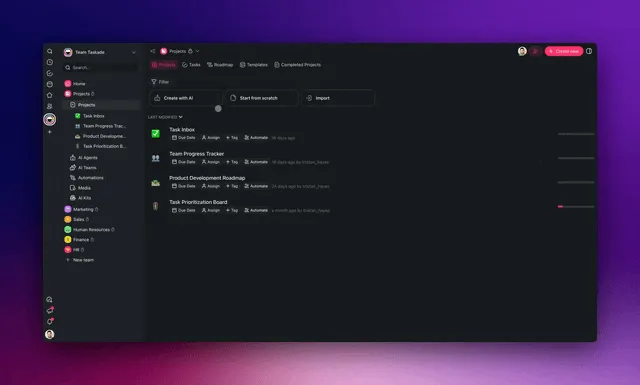
Every box on the left is a bidirectional integration, the trigger pulls the event in, and an action pushes the result back out. With 100+ integrations, the same lead flows from your form to enrichment to your CRM in one continuous run. See it built live below.
How do AI sales agents connect to my CRM, inbox, and ad tools?
AI sales agents connect through 100+ bidirectional integrations, triggers pull events in from your CRM, forms, calendar, ads, and inbox, and actions push enriched records, drafted emails, tasks, and alerts back out. The bidirectional part is what makes a closed loop possible: an agent reads a new lead, enriches it, scores it, drafts the outreach, and updates the CRM in one run, with no copy-paste between tools.
| Direction | What happens | Example |
|---|---|---|
| Trigger (pull in) | An event enters the app | New form submission, new CRM lead, new calendar booking |
| Agent (reason) | An agent acts on the event | Enrich, score, research, draft outreach |
| Action (push out) | The result returns to your stack | Update CRM, draft email, create task, post Slack alert |
This is the difference between a single pipeline app and a true sales operating system. A tracker holds your deals; an operating system moves them. For the connector setup steps, see Learn: connect your tools and the agents help hub.
How Taskade does it differently
Most sales-automation tools, Zapier, Make, n8n, and even agent platforms like Lindy, ask you to wire nodes. You drag a trigger, connect it to an enrichment step, branch it to an email node, and maintain that canvas forever. To be fair, these tools are genuinely excellent at deterministic, high-volume plumbing: if you need a rock-solid webhook-to-webhook relay that fires a million times a month, a dedicated workflow engine like Zapier or n8n is a strong, mature choice, and their connector catalogs are deep. That is a real strength worth acknowledging.
Taskade is different in kind, not just degree. You do not wire a canvas. You describe the outcome and get a living app. From one prompt, Taskade Genesis ships the pipeline database, the AI agents, and the automations together, already connected. The app is the workflow and the interface and the team.
| Capability | Node-wiring tools (Zapier, Make, n8n, Lindy) | Taskade Genesis |
|---|---|---|
| How you build | Drag and connect nodes on a canvas | Describe the outcome in plain English |
| What you get | A workflow that fires | A living app: database + agents + automations |
| Where data lives | In another SaaS you also pay for | In your workspace, as Memory the agents reuse |
| Team of agents | Usually one agent or linear steps | Multi-agent collaboration, native |
| Reuse | Rebuild per use case | Clone a community app and adapt |
| Views over the data | None — it is plumbing | Multiple project views on the same pipeline |
The wedge is Workspace DNA: Memory (your pipeline Projects) feeds Intelligence (your sales agents), Intelligence triggers Execution (your automations), and Execution writes new outcomes back into Memory. A node-graph has no memory of its own and no interface. It is plumbing between other people's apps. Taskade is the app, the database, and the team in one place. And because every build is cloneable, you can start from a working community app instead of a blank canvas, something a node graph can never offer.
Taskade Genesis vs the AI sales tools (Clay, 11x, Artisan, Agentforce, Breeze)
The 2026 AI-sales market has split into four camps: enrichment engines (Clay), autonomous AI SDRs (11x, Artisan), and CRM-native copilots (Salesforce Agentforce, HubSpot Breeze). Each is strong at one slice of the funnel. Taskade Genesis is different in kind. It is not a point tool you bolt onto a stack, it is the connected app that runs the whole sales-ops loop and that you own, clone, and adapt. Here is the honest landscape.
| Tool | Best at | Where it is strong | The catch | Entry price |
|---|---|---|---|---|
| Clay | Data enrichment & research | 100+ data sources in one waterfall; excellent for building lists | It is plumbing, not an app — you still need a CRM, sequencer, and dashboard around it | From ~$149/mo |
| 11x (Alice) | Autonomous outbound SDR | Sends prospecting email at scale, enterprise-grade | Black-box agent, enterprise contracts often $50K+/yr; you do not own the workflow | Enterprise quote |
| Artisan (Ava) | Full-replacement AI BDR | 300M+ contact database, autopilot mode | Channels narrowed after 2026 LinkedIn restrictions; opaque "replace the rep" framing | Custom / high |
| Salesforce Agentforce | CRM-native agents | Deep Salesforce data, governance | Locked to Salesforce; you need the (costly) platform first | Salesforce add-on |
| HubSpot Breeze | Copilot inside HubSpot | Uses your HubSpot history to suggest outreach | A copilot, not an autonomous agent — you stay the operator; HubSpot-locked | HubSpot add-on |
| Taskade Genesis | The whole sales-ops app | One prompt builds DB + agents + automations; you own and clone it | Younger sales-specific connector catalog than Salesforce | Free |
The pattern is clear: the incumbents make you assemble Clay + a CRM + a sequencer + a dashboard, or lock you into one expensive platform. Taskade Genesis collapses that stack into one living app you describe in a sentence, and because the build is cloneable, you start from a working system instead of a blank canvas or a six-figure contract.
Choose a specialist if…
Honest guidance beats a strawman, so here is when a competitor is the right call:
- Choose Clay if your single biggest pain is list-building and enrichment depth and you already have a CRM and sequencer you love. Clay's data-waterfall is genuinely best-in-class for that one job.
- Choose 11x or Artisan if you want a fully hands-off, agent-runs-everything outbound machine, you have the budget for enterprise pricing, and you are comfortable not owning the underlying workflow.
- Choose Agentforce or Breeze if you are already all-in on Salesforce or HubSpot and want agents that live inside that data, the integration depth is real when you never leave that platform.
- Choose Taskade Genesis if you want to own the whole sales-ops system, pipeline, agents, and automations in one app you can clone, adapt, view many ways, and run starting free instead of stitching four tools together.
Why this matters: Industry research found that only ~2% of standalone AI-SDR rollouts survive past year one, and 50–70% churn within twelve months, usually because the agent is a black box bolted onto a stack nobody owns. Hybrid human-AI models, where teams keep control of the workflow, are now run by ~45% of companies versus ~22% that tried full replacement. Taskade Genesis is built for that hybrid model: agents do the admin, your team owns the app, and the human keeps the 1% that closes.
What Taskade Genesis can do for your whole sales motion
Taskade Genesis is not just a sales-agent feature. It is a full Workspace DNA platform where Memory, Intelligence, and Execution reinforce each other on the same data. That is why a single prompt can replace an enrichment tool, a sequencer, a CRM front-end, and a reporting dashboard at once. Here is the full platform, mapped to the sales jobs in this guide.
| Capability | What it is | What it does for sales |
|---|---|---|
| Workspace DNA loop | Memory (Projects) → Intelligence (Agents) → Execution (Automations) → back to Memory | Every closed or lost deal sharpens how the next lead is scored — the app gets smarter each cycle |
| built-in agent tools | Web search, file analysis, code execution, custom slash commands, persistent memory, and more | One agent enriches, scores, researches, and drafts in a single run — no tab-hopping |
| Multiple project views | List, Board, Calendar, Table, Mind Map, Gantt, Org Chart | The same pipeline reads as a kanban for reps, a table for ops, a Gantt for forecasting |
| Multi-agent teams | Research → writer → reviewer agents collaborating natively | On-brand outreach with an accuracy gate before anything sends |
| 100+ bidirectional integrations | Triggers pull events in, actions push data out | A new lead flows form → enrich → score → CRM in one continuous run |
| Frontier models | Route across models from top AI labs | Run the reviewer agent on a different model than the writer for an independent check |
| Custom domains + app publishing | Publish a live Genesis app on your own domain | Ship a branded partner-deal-reg or referral portal, not just an internal tool |
Each capability ties straight back to a job in this guide: the built-in tools power the research and scoring agents, the integrations connect your CRM and inbox, the views let ops and reps read the same pipeline, and Taskade EVE orchestrates the multi-agent outreach team. Browse community sales apps to see real builds you can clone.
How do you keep AI outreach on-brand and safe?
You keep AI outreach on-brand by keeping a human on the 1%, and by running outreach as a multi-agent team instead of a single agent firing templates. A research agent gathers context, a writer agent drafts in your voice, a reviewer agent checks accuracy and compliance, and a human approves before anything sends. Each agent carries persistent memory, so it learns your offers, your tone, and your guardrails over time rather than starting cold on every lead.
LEAD ──▶ RESEARCH AGENT ──▶ WRITER AGENT ──▶ REVIEWER AGENT ──▶ HUMAN
         (gathers facts)     (drafts in       (checks accuracy   (final
                              your voice)       & compliance)      approval)
                                  ▲                                  │
                                  └──── persistent memory ◀──────────┘
                                       (learns voice over time)
This pattern is why agentic outreach beats template blasts on both deliverability and reply rate, every message is specific, accurate, and reviewed. Taskade supports multi-agent collaboration natively, and a clear role model (Owner to Viewer) controls who can approve, edit, or only view, so your reviewer gate is enforced by permissions, not by trust. Each agent can route across frontier models from top AI labs, so the reviewer can run a different model than the writer for an independent check.
What should you automate first, and what stays human?
Automate the highest-frequency, lowest-judgment task first, usually lead enrichment or follow-up sequencing, and keep the 1% that is pure relationship for the human. The decision is not "agent vs human," it is "which jobs are repeatable enough to hand off." Use this tree to decide.
                 Is the task repeatable & rule-shaped?
                          │
              ┌───────────┴───────────┐
             YES                       NO
              │                         │
   Does it need human judgment    Keep it human
   on every single instance?      (negotiation, closing,
              │                    relationship calls)
       ┌──────┴──────┐
      NO             YES
       │              │
  Full agent     Agent drafts,
  (enrich,       human approves
  score, log,    (outreach copy,
  research)      pricing, exceptions)
The pattern that compounds: research, then drafting, then sequencing, then reporting, each agent built on top of the last. Within a few weeks you have a connected sales-ops app where every new agent reinforces the one before it. Here is a sane rollout order.
| Week | Build this agent | Why this order |
|---|---|---|
| 1 | Lead enrichment + scoring | Highest frequency, zero judgment — instant time back |
| 2 | Prospect research | Feeds outreach with real context |
| 3 | Personalized outreach (draft, human approves) | Reply speed gain shows up in win rate fast |
| 4 | Follow-up sequencer | Stops deals stalling silently |
| 5 | Pipeline-hygiene + reporting | Keeps Memory clean so scoring stays accurate |
Want to skip the blank page? Clone a sales-ops app and adapt it, or read build an AI sales pipeline for the single-app starting point and the AI pipeline builder guide for the builder mechanics. For the wider playbook, the automate marketing with AI agents guide covers the demand side that feeds this pipeline.
What does it cost to run an AI sales team?
It starts free. Taskade Genesis is free to begin, and paid plans on annual billing are Pro at $10/month (the Popular tier), Business at $25/month, Max at $100/month, and Enterprise at $250/month. Because one connected app replaces a separate enrichment tool, sequencer, scheduler, and reporting dashboard, most teams cut total sales-software spend meaningfully after consolidating, and they get a team of AI agents on top.
| Plan (annual) | Price / month | Best for |
|---|---|---|
| Free | $0 | Solo founder testing the first agent |
| Pro | $10 (Popular) | Small sales team sharing agents, with up to 10 custom domains (annual-only) |
| Business | $25 | Growing teams needing roles |
| Max | $100 | High-volume orgs running many agents |
| Enterprise | $250 | SSO, advanced controls, large rollouts |
The real return is not the software line item. It is the selling time you give every rep back, plus the win-rate lift from faster, more consistent follow-up. Compare plans on the pricing page or just start building free and measure the hours your first agent returns.
How does sales automation connect to the rest of revenue?
Sales is one stage of a single revenue loop, and the same agentic pattern runs every stage. Demand generation feeds the pipeline this guide automates, and post-sale success keeps customers (and expansion revenue) alive. Because all three live in one Taskade workspace, the Memory is shared: a marketing agent's intent signals sharpen the sales-scoring agent, and a closed deal's notes seed the onboarding agent. That hand-off is impossible when each function lives in a different SaaS silo.
Build the sales loop first, then extend it: the automate marketing with AI agents guide covers the demand side that feeds this pipeline, and automate customer success with AI agents covers the retention side that compounds it. The AI sales pipeline and AI pipeline builder guides go deep on the single-app starting point.
Where this is heading
The direction is clear: in a year or two, you will not "set up a sales stack" at all. You will describe the revenue outcome you want and a living app will assemble itself, then keep improving on its own. Taskade's vision is that every team runs on a self-reinforcing Memory + Intelligence + Execution loop: one prompt becomes an app, the app gets smarter with every deal it touches, and the agents that ran yesterday's pipeline propose better plays for tomorrow's. The rep stops being a data-entry clerk and becomes the director of a system, keeping the 1% that is pure human judgment while the app handles everything around it. The sales team of 2027 is not a row of people doing admin; it is a small group of people directing a workspace that learns.
Where to start today
Start with one agent and one job. Open Taskade Genesis, describe the part of your sales week that wastes the most time, and let it build the agent, the automation, and the app around it. Then clone a community sales app, connect your CRM, and watch the lead-to-first-reply window collapse from hours to seconds.
The sales process has not changed, leads still need scoring, research, outreach, follow-up, and a clean pipeline. What changed is who does the admin. In 2026 that is a team of AI agents, and the rep keeps the 1% that closes. Build the system once and it runs every day after.
- New to agents? Start at the agents hub and Learn: custom agents.
- Ready to wire workflows? See the automation hub and automate sales workflows.
- Want the demand side too? Read automate marketing with AI agents.
- Building the first pipeline app? Follow build an AI sales pipeline.
Memory feeds Intelligence, Intelligence triggers Execution, Execution writes back to Memory, the self-reinforcing loop that turns a stack of disconnected sales tools into one living operating system. That is Workspace DNA, and it is why the app you clone today gets smarter every deal it touches.
▲ ■ ● Built with Taskade, Memory, Intelligence, Execution. Start free →
Frequently Asked Questions
How do you automate your sales process with AI agents in 2026?
You replace manual sales admin with AI agents that set a goal, plan the steps, execute across your CRM and inbox, evaluate the result, and adjust without per-step approval. Start with one agent per repeatable job, a lead-scoring agent, a prospect-research agent, a personalized-outreach agent, a follow-up sequencer, and a pipeline-hygiene agent. In Taskade Genesis you describe the sales outcome in plain English and it builds the agents, the automations, and a live app to run them. Reps spend up to 70 percent of their week on non-selling admin, so automating that block is the single biggest lever on quota attainment. It starts free, with Pro at 10 dollars per month on annual billing.
Can you really automate 99 percent of a sales process?
You can automate the repeatable 99 percent, lead enrichment, scoring, research, drafting outreach, sequencing follow-ups, logging activity, and keeping the pipeline clean, while a human keeps the 1 percent that closes the deal: the live conversation, negotiation, and final relationship judgment. The work that fills a rep's calendar is mostly administrative, not relational. AI agents reason through it end to end, so the rep moves from doing the work to directing the system and showing up for the human moments that actually move revenue.
What sales AI agents should I build first?
Build the highest-frequency, lowest-judgment agent first, usually lead enrichment or follow-up sequencing. The five core sales agents are a lead-scoring agent, a prospect-research agent, a personalized-outreach agent, a follow-up sequencer, and a pipeline-hygiene agent. In Taskade Genesis each agent ships with built-in tools including web search, file analysis, and code execution, and routes across frontier models from top AI labs. Add one agent, measure the hours it saves, then add the next.
How much time does sales automation save a rep?
Sales reps spend up to roughly 70 percent of their week on non-selling tasks, data entry, research, CRM updates, and writing follow-ups. Handing that block to AI agents can give a rep back two to three days of selling time every week. The compounding effect is larger because faster, more consistent follow-up directly raises win rate, and reply speed is one of the strongest predictors of whether a deal closes.
Does reply speed really affect win rate?
Yes. Reply speed is one of the strongest predictors of win rate in sales. The longer a lead waits, the colder the intent and the more likely a competitor responds first. AI agents close that gap by enriching, scoring, and drafting a personalized first reply the moment a lead arrives, often in seconds rather than hours. A pipeline-hygiene agent then makes sure no deal stalls silently, so follow-up never depends on a rep remembering.
What is the difference between sales automation and AI sales agents?
Classic sales automation follows fixed if-this-then-that rules, send a templated email when a form is filled. AI sales agents reason. They read the lead's context, decide what to research, write a reply in your voice, and adapt when a deal changes stage. Taskade Genesis combines both, reliable rule-based automations for consistency plus AI agents for judgment, so your sequences fire on schedule while your messaging stays personalized.
How do AI sales agents connect to my CRM and email?
Through 100 plus bidirectional integrations, triggers pull events in from your CRM, forms, calendar, and inbox, and actions push enriched records, notes, and tasks back out. An agent can read a new lead, enrich it, score it, draft the outreach, and update the CRM in one continuous run. Each integration works in both directions, so your pipeline data stays in sync across every tool your team already uses.
Do I need to know how to code to automate sales?
No. Taskade Genesis is fully no-code. You describe the sales system you want in plain English and it builds the agents, the automation workflows, the database, and a shareable app. There is nothing to wire, host, or deploy. An IT program manager or solo founder can ship a working lead-routing and follow-up system in an afternoon without an engineer, then clone and adapt community apps to skip the blank page entirely.
Is AI sales outreach safe for brand voice and deliverability?
Yes, when you keep a human on the 1 percent. The reliable pattern is a multi-agent team, a research agent gathers context, a writer agent drafts in your tone, a reviewer agent checks accuracy and compliance, and a human approves before anything sends. Taskade Genesis supports multi-agent collaboration natively, and agents carry persistent memory so they learn your voice, your offers, and your guardrails over time rather than blasting generic templates.
How much does it cost to automate sales with Taskade Genesis?
Taskade Genesis is free to start. Paid plans on annual billing are Pro at 10 dollars per month, Business at 25 dollars per month, Max at 100 dollars per month, and Enterprise at 250 dollars per month. Because one platform replaces a separate enrichment tool, sequencer, and reporting dashboard, most teams cut total sales software spend significantly after consolidating into one connected sales-ops app.
How does Taskade Genesis compare to Clay, 11x, Artisan, Agentforce, and HubSpot Breeze?
Those tools each own one slice of the funnel, Clay is best-in-class enrichment, 11x and Artisan are autonomous outbound SDRs, and Agentforce and HubSpot Breeze are copilots locked inside Salesforce or HubSpot. Taskade Genesis is different in kind: from one prompt it builds the pipeline database, the AI agents, and the automations together as one living app you own and can clone, instead of a point tool you bolt onto a stack or an enterprise contract you rent. It starts free, with Pro at 10 dollars per month, versus enrichment tools from roughly 149 dollars per month and autonomous SDR platforms that often exceed 50,000 dollars per year. Research found only about 2 percent of standalone AI-SDR rollouts survive past the first year, so owning the workflow matters.