






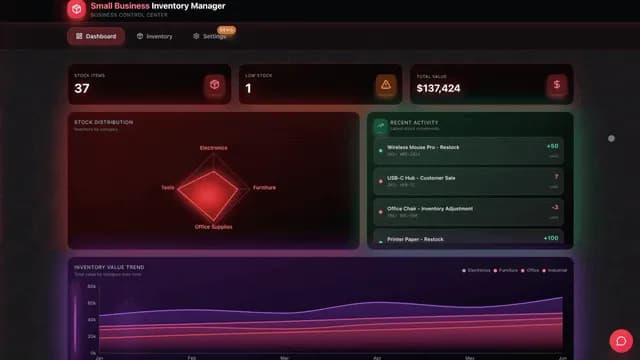
TL;DR: You can run almost all of a small business from one Taskade Genesis workspace — leads, invoicing, scheduling, support, and social — by setting it up as a system: Projects are your memory, AI agents are your team, automations are your scheduled execution, and integrations are your connectors. Describe each outcome in plain English and Taskade Genesis builds the app, agents, and workflow. 150,000+ apps have been built since launch. Start free →
Meet David. He is an IT program manager who has never shipped a line of production code. A few months ago he needed a project dashboard for a cross-team rollout, described what he wanted in plain English, and shipped it to production — with no engineers. The same approach that built that dashboard can run an entire small business, and this guide shows you exactly how.
"Automate 99% of your small business" sounds like hyperbole until you see the shape of the work. Most of what eats a small operator's week is not strategy. It is the same five loops over and over: chase the lead, send the invoice, book the call, answer the email, post the update. Each loop is repetitive, time-sensitive, and easy to describe — which is exactly what makes it automatable.
This is a full guide for a non-technical operator. By the end you will have a single workspace that captures leads, follows up, invoices, schedules, answers support, and drafts your social posts — built by describing the outcome, not by wiring nodes or hiring a developer.
The setup is what makes it powerful
The reason most people never get value out of automation tools is that they treat them like a chatbot — ask a one-off question, get a one-off answer, close the tab. The leverage comes from setting up your workspace as a system so it keeps working when you are not looking.
In Taskade Genesis, that system has four parts. Get these four right and your business runs itself for the routine 99%, leaving you the 1% that actually needs you.
Here is what each part is, in plain English.
Projects — your memory and your folders
A Project is where your business data lives: your leads, your invoices, your clients, your inventory, your content calendar. Think of it as a smart folder that your agents and automations can read and write.
Projects are not flat lists. Each one has multiple views of the same data, so the same leads can be a pipeline board for sales and a calendar for follow-ups:
| View | What you use it for |
|---|---|
| List | A clean outline of tasks, leads, or invoices |
| Board | A kanban pipeline (New → Contacted → Won) |
| Calendar | Follow-up dates, booking slots, content schedule |
| Table | A spreadsheet-style database with fields |
| Mind Map | Brainstorming offers, campaigns, org structure |
| Gantt | Project timelines for client work (Timeline scrolls inside Gantt) |
| Org Chart | Team, roles, or account hierarchy |
This shared data is part of what Taskade calls Workspace DNA — the Memory + Intelligence + Execution loop where your data feeds your agents, your agents trigger your automations, and your automations write new data back. Your business gets smarter every week instead of starting from scratch.
AI agents — your team and their skills
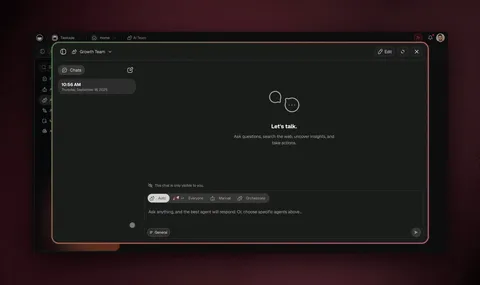
An AI agent is a teammate you set up once and reuse forever. A "lead qualifier" agent reads a new inquiry and scores it. An "invoice writer" agent turns a finished job into a clean invoice. A "support replier" agent drafts an answer in your tone.
Each agent comes with built-in tools — web search, code, file analysis, custom slash commands, persistent memory, and more — and routes across frontier models from top AI labs automatically, so you never pick a model. For bigger jobs, several agents collaborate in orchestration mode: one researches, one drafts, one reviews, and they hand off to each other.
Automations — your scheduled execution
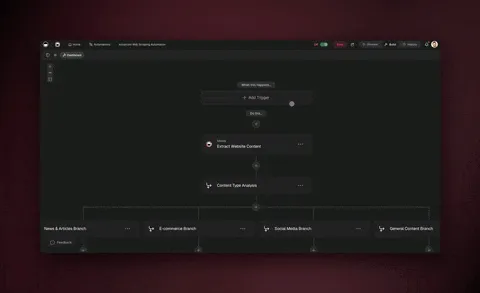
An automation is the part that runs while you sleep. It has a trigger ("when a new lead comes in," "every Monday at 8am," "when Stripe records a payment") and a sequence of steps that follow.
Taskade automations are reliable, durable workflows. They can branch (if the lead is enterprise, route to you; otherwise auto-reply), loop (send three reminders, three days apart), filter (only paid invoices), wait minutes to days, and resume from the step that failed instead of starting over. That durability is why you can trust a 7-day payment-reminder sequence to actually finish.
Integrations — your connectors
Integrations plug your workspace into the tools you already use. Taskade Genesis has 100+ bidirectional integrations — triggers pull events in, actions push data out — including native Shopify and Stripe.
That two-way flow is the whole point. A new Shopify order can trigger a workflow; an agent can push a thank-you email and write the customer into your CRM. You connect what you have instead of ripping it out and replacing it.
Build it in 4 steps
You do not need to understand any of this to start. Here is the whole setup as a numbered walk-through — the same path David followed. Plan on an afternoon for the first version, then improve it as you go.
Step 1 — Describe the outcome (don't build the plumbing)
Open Taskade Genesis and tell Taskade EVE, the meta-agent that helps you build, what you want in plain language. Be outcome-first, not step-by-step:
"Build me a small-business workspace with a CRM to track leads through a pipeline, an invoicing app that reminds clients about unpaid invoices, and a booking page for consultation calls."
Taskade EVE reads that and sets up the Projects, the views, the starter agents, and the automation skeletons for you. You are describing the destination; the workspace figures out the route.
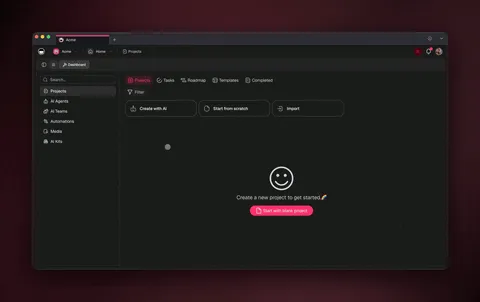
If you would rather not start from a blank prompt, clone a working app from the Community Gallery in about 30 seconds and customize it. That is the fastest path for most operators — start from something real, then make it yours.
Step 2 — Connect your tools
Add your integrations so the workspace can see your real business. The common starting set for a small business:
| Tool | What it unlocks |
|---|---|
| Email (Gmail / Outlook) | New inquiries become leads; agents draft replies |
| Stripe | Payment events trigger invoice and receipt flows |
| Shopify | New orders trigger fulfillment and thank-you flows |
| Calendar | Booked calls and follow-up dates land on your schedule |
| Slack / your chat tool | Get pinged when something needs your decision |
Connect only what you use. Each connection is two-way, so events flow in to start automations and your agents push results out.
Step 3 — Hire your agents
Give each repetitive job to an agent. Tell each one its role and the tone you want in plain English — for example: "You are my lead qualifier. Read each new inquiry, score it Hot / Warm / Cold, and draft a friendly first reply in my voice. Never make up pricing — pull it from the Pricing project."
Because agents have persistent memory, they remember your pricing, your tone, and your past decisions, so they get more useful the longer you run them. Want a deeper walkthrough of building agents? See the AI agents hub and the AI CRM builder guide.
Step 4 — Schedule the work
Turn the manual runs into scheduled or recurring automations so they fire without you. "Every morning at 8, triage new inquiries and draft replies." "Every Monday, send reminders for invoices unpaid more than 7 days." "When Stripe records a payment, send a receipt and mark the invoice paid."
From here, your job changes. You stop doing the routine work and start approving it — and eventually you let the safe, low-risk steps run on their own.
7 real small-business automations to build first
Here are seven automations that cover most of what a small business does every week. Each one lists what it does and how to set it up in plain English. Start with one, get it running, then add the next.
1. Lead capture and follow-up (your CRM)
What it does: Every new inquiry — from a form, an email, or a DM — becomes a lead card in your pipeline. An agent scores it, drafts a first reply, and schedules follow-ups so no lead goes cold.
How to set it up: Clone a CRM app (see the live demo below), connect your email and form tool, and create a "lead qualifier" agent. Add an automation: when a new inquiry arrives, create a lead card, score it, draft a reply, and if there's no response in 3 days, send a polite nudge. Branch enterprise leads straight to you.
┌─ Neon CRM Dashboard ──────────────────────────────────────┐
│  Leads          [+ New]      🔍 Search        ⚙ Automate   │
├───────────────────────────────────────────────────────────┤
│  NEW (4)         CONTACTED (3)     PROPOSAL (2)   WON (5)   │
│  ┌─────────────┐ ┌─────────────┐  ┌───────────┐ ┌────────┐ │
│  │ Acme Co     │ │ Riverside   │  │ Northwind │ │ Lumen  │ │
│  │ 🔥 Hot · $8k│ │ 🟡 Warm     │  │ 🔥 $24k   │ │ ✅ $12k│ │
│  │ ↩ replied   │ │ ⏰ nudge 2d │  │ 📄 sent   │ │ 🎉 paid│ │
│  └─────────────┘ └─────────────┘  └───────────┘ └────────┘ │
│  ▸ Agent: qualified 4 · drafted 4 replies · 0 leads cold   │
└───────────────────────────────────────────────────────────┘
2. Invoicing and payment reminders
What it does: When a job is marked done, an agent generates a clean invoice and sends it. Stripe payment events mark it paid automatically. Unpaid invoices get a polite reminder sequence — 3, 7, and 14 days — that stops the moment payment lands.
How to set it up: Connect Stripe, create an "invoice writer" agent, and add a durable automation that loops the reminder schedule and filters out anything already paid. Because the workflow can wait days and resume from failure, a two-week sequence never loses its place. For the deep dive, see the sibling guide on AI invoice automation.
3. Scheduling and booking
What it does: A booking page lets clients pick a slot, which lands on your calendar, sends a confirmation, and triggers a reminder the day before. No back-and-forth email.
How to set it up: Describe "a consultation booking page that syncs to my calendar, confirms by email, and reminds the client 24 hours before." Connect your calendar. Add a "no-show reducer" automation: if a slot is booked, send a reminder; if unconfirmed 24 hours out, send a second nudge.
4. Customer support replies
What it does: Incoming support emails get a drafted reply in your tone, grounded in your own help docs and order history. Simple questions can auto-resolve; anything sensitive routes to you for a one-click approve.
How to set it up: Point a "support replier" agent at a Project holding your FAQs and policies. Add an automation: when a support email arrives, draft a reply; if it's a refund, billing, or complaint, flag it for me; otherwise send after I approve. Over time, let the safe categories send on their own.
5. Social and marketing content
What it does: Each week, an agent drafts a batch of social posts from your content calendar, your recent wins, and your product updates — ready for you to tweak and schedule.
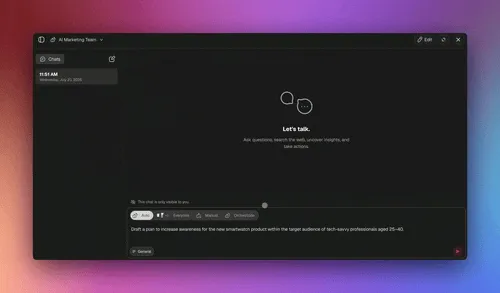
How to set it up: Keep a "content ideas" Project. Create a "social writer" agent that knows your brand voice. Schedule a recurring automation: every Friday, draft 5 posts for next week from the content calendar and recent updates. For richer pieces, let agents collaborate in orchestration mode — one researches the topic, one drafts, one edits.
6. Order and inventory operations
What it does: A new Shopify order triggers a fulfillment checklist, a thank-you email, and a CRM record. Low-stock items raise a reorder flag before you sell out.
How to set it up: Connect Shopify and Stripe. Add an automation: when an order comes in, create a fulfillment task, send a branded thank-you, and add the customer to the CRM. Add a daily check: flag any product below its reorder threshold.
7. The Monday operations brief
What it does: Every Monday morning, an agent reads across your Projects and sends you one brief: new leads, overdue invoices, this week's bookings, support backlog, and content to approve. Your whole business on one page.
How to set it up: Create a "chief of staff" agent with read access to your Projects. Schedule it: every Monday at 7am, summarize leads, invoices, bookings, support, and content, and post it to Slack. This single automation is the one most operators say they could not live without.
┌─ Monday Brief · 7:00 AM ──────────────────────────────────┐
│  This week at a glance                                     │
│  ───────────────────────────────────────────────────────  │
│  💰 Leads          4 new · 2 hot · 1 needs your reply      │
│  🧾 Invoices       3 sent · 1 overdue ($2,400) · reminded  │
│  📅 Bookings       5 calls · Tue 2pm needs prep notes      │
│  💬 Support        7 handled by agent · 1 refund → you     │
│  ✍️  Content        5 posts drafted · approve to schedule   │
│  ───────────────────────────────────────────────────────  │
│  ▸ 1 item needs you. Everything else is handled.           │
└───────────────────────────────────────────────────────────┘
See it live: clone a working CRM in 30 seconds
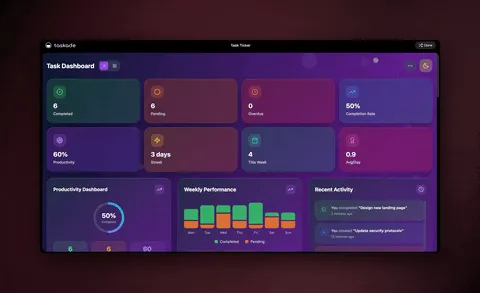
The fastest way to understand this is to touch a real one. Below is a live, cloneable Taskade Genesis app — a CRM dashboard that tracks leads, manages deals, and monitors performance. It is the lead-capture workflow from automation #1, already built.
Preview it, then clone it into your own workspace and connect your email and Stripe. You will have a working CRM with lead scoring and follow-up automations before lunch.
Want more starting points? The Community Gallery has cloneable apps for invoicing, booking, client portals, store management, and more — each a live app you can fork and make yours.
What to automate first
You cannot automate everything at once, and you should not try. Pick by frequency × repetitiveness × pain. Here is the order most small businesses get the most value from, fastest:
| Priority | Automate | Why it's first | Effort | Time saved / week |
|---|---|---|---|---|
| 1 | Lead follow-up | Repetitive, time-sensitive, leaky | Low | 3–5 hrs |
| 2 | Invoice reminders | Recovers real cash on autopilot | Low | 2–3 hrs |
| 3 | Support drafts | High volume, same shapes | Medium | 4–6 hrs |
| 4 | Booking + reminders | Kills email back-and-forth | Low | 2–4 hrs |
| 5 | Social drafts | Batches creative busywork | Medium | 2–3 hrs |
| 6 | Order / inventory ops | Scales with your store | Medium | 2–4 hrs |
| 7 | Monday ops brief | One view of the whole business | Low | 1–2 hrs |
The rule David uses: automate the task you do most often that follows the same steps every time. That is almost always lead follow-up or invoice reminders. Ship one, watch it run for a week, then add the next. Within a month you will have most of the routine 99% handled — and you will be spending your time on the 1% that actually grows the business.
Why one workspace instead of five separate tools? Because of the shared memory. Your CRM, your invoicing, your booking, and your support all read and write the same Projects, so a paid invoice can close a lead, and a booked call can update support context — automatically.
Pricing: what it costs to run this
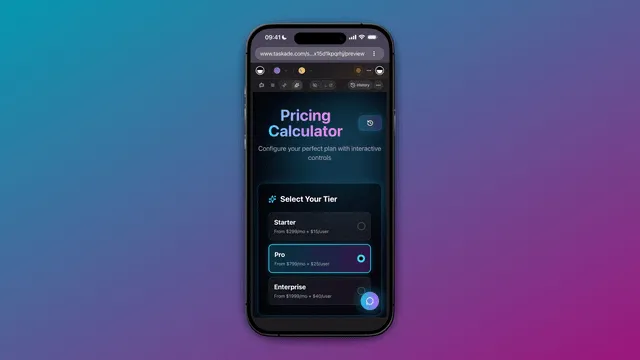
Taskade Genesis is free to start, and most solo operators and small teams run their entire automation stack on the lower tiers. All prices below are annual billing:
| Plan | Price (annual) | Best for |
|---|---|---|
| Free | $0 | Trying it out, your first app |
| Pro ★ | $10/mo (10 users) | Growing teams, more agents and runs |
| Business | $25/mo | Custom domains + built-in sign-in for client apps |
| Max | $100/mo | High-volume agents and automation |
| Enterprise | $250/mo | Larger orgs, advanced controls |
Pro is the Popular plan, and Business is the first tier with custom domains and built-in sign-in — so you can publish your booking page or client portal on your own domain with a real login. Confirm current pricing on the pricing page.
How this compares to wiring it yourself
You can build a lot of this with classic automation tools by connecting nodes one at a time. Tools like Zapier, Make, and n8n are excellent at moving data between apps — if you enjoy designing each trigger, action, and field mapping by hand.
The difference is altitude. With node-by-node tools you assemble plumbing and end with an automation. With Taskade Genesis you describe the outcome and end with an automation and an AI agent and a real app that shares one memory. For a small business that wants a CRM, an invoicing app, and a booking page that all talk to each other, that all-in-one model is the wedge. For a full breakdown, see our 9 best Make.com alternatives guide.
| Node-by-node tools | Taskade Genesis | |
|---|---|---|
| Move data between apps | ✅ | ✅ |
| Built-in AI agents | ⚠️ add-on | ✅ built-in tools |
| Builds a real app + UI | ❌ | ✅ |
| Shared memory across workflows | ❌ | ✅ Workspace DNA |
| Resume from failed step | ⚠️ varies | ✅ durable |
| Setup style | Wire each node | Describe the outcome |
Frequently Asked Questions
How do I automate my small business without hiring developers?
Set up one Taskade Genesis workspace as your operating system: Projects hold your data, AI agents handle the thinking, automations run the work on a schedule, and integrations connect your existing tools. You describe each outcome in plain English and Taskade Genesis builds the app, the agents, and the workflow. No code, no servers — it starts free, and 150,000+ apps have been built since launch.
What parts of a small business can Taskade actually automate?
The five highest-leverage areas are lead capture and follow-up, invoicing and payment reminders, scheduling and booking, customer support, and social content. Taskade Genesis runs all five from one workspace using AI agents with built-in tools and reliable automation workflows that branch, loop, filter, wait, and resume from the step that failed.
Do I need to know how to code to build business automations in Taskade?
No. Taskade Genesis is built for non-technical operators. You describe the result in natural language and it assembles the app, the agents, the integrations, and the automation. A program manager with no engineers shipped a production dashboard this way. You can also clone a working app from the Community Gallery in about 30 seconds.
How much does it cost to automate a small business with Taskade?
Taskade Genesis is free to start. On annual billing: Pro $10/month for 10 users (the Popular plan), Business $25/month, Max $100/month, Enterprise $250/month. Most small teams run their whole stack on the Free or Pro plan. See the pricing page for current details.
Can Taskade connect to the tools my business already uses?
Yes. Taskade Genesis has 100+ bidirectional integrations — triggers pull events in, actions push data out — including native Shopify and Stripe. New orders, bookings, form submissions, and payments can start an automation, and your agents write back to email, your CRM, and your calendar.
What happens when a business automation fails halfway through?
Taskade Genesis runs automations as reliable, durable workflows. If a step fails, the workflow resumes from the exact step that failed instead of starting over or dropping the job. Workflows can also wait minutes or days, so a reminder sequence or onboarding drip keeps its place across long gaps.
How is Taskade different from Zapier or Make for a small business?
Zapier and Make move data between apps node by node, and they are great at it. Taskade Genesis works at a higher altitude: you describe the outcome and get an AI agent, an automation, and a real app with a database and UI. See the Make.com alternatives guide for the full comparison.
What is Taskade EVE and how does it help run my business?
Taskade EVE is the public meta-agent that helps you build and orchestrate your workspace. You tell EVE what you want — a lead tracker, an invoice reminder flow, a support assistant — and it sets up the projects, agents, and automations. For multi-step work, several agents collaborate in orchestration mode.
Can I share or sell the business apps I build in Taskade?
Yes. Every app gets a live, shareable URL. On Business and above you can put it on a custom domain with built-in sign-in for clients or staff. You can publish to the Community Gallery so others can clone it, and package reusable setups as app kits.
Where should a small business start automating first?
Start with the task you do most often that follows the same steps every time — usually lead follow-up or invoice reminders. Clone a matching app from the Community Gallery, connect your email and Stripe, and let an agent draft while you approve. Add the next workflow once the first is running.
Ready to run your business on autopilot? Start free with Taskade Genesis — describe what you want, and watch it build the CRM, the invoicing, the booking, and the support flows that run your week. Or clone a working app and connect your tools in minutes.

Explore the automation hub, meet your AI agents, browse cloneable apps, or read the sibling guides on AI invoice automation and the 9 best Make.com alternatives. To go deeper on the CRM piece, see the AI CRM builder walkthrough.
▲ ■ ● Memory, Intelligence, Execution — your Projects remember the business, your agents reason over it, and your automations run the work. That's the difference between a stack of disconnected tools and a small business that runs itself.