






The CRM industry is worth $89 billion in 2026, and Salesforce captures roughly a quarter of that market. But there is a growing gap between what Salesforce charges and what most small teams actually need.
A 10-person sales team on Salesforce Enterprise pays $19,800 per year — before implementation, before Einstein AI add-ons, before hiring a Salesforce admin. Meanwhile, vibe coding platforms are letting non-technical founders build functional CRMs from a single prompt in under 15 minutes.
This article is not about whether Salesforce is bad. It is the best CRM on the planet for enterprises with 500+ users and complex compliance needs. This article is about whether your team — the 5-50 person startup, the agency, the small sales org — actually needs it.
TL;DR: Salesforce Enterprise costs $19,800/year for 10 users before implementation. Taskade Genesis builds a working CRM from one prompt for $120/year — with AI agents for lead enrichment, automations for follow-ups, and 100+ integrations. 150,000+ apps built, 63% by non-developers. Build your free CRM now →
💸 The $300/Seat Problem
Salesforce pricing looks straightforward on their website. It is not.
Here is what a 10-person sales team actually pays across tiers:
| Tier | Per User/Month | 10 Users/Year | Einstein AI Add-On | Total with AI |
|---|---|---|---|---|
| Starter Suite | $25 | $3,000 | Not available | $3,000 |
| Professional | $80 | $9,600 | $50/user/mo extra | $15,600 |
| Enterprise | $165 | $19,800 | $50/user/mo extra | $25,800 |
| Unlimited+ | $330 | $39,600 | Included | $39,600 |
But the sticker price is just the beginning. Most small businesses also pay:
- Implementation: $50,000-$150,000 through certified Salesforce consulting partners
- Salesforce Administrator: $80,000-$120,000/year salary (or $2,000-$5,000/month managed services)
- AppExchange add-ons: $10-$50/user/month for email tracking, document signing, data enrichment
- Training: $2,000-$10,000 for team onboarding
A 10-person team on Salesforce Enterprise with Einstein AI, a part-time admin, and basic implementation easily spends $80,000+ in year one and $35,000+ every year after.
And then there is the complexity tax. A CNBC analyst questioned whether Salesforce's core innovation was 25 years ago, with AI bolted on rather than built natively into the architecture. Einstein AI — which starts at $50/user/month on top of your CRM license — was not designed from the ground up as an AI system. It was added to an existing platform.
The enterprise version of this critique just landed in public. At Knowledge 2026 (May 2026), ServiceNow announced Autonomous CRM — sales, service, fulfillment, and customer success on a single AI platform with role-based AI Specialists handling quoting, deal closure, dispute resolution, and renewals end-to-end. The CPQ engine (acquired via Logik.ai in April 2025) is processing 7M+ transactions/month. Pure Storage migrated and cut resolution time from 26 days → 5 days, NPS hit 82%, and they retired 13 software platforms overnight. ServiceNow targets the F500 with that pitch; Taskade Genesis ships the same architectural bet — Memory + Intelligence + Execution in one workspace — for teams that can't write a $19,800/year contract before lunch.
What Genesis Ships That Salesforce + Einstein Charges Extra For
Every row in this table is a Genesis capability shipping today — no AppExchange add-on, no $50/user/month upcharge, no Salesforce Administrator FTE required:
| Salesforce + Einstein AI sells you | Taskade Genesis ships out of the box |
|---|---|
| CRM seats — $25–330/user/mo | Free / $10 / $25 / $100 per workspace |
| Einstein AI — $50/user/mo add-on | 15+ frontier models auto-routed (Claude, GPT, Gemini, open-weight) per workspace |
| AppExchange integrations ($10–50/user) | 100+ bidirectional integrations included |
| Salesforce CPQ — separate $75-150/user/mo | Stripe checkout inside any Genesis app — no extra SKU |
| Service Cloud — separate $80-330/user/mo | EVE meta-agent + Custom AI Agents v2 with built-in tools |
| Knowledge Base — separate AppExchange | Workspace Memory + Mind Graph at /memory |
| Implementation consultant — $50K-150K | Single prompt → live app in ~7 minutes |
| Salesforce Administrator FTE — $80K-120K/yr | Workspace owner role — no certification required |
| Lightning Web Component developer time | App Kits — clone in 60 seconds, customize visually |
| Branded customer portal — extra SKU | Custom domain + auto SSL on Business+, password protection on Pro+ |
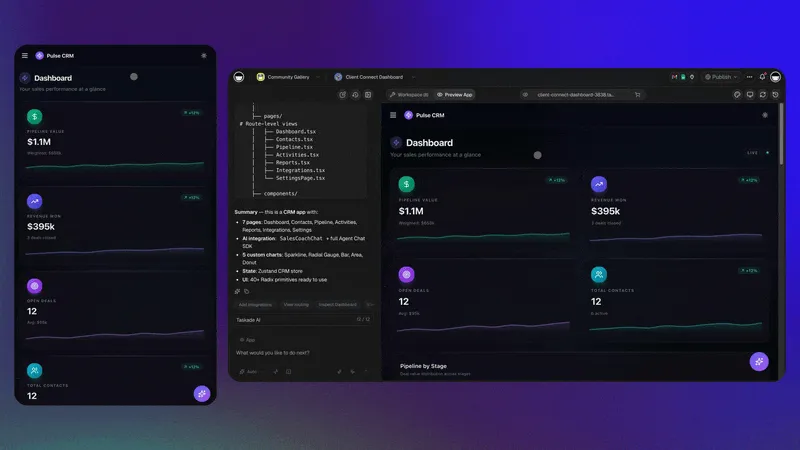
Genesis CRM App Kit — the workspace-scale answer to Salesforce's "empty CRM + 6-month implementation + Administrator FTE" stack. Pipeline tracking, contact records, automated follow-up, and Stripe checkout in a single clonable app. Source: CRM, Storefront & Analytics Dashboard newsletter (Apr 2026).
As Y Combinator CEO Garry Tan put it: "Why pay $30/seat/month for over-bundled SaaS" when non-technical teams can build exactly what they need? The CRM version of that question is even more pointed — why pay $165-$330/seat/month?
📋 What Small Teams Actually Need from a CRM
The dirty secret of the CRM industry is that most small sales teams use about 20% of Salesforce's features. They need a contact database, a deal pipeline, follow-up reminders, and some basic reporting. They do not need territory management, CPQ, or multi-entity org structures.
Here is what the research shows about actual CRM usage in teams under 50 people:
A 10-person agency running Salesforce Enterprise to manage 200 leads per month is like renting a 747 to fly across town. The plane works — it is just absurdly expensive for the trip.
What these teams actually need:
- A contact database with custom fields (company, deal size, stage, last contacted)
- A visual pipeline to drag deals between stages (Lead → Qualified → Proposal → Closed)
- Automated follow-ups — if no activity in 7 days, send a reminder or draft an email
- AI-powered lead scoring — prioritize who to call next based on engagement signals
- Basic reporting — revenue by stage, conversion rates, team activity
- Collaboration — assign leads, leave notes, share context with teammates
Every one of these features can be built with Taskade Genesis in a single session. Here is exactly how.
🔨 Step-by-Step: Build a CRM with Taskade Genesis
Building a CRM with Taskade Genesis is not a metaphor. You write a prompt. You get a working application. Here is the actual process.
Step 1: Write Your CRM Prompt
Open Taskade Genesis and describe what you need. Be specific about your pipeline stages, contact fields, and automation rules. Here is an example prompt:
Build me a sales CRM for a 10-person marketing agency. I need:
- Contact database with fields: name, company, email, phone, deal value, source, last contacted date
- Deal pipeline with 6 stages: New Lead, Contacted, Qualified, Proposal Sent, Negotiation, Closed Won/Lost
- Board view so I can drag deals between stages
- Table view for bulk contact management
- Automated reminder if a deal has no activity for 7 days
- Weekly summary report of pipeline value by stage
- AI agent that drafts personalized follow-up emails based on deal context
Step 2: Genesis Builds Your App
Taskade Genesis takes your prompt and generates a working CRM application. This is not a mockup or a wireframe — it is a live app with:
- A functional interface with your custom fields and pipeline stages
- Multiple views — project views including Board (Kanban), List, Table, Calendar, Mind Map, Gantt, and Org Chart
- Real-time collaboration — your team can edit simultaneously
- Built-in AI — not an add-on, not an extra charge
The app runs on Workspace DNA where your CRM data (Memory) feeds AI agents (Intelligence) that trigger automations (Execution) — a self-reinforcing loop that makes your CRM smarter over time.
Step 3: Add AI Agents for Lead Enrichment
This is where a Genesis CRM goes beyond what a basic CRM does. AI agents in Taskade are not chatbots sitting in a sidebar — they are autonomous workers with built-in tools, persistent memory, and the ability to take action.
Set up agents for:
Lead Research Agent — When a new contact is added, the agent pulls company info, recent news, LinkedIn data, and summarizes it in a note attached to the contact. No more spending 10 minutes per lead on manual research. The agent compiles a one-paragraph brief and attaches it to the contact record before your rep even opens it.
Follow-Up Drafter — Reads the deal context, last interaction notes, and drafts a personalized follow-up email in your tone. Not a generic template — an actual contextual email that references the prospect's specific pain points, your last conversation, and next steps. Your rep reviews, edits if needed, and sends.
Pipeline Analyst — Scans your pipeline weekly and flags deals that are stuck, overdue, or have high close probability based on historical patterns. Generates a prioritized call list every Monday morning so your team knows exactly who to contact first.
Meeting Prep Agent — Before a scheduled call, this agent compiles the deal history, recent company news, key contacts, and suggested talking points into a one-page brief. No more scrambling to review notes 5 minutes before a call.
Win/Loss Analyzer — After a deal closes (won or lost), the agent analyzes the deal timeline, identifies what worked or what stalled, and adds insights to your team's knowledge base. Over time, your CRM learns which approaches close deals and which lose them.
These agents use frontier models from OpenAI, Anthropic, and Google — 15+ models available. They run on persistent memory, meaning they learn from your workspace data and improve their recommendations over time. The more deals your team closes, the smarter your CRM gets.
Step 4: Set Up Automations
Automations handle the repetitive work that kills sales productivity:
- Lead Routing — New leads from web forms are automatically assigned to team members based on territory, industry, or round-robin rules
- Follow-Up Sequences — If a deal moves to "Proposal Sent" and has no activity for 3 days, trigger a check-in reminder
- Stage Change Notifications — When a deal moves to "Negotiation," notify the sales manager in Slack
- Weekly Digest — Every Monday morning, send a pipeline summary to the team channel
Taskade supports 100+ integrations across email, Slack, calendar, and more — so your CRM does not live in isolation.
Here are common automation recipes for sales teams:
| Trigger | Action | Integration |
|---|---|---|
| New lead from web form | Create contact, assign to rep, notify in Slack | Slack, Email |
| Deal moves to "Proposal Sent" | Generate proposal draft, set 3-day follow-up timer | |
| No activity on deal for 7 days | Send reminder to assigned rep, escalate to manager | Slack, Email |
| Deal moves to "Closed Won" | Send congratulations to team channel, create onboarding project | Slack |
| Deal moves to "Closed Lost" | Trigger win/loss analysis agent, add to re-engagement list | Internal |
| New meeting scheduled | Run meeting prep agent, compile deal brief | Google Calendar |
| Monthly anniversary | Send check-in email to active clients | |
| Lead score exceeds threshold | Move to "Hot Leads" pipeline, notify senior rep | Slack |
Step 5: Set Up Views and Dashboards
One of the biggest frustrations with Salesforce is the reporting layer. Building a custom dashboard requires navigating Report Builder, selecting report types, choosing filters, and then adding components to a dashboard — a process that takes hours and often requires admin privileges.
In Taskade, you get multiple project views out of the box:
- Board View (Kanban) — Drag deals between pipeline stages. This is your daily operating view.
- Table View — Spreadsheet-style for bulk editing contacts, updating deal values, filtering by stage or owner.
- List View — Hierarchical task lists for tracking action items per deal.
- Calendar View — See follow-up dates, meeting schedules, and deal deadlines on a visual calendar.
- Mind Map View — Map out account relationships, decision-maker hierarchies, and deal dependencies.
- Gantt View — Timeline view for tracking deal progress against expected close dates.
- Org Chart View — Visualize your team's deal assignments and account ownership.
- Timeline View — Chronological activity stream per contact or deal.
Every view pulls from the same underlying data. Update a deal stage in Board view, and it instantly reflects in Table, Calendar, and List views. No sync delays, no data inconsistencies.
Step 6: Customize and Iterate
The power of a vibe-coded CRM is that you are never locked into a fixed schema. Need to add a "Referral Source" field? Just tell the AI. Want a new pipeline stage for "Contract Review"? Drag and drop. Need a dashboard showing month-over-month revenue? Ask your AI agent to build it.
No Salesforce admin required. No consulting engagement. No 3-6 month implementation timeline.
Here is a real example of the iteration cycle. Say your sales manager notices that deals are stalling between "Proposal Sent" and "Negotiation." In Salesforce, fixing this would mean:
- Filing a request with your Salesforce admin
- The admin creating a new Flow in Flow Builder
- Testing the Flow in a sandbox environment
- Deploying to production
- Notifying the team of the change
Time: 1-2 weeks. Cost: 4-8 hours of admin time.
In Taskade Genesis, you tell the AI: "Add a 48-hour timer after Proposal Sent. If no response, trigger the follow-up agent to draft a check-in email and notify the rep in Slack." Done in 30 seconds.
This is the compounding advantage of AI-native architecture. Every improvement to your CRM is instant, free, and does not require a specialist. Over 12 months, this adds up to dozens of micro-optimizations that would have cost thousands in Salesforce admin hours.
💰 The Real Cost Comparison
Here is the honest math. We are comparing annual costs for a 10-person sales team that needs contact management, deal tracking, automations, and AI features.
Annual Cost for 10 Users
| Platform | Plan | Annual Cost (10 users) | AI Included? | Implementation Cost |
|---|---|---|---|---|
| Salesforce Enterprise | $165/user/mo | $19,800 | No (+$6,000/yr) | $50,000-$150,000 |
| Salesforce Unlimited+ | $330/user/mo | $39,600 | Yes | $50,000-$150,000 |
| HubSpot Professional | $100/user/mo | $12,000 | Limited | $3,000-$10,000 |
| HubSpot Enterprise | $150/user/mo | $18,000 | Yes | $5,000-$15,000 |
| Zoho CRM Enterprise | $40/user/mo | $4,800 | Zia AI included | $5,000-$20,000 |
| Zoho CRM Professional | $23/user/mo | $2,760 | Limited | $2,000-$10,000 |
| Taskade Pro | $10/mo billed annually (10 users) | $120 | Yes — full AI agents | $0 |
The price difference is not incremental. Taskade Pro is 165x cheaper than Salesforce Enterprise and 100x cheaper than HubSpot Professional for the same team size.
3-Year Total Cost of Ownership
This is where the gap becomes a chasm. Salesforce costs compound with admin salaries, AppExchange add-ons, and periodic reimplementation.
| Cost Category | Salesforce Enterprise | HubSpot Professional | Zoho Enterprise | Taskade Pro |
|---|---|---|---|---|
| Licenses (3 years) | $59,400 | $36,000 | $14,400 | $360 |
| AI Add-on (3 years) | $18,000 | $0 (limited) | $0 (Zia) | $0 (included) |
| Implementation | $75,000 | $6,000 | $10,000 | $0 |
| Admin/Maintenance | $120,000 | $30,000 | $15,000 | $0 |
| Training | $6,000 | $3,000 | $2,000 | $0 |
| 3-Year Total | $278,400 | $75,000 | $41,400 | $360 |
For context, $278,400 is the salary of two senior sales reps. Or 2,320 years of Taskade Pro.
ROI Calculation
If your 10-person team closes $500,000 in annual revenue:
| Metric | Salesforce Enterprise | Taskade Pro |
|---|---|---|
| Annual revenue | $500,000 | $500,000 |
| Annual CRM cost (with admin) | $35,000 | $120 |
| CRM cost as % of revenue | 7.0% | 0.02% |
| Revenue needed to break even on CRM | $35,000 | $120 |
The Hidden Cost of "Free" CRMs
Some teams consider free CRM options — HubSpot Free, Zoho Free, or Bitrix24. But free tiers come with predictable limitations:
- HubSpot Free CRM — No custom reports, no sequences, no workflow automations, limited to 5 email templates, HubSpot branding on forms and emails. The moment you need automation or reporting, you are on Professional at $100/user/month.
- Zoho Free CRM — Limited to 3 users, no workflow rules, no custom dashboards, no email integration. Useful for a solo freelancer; useless for a team.
- Bitrix24 Free — 5 GB storage, limited CRM features, heavy upselling within the interface. The free tier is a marketing funnel, not a product.
The pattern is the same: free tiers exist to get you onto the platform so you pay full price once you actually need the features that make a CRM useful. The total cost after 12 months of "free" CRM usage — once you inevitably upgrade — often exceeds what you would have paid by starting on Taskade Pro from day one.
Cost Per Deal Analysis
Here is another way to think about CRM economics. If your 10-person team closes 200 deals per year:
| Platform | Annual Cost | Cost Per Deal | AI-Assisted? |
|---|---|---|---|
| Salesforce Enterprise + Einstein | $25,800 | $129.00 | Yes (limited) |
| Salesforce Enterprise (no AI) | $19,800 | $99.00 | No |
| HubSpot Professional | $12,000 | $60.00 | Limited |
| Zoho CRM Enterprise | $4,800 | $24.00 | Zia (basic) |
| Taskade Pro | $120 | $0.60 | Yes (full agents) |
At $0.60 per deal, the CRM stops being a cost center. It becomes a rounding error — which is exactly what it should be for a small team. Your CRM should not eat 7% of your revenue. It should eat 0.02%.
🤖 What You Gain: AI That Actually Works in Your CRM
The biggest difference between a Salesforce CRM and a Taskade Genesis CRM is not just price — it is how AI is integrated.
Salesforce Einstein AI
Einstein AI was added to Salesforce as a bolt-on layer. It lives in a sidebar. It offers:
- Lead scoring (requires historical data and Enterprise+ license)
- Opportunity insights (suggestions in sidebar, no autonomous action)
- Einstein Copilot (chat interface for queries, $50/user/month add-on)
Einstein is useful for large orgs with years of historical data. For a 10-person team with 200 contacts, it barely has enough data to generate meaningful insights.
Taskade Genesis AI
AI in Taskade Genesis is not a sidebar — it is the architecture. Every CRM you build has:
- AI agents with persistent memory — they remember every interaction, every deal note, every email draft across your entire workspace
- Built-in tools — agents can search the web, read documents, analyze data, draft content, and take action within your CRM
- Multi-model access — 15+ frontier models from OpenAI, Anthropic, and Google so you can use the best model for each task
- Custom agent tools — build slash commands that let agents perform CRM-specific actions
- Autonomous execution — agents do not just suggest, they act. A follow-up agent drafts and queues the email. A research agent enriches the lead without you asking.
This is the difference between AI-native and AI-bolted-on. Salesforce bolted AI onto a 25-year-old platform. Taskade Genesis was born with AI as the foundation.
Automations That Replace Manual Workflow
Salesforce Flow Builder requires a certified admin to configure. Taskade automations work with natural language:
| Task | Salesforce | Taskade Genesis |
|---|---|---|
| Route leads by territory | Flow Builder (admin required) | "Route leads from California to Sarah" |
| Send follow-up after 3 days | Process Builder + Email template | "If no activity in 3 days, draft follow-up" |
| Update deal stage on email reply | Apex trigger (developer required) | "When client replies, move to Qualified" |
| Weekly pipeline report | Report Builder + scheduled export | "Every Monday, summarize pipeline in Slack" |
| Enrich new leads with company data | AppExchange add-on ($$$) | AI agent does it automatically |
With 100+ integrations — Slack, Gmail, Google Calendar, Stripe, Shopify, and more — your Genesis CRM connects to the tools your team already uses.
🎯 Real-World CRM Use Cases by Team Type
Different teams need different CRM setups. Here is what actual teams are building with Taskade Genesis — and what the equivalent Salesforce setup would cost.
Digital Marketing Agency (8 people)
What they need: Track client leads from initial inquiry through proposal, contract, and onboarding. Automate follow-ups when proposals go unanswered. AI agent drafts personalized outreach based on the prospect's industry and website.
Genesis CRM setup time: 20 minutes
Annual cost: $120 (Pro plan)
Salesforce equivalent: Professional at $80/user/month = $7,680/year + $15,000 implementation
SaaS Startup (12 people, pre-Series A)
What they need: Inbound lead management from website forms and product demos. Pipeline tracking from trial signup to paid conversion. AI agent scores leads based on product usage signals. Weekly pipeline reports for investor updates.
Genesis CRM setup time: 25 minutes
Annual cost: $120 (Pro plan, 10 users included — additional seats available)
Salesforce equivalent: Enterprise at $165/user/month = $23,760/year + $50,000 implementation
Real Estate Team (5 agents)
What they need: Property-buyer matching pipeline. Automated follow-ups after showings. AI agent monitors new listings and matches them to buyer preferences. Calendar integration for showing schedules.
Genesis CRM setup time: 15 minutes
Annual cost: $120 (Pro plan)
Salesforce equivalent: Professional at $80/user/month = $4,800/year + $10,000 implementation + MLS AppExchange add-on
Freelance Consultant (Solo)
What they need: Simple contact list with project history. Deal pipeline with 4 stages. AI agent drafts proposals based on project scope. Monthly invoice reminders.
Genesis CRM setup time: 10 minutes
Annual cost: $120 (Pro plan at $10/month, billed annually)
Salesforce equivalent: Starter Suite at $25/month = $300/year (but no AI, no automations worth using)
Use Case Fit Matrix
| Team Type | Team Size | Best CRM Choice | Why |
|---|---|---|---|
| Solo freelancer | 1 | Taskade Pro ($10/mo billed annually) | Full AI agents, with 10 seats to grow into |
| Small agency | 5-15 | Taskade Pro ($10/mo billed annually) | 10 users included, instant setup |
| Growth startup | 15-50 | Taskade Pro or Business | Scale with AI agents and automations |
| Mid-market company | 50-200 | Evaluate both | Depends on compliance and complexity needs |
| Enterprise | 200-500+ | Salesforce or HubSpot Enterprise | Compliance, CPQ, multi-entity support |
| Regulated industry (any size) | Any | Salesforce | SOC 2, HIPAA, FedRAMP required |
⚠️ What You Lose: An Honest Assessment
We would be doing you a disservice if we pretended Taskade Genesis replaces Salesforce in every scenario. It does not. Here is what you genuinely lose.
Enterprise Ecosystem
Salesforce's AppExchange has 7,000+ apps and integrations. This includes industry-specific tools for healthcare (HIPAA-compliant patient management), financial services (regulatory reporting), manufacturing (ERP connectors), and real estate (MLS integrations). Taskade has 100+ integrations — comprehensive for general business use, but not comparable to a 20-year ecosystem.
Compliance Certifications
Salesforce holds SOC 2 Type II, HIPAA, FedRAMP, PCI DSS, and ISO 27001 certifications. If your industry requires these specific compliance frameworks — healthcare, government, financial services — Salesforce is the safer choice. Compliance is not a feature you can vibe-code.
Multi-Entity Org Structures
Companies with 500+ users across multiple business units, subsidiaries, and geographic regions need Salesforce's org hierarchy, territory management, and role-based visibility rules. Taskade's permission system (Owner to Viewer) is robust for teams, but it is not designed for Fortune 500 org structures.
CPQ and Complex Sales Processes
If your sales process involves configure-price-quote workflows with multi-line item proposals, approval chains across departments, and contract lifecycle management — Salesforce CPQ exists for a reason. This is a genuinely complex problem that requires purpose-built software.
Legacy Data and Existing Customizations
If your company has spent 5+ years and $500,000+ customizing Salesforce with custom objects, Apex triggers, Visualforce pages, and Lightning components — the switching cost is real. Migrating is not just about moving contacts. It is about rebuilding business logic that lives in Salesforce's proprietary automation layer.
Feature Comparison Matrix
| Capability | Salesforce Enterprise | Taskade Genesis | Verdict |
|---|---|---|---|
| Contact management | Full | Full | Tie |
| Deal pipeline | Full | Full | Tie |
| Email integration | Native + add-ons | Via integrations | Salesforce edge |
| AI lead scoring | Einstein ($50/user/mo extra) | Built-in AI agents | Taskade (included) |
| Workflow automation | Flow Builder (admin required) | Natural language | Taskade (easier) |
| Reporting/dashboards | Advanced | AI-generated | Salesforce edge |
| Mobile app | Dedicated | Responsive web + apps | Tie |
| AppExchange ecosystem | 7,000+ apps | 100+ integrations | Salesforce wins |
| Compliance certs | SOC 2, HIPAA, FedRAMP | Standard security | Salesforce wins |
| Multi-entity orgs | Full support | Team-level | Salesforce wins |
| CPQ | Full | Not available | Salesforce wins |
| Implementation time | 3-6 months | 15-30 minutes | Taskade wins |
| Implementation cost | $50K-$150K | $0 | Taskade wins |
| Ongoing admin cost | $80K-$120K/yr | $0 | Taskade wins |
| Annual license (10 users) | $19,800 | $120 | Taskade wins |
| AI agents | Sidebar suggestions | Autonomous with tools | Taskade wins |
| Real-time collaboration | Limited | Native | Taskade wins |
| Custom views | 3 (List, Board, Calendar) | multiple views | Taskade wins |
🏢 When to Stay on Salesforce
Be honest with yourself about these criteria. If three or more apply to your company, Salesforce is probably the right tool:
- You have 500+ CRM users across multiple divisions or subsidiaries
- You operate in a regulated industry that requires SOC 2 Type II, HIPAA, or FedRAMP compliance
- Your sales process requires CPQ with multi-line proposals, approval workflows, and contract management
- You depend on AppExchange integrations that are specific to your industry (healthcare, finance, manufacturing)
- You have a dedicated Salesforce team — admins, developers, architects — already on staff
- Your org has 5+ years of customizations in Apex, Flows, and Lightning components that represent significant institutional knowledge
- You need enterprise-grade audit trails for every data change across thousands of users
- Multi-currency, multi-language support is a daily operational requirement
Salesforce exists because these problems are genuinely hard to solve. The company earns its $300+ billion market cap by serving enterprises with complex needs.
🚀 When to Switch (or Never Start)
If you are a small team evaluating CRM options — or a startup about to sign a Salesforce contract — ask these questions first:
The Decision Matrix
| Question | If Yes → | If No → |
|---|---|---|
| Do you have fewer than 50 CRM users? | Consider Genesis | Evaluate Salesforce |
| Is your annual CRM budget under $10,000? | Genesis is your tier | You can afford incumbents |
| Do you need SOC 2/HIPAA compliance? | Stay on Salesforce | Genesis works |
| Do you need CPQ? | Stay on Salesforce | Genesis works |
| Are you in healthcare/finance/government? | Stay on Salesforce | Genesis works |
| Do you want AI agents, not just AI suggestions? | Genesis is ahead | Einstein may suffice |
| Is your sales process: leads → pipeline → close? | Genesis handles this | — |
| Do you need a CRM in production this week? | Genesis (15 minutes) | Salesforce (3-6 months) |
Who Is Switching Today
The shift is already happening. 63% of vibe coding users are non-developers — many of them are sales ops managers, marketing directors, and agency founders who got tired of waiting 6 months and $100,000 for a Salesforce implementation that still did not do what they needed.
Common profiles making the switch:
- Agencies (5-20 people) — Need client pipeline tracking, not enterprise CRM
- Startups (seed to Series A) — Cannot justify $20,000+/year on CRM before product-market fit
- Freelancers and solopreneurs — Need deal tracking with AI, not 7,000 AppExchange apps
- SMB sales teams (10-50 people) — Use 20% of Salesforce, pay for 100%
- Non-profits and education — Budget-constrained, need simple donor/student pipeline management
These teams are not downgrading. They are right-sizing. They are building exactly the CRM they need with AI agents that actually work autonomously — not sidebar suggestions that require a $50/user/month add-on.
🔄 The Migration Path: Salesforce to Genesis
If you are currently on Salesforce and want to test the waters, you do not have to go all-in immediately.
Phase 1: Shadow CRM (Week 1)
Build a Genesis CRM alongside Salesforce. Mirror your pipeline stages, import your top 50 deals manually, and let your team try both for a week. Compare:
- How quickly can reps log activities?
- How useful are AI agent suggestions vs Einstein suggestions?
- How much time does the automation save vs Salesforce Flows?
Phase 2: Parallel Run (Weeks 2-4)
Move your active pipeline to Genesis. Keep Salesforce as your system of record for historical data. Run both systems for a month and measure:
- Deal velocity (time from lead to close)
- Rep adoption (which system do they actually open daily?)
- AI utility (which system's AI actually helps reps close deals?)
Phase 3: Full Migration (Month 2)
Export your Salesforce contacts and deals. Import them into your Genesis CRM. Set up integrations with your email, calendar, and communication tools. Cancel your Salesforce contract.
Estimated savings in year one: $19,680 (Salesforce Enterprise minus Taskade Pro) — or $79,880 if you factor in the implementation and admin costs you no longer need.
What to Migrate (and What to Leave Behind)
| Data Type | How to Migrate | Priority |
|---|---|---|
| Contacts and leads | CSV export → import into Genesis CRM | High |
| Active deals | Manually recreate top 50 deals in pipeline | High |
| Email history | Keep in email provider (Gmail/Outlook) | Medium |
| Notes and activities | Copy key notes for active deals | Medium |
| Custom reports | Rebuild with AI agent (takes minutes) | Low |
| Salesforce Flows | Recreate as Taskade automations | Medium |
| AppExchange integrations | Map to Taskade's 100+ integrations | Low |
| Historical data (closed deals) | Export to CSV for archival records | Low |
The key insight: you do not need to migrate everything. Most historical CRM data is never accessed again. Focus on active deals, current contacts, and the workflows your team uses daily. The rest is archival.
📈 The Vibe Coding CRM Advantage Over Time
One aspect that pricing tables do not capture is the compounding advantage of a CRM that evolves through conversation rather than configuration.
Month 1: Basic CRM
Your Genesis CRM starts with contacts, pipeline, and basic automations. It handles the same workflows as Salesforce Starter. Your team is productive from day one.
Month 3: Smart CRM
Your AI agents have processed hundreds of leads. The lead research agent's summaries are better because it has learned your industry context. The follow-up drafter writes emails that sound like your top rep because it has been trained on their communication style. The pipeline analyst can now predict close probability based on patterns in your data.
Month 6: Adaptive CRM
You have iterated on the CRM a dozen times — added fields, new automation triggers, refined agent instructions. Each change took seconds, not weeks. In Salesforce, you would have filed 12 admin requests, spent $5,000+ in admin time, and waited 2-3 months for the full backlog to clear.
Month 12: Competitive Moat
Your CRM is now a custom-fit system that no competitor has. It reflects your exact sales process, your team's communication style, and your industry's specific pipeline dynamics. Salesforce gives every customer the same platform. Your Genesis CRM is yours.
This is Workspace DNA in action. Memory (your CRM data) feeds Intelligence (AI agents that learn from your deals) that triggers Execution (automations that improve every cycle). The loop compounds. Your CRM gets measurably better every month — without a single line of code or admin intervention.
📊 CRM Market Reality Check
The $89 billion CRM market in 2026 is not shrinking. But where the money goes is shifting.
Traditional CRM vendors — Salesforce, HubSpot, Zoho, Microsoft Dynamics — built their businesses on per-seat licensing models designed for an era when software was expensive to build and maintain.
Vibe coding changes the economics. When a non-technical founder can build a functional CRM in 15 minutes and deploy it to their team for $120/year, the per-seat model faces existential pressure.
This does not mean Salesforce disappears. It means Salesforce becomes what Oracle Database became — the enterprise choice for complex, regulated, large-scale deployments. The 80% of the market that is small teams, agencies, and startups will increasingly build their own.
As we explored in AI-native vs AI-bolted-on, the architecture difference matters. Salesforce is adding AI to a platform built in 1999. Taskade Genesis is building CRMs from AI. The user experience gap will only widen.
🧬 How Workspace DNA Powers Your CRM
The reason a Genesis CRM improves over time — while a Salesforce CRM stays static unless you pay an admin to change it — comes down to architecture.
In a traditional CRM, data sits in a database. You query it manually. You build reports manually. You write follow-up emails manually.
In a Workspace DNA-powered CRM:
- Memory feeds Intelligence: Every new contact, every deal update, every email log feeds your AI agents. They have full context without you summarizing anything.
- Intelligence triggers Execution: When agents identify a pattern (stalled deal, hot lead, overdue follow-up), they trigger automations automatically. No manual intervention.
- Execution creates Memory: Every automated action — the follow-up sent, the lead routed, the notification delivered — becomes new data that feeds back into the loop.
The result is a CRM that gets smarter every sales cycle. After 6 months, your Genesis CRM knows your sales process better than a Salesforce admin who has been configuring it for 2 years.
📰 The Market Is Already Moving: Klarna, Agentforce, and the CRM Reckoning
The shift from buying CRM to building CRM is not theoretical. It is happening at scale:
Klarna eliminated Salesforce entirely. The fintech company dropped Salesforce and approximately 1,200 other SaaS services, with an AI customer service bot replacing 700 contract employees and saving approximately $40 million annually. Klarna's CEO later clarified they replaced SaaS with a mix of alternative tools and internal AI-powered systems — but the signal was clear: enterprise-grade CRM is no longer indispensable.
Salesforce Agentforce adoption stalled. Despite Salesforce's massive marketing push, only approximately 8,000 of 150,000+ customers adopted Agentforce by May 2025. The $2/conversation pricing model caused immediate confusion about what constitutes a "conversation." The backlash was significant enough that Salesforce pivoted to a credit-based model. Meanwhile, Salesforce stock declined approximately 28% YTD in 2026, and revenue growth slowed to 7.7% year-over-year.
SaaStr's Jason Lemkin replaced his entire GTM team with AI agents. After his last salesperson quit, Lemkin deployed 20 AI agents managed by just 1.2 humans — doing the work of 10 SDRs and account executives. His prediction: "Cadence-based SDRs sending emails and qualifying inbound leads will be 90% displaced within 12 months."
These are not startups experimenting with AI. These are industry leaders — a $60B fintech, the world's largest CRM company's own customers rejecting its AI product, and the most influential SaaS investor in the world — all moving in the same direction: away from per-seat CRM and toward AI-native alternatives.
For the full picture of how the SaaS market is being restructured, read our analysis of the $285 billion SaaSpocalypse and the AI-native vs AI-bolted-on framework that explains why this shift is architectural, not just economic.
❓ Frequently Asked Questions
Can I use Taskade Genesis CRM for email marketing?
Taskade is not a dedicated email marketing platform like Mailchimp or HubSpot Marketing Hub. However, you can use AI agents to draft personalized emails for individual leads and small segments, and automations to trigger email sequences through your existing email provider via integrations. For mass email campaigns to thousands of contacts, pair your Genesis CRM with a dedicated email tool.
Does Taskade Genesis support phone and call logging?
You can log calls manually in your CRM project or set up automations to create call log entries when meetings end in Google Calendar or when notes are added from a specific template. Native call recording or VoIP integration is not built in — for that, teams typically connect their Genesis CRM to tools like Zoom or Google Meet via automations.
Can I share my Genesis CRM with clients or partners?
Yes. Taskade Genesis supports publishing apps with custom domains and password protection. You can create a client-facing portal where prospects see their deal status, upload documents, and communicate with your team — without giving them access to your internal pipeline data. The permission system (Owner to Viewer) lets you control exactly what external users can see and do.
How does data security compare to Salesforce?
Salesforce offers enterprise-grade certifications including SOC 2 Type II, HIPAA, FedRAMP, PCI DSS, and ISO 27001. If your organization is contractually or legally required to meet these specific compliance frameworks, Salesforce is the appropriate choice. For small teams without regulatory compliance mandates, Taskade provides standard security practices including encryption in transit and at rest, role-based access controls, and secure infrastructure.
Can I migrate back to Salesforce later if Genesis does not work out?
Yes. Your CRM data in Taskade is your data. You can export contacts, deals, and activity logs at any time. Since Genesis CRM costs $120/year vs $19,800+ for Salesforce, the financial risk of trying Genesis first is negligible. If you outgrow it — because you scale to 500+ users, need SOC 2 compliance, or require CPQ — you can migrate to Salesforce with your data intact.
What happens if Taskade goes down? Is there CRM redundancy?
Taskade runs on distributed infrastructure with multiple availability zones. For critical CRM data, best practice is the same as with any cloud tool: maintain regular exports of your contact and deal data. That said, the same risk exists with Salesforce — any cloud CRM can experience downtime. The difference is that a Salesforce outage costs your team $55/hour per user in lost license value. A Taskade outage costs $0.05/hour.
🔑 Key Takeaways
Before you make your CRM decision, here are the numbers that matter:
| Metric | Salesforce Enterprise | Taskade Genesis Pro |
|---|---|---|
| Annual cost (10 users) | $19,800 + $6,000 AI | $120 (AI included) |
| Implementation | $50,000-$150,000 | $0 (15 minutes) |
| Time to first deal tracked | 3-6 months | Same day |
| Ongoing admin cost | $80,000-$120,000/year | $0 |
| AI agents | Sidebar suggestions ($50/user/mo extra) | Autonomous with built-in tools |
| Customization speed | Weeks (admin required) | Seconds (natural language) |
| 3-year TCO | $278,400 | $360 |
The question is not whether Salesforce is a better CRM — it is, for enterprises with 500+ users and complex compliance needs. The question is whether your team needs a $278,400 solution when a $360 solution covers 80% of the functionality with AI that actually works autonomously.
For more on the vibe coding tools reshaping the software landscape, check out our complete guide to AI app builders.
🏗️ Build Your Free CRM Now
If you made it this far, you are probably paying too much for CRM software. Or you are about to.
Here is what you can do in the next 15 minutes:
- Go to Taskade Genesis
- Describe your CRM in plain English — your pipeline stages, your contact fields, your automation rules
- Get a working CRM with AI agents and automations built in
- Invite your team — Pro plan includes 10 users for $10/month billed annually
- Connect your integrations — Slack, Gmail, Calendar, Stripe, and 100+ more
- Start closing deals instead of configuring Salesforce
150,000+ apps have been built on Taskade Genesis. The community gallery has thousands of examples. And 63% of the people building them are not developers.
Your CRM does not need to cost $300/seat. It does not need a 6-month implementation. It does not need a dedicated administrator.
It needs to help your team sell. Build yours now →
Want to explore more? Read our deep dives on why vibe coding threatens over-bundled SaaS, Taskade vs Zoho, why AI-native architecture beats AI bolt-ons, and vibe coding for non-developers. Or skip straight to the Community Gallery to see what others have built.