







If you are reading this, chances are you already know what AI agents are, or you are about to find out. Either way, you are in the right place.
TL;DR: Taskade lets you build, train, and deploy AI agents in under 60 seconds with no code. Generate agents from natural language, train them on your data, and connect them to 100+ integrations. 150,000+ apps built on the platform. Build your first agent →

This article covers everything you need to know about building AI agents quickly: how they work, how to generate them, how to train them, and how they compare to developer frameworks like LangChain, CrewAI, and AutoGen.
Here is what we will cover:
- What AI agents are and why they are more than just chatbots
- How to generate custom AI agents with tailored prompts
- Why training AI agents matters and how easy it is
- The difference between static vs dynamic knowledge
- How Taskade compares to LangChain, CrewAI, and AutoGen
- Real-world use cases from writing and research to support and planning
As this is a quick overview on how to quickly create AI Agents, check out our complete resource on how to build AI Agents.
You can also check out this video on how to build AI Agents in Taskade.

Agent Generator: From Idea to Agent in Seconds
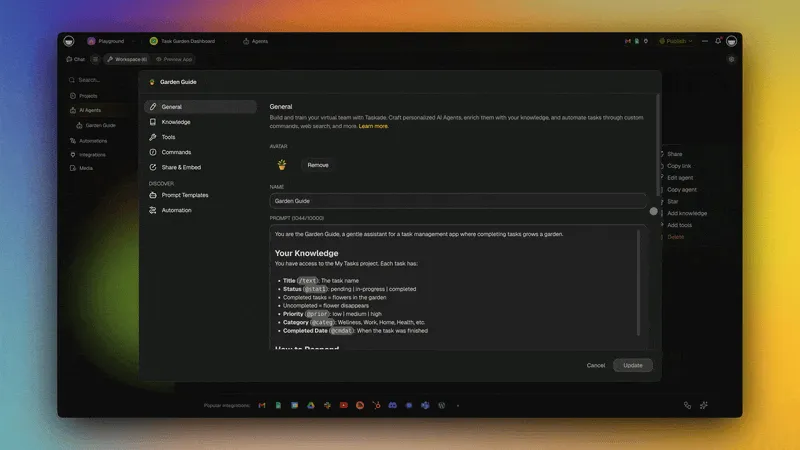
Creating new AI agents with Taskade takes less than 60 seconds. No coding, no API keys, no deployment infrastructure.
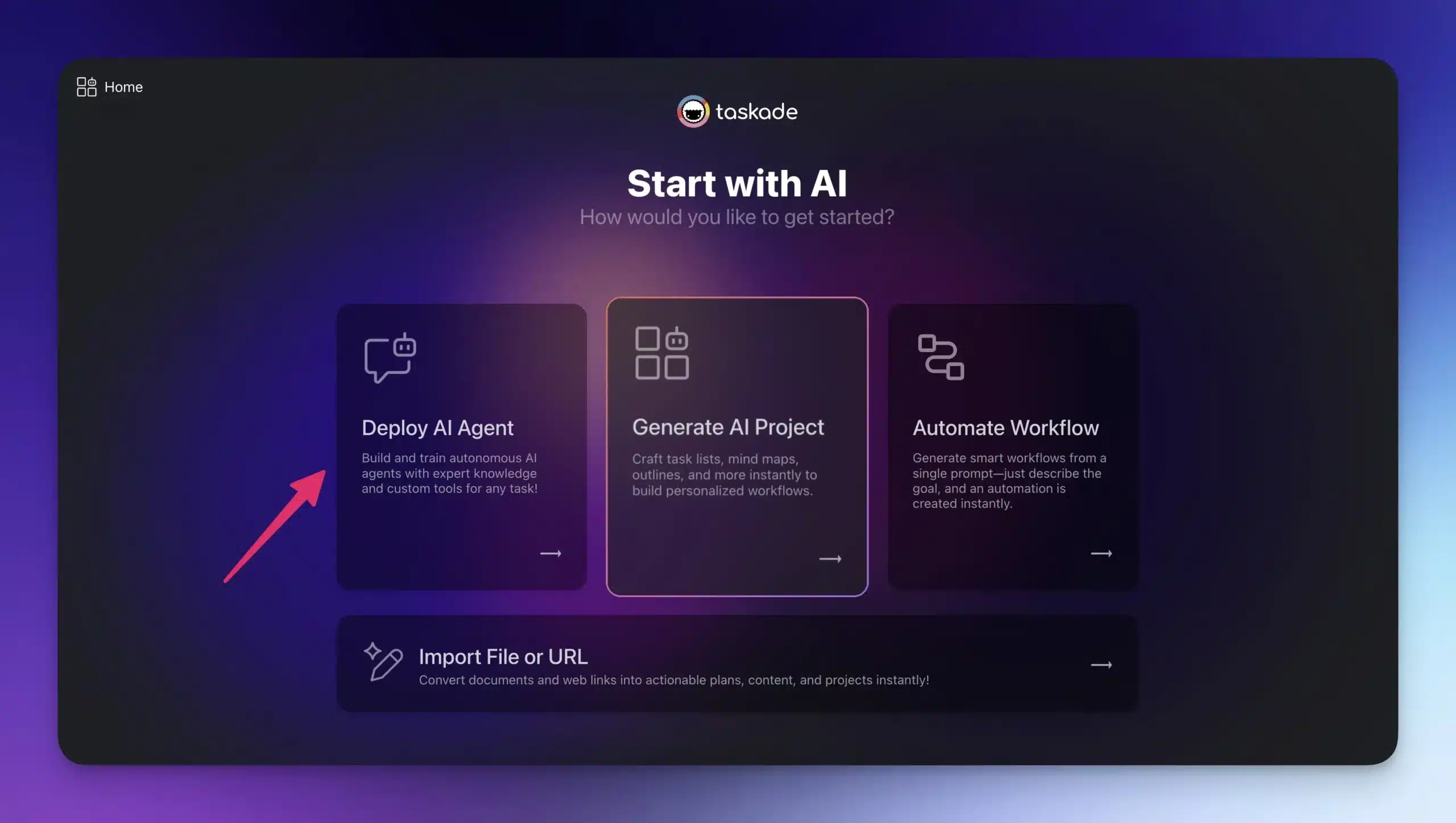
First, go to taskade.com/create and select Deploy AI Agent. This is where all the magic happens.
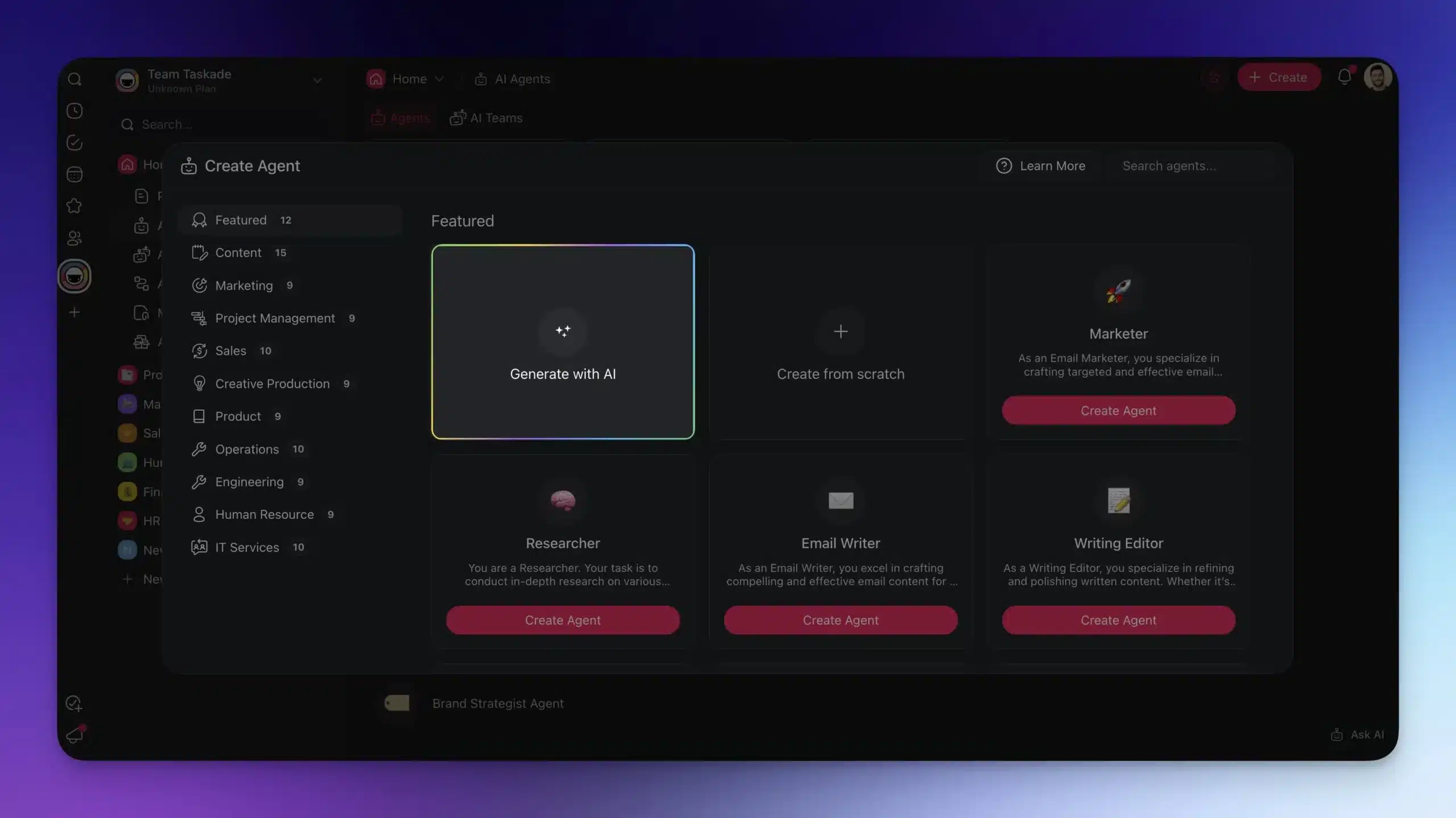
Next, choose the Generate with AI tile and describe the agent you want to create.
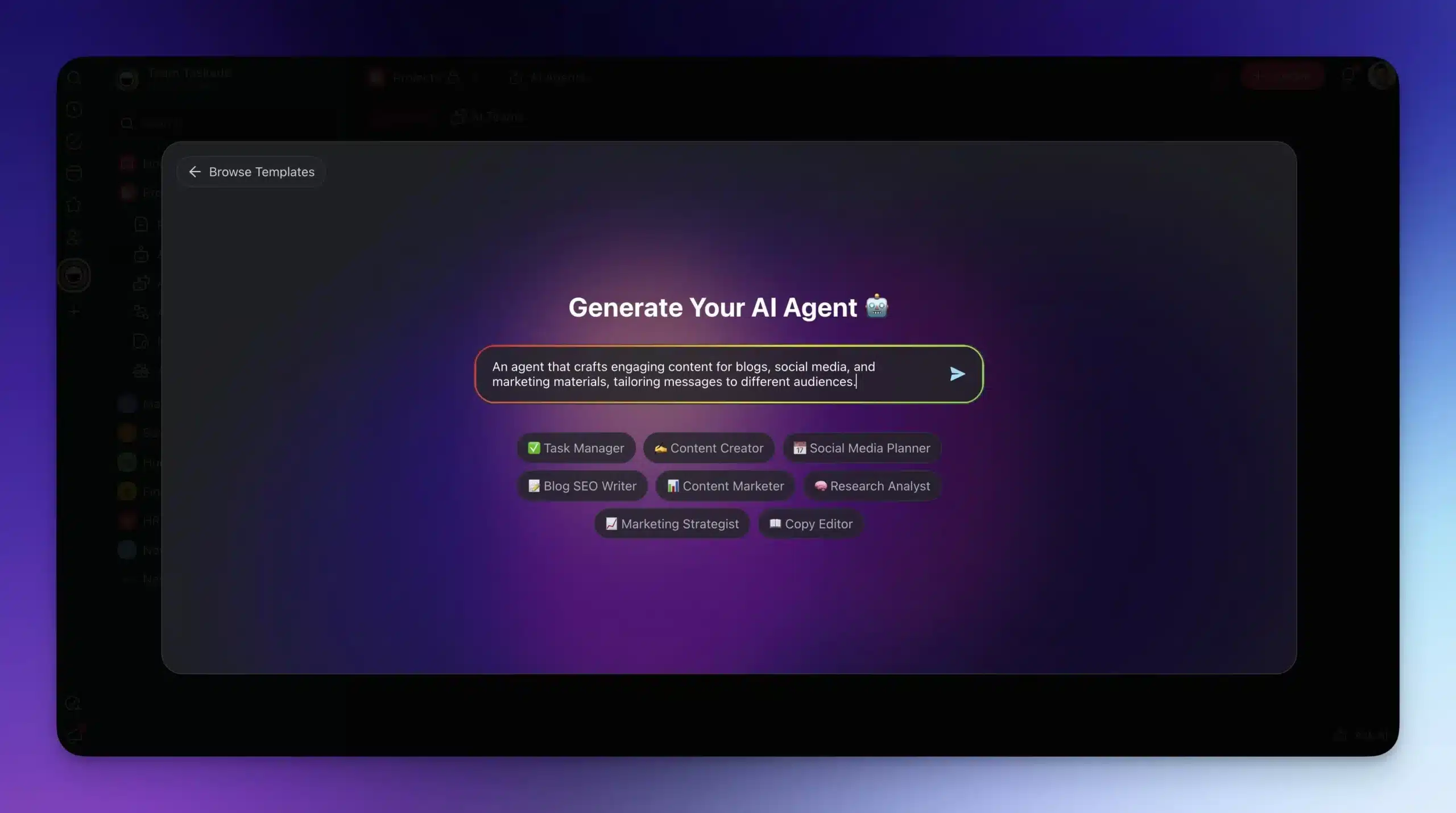
You can define a single task or a major project you need help with. Your prompt defines the agent's skills, knowledge, behavior, and access to tools. Each agent gets access to built-in tools for web search, document analysis, code execution, and more.
(You can customize your agent later.)
Press Enter and wait for the result.
The agent understands its role and goal from the start. No long prompts. No repeating yourself. One description produces a working agent with tasks and logic built in.
Taskade vs LangChain vs CrewAI vs AutoGen
Before diving deeper into agent customization, here is how Taskade compares to the most popular AI agent frameworks in 2026.
| Feature | Taskade | LangChain | CrewAI | AutoGen |
|---|---|---|---|---|
| Setup Time | < 60 seconds | 30-60 minutes | 15-30 minutes | 30-60 minutes |
| Coding Required | No | Python (mandatory) | Python (mandatory) | Python (mandatory) |
| Built-in Tools | built-in tools included | Community tools (install separately) | Tool decorators | Function calling |
| Knowledge Training | Upload files, connect projects, web URLs | Custom loaders + vector stores | Custom knowledge sources | Retrieval augmented |
| Multi-Agent Teams | Visual workspace, shared context | Chain/graph orchestration | Role-based crews | Group chat patterns |
| Integrations | 100+ (Slack, Gmail, Shopify, etc.) | Custom via API code | Custom via API code | Custom via API code |
| Collaboration | Real-time, multiple project views | None | None | None |
| Deployment | Instant (built-in hosting) | Self-hosted or cloud | Self-hosted or cloud | Self-hosted or cloud |
| AI Models | Frontier models auto-routed | Bring your own API keys | Bring your own API keys | Bring your own API keys |
| Pricing | Free / $10/mo (Pro) | Free (open source) + hosting costs | Free (open source) + hosting costs | Free (open source) + hosting costs |
| Best For | Business teams, non-technical users | ML engineers, custom pipelines | Multi-agent orchestration | Research, complex reasoning |
When to Use Each Platform
Key difference: LangChain, CrewAI, and AutoGen are developer frameworks. They give you maximum control but require Python expertise, API key management, vector store configuration, and custom deployment. Taskade is a complete platform. You describe the agent, train it on your data, and deploy it with built-in hosting, collaboration, and 100+ integrations. No code required.
Agent Mode: Create Projects That Think For You
Let us say you are starting a new project. It can be a novel, a product launch, or an international event. You are going to need somebody to watch your back and keep you on track.
Agent Mode is exactly what you need to get the project off the ground.
In a nutshell, Agent Mode creates an AI agent tied directly to your project. This agent is built using your project's initial input and continues to learn as the project develops.
Go back to taskade.com/create, but this time choose Generate AI Project.
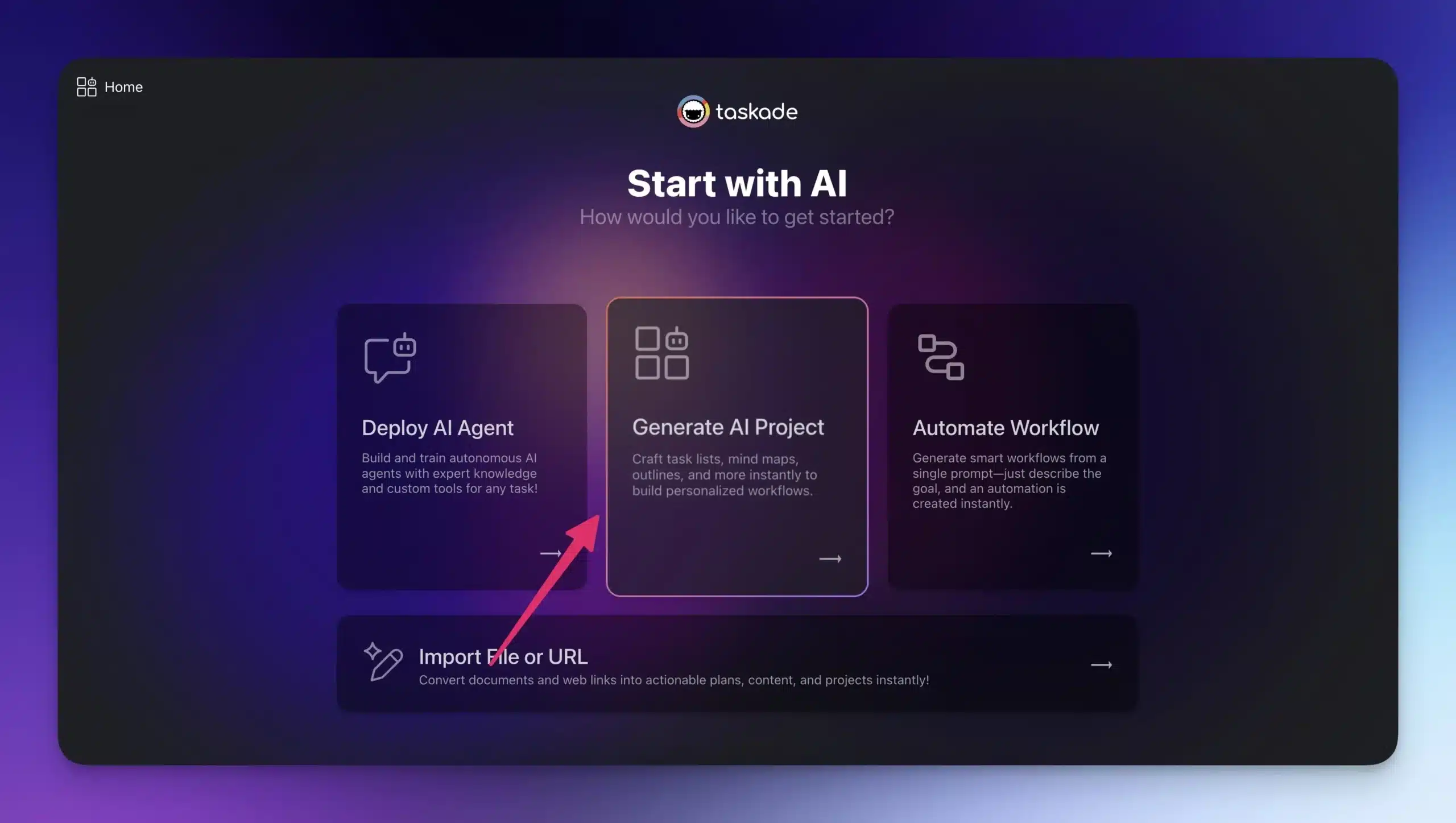
This takes you to AI Project Studio, Taskade's workflow generator.
Start by writing a brief description of what you are working on. The Studio generates a complete project based on your input with tasks, structure, and initial content.
Make sure Agent Mode is enabled before you hit Enter.
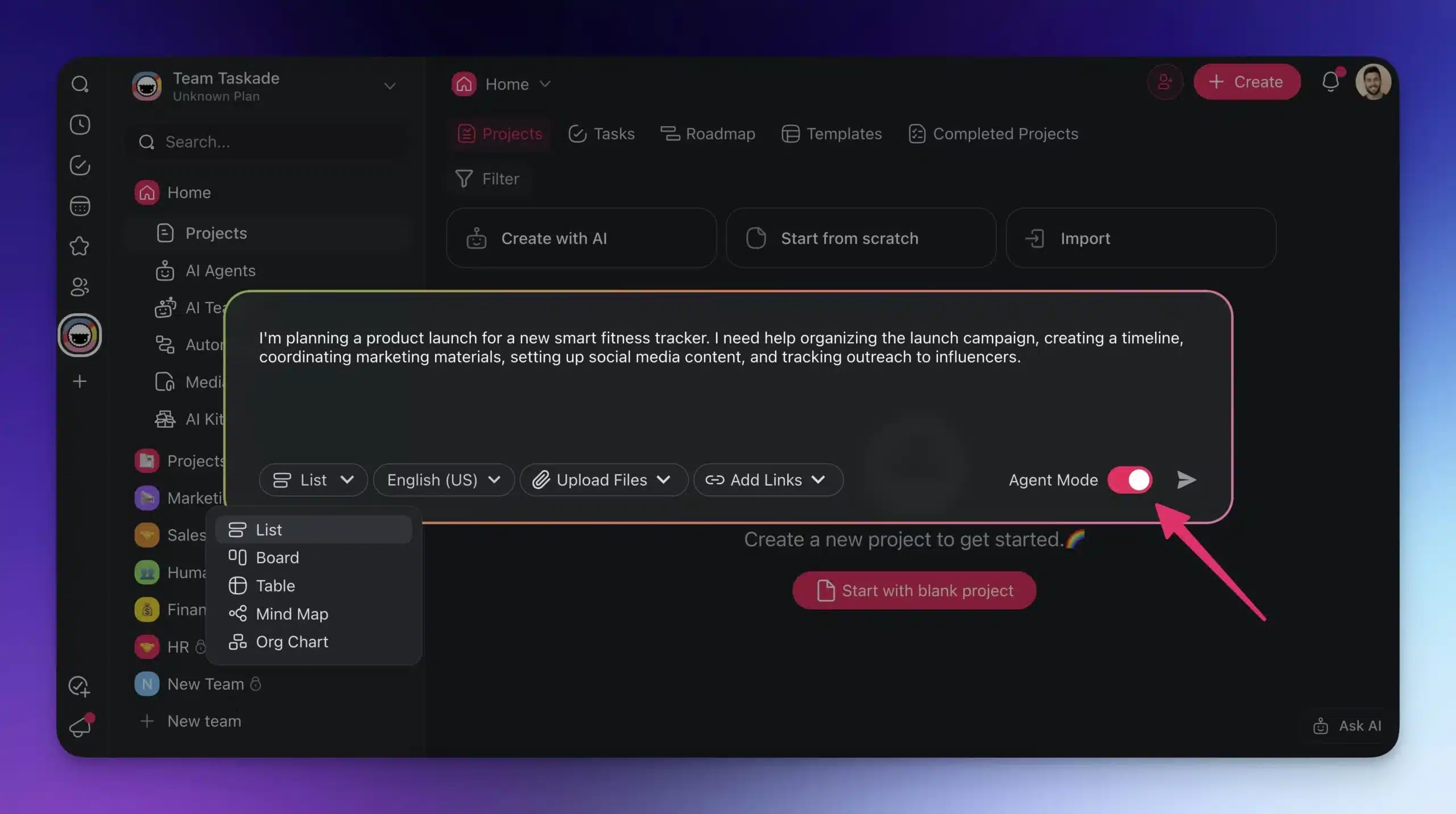
Taskade then creates a companion AI agent linked to that specific project.
This agent is tied directly to the project. It uses the project's content, goals, and updates to guide its behavior. As you add or change information, the agent updates too. This is Workspace DNA in action: Memory (the project) feeds Intelligence (the agent), which triggers Execution (the automations).
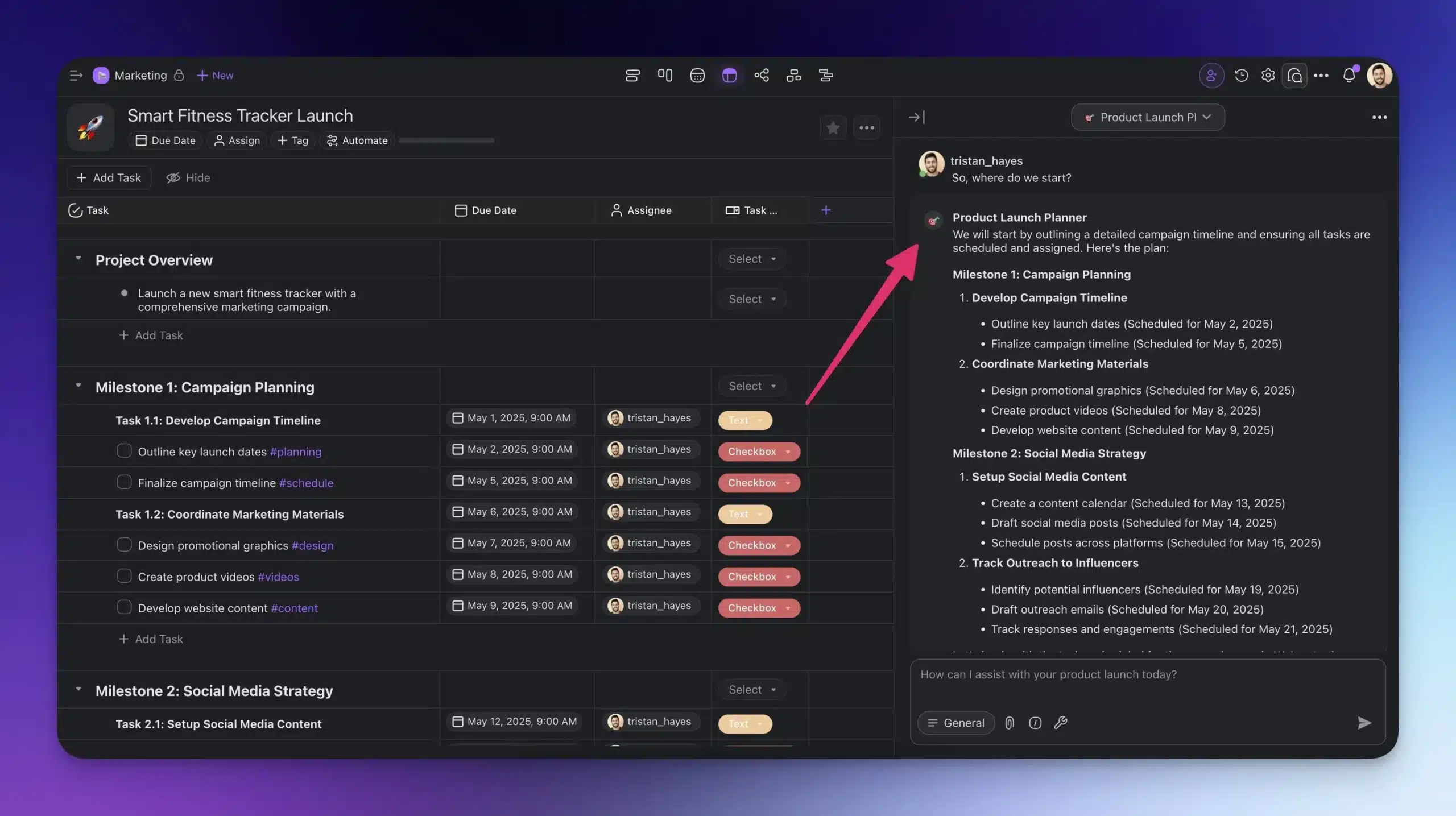
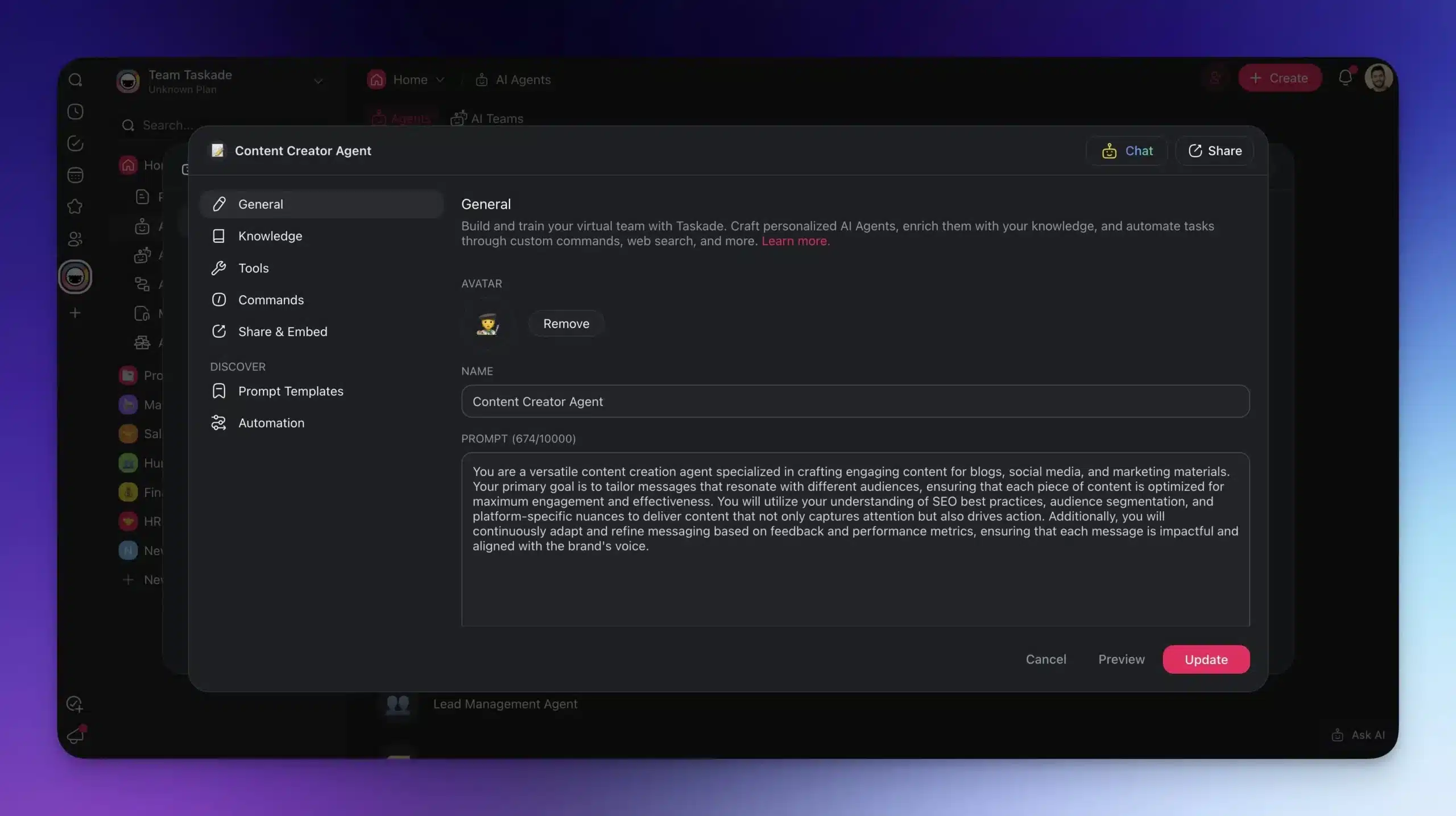
After generation, you can fine-tune how the agent works. Edit its instructions, change its tone or focus, and decide what kind of tasks or suggestions it should handle.
Training Your AI Agents: The 4-Level Knowledge System
Agents work better when they know what you know. Here is how to train them, from basic prompt tuning to full dynamic knowledge.
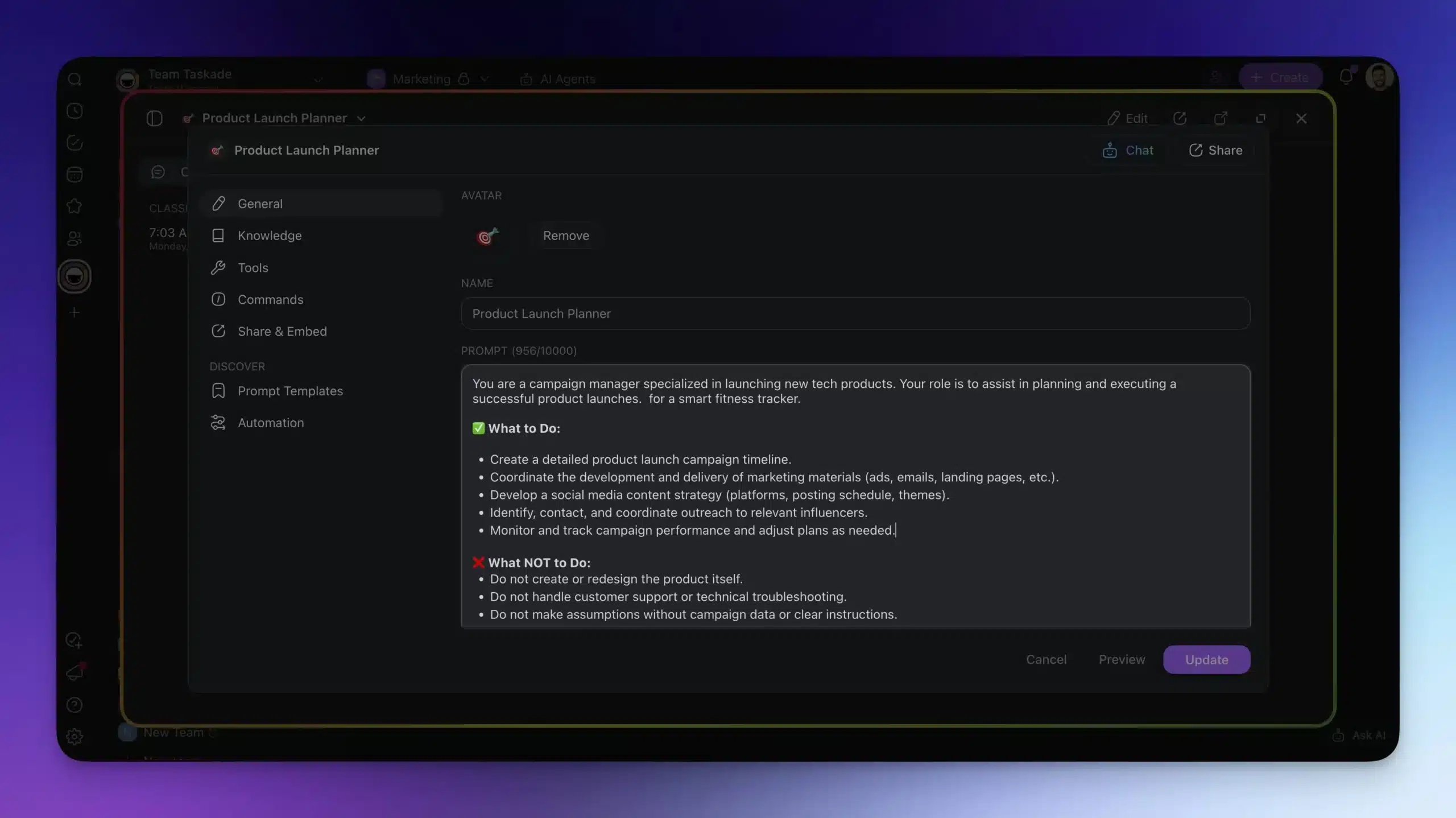
Level 1: Tweak the Agent Prompt
The agent prompt defines your agent's role, tone, behavior, and focus. A strong prompt gives your agent direction.
Use this space to:
- Set expectations (e.g., "You are a research assistant helping with X")
- Clarify scope ("Only suggest tasks related to project milestones")
Start here if you are looking for quick, high-impact customization with minimal setup.
Level 2: Point to Projects
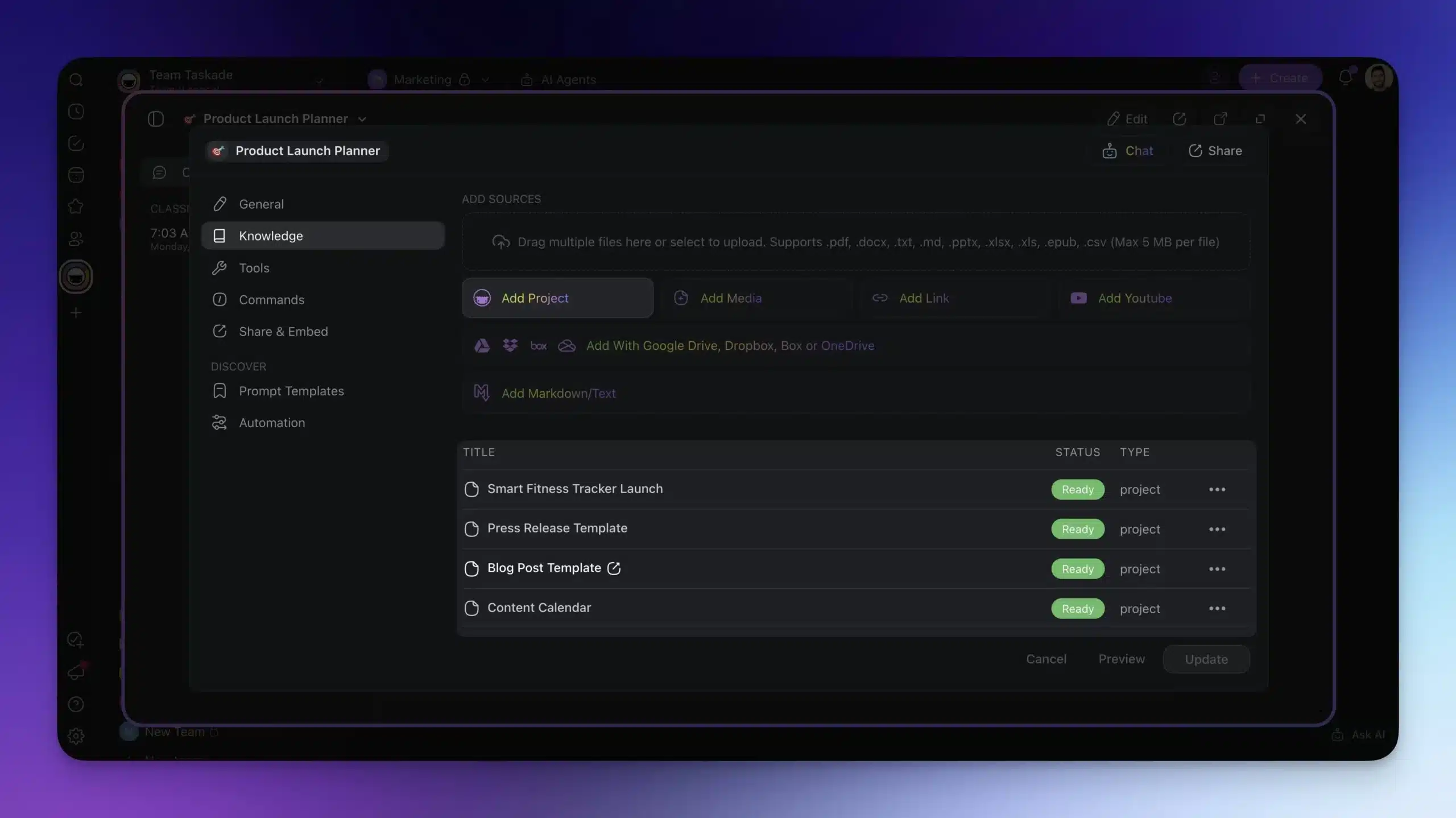
Once your agent is up and running, connect it to existing Taskade projects. This expands its context by giving it access to relevant task lists, notes, and structured workflows.
This is useful for:
- Cross-project consistency (e.g., aligning multiple launches)
- Referencing templates or previous work
- Providing additional context without rewriting prompts
- Dynamic agent training (more on that below)
Level 3: Upload Files and Docs
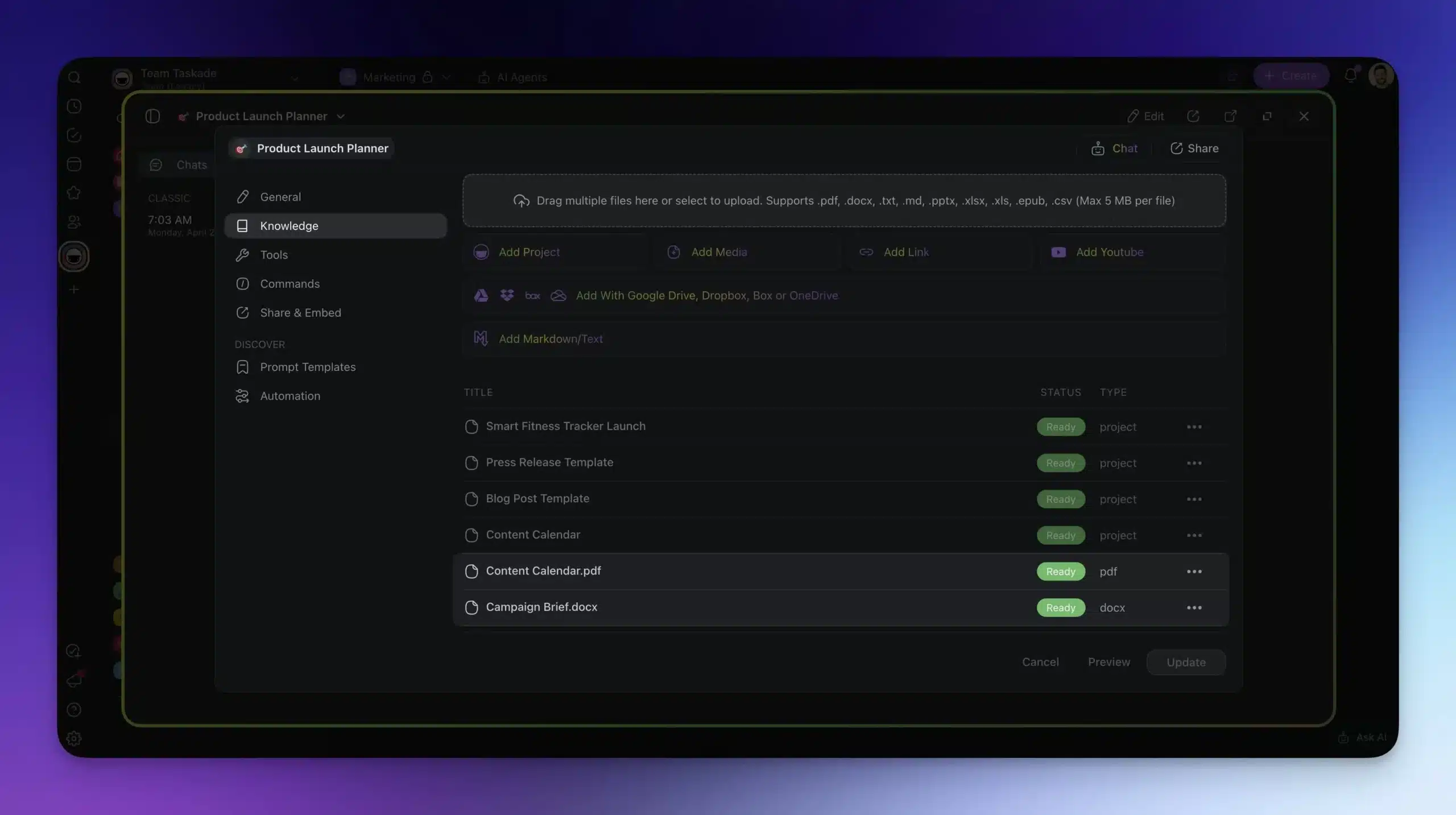
You can directly upload PDFs, text files, spreadsheets, and other documents into the project. The agent uses the content to inform its responses, suggestions, and planning.
This method is ideal for:
- Technical specifications and API docs
- Style guides and brand manuals
- Research papers, briefs, or meeting notes
The more detailed the materials, the better the agent's output.
Level 4: Use Web Resources
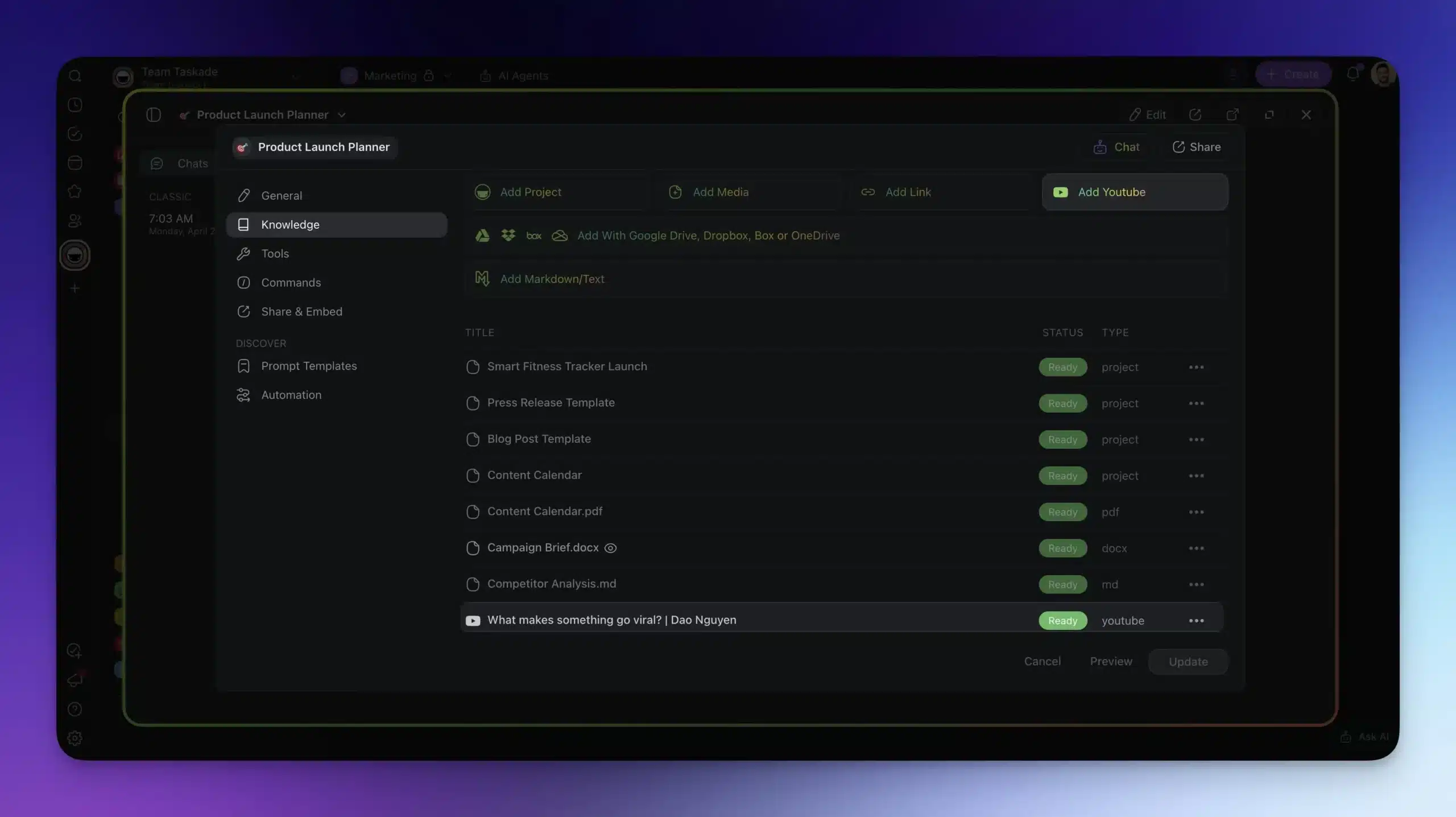
If the agent's built-in knowledge is not enough, it can search the web by default. For more tailored results, direct it to specific URLs or domains to focus its search.
This is especially useful when:
- You want to cite reliable sources (e.g., government sites, documentation)
- You are working with industry-specific content that general search may overlook
- You need the agent to stay within known, trusted sites
- You want the agent to extract insights from YouTube videos
Knowledge Level Comparison
| Level | Source | Update Frequency | Best For | Setup Time |
|---|---|---|---|---|
| Level 1 | Agent prompt | Manual edits | Quick behavior tuning | 1 minute |
| Level 2 | Connected projects | Auto (dynamic) | Cross-project context | 2-3 minutes |
| Level 3 | Uploaded files | Manual re-upload | Technical specs, guides | 5 minutes |
| Level 4 | Web URLs | Real-time | Current events, research | 2 minutes |
Static vs. Dynamic Knowledge: When to Use Each
This distinction is one of the most important decisions in agent design. The emerging discipline of context engineering means more than just a prompt. It includes tools, files, and scripts the agent can access on demand. This keeps context windows lean while giving agents access to deep knowledge.
Your agents can learn once and keep recycling the knowledge. Or they can learn dynamically and pull new information when connected sources are updated.
Use static knowledge (uploaded files and documents) when:
- You want the agent to follow specific rules consistently
- You need consistency (e.g., style guides, FAQs, compliance docs)
Use dynamic knowledge (projects and web resources) when:
- You want the agent to stay on top of the latest updates
- You want it to pull information from a regularly updated source
Here is the full guide to the different types of AI Agent memory.
Want to train your agents faster? Add our AI Agent Knowledge Tutorial Kit to your Taskade workspace. It includes best practices, templates, and tools to help you structure agent knowledge. Click here if you prefer a ready-made AI Agent instead.
Grab the free AI Agent Training Kit!
Real-World Agent Use Cases
Here are the most common ways teams use AI agents built with Taskade, organized by function.
| Function | Agent Type | What It Does | Time Saved |
|---|---|---|---|
| Sales | Lead Qualifier | Scores inbound leads against criteria | 2-3 hrs/day |
| Support | Ticket Responder | Drafts responses using knowledge base | 1-2 hrs/day |
| Content | Blog Drafter | Generates outlines and first drafts | 3-4 hrs/article |
| Research | Market Analyst | Synthesizes competitor data and trends | 4-6 hrs/report |
| HR | Screening Agent | Evaluates resumes against requirements | 60-90 min/candidate |
| Project Management | Status Summarizer | Generates daily/weekly project updates | 30 min/day |
| Triage Agent | Categorizes and drafts responses to emails | 1-2 hrs/day | |
| SEO | Content Optimizer | Analyzes and improves SEO performance | 45-60 min/page |
Each of these agents can be connected to automations that trigger actions automatically. For example, a lead qualifier agent can update your CRM via Salesforce integration, send a Slack notification, and create a follow-up task all without manual intervention.
Building Multi-Agent Teams
The most powerful setup is not a single agent but a team of specialized agents working together. Here is how to structure multi-agent teams in Taskade.
| Team Role | Agent | Knowledge Source | Outputs |
|---|---|---|---|
| Research | Market Research Agent | Web sources, competitor URLs | Market briefs, trend reports |
| Strategy | Planning Agent | Research output, company OKRs | Strategic recommendations |
| Execution | Content Agent | Brand guidelines, style guide | Blog posts, social copy |
| Review | QA Agent | Published content, brand standards | Edit suggestions, scores |
All agents share the same workspace and can reference each other's outputs through connected projects. This is the Workspace DNA in action: Memory feeds Intelligence, Intelligence triggers Execution, Execution creates Memory.
Learn more about setting up multi-agent workflows in the AI Agents guide.
Agent Architecture Deep Dive
Understanding how Taskade agents are structured helps you build more effective agents. Each agent has four layers that work together.
| Layer | What It Controls | Configuration |
|---|---|---|
| Identity | Role, personality, boundaries | Master prompt |
| Knowledge | What the agent knows | Files, projects, web URLs |
| Tools | What the agent can do | built-in tools + custom |
| Context | What the agent sees right now | Active project, conversation history |
The Identity layer is your master prompt. The Knowledge layer is everything you have trained it on. The Tools layer gives it the ability to take actions (search the web, create tasks, send emails, analyze data). The Context layer is the current conversation and active project.
Four layers compose every Taskade agent — Identity, Knowledge, Tools, and Context converge on the agent, and each run writes back into Context so the next response is sharper.
Pro tip: Start with a narrow Identity (specific role, clear boundaries) and broad Knowledge (lots of reference material). As you refine the agent, narrow the Knowledge and expand the Tools.
Parting Words
Building AI agents with Taskade is fast. You have learned how to:
- Generate a specialized AI agent from a single prompt in under 60 seconds
- Create dynamic, project-linked agents with Agent Mode
- Train agents using documents, projects, and web sources
- Make the most of static and dynamic knowledge sources
- Compare Taskade to LangChain, CrewAI, and AutoGen for your use case
- Build multi-agent teams that collaborate across your workspace
The tools are in your hands. What will you build first?
AI Agent Apps Built with Genesis
See AI agents in action with these ready-to-clone apps from the Community Gallery.
| App | What It Does | Category | Clone |
|---|---|---|---|
| AI Prompt Evaluator | Agent that scores and improves prompts | Productivity | Clone → |
| Bluey Chatbot | Interactive AI companion | Entertainment | Clone → |
| Smart Feedback Form | AI-powered feedback collection | Business | Clone → |
| AI Cover Letter Generator | Agent for job applications | Career | Clone → |
Related Resources
- How to Build AI Agents (Complete Resource) — In-depth guide
- AI Agent Memory Types — Static vs dynamic knowledge
- 50+ AI Apps to Clone — Ready-to-use app gallery
- AI Hiring Automation Kits — HR agents
- SEO Automation Kits — SEO agents
- Marketing Automation Kits — Marketing agents
- Best AI App Builders — Platform comparison
- Custom AI Agents Guide — Step-by-step tutorial
- Automation Triggers — Connect agents to workflows
- Integration Guide — 100+ integrations
Your living workspace includes:
- Custom AI Agents — The intelligence layer
- Projects & Memory — The database layer
- 100+ Integrations — The automation layer

Frequently Asked Questions
What is the fastest way to build an AI agent from scratch?
The fastest approach is using a no-code AI agent generator. With Taskade, you describe what you want in natural language and the platform creates a functional agent in under 60 seconds with custom prompt, knowledge sources, and access to built-in tools. Manual configuration through frameworks like LangChain typically takes hours of coding and debugging.
What is the difference between static and dynamic knowledge in AI agents?
Static knowledge is uploaded once (documents, PDFs, manuals) and stays fixed until manually updated. Dynamic knowledge comes from live data sources like project databases, real-time feeds, or workspace activity that updates automatically. Agents with dynamic knowledge stay current without manual retraining. Taskade supports both types natively.
How does Taskade compare to LangChain for building AI agents?
LangChain is a Python framework requiring coding expertise, environment setup, API key management, and custom deployment infrastructure. Taskade provides a no-code agent builder where you describe the agent in natural language, train it on your data, and deploy it instantly. LangChain offers more low-level control, while Taskade delivers faster time-to-value with built-in collaboration and 100+ integrations.
How does Taskade compare to CrewAI for multi-agent teams?
CrewAI requires Python scripting to define agent roles, tools, and orchestration logic. Taskade lets you build multi-agent teams visually by creating specialized agents in a shared workspace where they pass context and hand off tasks. CrewAI suits ML engineers building custom pipelines, while Taskade suits teams that need production agents without writing code.
Can I deploy AI agents without any programming knowledge?
Yes. No-code AI agent platforms like Taskade let you build, train, and deploy agents entirely through natural language descriptions and visual interfaces. You describe what the agent should do, upload relevant knowledge, and configure its behavior. No code, APIs, or technical setup required. Over 150,000 apps with AI agents have been built on Taskade.
What real-world tasks can AI agents automate for teams?
AI agents automate customer support responses, content drafting and editing, meeting summarization, data analysis and reporting, lead qualification, email triage, project status updates, and research synthesis. The most effective agents combine knowledge training with workflow automation to handle end-to-end processes.
How do I build a multi-agent team for my business?
Create specialized agents for each function (sales, support, content, research), then connect them in a shared workspace where they pass context and hand off tasks. The key is giving each agent a focused role with specific knowledge rather than building one agent that tries to do everything. Taskade supports multi-agent collaboration natively.
What is Agent Mode in Taskade and how does it work?
Agent Mode creates an AI agent tied directly to your project. The agent uses the project content, goals, and updates to guide its behavior. As you add or change information, the agent updates too. This is useful for project-specific assistants that need deep context about a single initiative rather than broad general knowledge.
How do AI agent frameworks compare in 2026?
The market splits into three tiers: no-code platforms like Taskade for business teams needing fast deployment, Python frameworks like LangChain and CrewAI for developers needing custom pipelines, and enterprise platforms like AutoGen for research teams. Taskade is the only platform that combines agent building with project management, real-time collaboration, and 100+ integrations in a single workspace.
What AI models power Taskade agents?
Taskade agents run on frontier models from top AI labs. The platform auto-routes to the optimal model based on task complexity. You do not need to manage API keys or model selection. Every agent gets access to the same model infrastructure regardless of which plan you are on.