






Most productivity methodologies are built on more or less the same idea: Intentional processes help you accomplish your goals. And there’s no method that makes this clearer than David Allen’s Getting Things Done® (GTD®). It’s right there in the name—use this method, and you’ll be able to get things done.
Building GTD workflows for yourself and your team helps bring order and clarity to these processes. Whether you’re working through important tasks, planning your next project, or just trying to get a handle on your team’s current capacity, the GTD method helps you find the best approach.
Using GTD to build workflows for your team also helps your team think more holistically about their contributions to your company. It fosters a cohesive team culture that’s mindful of everyone’s impact on larger company goals and keeps each person moving toward the same goal. GTD workflows create a sustainable engine to drive productivity for your team.
And that's what we're talking about today. Getting Things Done® (GTD®) was built as a personal productivity method, but with the right tools, you can easily apply it to team collaboration as well.
💡 New to GTD? Start with our complete GTD methodology guide for the full breakdown of the 5-step system.
💡 Related team productivity guides:
So how do you build a GTD Workflow for your distributed team? It's simple!
Let’s get started.
What Is Getting Things Done® (GTD)? 🤔
Getting Things Done® (GTD®) is a productivity methodology created by well-known productivity consultant David Allen and first popularized by his 2001 book “Getting Things Done: The Art of Stress-Free Productivity.” It’s a time management framework with the goal of helping practitioners better organize and manage their day-to-day responsibilities.
“Getting Things Done® is a personal productivity methodology that redefines how you approach your life and work.”
Built originally as a personal productivity system, GTD has a bottom-up approach that’s easily adapted for teams as well as individuals. By defining a systematic process for brainstorming, research, organization, and the implementation of new ideas, GTD gives your remote team the tools they need to be creative and maintain productive work habits.
How and Why Getting Things Done® (GTD) Works 🧠
The Getting Things Done method is built on five core concepts, each designed to help your team think holistically about their daily tasks and responsibilities. Following this five-step process makes it easy to spec out new projects, execute on individual tasks, and reflect on all the work that goes into everything your team does.
Taking a full account of your team’s productivity also helps identify potential issues before they cause unnecessary bottlenecks. This is especially important for distributed teams that need to be more intentional in how they collaborate to keep everyone on the same page.
⚡️ The Five Tenets of Getting Things Done
Getting Things Done® (GTD)® builds on five steps: capture, clarify, organize, reflect, and engage.
🟠 Capture: This is the stage where you spec out everything that goes into a project and record it in a document. Think of it as your brainstorming session.
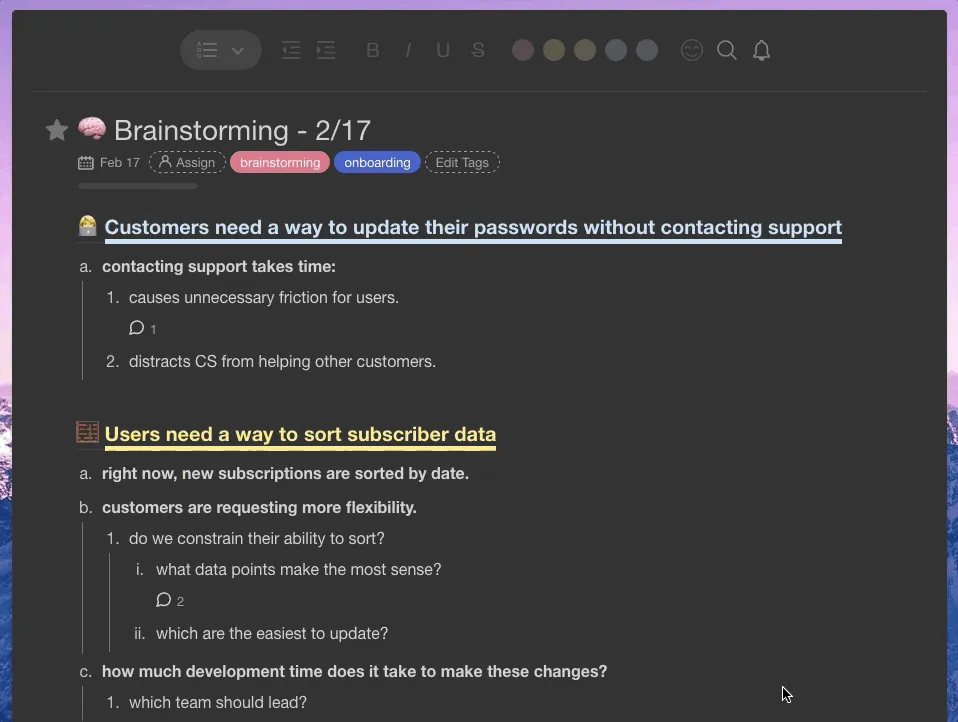
🟡 Clarify: Once you’ve documented this brainstorming session, it’s time to decide what ideas are valuable and can be easily executed on. This where you refine requirements for your team. Basically, you should be asking yourself, “is [my idea] actionable?”
🔵 Organize: When you understand what’s actionable and valuable, it’s easier to organize and prioritize your work more effectively. At this point, you’re creating tasks and assigning them to your team.
🟣 Reflect: The GTD methodology works by consistently re-evaluating your tasks to regain context and make adjustments. In that way, it shares a lot with the bullet journal method.
🟢 Engage: Now that everything is in place, you’ll be able to execute on tasks with confidence and move the project forward as a team.
🚀 Startup GTD Workflow
Each of these steps builds on the previous one to help you codify the way you think about an upcoming task or problem. Here’s an example of what this process might look like if your company was a startup with a remote, distributed workforce in the process of building new features for your product and customers:
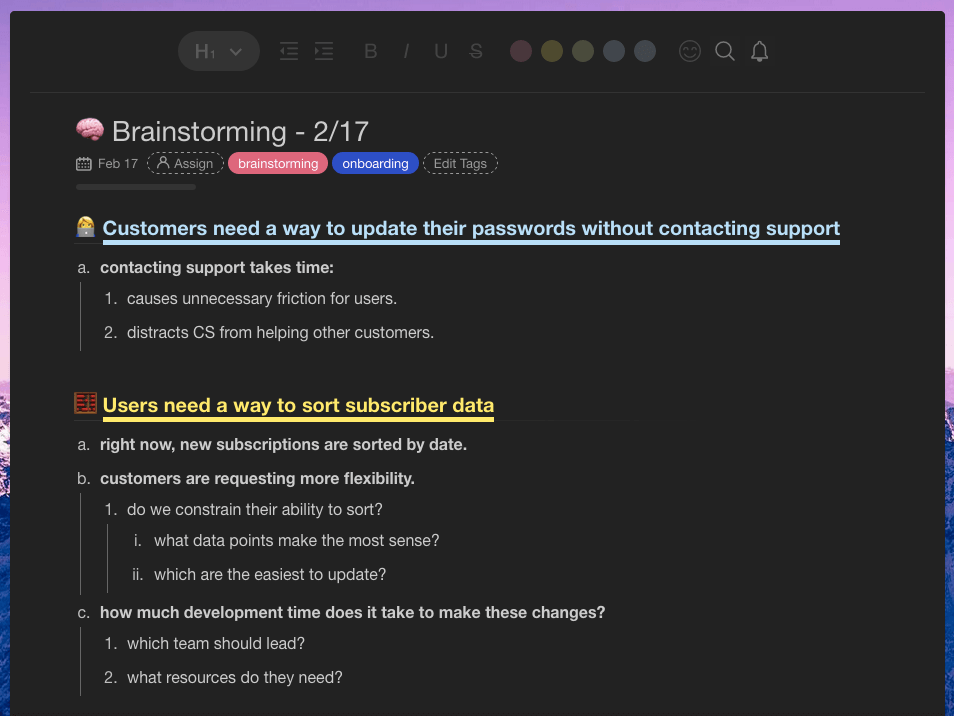
🧠 Capture: To get started, you have a brainstorming session with your product and development teams. During that session, you compile a document that brings together each team member’s thoughts and ideas about what the new feature should be. Once you have all these ideas “on paper,” it’s time to decide what features are both valuable for customers and feasible for your team to build.
👩💻 Clarify: Let’s say you narrow it down to three: adding subtasks, including tags, and implementing dark mode in the UI. Based on your user research and team feedback, adding subtasks is the most immediately valuable and actionable feature.
✍️ Organize: During this step, you’ll actively be assigning tasks to your team, breaking up the work required to build this new feature into manageable chunks for each upcoming sprint.
🤔 Reflect: While you’re in the process of assigning these tasks, it’s important to reflect on each team member’s capacity to ensure that all work can be accomplished efficiently. Have each individual team member add their feedback to their tasks, so you know when it’s necessary to provide additional context.
✅ Engage: Once you’ve finished reflecting on the work required and organized it in a way that’s optimal for everyone involved, you can start executing on individual tasks.
When you think systematically about how your team moves forward with any project, it creates a GTD workflow that makes it easy for everyone to get their work done. But the cycle doesn’t stop there—check in at key touchpoints throughout the process to reflect and reorganize based on the current needs and constraints of your team. If you’ve completed a set of subtasks that change the direction of the project, it’s better to know early in the sprint than adjusting expectations later.
As you become more comfortable with this process, building these GTD workflows will become easier and easier for your team.
How to Build a GTD Workflow for Your Distributed Team 🎯
Applying the GTD method to team collaboration works best when you get everyone to contribute to the GTD workflow from the start. Getting Things Done is, at its core, a bottom-up productivity method, so team input leads to better results and increased productivity over time. The process of building these workflows trains employees to think more holistically about task management and project planning.
This early input from your team also makes it easier to adopt new processes and tailor the GTD workflow to each person’s specific needs. Stepping through each tenet individually acts as a forcing function to increase systematic thinking across your team.
Creating a GTD workflow helps you define the processes you use to build new products and features in the future as well. It boosts engagement with the entire product pipeline—from brainstorming new ideas all the way to retrospectives. When each member of your team understands the reason behind every decision, that increased engagement leads to more accountability and trust.
Let’s take a look at how teams move through a GTD workflow using Taskade. The first step is to capture ideas in a brainstorming document:
Once that information is documented, you move on to the “Clarify” stage and start thinking about which ideas matter most. Striking out certain ideas and adding comments helps you gain insight into what’s truly valuable for customers—you’re figuring out the best path forward for the team.
With these ideas captured and clarified, it’s time to organize and decide on their priority. This ensures that you’re able to make the most impact as your team starts executing on their work.
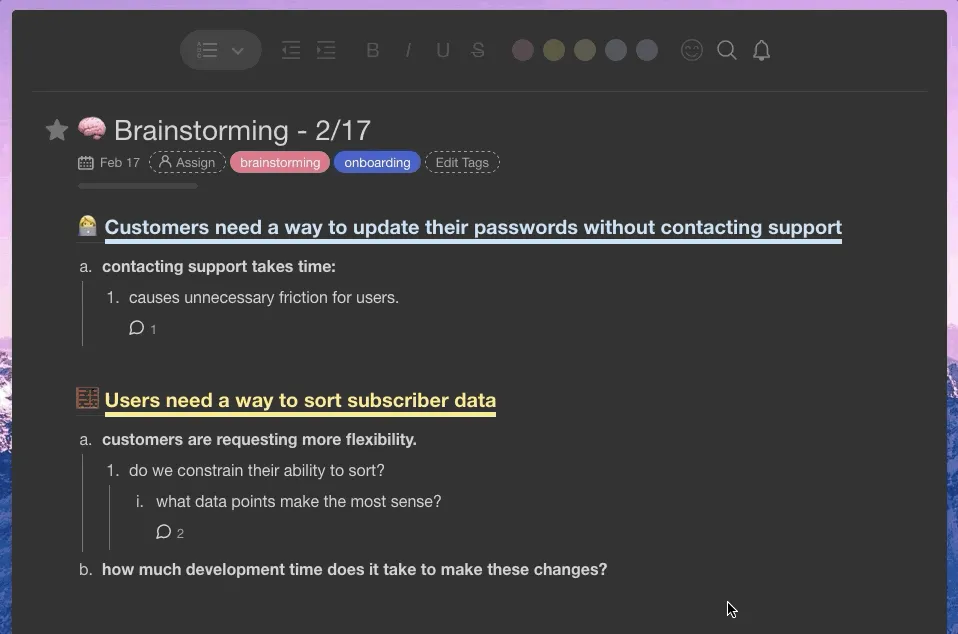
Setting priorities helps frame the next stage of your GTD workflow when you reflect on how best to execute on your ideas. This is the point where it’s important to regain context to make sure you’re able to make the most impact on the product and your customers.
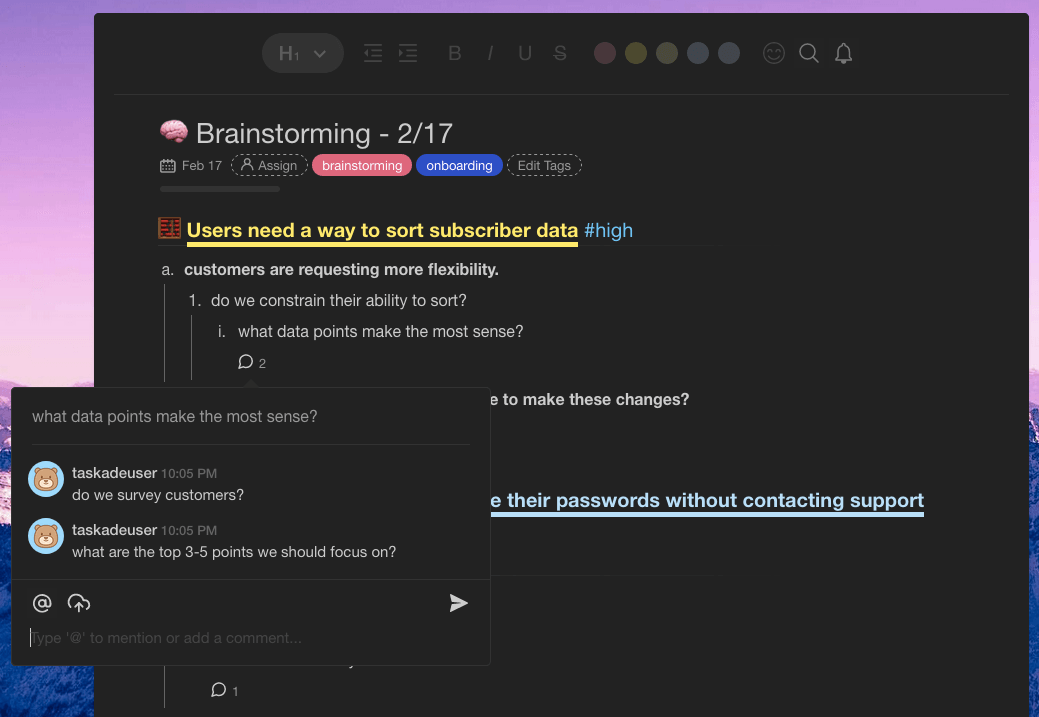
Reflecting at this point also ensures that you’ll be able to provide the most value to customers in the most efficient way possible. From here, you’re ready to start engaging with the work and executing on individual tasks directly.
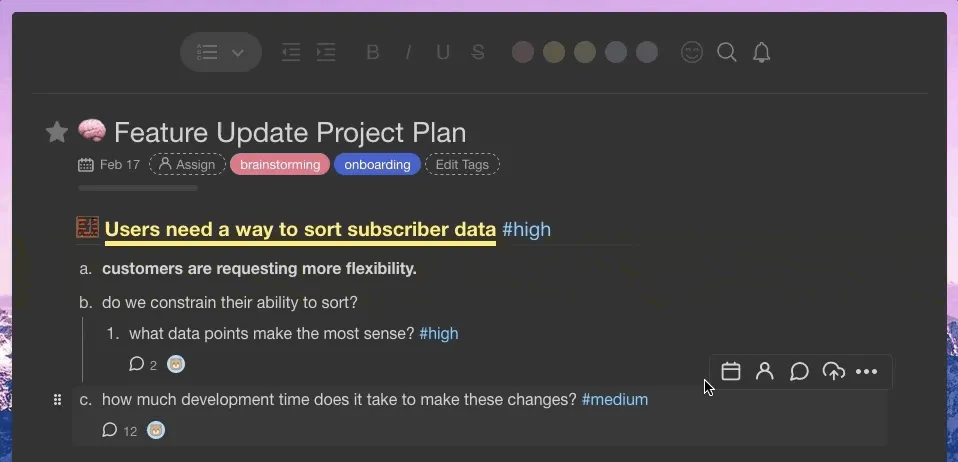
This GTD workflow helps ensure that the work your team does always moves projects toward the same goal. It’s a systematic approach to thinking that helps you understand how best to organize your efforts for the maximum impact. It’s efficient and builds habits that make your remote team more productive as they become more acclimated to the process.
GTD Workflows Help Distributed Teams Get Things Done ✅
When you build GTD workflows for your team, this helps them think holistically about the impact their work has on both your team and your customers. It’s a systematic approach that builds mindfulness and intention into every action they take throughout the day.
Being intentional with not only how you think about problems but also how you address and work through them makes your team more efficient. That increased efficiency helps you build products faster and keeps your team engaged with the work that they do. It also boosts accountability and visibility, which are even more important for distributed teams.
Sign up and supercharge your GTD workflow with Taskade AI! 🤖
🤖 Custom AI Agents: Deploy custom AI agents to coordinate and manage team tasks, aligning everyone's work with the team's objectives.
🪄 AI Generator: Generate collaborative project outlines, brainstorming topics, or meeting agendas based on natural-language descriptions.
✏️ AI Assistant: Employ an AI Assistant to streamline communication, prioritize tasks, write content, and improve project documentation.
🗂️ AI Prompt Templates Library: Access specialized AI prompt templates to kick off tasks, projects, workflows, and documents.
💬 AI Chat: Clarify, develop ideas, or even solve team conflict with smart insights. The AI Chat is available anywhere in Taskade when you need it.
📄 Media Q&A: Implement AI for thorough analysis of team communications, project documents, and feedback loops.
And much more...
🧬 GTD-Style Apps Built with Genesis
Clone these productivity apps designed for Getting Things Done workflows:
| App | What It Does | Clone |
|---|---|---|
| Minimalistic ToDo App | Clean inbox-style task capture | Clone → |
| Note Tiles | Quick capture and organization | Clone → |
| Neon Task Dashboard | Project-based task visualization | Clone → |
| Time Tracker | Track time for weekly reviews | Clone → |
🔍 Explore All Community Apps →
Build your own GTD system with Taskade Genesis — describe what you need, and watch it come to life.
Your living workspace includes:
- 🤖 Custom AI Agents — The intelligence layer
- 🧠 Projects & Memory — The database layer
- ⚡️ 100+ Integrations — The automation layer
Get started:
- Create Your First App → — Step-by-step tutorial
- Learn Workspace DNA → — Understand the architecture
Frequently Asked Questions About GTD for Remote Teams
How do you adapt GTD for a distributed team?
The core GTD framework — capture, clarify, organize, reflect, engage — stays the same, but the tools and cadence change for remote teams. Replace physical inboxes with a shared digital workspace where every team member can capture ideas asynchronously. Use #tags and context labels (@home, @office, @waiting-for) to organize team Next Actions. Most importantly, make the Weekly Review a shared ritual — schedule a recurring team sync where everyone reviews open projects, updates delegated tasks, and clears their inboxes together. The GTD methodology guide covers the full framework in detail.
What is the best GTD tool for remote teams?
The best GTD tool for remote teams consolidates capture, clarify, organize, and reflect into a single workspace — eliminating the context switching that comes from juggling separate apps for notes, tasks, chat, and docs. Look for real-time collaboration, multiple project views (list for Next Actions, board for Kanban, mind map for brainstorming), and AI Agents that can automate the "clarify" step by routing items to the right team member.
How do you handle the GTD "Waiting For" list in a remote team?
The "Waiting For" list is critical for remote teams because you can't just walk over and ask someone for an update. In Taskade, you can assign tasks to specific team members, set due dates, and track completion status in real time. Add a "Waiting For" tag to delegated items so they surface during your Weekly Review. This replaces the manual tracking that GTD originally required and ensures nothing slips through the cracks — even across time zones.
Can AI agents automate parts of the GTD workflow?
Yes. Taskade's AI Agents can automate several GTD steps: (1) Capture — agents can extract action items from meeting recordings via Media Q&A, (2) Clarify — agents can classify inbox items as actionable/non-actionable and suggest Next Actions, (3) Organize — agents can route tasks to the right project lists and team members, and (4) Reflect — agents can generate Weekly Review summaries highlighting overdue items and stale projects. The human stays in control of the "Engage" step — deciding what to work on and actually doing it.
How often should a remote team do a GTD review?
David Allen recommends weekly for individuals, and the same cadence works for teams — but remote teams benefit from adding a lighter daily check-in too. A 15-minute async standup (using a shared Taskade project) where each team member updates their Next Actions list keeps everyone aligned between Weekly Reviews. For the full Weekly Review, schedule 60-90 minutes where the team clears all inboxes, reviews every active project, and surfaces blockers. Many teams pair this with the Eisenhower Matrix to reprioritize for the week ahead.
🔗 Resources
Allen, D. (2001). Getting Things Done: The Art of Stress-Free Productivity. Penguin Books. https://gettingthingsdone.com/
Masicampo, E. J., & Baumeister, R. F. (2011). Consider it done! Plan making can eliminate the cognitive effects of unfulfilled goals. Journal of Personality and Social Psychology, 101(4), 667-683.
Buffer. (2023). State of Remote Work Report. https://buffer.com/state-of-remote-work
Qatalog & Cornell University. (2022). Workgeist Report: The hidden cost of context switching.