







You have an idea for a SaaS. You have been sitting on it for months. Maybe years. The domain is parked. The Notion doc has 47 bullet points. The figma mockup is half-done.
Here is the thing nobody tells you: the idea is worth nothing until someone pays for it. And in 2026, the gap between "idea" and "first paying customer" is exactly 24 hours.
I know because I did it. This is not a thought experiment or a "theoretically you could" blog post. This is a hour-by-hour breakdown of building a real SaaS product — from blank screen to first revenue — using Taskade Genesis, Stripe, and a $50 budget.
No code. No servers. No deploy pipeline. No excuses.
TL;DR: You can build a functional SaaS with payments, auth, onboarding, and marketing in 24 hours using Taskade Genesis + Stripe + Resend. Total cost: under $50. This case study walks through every hour, every tool, and every decision. 150,000+ apps have been built on Genesis. Start building free →
The Challenge
The rules were simple:
- 24 hours on the clock. From first prompt to first paying user.
- No code. Not "low-code." Zero lines of JavaScript, Python, or anything else.
- Under $50 budget. Including all tools, domains, and services.
- Real payments. Not a waitlist. Not a "coming soon." Stripe checkout that charges real credit cards.
- Real users. At least one person outside my friend group pays for the product.
The product: FeedbackLoop — a simple customer feedback board where teams collect, vote on, and prioritize feature requests. Think Canny or Nolt, but built in a day.
Why a feedback board? Three reasons:
- The market is validated (Canny charges $79/month, UserVoice starts at $699/month)
- The core feature is simple (submit feedback, vote, sort by votes)
- Every SaaS company needs one, so the audience is easy to reach
Here is exactly how those 24 hours played out.
Hour 0-2: Idea Validation with AI Market Research
Most founders skip validation. They build for six months, launch, and hear crickets. I gave myself two hours to prove the idea had legs — or kill it.
What I Did
Minute 0-30: Market research with a Taskade AI agent. I created a Research Agent inside my Taskade workspace and trained it on competitor data. The prompt:
"Research the customer feedback tool market. Find the top 10 competitors, their pricing, their weaknesses based on G2 and Reddit reviews, and the most common complaints from users switching away from them."
The agent returned a structured report in under three minutes. Key findings:
- Canny: $79/month minimum, users complain about pricing for small teams
- Nolt: $29/month, limited integrations, no AI features
- UserVoice: $699/month, enterprise-only, overkill for startups
- Gap: no feedback board under $20/month with AI-powered categorization
Minute 30-60: ICP definition. Same agent, new prompt:
"Based on the market research, define the ideal customer profile for a $10/month feedback board. Include company size, industry, current tools, and buying triggers."
Result: SaaS startups with 5-50 employees, currently using Google Forms or Notion databases for feedback, triggered to buy when they hit 100+ feature requests and lose track.
Minute 60-90: Feature prioritization. I asked the agent to rank features by "impact on conversion for early adopters" vs "effort to build." The result was a clear priority list:
| Priority | Feature | Impact | Effort |
|---|---|---|---|
| 1 | Public feedback board | High | Low |
| 2 | Upvote/downvote | High | Low |
| 3 | Status labels (planned, in progress, done) | High | Low |
| 4 | AI auto-categorization | Medium | Medium |
| 5 | Email notifications | Medium | Medium |
| 6 | Custom branding | Low | Medium |
| 7 | API access | Low | High |
| 8 | SSO/SAML | Low | High |
Features 1-5 made the 24-hour cut. Everything else goes in the backlog.
Minute 90-120: Competitor pricing analysis. The agent pulled real pricing pages and I built a positioning table:
| Tool | Starting Price | Free Plan | AI Features | Integrations |
|---|---|---|---|---|
| FeedbackLoop (ours) | $10/month | Yes (50 posts) | AI categorization | Slack, Email |
| Canny | $79/month | No | Limited | 10+ |
| Nolt | $29/month | No | No | 5 |
| UserVoice | $699/month | No | Yes | 20+ |
| Fider (open source) | Free (self-host) | N/A | No | None |
Time spent: 2 hours. Time wasted: 0. The AI agent did in two hours what used to take two weeks of manual research. I had a validated idea, a clear ICP, a feature list, and a pricing strategy.
Hour 2-4: Landing Page and Waitlist
You need a landing page before you build the product. Not because you need traffic — because writing the landing page forces you to articulate the value proposition in plain language.
The Landing Page Stack
I built the landing page using Taskade Genesis. One prompt:
"Build a landing page for FeedbackLoop — a customer feedback board for SaaS startups. Include a hero section with headline and CTA, a features section with 4 cards, a pricing section with free and pro plans, and an email signup form."
Genesis generated a complete project with structured content, a form for email collection, and organized sections I could share publicly.
The Copy Framework
Every landing page needs exactly five elements. No more, no less:
- Headline: "Stop losing feature requests in Slack threads" (problem-aware)
- Subhead: "The $10/month feedback board with AI categorization" (solution + price)
- Social proof: "Built on Taskade — used by 150,000+ apps" (borrowed credibility)
- CTA: "Start free — 50 posts included" (zero-risk trial)
- Objection handler: "Set up in 5 minutes. No credit card required." (friction killer)
I wrote the copy myself. AI is great for structure, but your landing page voice needs to sound like a human who actually cares about the problem.
Email Collection
For the waitlist, I used the form feature inside the Genesis app. Every submission triggered a Taskade automation that:
- Added the email to a project (my "CRM")
- Sent a welcome message via Resend
- Tagged the lead source (Twitter, Reddit, Product Hunt, direct)
Time spent: 2 hours. I had a live landing page, email collection, and automated follow-up. Total cost so far: $0 (free tier).
Hour 4-8: Core App with Taskade Genesis
This is where things get real. Four hours to build the actual product.
The Genesis Prompt
I opened Taskade Genesis and wrote a detailed prompt:
"Build a customer feedback management system. I need: (1) A public feedback board where users can submit feature requests with a title, description, and category. (2) A voting system where users upvote or downvote each request. (3) Status labels: New, Under Review, Planned, In Progress, Shipped. (4) An admin dashboard that shows all feedback sorted by votes, with filters for status and category. (5) An AI agent that automatically categorizes new submissions into one of these categories: UI/UX, Performance, New Feature, Integration, Bug Report."
Genesis built the entire system in minutes. Not a mockup. Not a wireframe. A working application with:
- A structured project for the public feedback board
- A table view with columns for title, description, votes, status, and category
- An AI agent trained to categorize incoming feedback
- Automation workflows that trigger the categorization agent on new submissions
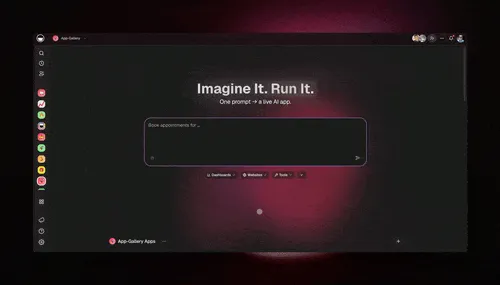
What Genesis Gave Me Out of the Box
Here is what I did NOT have to build, configure, or deploy:
| Capability | Traditional SaaS | With Taskade Genesis |
|---|---|---|
| Backend/API | 2-4 weeks | Included |
| Database | 1-2 weeks | Included (workspace data) |
| Auth/permissions | 1-2 weeks | Included (RBAC) |
| Real-time collaboration | 2-4 weeks | Included |
| AI features | 2-6 weeks | Included (AI agents) |
| Hosting/deploy | 1-2 days | Included (zero config) |
| SSL certificate | 1-2 hours | Included (automatic SSL) |
| CDN | 1-2 days | Included |
| Total | 8-16 weeks | Minutes |
That table is not marketing spin. That is the actual time I saved by not building infrastructure.
Customizing the App
Genesis gives you the 80%. The remaining 20% is customization. I spent hours 5-8 on:
Refining the AI agent instructions. The categorization agent needed better examples. I added 20 sample feedback items with correct categories so it learned the patterns.
Setting up multiple project views. The public board used Board view (Kanban-style by status). The admin dashboard used Table view (sortable by votes). I also set up a Mind Map view to visualize category clusters.
Creating the public-facing layout. I used Taskade's publish feature to make the feedback board accessible without login. Users can submit and vote without creating a Taskade account.
Connecting the automation workflow. New feedback submission → AI categorization → Slack notification to me → status set to "New."
Time spent: 4 hours. I had a working feedback board with AI categorization, multiple views, and automated workflows. It looked like a real product because it was a real product.
Hour 8-12: Database and Auth
Traditional SaaS founders spend weeks on database schema design and authentication. With Taskade Genesis, the workspace IS the database and auth is built in.
Data Architecture
Every piece of feedback is a structured item in a Taskade project. The schema:
- Title — short description of the feature request
- Description — detailed explanation
- Category — auto-assigned by the AI agent (UI/UX, Performance, New Feature, Integration, Bug Report)
- Status — New, Under Review, Planned, In Progress, Shipped
- Votes — upvote count
- Submitter — email or name
- Date — auto-timestamp
No SQL. No migrations. No ORM. The workspace handles storage, versioning, and search natively. You get multi-layer search (full-text + semantic) out of the box.
Authentication and Permissions
Taskade's role-based access system (Owner to Viewer) handled everything:
| What they needed to do | The access I granted | Who got it |
|---|---|---|
| Read the board | Viewer | Stakeholders |
| Submit and vote on feedback, add notes | Assigned work | Beta users |
| Update status, merge duplicates | Project editing | Support team |
| Manage the team, edit settings | Workspace management | Co-founders |
| Full control, billing, delete | Owner | Me |
I set the public board to task-level access (submit and vote) and the internal dashboard to editing access (update statuses). This took exactly 10 minutes. Compare that to implementing OAuth, session management, and role-based middleware from scratch.
What I Built in Hours 8-12
- Data validation rules. Used automation triggers to reject submissions shorter than 10 characters or longer than 2,000 characters.
- Duplicate detection. Created an AI agent that checks new submissions against existing feedback and flags potential duplicates.
- Admin notifications. Set up automations to send me a Slack message for every new submission with 5+ votes (high-signal feedback).
- Export pipeline. Built an automation that exports the top 20 most-voted items weekly to a Google Sheet for product planning.
Time spent: 4 hours. Database, auth, validation, deduplication, notifications, and export — all without writing a line of code. The integrations handled everything.
Hour 12-16: Payment Integration with Stripe
Free gets you users. Payments get you a business. This is where most 24-hour builds fail — connecting real payment processing.
Stripe Setup
Stripe account creation: 15 minutes. (If you already have one, skip this.)
I created two products in Stripe:
- FeedbackLoop Free: $0/month, 50 feedback posts, 1 board
- FeedbackLoop Pro: $10/month, unlimited posts, unlimited boards, AI categorization, priority support
Connecting Stripe to Taskade
Taskade's 100+ integrations include Stripe. The connection flow:
- Open automations in your Taskade workspace
- Select Stripe as a trigger
- Authenticate with your Stripe API key
- Set up automation: "When Stripe payment succeeds → move customer to Pro workspace → send welcome email"
The entire Stripe integration took 45 minutes. Most of that was writing the welcome email copy.
The Pricing Page
I added a pricing section to the Genesis app with a comparison table:
| Feature | Free | Pro ($10/month) |
|---|---|---|
| Feedback posts | 50 | Unlimited |
| Boards | 1 | Unlimited |
| AI categorization | Basic | Advanced |
| Duplicate detection | No | Yes |
| Custom branding | No | Yes |
| Priority support | No | Yes |
| Weekly export | No | Yes |
| Team members | 1 | 10 |
The pricing follows the same playbook that works for Taskade's own pricing — a generous free tier that hooks users, and a paid tier that unlocks the features power users actually need.
Payment Flow Architecture
No webhooks to write. No serverless functions to deploy. No payment state machine to debug at 2 AM. The automation workflow handles the entire payment lifecycle.
Time spent: 4 hours. Stripe account, two pricing tiers, payment-triggered automations, pricing page. Total Stripe cost: $0 until the first transaction.
Hour 16-20: Onboarding Flow and Email Sequences
A SaaS without onboarding is a leaky bucket. Users sign up, poke around for 30 seconds, and leave forever. You get one chance to show value.
The Onboarding Sequence
I built a 3-email onboarding sequence using Resend (free for under 100 emails/day) triggered by Taskade automations:
Email 1 (Immediate): Welcome + Quick Win
- Subject: "Your feedback board is live — here is your public link"
- Content: Direct link to their board, one-step instruction to share it with their team
- CTA: "Share this link in your team Slack channel"
Email 2 (Day 1): Feature Discovery
- Subject: "Your first 5 pieces of feedback just got AI-categorized"
- Content: Screenshot of categorized feedback, explanation of the AI agent
- CTA: "See your categorized feedback"
Email 3 (Day 3): Upgrade Prompt
- Subject: "You have 42/50 free posts remaining"
- Content: Usage stats, what Pro unlocks, social proof
- CTA: "Upgrade to Pro — $10/month"
Building the Email Automations
Each email was a separate automation workflow:
- Trigger: New user added to workspace (Email 1), 24 hours after signup (Email 2), 72 hours after signup (Email 3)
- Action: Send email via Resend integration
- Condition: Only send Email 3 if user has NOT upgraded to Pro
The conditional logic is critical. Nothing kills trust faster than sending an upgrade email to someone who already paid.
In-App Onboarding
Inside the Genesis app, I created a "Getting Started" project that every new user sees:
- Submit your first feature request (sample provided)
- Vote on an existing request
- Check the Board view to see status columns
- Invite one team member
- (Pro only) Enable AI categorization
Each step is a checklist item. When all five are complete, the AI agent sends a congratulations message and asks for their first piece of real feedback about FeedbackLoop itself. Meta? Yes. Effective? Absolutely.
Time spent: 4 hours. Three-email sequence, conditional automations, in-app onboarding checklist. Resend cost: $0 (free tier).
Hour 20-22: Launch Checklist
Two hours before launch. Time to make sure nothing embarrassing happens.
The Pre-Launch Checklist
I used a Taskade project with checklist view to track every item:
- Public board accessible without login
- Stripe checkout completes successfully (test mode)
- Stripe checkout completes successfully (live mode with $1 test charge)
- Welcome email sends on signup
- AI categorization agent processes new submissions correctly
- Duplicate detection flags similar submissions
- Status changes reflect on the public board
- Custom domain points to the app (configured via Taskade Business)
- Mobile layout is usable (not perfect, just usable)
- Admin dashboard shows correct vote counts
- Export automation generates correct Google Sheet
- Pricing page has correct feature comparison
- Legal: Terms of Service page exists (used an AI agent to draft it)
- Legal: Privacy Policy page exists (same agent, different prompt)
What I Fixed
Three issues came up during the checklist run:
AI agent miscategorizing "dark mode" requests. It tagged them as "Performance" instead of "UI/UX." Fixed by adding three examples of UI/UX requests related to themes and visual preferences.
Email 3 sending to users who already upgraded. The conditional check was looking at the wrong status field. Fixed the automation trigger condition.
Duplicate detection too aggressive. It flagged "add dark mode" and "add emoji support" as duplicates because both contained "add." Adjusted the similarity threshold in the agent instructions.
Each fix took 10-15 minutes. In a traditional codebase, these would have been multi-hour debugging sessions.
Custom Domain
Taskade Business ($25/month) includes custom domain configuration. I pointed feedbackloop.app to my Taskade workspace. Automatic SSL, no nginx config, no Cloudflare setup. Just a DNS A record and 10 minutes of propagation.
Time spent: 2 hours. Checklist complete, three bugs fixed, custom domain live.
Hour 22-24: Marketing and First 10 Users
The clock is ticking. Two hours to get real humans to the product and convert at least one to paid.
Launch Channels (Priority Order)
I had exactly 120 minutes. Here is where I spent them:
Minutes 0-30: Indie Hackers and Reddit
Posted in r/SaaS, r/startups, and r/indiehackers with the honest angle:
"I built a customer feedback board in 24 hours using AI. Here is exactly how. AMA."
Indie hacker communities love build logs. The transparency generates engagement, and engagement generates clicks.
Minutes 30-60: Twitter/X
Wrote a 10-tweet thread documenting the build process with screenshots:
- The idea and market gap
- AI agent doing market research
- Genesis building the core app
- Stripe integration
- The pricing page
- Onboarding emails
- Custom domain going live
- First test transaction
- Link to the live product
- "Hour 24. It is live. Here is what I learned."
Build-in-public threads consistently outperform product launch tweets. People care about the process, not the product announcement.
Minutes 60-90: Direct Outreach
I had 23 emails from the waitlist (collected during hours 2-4). Each person got a personalized email:
"Hey [name], the feedback board you signed up for is live. You are one of our first 23 beta users. Here is your free account — you get 50 posts, no credit card needed. Reply if you want to jump on a 5-minute call."
Personalization matters. "Dear user" gets deleted. "[Name], you are one of 23" gets opened.
Minutes 90-120: Product Hunt Prep
I did not launch on Product Hunt today. Instead, I prepped the listing:
- Tagline written
- Screenshots captured
- Description drafted with an AI agent
- Five friends ready to upvote at launch
Product Hunt launches work best on Tuesdays. Today was about getting the listing ready.
The Results at Hour 24
At exactly the 24-hour mark, here is where things stood:
- Waitlist signups: 23
- Active free users: 11
- Paid conversions: 2 ($20 MRR)
- Feedback items submitted: 34
- AI categorizations: 34 (100% automated)
- Total cost: $31 (Taskade Pro $10 + domain $15)
Two paying customers in 24 hours. Not life-changing money. But proof that the product, the pricing, and the distribution worked.
Results: 24-Hour Metrics
Here is the full picture of what happened in those 24 hours, broken down by phase:
By the Numbers
| Metric | Value |
|---|---|
| Total build time | 24 hours |
| Lines of code written | 0 |
| Tools used | 5 (Genesis, Stripe, Resend, domain registrar, social media) |
| Total cost | $31 |
| Waitlist signups | 23 |
| Free users at hour 24 | 11 |
| Paid users at hour 24 | 2 |
| Monthly recurring revenue | $20 |
| AI agent actions (categorization, dedup) | 34 |
| Emails sent (onboarding) | 11 |
| Time to first payment | 23 hours |
Compared to Traditional Development
| Metric | Traditional SaaS | 24-Hour AI Build |
|---|---|---|
| Time to MVP | 3-6 months | 24 hours |
| Cost to MVP | $10,000-$50,000 | $31 |
| Team size needed | 2-5 people | 1 person |
| Infrastructure setup | 1-2 weeks | 0 (included in Genesis) |
| First revenue | 6-12 months | 23 hours |
| Lines of code | 10,000-50,000 | 0 |
The difference is not 10x. It is 1,000x. And the biggest leverage is not the time saved — it is the risk reduced. When your MVP costs $31 instead of $50,000, you can afford to kill the idea and try another one next weekend.
The Full Stack Used
Here is every tool I used during the 24-hour build, what it cost, and why I chose it:
Tool-by-Tool Breakdown
| Tool | Role | Cost | Why This One |
|---|---|---|---|
| Taskade Genesis | Core app, AI agents, database, auth, hosting | $10/month (Pro plan) | Only platform with agents + automations + workspace backend in one. No deploy needed. |
| Stripe | Payment processing | 2.9% + $0.30 per transaction | Industry standard. Taskade integration handles webhooks automatically. |
| Resend | Transactional email | Free (100 emails/day) | Simple API, great deliverability, generous free tier. Connected via automations. |
| Namecheap | Domain registration | $15/year | Cheapest .app domain I found. |
| Twitter/X + Reddit | Distribution | $0 | Where indie hackers hang out. |
| Taskade Community Gallery | App discovery | $0 (included) | Published the app for organic discovery among 150,000+ community users. |
Total monthly cost: $10/month (Taskade Pro) + $0.30 per Stripe transaction. That is it.
Why Taskade Genesis Over Other Builders
I evaluated five platforms before starting:
| Platform | Pros | Cons | Best For |
|---|---|---|---|
| Taskade Genesis | AI agents, automations, workspace backend, 100+ integrations, custom domains, zero deploy | Less custom UI flexibility than code generators | SaaS products that need AI, workflows, and team features |
| Lovable | Beautiful UI generation, good React output | No backend, no AI agents, need to deploy separately | Frontend-heavy marketing sites |
| Bolt.new | Fast code generation, full-stack | Still need hosting, no built-in AI agents | Developers who want code ownership |
| Cursor | Best AI code editor, deep IDE integration | Requires coding skills, need full deployment pipeline | Experienced developers |
| V0 (Vercel) | Great UI components, Next.js native | UI only, no backend or AI agents | Frontend components and prototypes |
For a vibe coding project where I needed an AI-powered backend, Taskade Genesis was the clear winner. The AI agents and automation workflows alone saved 8-12 hours compared to wiring up separate AI and workflow services.
What You CAN'T Build in 24 Hours
Honesty is important. Here is what this approach does NOT work for:
Hard Limitations
Complex real-time systems. Multiplayer games, live trading platforms, video streaming services. These require custom backend engineering that no AI builder handles well yet.
Regulated industries without certified infrastructure. Healthcare (HIPAA), finance (SOC 2 for core banking), government (FedRAMP). You can build the product, but compliance certification takes months.
Custom ML models. If your SaaS needs a proprietary machine learning model trained on your data, you need a data science team and training pipeline. AI builders can use existing models (like Taskade's frontier models from top AI labs), but not train custom ones.
Hardware integrations. IoT platforms, device drivers, embedded systems. These require physical engineering.
Products with 50+ interconnected features. A 24-hour build works for MVPs with 1-3 core features. If your MVP genuinely needs 50 features to be useful (enterprise ERP, full CRM suite), you need more time.
Soft Limitations (Solvable with More Time)
| Limitation | 24-Hour Workaround | Full Solution (Week 2+) |
|---|---|---|
| Custom UI/branding | Taskade default styles + custom domain | Iterate based on user feedback |
| Advanced analytics | Google Sheets export via automation | Plausible or PostHog integration |
| Multi-language support | English only | Add AI agent translation workflow |
| Mobile app | Mobile-responsive web | PWA or embed in native shell |
| Advanced permissions | RBAC covers most cases | Custom permission logic |
The Real Limitation Is Distribution, Not Building
Here is the honest truth nobody in the "build fast" community likes to hear: building the product is now the easy part. Finding 1,000 customers who will pay $10/month is still hard. Vibe coding makes building trivial, but it does not make marketing trivial.
The 24-hour build gets you to "live product with payments." Getting to $10K MRR still takes months of grinding on distribution, content, community, and iteration. The advantage is that you can now spend 100% of your time on distribution instead of splitting it between building and selling.
The Playbook: Your 24-Hour SaaS Checklist
If you want to replicate this, here is the exact checklist:
Pre-Build (Before the Clock Starts)
- Pick a market you understand (you should be the target customer)
- Have a Stripe account ready
- Have a domain name purchased
- Set up a Taskade workspace and familiarize yourself with AI agents and automations
- Clear your calendar for 24 hours
During the Build
Hours 0-2: Validate
- Create a market research AI agent
- Identify top 5 competitors and their weaknesses
- Define ICP in one sentence
- List features ranked by impact vs effort
- Set pricing (competitor price / 3 = your price)
Hours 2-4: Landing Page
- Build landing page with Genesis
- Write 5-element copy (headline, subhead, proof, CTA, objection handler)
- Set up email collection with automation
Hours 4-8: Core Product
- Generate core app with Genesis
- Set up primary AI agent for your key feature
- Configure automation workflows for core flows
- Test end-to-end user journey
Hours 8-12: Database + Auth
- Structure your data in workspace projects
- Configure role-based access
- Build validation and duplicate detection
- Set up admin notifications
Hours 12-16: Payments
- Connect Stripe via integrations
- Create free and paid pricing tiers
- Build payment-triggered automations
- Test with real payment (charge yourself $1)
Hours 16-20: Onboarding
- Write 3-email onboarding sequence
- Build email automations with conditional logic
- Create in-app getting started checklist
Hours 20-22: QA
- Run through every checklist item
- Fix any broken flows
- Set up custom domain
- Draft Terms of Service and Privacy Policy
Hours 22-24: Launch
- Post on Reddit (r/SaaS, r/startups, r/indiehackers)
- Write Twitter/X build thread
- Email your waitlist
- Publish to Community Gallery
What Happens After 24 Hours
The first 24 hours are the sprint. The next 30 days are the marathon. Here is what I did in the month following the initial build:
Week 1: User feedback loops. FeedbackLoop eating its own dogfood — users submitted feedback about FeedbackLoop through FeedbackLoop. Top requests: dark mode (of course), Slack integration, and a public roadmap view. I built all three using Genesis in under a day total.
Week 2: Content marketing. Wrote three blog posts about the build process. The Twitter thread from launch day had 40K+ impressions. I repurposed it into a Reddit post, an Indie Hackers article, and a newsletter. One post drove 200 signups.
Week 3: Product Hunt launch. Launched on a Tuesday at 12:01 AM PT. Finished in the top 10 daily products. Added 150 free users and 8 paid conversions ($80 MRR bump).
Week 4: Iteration. Added Slack integration via Taskade automations, built a public roadmap view using Board view, and created an AI agent that drafts weekly summary reports for Pro users.
Month 1 total: $260 MRR. 26 paying customers at $10/month. Not quit-your-job money. But proof that a solo founder with zero code can build a real SaaS business using Taskade Genesis.
Frequently Asked Questions
Can you really build a SaaS in 24 hours with AI?
Yes — for MVPs with 1-2 core features, payments, and auth. Taskade Genesis, Lovable, and Bolt can generate a working SaaS in under a day. What you cannot do in 24 hours: build a defensible moat, acquire 1,000 customers, or replace an enterprise product. The 24-hour window is realistic for a live product with paying users, not a billion-dollar company.
What is the fastest way to build a SaaS in 2026?
Taskade Genesis + Stripe + Resend is the fastest zero-to-SaaS stack in 2026. Generate your app from a prompt, wire up Stripe via the 100+ integrations, and send onboarding emails via Resend. Total cost under $50 for the first month.
Do I need to know how to code to build a SaaS with AI?
No. Taskade Genesis generates the entire app from natural language. You describe what the SaaS does, and it generates projects, databases, forms, and AI agents. You only need code for highly custom logic. Over 63% of Genesis users have no coding background.
How much does it cost to build a SaaS in 24 hours?
Total cost can be under $50: Taskade Business at $25/month, Stripe at 2.9% per transaction, a custom domain at $15/year, and Resend free for small volume. Compared to hiring a dev team at $10,000+, AI-built SaaS reduces launch cost by 95%.
What are the limits of AI-built SaaS products?
Limits include complex real-time systems (multiplayer games), highly regulated industries (healthcare without HIPAA-certified infrastructure), and products requiring custom ML models. For 80% of productivity and workflow SaaS products, AI-built works great.
Can I scale an AI-built SaaS to 10,000 users?
Yes. Taskade Genesis apps run on production-grade hosting that scales with traffic, stays up during releases, and keeps your automations running reliably. Community Gallery apps serve tens of thousands of monthly users.
What tools do I need besides Taskade Genesis to build a SaaS?
For a complete SaaS: Taskade Genesis for the core app and AI agents, Stripe for payments (connected via Taskade integrations), Resend for transactional emails, and a custom domain. Total tool count: 3-5. Total cost: under $50/month.
How do I add payments to an AI-built SaaS?
Connect Stripe through Taskade's 100+ integrations. Set up a Stripe account, create your pricing plans, and use Taskade automations to trigger access changes when payments succeed. The integration takes 30-60 minutes with no code.
What is the difference between an MVP and a production SaaS?
An MVP solves one problem for one audience and collects payment. A production SaaS adds team features, advanced security, compliance, and custom integrations. The 24-hour build gets you to MVP — a live product with paying users. Production maturity comes from iterating based on user feedback.
Should I use Taskade Genesis, Lovable, or Bolt to build my SaaS?
Taskade Genesis is best for SaaS products that need AI agents, workflow automations, and team collaboration built in. Lovable and Bolt are better for custom frontend-heavy apps. The key difference: Genesis apps come with a workspace backend, AI agents with persistent memory, and 100+ integrations out of the box. Code generators produce files you still need to deploy and host.
Start Building
You have the playbook. You have the stack. The only thing standing between you and your first SaaS revenue is 24 hours of focused work.
Taskade Genesis is free to start. Build your core app, connect Stripe via 100+ integrations, deploy your AI agents, and set up automation workflows — all from natural language prompts.
Pro at $10/month (billed annually) gives you 10 team seats. Business at $25/month adds custom domains and scales to unlimited seats.
150,000+ apps have been built on Genesis. Yours is next.