







import IFrame from '@/components/ui/IFrame';
TL;DR: I built 7 AI apps in 1 day with Taskade Genesis, a SaaS Landing Page, an Invoice Generator, a Sales Pipeline, a Cover Letter Generator, a Recruitment Workflow, a Customer Health Dashboard, and a Real Estate Landing Page. Every one is embedded live below, click "Use this app" to clone any of them into your free workspace. 150,000+ apps built on Genesis since launch. Try Genesis →
Most AI app builder roundups show you a screenshot and a pricing table. This one embeds 7 working apps you can clone right now, agents, automations, and databases included. No deploy step, no auth wiring, no waiting. Every app below was built with a single prompt in Taskade Genesis in under 7 minutes, and every one is live as you read this.
The difference between a screenshot and a working system is the entire point. Bill Atkinson did not show the Mac at developer conferences. He handed people a HyperCard stack and let them edit it on the spot. The demos below work the same way: click "Use this app" on any iframe and you are inside a running system you can customize in under a minute.
What makes an AI app builder worth using in 2026
The 2026 generation of AI app builders splits into two categories that look similar from the outside but are structurally different. The first category, Bolt.new, Lovable, V0, Cursor, generates code. The output is a repository of files. To use it, you need a hosting provider, a database, an authentication provider, and some understanding of how to wire them together. That is fine if you are a developer who wants to accelerate file generation. It is not useful if you need a running business application your team can use tomorrow.
The second category, which Taskade Genesis leads, generates systems. The output is a live workspace with persistent memory, embedded AI agents, and automated workflows. You share a URL; your team opens a running application; agents start answering questions and automations start processing events. No Vercel account, no Supabase project, no GitHub Actions pipeline. The system is live on day one.
This post is for the second category. Every app below is a system, not a screenshot. Clone any of them to your free Taskade workspace and you have a working tool, not a starting point.
The seven apps in 60 seconds
| App | Build time | Projects | Agents | Automations |
|---|---|---|---|---|
| SaaS Landing Page | 4 min | 5 | 2 | 3 |
| Invoice Generator | 4 min | 3 | 1 | 4 |
| Sales Pipeline Workflow | 6 min | 4 | 2 | 3 |
| Cover Letter Generator | 3 min | 7 | 3 | 1 |
| Recruitment Workflow | 7 min | 4 | 1 | 3 |
| Customer Health Dashboard | 5 min | 4 | 1 | 2 |
| Real Estate Landing Page | 4 min | 3 | 1 | 1 |
Why I Stopped Using Bolt and V0 for Real Apps
Code generators output a repo. Taskade Genesis outputs a running system. That distinction matters the moment you need your app to remember something, do something, or connect to something, and code generators have no equivalent of the Workspace DNA loop.
The friction point is not the generation step, every AI app builder can scaffold a UI from a prompt quickly. The friction is everything that comes after: setting up the database schema, wiring the authentication provider, writing the webhook handlers, deploying to a hosting platform, setting up environment variables, and then maintaining all of that as requirements change. For a solo side project that runs for two weeks, the overhead is acceptable. For a business tool your team uses daily, it is a second engineering job that never ends.
Taskade Genesis eliminates the post-generation maintenance loop by making the workspace the unit of deployment. The Projects are the database. The Agents are the logic layer. The Automations are the webhook handlers. The App UI is the frontend. Genesis Auth is the authentication. All of it lives in a single workspace that your team opens in a browser with no setup required.
The technical underpinning of this is the Virtual Workspace Computer architecture, a persistent, tenant-isolated compute environment where Memory, Intelligence, and Execution form a self-reinforcing loop. That post is the companion to this one if you want the architectural context. This post is the hands-on proof.
┌─────────────────────────────────────────────────────────────┐
│  ▲ MEMORY              ■ INTELLIGENCE        ● EXECUTION    │
│  ──────────            ───────────────       ─────────────  │
│  Projects              AI Agents             Automations    │
│  Custom fields         frontier models       100+ integrations│
│  Knowledge base        34 built-in tools    Durable retries │
│  7 views               Persistent memory     Bidirectional   │
│                                                              │
│  Memory feeds Intelligence                                   │
│  Intelligence triggers Execution                             │
│  Execution creates new Memory  →  loop compounds             │
└─────────────────────────────────────────────────────────────┘
When you use Bolt.new, Lovable, or V0, the output is a src/ directory. You still need a Vercel account, a Supabase project, an auth provider, and a webhook setup. For a solo project at 2am, that is survivable. For a business app with five teammates, a Stripe integration, and a Slack channel, it is a second job. Taskade Genesis ships the deploy, the auth, the database, and the agents in the same click that ships the app.
The 7 AI Apps, Embedded Live
1. SaaS Landing Page: 4-minute build
The SaaS Landing Page ships a conversion-optimized site with feature sections, pricing tables, and a lead capture form, backed by two AI agents that answer visitor questions and qualify leads.
▲ ■ ● This is live. Click "Use this app" to clone the SaaS Landing Page (5 projects · 2 agents · 3 automations) into your workspace.
Inside the cloned workspace you get: a Projects layer with page sections as structured nodes (so you can edit copy in the Taskade List or Table view without touching HTML), two agents wired to the landing page context so they can answer visitor questions in real time, and three automations, one fires a Slack notification when a lead form is submitted, one schedules a follow-up email via Gmail, and one logs the lead to your Projects database. The whole thing runs on your custom domain with Genesis Auth (OIDC/SSO) handling sign-in if you need gated access. See how custom domains work →
2. Invoice Generator: 4-minute build
Professional invoices with client details, service breakdowns, and automated payment reminders, without a spreadsheet in sight.
▲ ■ ● This is live. Click "Use this app" to clone the Invoice Generator (3 projects · 1 agent · 4 automations) into your workspace.
The Invoice Generator is the clearest example of why Workspace DNA is not just a marketing term. The Memory layer holds your client list, service catalog, and invoice history as linked Projects. The Intelligence layer runs a Finance agent that drafts invoice line items from natural language ("bill Acme for 12 hours of design at $150/hr, plus $200 in stock photo licenses"). The Execution layer fires four automations: PDF generation via a Zapier-style action, an email send via Gmail integration, a Stripe payment link creation, and a Slack alert to your finance channel when the invoice is paid. None of these automations require you to write a single line of code. See the full automations setup →
3. Sales Pipeline Workflow: 6-minute build
A multi-stage CRM with AI lead research, deal scoring, and automated follow-up sequences, wired to Slack, Gmail, and Salesforce.
▲ ■ ● This is live. Click "Use this app" to clone the Sales Pipeline Workflow (4 projects · 2 agents · 3 automations) into your workspace.
The Sales Pipeline Workflow ships with four projects, Lead Inbox, Active Deals, Won, and Lost. So your pipeline view is ready the moment you clone it. The two agents do the heavy lifting: a Research Agent that enriches new leads (company size, tech stack, recent funding) from web sources, and an Outreach Agent that drafts personalized follow-up emails based on deal stage. The three automations handle Slack notifications for new leads, Gmail follow-up scheduling at the right deal-stage intervals, and a weekly pipeline summary to the team channel. This is the same app embedded as the primary demo on /automate/sales and in the /compare/bolt comparison. See more sales automation options →
4. Cover Letter Generator: 3-minute build
Three AI agents (Researcher, Writer, and Quality Editor) collaborate to produce job-specific cover letters from a paste of the job description.
▲ ■ ● This is live. Click "Use this app" to clone the Cover Letter Generator (7 projects · 3 agents · 1 automation) into your workspace.
Seven projects means seven distinct memory spaces, one for each of the app's functional areas (research, drafts, employer context, tone guide, and so on). The three-agent collaboration is the fastest visible demonstration of Taskade AI Agents v2: the Researcher pulls company context, the Writer drafts, the Editor revises for tone and length. Multi-agent collaboration across all three runs in under 60 seconds. The single automation sends the finished letter to your email. It is the simplest possible proof that multi-agent collaboration ships as a first-class feature, not an add-on.
5. Recruitment Workflow: 7-minute build
End-to-end hiring pipeline with candidate intake, AI scoring, interview scheduling, and offer letter drafting.
▲ ■ ● This is live. Click "Use this app" to clone the Recruitment Workflow (4 projects · 1 agent · 3 automations) into your workspace.
The Recruitment Workflow has the most visible automation chain of the seven apps. A candidate submits a form. Automation 1 creates a candidate record in the Applicants project. Automation 2 triggers the Sourcer Agent to enrich the application with LinkedIn and GitHub context, then score it against the job description. Automation 3, if the score clears the threshold, sends an interview scheduling link via Gmail. All of this runs without any human in the loop until the calendar invite lands. The three automations run on reliable durable execution, so they retry automatically on failures without losing state. Learn more about automation triggers →
6. Customer Health Dashboard: 5-minute build
Real-time customer success metrics surfaced across four structured projects, with a CS agent that flags at-risk accounts.
▲ ■ ● This is live. Click "Use this app" to clone the Customer Health Dashboard (4 projects · 1 agent · 2 automations) into your workspace.
Customer health scoring is a data problem. The four projects in this app cover Account Profiles, Health Scores, Active Issues, and QBR Prep. The CS Agent runs on a schedule. You can configure how often, and updates health scores based on product usage signals, support ticket volume, and last login date. When a score drops below the at-risk threshold, Automation 1 sends a Slack alert to the account owner. Automation 2 creates a follow-up task in the Active Issues project. The dashboard view is built in Taskade's Table view with custom fields, no code, no SQL, no Retool. Explore the /apps for more dashboard apps →
7. Real Estate Landing Page: 4-minute build
A property showcase site with gallery sections, lead capture, and automated follow-up, adaptable to any listing in minutes.
▲ ■ ● This is live. Click "Use this app" to clone the Real Estate Landing Page (3 projects · 1 agent · 1 automation) into your workspace.
The Real Estate Landing Page demonstrates how quickly a Genesis app adapts to vertical context. The three projects hold the listing data, lead CRM, and content assets. The agent acts as a property assistant, answering visitor questions about the listing, neighborhood, and availability. The automation captures the lead inquiry and fires a Gmail notification to the agent. Total customization time to adapt to a new listing: under 10 minutes, no technical skills required. See more landing page options →
How Taskade Genesis Compares to Bolt, Lovable, V0, Replit, and Cursor
| Tool | Price | Live cloneable demo? | AI agents included | Native automations | DB / auth included | Memory across runs |
|---|---|---|---|---|---|---|
| Taskade Genesis | Free | ✅ inline above | ✅ built-in tools | ✅ 100+ integrations | ✅ + Genesis Auth | ✅ Workspace DNA |
| Bolt.new | $20/mo | ❌ | ❌ | ❌ | ❌ | ❌ |
| Lovable | $20/mo | ❌ | ❌ | ⚠️ Supabase only | ⚠️ Supabase | ❌ |
| V0 by Vercel | $20/mo | ❌ | ❌ | ❌ | ⚠️ KV only | ❌ |
| Replit Agent | $25/mo | ⚠️ public repl | ⚠️ single | ❌ | ✅ | ❌ |
| Cursor | $20/mo | ❌ | ❌ | ❌ | ❌ | ❌ |
| Base44 | $20/mo | ❌ | ❌ | ❌ | ⚠️ Firebase | ❌ |
The table tells a structural story: every code generator in this list outputs something you have to host, maintain, and extend as a developer. Taskade Genesis outputs something you can share, clone, and iterate on in natural language. The /compare/bolt, /compare/lovable, and /compare/v0 pages go deeper on head-to-head capabilities. The /compare/replit and /compare/cursor comparisons cover the developer-tools angle. /compare/base44 covers the no-code end of the spectrum.
The embedded demos above are the full proof. Code generators have no equivalent of this: a live running app, inside a blog post, that you can clone and customize in under a minute.
The key dimension none of them can copy
The column that matters most in the table above is "Live cloneable demo?" Every competitor has a ❌ or a weak ⚠️. That is not a product gap. It is an architectural gap. A code generator cannot ship a cloneable demo because there is nothing to clone: the repo is private, the deployment is user-specific, and the agent configuration (if any) is not part of the generated output.
Taskade Genesis apps are self-contained workspaces. The Projects, the Agents, the Automations, the App UI, and the demo data are all part of the workspace state. When you click "Use this app" on a /share/apps/{id} URL, you are copying the entire workspace state, not just a template, not just a schema, but a running system with all four layers intact. That is why the clone activates in seconds rather than requiring a setup wizard.
This is also why the Community Gallery exists as a distribution channel. Every Genesis app that gets published becomes a marketing asset for the builder who created it. Community creators can share apps with full agents and automations as a single URL, and anyone who finds that URL can fork the entire system into their own workspace. There is no equivalent of this in any code generator on the market.
A note on pricing at scale
One dimension the comparison table above does not show: total cost of ownership at team scale. Bolt.new at $20/month works out to $240/year for a single user. For a 10-person team, that is $2,400/year before you add the hosting, database, and auth provider costs (Vercel Pro: $20/user/month; Supabase Pro: $25/month; Auth0: $23/month minimum), putting the real cost for a 10-person Bolt team at closer to $4,000-5,000/year.
Taskade Genesis Pro at $10/month annual billing covers up to 10 seats with all features included, agents, automations, multiple project views (List, Board, Calendar, Table, Mind Map, Gantt, Org Chart), and unlimited cloning. No add-ons, no per-viewer fees, no separate hosting bill. The Taskade Business plan at $25/month covers unlimited seats. That is the pricing comparison the table cannot fit in a cell. Full pricing breakdown →
How Workspace DNA Makes the Difference
The Workspace DNA loop is what separates a Genesis app from a generated UI. When Execution (automation) completes a run, it writes new state into Memory (Projects). That new state is immediately available to Intelligence (agents) the next time they reason about the workspace. The loop compounds. A Sales Pipeline Workflow that closes a deal does not just update a status field. It triggers an automation that logs the closed deal, which the Research Agent reads when preparing the next quarterly pipeline report, which informs the Outreach Agent's messaging for the next cohort.
Code generators have no equivalent of this loop. They generate a UI that talks to a database. Taskade Genesis generates a system that thinks, acts, and remembers.
The three pillars of the loop are worth understanding in detail before you customize any of the cloned apps above:
Memory (Projects) is the filesystem of the workspace. Every piece of data, leads, invoices, candidates, customer accounts, listing details, lives in a Project. Projects support multiple views (List, Board, Calendar, Table, Mind Map, Gantt, Org Chart), custom fields, and linked records between Projects. The agents read and write Projects directly, so there is no separate "database configuration" step. Learn about Projects and views →
Intelligence (Agents) is the reasoning layer. Each agent has a system prompt (configurable in plain language), access to built-in tools (web search, image generation, code execution, file management, project read/write, and more), and persistent memory backed by Projects. Agents auto-route to the right frontier model from OpenAI, Anthropic, or Google based on your plan. AI Agents v2 capabilities → · Configuring custom agents →
Execution (Automations) is the I/O layer. Automations in Taskade are bidirectional: triggers pull external events in (Slack messages, Gmail emails, Stripe payment events, Salesforce record changes, GitHub PRs, Calendly bookings, webhook payloads), and actions push data out (send Gmail, create Stripe checkout sessions, update Salesforce, post to Slack, create GitHub issues). All automations run on reliable durable execution. They retry automatically on failure without losing state. Explore automations → · Automation triggers and actions guide →
For a deeper look at how AI Agents v2 work inside the loop, or how to configure automations with 100+ integrations, the Learn Taskade guides are the fastest path.
The Build Process: From Prompt to Live App in 4 Minutes
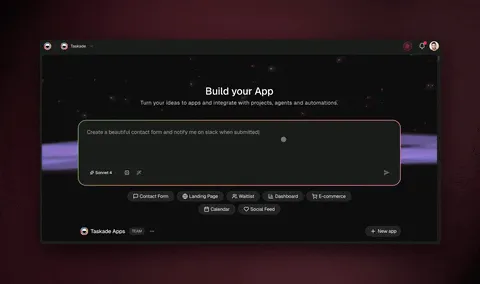
EVE (Entity of Vision and Execution) is the meta-agent that builds every Genesis app. The build sequence is deterministic: EVE resolves ambiguity first (the Ask-Questions tool fires if your prompt is underspecified), then scaffolds Memory (creates the Projects structure), then wires Intelligence (configures the agents with tools and knowledge), then connects Execution (sets up the automation triggers and actions). The result is a publishable app with a /share/apps/{id} URL, ready to embed, share, or clone. Learn more about EVE and the build process →
What to Expect When You Clone Each App
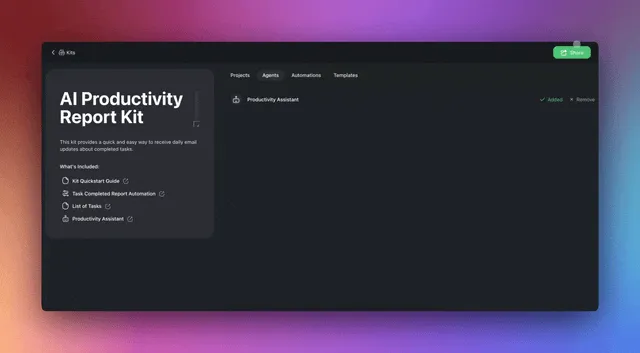
Cloning a Genesis app is a single click inside any /share/apps/{id} preview. Here is what activates for each of the seven apps above:
SaaS Landing Page: Projects, agents, and automations copy into your workspace immediately. The page renders with your own Taskade workspace as the backend. To publish to a custom domain, go to Genesis Settings and connect your domain. The two agents are already trained on the page context.
Invoice Generator: Your client list starts empty. Add one client record to the Client project and the Finance Agent can immediately draft an invoice. The Stripe action requires connecting your Stripe account in the Automations settings, a one-time OAuth flow.
Sales Pipeline Workflow: Four pipeline projects (Lead Inbox, Active Deals, Won, Lost) clone with demo records so you can see the views immediately. Delete the demo data and add your own leads. The Research Agent is pre-configured with web search; the Outreach Agent needs your Gmail connected.
Cover Letter Generator: Paste the job description into the Job Description project. The three agents run sequentially without any additional setup. Draft is in the Drafts project in under 60 seconds.
Recruitment Workflow: The intake form URL is in the App UI, share it with candidates immediately. The Sourcer Agent is configured to enrich from public web sources. The interview scheduling automation needs your preferred calendar integration connected.
Customer Health Dashboard: Accounts project is empty by default. Import your customer list via CSV or create records manually. The CS Agent's scoring logic can be adjusted via its system prompt, no code needed. Learn how to customize agents →
Real Estate Landing Page: Swaps in under 10 minutes for any listing. Edit the listing data in the Listings project. The Property Assistant Agent auto-updates its context from the project. Replace the demo images in the App UI.
When to Use Each App
Product-led growth teams building acquisition surfaces: start with the SaaS Landing Page + the Customer Health Dashboard together. The landing page captures leads; the health dashboard tracks them post-onboarding. The /apps/workflows gallery has more workflow-centric examples.
Revenue teams managing pipeline: the Sales Pipeline Workflow is the canonical demo on /automate/sales for a reason. Pair it with /templates/sales-pipeline for the static-template view of the same data structure.
HR and talent teams: Recruitment Workflow + the /templates/recruitment-tracker curation page. The Recruitment Workflow handles the live pipeline; the templates page has additional hiring-stage variants.
Freelancers and consultants: Invoice Generator + Cover Letter Generator. Both are in the /generate/ai and /generate/ai-business curation pages alongside other generator-type Genesis apps.
Real estate teams: Real Estate Landing Page, listed on /templates/crm alongside CRM-adjacent apps. The /generate/apps page has additional landing-page variants for other verticals.
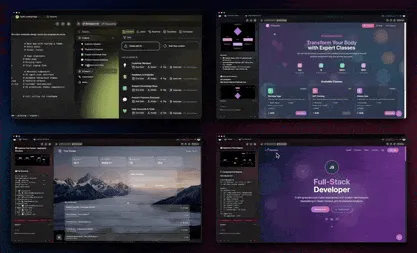
The Taskade Community Gallery is the best place to browse the full catalog, 150,000+ apps built by teams and indie builders, browseable by category.
FAQ
What is the best AI app builder in 2026?
Taskade Genesis is the only AI app builder that ships a deployed living app, Project, AI agents, automations, and 100+ integrations, from a single prompt. Every competitor in this category (Bolt.new, Lovable, V0, Cursor, Replit Agent) generates a code repository you must deploy and maintain. Genesis generates a running system. The seven apps embedded above are the direct proof: each one was live and shareable within minutes of the prompt, with no deployment step required. Try it at /create.
Can I clone Genesis apps for free?
Yes. Every app on /share/apps/{id} can be cloned into a free Taskade workspace in one click. The Free plan includes up to 6,000 AI credits, basic project views, the full Workspace DNA loop (Memory + Intelligence + Execution), and unlimited cloning of Community apps. Paid credits extend the generation capacity but cloning itself is always free. See all plans and credit details →
How is Taskade Genesis different from Bolt.new and Lovable?
Bolt.new and Lovable generate frontend code that you must deploy and connect to a database. Taskade Genesis generates a complete living workspace with persistent Memory (Projects), Intelligence (AI agents with frontier models from OpenAI, Anthropic, and Google and built-in tools), and Execution (automations across 100+ bidirectional integrations). The output is a running system, not a code repo. Bolt.new does not include agents. Lovable does not include automations. Neither includes a persistent memory layer that agents can read and write across sessions. Full Taskade Genesis vs Bolt comparison → · vs Lovable →
Do Genesis apps include AI agents?
Yes. Every Genesis app ships with one or more AI agents trained on the app's purpose. Agents have persistent memory across the workspace (backed by Projects), can call any of the built-in tools (web search, image generation, code execution, file management, project read/write, and more), and auto-route to the right frontier model from OpenAI, Anthropic, or Google based on your plan. Agents are not a plugin bolted onto the side. They are a first-class layer in the Workspace DNA architecture. Learn about AI Agents v2 capabilities → · Custom agent configuration →
What is Workspace DNA?
Workspace DNA is the self-reinforcing loop inside every Genesis app. Memory (Projects) feeds Intelligence (AI agents). Intelligence triggers Execution (automations). Execution creates new Memory. The loop compounds over time, the longer you use the workspace, the more context it accumulates, and the more useful the agents become. This is the architecture behind all 150,000+ apps built on Genesis since launch, and the reason a cloned app activates immediately rather than requiring a setup wizard. Full Workspace DNA explainer →
Can I publish a Genesis app to a custom domain?
Yes. Taskade Genesis Auth (OIDC/SSO) is built in. From the Taskade Genesis Settings panel you can: publish to a custom domain, password-protect the app with a single passphrase, allow public anonymous access, or gate access behind your existing identity provider via OIDC. No code required for any of these options. The App Users surface in Settings provides first-class end-user management once you have published. Step-by-step publishing guide →
How much does Taskade Genesis cost?
Free plan ($0) includes up to 6,000 credits and unlimited cloning of Community apps. Pro is $10/month billed annually (up to 10 seats, the most popular tier). Business is $25/month billed annually (unlimited seats). Max is $100/month billed annually (unlimited seats, maximum AI credit capacity for high-volume generation). Enterprise is $250/month billed annually with custom SLA. All paid tiers include unlimited Genesis apps, all integrations, and all project views. Full pricing breakdown →
Can Genesis apps connect to Stripe, Slack, Gmail, and Salesforce?
Yes. Taskade Genesis ships 100+ bidirectional integrations across 10 categories. Triggers pull external events in, Slack messages arrive, Gmail emails land, Stripe payment events fire, Salesforce records change, GitHub PRs open, Calendly events book. Actions push data out, create Stripe checkout sessions, send Gmail follow-ups, update Salesforce records, post to Slack channels, create GitHub issues, trigger Notion syncs. Automations run on reliable durable execution with automatic retries, no silent failures. Full automation catalog → · Automation setup guide →
What is EVE in Taskade Genesis?
EVE (Entity of Vision and Execution) is the meta-agent that builds and evolves every Genesis app. EVE has a slash-command system, persistent memory stored as Taskade Projects (so it remembers previous builds), an Ask-Questions tool that fires when your prompt is ambiguous, and full access to the build environment. You chat with EVE to create a new app, add a feature to an existing app, or debug an automation. EVE is the operator of your Virtual Workspace Computer. Learn Genesis FAQ →
How do I customize the agents in a cloned app?
After cloning, go to the Agents section of your workspace. Each agent has a system prompt you can edit in plain language (no code required), a tool set you can add to or restrict, and a model selection (auto-route is the default). The most common customization is updating the system prompt to reference your specific product, industry, or workflow. Custom agents guide →
Does Taskade Genesis support multi-agent collaboration?
Yes, since AI Agents v2. Multiple agents can collaborate inside one workspace, each with its own role, tools, and memory. The Cover Letter Generator above (7 projects · 3 agents · 1 automation) is the clearest demo of this: Researcher → Writer → Editor run sequentially, each reading the previous agent's output from the Projects memory layer. More complex apps like the Team Capacity Planner in the Community Gallery ship with 7 agents working in parallel and serial chains.
Building From Scratch vs Cloning: Which Path Is Right for You
The seven apps in this post cover the most common business workflows. If one of them matches your use case, cloning is the fastest path. You are in a running system in under 60 seconds, and you can customize it from there.
If your use case is different, starting from scratch at /create gives you a blank workspace and EVE's full generation capability. The prompting approach matters: the more specific you are about what Memory (what data you want to track), what Intelligence (what decisions or content you want agents to produce), and what Execution (what external systems should trigger or receive actions) you need, the more closely the generated app matches your intent.
Some teams use both paths: clone the closest existing app to get the structure right, then use EVE to modify specific agents or add an automation that the original did not have. Because Genesis apps are living workspaces, you can always open the EVE chat and ask it to "add a Slack notification whenever a new lead is created in the Lead Inbox project" and it will wire the automation without you touching any settings.
Tips for faster builds
Be specific about output type. "Build a CRM" generates a generic pipeline. "Build a sales pipeline for a B2B SaaS company with stages: Lead Contacted, Demo Scheduled, Proposal Sent, Closed Won, Closed Lost, and a Research Agent that enriches leads from LinkedIn before they move to Demo Scheduled" generates the exact structure you need.
Name your integrations. EVE will select the right automation triggers and actions if you mention them: "send a Slack notification to #sales-alerts, create a Stripe checkout link, and log the deal to Salesforce." Naming them in the prompt means they are pre-configured in the generated automations.
Use the Ask-Questions tool. If EVE fires a clarifying question before building, answer it precisely. EVE's Ask-Questions capability was added specifically so that it can disambiguate underspecified prompts without generating a wrong app. A 30-second conversation here saves a full rebuild later.
Iterate with the EVE chat. After cloning or after an initial build, the EVE chat is available at the top of your workspace. "Add a Calendar view to the Lead Inbox project," "rename the Research Agent to 'Apollo Enricher'," "add a Gmail trigger that creates a new lead record whenever someone emails sales@yourcompany.com", all of these work as natural language instructions. Genesis FAQ and build tips →
The community shortcut
Before building from scratch, search the Community Gallery. The gallery has apps across every category, productivity, sales, HR, marketing, engineering, finance, real estate, and more. Many community-built apps in the gallery are more specialized than the seven official apps in this post: there are industry-specific CRMs, niche workflow automations, and domain-specific agent configurations that the official catalog does not cover.
The /apps/creators page shows individual builders and the apps they have published. If you find a creator who builds in your industry, their apps are likely starting points for your use case. The /templates/sales-pipeline, /templates/marketing, /templates/human-resource, and /templates/client-onboarding curation pages also group community and official apps by workflow category.
Clone Any of the 7 Apps Now
Every app in this post is live and cloneable. Start with the one closest to your immediate problem:
- Clone SaaS Landing Page, lead capture + AI assistant
- Clone Invoice Generator, billing + payment automation
- Clone Sales Pipeline Workflow, CRM + AI research + outreach
- Clone Cover Letter Generator, multi-agent writing
- Clone Recruitment Workflow, hiring pipeline + AI scoring
- Clone Customer Health Dashboard, CS metrics + at-risk alerts
- Clone Real Estate Landing Page, property showcase + lead follow-up
Or start from scratch at /create, one prompt, one app, live in minutes.
The /apps gallery has every published app, browseable by category and use case. The /apps/creators page shows what the Taskade community is building. The /generate/apps and /generate/dashboards curation pages group apps by output type. And the /templates/sales-pipeline, /templates/marketing, and /templates/human-resource pages are good entry points if you want a static template that doubles as a Genesis clone target.
