







TL;DR: A living AI knowledge base answers questions from your own docs, auto-links related content, and stays current, unlike static Notion or Confluence wikis. Taskade Genesis builds the full stack, knowledge graph view, ask-anything agent, and onboarding automations, from a single prompt. 150,000+ apps built, starting free. Cloneable demo below.
Workspace DNA applied to knowledge management: Your wiki documents are Memory, stored as Projects with full metadata, relationship tracking, and version history. Memory feeds Intelligence: the ask-anything AI agent reads your actual team documents to answer questions with citation links, using multi-layer search (full-text + semantic HNSW + OCR). Intelligence triggers Execution: onboarding sequences push the right articles to new hires automatically; freshness alert automations scan for drift and route stale articles to owners. Execution creates new Memory: every new doc, every decision log entry, every onboarding completion flows back into Projects and makes the knowledge graph denser.
Most team knowledge bases are abandoned within six months of launch.
The pattern is consistent: someone creates a Notion or Confluence space, migrates the docs, and announces it to the team. For two weeks, people contribute. Then new hires stop finding what they need, edits stop happening, and the wiki drifts further from reality until nobody trusts it enough to reference.
The problem is not motivation. The problem is that static wikis require constant human maintenance, tagging, linking, updating, answering the same question for the twentieth new hire, and that maintenance never gets prioritized against shipping work.
An AI-powered team knowledge base changes the maintenance equation. The AI handles tagging, linking, surfacing, and answering. Humans write and curate. The result is a living wiki that stays accurate and useful without a dedicated knowledge manager.
This guide explains how to build one in 2026, compares it to Notion and Confluence, and gives you a cloneable Taskade Genesis app to start immediately.
Living Wiki Architecture: Static vs Living
┌──────────────────────────────────────────────────────────────────┐
│  LIVING WIKI ARCHITECTURE                                        │
├─────────────────────────────┬────────────────────────────────────┤
│  Static Wiki                │  Living Wiki                       │
│  (Notion / Confluence)      │  (Taskade Genesis)                 │
├─────────────────────────────┼────────────────────────────────────┤
│  Stores docs                │  Reads + Updates docs              │
│  Keyword search bar         │  Ask-anything agent (citations)    │
│  No automated actions       │  Auto-onboarding new hires         │
│  Manual tagging/linking     │  Auto-links related articles       │
│  Drift silently             │  Freshness alerts on 90-day scan   │
│  Folder navigation          │  Knowledge graph + Mind map        │
│  Single flat view           │  7 project views built in          │
│  No memory of decisions     │  Decision log with AI retrieval    │
│  Abandoned in 6 months      │  Gets smarter as team uses it      │
├─────────────────────────────┴────────────────────────────────────┤
│  ▲ Memory  → every doc is a Project with metadata + history      │
│  ■ Intelligence → agent reads docs, answers with citations       │
│  ● Execution → onboarding automation, freshness alerts, sync     │
└──────────────────────────────────────────────────────────────────┘
What Makes a Knowledge Base "Living"?
A living knowledge base has four capabilities a static wiki lacks:
1. Ask-anything retrieval with citations
Not keyword search, conversational question answering grounded in your own docs. "What is our policy on client data retention?" returns the actual policy section with a citation link, not a list of documents you have to read.
2. Automatic content connection
The system surfaces related articles when you view any document. It identifies that your engineering runbook and your incident response SOP reference the same infrastructure, and links them bidirectionally, without anyone manually managing a tag taxonomy.
3. Freshness detection
The system flags articles that reference outdated information, a pricing section written before the last pricing change, a tool guide for a product the team no longer uses. Static wikis accumulate silent inaccuracies. Living wikis surface them.
4. Onboarding automation
When a new team member joins, the knowledge base does not wait to be discovered. Automations push the right articles to the right people at the right time, the engineering runbook on day 1, the client relationship guide when they are assigned their first client, the decision log when they ask why something works the way it does.
Living Wiki vs Static Wiki: Feature Comparison
| Capability | Taskade Genesis | Notion AI | Confluence + AI | Static Wiki |
|---|---|---|---|---|
| Ask-anything agent with citations | ✅ | ⚠️ (limited) | ⚠️ (limited) | ❌ |
| Knowledge graph view | ✅ | ❌ | ❌ | ❌ |
| Mind map zoom across all docs | ✅ | ❌ | ❌ | ❌ |
| Semantic + full-text + OCR search | ✅ | ⚠️ | ⚠️ | ❌ |
| Auto content freshness alerts | ✅ | ❌ | ❌ | ❌ |
| Onboarding automation | ✅ | ❌ | ❌ | ❌ |
| AI agents (custom tools) | ✅ | ❌ | ❌ | ❌ |
| RBAC | ✅ | ⚠️ (3 tiers) | ✅ | ❌ |
| Built-in project views (7) | ✅ | ⚠️ (4) | ⚠️ (3) | ❌ |
| Starting price | Free | $15/mo | $5.75/mo | Free |
How Search Actually Works: Semantic HNSW vs Basic Vector vs Keyword + LLM
Most "AI knowledge base" tools claim semantic search. Few ship the architecture that delivers it. Here is what you are actually getting on each platform, and why retrieval quality on a 5,000-document knowledge base diverges sharply at the depth tier.
| Search dimension | Taskade Genesis | Slite / Notion AI | Helpscout / Zendesk AI | Static Wiki |
|---|---|---|---|---|
| Search architecture | Multi-layer: full-text + semantic HNSW (1536-dim) + file-content OCR | Vector index over page chunks | Keyword search + LLM rerank | Keyword only |
| Embedding dimensions | 1536 (OpenAI text-embedding-3-large class) | Typically 768–1024 | N/A (no embeddings) | N/A |
| HNSW graph traversal | Yes — sub-100ms recall on 100K+ docs | Limited | No | No |
| Cross-doc relationship awareness | Knowledge-graph view + bidirectional auto-linking | None | Tag-based | None |
| OCR for image / PDF content | Built-in (file-content OCR pass during index) | ⚠️ Partial | ❌ | ❌ |
| Agent-callable as a tool | ✅ (search tool exposed to every agent) |
❌ | ❌ | ❌ |
| Citations in answers | Always — agent quotes specific passages | Sometimes | Sometimes | N/A |
| Persistent memory across sessions | Yes — every agent stores its own Memory as Projects | ❌ | ❌ | ❌ |
Why HNSW matters: Hierarchical Navigable Small World graphs index embeddings as a multi-layer graph that lets you find the nearest semantic neighbors in logarithmic time (O(log N)) rather than linear scan (O(N)). On a 100K-document knowledge base, that is the difference between a 60-millisecond response and a 10-second timeout. Slite and Notion AI use simpler vector indexes that work fine at low scale but degrade as your KB grows past a few thousand pages. Helpscout and Zendesk fall back to keyword matching with an LLM rerank pass, fast, but it misses semantically-related content that does not share keywords.
Agent-callable search is the wedge no competitor matches. In Taskade, your custom agents can call the workspace search index as a tool (search) inside any reasoning chain. So the "Ask-the-Wiki Agent" in the cloneable demo below is not a separate product. It is any agent you build, with the search tool enabled, pointed at your KB project. This is why Taskade Genesis ships a knowledge base that grows new capabilities as you add agents, while every other tool's "AI knowledge base" is locked to the vendor's one query interface.
Live Demo: Taskade Genesis Team Knowledge Base App
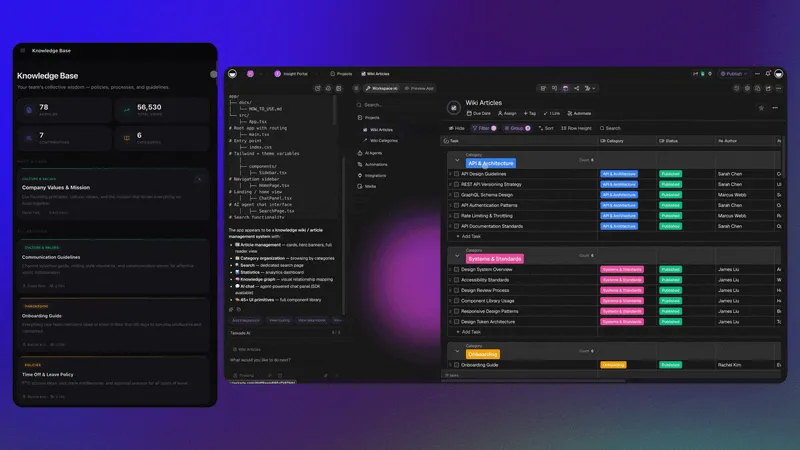
Clone the Team Knowledge Base app below. It ships with a living wiki structure, a knowledge graph view, a mind map overlay, and an embedded ask-anything agent that answers questions from your team's own documents.
The app structure after cloning:
- Main Wiki Project: structured wiki with section hierarchy (Onboarding, Processes, Tools, Decisions, FAQ)
- Knowledge Graph View: visualizes how all docs connect as a network
- Mind Map Zoom: zoom out for the full structure, zoom in to read any article
- Ask-the-Wiki Agent: trained on your project content, answers questions with citation links
- Freshness Alert Automation: weekly scan for articles older than 90 days, sends Slack/email summary
Step-by-Step: Building Your AI Knowledge Base with Taskade Genesis
Step 1: Define Your Knowledge Architecture
Before cloning or building, map what your knowledge base needs to contain. Most teams need:
- Onboarding: role-specific guides for each function, tool access, first-week checklist
- Processes: SOPs for recurring workflows, publishing, client onboarding, engineering deployments
- Decision Log: record of major architectural and strategic decisions with rationale
- Tool Documentation: how your team uses each tool, known gotchas, admin contacts
- FAQ: answers to questions new team members ask repeatedly
The FAQ section is undervalued. Every recurring question a manager answers is time that an ask-anything agent could save.
Step 2: Clone the Team Knowledge Base App
Go to the Community Gallery or clone directly from the demo above. The app creates in your workspace immediately, projects, AI agent, and automations pre-configured.
Step 3: Populate with Your Team's Documents
Import or write your documents into the Wiki project. Use Taskade's markdown editor for clean structure. For existing docs:
- Notion: export your Notion workspace as Markdown/CSV then import the files into Taskade, see /learn/import/notion
- Confluence: export as markdown or HTML, then bulk-import the files
- Google Docs: paste content directly; the editor preserves headings and formatting
- PDFs and scanned files: upload directly; semantic search and OCR index them automatically
Step 4: Configure the Ask-the-Wiki Agent
The embedded AI agent reads from your project content. In the agent settings:
- Set the knowledge source to your Wiki project
- Configure the response style (concise answers with citation links)
- Set the thinking mode (Thinking or Reasoning recommended for research questions)
- Test with five common questions new hires ask
The agent answers using only your team's documents, not general internet training data. This means answers are accurate to your actual policies and processes.
Step 5: Set Up the Onboarding Automation
Configure the Onboarding automation to push documents to new workspace members:
- Day 1: send the role-specific onboarding guide and tool access checklist
- Day 3: send the team processes SOP and decision log introduction
- Day 7: send the FAQ and encourage first contribution
The automation runs on a trigger (new member added to workspace) with a time-delay sequence. No manual scheduling required.
Step 6: Configure Freshness Alerts
Add the Freshness Alert automation: a weekly scan of articles not updated in 90 days. The automation tags the outdated articles and sends a summary to the knowledge base owner (or distributes articles to their respective owners for update).
This single automation is why living wikis stay accurate and static wikis do not. The maintenance becomes proactive and automated rather than reactive and forgotten.
The Client Connect Dashboard: Knowledge + Service Operations
For teams that manage external clients alongside internal documentation, the Client Connect Dashboard extends the knowledge base model to client-facing operations, surfacing real-time client metrics, service history, and communication records alongside internal documentation.
The Client Connect Dashboard combines:
- Real-time client service metrics with sortable views
- Quick-filter controls for account status and SLA tracking
- AI agent with access to client documentation and history
- 4 automations for client update notifications and escalation routing
Teams that run both a Team Knowledge Base and a Client Connect Dashboard get the full picture: internal knowledge for the team, client context for account management, both connected through the same Workspace DNA memory layer.
How the Living Wiki Responds to a New Hire Question
Workspace DNA: How Living Wikis Actually Work
The Taskade Workspace DNA framework explains why living knowledge bases outperform static ones architecturally.
Memory (Projects): Your wiki documents are not stored as flat files. They are structured data in Projects with metadata, relationships, and versioning. Every article knows what other articles reference it and what automations depend on it.
Intelligence (Agents): The ask-anything agent is not a search engine. It reads your Project data through the same interface as any team member, with context, history, and the ability to synthesize across multiple documents before answering. It uses the same retrieval layer as the knowledge graph view.
Execution (Automations): Freshness alerts, onboarding sequences, and content routing are not plugins on top of a wiki. They are native automations in the same system. When an article changes, automations that depend on it can fire. When a new team member joins, their onboarding sequence starts automatically.
This is the self-reinforcing loop: Memory feeds Intelligence (agents answer questions from Projects), Intelligence triggers Execution (agents flag issues, initiate updates), Execution creates Memory (new automations log decisions back to Projects). The wiki gets smarter as the team uses it.
Notion vs Confluence vs Taskade Genesis: Head-to-Head
Notion for Knowledge Bases
Notion is the most popular knowledge base tool for modern teams. Its flexible database structure, excellent writing experience, and broad integrations make it a capable static wiki.
Strengths:
- Excellent block-based writing editor
- Database views for structured content (tables, galleries, calendars)
- Notion AI for writing assistance and summarization
- Strong integration ecosystem
Limitations:
- No ask-anything agent reading from your own content
- No knowledge graph view
- Notion AI is generative (writes from scratch) rather than retrieval (answers from your docs)
- No native onboarding automation
- Scales poorly beyond ~500 pages due to navigation complexity
Notion is the right choice if your team already lives there and you need a clean writing environment. It is not the right choice if you need an agent that answers questions from your docs.
Confluence for Knowledge Bases
Confluence has been the enterprise wiki standard since 2004. Deep Jira integration makes it strong for engineering teams in Atlassian environments.
Strengths:
- Deep Jira integration for linking docs to issues and sprints
- Enterprise compliance features (retention policies, audit logs)
- Atlassian Intelligence for AI search and summarization
- Mature permission system
Limitations:
- Complex interface with steep learning curve for new contributors
- Atlassian Intelligence requires Premium or Enterprise plan
- No knowledge graph or visual document map
- Notoriously slow with large spaces
- Pricing: Standard $5.75/user/month, Premium $11/user/month
Confluence is the right choice for large engineering organizations already in the Atlassian ecosystem. For startups and scale-ups, the interface complexity creates the same abandonment problem as other static wikis.
Taskade Genesis for Knowledge Bases
Taskade Genesis builds a living knowledge base as a deployed app, the full Workspace DNA stack in one workspace. The ask-anything agent reads your actual documents. The knowledge graph visualizes connections. The automations keep the wiki fresh.
Strengths:
- Ask-anything agent trained on your own content with citation links
- Knowledge graph + mind map views for visual navigation
- Native onboarding automation and freshness alerts
- Multiple project views (List, Board, Calendar, Table, Mind Map, Gantt, Org Chart)
- Multi-layer search: full-text + semantic + OCR
- 100+ integrations for connecting to Slack, Google Drive, Notion, and more
- Free to start, with Pro from $10/month billed annually
Limitations:
- Less mature writing editor than Notion
- Smaller integration ecosystem than Confluence for Atlassian-specific workflows
- Knowledge graph view best with 20+ connected documents (smaller spaces show limited connections)
Frequently Asked Questions
How do I prevent my AI knowledge base from drifting out of date?
The Freshness Alert automation in Taskade Genesis scans for articles not updated within a configurable window (default 90 days) and routes them to owners for review. Additionally, the ask-anything agent can be configured to flag when it answers a question from a document that has not been updated recently, prompting the asker to verify the information is still current.
Can the AI agent answer questions about confidential team documents?
Yes. The ask-anything agent reads only from the projects and documents you configure as its knowledge source. It does not access the general internet or other team members' private projects unless you explicitly include them in the agent's scope. Workspace DNA permission controls (RBAC) determine who can see which documents, the agent respects the same permission boundaries.
How many documents can the knowledge base handle?
Taskade knowledge bases scale to thousands of documents. The semantic search layer uses HNSW indexing (1,536-dimensional vectors) which scales efficiently. For very large knowledge bases (10,000+ documents), chunking strategy matters, Taskade's default chunking preserves article-level context, which works well for most team wiki use cases.
What is the best structure for a team FAQ section?
Structure FAQs by context, not by question frequency. Group questions by role (engineering, sales, operations) or by lifecycle stage (onboarding, first client, first quarter). Frequency-sorted FAQs put onboarding questions at the top and bury operational questions that more senior team members need. Context-sorted FAQs serve everyone better. The ask-anything agent removes the need for manual FAQ navigation entirely, users just ask.
Can Taskade Genesis import from Confluence or Notion?
Yes, via export + import. The documented Notion flow at /learn/import/notion is: export your Notion workspace as Markdown/CSV, then import the files into Taskade. Confluence follows the same pattern (export as markdown or HTML, then bulk import). For Google Docs, paste content directly or connect Google Drive. The import preserves headings and internal links, and the AI agent can immediately begin answering questions from the migrated content.
Build Your Living Team Knowledge Base Today
The static wiki is a solved problem. It solves for storage. The living knowledge base solves for access, accuracy, and onboarding. The difference shows up most clearly at two moments: the new hire's first week (does the wiki answer their questions or create more?) and the quarterly review (does the wiki still reflect how the team actually works?).
An AI-powered team knowledge base gets better at both over time. The ask-anything agent gets trained on more documents. The knowledge graph gets denser. The freshness automations catch more drift. The onboarding sequence covers more edge cases.
Workspace DNA: The Three Pillars of a Living Knowledge Base
The Workspace DNA loop is what separates a static document repository from a living knowledge system:
- ▲ Memory (Projects + Knowledge), every wiki article, decision log entry, SOP, and FAQ answer is a structured Project with full metadata: author, date, related articles, revision history, and which automations depend on it. Multi-layer search (full-text + semantic HNSW at 1,536 dimensions + file content OCR) means every PDF, scanned document, and embedded screenshot is searchable by concept, not just keyword. The knowledge graph view reveals how all your documents connect, roles, decisions, and processes as a visual network rather than a folder hierarchy.
- ■ Intelligence (AI Agents v2), the ask-anything agent reads your actual team documents (not general internet training data) and answers with citation links to the specific article section. built-in tools include semantic retrieval, web search for supplementary facts, and file reading. Configurable thinking modes let you pin the knowledge agent to Thinking or Reasoning mode. So it synthesizes carefully across multiple documents before answering complex policy questions, and uses Standard mode for simple factual lookups.
- ● Execution (Automations), onboarding sequences push articles to new hires on a configurable schedule without any manual coordination. Freshness alert automations scan for 90-day-old articles and route them to owners for review. Content sync automations keep your Taskade wiki and Notion ops database in sync across tools. Every automation execution logs back to Memory, recording which articles were accessed, flagged, and updated.
Build your team knowledge base free →
Browse knowledge management apps →
Related reading:
- 7 Best AI Content Calendar Tools 2026
- AI Thinking Modes Explained: Standard vs Reasoning
- Connect Claude Desktop and Cursor via MCP
- Best AI App Builders 2026
- Your Workspace Is a Computer
- Founder Operating System
- Browse Cloneable Genesis App Demos
- Browse Knowledge Management Templates →
- Explore AI Agents →
- Build Autonomous Workflows →
- Browse the Community Gallery →
- Explore the AI App Builder →
- Wiki: Workspace DNA →
- Wiki: Autonomous AI Systems →
- Wiki: AI Knowledge Graphs →