







TL;DR: Notion templates are Memory, beautifully organized information that sits still until a human acts on it. Taskade Genesis apps are the full Workspace DNA loop: Memory feeds Intelligence, Intelligence triggers Execution, Execution creates new Memory. One prompt, embedded agents, reliable automation workflows, and a deployed URL. Try Taskade Genesis free →
Workspace DNA: The Loop Notion Templates Cannot Complete
Notion is the best Memory layer ever built for teams and creators. The gap is structural: Memory without Intelligence or Execution is a beautiful library that no one operates. Taskade Genesis closes the loop.
Applied to the Notion world: a Notion wiki is Memory. A Notion CRM is Memory. A Notion project tracker is Memory. The moment you want those pages to answer questions, flag stale data, trigger a Slack notification, or update a connected system. You leave Notion's domain. Taskade Genesis keeps you in one system: Memory lives in Projects, Intelligence lives in AI Agents v2 (built-in tools, 15+ frontier models), and Execution lives in reliable automation workflows that span 100+ bidirectional integrations. EVE, the Genesis meta-agent, stores its own operational memory as real Taskade Projects, the platform eats its own cooking.
Why This Comparison Is Different
Notion is one of the most beloved productivity tools ever built. Its block-based editor, flexible databases, and massive template library have made it the go-to knowledge management layer for millions of teams and creators. The Notion ecosystem is substantial: a marketplace of paid templates, hundreds of YouTube tutorials, and a creator community that has built careers around it.
This comparison is not about whether Notion is good. It is about what happens when you need the information to act.
Notion's structural model is Memory: it stores, organizes, and connects information beautifully. A Notion database of project tasks answers "what exists and what stage is it in?" A Notion wiki answers "what do we know?" A Notion CRM answers "what is the status of this deal?" These are all Memory operations.
Taskade Genesis runs a different model, Workspace DNA, where Memory is only the first of three layers:
- Memory (Projects): stores your data, just like Notion
- Intelligence (Agents): reads that data, reasons about it, and acts on it, autonomously, on triggers, with built-in tools and 15+ frontier models
- Execution (Automations): pushes results to 100+ external systems and creates new Memory that feeds back into the cycle
A Notion template is Memory without Intelligence or Execution. A Taskade Genesis app is the full loop.
The creator economy comparison makes this concrete. Notion template creators sell static documents for one-time fees on Gumroad. Taskade Genesis creators publish running apps to the Community Gallery, monetize access via Stripe Connect, and earn from 150,000+ potential clones of a living system. The economics are different because the product is different.
Quick Comparison Table
| Dimension | Notion | Taskade Genesis |
|---|---|---|
| Core model | Document and database (Memory only) | Workspace DNA (Memory + Intelligence + Execution) |
| AI | Notion AI (assistive writing/summarization) | Autonomous agents, built-in tools, 15+ frontier models |
| AI autonomy | Responds when asked | Runs on triggers, events, and schedules |
| Automations | Basic in-database property triggers | 100+ bidirectional integrations (triggers pull, actions push) |
| Block editor | ✅ Best-in-class | ⚠️ Structured editor (not freeform blocks) |
| Databases | ✅ Relational, filtered views | ✅ Projects with table, board, calendar, mind map, gantt views |
| Project views | Table, Board, List, Calendar, Gallery, Timeline | 7: List, Board, Calendar, Table, Mind Map, Gantt, Org Chart |
| External app deployment | ⚠️ Shared page (limited) | ✅ Custom domains, public URLs, password protection |
| Creator monetization | Gumroad / one-time sales | Stripe Connect, recurring revenue, Community Gallery |
| Free tier | ✅ Limited (10 guests, 7-day history) | ✅ Unlimited viewers, AI credits |
| Plus pricing | $12/user/month + $10/user AI add-on | Pro: $10/month total (≤10 seats, annual) |
| Business pricing | $18/user/month + AI add-on | $10/month total (≤10 seats, annual) |
| Community gallery | Template marketplace (static docs) | 150,000+ cloneable live apps |
| Workspace DNA | ❌ | ✅ |
Taskade Genesis Capabilities at a Glance
┌─────────────────────────────────────────────────────────────────────┐
│  TASKADE GENESIS CAPABILITIES                                       │
├─────────────────────────────────────────────────────────────────────┤
│  Memory          7 project views (List/Board/Calendar/Table/Mind   │
│                  Map/Gantt/Org Chart) · RBAC · workspace-          │
│                  scoped knowledge bases                            │
│                                                                     │
│  Intelligence    AI Agents v2 · 34 built-in tools · 15+ frontier  │
│                  models from OpenAI/Anthropic/Google + Vercel AI   │
│                  Gateway · custom slash commands · persistent      │
│                  agent memory · multi-agent collaboration          │
│                                                                     │
│  Execution       Durable workflow execution · 100+ bidirectional   │
│                  integrations · branching/looping/retries · agent  │
│                  call primitive · ask_ai_structured (typed JSON)   │
│                                                                     │
│  Interface       Genesis Auth (OIDC/SSO) · custom domains ·        │
│                  password protection · App Users (beta) ·          │
│                  Community Gallery · Stripe Connect for creators   │
└─────────────────────────────────────────────────────────────────────┘
What Is Notion?
Notion was founded in 2013 and relaunched in 2018 with its current block-based editor. It is one of the fastest-growing productivity tools in history, valued at $10 billion at its 2021 Series C. The product is used by individuals, startups, and enterprises for knowledge management, project tracking, wikis, CRMs, and docs.
Notion's core innovation is the flexible block: every piece of content (text, database, image, embed, code block) is a block that can be nested, referenced, and combined freely. This flexibility makes Notion uniquely powerful for teams that want a single tool for both documentation and data management.
The Notion template ecosystem is enormous. Thousands of creators publish templates for every workflow imaginable, personal knowledge management (PKM), second brain systems, content calendars, project trackers, CRMs, investment trackers, and more. Most templates are sold as one-time purchases via Gumroad for $9-$99.
Notion launched Notion AI in 2023, an assistive writing tool that generates text, summarizes pages, and answers questions about Notion content. In 2024, Notion added Automations (button-triggered or property-change-triggered actions) and improved its API integrations. Notion AI is available as a $10/user/month add-on.
Notion's pricing: Free (10 guests, 7-day history), Plus ($12/user/month, annual), Business ($18/user/month, annual), Enterprise (custom). AI add-on: $10/user/month on top of each tier.
What Is Taskade Genesis?
Taskade Genesis is the AI app builder on Taskade, powered by Workspace DNA, the self-reinforcing loop of Memory (Projects), Intelligence (AI Agents), and Execution (Automations). Where Notion stores and organizes information, Taskade Genesis builds deployed apps that run on that information, agents that answer questions, automate follow-ups, and update data in real time.
EVE, the Genesis meta-agent, builds apps from natural-language prompts. Describe your use case ("a team knowledge base with an AI agent that answers questions from our docs and surfaces related articles") and EVE structures the Memory layer (projects and databases), configures the Intelligence layer (agent with built-in tools and 15+ frontier models), and wires the Execution layer (automations that update the knowledge base when new content is added).
The deployed app gets a shareable URL, supports custom domains and password protection, and can be published to the Community Gallery where users can clone and adapt it. Creator apps on Genesis can be monetized via Stripe Connect, recurring revenue from a living system, not a one-time template sale.
Pricing: Free ($0), Pro ($10/month, ≤10 seats), Business ($25/month, unlimited seats), Max ($100/month), Enterprise ($250/month), all billed annually. AI agents included from Free, no AI add-on fee. See /pricing.
5 Key Differences
1. Knowledge Base: Static Wiki vs Living Reference System
Notion wikis are excellent. Clean hierarchy, rich text, inline databases, linked mentions, for a team that maintains documentation collaboratively, Notion's wiki structure is best-in-class. The limitation is passivity: the wiki answers questions when humans read it. It does not pro-actively surface what you need, update itself when source data changes, or notify stakeholders when a section becomes outdated.
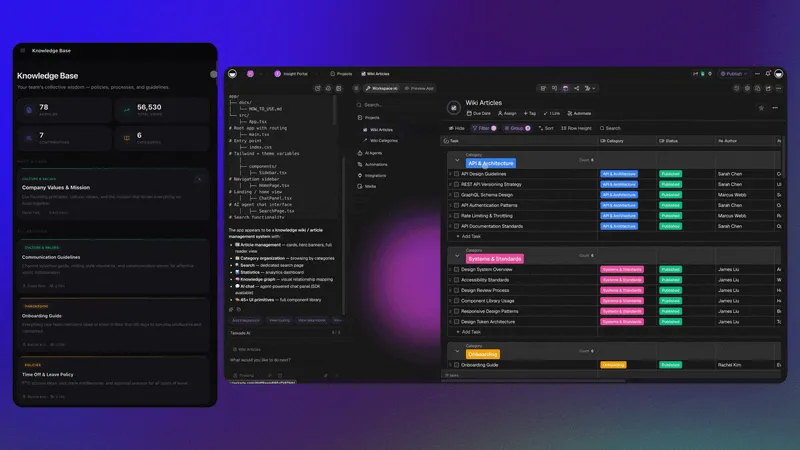
Taskade Genesis knowledge bases add an Intelligence layer. An AI agent embedded in the knowledge base can answer natural-language questions from team members, surface related articles based on semantic similarity, and flag pages that haven't been updated in 90+ days with an automated review reminder. The Knowledge Base is not just readable. It participates.
Here is a Team Knowledge Base built on this model:
Clone this Knowledge Base and add your team's documentation. See how it compares to your current Notion wiki. Explore more in the Community Gallery.
2. HR Dashboard: Process Documentation vs Operational System
Many teams use Notion for HR documentation, employee handbooks, onboarding checklists, org charts, PTO trackers. These documents are valuable. The gap is execution: when a new hire arrives, the onboarding checklist sits there until a coordinator manually copies it, assigns tasks, and follows up.
Taskade Genesis HR workflows execute the process. An automation watches for a new hire Slack message or form submission → creates a personalized onboarding project from the template → assigns tasks to HR, IT, and the hiring manager → tracks completion → sends a Slack digest each morning with open items. The coordinator manages exceptions, not every step.
This HR Dashboard runs that pattern:
Clone this HR Dashboard and connect your onboarding intake form. Compare with Your Workspace Is a Computer for the Workspace DNA framing behind this pattern.
3. Project Portal: Shared Page vs Deployed App
Notion client portals are shared pages: a read-only or edit view of a Notion database that clients access via a public URL. They are clean and functional but static, clients see current data, but the portal does not respond to their actions, answer their questions, or proactively notify them of updates.
Taskade Genesis project portals are deployed apps. Clients access a custom-domain URL, interact with an AI agent that answers their questions about project status, and receive automated Slack or email updates when milestones are hit. The portal is a running system, not a page share.
This Project Portal shows what that looks like for a client-facing professional services workflow:
Clone this Project Portal and customize it for your client delivery model. Read Best AI App Builder Demos You Can Clone Today for more portal examples.
4. Client Portal Nexus: Creator Revenue Beyond Gumroad
Notion template creators have built real businesses. A well-designed Notion template for personal knowledge management or business operations can sell thousands of copies at $20-$99 via Gumroad. The economics are: one-time payment, static product, no recurring engagement.
Taskade Genesis reframes the creator model. Publish an app to the Community Gallery, a recruitment portal, a client portal nexus, an investor dashboard, and every clone generates usage. Connect Stripe Connect to monetize access directly from the Taskade Genesis app. The product is a live running system; cloners get a working tool, not a template to configure. Recurring revenue replaces one-time sales.
EVE (the Genesis meta-agent) even stores its own memory as real Taskade Projects, the platform literally runs on its own Workspace DNA, a concrete proof point that the system sustains itself. If the tool you built eats its own cooking, the thing you're selling is real.
This Client Portal Nexus demonstrates the multi-client management pattern that becomes a productizable Taskade Genesis app:
Clone this Client Portal Nexus and publish it to the Community Gallery as your first Genesis product. See /agents for the agent capability spec.
5. Investor Dashboard: Reporting Doc vs Live Intelligence System
Notion investor update templates are popular: a weekly/monthly page with metrics, highlights, lowlights, and asks. The founder fills in the template, links it in Slack, and investors read it. It is better than an email, organized, linkable, version-tracked.
Taskade Genesis investor dashboards are live. An agent monitors your KPI data sources (Google Sheets, Stripe, internal databases), generates a structured weekly update, flags metrics that changed significantly versus the prior period, and posts a summary to a Slack investor channel, automatically, every Monday morning. The investor update writes itself.
This Investor Dashboard shows what investor intelligence looks like as a running Genesis system:
Clone this Investor Dashboard and connect your KPI data sources. See Founder Operating System 2026 for how to build a full investor operations layer on Workspace DNA.
When to Choose Notion
Notion is the better choice when:
- Your primary need is knowledge management: Notion's freeform block editor, bidirectional links, and slash-command UI are genuinely best-in-class for documentation, note-taking, and personal knowledge systems
- Your team wants a single writing and database tool: Notion's flexibility as both a doc editor and a relational database manager is unique; few tools match it for unstructured content
- You run a creator business on Notion templates, if your audience is Notion-native and you have an established template catalog, the switching cost is high
- You need Notion's specific ecosystem: Notion's API, integrations with tools like Zapier, and rich embed support are well-established with many third-party connectors
- Your workflows are documentation-heavy and change slowly, static wikis, knowledge bases, and process docs that don't need to execute anything are perfectly served by Notion
- Personal use or freelance: Notion Free's block editor is excellent for personal productivity without requiring a paid plan
When to Choose Taskade Genesis
Taskade Genesis is the better choice when:
- You want your information to act, not just be stored, but processed by AI agents that trigger automations and update connected systems
- You are building apps for external audiences, client portals, investor dashboards, team wikis, with custom domains and no per-user external access fees
- You want AI agents included, not as a $10/user/month add-on but as an embedded, autonomous part of every workspace and app
- Your team budget is tight: Taskade Genesis Pro at $10/month for 10 seats vs Notion Business + AI at $28/user/month ($3,360/year for 10 seats) is a 28× difference
- You want creator revenue from living apps: Stripe Connect monetization, recurring subscriptions, and a gallery of 150,000+ potential cloners
- Your workflows need to span external systems, automations that pull from Slack, Gmail, Stripe, GitHub, and push to Salesforce, HubSpot, Notion (yes, you can pipe Taskade outputs back to Notion too)
- You need all project views including Mind Map and Org Chart, no Notion equivalent for brainstorming-to-execution or hierarchy visualization; a view system with every view wired to the same live agent layer (Timeline is inside Gantt, not a separate view)
- You want role-based access with no ambiguity: every role from Owner to Viewer maps to a clear set of rights
- Your AI agent needs span 4 model providers, 15+ frontier models from OpenAI, Anthropic, Google, and open-weight providers , selectable per agent for optimal cost-performance routing
- You want creator revenue from living systems: Stripe Connect recurring subscriptions from Community Gallery clones vs Gumroad one-time static document sales
Related: Best AI App Builder Demos You Can Clone Today | AI Agents | Templates | Workspace DNA | Automations | Community Gallery | Your Workspace Is a Computer
Pricing Comparison
| Plan | Notion | Taskade Genesis |
|---|---|---|
| Free | 10 guests, 7-day history, no AI | Unlimited viewers, AI credits |
| Pro / Plus | $12/user/month + $10/user AI | $10/month total, ≤10 seats (annual) |
| Business | $18/user/month + $10/user AI | $10/month total, ≤10 seats (annual) |
| Team / Business | — | $25/month, unlimited seats |
| Max | — | $100/month, max AI capacity |
| Enterprise | Custom | $250/month, custom SLA |
| AI agents | Add-on ($10/user/month) | Included from Free |
| External app users | Shared pages only | Unlimited, custom domain |
10-seat cost comparison (annual, with AI):
- Notion Business + AI: ($18 + $10) × 10 × 12 = $3,360/year
- Taskade Genesis Pro: $10/month = $120/year
- Difference: 28× cheaper with more autonomous AI capability
Migration: How to Move From Notion to Taskade Genesis
- Export your Notion content: Settings → Export → Markdown & CSV (all pages export as markdown files; databases export as CSV)
- Import your structure: Taskade accepts CSV imports for project/task data; markdown content can be pasted directly into Taskade projects
- Rebuild your databases, create Taskade table projects that mirror your Notion databases; map properties to fields
- Prompt EVE for the agent layer, describe the intelligence you want layered on top of your data; EVE configures agents with the right tools and memory
- Reconnect automations: Notion's button triggers map to Taskade automation rules; extend them to external integrations (Slack, Gmail, CRM)
- Configure sharing, set up custom domain if needed (included in all paid plans); configure role-based access
See the free Notion alternative comparison and visit /learn/genesis/faq for Genesis-specific setup guides.
FAQ
Is Taskade Genesis a good Notion alternative?
Yes. Taskade Genesis is a strong Notion alternative for teams and creators who want apps that execute work, not just organize it. Genesis builds fully deployed apps from a prompt with embedded AI agents (built-in tools, 15+ frontier models), reliable automation workflows across 100+ integrations, and a creator monetization model with Stripe Connect. Pricing starts free, with Pro from $10/month billed annually, vs Notion Plus at $12/user/month. The key structural difference: Notion templates are static documents (Memory only); Taskade Genesis apps are living systems (Memory + Intelligence + Execution).
What is the core structural difference between Notion and Taskade Genesis?
Notion is a document-and-database platform. It excels at organizing and storing information (Memory). Taskade Genesis runs Workspace DNA: Memory (Projects) feeds Intelligence (AI agents with built-in tools), Intelligence triggers Execution (reliable automation workflows across 100+ integrations), and Execution creates new Memory, a self-reinforcing loop that runs continuously without manual intervention.
Does Notion have AI agents?
Notion AI is an assistive writing and summarization tool. It does not have autonomous agents that run on triggers, maintain persistent memory, use external tools, or coordinate multi-step workflows. Taskade Genesis agents are autonomous: they trigger on events from 100+ external integrations, process data with built-in tools, operate across 15+ frontier AI models, and store their memory as persistent Taskade Projects.
How do Notion template creators compare to Taskade Genesis creators?
Notion template creators typically sell via Gumroad at $9-$99 for a one-time digital product. The template is a static document the buyer copies and fills in manually. Taskade Genesis creator economics are fundamentally different: publish an app to the Community Gallery, and every clone generates usage. Connect Stripe Connect to monetize app access and earn recurring revenue from a running system, not a file.
Can Taskade Genesis replace Notion for knowledge management?
Yes for most use cases. Taskade Genesis can build team knowledge bases, wikis, HR handbooks, project documentation, and process libraries, with embedded AI agents that answer questions, surface relevant articles, and update content. For teams primarily using Notion as a document repository with minimal automation, Taskade's Memory layer covers the same ground. Notion's freeform block editor is a unique strength; Genesis wins on automation and agent depth.
What is the pricing difference between Notion and Taskade Genesis?
A 10-person team on Notion Business with AI costs $28/user/month = $3,360/year. Taskade Genesis Pro is $10/month total (≤10 seats, annual) = $120/year. That is a 28× price difference, with more autonomous AI capability in Taskade. AI agents are included from Taskade's Free tier. There is no separate AI add-on fee.
Does Taskade have a template marketplace like Notion?
Taskade has a Community Gallery (taskade.com/apps) with 150,000+ cloneable Taskade Genesis apps. Taskade templates are live apps (not static documents), so cloning one gives you a running system with agents and automations already configured. You can also publish your own Taskade Genesis apps to the gallery and monetize them via Stripe Connect for recurring revenue.
How do Notion automations compare to Taskade automations?
Notion Automations are button-triggered or property-change-triggered actions within a Notion database, useful for basic workflow routing. Taskade automations are bidirectional across 100+ external integrations, triggers pull events from Slack, Gmail, Stripe, GitHub, Calendly, and more; actions push data to Salesforce, HubSpot, Google Sheets, Webhooks, and more. Taskade automations support AI agent steps that reason about data and make conditional decisions mid-workflow.
Get Started
Notion gives you Memory, beautifully organized. Taskade Genesis gives you the full Workspace DNA loop, Memory, Intelligence, and Execution running together from a single prompt.
Start free at /create, explore 150,000+ cloneable Taskade Genesis apps in the Community Gallery, or browse templates and agent templates to see what your Notion workflow looks like as a running system.
Migration Workflow: Notion → Taskade Genesis
Notion's export gives you Markdown files (pages) and CSVs (databases). Markdown content pastes directly into Taskade projects; CSVs import into the table view. Once imported, prompt EVE to add the Intelligence layer: configure agents that answer questions from the knowledge base, flag stale pages, and trigger review automations. The static wiki becomes a living reference system in one step.
Explore cloneable Genesis demos, Founder OS, AI Agents, Automations, Templates, Workspace DNA wiki, and the Community Gallery for your first living Notion replacement.