







TL;DR: Retool charges $50/user/month for external users, at any reasonable scale, that adds up to tens of thousands per year. Taskade Genesis Pro costs $120/year with unlimited external users. Both produce a deployed app, Genesis just does it from a single prompt, with built-in AI agents and reliable automation workflows included. Try Taskade Genesis free →
Workspace DNA: The Loop Retool Cannot Build
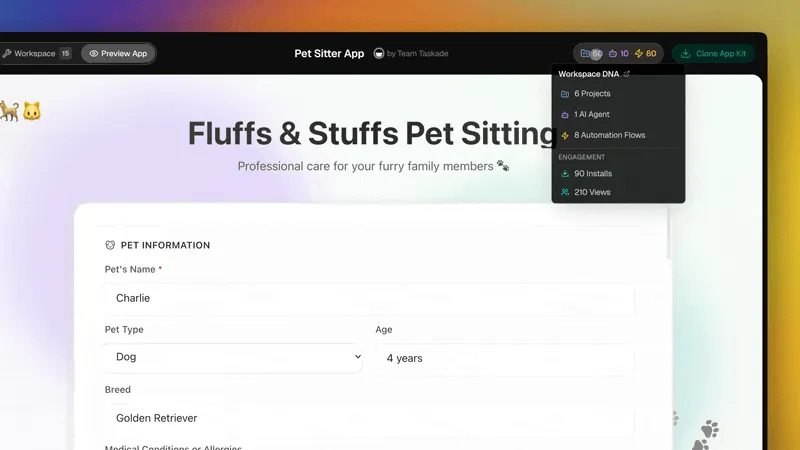
Every Taskade Genesis app runs on Workspace DNA, a self-reinforcing three-layer architecture where data, intelligence, and execution feed each other continuously. Retool is a component library: it renders data, it does not process it autonomously.
In the Retool context, this loop exposes the structural gap: Retool gives you the Memory layer (data tables and component views) but has no Intelligence layer (autonomous agents that reason about your data) and no self-updating Execution layer (automations that fire across 100+ external integrations without code). A Retool dashboard displays what happened yesterday. A Taskade Genesis app executes what should happen today, automatically.
Why This Comparison Is Different
Most Retool vs Taskade comparisons focus on feature lists. This one focuses on a structural difference: who can actually build the app, and who pays to share it, and whether the app thinks for itself after deployment.
Retool is a developer-first component library. Building in Retool means writing SQL queries, configuring REST API connectors, dragging UI components, and debugging JavaScript transform functions. The person who builds the app is typically a frontend or fullstack engineer with at least moderate database knowledge.
Taskade Genesis works the opposite way. Describe what you want, "a sales pipeline tracker with an AI agent that summarizes deals and sends Slack alerts when a deal goes stale", and EVE, the Genesis meta-agent, builds a structured app with Memory (data tables and projects), Intelligence (AI agents with built-in tools), and Execution (automation workflows). No SQL. No component configuration. No deploy step.
The second structural difference is pricing for external users. Retool charges per external seat. A customer portal shared with 1,000 clients costs upwards of $50,000/year on Retool. That same portal on Taskade Genesis Pro costs $120/year, the flat $10/month plan price. For any team building apps that customers, partners, or vendors will use, the pricing structure alone justifies the switch.
This is the wedge: Retool gives you a developer toolkit to build a container. Taskade Genesis gives you a running system, prompt, agents, automations, and deployment included.
Quick Comparison Table
| Dimension | Retool | Taskade Genesis |
|---|---|---|
| Target user | Developers with SQL/JS skills | Anyone — no code required |
| App creation | Drag-and-drop + code | Natural language prompt → EVE builds it |
| AI agents | Basic AI query assistance | built-in tools, 15+ frontier models, autonomous agents |
| Automation | Code-based Retool Workflows | No-code reliable automation workflows with 100+ integrations |
| External users | $50/user/month (scales with every external user) | Unlimited (included in flat plan) |
| Internal users | $10/user/month | Included in team plan |
| Free tier | ✅ (5 users, limited features) | ✅ (generous AI credits) |
| Pro pricing | $50/user/month (external) | $10/month (≤10 seats, annual) |
| Custom domains | ⚠️ Enterprise only | ✅ All paid plans |
| Password protection | ✅ | ✅ |
| Community gallery | ❌ | ✅ |
| Project views | ❌ (table/dashboard only) | ✅ multiple views (List, Board, Calendar, Table, Mind Map, Gantt, Org Chart) |
| Workspace DNA loop | ❌ | ✅ Memory + Intelligence + Execution |
Taskade Genesis Capabilities at a Glance
┌─────────────────────────────────────────────────────────────────────┐
│  TASKADE GENESIS CAPABILITIES                                       │
├─────────────────────────────────────────────────────────────────────┤
│  Memory          7 project views (List/Board/Calendar/Table/Mind   │
│                  Map/Gantt/Org Chart) · RBAC · workspace-          │
│                  scoped knowledge bases                            │
│                                                                     │
│  Intelligence    AI Agents v2 · 34 built-in tools · 15+ frontier  │
│                  models from OpenAI/Anthropic/Google + Vercel AI   │
│                  Gateway · custom slash commands · persistent      │
│                  agent memory · multi-agent collaboration          │
│                                                                     │
│  Execution       Durable workflow execution · 100+ bidirectional   │
│                  integrations · branching/looping/retries · agent  │
│                  call primitive · ask_ai_structured (typed JSON)   │
│                                                                     │
│  Interface       Genesis Auth (OIDC/SSO) · custom domains ·        │
│                  password protection · App Users (beta) ·          │
│                  Community Gallery · Stripe Connect for creators   │
└─────────────────────────────────────────────────────────────────────┘
What Is Retool?
Retool is an internal tool builder founded in 2017 and based in San Francisco. It lets engineering teams assemble admin dashboards, CRUD interfaces, and operational tools by connecting to databases and APIs, then laying out UI components (tables, forms, buttons, modals) with a visual editor.
Retool's core workflow is: connect a data source (PostgreSQL, MySQL, MongoDB, REST API, GraphQL), write a query, drag a component onto a canvas, bind the query result to the component, and configure JavaScript event handlers for interactions. The result is a private internal tool accessible to company employees.
Retool is widely used at companies like DoorDash, Amazon, and Stripe for internal operations tooling, inventory management, customer support dashboards, data pipelines monitoring, and financial reporting interfaces. It is a mature product with strong enterprise features including role-based access, audit logs, SSO, and Git-backed version history.
The limitation is its developer dependency. Every Retool app requires someone who can write SQL or REST queries, understand data schemas, and troubleshoot component bindings. Non-technical stakeholders can use the finished app but cannot build or meaningfully modify it without engineering help.
Retool's external user pricing model was designed for its original use case, internal tools, and has become a significant cost barrier for teams that want to share apps with external audiences.
What Is Taskade Genesis?
Taskade Genesis is the AI app builder inside Taskade, a workspace platform that unifies projects, AI agents, and automations into a single loop, Workspace DNA. Genesis turns that loop into a deployable app from a natural-language prompt.
When you describe an app to EVE (the Genesis meta-agent), EVE structures it across three layers:
- Memory: Projects, databases, and document storage that persist your data
- Intelligence: AI agents with 15+ frontier models from OpenAI, Anthropic, Google, and open-weight providers, equipped with built-in tools (web search, file reading, URL summarization, code execution, and more)
- Execution: Reliable automation workflows that trigger actions across 100+ bidirectional integrations when conditions are met
The deployed app gets a /share/apps/* URL, supports custom domains, password protection, and can be published to the Community Gallery where 150,000+ apps have been cloned. External users access it through a browser, no Taskade account required.
For non-developers, Taskade Genesis is the only path to a fully deployed, AI-powered app that doesn't require learning a framework. For developers, it provides a faster starting point than Retool for any app with an AI-first workflow requirement.
Pricing runs from Free (unlimited viewers, generous AI credits) to Pro at $10/month (≤10 seats), Business at $25/month (unlimited seats), and Max at $100/month for high-volume Genesis generation, all billed annually. See the full matrix at /pricing.
5 Key Differences
1. Pricing for External Users: Per-Seat vs Flat-Fee
The most concrete difference between Retool and Taskade Genesis is the cost of sharing an app with people outside your company.
Retool charges $50 per external user per month on the Starter plan. Sharing a client portal with 1,000 external users costs $50,000/year. Sharing with 100 external users costs $5,000/year. This pricing model was built for internal tooling and penalizes external audiences.
Taskade Genesis includes unlimited external app viewers on every paid plan. The Pro plan at $10/month ($120/year) supports up to 10 seats building apps and unlimited external viewers accessing them. For teams that build customer-facing portals, investor dashboards, or partner workflows, the pricing difference grows linearly with each external user.
Here is a live Investor Dashboard built on Taskade Genesis, a typical external-sharing use case where Retool's pricing would reach into the tens of thousands annually:
Clone this app and share it with unlimited investors for $10/month on Taskade Genesis Pro. The equivalent on Retool at $50/external-user/month would cost more per investor than the entire Genesis plan.
2. Who Can Build the App
Retool apps require a developer. Taskade Genesis apps require a description.
In Retool, a non-developer can observe and use a finished app but cannot create one from scratch. Every data connection, query, and component binding requires technical knowledge. This creates a bottleneck: every new internal tool needs an engineering sprint.
In Taskade Genesis, any team member can prompt EVE: "Build a client portal with a welcome dashboard, a document library where I can share files, and an AI agent that answers client questions about our product." EVE builds the structure, sets up the AI agent with the right tools, and deploys a shareable URL, no coding, no SQL, no drag-and-drop component wiring.
This Client Portal was built from a single prompt and is live for external users to clone:
Clone this app and adapt it to your client list in minutes. No developer required.
3. AI Agents vs AI Queries
Retool's AI features are assistive: an AI query assistant helps you write SQL, and an LLM component lets you embed a chat interface. The AI does not operate autonomously, does not trigger actions in your workflow, and does not have persistent memory or tools.
Taskade Genesis embeds AI agents into every app at creation time. These agents:
- Run autonomously when triggered by automation workflows
- Access built-in tools (web search, URL summarize, file read, structured JSON output, and more)
- Choose from 15+ frontier models across OpenAI, Anthropic, Google, and open-weight providers
- Maintain persistent memory stored as real Taskade Projects
- Respond to events from 100+ bidirectional integrations
Here is a Sprint Tracker with an embedded AI agent that summarizes sprint progress and flags blockers, a workflow impossible to configure in Retool without significant custom JavaScript:
Clone this Sprint Tracker and let the agent run standup summaries automatically.
4. Automation Depth and Integration Breadth
Retool Workflows is a code-based automation tool. Building a workflow requires writing JavaScript step functions and understanding the Retool execution model. It integrates with databases and APIs but does not have a broad catalog of pre-built triggers and actions.
Taskade Genesis automations are fully no-code. The workflow builder supports branching, looping, filtering, and conditional logic. Triggers pull events from external systems, Slack messages, Gmail emails, Google Sheets rows, Calendly bookings, Stripe payments, GitHub commits, and 100+ more. Actions push results back out, create Taskade projects, send Slack messages, update Salesforce records, post to Notion pages, trigger webhooks.
This Sales Pipeline Workflow demonstrates the bidirectional integration model, pulling lead data in and pushing deal updates out, a pattern that would require significant Retool Workflow code to replicate:
Clone this Sales Pipeline and connect your CRM triggers in minutes, not sprint cycles.
5. Workspace DNA vs Component Library
Retool is a component library: tables, forms, buttons, modals, charts, and API connectors assembled into a static UI. Each component is a container for displaying or editing data. The app does not evolve after you finish building it.
Taskade Genesis is built on Workspace DNA, a self-reinforcing loop where Memory feeds Intelligence, Intelligence triggers Execution, and Execution creates new Memory. An app built on Taskade Genesis is a living system: agents respond to events, automations update data, projects accumulate history, and the entire state evolves over time without manual intervention.
This Recruitment Workflow illustrates the difference. It does not just display candidate data, it runs agents that score applicants, trigger interview scheduling, and update the pipeline as decisions are made:
Clone this Recruitment Workflow and have EVE run your pipeline autonomously.
When to Choose Retool
Retool is the better choice when:
- Your team has dedicated frontend/fullstack engineers who own the internal tool stack and need precise SQL-driven UI control
- You operate deep relational database workflows with complex multi-table joins, stored procedures, and data warehouse integrations (Snowflake, BigQuery, Redshift) that require exact query control
- You need pixel-perfect admin UI with granular component configuration, custom table renderers, nested modals, complex form validation logic
- Your internal tool use case is well-defined and static, a customer support dashboard, a data operations tool, or a financial reporting interface that does not need to evolve with agent input
- You are already invested in the Retool ecosystem with existing apps, configured data sources, and trained engineering staff
Retool is a mature, stable platform with strong enterprise compliance credentials. If your engineering team already uses it and your use case is pure internal tooling with no external-user sharing requirement, there is no urgent reason to migrate. If your shortlist is wider than internal-tool platforms, see how ten ops dashboard tools compare for operators, which puts Retool next to field-service SaaS, portal builders, and code generators.
When to Choose Taskade Genesis
Taskade Genesis is the better choice when:
- Non-developers on your team need to build or modify apps without filing engineering tickets
- You share apps with external users, clients, investors, partners, or customers, and Retool's $50/user/month external pricing is prohibitive
- You need AI agents embedded in your app, agents that run autonomously, trigger workflows, and respond to external events without custom code
- You want reliable automation workflows that connect 100+ external tools (Slack, Gmail, Stripe, Salesforce, GitHub, Notion, Google Calendar) without writing JavaScript
- Your app needs to evolve over time, accumulating data, learning from interactions, and responding to changing inputs via Workspace DNA
- You want to publish apps to a public gallery or give them custom domains for brand consistency
- Speed matters: Taskade Genesis apps deploy in minutes from a prompt; equivalent Retool apps can take days of engineering time
- You need multiple project views: List, Board, Calendar, Table, Mind Map, Gantt, and Org Chart (Timeline is the scrolling component inside Gantt, not a separate view) across the same live data layer
- You want role-based access you can reason about: Owner to Viewer granularity built into every app from day one
- Your AI model requirements span multiple providers, 15+ frontier models from OpenAI, Anthropic, Google, and open-weight providers , selectable per agent
- You want the Workspace DNA loop: Memory feeds Intelligence, Intelligence triggers Execution, Execution creates new Memory, continuously, without manual wiring
Related: Best AI App Builder Demos You Can Clone Today | Your Workspace Is a Computer | Workspace DNA | AI Agents | Automate | Community Gallery
Pricing Comparison
| Plan | Retool | Taskade Genesis |
|---|---|---|
| Free | 5 internal users, limited features | Unlimited viewers, generous AI credits |
| Pro | $50/user/month (external) | $10/month, ≤10 seats (annual) |
| Business / Team | $50/user/month | $25/month, unlimited seats (annual) |
| Max | — | $100/month, unlimited seats, max AI capacity |
| Enterprise | Custom | $250/month, custom SLA |
| External users | $50/user/month (add-on) | Included in all paid plans |
| Custom domain | Enterprise only | All paid plans |
1,000 external users cost comparison:
- Retool external users: $50/user/month per external user (scales linearly)
- Taskade Genesis Pro: $120/year flat (unlimited external viewers)
Migration: How to Move From Retool to Taskade Genesis
- Audit your existing Retool apps, identify which are genuinely developer-owned (complex SQL, stored procs) vs. which are dashboards and portals that could be prompt-built
- Export your data: CSV from Retool's table components, API JSON from connected sources, or direct database exports
- Prompt EVE, describe each app: its purpose, the data it displays, the actions users take, and any automation it should run. EVE builds the Workspace DNA structure
- Connect your data sources, use Taskade's 100+ bidirectional integrations to reconnect to Google Sheets, Airtable, Notion, or any REST API endpoint your Retool app consumed
- Set up automations, recreate Retool Workflow steps as no-code trigger-action rules in Taskade Genesis
- Share and deploy, configure custom domain, set access controls (role-based access: Owner through Viewer), and share the new URL with your users
See the free Retool alternative comparison for a structured feature-by-feature breakdown, and explore AI agents to understand how Taskade Genesis agents differ from Retool's AI query features.
For step-by-step setup guides, visit Learn Taskade or explore our automation templates.
FAQ
Is Taskade Genesis a good Retool alternative?
Yes. Taskade Genesis is a strong Retool alternative for teams that want to build internal tools, client portals, and dashboards without writing code or paying Retool's external-user fees. Taskade Genesis deploys apps from a single prompt with embedded AI agents, automations, and database connections, no frontend or backend code required. Pricing starts free, with Pro from $10/month billed annually, vs Retool's $10/month per internal user and external-user pricing that scales to tens of thousands per year at scale.
What is the main pricing difference between Retool and Taskade Genesis?
Retool's external-user plan charges $50 per external user per month, which scales linearly with each external user. Taskade Genesis Pro is $10/month (annual billing) with unlimited external app users. That's $120/year. For teams sharing apps with clients, customers, or partners outside the company, Genesis stays flat at $120/year no matter how many external users open the app.
Can non-developers use Taskade Genesis to build apps?
Yes. Taskade Genesis is designed for non-developers. EVE, the Genesis meta-agent, translates a natural-language prompt into a fully structured app, with data tables, AI agents, automations, and a deployed URL, without requiring SQL queries, JavaScript, or drag-and-drop component configuration. Retool requires developers who understand REST APIs, SQL, and component frameworks.
Does Retool have AI agents built in?
Retool has an AI Query feature for writing SQL with LLMs, and a limited AI assistant. It does not have persistent AI agents that run autonomously inside apps, trigger automations, respond to events, or operate across multiple workflows. Taskade Genesis embeds AI agents (with built-in tools and 15+ frontier models) directly into every app at creation time.
How does Retool handle automation compared to Taskade?
Retool Workflows provides a code-based workflow builder for backend jobs. Taskade Genesis includes reliable automation workflows with branching, looping, filtering, and 100+ bidirectional integration triggers (Slack, Gmail, Stripe, GitHub, Salesforce, etc.) baked in. Taskade automations are no-code and driven by AI agents, no JavaScript required to build a trigger-action pipeline.
What apps can I build with Taskade Genesis that I cannot build with Retool?
Taskade Genesis can build customer-facing portals, team wikis, onboarding flows, recruitment trackers, sales pipelines, investor dashboards, and content calendars, all with embedded AI agents that answer questions, summarize data, or run actions automatically. Retool specializes in internal admin panels and dashboards for engineering teams. Genesis supports custom domains, password protection, and public embedding, making it suitable for external audiences Retool is not designed for.
Does Taskade Genesis replace Retool for enterprise internal tools?
For light internal tooling, dashboards, portals, trackers, and forms, Taskade Genesis covers most use cases with far less setup time. For complex database joins, multi-step SQL queries across large relational data warehouses, or deep integration with existing enterprise data infrastructure, Retool still has an advantage. Enterprise teams with dedicated frontend engineers and complex BI requirements may use both tools for different workloads.
How do I migrate from Retool to Taskade Genesis?
Export your data sources from Retool (CSV exports, API JSON, or database snapshots). In Taskade Genesis, prompt EVE to build an app that mirrors your existing tool, describe the data it should display, the actions it should support, and who uses it. Connect your data sources via the 100+ integration connectors (Google Sheets, Airtable, Notion, PostgreSQL-backed APIs). Most simple Retool apps can be recreated in Genesis in under 30 minutes.
What is Retool best suited for?
Retool is best suited for engineering teams building internal admin dashboards, debugging tools, and data operations UIs where developers already own the stack and need precise SQL-driven component control. It is not designed for external-user apps, AI-first workflows, or non-developer builders.
Get Started
Retool gives you a developer toolkit. Taskade Genesis gives you a running system, one prompt, embedded agents, reliable automation workflows, and unlimited external sharing.
Start free at /create, explore ready-to-clone Taskade Genesis apps in the Community Gallery, or browse agent templates and automation templates to see what your first app could look like.
Migration Workflow: Retool → Taskade Genesis
Most simple Retool internal tools can be rebuilt as Taskade Genesis apps in under 30 minutes. Complex SQL-heavy dashboards may take longer, start with the portals and customer-facing apps where Retool's external-user pricing is most painful, then migrate the internal tooling over subsequent sprints.
Explore cloneable Genesis demos, the Founder OS guide, AI Agents, Automations, Templates, and the full Community Gallery for inspiration.