






Do you remember launching your web browser to read this article? If not, don’t worry. The history of web browsers started over thirty years ago and we no longer notice how frictionless the browsing experience is.
But have you ever wondered where it all began?
In today’s article, we dig deep into the browsing history (put intended) to track down the key milestones in the evolution of modern web browsers:
- 🥚 What was the first web browser?
- 🐓 Who invented it?
- ⚔️ Who won "The Browser Wars?"
- 📈 Why is Chrome so successful today?
- 🗂 Who pioneered tabbed browsing?
- 🔎 And more...
💡 Before you begin… The first web browser changed the history of online productivity. Be sure to follow up on other inventions that blazed that trail.
- 🌊 The Rise and Fall of Google Wave
- 💬 How It All Started: Internet Relay Chat (IRC)
- 👾 Multiplayer Software: From Games to Collaboration Tools
- 🌳 Past, Present and Future of Outlining Software
- 🎥 The Evolution of Video Conferencing
👩🔬 The 1990s at CERN: WorldWideWeb Browser
Like many cool inventions—including your smartphone’s touchscreen—web browsers came to life in the hallways of the European Organization for Nuclear Research (CERN). And that’s nothing to sneeze considering CERN’s other pursuits including the 'God particle' and antimatter.
Our story starts with not-yet-knighted Tim Berners-Lee, a British software engineer who took up a contract at CERN in the 1980s. During his stay, Berners-Lee romanced with a concept of a system that could streamline and improve collaboration between CERN employees.
“I actually wrote some programs to take information from one system and convert it so it could be inserted into another system. More than once. And when you are a programmer, and you solve one problem and then you solve one that’s very similar, you often think, “Isn’t there a better way? Can’t we just fix this problem for good?”
Tim Berners-Lee via W3(2)
While the original project—dubbed ENQUIRE—hadn’t caught traction, Berners-Lee revisited the idea in 1989 in two formal proposals he drafted with a CERN employee, Robert Cailliau. From there, the pair moved on to develop a virgin infrastructure for the World Wide Web—a server on a NeXT computer, a web page, and the WorldWideWeb browser.(3)
With those three components in place, Berners-Lee released his invention to the public with the libWWW software package in November 1992. That was the beginning of the (mostly) wonderful history of web browsers.(4)
Web Productivity Milestone #1: Cross-Platform Experience
Much of the appeal of modern productivity tools lies in cross-platform experience. Regardless if you want to edit documents, check items off to-do lists, send emails, or browse the web, you can expect a comparable experience on all leading platforms.
While Berners-Lee’s WorldWideWeb couldn’t run on anything else than a NeXT system, it’s younger and much more agile offspring could. In 1991, a CERN intern Nicola Pellow but the Line Mode Browser that traded some of WWW’s features for better hardware compatibility.(5)
According to the official user guide, the Line Mode Browser could run on “Almost anything. All unix systems, VMS with any flavour of TCP/IP, VM/CMS, PC (any reasonable socket library), MVS, (even the Mac).
Here’s another CERN restoration project showcasing its capabilities. 👇
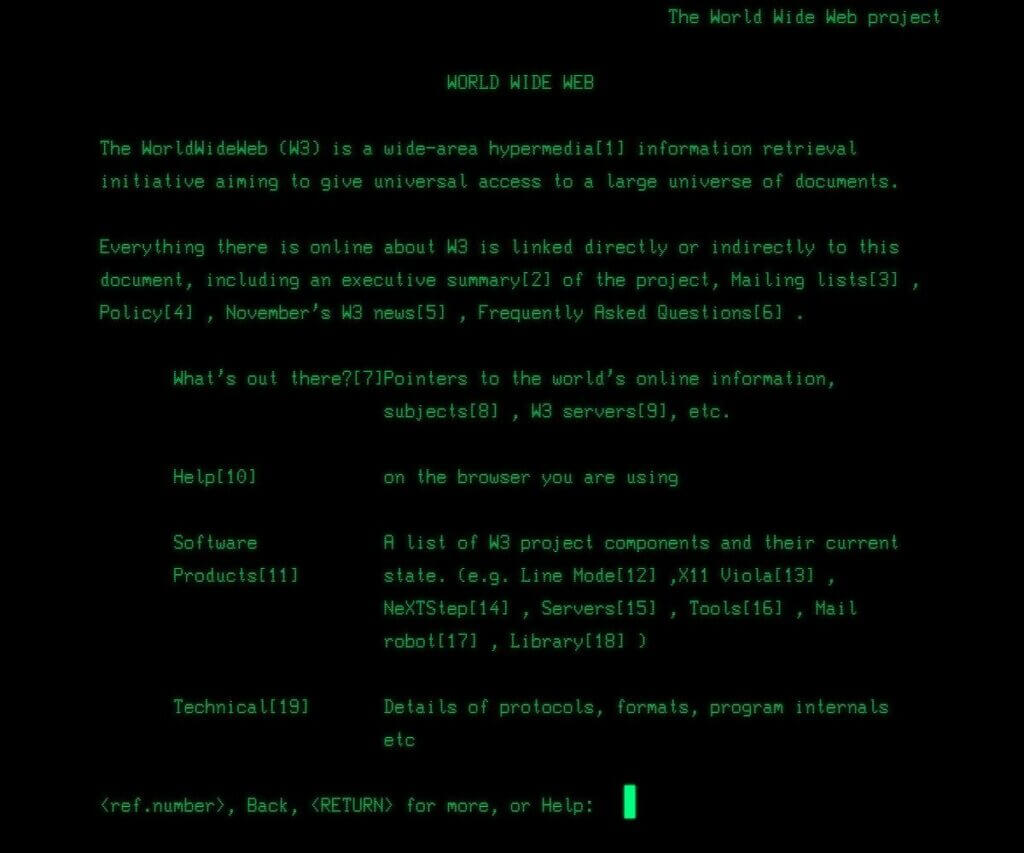
Line-Mode Browser 2013 by CERN. You can give the browser a go here
🧩 The NCSA and the Mosaic Browser (1993)
Following Berners-Lee’s release of the libWWW, new web browsers started popping up all over the world. One of the key additions to that ilk came from the direction of two programmers at the National Center for Supercomputing Applications (NCSA).
On January 23, 1993, Marc Andreessen and Eric Bina released the X Mosaic web browser. The official release message, later redistributed by Berners-Lee himself, read:
"By the power vested in me by nobody in particular, alpha/beta version 0.5 of NCSA's Motif-based networked information systems and World Wide Web browser, X Mosaic, is hereby released.”(6)
According to the release notes, the new browser included features like multi-window support, document printing, customizable fonts, keyword search, and “hotlist” which was essentially a sidebar with for navigating bookmarked documents.
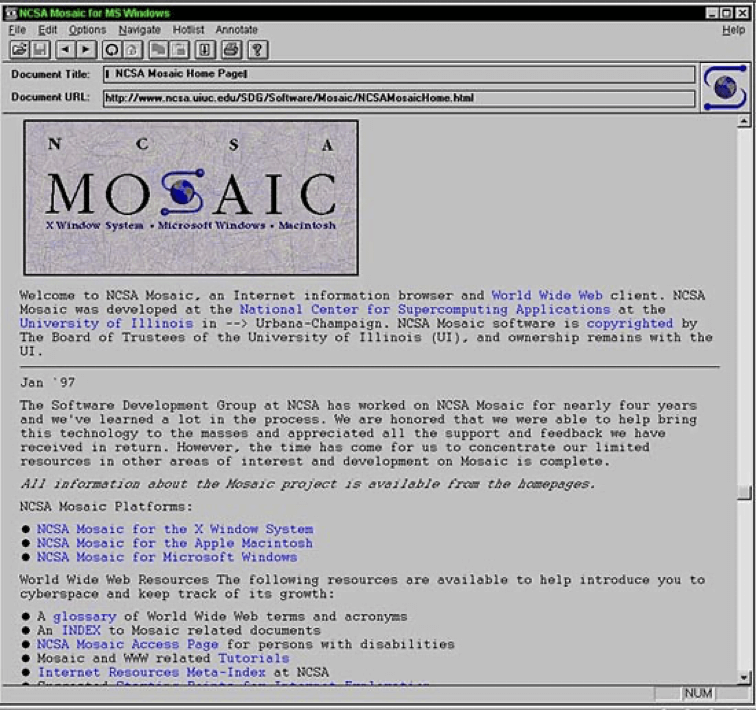
NCSA Mosaic via Wired(7)
On the net productivity end, Mosaic offered some fledgling real-time collaboration capabilities too. Thanks to an integration with the NCSA network, it let users feed and pull documents in and out of the system.
Talk about a future-proof design!
Web Productivity Milestone #2: Opera and Muti-Document Interface
Web browsers made another step in the direction of productivity tools in 1996 when Jon Stephenson von Tetzchner and Geir Ivarsøy created Opera. What started as an internal research project for Norwegian Telenor eventually turned into an independent venture.(8)
One of the most interesting features of the Norwegian browser was support for multi-document interface (MDI) browsing, an early iteration of modern browser tabs. On last year’s April Fool’s day, the company joked about bringing MDI back as part of a mock “Vintage Opera” browser.
🧭 The Short-Lived Revolution: Netscape Navigator (1994)
Since the development of Mosaic was closely tied to NCSA, Marc Andreessen decided to jump ship and leave the Mosaic team to start his own thing. Along with Jim Clark from Silicon Graphics, Andreessen established Mosaic Communications Corporation on April 4, 1994.
“It was 'let's do a software company' for sure, because he had done a hardware company [Silicon Graphics], and hardware companies are very capital-intensive and they take a long time to take off. And then we basically tried to figure out what kind of software to build.”
Marc Andreessen via IDG - ARN(7)
Along with a group of developers from the original Mosaic project, the company (later renamed to Netscape Communications Corporation) set out to improve on the original design and create what was would eventually become Netscape Navigator.
💡 Web Browser Trivia: Since the new project was meant to undermine Mosaic’s position, it needed a fitting codename to go with that goal. The team settled on Mozilla (yep) which was a combination of “Mosaic” and “Godzilla,” read: a true Mosaic killer.(10)
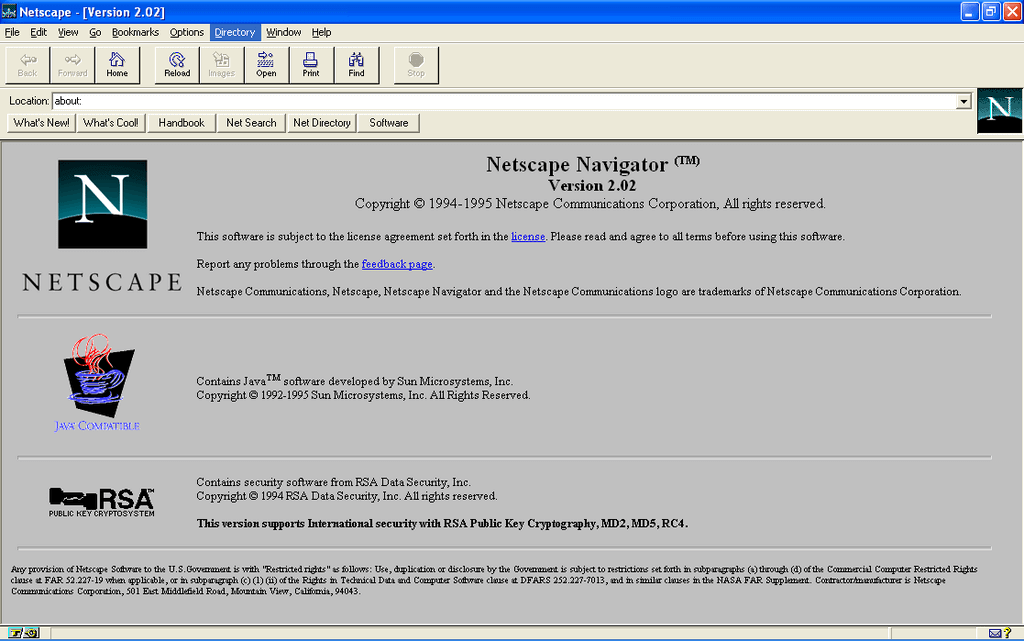
Netscape Navigator 2.02 via Wikipedia(11)
Netscape was the first browser that could display partially loaded web pages. In May 1995, in the course of a partnership with Brendan Eich, Netscape also received JavaScript support that was meant to make the browsing experience more dynamic.(12)
After making a big splash and gaining considerable fandom, Netscape eventually lost its dominance to Microsft’s Internet Explorer (more on that in a bit). AOL acquired the company along with its IP in 1998 and finally killed off the browser in 2008.(13)
🚀 The Internet Explorer Takes Off (1995)
In August 1995, Microsoft, a latecomer to the browser party, released Internet Explorer 1.0. IE started as a standalone product but eventually became bundled with the latest (and hardly greatest) Windows 95. That move marked the beginning of the end for Netscape Navigator.
When the top brass at Microsoft realized IE had a lot to catch up to, Microsoft decided to throw everything they had against Netscape’s browser. The rivalry between Netscape and Internet Explorer became a key hotspot in the history of web browsers and even earned the name of the First Browser War.
As noted by Jay Hoffman at “The History of the Web:”
“Netscape continued to innovate, but they knew they couldn’t keep up. So in January of 1998, they open sourced their browser, and began giving it away for free. But even that wasn’t enough. By the end of 1998, Microsoft had claimed 50% of the market. By 1999, that had risen to almost 80%. The tables had officially turned.(14)
Web Productivity Milestone #3: Multi-Tab Browsing Conundrum
Although Opera is credited with being one of the first browsers to pack multi-document interface (MDI), there’s some debate about who came up with the idea of multi-tab browsing. Yes, the one that lets you open, reorder, and organize dozens of pages simultaneously.
Some sources point to a relatively unknown browser called InternetWorks released in 1994. Tabbed browsing also appeared in NetCaptor, an Internet Explorer shell created by Adam Stiles in 1997. When asked about other browsers implementing the feature, Stiles admitted:
“I don’t remember a specific moment, because it took many years (1997 through 2005 or so). There were IE-shells like NetCaptor, then Mozilla/Firefox, followed by Opera, Safari and IE.”(15)
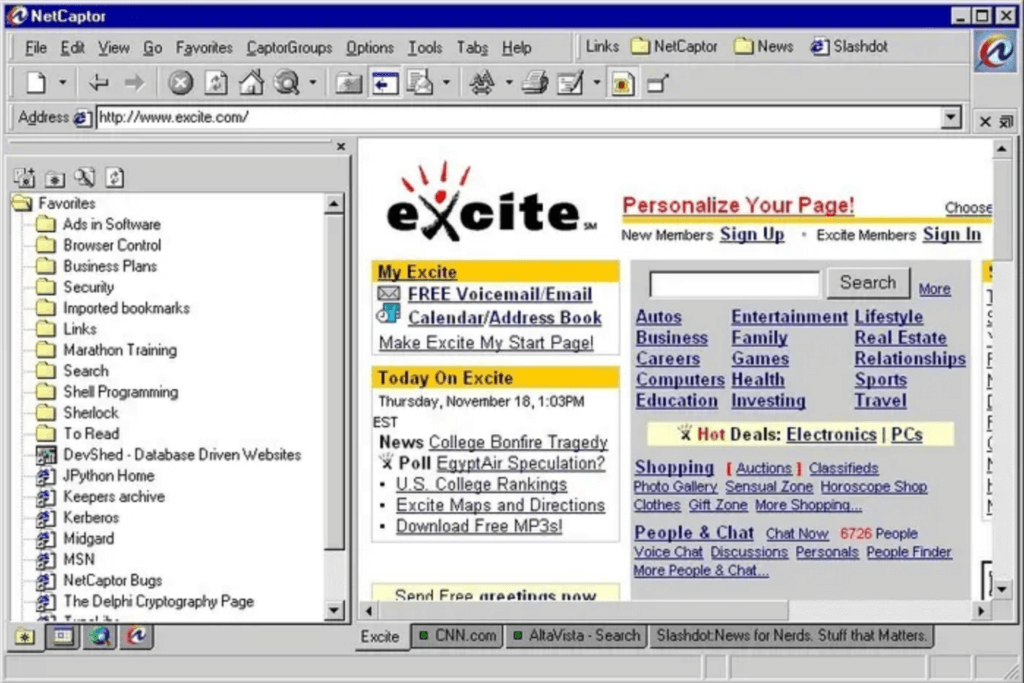
image13 1
Adam Stiles’ NetCaptor (1997) via BuzzFeed News(15)
Productivity-wise, the invention of tabbed browsing was one of the pivotal moments in the history of web browsers. Not only did it speed up the process of finding and collecting information online, but it also made it possible to compare data on different sites.
Tabbed browsing is so cool that we even included it in Taskade’s desktop apps! You can open individual projects as new tabs, drag them around, and quickly switch between relevant spaces.
Like so. 👇
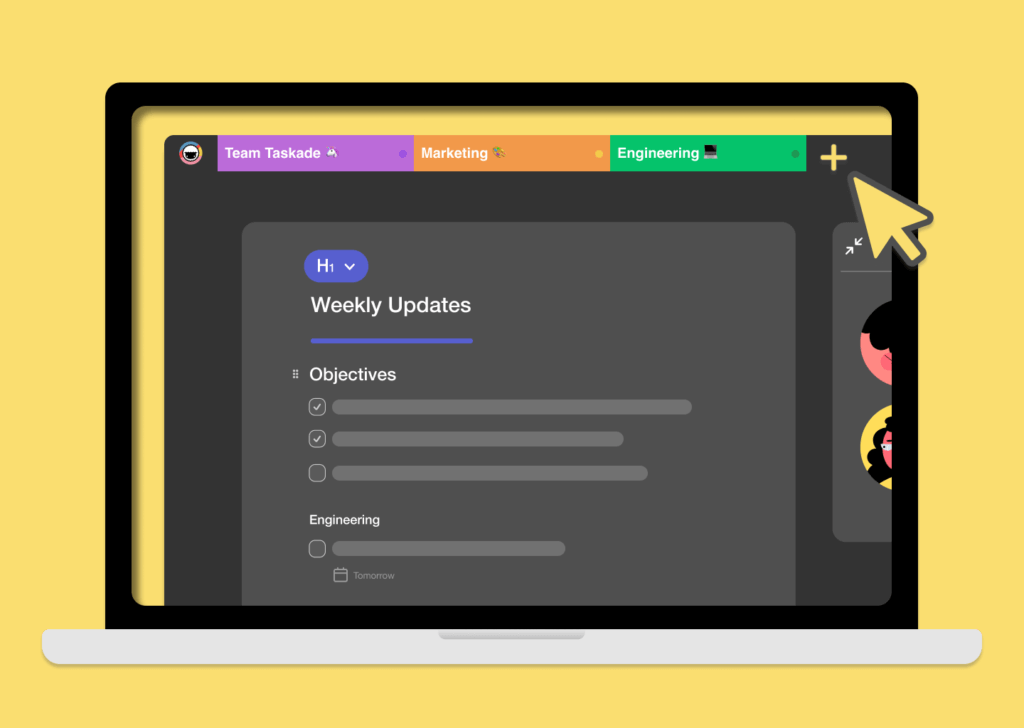
Multi-Tab browsing in Taskade for Desktop. Looks familiar?
🦖 The Mozilla Project Takes Shape (1998)
When Navigator was finally dethroned by IE, Netscape decided to release the source code of the browser to the public. Netscape’s intellectual property was then fed into the Mozilla Project, a global community incentive that would later become a non-profit Mozilla Foundation in 2003.
In 2002, the community behind the Mozilla Project released two(!) new web browsers: Mozilla and Phoenix 0.1. While the first built on Netscape’s heritage and substantial financial support from the likes of AOL, the latter took a start-from-scratch approach.(16)
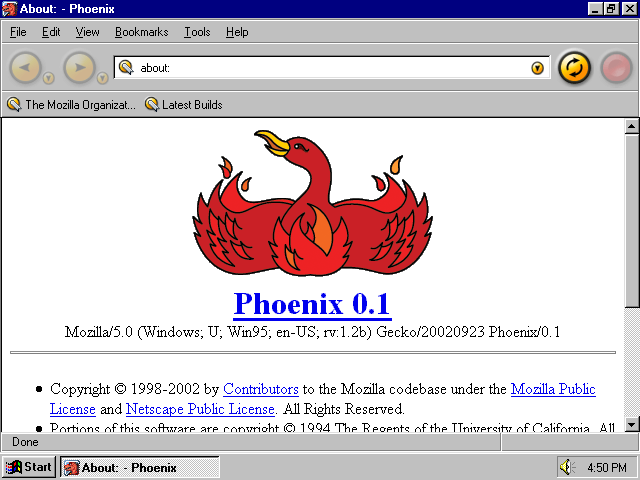
The Phoenix 0.1 browser (2002) via Andrew Turnbull(17)
Confusing?
Don’t worry, the official Phoenix 0.1 release FAQ clears it all up (to some degree). 👇
Q: “What a bunch of idiots. Why didn't they call it, say, Mozilla Lite? Don't they know the importance of brand recognition?”
A: “Third, "Mozilla" is not the name of an application; it is the name of a monolithic suite containing a browser, a mail client, an irc client, and an indoor skating rink (we hear that's coming, anyways[…]. We also believe Mozilla, in general, is going in the wrong direction in terms of bloat and UI, and see no reason for our releases to carry those connotations.”
Phoenix 0.1 Release Notes and FAQ by Mozilla(18)
In 2005, the Mozilla Foundation established its subsidiary, the Mozilla Corp in order to “[...] create and distribute great open and free-of-charge end-user products — such as the popular Mozilla Firefox Web browser and Mozilla Thunderbird email client — that promote choice and innovation on the Web.”(19)
By August 2008, the newly renamed Firefox became the second most popular browser, with a market share of 32.4%. While Microsoft’s IE topped the (short) list of key browsers with 60% of the market in hand, it was only a matter of time before Firefox or another competitor will kick it off its wobbly throne.
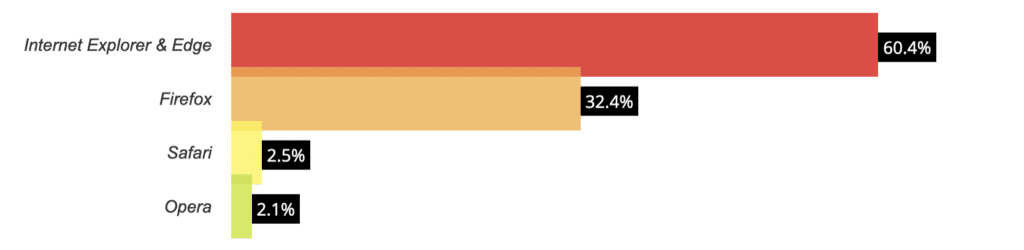
Web browser market share (August 2008), one month before
Google Chrome debut by W3Counter(20)
Firefox + Taskade 🐑
Did you know that Taskade has its own Firefox extension? Make checklists, capture ideas, and collaborate with your team from within your browser. Jump over here to download.

image 66
🍎 Apple Goes on a Safari (2003)
On June 23, 2004, Apple marked another important milestone in the history of web browsers with Safari 1.0, a brand new web browser the company lauded as “The Fastest Browser on the Mac—the Best Browser on Any Platform.”
The official Apple release page following WWDC 2003 continued:
“The fastest web browser ever created for the Mac, Safari re-energizes the browser category through innovations like built-in Google search; SnapBack to instantly return to search results; a completely new way to name, organize and present bookmarks; tabbed browsing; and automatic “pop-up” ad blocking.”(21)
Interestingly enough, before Apple developed its own browser, the company was bound to ship its devices with Internet Explorer as the default browser. The condition was part of a $150 million conciliatory deal the two companies struck in 1997.(22)
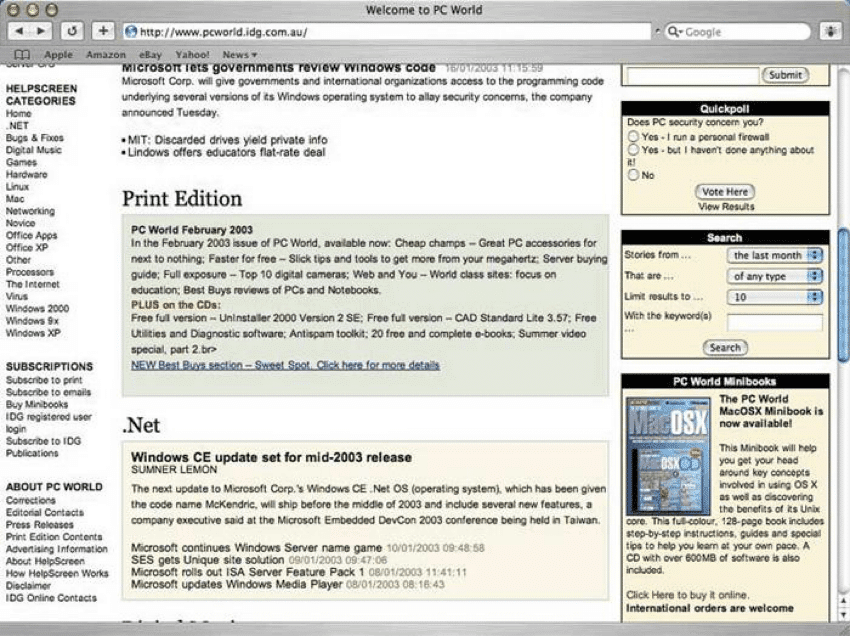
Safari 1.0 Beta by Apple via PC World Australia(23)
After years of playing tag with its competitors, Safari has found a comfortable niche among the user base of macOS and iOS users. As of August 2020, the browser holds a respectable 17.2% of the global web browser market share.
🤘 Google Chrome Steals the Show
Was Microsoft’s IE a latecomer to the browser market? Sure, but it all pales in comparison to the way Google rammed its way into the Second Browser War in 2008. After two years of development, Google unveiled its own Chrome browser on September 2, 2008.
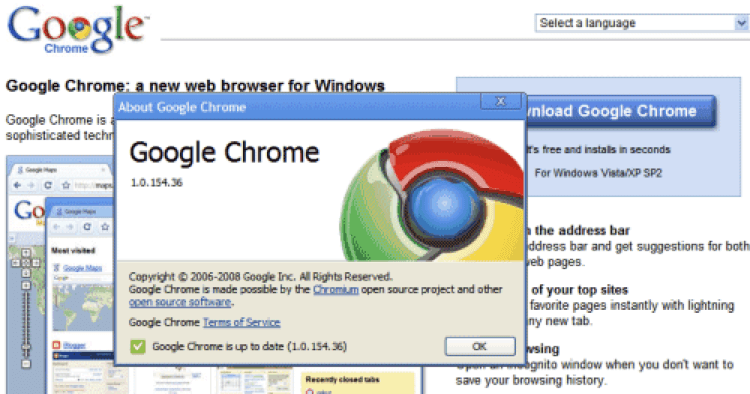
Google Chrome release graphic by Google(24)
Branded as “A fresh take on the web browser,” Chrome came packed with innovative features like sandboxing tabs as individual processes, a task manager, unified search, address and history bar, web apps, or dynamic tab placement.
“On the surface, we designed a browser window that is streamlined and simple. To most people, it isn’t the browser that matters. It’s only a tool to run the important stuff — the pages, sites and applications that make up the web. [...] It gets out of your way and gets you where you want to go.”
Google Chrome beta release notes(25)
Chrome’s novel functionality and exceptional user experience proved a successful combination. By August 2012, Google’s browser became the alpha dog in the Second Browser war. Eight years later, Chrome’s still the champ and holds over 61% of the global browser market share.
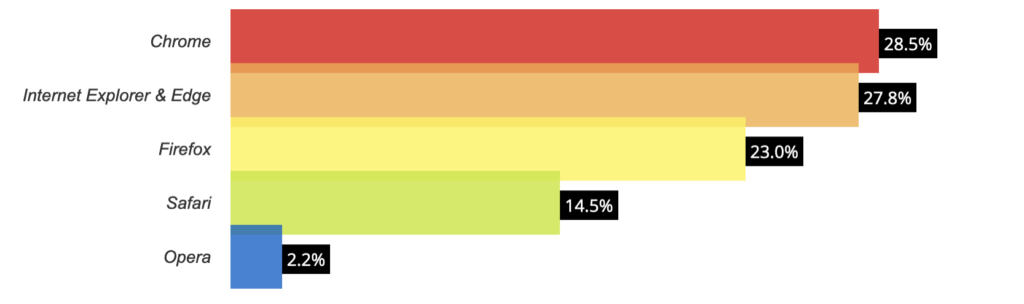
Web browser market share (August 2012), four years
after Google Chrome's debut by W3Counter(20)
Web Productivity Milestone #4: Chrome + Productivity
Google’s late but immensely successful entry to the history of web browsers proves that there’s always room for improvement. Sure, Firefox, Safari, IE were already rocking the browser market back in 2008, but all those browsers were, well… just browsers.
Google designed Chrome to be way more than just as a means of consuming content online. It made it a platform that would later turn into an entire ecosystem based on a vast marketplace of apps and extensions. And all that with the support of the open-source community to boot.
What more could we ask for?
Chrome + Taskade 🐑
Using Chrome as your daily driver? Taskade Chrome extension has you covered. Turn every new tab into a productivity super-tool. You can grab our free extension here.

🏅 Honorable Mention
Microsoft Edge
The first news about Microsoft’s successor to Internet Explorer started appearing in media outlets in late 2014. Nicknamed project “Spartan,” Edge was meant to become the company’s clean slate in the browser market. Fast, simple, powerful, it had everything to shine.
The new browser was officially unveiled on April 29, 2015, during Microsoft’s annual Build conference. Edge was advertised as “a browser built for doing, with built-in note taking and sharing; a reading pane for no distractions; and integration with Cortana.”(26)
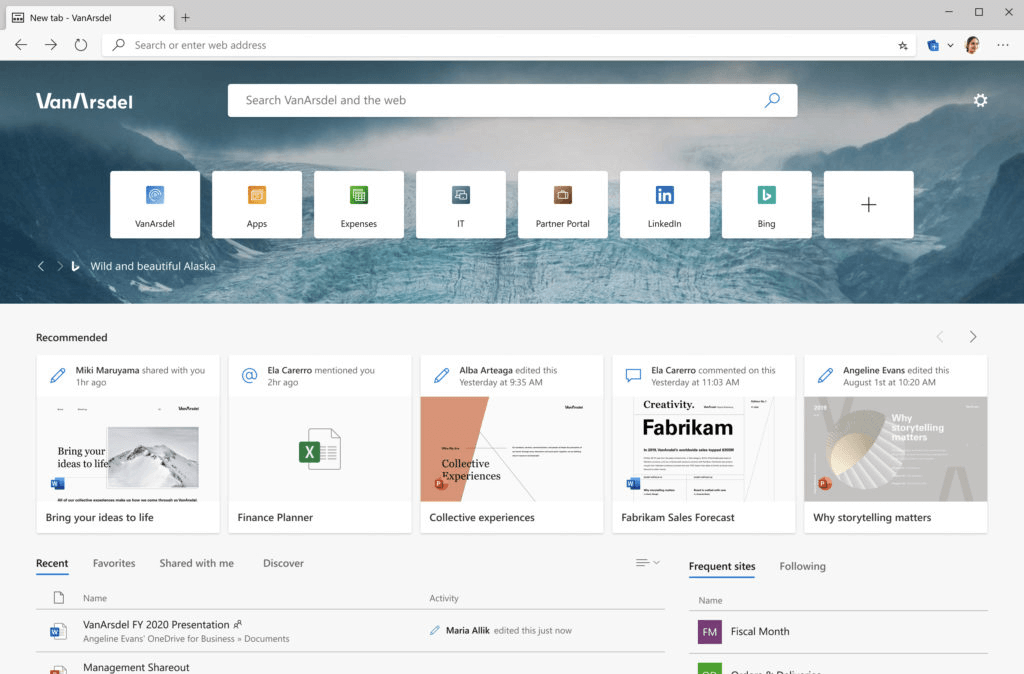
Microsoft Edge in January 2015 by Microsoft
In 2019, the browser took a bite of Chromium open-source heritage and underwent a major overhaul effectively becoming yet another web product built using Google’s tech. By the end of September 2020, Edge and IE held slightly over 6.3% of the market share.(20)
Edge + Taskade 🐑
If you want to give Microsoft’s browser a go, don’t forget to grab our Edge extension here!
Frequently Asked Questions
How have web browsers evolved over the years?
Web browsers evolved from simple text-based tools like Mosaic in 1993, through the browser wars between Netscape and Internet Explorer in the late 1990s, to the modern era of Chrome, Firefox, Safari, and Edge. Today's browsers are full application platforms supporting complex web apps, AI integrations, and real-time collaboration tools.
How did web browsers change productivity?
Browsers transformed productivity by moving software from desktop installations to cloud-based web apps. This enabled real-time collaboration, cross-device access, and the rise of SaaS tools. Today, entire workflows — from project management to AI-powered automation — run entirely in the browser through platforms like Taskade.
Which web browser is best for productivity?
Chrome dominates market share with its speed and extension ecosystem, but Firefox offers better privacy, Safari excels on Apple devices, and Edge has strong enterprise features. For productivity, the browser matters less than the web apps you use — choose one that handles your key tools smoothly and doesn't drain your system resources.
What is the future of web browsers?
Browsers are evolving into AI-enhanced platforms with built-in assistants, smarter tab management, improved privacy controls, and deeper integration with cloud workspaces. The trend is toward browsers that proactively help users work more efficiently rather than passively displaying web pages.
🐑 Conclusion
It seems the history of web browsers has reached a peculiar point. With Chrome at the helm and no meaningful competition for a coup d'etat, we’re unlikely to see the grandiose of the next Browser Wars anytime soon.
But maybe that’s not such a bad thing?
After 30 years of innovation, web browsers have become an essential element of every workflow. It doesn’t matter if want to source valuable content, become more productive or communicate with the world. Your browser’s address bar holds all that, and much more.
Till next time! 👋
🔗 Resources
- https://Www.airforcemag.com/Article/0197arpanet/
- https://Www.w3.Org/People/Berners-Lee/Kids.html
- https://Worldwideweb.cern.ch/
- https://Awards.acm.org/Award-Winners/BERNERS-LEE_8087960
- https://Home.cern/News/News/Computing/Dream-Team-Web-Developers-Recreate-Line-Mode-Browser
- https://Groups.google.com/Forum/#!Original/Comp.infosystems/APbn2mVRoBc/CsYJN_c6v2UJ
- htps://Www.wired.com/2010/04/0422mosaic-Web-Browser/
- http://Www.blooberry.com/Indexdot/History/Opera.htm
- https://Www.arnnet.com.au/Article/33749/Interview_netscape_other_communicator_-_marc_andreessen/
- http://Www.davetitus.com/Mozilla/
- https://Commons.wikimedia.org/Wiki/File:Netscape_Navigator_2_Screenshot.png
- https://Auth0.Com/Blog/A-Brief-History-Of-Javascript/
- https://Www.failory.com/Cemetery/Netscape
- https://Thehistoryoftheweb.com/Browser-Wars/
- https://Www.buzzfeednews.com/Article/Josephbernstein/Meet-The-Man-Who-Invented-Tabs
- http://Www.mozillazine.org/Articles/Article2278.Html
- http://Www.andrewturnbull.net/Mozilla/Historyfx.html
- https://Website-Archive.mozilla.org/Www.mozilla.org/Firefox_releasenotes/En-Us/Firefox/Releases/0.1
- https://Www-Archive.mozilla.org/Press/Mozilla-2005-08-03.Html
- https://Www.w3counter.com/Globalstats.php?Year=2008&Month=8
- https://Www.apple.com/Newsroom/2003/06/23Apple-Releases-Safari-1-0/
- https://Www.mentalfloss.com/Article/84258/Date-1997-Microsoft-Invested-Apple
- https://Www.pcworld.idg.com.au/Article/62233/Safari_1_0_beta_mac/
- https://Googleblog.blogspot.com/2008/09/Fresh-Take-On-Browser.html
- http://Googlesystem.blogspot.com/2008/12/Google-Chrome-10-Released.html
- http://Blogs.windows.com/Bloggingwindows/2015/04/29/Welcoming-Developers-To-Windows-10/