






Want to overcome distractions at home once and for all? Well, let’s just say you’re not the first remote worker to ask the question. If you feel you’re deep in the limbo of chronic procrastination, we’ll put you back on track in a jiffy.
Work-from-home comes with some cool time-saving superpowers. ⚡️
Not only can you spend less time on prepping your food and work clothes, but you can also skip on the daily commute (and carbon footprint) that, according to the U.S. Census Bureau, consumed an averaged of 27.1 minutes of our time in 2019.(1)
So, where’s that extra time when you really need it?
In today’s article, we set out on a hunt for the garden-variety distractions that rob you and millions of remote workers around the world from those precious minutes.
🤹♂️ What distractions are lurking at your home?
🧠 Is your brain wired to look for the “easy way?”
🤺 How to overcome distractions at home?
🤔 Why Are Distractions at Home So… Distracting?
Distraction
1. The state of being very bored or annoyed
2. Something that prevents you from giving attention to something else
3. An activity that you do for pleasureCambridge English Dictionary(2)
Why is it so easy to fall for distractions when working from home?
According to Kenneth E. Miller, Ph.D., at Psychology Today, we indulge in distracting activities to escape reality, or more precisely the stress and anxiety that come in the package.
When you’re buried with work and deadlines are breathing down your neck, even a small detour from the ordeal can feel like heaven. Miller further argues that:
“This (stress and anxiety) can give our behavior a compulsive quality—we may find ourselves continuously getting on Twitter or Instagram, eating or drinking or somehow distracting ourselves to avoid sitting with an inner experience that is calling out for our attention.”(3)
The escape from reality through compulsive, mentally and physically undemanding diversions is a fairly popular psychology concept known as the pleasure principle.
Thanks to Freud’s work on psychoanalysis, we know that the brain is wired to look for the “easy way.” The pleasure principle drives our actions toward instant pleasure (gorging on a bucket of ice cream, playing video games) and away from pain (tackling complex tasks).(4)

🧠 The Weird Habits of Your Brain
Mindfulness, the practice of cultivating awareness of your actions, surroundings and thoughts, has gained a lot of notoriety in recent years. And for many good reasons.
With mounting professional and personal obligations, constant information overload and overbearing “connectedness,” moments of deep, intense focus are in short supply.
But is slacking a choice?
The author and researcher Alex Pang, Ph.D., says that giving in to distractions is a multifaceted but also universal process we all fall for on a regular basis.
Regardless if your a CEO, freelancer or member of a remote team, the process of getting distracted always starts with what Pang calls Directed Attention.
Take a look at the first image on the left. The black square in the top right corner represents the task you’re trying to focus on. It can be that report you need to finish by Friday or the draft you’ve been working on for four hours straight.
This is the right-task-at-the-right-time type of situation.
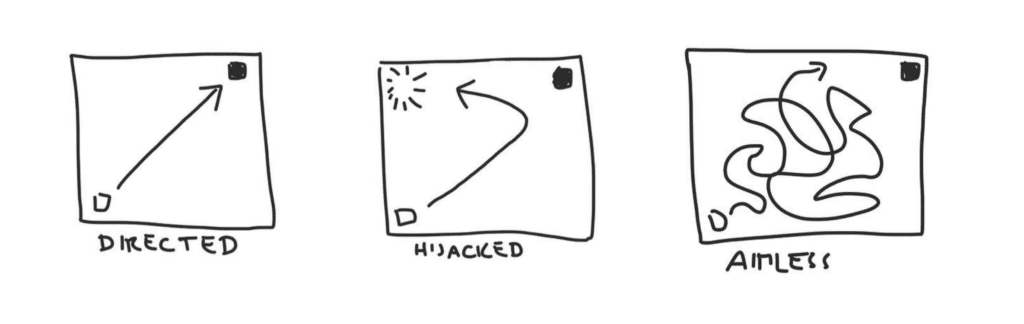
Directed Attention by Alex Pang, Ph.D. via Psychology Today(5)
When distractions kick in, your attention is Hijacked and you break focus to see what’s up. Maybe it’s the kids playing in the next room or your phone vibrating like crazy.
But that’s not all.
Pang argues there’s a third scenario the brain frantically tries to avoid the ordeal and slide into the Aimless state that’s also called “monkey mind”.
Even if you get back to work immediately after registering the distraction, it takes some time before your brain can regain focus and context for the interrupted task.
Here’s how you can prevent that from happening. 👇
🤺 4 Ways to Overcome Distractions at Home
1. Identify the Problem
Remember how we said that mindfulness is a way to become more aware of your actions, surroundings and thoughts? This is exactly where you should start.
Which objects and events do you consider the most distracting? Look at the list below and write down the top triggers that notoriously break your focus.
🔔 Phone notifications
📥 Incoming emails
🔉 Background noise
🧹 Household chores
🍪 Compulsive snacking
👋 Social calls
🎞 Streaming services
🚸 Family obligations
💬 Social media
Ready? Good. Now’s the time for a challenge.
Laura Vanderkam, the author of 168 Hours: You Have More Time Than You Think suggests a simple time-tracking experiment. For one week, keep track and make a note of everything you do in 15 or 30-minute intervals.
At the end of the week, look at your notes and sum up the time you spent on distractions vs. the time you spent on meaningful work. As Vanderkam notes:
“The tool itself doesn’t matter. What matters is that you do it. Time tracking is tremendously useful to the cause of time management. After all, how can you spend your time better if you don’t know how you’re spending it now?”
By following this regimen for one week, you’ll have a clear picture of your daily schedule and see the sequence that leads to distracting activities.
2. Don’t Waster Your Willpower
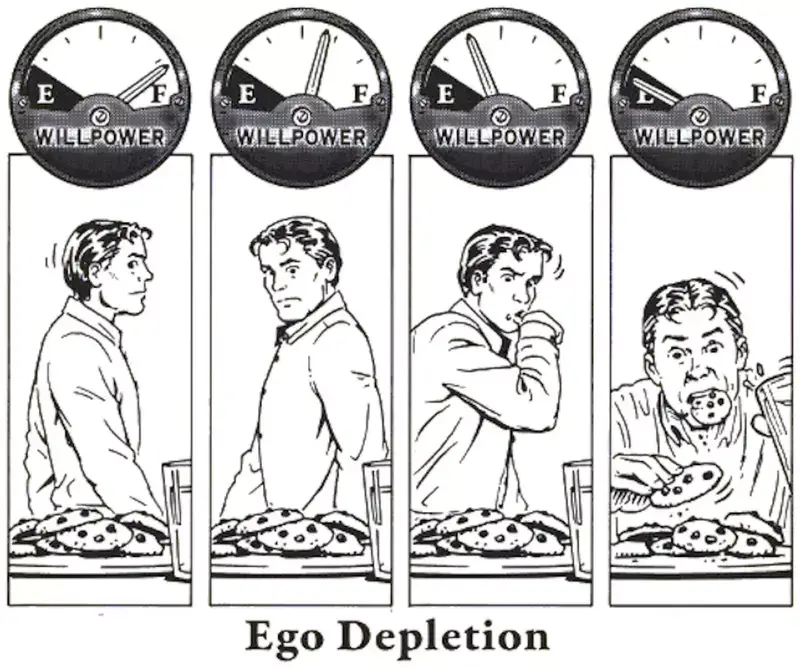
In 1998, social psychologist Roy Baumeister and a group of researchers from the Case Western Reserve University proposed a theory comparing willpower to a muscle.
Baumeister’s research found that self-control can be either trained and fortified or become fatigued with use in a process called ego depletion.(5)
In a nutshell, every choice you make throughout the day gradually exhausts your self-control. For instance, whenever you resist the urge to reach for your phone when you get a text, each consecutive attempt will have a slightly higher failure rate.
As those small distractions gradually your willpower, you’re more likely to give up on meaningful work and indulge in undesirable, compulsive behaviors.
If you don’t want to exhaust your self-control, stop trying to fend those distractions off. Instead, make a preemptive strike and move them out of the way before getting to work.
Here’s how you can do that:
🧹 Clean Up Your Desk And Keep Only Work-Related Stuff.
🍌 Stock Up On Snacks So You Don’t Have To Leave The Room.
🎮 Keep Your Remotes, Books, And Games Out Of Reach.
🔕 Put Your Phone On Silent Mode Or Turn It Off Completely.
✋ Install A Browser Extension To Block Distracting Websites.
🗃 Organize Your Physical And Digital Storage To Save Time.
🚪 Keep The Door Shut And Ban Social Calls During Work Hours.
Keep in mind that Baumeister’s theory on ego depletion has bee repeatedly proven and disproven since its publication. You can read more about the latest findings here.
3. Focus on Systems instead of Goals
“How to be more productive when working from home?”
Well, the usual run-of-the-mill piece of advice you can find online will tell you to… brew some coffee, light a couple of joss sticks and ease into a productive mood. Oh, and don’t forget to tune into the soothing sounds of Tibetan singing bowls.
Ok. Let’s get serious for a moment.
The concept of self-improvement is closely tied to objectives. Whether you want to become a better writer, digital artist or… beat distractions at home, you need to frame those aspirations in a set of goals that will give your efforts a direction.
The thing is, goal-setting is only part of the story.
James Clear, the author of the New York Times bestselling book Atomic Habits, suggests that you can reap much better and consistent results by focusing on systems:
“Goal setting suffers from a serious case of survivorship bias. We concentrate on the people who end up winning—the survivors—and mistakenly assume that ambitious goals led to their success while overlooking all of the people who had the same objective but didn’t succeed.”
James Clear, Atomic Habits(6)
Here are some recommendations you might want to explore:
🧠 Cal Newport’s Deep Work
📥 David Allen’s Getting Things Done (GTD)
🍅 The Pomodoro technique
🧘♀️ Cal Newport’s Digital Minimalism
🐸 Brian Tracy’s Eat that Frog
All these systems and techniques have been battle-tested by millions of people around the world. Some, like bullet journaling or GTD, will help you structure your day. Others, like the Pomodoro technique, will keep you on track and away from distractions.
Check out this cool presentation of Newport’s Deep Work by Better Than Yesterday. 👇
4. Communicate With Your Environment (or Don’t)
“Not now, I’m busy!”
Now, hold on a minute.
You don’t have to isolate yourself from the whole world to get work done at home. Whether it’s a family member asking for a favor or friends who want to hang out during your work hours, clear and open dialogue is your best bet.
Start by communicating your needs to your family and friends. Let them know that work-from-home is still work and that your professional commitments still apply.
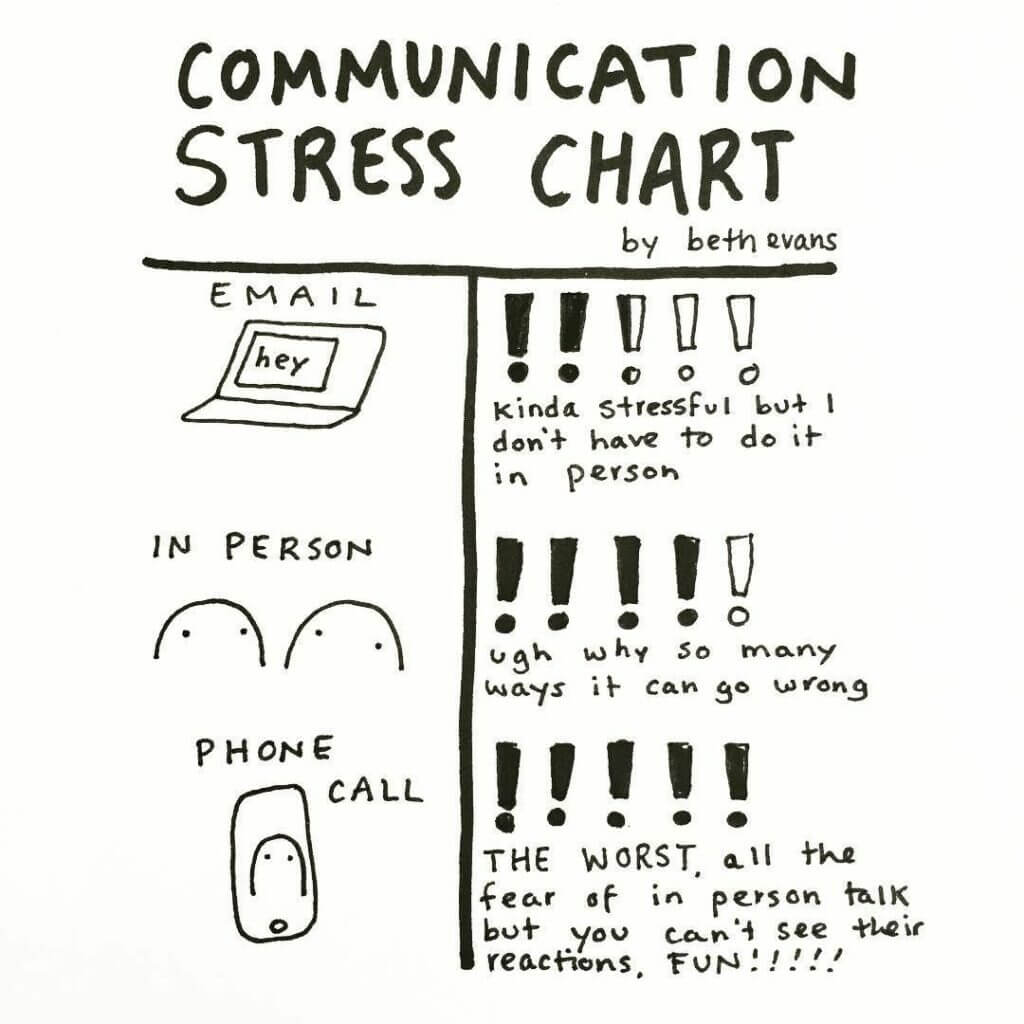
Communication Stress Chart by Beth Evans (#bethdrawsthings)
Ignoring your family and friends will only skew the work-life balance in the wrong direction. Instead, find the right time and place for them in your schedule.
Here’s how:
🚧 Set clear boundaries between work and personal time
❌ Don’t try to tackle “one more thing” after you call it day
⏰ Make sure your workday has a rigid start and end time
🔔 Set reminders to take regular breaks from work
💬 Use the downtime to unwind and hang out with the fam
📍 Don’t carry your work (computer, documents) around the house
“And what about my coworkers?
According to industrial and organizational psychologist Timothy Golden, Ph.D., remote workers should take initiative and foster team camaraderie whenever possible:
“While it might be tempting to think of yourself as an island working from home, telecommuters need to provide a social and professional support system to each other so that the social fabric that occurs in the corporate workplace is replicated as much as possible when working remotely.”
Timothy Golden, Ph.D., at Psychology Today(7)
If everything else fails and you still have a session of deep work ahead of you, you can always grab a pair of noise-canceling headphones and go into a 100% DND mode.
Have a shoestring budget? Look for industrial-grade earmuffs or earplugs instead. High-quality models are rated for 37dB and you can get them for $40 or less.
Frequently Asked Questions
Why is it so hard to focus when working from home?
According to psychology research, we indulge in distractions to escape stress and anxiety — a concept Freud called the pleasure principle. The brain is wired to seek instant gratification (social media, snacking) and avoid pain (complex tasks). When buried in work, even a small detour feels like relief, making home distractions especially tempting.
How can I overcome distractions while working remotely?
Four proven strategies: (1) Identify your top distraction triggers and track time in 15-30 minute intervals for one week. (2) Remove distractions preemptively — silence phone, block websites, clean desk — to preserve willpower. (3) Focus on systems like Deep Work, GTD, or Pomodoro instead of just setting goals. (4) Communicate clear boundaries with family about work hours.
What is ego depletion and how does it affect remote work?
Ego depletion, proposed by psychologist Roy Baumeister, suggests that willpower works like a muscle — every choice you make throughout the day gradually exhausts your self-control. Each time you resist checking your phone, the next attempt has a slightly higher failure rate. The solution is to remove distractions preemptively rather than relying on willpower to resist them.
Should I use goals or systems to improve work-from-home productivity?
James Clear, author of Atomic Habits, argues that systems beat goals because goal-setting suffers from survivorship bias. Instead of just setting objectives, adopt proven productivity systems — Cal Newport's Deep Work for sustained focus, GTD for task organization, the Pomodoro technique for time management, or bullet journaling for structured daily planning.
🐑 Conclusion
Distractions at home are part of the remote-work lifestyle. They simply come with the package. So, if you want to stay productive and enjoy the confines of your home office without pesky interruptions, use our tips to take back control.
Oh, and don’t forget to reward yourself afterward.
When you call it day, eat that cookie and don’t feel bad about it. Play video games, hang out with friends and family, go for a walk, and savor those moments. You’ve earned it.
Till next time! 👋
📚 Reading Corner
Figuring out how to overcome distractions at home can be a tedious process. If you don’t feel like experimenting on yourself, grab these books for some trusted recipes:
🧘♂️ Deep Work by Cal Newport
🚀 Getting Things Done (GTD) by David Alen
🐸 Eat that Frog by Brian Tracy
⚛️ Atomic Habits by James Clear
Sign up and regain focus with Taskade AI! 🤖
🤖 Custom AI Agents: Set up custom AI agents to automate routine tasks so you don't have to shuffle multiple tools and apps.
🪄 AI Generator: Use the AI Generator to develop workflows and project structures for all kinds of business and personal projects.
✏️ AI Assistant: Research, plan, write, and organize tasks faster with a set of powerful /AI commands available in the project editor.
🗂️ AI Prompt Templates Library: Choose from hundreds of AI prompts that will help you overcome distractions and focus on your work.
💬 AI Chat: Get advice on managing distractions, tips for maintaining discipline, or solutions to common work obstacles.
📄 Media Q&A: Analyze documents, spreadsheets, and other resources to speed up research and extract key insights.
And much more...

🔗 Resources
https://www.census.gov/library/visualizations/interactive/work-travel-time.html
https://dictionary.cambridge.org/dictionary/english/distraction
https://www.psychologytoday.com/us/blog/the-refugee-experience/201908/
https://www.psychologytoday.com/us/blog/rest/201602/so-what-is-distraction-again
https://faculty.washington.edu/jdb/345/345%20Articles/Baumeister%20et%20al.%20(1998).pdf