
Definition: Agent scaling is the practice of growing an AI system's capacity by adding tools, context, or more AI agents, and of choosing which of those three levers a job actually needs. You scale an agent vertically when you give one agent better knowledge and tools, and horizontally when you split work across several agents that run side by side under an orchestrator.
TL;DR: More agents is not free and not always better. Anthropic measured that agents use about 4x the tokens of chat and multi-agent systems about 15x, and its 2026 guidance puts multi-agent at 3-10x the tokens of a single agent for the same task. Multi-agent wins on broad, parallel work that overflows one context window. It loses on sequential work where every step depends on the last. Scale in rungs: one agent, then agent plus automations, then an Agent Team, then multiple teams. Build your first agent free →
Think of it the way a small company hires. You do not hire five people to answer one inbox. You hire one good person, give them the right tools and the shared drive, and add a second hire only when the work splits cleanly into two jobs that do not need to talk every minute. AI agents follow the same logic, and the research now puts numbers on it.
What It Costs to Scale AI Agents
The best public data on multi-agent economics comes from Anthropic's write-up of its own Research feature, published June 13, 2025 (Anthropic Engineering). A lead agent plans the research and spawns subagents that search in parallel. The results, in Anthropic's words:
| Finding | Figure | Source |
|---|---|---|
| Lead agent plus subagents vs a single agent on Anthropic's internal research eval | "outperformed single-agent Claude Opus 4 by 90.2%" | Anthropic, Jun 2025 |
| Token use of a single agent vs chat | "about 4× more tokens than chat interactions" | Anthropic, Jun 2025 |
| Token use of a multi-agent system vs chat | "about 15× more tokens than chats" | Anthropic, Jun 2025 |
| What explains performance on BrowseComp | Token usage alone explains 80% of the variance. Token usage, tool calls, and model choice together explain 95% | Anthropic, Jun 2025 |
| Speed gain from parallel tool calls | Research time cut by up to 90% on complex queries | Anthropic, Jun 2025 |
| Multi-agent vs single-agent cost, same task | "typically use 3-10x more tokens than single-agent approaches for equivalent tasks" | Claude blog, Jan 2026 |
The lesson hides in the 80% line. Multi-agent systems win largely because they spend more tokens, spread across more context windows, on problems too big for one window. That makes scaling an economic decision first. In Anthropic's words, "multi-agent systems require tasks where the value of the task is high enough to pay for the increased performance." Simon Willison singled out that constraint in his review and called the post uniquely useful: "I haven't seen anything else about multi-agent system design that's anywhere near this practical" (Simon Willison, Jun 2025). Anthropic also scales effort to the query. A simple fact-find gets one agent with 3-10 tool calls, a direct comparison gets 2-4 subagents with 10-15 calls each, and complex research can use more than 10 subagents. Scaling is a dial you turn per task, not a size you pick once.
When to Add Agents vs Tools or Context
Anthropic's January 2026 guidance names three situations where more agents pay off: context protection (keeping irrelevant material out of an agent's window), parallelization (independent paths searched at once), and specialization (focused tools and prompts per domain). Its advice for everything else: "Start with the simplest approach that works, and add complexity only when evidence supports it" (Claude blog).
| Symptom you see | Add this first | Why |
|---|---|---|
| The agent gives wrong or generic answers | Better knowledge and a sharper prompt | The model lacks facts, not helpers |
| The agent cannot reach a system or take an action | A tool or an integration | A new agent without the tool fails the same way |
| Quality drops late in long sessions | Context management, or one subagent to absorb the reading | This is context rot, fixed by isolation |
| Many independent sources must be read at once | Parallel subagents | Parallelization cuts wall-clock time |
| Distinct domains need distinct tools and rules | Specialist agents on a team | Specialization keeps each prompt short and focused |
| Each step depends on the previous step | Stay with one agent | Handoffs lose context, and splitting sequential work hurts |
The last row matters most. Anthropic says to split work by context, not by workflow phase. A planner agent that hands to a builder agent that hands to a tester agent pays a coordination tax at every handoff, because each one must re-learn what the last one knew.
When More Agents Make Things Worse
Google Research tested 180 agent configurations across five architectures (single, independent, centralized, decentralized, and hybrid) and reported the results on January 28, 2026 (Google Research). On a parallelizable financial-reasoning task, centralized coordination improved results by 80.9% over a single agent. On sequential reasoning, every multi-agent variant cut performance by 39-70%. Independent agents that never checked each other amplified errors by 17.2x, while an orchestrator that validated work held that to 4.4x.
The first version of the paper behind the post, Kim et al., arXiv:2512.08296, adds a finding every team should know before it adds agents: capability saturation. Once a single agent already scores above roughly 45% on a task, coordination "yields diminishing or negative returns." The better your one agent gets, the less a team adds. The authors also built a model that picked the best coordination strategy for 87% of held-out configurations from measurable task properties such as tool count and how cleanly the task splits.
The paper was revised on April 8, 2026 (arXiv v3). The revision widens the study to 260 configurations across six benchmarks and reports a range from +80.8% on decomposable financial reasoning to -70.0% on sequential planning. Its abstract describes error propagation in words, saying that systems without centralized verification spread errors more readily. Both versions agree on the design rule: match the architecture to the task, and put a coordinator that checks work in the middle.
| Finding (Kim et al.) | Figure | What it means for you |
|---|---|---|
| Centralized coordination on parallel financial reasoning | +80.9% vs one agent (v1) | Split work that truly splits |
| Every multi-agent variant on sequential planning | -39% to -70% (v1) | Keep step-by-step work with one agent |
| Independent agents with no checker | Errors amplified 17.2x (v1) | Never merge unchecked output |
| Centralized agents with an orchestrator | Errors amplified 4.4x (v1) | A checking lead contains the damage |
| Single-agent baseline above about 45% | Diminishing or negative returns (v1) | Improve the one agent before you add more |
The Orchestrator-Worker Pattern
The pattern both studies point to for work that splits is orchestrator-worker: one lead agent owns the goal, splits it into independent pieces, sends each to a worker, and checks and merges what comes back. See agent orchestration for the routing detail and multi-agent systems for the wider family of designs. The verify step in the diagram is not decoration. It is the difference between the 17.2x and the 4.4x error figures that Google Research reported.
The Agent Scaling Journey
Climb one rung at a time, and climb only when the rung below shows a real limit.
| Rung | What you add | Climb when | In Taskade |
|---|---|---|---|
| 1. Single agent | One agent with knowledge, memory, and built-in tools | Always start here | Custom agents, 1 agent on Free |
| 2. Agent plus automations | Triggers that call the agent and actions that use its output | The agent works, but a person still starts and moves every job | Automations with 100+ bidirectional integrations |
| 3. Agent Team | Specialists under one team, run in Auto, Everyone, or Orchestrate mode | Work splits into distinct domains or parallel reads | AI Teams, Pro and above |
| 4. Multiple teams | One team per function, called from automations | Separate functions each need their own specialists | Ask Agent Team inside flows |
Rung 4 is not a hands-off "autonomous workforce". Longer, larger runs need more checkpoints, not fewer. Put human-in-the-loop review on any step that sends, pays, or deletes, and see long-horizon agents for how multi-hour tasks stay on track.
Scaling Patterns
- Horizontal scaling (more agents): Add agents that handle similar work in parallel, for example one support agent per product line or one research worker per source. This pays off when the pieces are independent.
- Vertical scaling (smarter agents): Make one agent more capable with richer knowledge sources, more tools, automation connections, and a stronger model. This is the cheapest lever and the right first move for most teams.
- Orchestrated scaling (team coordination): Build a team with a lead that delegates, specialists for focused tasks, and a review step that checks output before it ships. This pays off when a job mixes domains.
Scaling an Agent Fleet Borrows From System Design
Scaling AI agents follows the same playbook that scales web applications. When one server cannot handle the load, engineers add servers and put a load balancer in front. An agent system scales the same way, with one important difference: agents are not stateless, so every split costs context. For the infrastructure underneath, read the system design guide.
| System design primitive | Agent fleet equivalent |
|---|---|
| Horizontal scaling (more servers) | More agents handling independent pieces |
| Vertical scaling (bigger server) | A stronger model and richer knowledge per agent |
| Load balancer | Orchestrator routing each piece to the best-suited agent |
| Redundancy (no single point of failure) | More than one agent able to cover a role |
| Health checks | A lead or reviewer that checks each result before merging |
| Shared cache | A shared project the whole team reads as context |
Real Scaling Examples
- Support that splits by tier. One support agent trained on the help docs answers most questions. When volume grows, a team adds a technical specialist with access to the bug tracker, and an automation routes each new ticket to the team. A human reviews every refund.
- An agency with shared knowledge. Each client gets a dedicated agent, and every agent reads the same agency playbook project, so a new client agent starts with the house style on day one.
- Research that fans out. A market scan across a dozen competitors runs in Orchestrate mode: the plan assigns one competitor per step to the best-suited agent, and the results merge into one project.
How to Scale AI Agents in Taskade
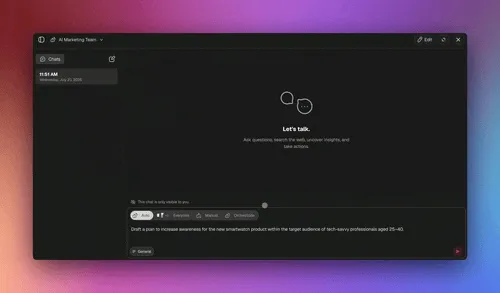
Taskade gives each rung a concrete home. An AI agent carries knowledge, persistent memory, custom slash commands, and built-in tools for web search, reading pages, running code, and analyzing files. Each agent can use any frontier model from top AI labs, with Auto as the default. Claude models need your own Anthropic key, through agent BYOK on Pro and up. Agents read the web through search and page fetch. They do not drive a browser. An AI Team runs in one of four execution modes, and each mode maps to one of the scaling choices above:
| Mode | What happens | Scaling pattern it matches |
|---|---|---|
| Auto | Taskade picks the most suitable agent or agents for the prompt | Vertical: one specialist, no coordination cost |
| Everyone | Every agent on the team responds | Horizontal: independent views side by side, useful for reviews |
| Manual | You pick one or more agents to answer | Vertical or horizontal, with a person choosing the specialists |
| Orchestrate | A plan is built step by step, and each step goes to the best-suited agent | Orchestrator-worker, with the plan as the lead |
The Ask Agent Team automation action sends a prompt to a team in Auto, Everyone, or Orchestrate mode and passes the team's conversation to later steps as output (guide). Two limits apply inside a flow: agent-app tools are not supported, and a tool that needs manual approval fails the flow. Keep approval-gated actions in chat, where a person can approve them.

Scaling in Taskade follows Workspace DNA: projects hold Memory, agents supply Intelligence, and automations handle Execution and write results back into the projects the next run reads. A shared project is the cheapest scaling lever of all, because every agent on every team reads the same facts without a handoff. Taskade EVE uses the same pieces when it builds a Taskade Genesis app.
Scaling Best Practices
- Start small, scale on evidence: Prove value with one agent. Add an agent only when a measured limit appears: context overflow, parallel reads, or a distinct domain.
- Split by context, not by phase: Give each agent a piece it can finish without the others. Do not chain planner, builder, and tester agents for sequential work.
- Keep one shared source of truth: Keep knowledge current in shared projects so every agent reads the same facts.
- Check before you merge: Put a lead or reviewer between workers and the final output. Add human review for irreversible actions.
- Measure cost and quality together: Track tokens and outcomes per task with agent evaluation and observability. A team that costs 5x must earn more than 5x.
Plan Limits and Enterprise Scaling
Prices below are annual-equivalent. See pricing for the full comparison.
| Plan | Scaling Capability |
|---|---|
| Free ($0) | 1 agent, 2 workspace members, 3 Taskade Genesis apps |
| Pro ($10/mo billed annually) | Unlimited agents and AI Teams, up to 10 seats, up to 10 custom domains for Taskade Genesis apps |
| Business ($25/mo billed annually) | Everything in Pro, plus SSO/SAML |
| Max ($100/mo billed annually) | Maximum AI generation capacity for high-volume teams |
| Enterprise ($250/mo billed annually) | Org-wide scaling with SCIM user provisioning and a custom SLA |
Related Concepts
Subagents · Orchestration · Parallelization · Multi-Agent Systems · Long-Horizon Agents · Multi-Agent Teams · Agent Orchestration · Agent Hosting · What Are AI Agents?
Frequently Asked Questions About Agent Scaling
What is agent scaling?
Agent scaling is growing an AI system's capacity by giving one agent better tools and knowledge (vertical) or by splitting work across several coordinated agents (horizontal). The skill is picking the lever the task actually needs.
How do you scale AI agents?
Climb a ladder: one agent, then that agent triggered by automations, then an Agent Team of specialists, then multiple teams. Move up only when you hit a measured limit, and add a check step between workers and the final result.
How much more do multi-agent systems cost?
Anthropic measured multi-agent systems at about 15x the tokens of chat, against about 4x for a single agent. Its January 2026 guidance puts multi-agent at 3-10x the tokens of a single agent for the same task.
Are more AI agents always better?
No. Google Research found multi-agent setups improved a parallel financial task by 80.9% but cut sequential reasoning performance by 39-70%. Tasks where each step depends on the last do best with one agent.
When does adding agents stop helping?
The study behind the Google Research post (Kim et al., first version) found that once a single agent scores above roughly 45% on a task, coordination gives diminishing or negative returns. Improve the one agent's knowledge and tools first, and add agents only for work that splits cleanly.
When do I add a tool instead of an agent?
Add a tool when the agent cannot reach a system or take an action. A second agent without that tool fails the same way. Add an agent when context overflows, reads can run in parallel, or a domain needs its own rules.
How does Taskade scale agents?
Start with one custom agent, connect it to automations, then group agents into an AI Team that runs in Auto, Everyone, or Orchestrate mode. The Ask Agent Team action runs a team inside any automation in the same three modes. AI Teams are available on Pro and above.