






When Thoreau moved into his Walden cabin in 1845, he left most of his possessions behind. Had he lived today, he’d have probably dumped his smartphone and smartwatch too and embraced the way of digital minimalism. What’s digital minimalism? Why is it good for you? Let's find out!
💡 Defining Digital Minimalism
Did you know that the average smartphone user—wink wink—checks their phone 58 times a day? According to RescueTime’s study, the numbers for some power users can add up to over 4.5 hours of screen time every single day.
Even when your phone doesn’t vibrate, chirp, or beep, you probably reach for it out of habit anyway, and unconsciously swipe up and down, left and right… And let’s not forget our smartphones aren’t the only digital devices we use.
No wonder so many people find it increasingly difficult to muster enough willpower to focus on meaningful, valuable work. It’s no mean feat to collect your thoughts amidst a constant buzz of emails, pop-ups, news, calls, and virtual pokes.
Luckily, digital minimalism is here to save the day ☀️
“But wait, isn’t minimalism that cult thing where folks give up their worldly possessions to live like hermits in empty homes and apartments?”
Close but no cigar.
According to Cal Newport, the author of Digital Minimalism: Choosing a Focused Life in a Noisy World, digital minimalism is:
“philosophy of technology use in which you focus your online time on a small number of carefully selected and optimized activities that strongly support things you value, and then happily miss out on everything else.”
In other words, digital minimalism helps you moderate the usage of technology, filter out the digital noise, and focus on meaningful activities. And it’s exactly the thing we need in the hyperconnected world.
So, who’s a digital minimalist?
A recluse?
A monk?
In his book, Newport defines digital minimalists as people who are selective about the technology they use—and the way they use it—and intentional in their digital activities. A digital minimalist is a person who understands the pitfalls of indulging in “too many devices, apps, and services.”
🤖 What Makes Your Digital Self
Your digital self reflects the way you interact with the world through technology. It’s your web browsing habits, social media activity, and app usage. It’s how you communicate with your peers, friends and family, or store and organize files in the cloud.
And yeah, your digital self may be as messy—or orderly!—as its real-life counterpart.
In that context, the space you create in the digital world is not unlike your immediate, physical environment. It can be neat and tidy, or unkempt and difficult to navigate. It can make you feel comfortable and safe, or anxious and overwhelmed.
In one book review, Newport’s approach to digital minimalism has been compared to Japanese tidying superstar, Marie Kondo:
"Newport is making a bid to be the Marie Kondo of technology: someone with an actual plan for helping you realize the digital pursuits that do, and don't, bring value to your life.”
Ezra Klein, Vox
In that sense, applying minimalism to your digital self means taking proper care of your files, apps, home screens, inbox, and all your digital habits.
👉 What do you read, listen to, and watch online?
👉 How much time do you spend on these activities?
👉 What part of that time is dedicated to meaningful work?
👉 What apps do you use and which ones do you really need?
Digital minimalism helps you find the right answers to these questions. By taking out the non-essential stuff and moderating media consumption, it puts your digital self back in the state of balance.
🧘♂️ The Benefits of Digital Minimalism
“The cost of a thing is the amount of what I will call life which is required to be exchanged for it, immediately or in the long run.”
Henry David Thoreau
A few weeks ago, Tesla and SpaceX CEO Elon Musk announced his plans to sell *almost* all his possessions and leave ear... no, wait. While the colonization of Mars is still some time away, Musk is really getting rid of the toys and putting his properties up for sale.
https://twitter.com/elonmusk/status/1256239554148724737?ref_src=twsrc%5Etfw
When asked about his decision on the Joe Rogan podcast, Musk reasoned:
"I think possessions kinda weigh you down... Does it really make sense for me to spend time designing and building a house? Or should I be allocating that time to getting us to Mars? I should probably do the latter."
Even if your goals are less grandiose than Musk’s, freeing up some of your physical space may actually be a good idea. Moderate minimalism can give you some breathing room to see things you haven’t noticed before, dedicate more time to meaningful pursuits and focus on the stuff that really matters. 🚀
In a similar fashion, digital minimalism makes it possible to clear up the digital clutter you’ve been accumulating for years and focus on the things that drive value.
But that’s not all. ⬇
Reclaim Time
Inbox clogged with old emails? Cloud storage looking like an illegal dumping ground? Social media profiles filled with goofy high school photos? Don’t worry, you’re not alone.
Without maintenance, your digital assets can quickly get out of control and become an unusable mess. But maintenance takes time. Digital minimalism can make you more selective about the stuff that goes in and less attached to the clutter that goes out.
Take Back Control
Many of our online activities are largely habitual. Whether it’s the YouTube algorithm that sucks you in for hours, or the insidious infinite scroll that keeps you… well, scrolling, modern media consumption is getting the best of us at every turn.
Minimalism encourages reflection on the purpose, value and intentionality of everything we do online. “How did I end up watching that video?” “Does this article add value to my life?” “Do I really need to use three separate apps to complete this project?” (👉 No, you don’t)
Reduce Anxiety (FOMO)
Fear of missing out (FOMO) is that pesky feeling that hits you in the gut every time you put away your smartphone or log out of Facebook. FOMO keeps you scrolling through your friends’ activity feeds, constantly checking your email or binge-watching the news, just to get a fresh dose of information and never miss a thing.
Digital minimalism helps reduce FOMO to an acceptable level, one where you don’t feel the urge to constantly fiddle with your phone or dash across the house when it starts ringing. It's not the end of the world if you don't check your notifications immediately 🌏
Focus on *Meaningful* Work
If you didn’t already know, meaningful work is to Taskade what puppies are to Keanu Reeves. No, really. We’re dead serious about that.
The only problem?
The modern workplace doesn’t encourage or reward deep work. As Newport writes in his book, Deep Work: Rules for Focused Success in a Distracted World, much of the work we do these days consists of shallow, repetitive tasks that drive little or no unique value.
Who’s to blame?
Distractions?
Guilty as charged.
Sure, we could dismiss it with “that’s how things are today.” But we still need deep work. In fact, we need it now more than ever. Just imagine what would happen if great novelists, painters, or poets gave up their craft because they couldn’t focus.
Going back to RescueTime's data, in 2017 office workers used an average of 56 apps and websites each day and switched between tasks over 300 times. That amounts to 40 email checks or an inbox peek every 7.5 minutes 😬
Digital minimalism helps filter out the distractions and create an environment that encourages deep work. It’s much easier to build up the state of flow when there are no obstacles in your way.
Still not convinced? Tune in to the wisdom of Master Yoda, “clear your mind must be, if you are to find the villains behind this plot.”
Escape the Dopamine Loop
To have a cookie or to eat a cookie? If you were to ask your brain, it’d probably choose to chase the cookie into oblivion rather than get one, all thanks to dopamine.
According to Psychology Today, dopamine is a neurotransmitter that “controls the ‘pleasure’ systems of the brain... Dopamine makes you feel pleasure and therefore motivates you to seek out certain behaviors, such as food, sex, and drugs.”
In other words, it’s like the carrot for a donkey. It works best when it’s just within reach, but not quite so you can actually get it. It’s not the reward itself that gets you. It’s the thrill of chasing it — the curiosity that pushes you toward new, more stimulating things.
That same mechanism drives our addiction to technology. Digital addictions like instant messaging, social media, YouTube, or Netflix create what’s called a Dopamine Loop. Each time we indulge in any of these activities, dopamine kicks in and makes us feel good about it.
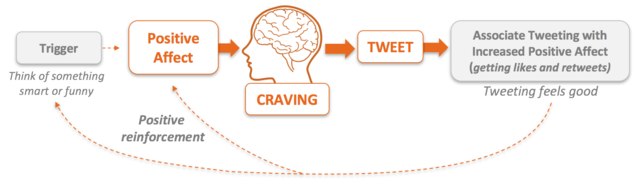
Twitter-induced dopamine rush via Judson Brewer
Every cycle creates an ever stronger craving that gets us going back more often and stay for longer. We seek digital pleasures for the thrill of it.
As a digital minimalist, you’ll be able to identify the “triggers” and replace them with positive behaviors. Sure, it probably won’t happen overnight. Forming habits takes time and resolve, but it’s well worth the effort 💪
📲 How to Become a Digital Minimalist
Embracing digital minimalism in your personal and professional life can be done in two ways: the hard way or the gentle way. You can either cut the cord and go on an all-out digital detox, or start with incremental tweaks to your digital habits.
In Digital Minimalism, Newport suggests a three-step Digital Declutter Process in which you:
Take one month of digital fast, during which you opt out of non-essential aspects of your digital life 🧘♂️
Use the fast period to replace bad digital habits with meaningful activities 🔄
Reintroduce some elements with a clear understanding of why you need them and how you’re going to use them 🗓
We get it. For some, going atomic and cutting the cord for 30 days may be difficult. That’s why we’ve come up with a more general checklist that’ll help you digest digital minimalism in small bites.
- Start small 🌱
Remember that Lawrence of Arabia line, “Big things have small beginnings”? That’s exactly how you should approach digital minimalism. Trying to correct years of digital hoarding overnight may be discouraging, not to say impossible, but you can embrace the small steps 💃
- Identify the problem(s) 🔍
Digital minimalism means that you’re *aware* of how you’re spending your time online. What apps do you use the most? How often do you check your email? How much time do you spend browsing particular websites? Use tools like Toggl or RescueTime to identify time-wasting apps and websites and never lose another minute to mindless browsing.
- Follow the rule of “1 in 1 out” 📥📤
Each new app, subscription, cloud storage account, newsletter, or social media profile complicates your digital life a bit. So the next time the mouse cursor hovers over a signup button, make sure the new service or app doesn’t duplicate functionality with another you’re already using. If there are upsides to the upgrade, keep only one of the two.
- Draw the line between work and play 🧸
The line separating your personal and professional life (or work and play) should extend to your digital self. This applies to file storage, work and pet projects, notes or social media activity. Unless your personal brand overlaps with your business, keep the two apart.
- Regular maintenance is key 🔧
Regular maintenance of your digital space (self) helps you save plenty of time in the long run. Schedule a weekly or monthly “maintenance hour” to delete old/duplicate files from your cloud storage, clear up to-do lists, or get into gear with the inbox zero policy. As Ben Franklin once said, “for every minute spent in organizing, an hour is earned.”
- Be intentional 👌
Be *intentional* about everything you do in your digital space. Whenever you open up a YouTube video, subscribe to a newsletter or download another app, make sure it drives value and serves a purpose in your life. Choose active participation over passive consumption (unless it’s funny cat videos).
🐑 Downsize Your Digital Life with Taskade
Even if you don’t own a cabin in the woods or plan on moving to Mars, you should still join the ranks of digital minimalists. Embracing digital minimalism can make you happier, more mindful and selective about the things you do online and focused on *meaningful* work.
And speaking of work...
Do you feel your remote work habits could use some downsizing too? We have a solution. Taskade is an aesthetic collaboration platform that lets you and your team get all your work done in *one* (your read that right) app.
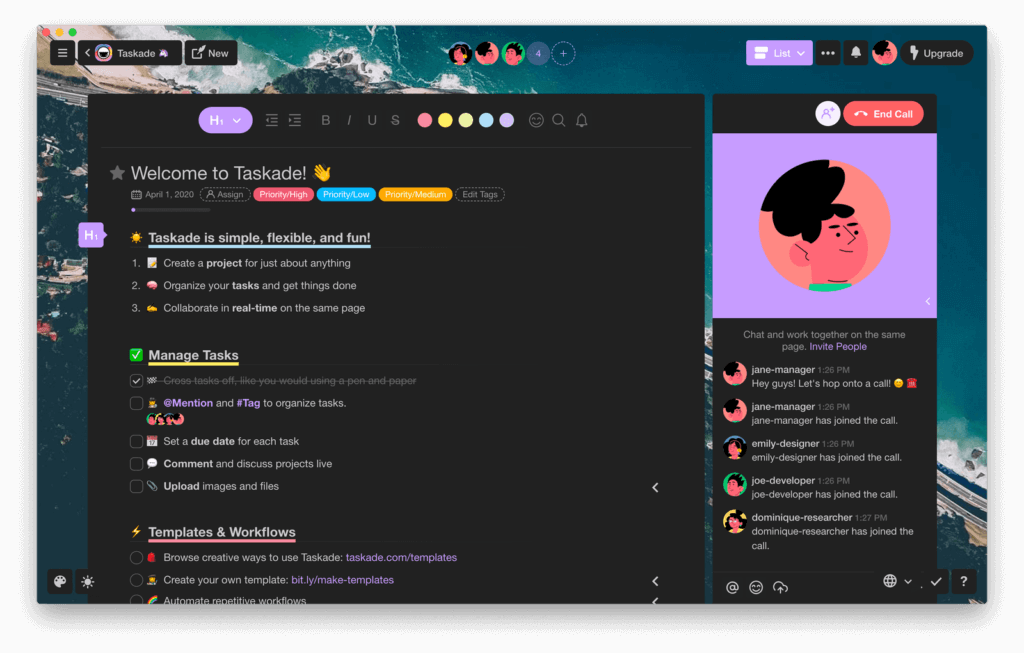
Taskade has a clean, user-friendly interface.
🤹 Are you tired of juggling between multiple apps, plugins and extensions?
🎥 Would you like to jump on conference calls while live-editing documents in the same window?
⌨ Do you want to have a choice between chat, video and voice communication?
🤯 Are you frustrated with clunky, outdated and unintuitive (or plain ugly) apps that kill any joy of work?
🎨 Do you need a customizable collaboration app that lets you tackle work "your way?"
If you answered YES to at least one of these questions, Taskade is the tool you've been looking for. Our goal is to draw and stick to the fine line between essential functionality and ease of use. We give you everything you and your team need and not a thing you don't.
You can sign up for a free Taskade account here. 👈
🎙 Oh, and before you go, here's an interesting discussion on the ins and outs of digital clutter. Featuring Cal Newport and the Minimalist podcast hosts Joshua Fields Millburn & Ryan Nicodemus.

Frequently Asked Questions
What is digital minimalism and how does it apply to remote work?
Digital minimalism is the intentional reduction of digital tools, notifications, and online activities to only those that provide real value. For remote workers, it means consolidating apps, turning off non-essential notifications, simplifying workflows, and choosing quality tools over quantity to reduce digital overwhelm.
How does digital clutter affect remote worker productivity?
Digital clutter — too many apps, tabs, notifications, and subscriptions — creates constant context-switching, decision fatigue, and anxiety. Studies show that each app switch costs several minutes of refocusing time. Remote workers are especially vulnerable because their entire work environment is digital.
How can remote teams practice digital minimalism?
Consolidate tools into an all-in-one workspace like Taskade instead of using separate apps for tasks, notes, chat, and meetings. Establish team-wide notification norms, reduce unnecessary meetings, archive old projects, and create clear information hierarchies so team members always know where to find what they need.
What are the benefits of a minimalist digital workspace?
Benefits include reduced stress, faster decision-making, fewer distractions, lower software costs, easier onboarding for new team members, and more time for deep work. Teams that simplify their tool stack typically report higher satisfaction and better focus.