







Ever noticed how the stuff you read online feels vaguely familiar? Even the ideas don’t surprise anymore. It might be AI behind the scenes. And if you’re on the content creation train, you’re probably using it too. But if you want your work to stand out, it’s time to learn how to humanize AI-generated content.
TL;DR: Humanizing AI content requires adding personal voice, varying sentence structure, fact-checking, and removing robotic phrases. In Taskade, you can build a custom AI agent trained on your past writing to automatically rewrite AI drafts in your authentic voice. Try it free →
Here’s the thing. Tools like ChatGPT can do the groundwork for you. But making sure your content feels relatable and personal? That’s where you come in.
In this guide, we'll show you how to weave in your unique voice and perspective into AI-generated content — so it feels like it's coming from you, not a machine.
💡 New to AI tools? Check our AI prompt guide to master the basics.
🧐 Why Would You Want To Humanize AI Content?

AI-generated content is everywhere.
But what exactly does “AI-generated” even mean? 🤔
It's pretty much what it sounds like — content that's not created by a human but by a machine. More specifically, by large language models (LLM) which are essentially clumps of sophisticated algorithms trained on vast amounts of data.
🤔 What makes us human? Psychologist Daniel Dennett and philosopher John Searle believe that the key ingredient AI lacks (yet) is consciousness. While LLMs can imitate human creativity, they are missing that inner experience we humans have — the awareness that goes beyond just processing data. It's what makes us, well, us.
This could be text or images generated using ChatGPT, or it could be snippets of code and even music. Anything that can be digitized and replicated by learning patterns can be produced by AI.
And according to Google, the oracle of content creators, it’s not entirely bad.
The Big G suggests that when used ethically, AI can enhance the content quality. If it meets the standards of experience, expertise, authoritativeness, and trustworthiness (EEAT), it's welcomed on their platform.
So, are there any penalties for not following the rules?
Google's is pretty clear on that too.
If you're pumping out low-quality content to manipulate rankings, you’re breaking the rules. This could get your content pulled from search results, which is exactly what happened to many sites after the recent Google core update.
That can hurt. Especially if you're in the content marketing business.
📉
Rankings matter, but so does perception.
Many people can instinctively tell when content is AI-generated. It may lack nuances and personal touch. Or it may rattle out the same robotic phrases (we’ll get to that) that instantly give away its “non-organic” origins.
If readers sense that your content lacks authenticity, they will drop out and never come back. So, let’s learn how to sprinkle in that human charm.
🤖 ➡ 🙋♂️ How to Humanize AI-Generated Content
1. Provide a "Seed" for Context
AI can't read your mind (yet) It can, however, infer your intent. In other words, it can "guess" what you're asking based on patterns it has learned.
🤔
Most of the time, the results of this guesswork are disappointingly generic.
The output may say things like "it is advisable '' without backing the advice with “science.” It will veer off the topic, touching on peripheral themes. It may go broad, never quite nailing the point. The more obscure or recent the topic you’re covering, the more likely AI is to trudge around.
Unless you want to entertain yourself with a short story about time-traveling dinosaurs ruling ancient Egypt, you need to start humanizing AI by providing context:
🟠 Give AI a starting point: Want to write an introduction to an article? Write the first sentence, and let AI build on top of that. It doesn't have to be Pulitzer-worthy; just lay down a few thoughts and ideas you’re aiming for.
🟠 Ask AI to enhance, not create: Use AI to add to or refine your content. Ask it to finish your own paragraphs or generate its variations. You can even provide the full draft and ask for suggestions on structure or argumentation.
🟠 Provide examples and let AI fill in the blanks: The more details you provide in the initial prompt, the better — think names, dates, places, facts. With context, AI will be less likely to slip into unhinged creative tangents.
2. Tone it Down
Sometimes, AI is like that one friend who uses five adjectives when one will do. Fancy words, complex sentences, a smorgasbord of synonyms no one asked for.
✨
(see what we did there?)
AI's enthusiasm for sophisticated vocabulary might seem impressive. You may even think it will impress your readers. The problem is that the output may say a lot without really saying anything.
People don't always talk like they're writing an essay for their English Lit class. Most conversations we have each day are casual. They're simple, direct.
Unless you’re writing a technical manual or a legal document, you need to simplify:
🟢 Opt for simple, relatable language: When giving AI instructions, be clear that you expect simple, conversational tone. You can use phrases like "explain this to me like I'm five," or "Write this as if you're telling a story to a friend." Tailor the style and language to your audience.
🟢 Cap the thesaurus: AI loves showing off its vocab. To keep it in check, ask AI to "use plain words,” or “avoid complex sentences.” Simple words will make your message clear and more relatable. No fancy dictionary needed!
🟢 Shorten the sentences: AI can get carried away with long, winding sentences. Steer it back by asking for "short sentences only" or to "get to the point quickly." Your readers will thank you.
3. Fact-Check the Output
By 2026, 90% of online content will be generated by AI.
And how much of the stuff you read online is penned by artificial intelligence? Nobody really knows. But a recent study with respondents from sixteen countries found that 85% of people worry about online disinformation.
🔍
We’re not going down the rabbit hole to explain the connection. But we can expect things will go from tricky to problematic really fast, really soon.
Unlike search engines which pull information from indexed sources, AI generates responses based on its training data. That means it doesn't always get the facts right and sometimes mixes reality with fiction in bizarre ways.
This is what the artificial intelligence industry calls “AI hallucinations.”
A seasoned human writer will catch the hallucinations if they know the subject well. But considering how much content we create each day — conservative estimates put it at around 328.77 million terabytes — it’s hard to make sure that everything AI generates is spot-on.
The good news is you can take a few steps to keep your content trustworthy.
🔵 Don’t treat AI like Google: Tools like ChatGPT don’t replace diligent research. They provide a good starting point, you still need to put in the work. The rule of thumb is: always make sure to cross-verify the output with direct sources or through additional research.
🔵 Develop a critical eye: Train yourself to spot potential AI hallucinations. Pay attention to any historical facts, specific data, or quotes — these are areas where AI might slip up. If you can’t cross-check the information, ask the AI point-blank where it got it from.
🔵 Tell AI to stick to the facts: Some AI models offer a “temperature” setting: a higher temperature results in more varied and creative outputs, while a lower temperature makes the responses more predictable. In more closed platforms like ChatGPT, you can simply include additional instructions in the prompt, e.g. “explain the photosynthesis based on your training data."
4. Use the Lingo of Your Audience
Nine times out of ten, generic prompts yield content that's about as exciting as watching paint dry. You get broad, vanilla statements that could apply to just about anyone. Think stock photos where everyone's smiling 24/7.
🥱
Your AI-generated content needs a unique flavor.
If you’re talking to finance pros, terms like “ROI” and “equity” should be part of the output they make sense in the context. If you're addressing programmers, the readers may expect terms like "debugging," "push," and "commit."
Who are you targeting with your content?
Are they industry experts, casual enthusiasts, or complete novices?
What language (jargon, technical terms) do they use?
Once you know your audience well, tweak your prompts accordingly (or start with our curated AI prompts as a baseline):
🟣 Set specific parameters: Instruct AI on the language level and jargon appropriate for your audience. Make it crystal clear who the content is targeting. You may request industry-specific terminology for healthcare professionals or legal language for lawyers.
🟣 Refer to style guides: Give your AI a specific style manual to follow. If you're targeting academics, set it to use APA for psychology buffs or MLA for the literature crowd. Consistency in citation will build credibility and make the output more consistent.
5. Add Real-Life Examples and Stories
When AI writes, it doesn’t consider the reader’s emotions or experiences. It delivers the what, but not the why or the how that people can see in their day-to-day lives.
🪞
Humanizing AI means you need to add elements your audience can relate to.
For instance, if you're covering a fitness app, don't just list the features — tell the tale of someone who hit their daily 10,000 steps and improved their health.
If you're breaking down a budgeting tool, go beyond the specs. Share a personal success story how it helped Emma kiss her debt goodbye.
You get the idea.
Details matter — real names, real problems, real results.
With these changes, your AI-generated text will mirror the conversations your readers have in their daily lives. They'll see themselves in the stories you tell.
🔴 Inject personal anecdotes: Find a real story that matches your point. Maybe it's your own, maybe it's a customer's. Just a few lines about a real experience can turn dull into relatable.
🔴 Add concrete examples: Stats and facts? Sure, they have their place. But follow them up with a concrete example. "This widget saves time" becomes "Meet John, who now enjoys breakfast with his kids because our widget cut his admin work by half."
🔴 Sprinkle an emotional touch: Tap into what you want your readers to feel. Share stories that hit home and genuine connections. Whether it's a tale of success or a heartfelt moment, emotions makes help your your message stick and build rapport.
6. Rewrite Overused Words and Phrases
In the realm of content creation, AI tools play a significant role in enhancing and augmenting the complexity and diversity of language…
Sounds familiar? That right there is AI at its best.
🤖
AI models are only as good as their training data. And since they are trained on vast collections of human-generated content, they inherit our linguistic ways.
If you’ve used AI tools a few times, you already know what to look for.
Words and phrases like “meticulous,” “navigating complexities,” and “in the realm of” pop up often, and they make AI-generated text mechanical or overly formal.
Now, don’t get us wrong, there is a place for sophisticated language. But most of the time, you’re fine with simpler and relatable language.
The solution? Tell AI what words and phrases to avoid.
Compile a list of common clichés and overused expressions specific to the AI model you’re using. When you’re done, feed it to AI with an instruction to stay clear (we'll revisit this point in a moment).
7. Avoid Using AI Detection Tools
Just because something sounds polished doesn't mean it's AI-generated.
Since GPT 3.5 and GPT-4 launched in late 2022 and early 2023, a ton of “AI detector” services have claimed to be able to flag content written by AI.
In a plot twist, one of those tools even flagged parts of the U.S. Constitution — that centuries-old cornerstone of American law— as AI-generated.
📜
Now imagine you're a student. You spend a whole night pouring your heart into an essay, fueled by liters of coffee. But when you submit your work, your professor runs it through AI detection tools.
The outcome? Doubt over its originality or, well… failing grade.
(to be fair, some students are using AI to write essays)
AI-detection recognizes patterns, and AI writing has patterns. But so does human writing. And so far, there hasn’t been a reliable way to tell them apart.
Here’s what you should do instead:
🟤 Use common sense: Don’t let tools dictate the authenticity of your content; trust your instincts. You know what sounds real and what doesn't. After all, you're the expert in your field, and you know your audience better than any algorithm (right, right?).
🟤 Emphasize personal insights: Inject your unique perspectives or personal anecdotes into your writing. AI writing tools may not easily replicate these personalized elements, which can help your work stand out.
🟤 Blend sources and styles: Mix various sources and stylistic elements in your writing. Use quotations, citations, and vocabulary that reflects wide reading beyond typical AI training sets. Oh, and AI sucks at humor, so try your hand at that.
AI Content Humanization: Methods Compared
| Method | Speed | Quality | Consistency | Cost |
|---|---|---|---|---|
| Manual editing by writer | Slow | Highest | Varies by editor | High (time) |
| Prompt engineering (specific instructions) | Fast | Medium | Low (prompt-dependent) | Low |
| AI "humanizer" tools (Undetectable, etc.) | Fast | Low-Medium | Medium | $10-50/mo |
| Custom Taskade AI Agent | Fast | High | High (trained on your style) | Free / $6/mo |
| Human editor + AI first draft | Medium | Highest | High | Medium |
The most effective approach combines AI speed with human quality: use a custom Taskade AI agent trained on your best content for consistent first-pass humanization, then add a quick human review for final polish. This workflow scales content production without sacrificing your authentic voice.
🐑🤖 Building An Agent In Taskade To Humanize Your AI-Generated Content
Everything we’ve covered so far falls into the “common sense” bag. But did you know that you can actually use AI to make your content more human?
"Wait, aren't we supposed to be careful with AI?"
Yes, but it's all about how you use it.
If you’re new to Taskade AI agents, here’s a tl;dr.
What Are Custom AI Agents in Taskade?
An agent is a small, specialized tool you can customize and train to perform specific tasks. It usually represents a specific role a human would occupy, e.g. editor, content strategist, engineer, or SEO expert.
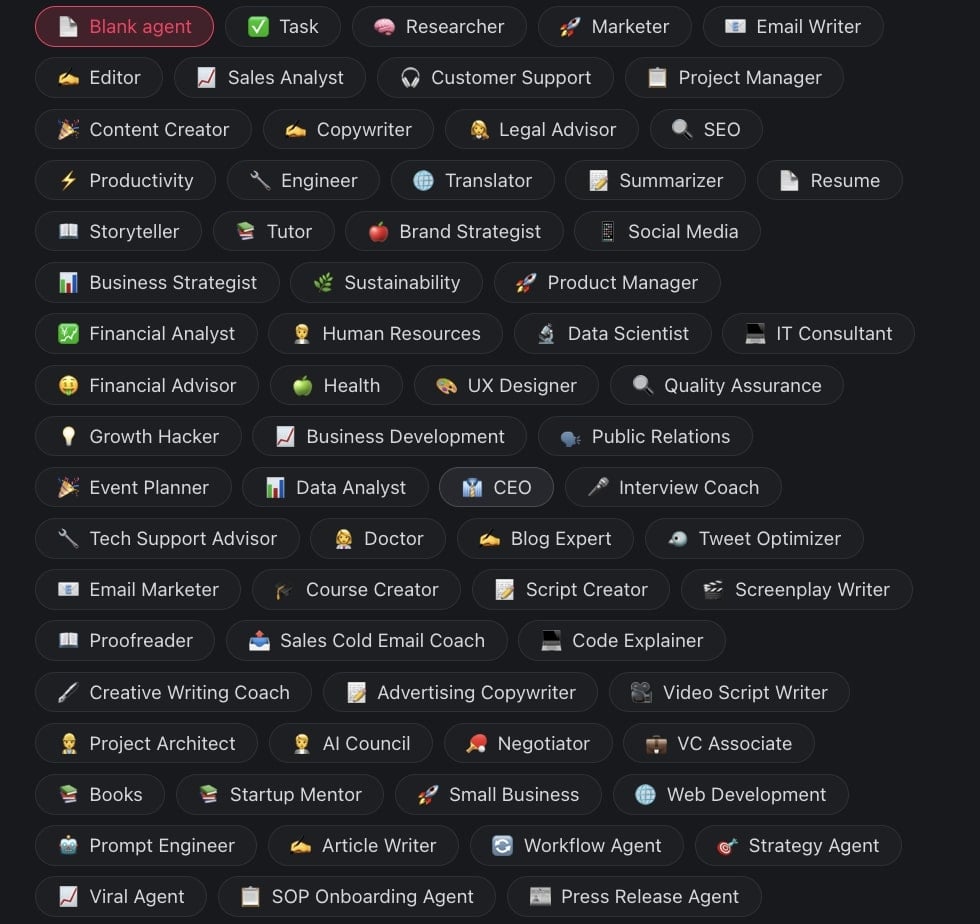
Taskade features dozens of agent templates you can start with, each with a set of customizable commands that speed up work (more on that in a bit).
You can run agents within your projects or interact with them in a chat.
Here's a quick video introduction that will help you get up to speed.
Pretty cool, huh? Now, let’s set one up.
Create Your First Agent
Here’s a typical content creator scenario.
You want to produce a weekly newsletter that highlights industry trends, news, and tips in a casual, yet authoritative tone.
We'll set up an agent that will act as a hyper-personalized writing assistant.
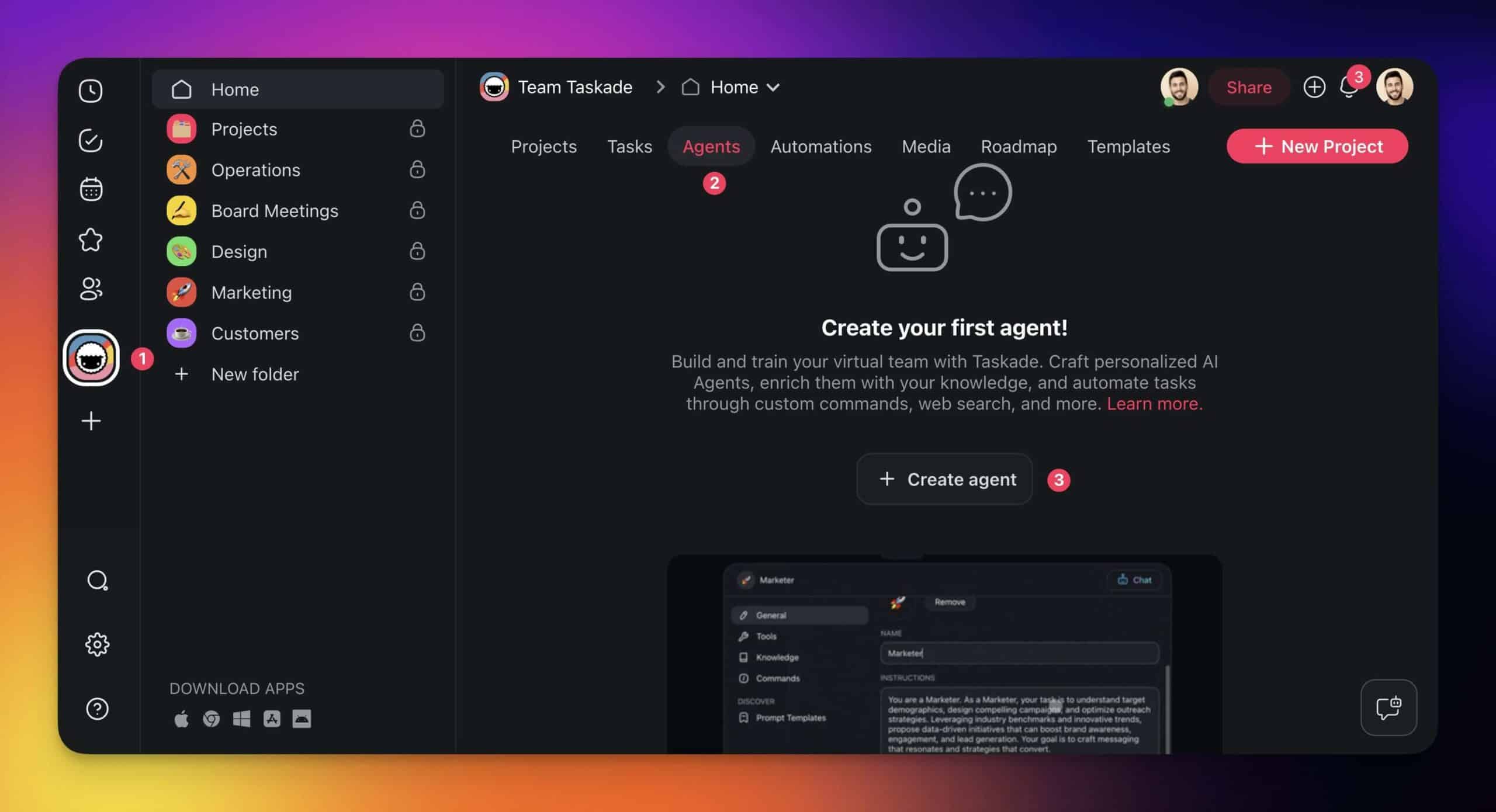
First, head over to your workspace and go to the Agents tab.
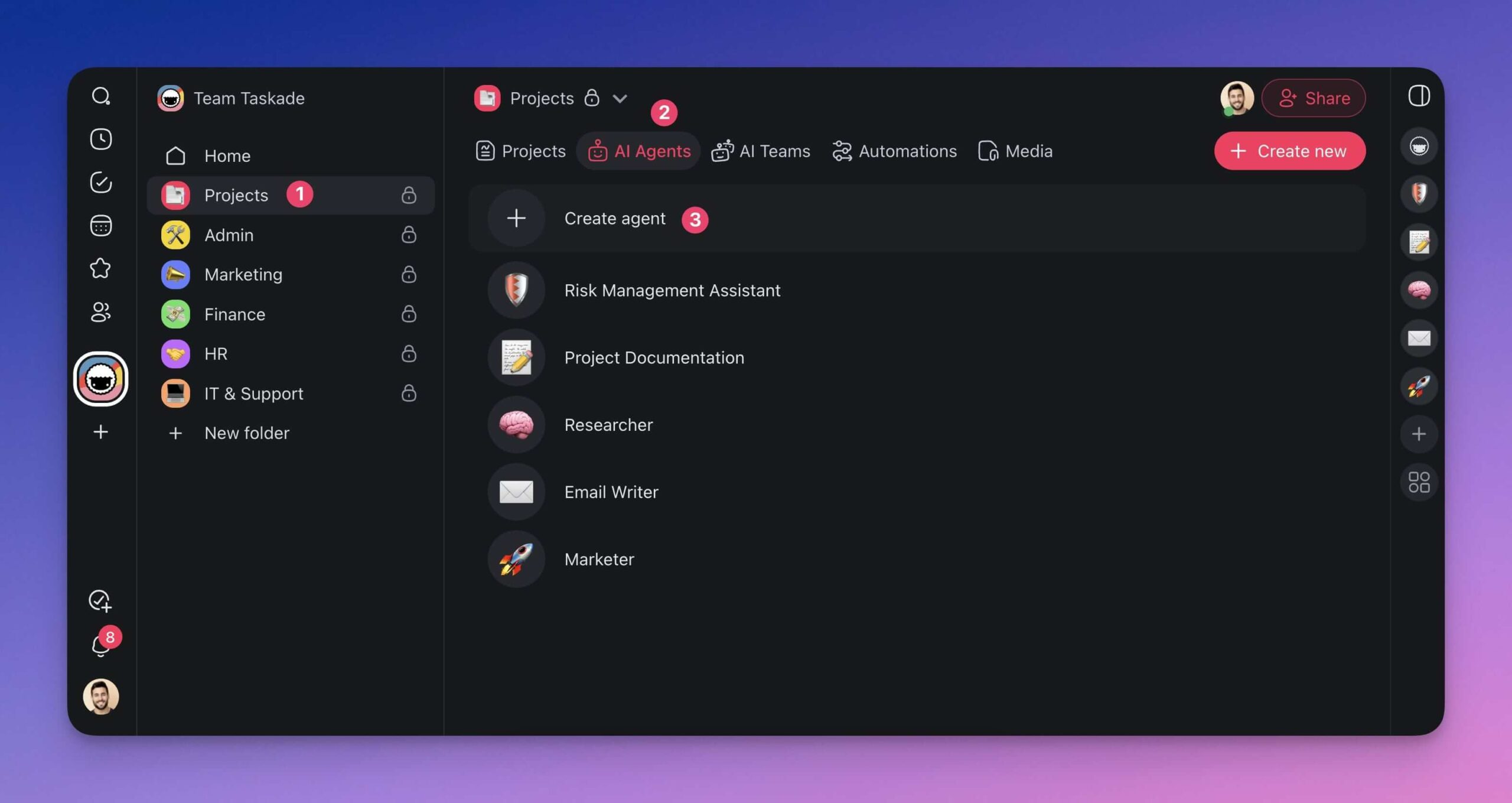
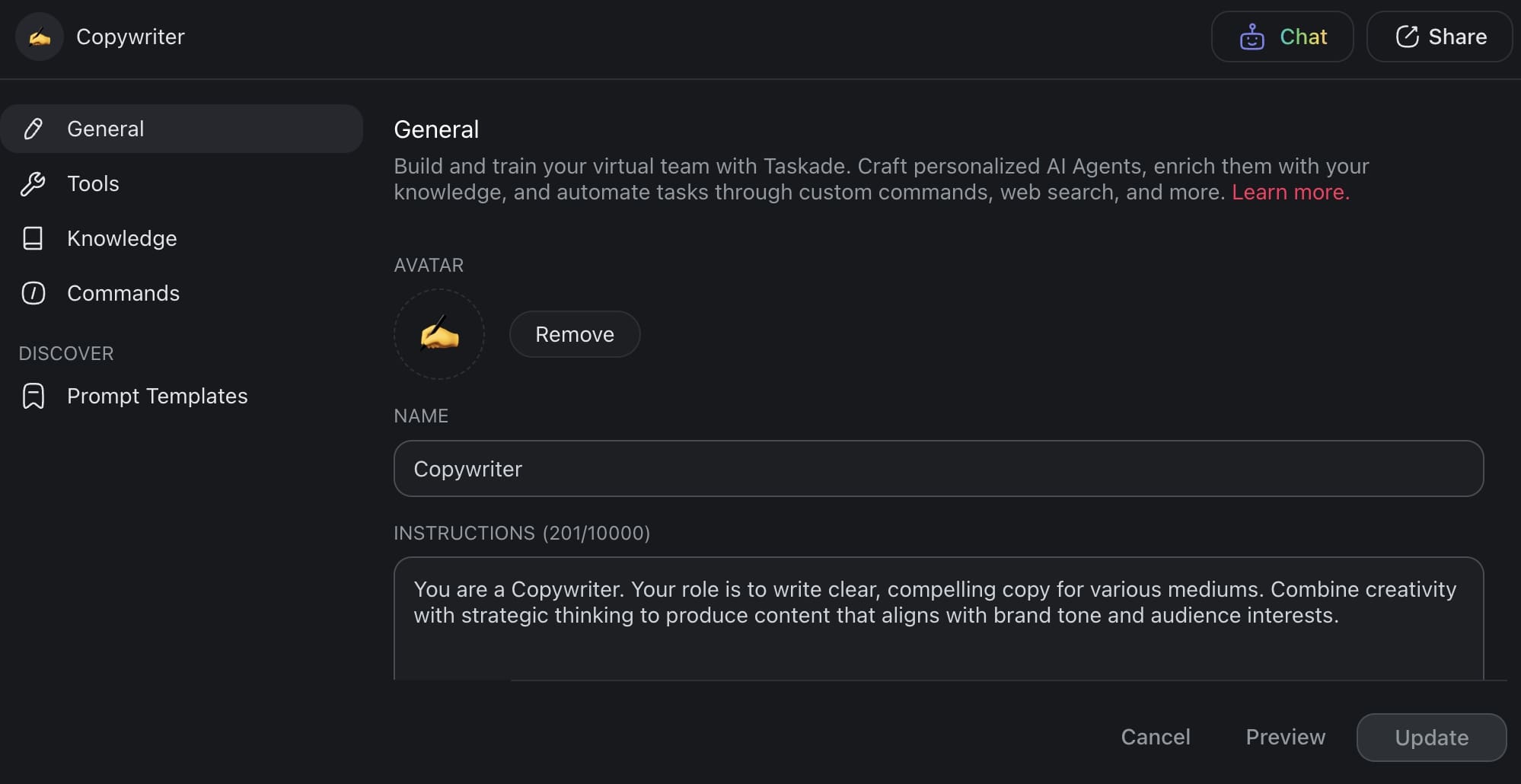
Once inside, click ➕ Create agent, pick the ✍️ Copywriter template, give your new agent a name and avatar (optional), and hit Create.
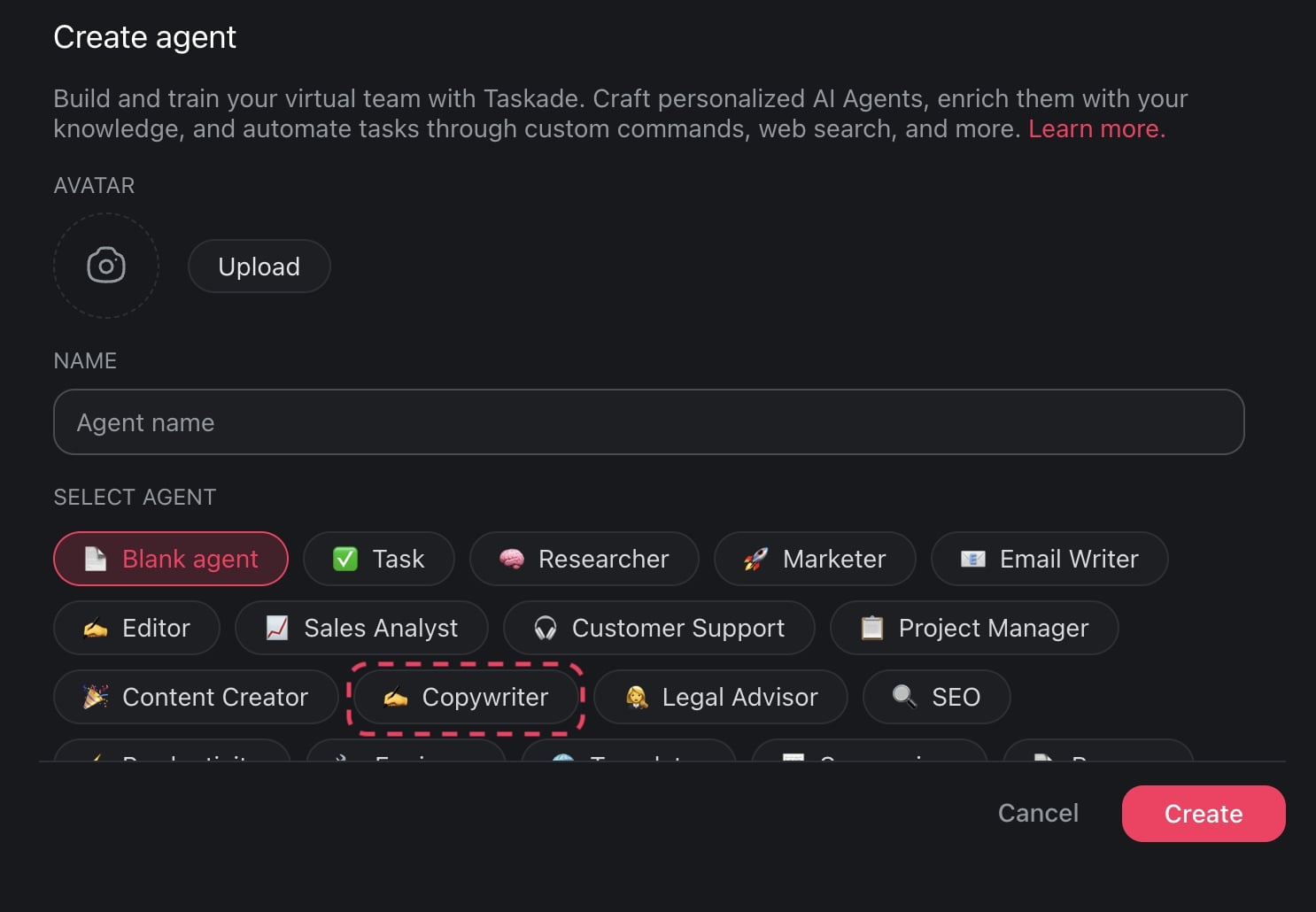
You're now in the Agent Settings menu.
Train Your Agent
The Knowledge tab on the left gives you several options to train your agent.
You can attach previous newsletters as .pdf or .docx documents, or any web resources (web pages, blogs, YouTube videos) you want the agent to learn from.
Start by adding a few newsletter samples so the agent can learn from your past content — what worked, what resonated, and the overall style.
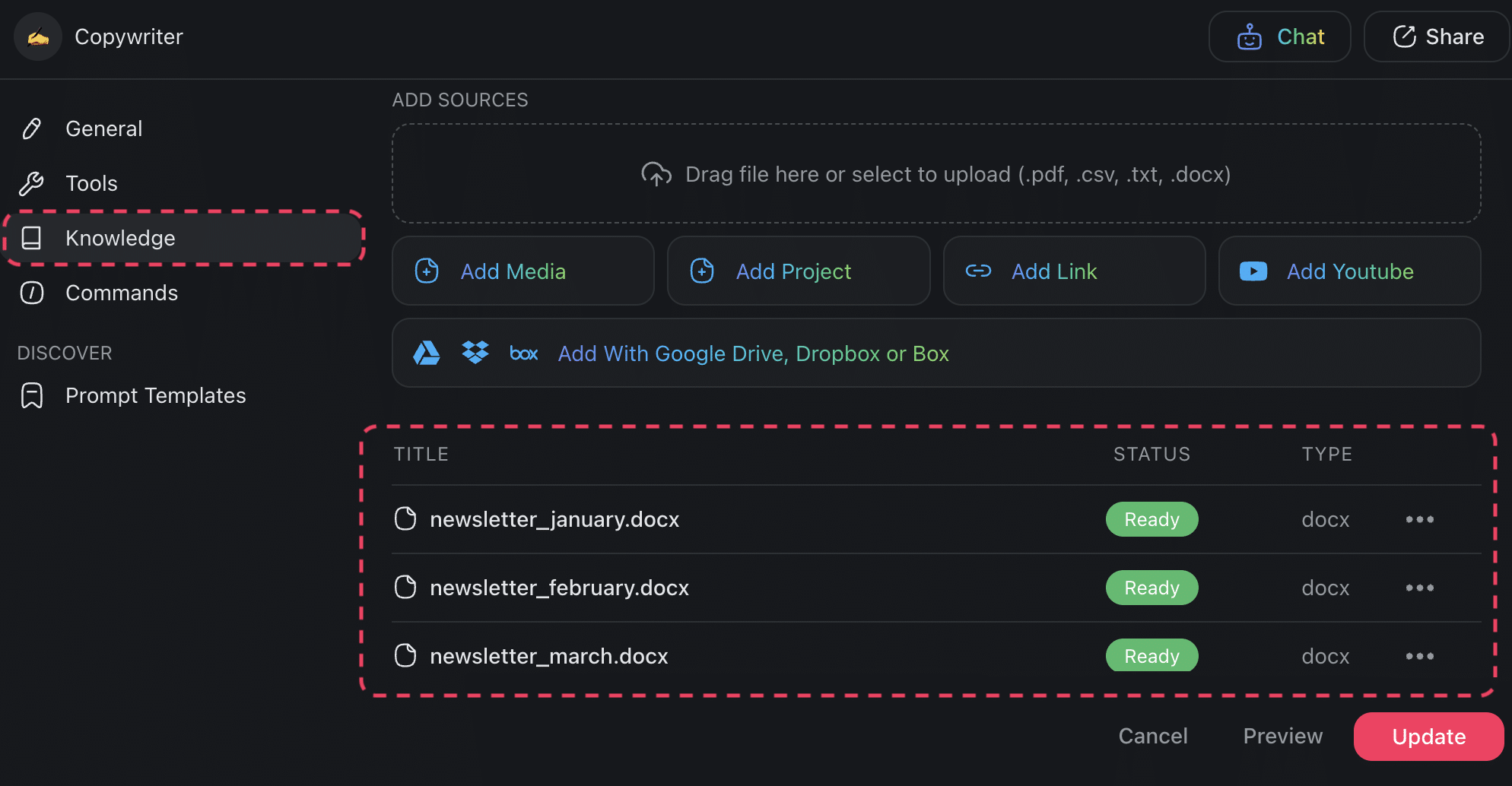
At this stage, you may also want to upload a list of words and phrases you want the agent to avoid.
Now, about those custom commands.
Define Custom Commands
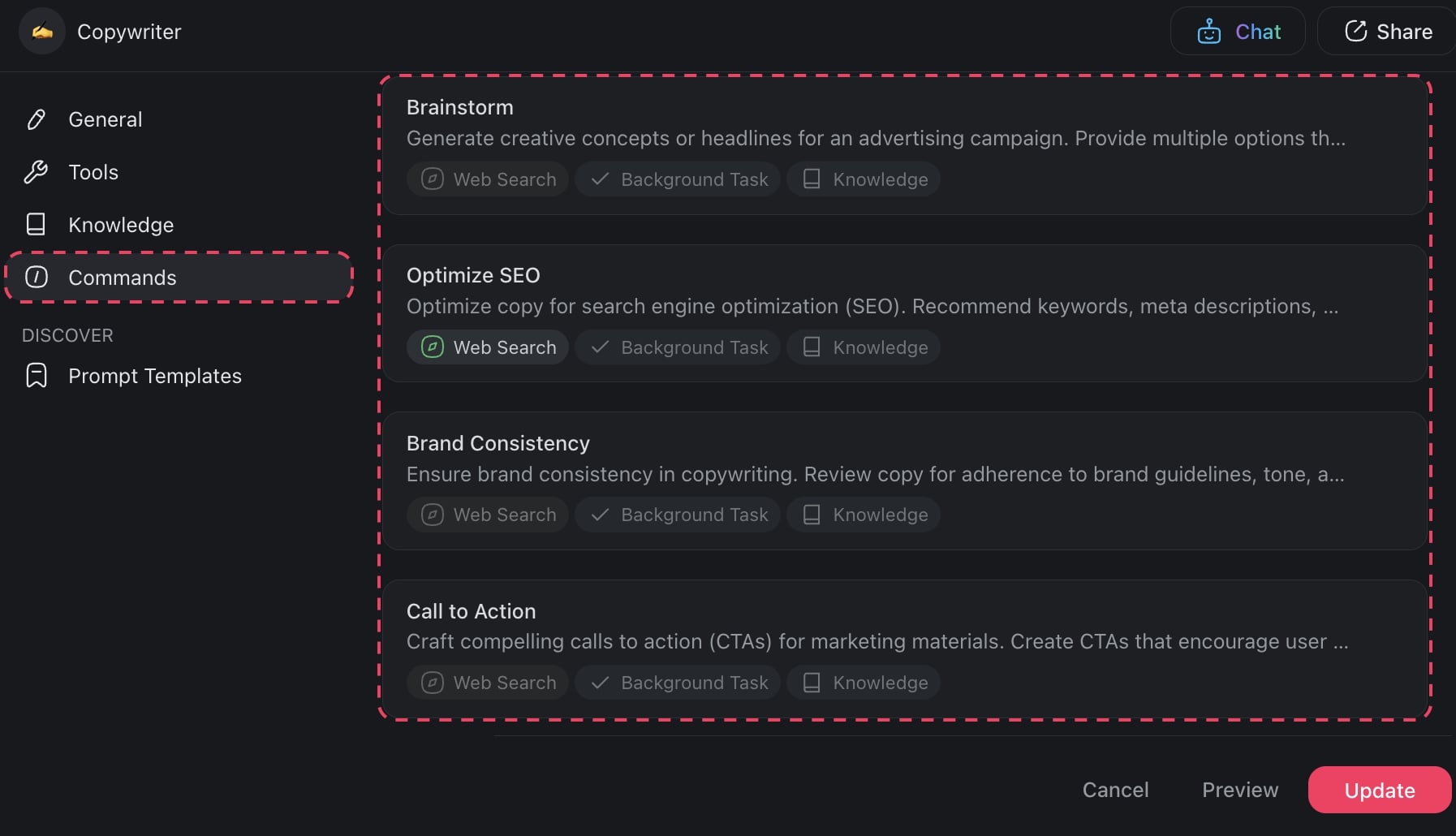
Custom commands are the levers you pull to interact with agents. They come in a simple / + “command name” format that works anywhere inside Taskade.
For instance, you may create a command to generate topic ideas based on trending keywords, or another to refine language for clarity and engagement.
Each command can be triggered in the project editor or in the chat.
The ✍️ Copywriter agent already includes several generic commands. You can customize each of them or add your own to the pool.
And now for the fun part. 🥳
Use the Agent
Head back to the Agents tab and choose the ✍️ Copywriter agent from the list.
Once in the Agent Chat, describe the newsletter you're working on.
You may include details like:
👤 Target audience
💡 Newsletter topic
📐 Format and length
💬 Key messages
📣 Call-to-action
🚦 Tone and style preferences
Don't forget to instruct the agent to imitate the style of the uploaded documents.
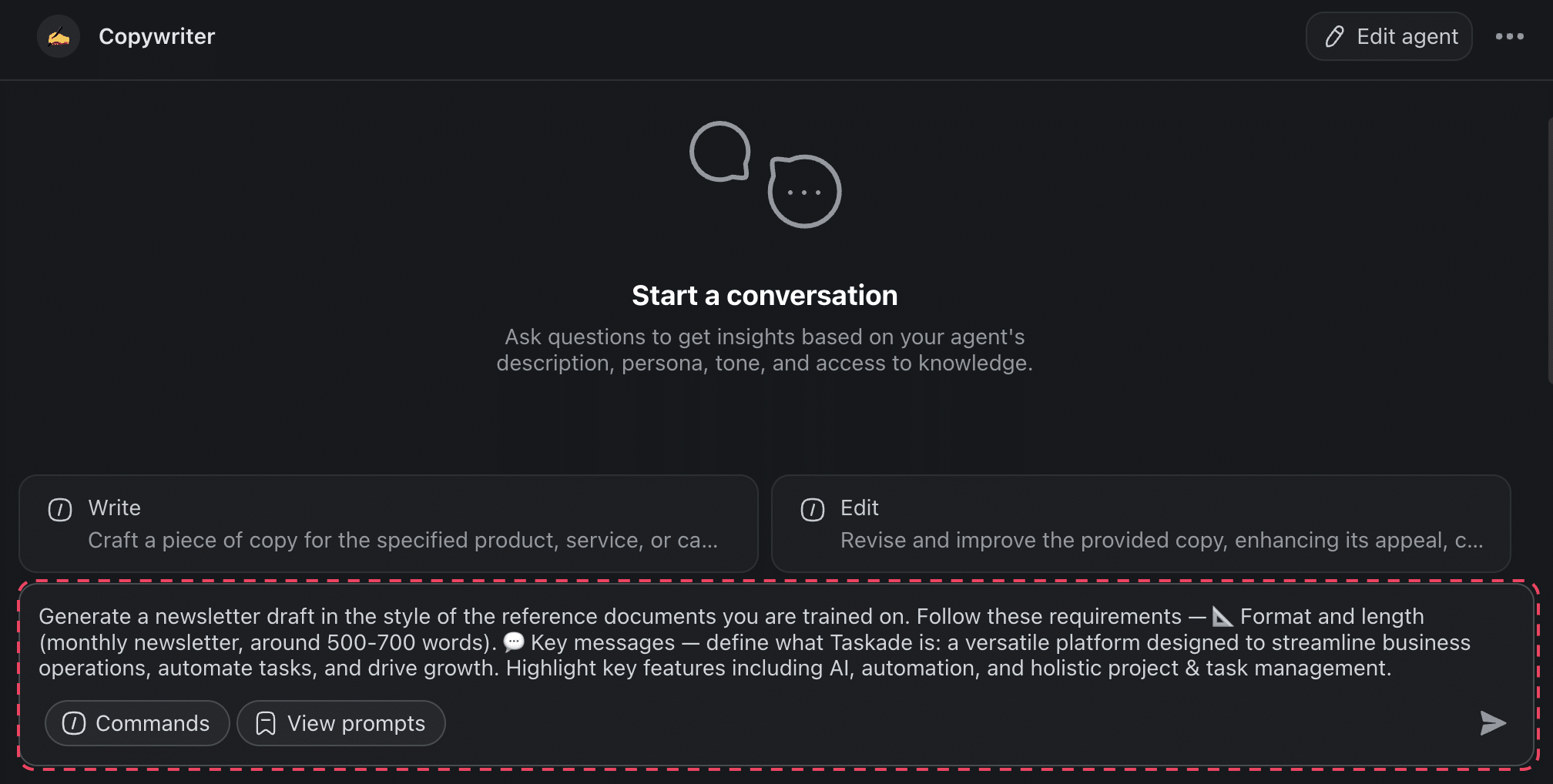
Finally, ask the agent to generate and press ⌨️ Enter.
The agent will craft a personalized newsletter draft based on the guidelines.
Experiment with agent settings to match the type of content you'r working on. Play with the tone, style, and agent knowledge to match your unique style.
And that’s it! 🥳
Ready to build your own custom AI agents?
Create a free Taskade account today! 🐑
Workspace DNA: How Memory + Intelligence + Execution Powers Content Humanization
The biggest challenge with humanizing AI content is inconsistency — different editors apply different standards, brand voice guidelines get forgotten, and new team members start from scratch. Taskade's Workspace DNA framework creates a self-reinforcing system that eliminates these gaps:
- Memory: Projects store your brand voice guide, past content examples, editorial feedback, lists of phrases to avoid, and approved terminology. Every editorial decision is retained, so your standards compound rather than reset with each new piece.
- Intelligence: AI agents with 33 built-in tools and persistent memory learn what makes your content sound human by analyzing your accumulated writing samples. Agents apply your specific style rules consistently across all content — they never forget a guideline or get tired.
- Execution: Workflow automations with 100+ integrations handle the production pipeline — routing AI drafts to the humanization agent, flagging content that needs human review, and publishing approved pieces to your CMS or social channels.
Memory feeds Intelligence (agents learn your voice from your best content), Intelligence triggers Execution (humanized drafts route through review), and Execution creates Memory (published content and editorial feedback improve future output). This loop means your content humanization process gets better with every piece you publish.
Common AI Tells and How to Fix Them
| AI Tell | Why It Sounds Robotic | Human Alternative |
|---|---|---|
| "It's important to note that..." | Filler phrase, delays the point | State the point directly |
| "In today's fast-paced world..." | Generic, overused opener | Use a specific, concrete detail |
| "Leveraging" | Corporate jargon AI defaults to | "Using," "applying," or the specific action |
| "In the realm of..." | Unnecessarily formal | "In" or rephrase entirely |
| "Delve into" | AI-favorite verb, rarely used by humans | "Explore," "look at," or "break down" |
| "Tapestry of..." | Overwrought metaphor | Simple, direct description |
| "Navigate the complexities" | Vague, says nothing specific | Name the specific challenge |
| "Paramount" | AI overuses formal adjectives | "Critical," "essential," or explain why it matters |
| Uniform sentence length | All sentences 15-20 words | Mix short (5 words) and long (25+ words) |
| No first-person perspective | AI avoids personal voice by default | Add "I," "we," anecdotes, opinions |
Train your Taskade AI agent with this list in its knowledge base, and it will automatically flag and rewrite these patterns in every draft it processes.
Vibe Coding: Building Content Humanization Tools Without Code
Vibe coding — describing what you want and letting AI build it — opens up a new approach to content humanization at scale.
Instead of manually checking every AI draft against your style guide, teams use Taskade Genesis to build custom editorial tools from natural-language prompts:
- "Build a content review dashboard that scores drafts on readability, brand voice alignment, and AI-tell detection"
- "Create an editorial workflow tool that routes drafts from AI agent to human reviewer to published with status tracking"
- "Build a style guide checker that flags overused phrases and suggests replacements based on our brand voice examples"
With 150,000+ apps built, Genesis lets content teams deploy these tools in minutes — complete with custom domains and password protection. Publish to the Community Gallery so other teams can benefit from your editorial systems.
Combined with AI agents trained on your writing style and automations that handle routing and scheduling, the result is a content production system where AI handles the heavy lifting while humans focus on the creative judgment that makes content truly resonate. This is the agentic AI approach to content — not replacing human writers, but amplifying what they do best.
For teams producing content at scale, the combination of Taskade's AI agents (starting at $6/month), workflow automation, templates, and 7 project views (List, Board, Calendar, Table, Mind Map, Gantt, Org Chart) provides everything needed to humanize AI content consistently across the entire operation.
🪄 Giving Your AI Content That Human Touch
Time to wrap it up.
Whether we like it or not, LLMs have transformed the entire creative landscape. And companies like OpenAI, Nvidia, Amazon, Google, and others are already cooking up even more impressive tech as we’re writing these words.
So, have humans fallen down the creative food chain?
Not so fast. AI-generated content may be affordable and easy to scale. But it can’t replace the human touch that makes it stand out from the noise.
The best approach is a hybrid workflow: let AI agents handle research, first drafts, and consistency checks, while you bring the personal voice, real-world experience, and creative judgment that no algorithm can replicate. Tools like Taskade, with workflow automation, AI-powered project management, and customizable templates, make this hybrid approach practical at scale.
So keep creating content that not only informs but also connects and stands the test of time. Lean on AI for support, but let your own voice shine through.
Ready to build your own content humanization agent? Create a free Taskade account and explore the Community Gallery for pre-built agent templates.
💬 Frequently Asked Questions About Humanizing AI Generated Content
What is the best AI Humanizer tool?
The best AI humanizer tool is the one you built yourself. You can train Taskade AI Agents using your past content to imitate the unique style and ideas that characterize your writing. The last step is editing, arguably the most important part of the writing process. This is where you refine and perfect your content to ensure it reflects your voice and resonates with your audience.
How do I make AI content undetectable?
Currently, there are no public AI detection tools with a proven track record. But, that doesn't mean you should use AI-generated text in your own work as is. Apply common sense. Use AI as a starting point, edit the output, and be on the lookout for words and phrases that frequently appear in text generated by large language models (LLMs).
How can I humanize AI content for free?
Start by building the agent mentioned in this article. Create a list of words and phrases that frequently appear in your AI-generated content, and use it to train the agent on what kind of language and linguistic constructions it should avoid. Fine-tune your agent and include additional knowledge sources depending on the style you want to achieve and the kind of content you want to generate.
