The global LMS market hit $28.1 billion in 2025. It is projected to reach $44.5 billion by 2028. Every Fortune 500 company, every university, and every government training department runs some form of learning management system.
But here is the disconnect: most LMS platforms are built for organizations with dedicated IT teams, six-figure budgets, and twelve-month implementation timelines. If you are a solo tutor, a small training department, a community educator, or a startup that needs to onboard customers — the enterprise LMS does not fit.
This guide compares 8 LMS and course platforms across the full spectrum, from institutional heavyweights to creator-focused builders to a fundamentally different approach: building your own learning app from a single prompt.
We include pricing tables, a full feature comparison matrix, a real-world case study of an educator generating 8,400 page views per month with custom Genesis apps, and a step-by-step tutorial for building your own AI study portal.
Let's dive in.
TL;DR
- Enterprise LMS (Canvas, Moodle, D2L Brightspace): Powerful, complex, expensive. Built for universities and large organizations with IT support.
- Course Builders (Teachable, Thinkific): Focused on selling courses online. Good for creators and solo educators.
- Collaborative Learning (Google Classroom, 360Learning): Free or team-oriented. Good for schools and corporate L&D.
- Build Your Own (Taskade Genesis): Describe the learning app you need, get a working system with AI tutors, quizzes, progress tracking, and automations in minutes. Free to start, with Pro from $10/month (annual billing).
The "build your own" angle is what no traditional LMS vendor offers. Instead of adapting your content to a platform's structure, you describe the structure you need and AI builds it.
Why AI in Education Matters Now
Before comparing platforms, it helps to understand what AI actually changes about learning. The shift is not cosmetic — it is structural.
The retention problem is real. Research consistently shows that students forget 70% of new material within 24 hours without active reinforcement. Traditional LMS platforms deliver content — videos, readings, slides — but do not reinforce it. Completion rates for online courses hover between 5% and 15%. Students watch the videos, take the quiz, and forget everything by next week.
AI changes this in three concrete ways:
1. Adaptive pacing. An AI-powered system adjusts the speed and difficulty of content based on individual performance. A student who masters cell biology quickly moves to genetics without waiting for the class. A student who struggles with inheritance patterns gets additional examples, different explanations, and more practice before moving on. This is not new in theory — adaptive learning has been discussed for decades — but AI makes it practical without requiring teams of instructional designers to build branching content paths manually.
2. On-demand tutoring. A well-trained AI agent can answer student questions at 2 AM on a Sunday, explain the same concept seven different ways, generate unlimited practice problems, and never lose patience. This does not replace human instructors — it supplements them. The instructor handles the nuanced discussions, the emotional support, and the judgment calls. The AI handles the repetitive explanations and the 200th time someone asks "What is the difference between mitosis and meiosis?"
3. Automated assessment at scale. Generating quizzes, grading short answers, providing feedback on practice problems — these tasks consume enormous amounts of instructor time. AI handles them reliably for well-defined question types, freeing instructors to focus on the teaching that requires human judgment: essay evaluation, project mentoring, and one-on-one guidance.
The question is not whether AI belongs in education. The question is which platform implements it in a way that actually helps learners.
The LMS Landscape in 2026
The learning technology market in 2026 splits into three tiers, and understanding where each tier falls is critical to choosing the right platform.
Tier 1: Institutional LMS platforms. Canvas (by Instructure), Moodle, D2L Brightspace, and the legacy players like Blackboard. These platforms manage the full learning lifecycle: enrollment, content delivery, assessments, grading, compliance tracking, analytics, and integration with student information systems. They serve universities enrolling 50,000 students and corporations training 100,000 employees. Implementation takes months. Configuration requires specialists. Annual costs run from $5,000 for small deployments to $50,000+ for enterprise contracts.
Tier 2: Course builder platforms. Teachable, Thinkific, Kajabi, and their competitors. These serve independent educators, coaches, and content creators who want to package and sell knowledge online. They handle course hosting, payment processing, student access, and basic analytics. They are not learning management systems in the traditional sense — they are commerce platforms for educational content. Monthly costs range from $36 to $200+.
Tier 3: Lightweight and collaborative tools. Google Classroom for K-12, 360Learning for collaborative corporate training, and various niche tools that serve specific use cases without the overhead of a full LMS.
The gap. Between Tier 1 (too complex, too expensive) and Tier 2 (too focused on selling courses), there is a massive underserved market: small teams, individual tutors, training departments within startups, community educators, and anyone who needs a custom learning experience without enterprise overhead or creator-focused commerce features.
This is where the "build your own" approach enters the picture.
Two Approaches: Buy vs Build
Every organization facing a learning technology decision has two paths. The traditional path is to buy an existing platform. The emerging path is to build exactly what you need.
  BUY (Traditional LMS)                    BUILD (Vibe Learning App)
  ─────────────────────                     ─────────────────────────
  1. Research platforms                     1. Describe what you need
  2. Request demos & quotes                 2. Genesis generates the app
  3. Negotiate contract                     3. Test with real content
  4. Configure for your needs               4. Iterate with prompts
  5. Adapt content to platform              5. Publish and share
  6. Train administrators                   6. Done.
  7. Train instructors
  8. Launch
  9. Ongoing maintenance  Timeline: 3-12 months                    Timeline: 15-60 minutes
Cost: $5,000-50,000+/year               Cost: $72/year (annual billing)
Customization: Limited to settings       Customization: Unlimited
AI Features: Vendor-dependent            AI Features: Built-in agents
The "buy" path makes sense when you need accreditation compliance, LTI integration with existing university systems, or SCORM-compatible grade books that connect to student information systems. These are real requirements for real institutions.
The "build" path makes sense when you need something that does not exist as a product. A flash card maker tuned to your curriculum. A quiz generator that draws from your specific knowledge base. A study portal that combines course content, practice exercises, and an AI tutor trained on your subject matter. A customer onboarding system that adapts based on user responses.
Consider a concrete example. A language tutor in Madrid teaches Spanish to business professionals. She needs:
- A vocabulary app focused on business terminology
- A conversational practice tool with AI dialogue partners
- A progress tracker that shows which grammar patterns each student struggles with
- Automated reminders for students who have not practiced in 3 days
No existing LMS offers all of this out of the box. Canvas is designed for universities, not solo tutors. Teachable is designed for selling courses, not adaptive practice. She could spend weeks cobbling together multiple tools and connecting them with Zapier. Or she could describe what she needs in a single Genesis prompt and have a working system in 30 minutes.
This is the gap that "build your own" fills: the space between what platforms offer and what educators actually need.
Coaches hit the same wall from the other side. Selling the program is solved; what is missing is a client progress portal you own rather than rent — per-client goals, session history, and between-session accountability that a course-commerce platform was never designed to hold.
Taskade Genesis is the platform that makes the "build" path possible for non-technical educators.
8 LMS Platforms Compared
Quick Reference Table
| # | Platform | Type | Best For | AI Features | Free Plan | Starting Price |
|---|---|---|---|---|---|---|
| 1 | Taskade Genesis | AI App Builder | Custom learning apps | AI tutors, quiz generation, automations | Yes | Free |
| 2 | Canvas | Institutional LMS | Universities, K-12 | SpeedGrader, analytics | Free for Teachers | Quote-based |
| 3 | Moodle | Open-Source LMS | Self-hosted deployments | Plugin-based AI | Yes (self-hosted) | Free (+ hosting) |
| 4 | Google Classroom | Classroom Tool | K-12 with Google Workspace | Limited | Yes (for schools) | Free |
| 5 | Teachable | Course Builder | Selling online courses | AI curriculum assistant | No | $39/mo |
| 6 | Thinkific | Course Builder | Course creators | AI content helper | Yes (limited) | $36/mo |
| 7 | D2L Brightspace | Enterprise LMS | Corporate + higher ed | Adaptive learning, Creator+ | No | Quote-based |
| 8 | 360Learning | Collaborative LMS | Corporate L&D teams | AI content suggestions | No | $8/user/mo |
The 8 Platforms: In-Depth
1. Taskade Genesis — Build Custom LMS From a Prompt
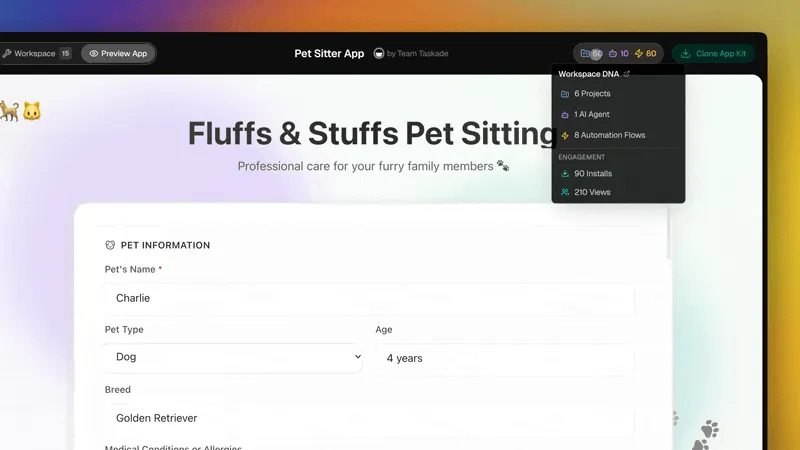
Taskade Genesis is not an LMS. It is an AI app builder that lets you create any learning application from a natural language description. Instead of configuring an existing platform, you describe the learning experience you want and Genesis builds it as a complete, working application.
Why this matters for education: Every educator has a unique approach to teaching. A chemistry tutor needs different tools than a corporate compliance trainer. A language school needs different workflows than a medical residency program. Traditional LMS platforms force everyone into the same structure. Genesis lets each educator build exactly the system that matches their pedagogy.
Workspace DNA for education. Taskade's architecture maps directly to learning needs:
- Memory (Projects): Course content, lesson plans, student records, and resource libraries stored in structured Projects with multiple views — List, Board, Calendar, Table, Mind Map, Gantt, and Org Chart. Organize a curriculum as a mind map, track assignments on a board, view the semester schedule on a calendar.
- Intelligence (AI Agents): Build AI tutors trained on your course material. An agent that answers student questions about organic chemistry. An agent that generates practice problems in calculus. An agent that reviews essay drafts and provides feedback. These run on 15+ AI models from OpenAI, Anthropic, and Google.
- Execution (Automations): Automated grading workflows, deadline reminders, progress notifications, and feedback loops. When a student completes a module, automatically assign the next one. When a quiz score drops below 70%, trigger a review session. Connect to Slack, Gmail, Google Sheets, and 100+ other services.
What educators have built with Genesis:
- Flash card makers with spaced repetition
- Interactive quiz generators for exam prep
- Study planners with AI-powered scheduling
- Course portals with module progression
- Student progress dashboards
- AI tutoring chatbots trained on specific textbooks
- Reading trackers with comprehension checks
- Multiplication playgrounds for elementary math
Pricing (annual billing): Free tier available. Pro at $10/month (10 users included). All plans include Taskade Genesis app building, AI agents, and automations.
Best for: Tutors, small training teams, educators who need custom tools, community educators, anyone who wants to build rather than configure.
2. Canvas (by Instructure) — The Institutional Standard
Canvas is the market leader for K-12 and higher education. It powers learning at thousands of universities and school districts worldwide. If you have attended a US university in the past decade, you have probably used Canvas.
What makes Canvas dominant: Canvas excels at scale. It handles tens of thousands of concurrent students, integrates with every major student information system (SIS), supports LTI for connecting third-party tools, and provides detailed analytics for institutional reporting. SpeedGrader makes assessment efficient for instructors managing hundreds of students. The mobile app is well-designed and reliable.
The AI angle: Instructure has been integrating AI features progressively. Canvas includes AI-assisted grading suggestions, predictive analytics for identifying at-risk students, and content recommendations. However, the AI features are additive — they enhance an existing platform rather than fundamentally changing how courses are built.
Where Canvas falls short: Complexity. Canvas is built for institutions with dedicated administrators. Setting up a course requires navigating modules, assignments, quizzes, discussion boards, and grading schemes through a multi-layered interface. For a solo tutor or small training team, Canvas is dramatically over-engineered. The "Free for Teachers" tier is limited to individual courses without institutional features.
Pricing: Free for individual teachers (limited features). Institutional pricing is quote-based — typically $5,000-$30,000+ per year depending on enrollment size and features.
Best for: Universities, K-12 school districts, and large organizations that need compliance, LTI integration, and enterprise-grade scalability.
3. Moodle — Open-Source and Self-Hosted
Moodle is the world's most widely used open-source LMS, with over 400 million users across 240+ countries. It is free to download and run on your own server, which makes it the default choice for organizations that need complete control over their learning platform.
The open-source advantage: Moodle's greatest strength is freedom. You own the platform. You control the data. You can modify the source code, build custom plugins, and integrate with any system you need. The plugin ecosystem includes 2,000+ extensions covering everything from plagiarism detection to virtual labs.
The AI story: Moodle itself does not include native AI features, but the plugin ecosystem fills the gap. Third-party plugins add AI-powered content generation, chatbot integration, adaptive learning paths, and automated analytics. MoodleNet, the organization's content sharing network, is expanding to include AI-curated resources.
The real cost of "free": Moodle is free to download but not free to run. You need server hosting ($10-100+/month depending on scale), a system administrator to manage updates and security, and technical knowledge to install and configure plugins. For a university IT department, this is routine. For a solo educator, it is a significant barrier.
Customization vs. complexity: Moodle can do almost anything, but configuring it requires deep familiarity with the platform. The admin interface has hundreds of settings. Course creation involves navigating activities, resources, grading schemes, and enrollment methods. The learning curve is steep even for experienced educators.
Pricing: Free (self-hosted). MoodleCloud hosted plans start at approximately $130/year for 50 users.
Best for: Organizations with IT support that need full data ownership, customization, and large-scale deployment.
4. Google Classroom — Free and Simple for Schools
Google Classroom is the default learning tool for millions of K-12 classrooms worldwide. It is free for any school using Google Workspace for Education, which covers the vast majority of US public schools and many international institutions.
Why schools love it: Google Classroom is simple. Teachers create a class, post assignments, and students submit work — all within the Google ecosystem they already use. Integration with Google Docs, Sheets, Slides, Drive, and Meet is seamless. There is almost no setup required.
Limitations: Google Classroom is not a full LMS. It lacks built-in quiz engines (you use Google Forms), does not support SCORM content, has minimal analytics, and offers limited customization. There is no concept of learning paths, adaptive content, or advanced assessment types. Grading is basic — pass/fail or point-based without rubric customization at the depth institutions expect.
AI features: Google has added AI-assisted practice sets and some Gemini-powered features for content suggestions, but the AI integration is still early compared to dedicated LMS platforms. The primary value is simplicity, not intelligence.
The privacy consideration: Google Classroom used through Google Workspace for Education is FERPA and COPPA compliant. However, the broader questions about student data within the Google ecosystem remain a concern for some institutions and parents.
Pricing: Free for schools with Google Workspace for Education. Google Workspace for Education Plus (advanced features) is $5/student/year.
Best for: K-12 teachers who need a simple, free tool within the Google ecosystem.
5. Teachable — Course Commerce for Creators
Teachable is a course builder platform designed for independent educators, coaches, and content creators who want to package and sell knowledge online. It is not an LMS in the institutional sense — it is an e-commerce platform for education.
The creator economy angle: Teachable handles the business side of online education: course hosting, payment processing (including subscriptions and payment plans), student management, and basic analytics. Creators upload videos, PDFs, and quizzes, organize them into modules, set pricing, and publish. Teachable's checkout and sales pages are optimized for conversion.
AI features: Teachable introduced an AI curriculum assistant that helps creators outline course structures and generate lesson descriptions. It speeds up the initial planning phase but does not create interactive learning experiences or adapt to student performance.
Where Teachable is strong: Monetization. If your primary goal is to sell a course, Teachable's payment processing, affiliate programs, and marketing integrations are well-built. The platform handles taxes, payouts, and compliance so creators can focus on content.
Where Teachable is limited: Interactivity. Teachable courses are primarily video-based with basic quizzes. There is no adaptive learning, no AI tutoring, no real-time collaboration, and limited assessment types. The platform is designed for consumption, not active learning.
Pricing: Basic at $39/month. Pro at $119/month. Pro+ at $199/month. All plans include unlimited students and courses. Transaction fees apply on the Basic plan (5%).
Best for: Content creators and coaches who want to sell courses online with professional payment processing.
6. Thinkific — Customizable Course Building
Thinkific competes directly with Teachable in the course builder space, with some key differentiators around customization, community features, and pricing structure.
What sets Thinkific apart: Thinkific offers more control over the student experience. The site builder provides deeper customization for course landing pages. Communities (launched in recent updates) let course creators build discussion spaces alongside their content. The app store includes integrations for marketing, analytics, and student engagement.
AI features: Thinkific has introduced AI-powered content generation tools that help creators draft lesson content, generate quiz questions, and create course descriptions. The AI assistance is focused on content creation efficiency rather than student-facing intelligence.
The free tier advantage: Unlike Teachable, Thinkific offers a free plan that lets creators publish one course with unlimited students. This makes it accessible for educators testing the waters before committing to a paid plan.
Assessment capabilities: Thinkific supports quizzes, surveys, and assignments with more variety than Teachable. However, like Teachable, it lacks adaptive learning, AI tutoring, and advanced assessment analytics that institutional LMS platforms provide.
Pricing: Free plan (1 course). Basic at $36/month. Start at $74/month. Grow at $149/month. No transaction fees on any paid plan.
Best for: Course creators who want more customization and community features than Teachable, with a free tier to start.
7. D2L Brightspace — Enterprise AI Learning
D2L Brightspace is an enterprise LMS that has been investing heavily in AI-powered learning features. It serves both higher education institutions and corporate training departments, with particular strength in accessibility and adaptive learning.
The AI advantage: Brightspace's Creator+ tool uses AI to help instructors build interactive, accessible course content. The platform includes adaptive learning paths that adjust content delivery based on student performance — students who master concepts quickly move ahead, while those who struggle receive additional support materials. Predictive analytics flag at-risk students before they fall behind.
Accessibility leadership: D2L has consistently led the LMS market in accessibility features. Brightspace meets WCAG 2.1 AA standards, includes built-in screen reader support, and provides tools for creating accessible content. For institutions with compliance requirements, this is a significant differentiator.
Corporate training features: Beyond higher education, Brightspace serves corporate L&D with competency-based learning, compliance tracking, certification management, and skills mapping. The platform connects learning outcomes to business objectives in ways that smaller tools cannot.
The complexity trade-off: Like Canvas, Brightspace is enterprise software. It requires dedicated administrators, significant configuration, and ongoing management. Implementation timelines range from weeks to months. The interface, while improved in recent versions, still reflects the complexity of the underlying system.
Pricing: Quote-based. Enterprise contracts typically start at $10,000+/year. D2L does not publish standard pricing.
Best for: Universities and corporations that need adaptive learning, strong accessibility, and enterprise-grade compliance tracking.
8. 360Learning — Collaborative Corporate Learning
360Learning takes a different approach to corporate training: collaborative learning. Instead of top-down course creation by a central L&D team, 360Learning enables subject matter experts across the organization to create, review, and improve training content together.
The collaborative model: In most organizations, the people who know the most about a topic are not on the L&D team. 360Learning lets sales managers create sales training, engineers create technical onboarding, and compliance officers create compliance courses — with L&D providing quality control and governance. This dramatically reduces content creation bottlenecks.
AI features: 360Learning uses AI to suggest content improvements, identify knowledge gaps based on quiz performance, and recommend courses to learners based on their role and performance data. The AI is focused on organizational learning intelligence rather than individual tutoring.
The peer learning advantage: Courses include built-in reactions, comments, and feedback loops. Learners can flag outdated content, suggest improvements, and share additional resources. This creates a continuously improving knowledge base rather than static courses that decay over time.
Where it fits: 360Learning is specifically designed for corporate training at scale. It excels when dozens or hundreds of subject matter experts need to contribute content, and when training needs to stay current with rapidly changing business practices.
Pricing: Starting at $8/user/month. Enterprise pricing is custom. Minimum seat requirements may apply.
Best for: Corporate L&D teams that want to decentralize course creation and leverage subject matter experts across the organization.
Full Feature Comparison Matrix
The table below compares all 8 platforms across 14 dimensions that matter most when choosing a learning platform. Green checkmarks indicate native support, yellow warnings indicate partial or plugin-dependent support, and red X marks indicate the feature is not available.
Use this matrix alongside the "When NOT to Build" section above to determine which platform fits your specific requirements. No single platform wins every category — the right choice depends on your constraints.
| Feature | Genesis | Canvas | Moodle | Google Classroom | Teachable | Thinkific | Brightspace | 360Learning |
|---|---|---|---|---|---|---|---|---|
| AI Tutoring | Custom AI agents | Limited | Plugin-based | Limited | No | No | Limited | No |
| Content Generation | AI-generated from prompt | No | Plugin-based | Limited | AI outline tool | AI draft tool | Creator+ AI | AI suggestions |
| Assessment Tools | Custom quizzes + AI | SpeedGrader + rubrics | Flexible quiz engine | Google Forms | Basic quizzes | Quizzes + surveys | Adaptive assessments | Quizzes + peer review |
| Adaptive Learning | Agent-driven | Analytics only | Plugin-based | No | No | No | Yes (native) | Performance-based |
| Mobile App | Responsive + native apps | Dedicated app | Dedicated app | Dedicated app | Responsive | Responsive | Dedicated app | Dedicated app |
| SCORM Support | No | Full | Full | No | Limited | Limited | Full | Import only |
| LTI Integration | No | Full | Full | Limited | No | Limited | Full | Limited |
| Integrations | 100+ via automations | LTI + SIS | 2,000+ plugins | Google ecosystem | Zapier + native | App store | Enterprise APIs | HR + Slack + native |
| Pricing Model | Per workspace | Per institution | Free + hosting | Free | Per plan | Per plan | Per institution | Per user |
| Customization | Unlimited (prompt-based) | Theme + config | Full source code | Minimal | Landing pages | Site builder | Theme + config | Template-based |
| Real-time Collaboration | Built-in multiplayer | Discussion boards | Forums + chat | Comments | None | Communities | Discussion | Peer reactions |
| Automation | Full workflow engine | Basic notifications | Plugin-based | Basic notifications | Zapier | Zapier | Workflow rules | Notifications |
| Data Ownership | Your workspace | Vendor-hosted | Self-hosted | Google-hosted | Vendor-hosted | Vendor-hosted | Vendor-hosted | Vendor-hosted |
| Setup Time | 5-15 minutes | Weeks-months | Days-weeks | Minutes | Hours | Hours | Weeks-months | Days-weeks |
Case Study: One Education Creator — 10+ Apps, 8,400 PV/Month
The most compelling argument for the "build your own" approach is not theoretical. It is already happening.
One education creator, building in the Taskade Genesis community, created over 10 education-focused apps using Taskade Genesis. These apps collectively generate approximately 8,400 page views per month, representing 12.5% of all Genesis community app traffic. One builder. One platform. Double-digit percentage of total traffic.
What they built:
- Flash Card Maker — Create, organize, and study flashcards with spaced repetition. Students input their material and the app generates study sessions optimized for retention.
- Quiz Generator — Upload notes or textbook content and the AI generates practice quizzes with multiple choice, fill-in-the-blank, and short answer questions.
- Study Planner — AI-powered scheduling that takes exam dates, topic complexity, and available study hours to generate an optimized study calendar.
- Exam Prep Tools — Subject-specific practice environments with timed mock exams, score tracking, and performance analytics.
- Multiplication Playground — Interactive math practice for younger students with gamified progression and achievement tracking.
- Reading Tracker — Log books, set reading goals, take notes per chapter, and track comprehension over time.
- Vocabulary Builder — Context-based vocabulary learning with AI-generated example sentences and usage patterns.
- Subject-Specific Tutors — AI chatbots trained on specific curricula that answer student questions and explain concepts in multiple ways.
Why this matters: This creator did not need a $50,000 LMS contract. They did not need a development team. They did not spend months configuring a platform. They described the tools their students needed and Genesis built them. Each app took minutes to create, runs on Taskade's infrastructure, and includes AI capabilities that enterprise LMS platforms charge premium prices for.
The traffic numbers tell the story. When education apps are genuinely useful, students use them. 8,400 monthly page views from organically discovered apps means real students are solving real learning problems with tools that did not exist six months ago.
The compound effect: Each app builds on the last. After building a flash card maker, the creator understood how Genesis handles data persistence. The quiz generator was faster. The study planner was faster still. By the tenth app, the build time was measured in minutes, not hours. This learning curve applies to any educator — the first app is an experiment, the fifth app is routine.
The organic discovery loop. These apps appear in the Taskade community, where other educators and students discover and clone them. A flash card maker built for AP Biology gets cloned and adapted for nursing school pharmacology. A quiz generator for history gets forked for SAT prep. Each clone generates its own traffic and drives more educators to the platform. This is a distribution model that no traditional LMS offers — your tool becomes a marketing channel.
This is the "build your own" advantage: instead of adapting to a platform's structure, you build the exact tool your learners need.
Build Your Own AI Study Portal
Watch: Build a live AI app from a single prompt with Taskade Genesis.
Here is a step-by-step guide to building a complete AI-powered study portal using Taskade Genesis. This example creates a multi-subject learning platform with course modules, quiz generation, progress tracking, and an AI tutor.
Step 1: Write the Genesis Prompt
Open Taskade Genesis and enter a prompt that describes your learning app. Be specific about the subjects, features, and user experience you want.
Example prompt:
Build an AI Study Portal for AP Biology students with:
Course Modules
- Cell Biology (structures, functions, transport)
- Genetics (DNA, RNA, inheritance patterns)
- Evolution (natural selection, speciation, evidence)
- Ecology (ecosystems, energy flow, population dynamics)
- Each module has: overview, key concepts, practice questions
Quiz Generator
- Generate 10-question quizzes from any module
- Question types: multiple choice, true/false, short answer
- Difficulty levels: review, practice, exam-level
- Show explanations for correct and incorrect answers
Progress Tracking
- Track which modules are completed
- Show quiz scores over time
- Identify weak areas that need more study
- Suggest next study topics based on performance
AI Tutor
- Chatbot trained on AP Biology curriculum
- Explains concepts in simple language
- Generates additional examples when students are confused
- Provides study tips and memorization strategies
Study Schedule
- Input exam date
- Generate daily study plan
- Balance across all modules
- Account for weak areas needing more time
Step 2: Review and Iterate
Genesis will build the app in 2-15 minutes. Review the generated interface and test each feature. Then refine with follow-up prompts:
- "Add a flashcard mode for vocabulary terms in each module"
- "Include a timer for practice quizzes so students can simulate exam conditions"
- "Add a section for linking YouTube videos and external resources per topic"
- "Make the AI tutor respond in both English and Spanish"
Step 3: Train the AI Tutor
Upload your course materials to the AI agent's knowledge base:
- Textbook chapters (PDF)
- Lecture notes (DOCX)
- Practice exam banks (CSV)
- Study guides and review sheets
- YouTube video transcriptions
- External resource URLs
The AI tutor will use this material to answer student questions with accurate, curriculum-specific responses rather than generic information. This is the critical difference between a generic chatbot and a trained educational agent: your tutor knows your curriculum, not just "biology in general."
Training tips for education agents:
- Upload the exact textbook your students use, not a general reference
- Include common misconceptions and how to address them
- Add example explanations at different difficulty levels
- Include the specific exam format (AP, IB, state standards) so the agent can tailor practice
- Update the knowledge base as the course progresses
Step 4: Set Up Automations
Configure automations using Taskade's automation engine:
- When a student completes a module, automatically assign the corresponding quiz
- When a quiz score is below 70%, send the student a review recommendation
- Weekly summary emails with progress updates and upcoming study targets
- When all modules are completed, generate a comprehensive practice exam
Step 5: Publish and Share
Publish the app with a shareable link. Students access it from any browser on any device. No downloads, no accounts (unless you require them), no installation.
Step 6: Iterate Based on Student Feedback
The real power of the "build your own" approach is iteration speed. After students use the portal for a week, you will know exactly what to improve:
- "Students keep asking for audio explanations — add a text-to-speech option"
- "The ecology quiz is too easy — increase the difficulty and add diagram-based questions"
- "Students want to see which topics their classmates are studying — add an anonymous leaderboard"
Each change is a prompt. Each prompt updates the live app immediately. No support tickets, no development sprints, no waiting for the next software release.
The entire process from first prompt to working portal takes 15-60 minutes depending on how much you customize. Compare that to weeks or months with a traditional LMS implementation. And the iteration cycle — weeks with traditional platforms, minutes with Genesis — means your learning tool improves at the speed of your teaching insights.
Live Demo
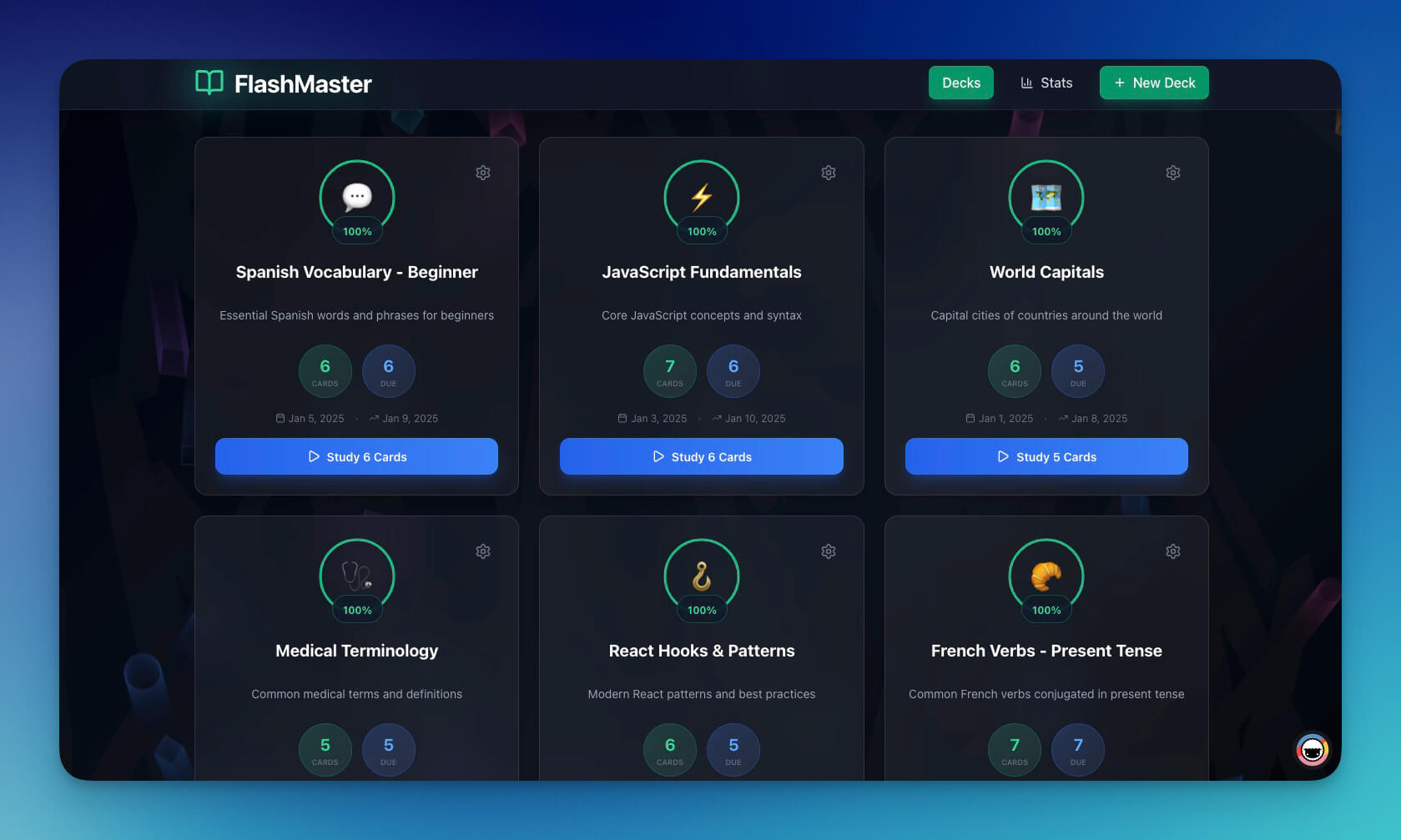
Try a Genesis-built education app below. This Flash Deck Maker was built from a single prompt and is actively used by students for exam preparation.
Click through the interface to create decks, add cards, and test the study mode. This is a live, working application — not a screenshot or mockup. Everything you see was generated by Genesis from a natural language description:
What you are seeing: A fully functional flash card application with deck creation, study mode, and progress tracking. Built in under 10 minutes. Running on Taskade infrastructure. No code written, no server configured, no maintenance required.
Want to build something similar for your students? Open Taskade Genesis and describe the learning tool you need. Or clone this app directly and customize it for your subject area.
The Economics: What Learning Technology Actually Costs
Cost is the most misunderstood dimension of learning technology. The sticker price rarely reflects the total cost of ownership.
Institutional LMS (Canvas, Blackboard, D2L Brightspace)
  Annual Institutional LMS Cost
  ═══════════════════════════════════════════════  License fee:          $5,000 - $50,000+
Implementation:       $10,000 - $50,000 (first year)
Admin staff:          $60,000 - $120,000/year (1-2 FTEs)
Training:             $2,000 - $10,000/year
Custom integrations:  $5,000 - $25,000
─────────────────────────────────────────────
Total Year 1:         $82,000 - $255,000+
Total Ongoing:        $67,000 - $180,000+/year
This makes sense for a university with 20,000 students. The per-student cost is $3-9/year. At scale, it is efficient.
It does not make sense for a tutoring business with 50 students, a startup onboarding 200 customers, or a community education program with a $5,000 annual budget.
Course Builder Platforms (Teachable, Thinkific)
Annual Course Builder Cost
═══════════════════════════════════════════════ Teachable Basic: $468/year
Teachable Pro: $1,428/year
Teachable Pro+: $2,388/year
- Transaction fees: 5% on Basic plan
Thinkific Basic: $432/year
Thinkific Start: $888/year
Thinkific Grow: $1,788/year
Reasonable for course creators generating revenue. The platform pays for itself with a few course sales. But these platforms are optimized for selling, not for learning. If you need AI tutoring, adaptive content, or custom learning workflows, you are out of luck.
Taskade Genesis
  Annual Taskade Genesis Cost
  ═══════════════════════════════════════════════  Free:                  $0/year (11,000 one-time AI credits)
Pro:                   $120/year ($10/month annual, 10 users)
  Includes:
├─ Unlimited app generation
├─ AI agents (15+ models)
├─ Workflow automations (100+ integrations)
├─ Real-time collaboration
├─ Publishing & hosting
├─ Mobile access
└─ Role-based access, Owner to Viewer
Free to start, with Pro at $120/year (annual billing), Taskade Genesis costs less than a single month of most institutional LMS contracts. And it includes AI capabilities — custom tutoring agents, automated quiz generation, adaptive workflows — that enterprise platforms charge premium tiers for.
The Hidden Costs Nobody Mentions
Content migration. Switching LMS platforms means migrating years of course content. SCORM packages help with standardized content, but custom quizzes, discussion threads, student records, and grade histories rarely transfer cleanly. Budget 20-40 hours of staff time for content migration on any platform switch.
Vendor lock-in. Once you build 50 courses in Canvas, switching to Moodle is a major project. Enterprise LMS vendors know this, which is why multi-year contracts with escalating pricing are common. The "build your own" approach with Genesis avoids this — your content lives in your Taskade workspace, and apps can be rebuilt or modified at any time.
Opportunity cost. The three months spent selecting, procuring, and implementing an enterprise LMS is three months your training department is not training anyone. For fast-moving organizations, the speed-to-deployment difference between "months" and "minutes" has real economic value.
The cost comparison in context:
| Solution | Annual Cost | AI Tutoring | Custom Apps | Setup Time |
|---|---|---|---|---|
| Canvas (institutional) | $5,000-50,000+ | Limited | No | Months |
| Moodle (self-hosted) | $120-1,200 (hosting) | Plugin-dependent | No | Days-weeks |
| Teachable Pro | $1,428 | No | No | Hours |
| Thinkific Start | $888 | No | No | Hours |
| 360Learning (50 users) | $4,800 | No | No | Days-weeks |
| Taskade Genesis (Free) | Free | Yes (AI agents) | Yes (unlimited) | Minutes |
When NOT to Build Your Own
The "build your own" approach is not universally correct. There are situations where a traditional LMS is the right choice:
You need SCORM/xAPI compliance for corporate training. If your organization requires importing SCORM-compliant courseware packages for compliance training, you need Canvas, Moodle, or D2L Brightspace. Genesis does not support SCORM because it builds custom experiences rather than importing packaged content.
You need LTI integration with existing university systems. If your courses must connect to a student information system (SIS), institutional grade books, or LTI-compatible tools like Turnitin, a traditional LMS is essential. These integrations require standardized protocols that custom-built apps do not provide.
You need accreditation-compliant grade books. If your institution requires grade book functionality that meets specific accreditation standards, with audit trails and compliance reporting, enterprise LMS platforms are purpose-built for this. Custom apps cannot replicate decades of compliance engineering.
You are training 10,000+ users simultaneously. At massive scale, institutional LMS platforms have load balancing, CDN integration, and infrastructure that is tested for concurrent access by tens of thousands of learners.
You need proctored examinations. Canvas, Brightspace, and Moodle integrate with proctoring services (Respondus, ProctorU) for high-stakes testing. Custom-built apps do not have these integrations.
The hybrid approach. Many organizations use both. A university runs Canvas for official courses with accreditation-compliant grade books, but individual professors build Genesis study tools — flash card apps, practice quizzes, AI tutors — that supplement the LMS. A corporate L&D team uses 360Learning for compliance training but builds Genesis apps for onboarding, product knowledge, and informal learning that does not need a formal LMS structure.
The tools are not mutually exclusive. The question is which tool fits which need.
The decision framework:
Do you need SCORM, LTI, or accreditation compliance?
├─ YES → Canvas, Moodle, or D2L Brightspace
└─ NO → Do you need to sell courses for revenue?
    ├─ YES → Teachable or Thinkific
    └─ NO → Do you need collaborative corporate training?
        ├─ YES → 360Learning
        └─ NO → Build your own with Taskade Genesis
The "sell courses for revenue" branch is where all-in-one platforms get bought by accident: the sales pages, email marketing, and checkout come along for the ride when the actual need is cohort logistics and a place for students to log in. If that describes your setup, read what to run when you only need the ops portal, not the whole course platform.
How Taskade's Workspace DNA Powers Education
Understanding why Taskade Genesis can replace specialized LMS features requires understanding the Workspace DNA architecture that powers it.
Memory (Projects). Every course, module, and lesson becomes a Project. Projects support multiple views: List view for sequential lesson plans. Board view for tracking student progress through modules. Calendar view for scheduling assignments and deadlines. Table view for managing grades and student data. Mind Map view for visualizing topic relationships and prerequisites. Each Project stores structured data that AI agents and automations can read and act on.
Intelligence (AI Agents). Each learning app can include multiple AI agents with specialized roles. A "Course Tutor" agent trained on your curriculum answers student questions. A "Quiz Master" agent generates practice questions from uploaded materials. A "Study Coach" agent creates personalized study plans. These agents run on 15+ models from OpenAI, Anthropic, and Google, and they have persistent memory — they learn from every interaction and improve over time. Agents support custom tools, slash commands, and built-in tools.
Execution (Automations). Learning workflows run automatically. A new student enrolls, and an automation assigns the first module. A quiz score drops below a threshold, and an automation notifies the instructor and assigns review material. A module is completed, and an automation updates the progress dashboard and sends a congratulatory message. These automations connect to 100+ integrations — post updates to Slack, log data in Google Sheets, send notifications through Gmail, schedule Zoom sessions.
The three pillars work together. Memory stores the knowledge. Intelligence understands it. Execution acts on it. This is what makes Genesis-built learning apps "living" — they adapt, respond, and improve based on real student interactions.
A practical example of Workspace DNA in education:
- A student opens the study portal and takes a quiz on cell biology (Interface layer)
- The quiz results are stored in a Project with scores, timestamps, and wrong answers (Memory)
- An AI agent analyzes the results and identifies that the student struggles with membrane transport (Intelligence)
- An automation triggers: assign a targeted review module on active and passive transport, send a push notification to the student, and update the instructor's dashboard (Execution)
- The student completes the review and retakes the quiz — the cycle continues
This feedback loop runs continuously without manual intervention. Traditional LMS platforms require an instructor to review analytics, identify struggling students, and manually assign additional materials. Genesis automates the entire loop while keeping the instructor informed.
Frequently Asked Questions
What is the best free AI LMS platform?
Moodle is the most established free option — it is open-source with 400+ million users — but "free" comes with hosting, maintenance, and administration costs. Google Classroom is genuinely free for schools with Google Workspace for Education, though it is more of a classroom tool than a full LMS. Taskade Genesis offers a free tier that lets you build custom AI-powered learning applications from natural language prompts, including AI tutoring agents and automated workflows, without any technical setup.
Can I build a learning management system without coding?
Yes. Taskade Genesis lets you describe the learning system you need in plain English — course modules, quizzes, progress tracking, AI tutors — and builds it as a deployable application. You iterate by chatting with the system rather than writing code. For more traditional LMS approaches, Moodle with managed hosting (MoodleCloud) and Google Classroom also require no coding, though they offer less customization.
How is AI changing education technology?
AI is shifting education platforms from content delivery systems to adaptive learning environments. The three biggest changes: adaptive pacing that adjusts to individual student performance, on-demand AI tutoring that provides unlimited practice and explanation, and automated assessment that generates quizzes, grades responses, and provides feedback at scale. By 2026, most major LMS platforms include some AI features, though depth and implementation quality vary enormously across platforms.
What is the difference between an LMS and a course builder?
An LMS (Learning Management System) manages the complete learning lifecycle: enrollment, content delivery, assessments, grading, analytics, and compliance tracking. Canvas, Moodle, and D2L Brightspace are LMS platforms designed for institutions. A course builder like Teachable or Thinkific focuses on creating and selling individual courses — it handles content hosting, payment processing, and student access. The LMS serves institutional learning needs; the course builder serves creator commerce needs. Taskade Genesis blurs this distinction by letting you build exactly the type of learning tool you need.
How much does an LMS cost for a small training team?
The range is enormous. Institutional LMS platforms like Canvas and Brightspace require enterprise quotes starting at $5,000+/year. Moodle is free to download but hosting runs $10-100+/month plus admin time. Course builders like Teachable ($468-2,388/year) and Thinkific ($432-1,788/year) are designed for course sales. 360Learning starts at $8/user/month, which means $4,800/year for a 50-person team. Taskade Genesis starts free, with Pro from $120/year ($10/month annual billing), and includes AI agents, automations, and unlimited app generation.
Is student data private on AI learning platforms?
Privacy depends entirely on the platform. Canvas and Moodle support FERPA compliance for US educational institutions. Google Classroom through Google Workspace for Education is FERPA and COPPA compliant. Moodle (self-hosted) gives you complete data ownership. Taskade provides SOC 2 security practices, workspace-level access controls with RBAC (Owner to Viewer), and data encryption. For any platform, review the data processing agreement before deploying with student data, and understand where data is stored, who can access it, and how AI models process it.
Do these platforms support SCORM?
Canvas, Moodle, and D2L Brightspace fully support SCORM 1.2 and SCORM 2004 standards for importing packaged courseware. 360Learning supports SCORM content import. Teachable and Thinkific have limited SCORM support. Google Classroom does not support SCORM natively. Taskade Genesis does not support SCORM — it is designed for building custom learning experiences from scratch rather than importing legacy content packages. If SCORM compliance is a hard requirement, an institutional LMS is the correct choice.
What integrations do AI learning platforms support?
Canvas uses LTI (Learning Tools Interoperability) to connect with thousands of education-specific tools including Turnitin, Kahoot, and Panopto. Moodle has 2,000+ plugins covering every imaginable integration. Google Classroom integrates seamlessly with Google Drive, Docs, Sheets, Meet, and Forms. Taskade Genesis connects to 100+ services through its automation engine — Slack, Gmail, Google Sheets, Zoom, HubSpot, Notion, Discord, and many more — plus AI agents that can process data from any connected source.
Can students use these platforms on mobile devices?
All major platforms offer mobile access. Canvas, Google Classroom, D2L Brightspace, and Moodle have dedicated mobile apps with offline access. Teachable and Thinkific courses are mobile-responsive through the browser. 360Learning has a mobile app optimized for microlearning. Taskade Genesis apps are fully responsive and work on any device with a browser. Taskade also offers native iOS and Android apps for the complete workspace experience including real-time collaboration, push notifications, and offline access.
What is the fastest way to build a learning app?
Taskade Genesis is the fastest path from idea to working learning application. Describe what you need in a single prompt — "Build a flash card app for Spanish vocabulary with spaced repetition and audio pronunciation" — and Genesis generates a deployable app in 2-15 minutes. Traditional LMS setup takes days to months. Course builder setup takes hours to days. Genesis compresses the entire cycle into minutes because it generates the complete system — interface, data storage, AI logic, and automations — simultaneously.
Related Reading
Genesis & Vibe Coding:
- Ultimate Guide to Taskade Genesis — Complete tutorial with prompt engineering tips
- Best Vibe Coding Tools 2026 — 7 AI app builders compared
- What is Vibe Coding? — The new era of app creation for non-coders
- 5 Genesis Apps You Can Build in 10 Minutes — Quick-start examples
Education Apps:
- 7 AI Education Portals & Study Dashboards — Clone-ready education tools
- 9 AI Apps for Students & Educators — Built with Genesis
Comparisons:
- Taskade vs Bolt.new — Side-by-side comparison
- Taskade vs Lovable — AI app builders compared
- Best WordPress Alternatives — AI-powered website builders
The Future of Learning Technology
The LMS market is at an inflection point. For two decades, the choice was between enterprise platforms that do everything (at enterprise prices and enterprise complexity) and lightweight tools that do one thing well (course hosting, quiz building, video delivery).
AI changes the equation. It is now possible for a single person to build a learning system that adapts to individual students, generates unlimited practice material, provides 24/7 tutoring, and automates the administrative work that consumes instructor time. This capability was previously available only to organizations that could afford custom development teams.
The platforms that will win in the next five years are the ones that put this power in the hands of educators directly — not through configuration panels with hundreds of settings, but through natural language descriptions of what learning should look like.
That is the core bet behind Taskade Genesis: the best person to design a learning experience is the educator who understands the students, and the best tool for building that experience is one that speaks the educator's language.
Start Building
Traditional LMS platforms solve traditional problems. If you need institutional compliance, use Canvas or Moodle. If you need to sell courses, use Teachable or Thinkific.
But if you need a learning tool that does not exist yet — something tailored to your students, your curriculum, your teaching style — the fastest and cheapest path is to build it yourself.
Taskade Genesis turns your description into a working learning app with AI tutors, automated workflows, and real-time collaboration. In minutes. Free to start, with Pro from $10/month (annual billing).
Last updated: March 5, 2026. Pricing and features verified as of publication date.