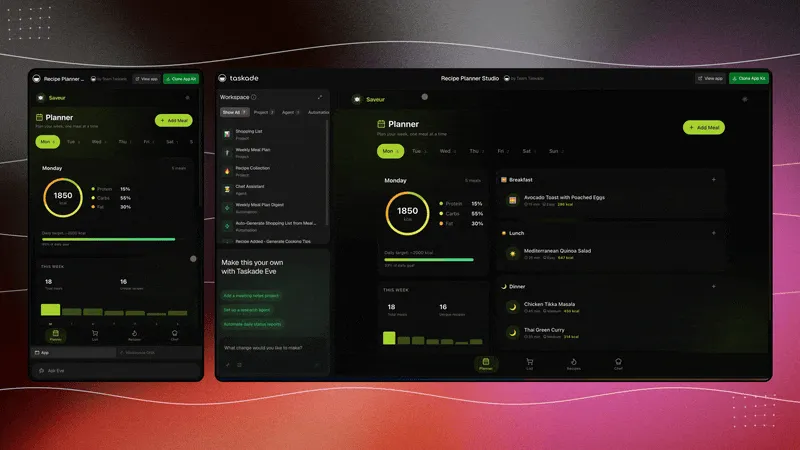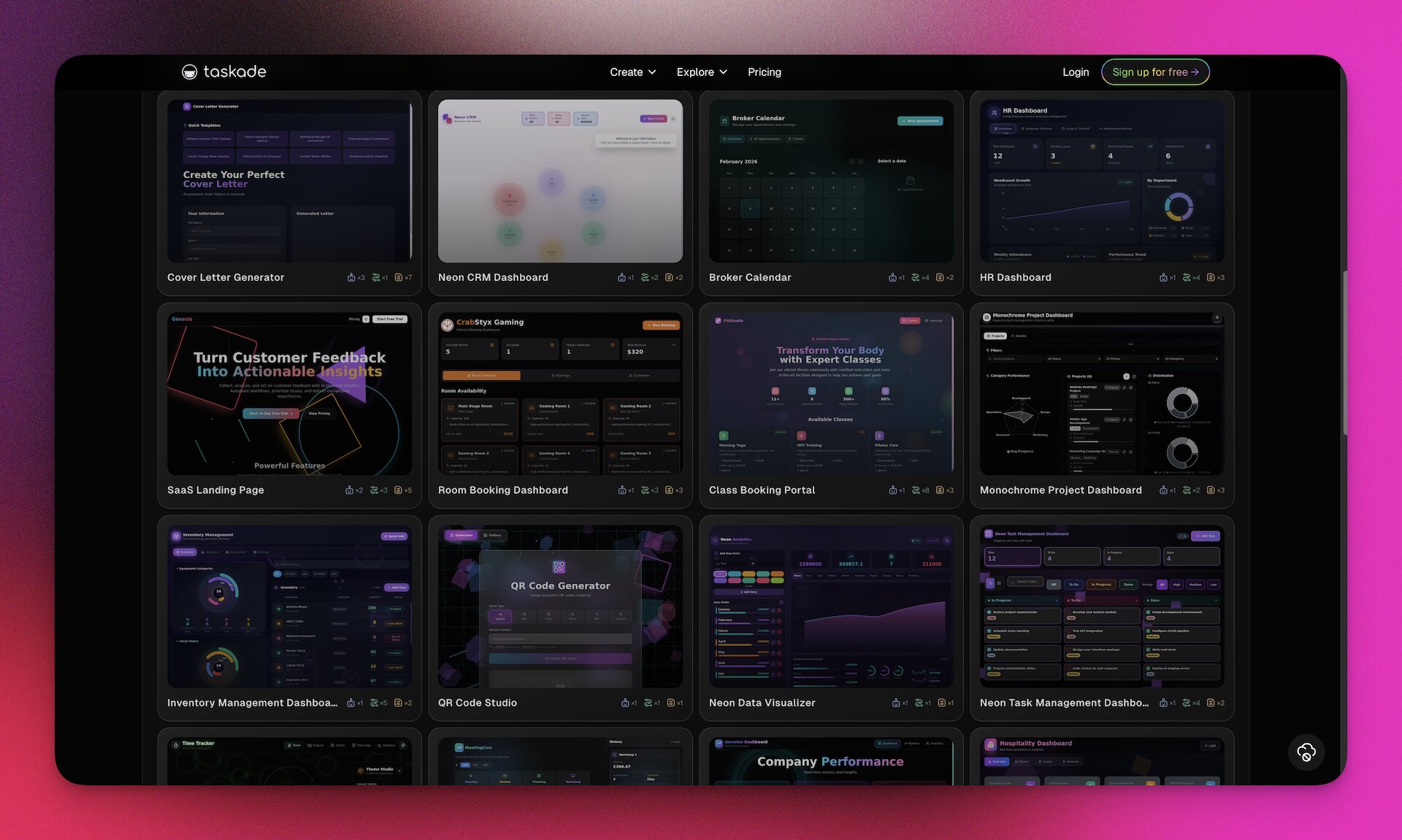
TL;DR -- The Taskade community now has 471 indexed Genesis apps (120+ verified) generating 67,671 pageviews per month. This directory organizes every category -- from calculators and booking systems to dashboards and CRMs -- with real traffic data, working examples you can clone in one click, and step-by-step guides to build your own.
The vibe coding market is moving fast. Replit raised at a $9B valuation. Lovable hit $6.6B. Bolt reached $700M. Wix acquired Base44 for $80M. But valuation is not the same as value. Most of these tools generate static code files that still require hosting, database setup, and manual deployment. Taskade Genesis is the only platform in this space where you describe an app in plain language and get a complete living system -- database, AI agents, automations, and hosting -- deployed in minutes.
This is the pillar page for the entire Vibe Apps blog series. Every category, every data point, and every series article is linked from here. Bookmark it.
What Is Vibe Coding?
The term "vibe coding" traces back to a February 2025 post by Andrej Karpathy, the former head of AI at Tesla and co-founder of OpenAI. Karpathy described a new way of programming where you "give in to the vibes, embrace exponentials, and forget that the code even exists." Instead of debugging syntax or wrestling with frameworks, you focus on the outcome -- what the software should do, not how it should be built.
Collins Dictionary named "vibe coding" its Word of the Year for 2025. By early 2026, 25% of Y Combinator startups reported building 95% of their codebases using AI-generated code. Global spending on AI coding tools reached $15 billion annually.
The core insight behind vibe coding is that describing intent is faster than writing implementation. A product manager who can articulate "I need a booking system with calendar availability, intake forms, and confirmation emails" should not need to learn React, set up a PostgreSQL database, or configure a deployment pipeline. The gap between knowing what you need and having it built has historically been filled by engineering teams, freelancers, or months of self-taught coding. Vibe coding collapses that gap to minutes.
How vibe coding differs from traditional no-code. Drag-and-drop builders like Bubble and Retool give you pre-built components that you wire together manually. The ceiling is low and the learning curve is steep -- you are still configuring, not creating. Vibe coding replaces configuration with conversation. You describe the outcome, and the AI generates the entire application.
How vibe coding differs from traditional coding. A developer building a CRM writes database schemas, API routes, frontend components, authentication logic, and deployment scripts. A vibe coder describes "a CRM with a pipeline board, lead scoring, and automated follow-ups" and gets the working system. The developer's version takes days to weeks. The vibe-coded version takes minutes.
Why it matters for non-technical builders. The barrier to creating functional software has dropped from "years of computer science education" to "the ability to describe what you need in clear language." Product managers can prototype without filing tickets. Founders can validate ideas without hiring engineers. Operations teams can build internal tools without waiting in a sprint queue. Educators can create interactive platforms without a development budget.
Not every tool that claims to support vibe coding delivers the same result. Code generators like Bolt.new, Lovable, and V0 output React files you still need to host and maintain. Taskade Genesis goes further -- it produces complete deployed applications with databases, AI agents, and automations built in. That distinction is the central theme of this directory.
For a deeper exploration of vibe coding history and methodology, see What is Vibe Coding?.
The Genesis App Ecosystem
Since launching in October 2025, Taskade Genesis has grown from zero to 150,000+ apps built, with 3 million+ automations running across the platform. The community gallery now indexes 471 apps, of which 120+ are verified and publicly cloneable.
Here is how traffic distributes across the top categories (30-day snapshot):
Category                 PV/30d     Apps    PV/App
-----------------------------------------------
Dashboards & Analytics   19,100     151     126
Calculators & Converters  5,440       5   1,088
Websites & Landing Pages  4,120      27     153
Events & Hospitality      3,500      15     233
Finance & Accounting      4,760      20     238
Booking & Scheduling      2,330      10     233
Education & Learning      2,220      20     111
Tools & Utilities         7,500      82      91
Wellness & Creative       3,100      22     141
Forms & Surveys           2,800      18     156
CRM & Sales               6,400      35     183
Health & Fitness          2,100      15     140
-----------------------------------------------
Other                     4,901      51      96
-----------------------------------------------
TOTAL                    67,671     471     144
The growth trajectory tells a clear story. Calculator and converter apps punch far above their weight -- 1,088 PV per app, which is 8.6x the dashboard average. This happens because calculators solve a single, specific problem that people search for directly. Finance tools and booking systems also over-index relative to their app count. Meanwhile, dashboards dominate total volume because there are simply more of them.
This distribution matches what we see in the broader SaaS market: utility tools attract search traffic, while business systems attract repeat usage. The most successful Genesis builders combine both -- a high-traffic calculator that funnels users into a deeper dashboard or booking workflow.
Category Directory
1. Calculators and Converters
Traffic: 5,440 PV/month | 5 apps | 1,088 PV/app
Calculators are the highest-traffic-per-app category in the entire Genesis ecosystem, and for good reason. When someone searches "mortgage calculator" or "BMI calculator," they want an instant answer, not a sign-up form. Genesis calculators deliver that experience -- a clean, focused tool that loads instantly and does one thing well.
What makes Genesis calculators different from the thousands of static calculators on the web is the Workspace DNA layer underneath. A mortgage calculator built with Genesis does not just compute a number. It can save the result to a project, trigger an automation that sends the estimate to a loan officer, or connect to an AI agent that explains the terms.
Top apps:
| App | PV/30d | Clone |
|---|---|---|
| Mortgage Calculator | 2,410 | Clone |
| Percentage Calculator | 1,200 | Clone |
| BMI Calculator | 980 | Clone |
| Unit Converter | 520 | Clone |
| Tip Calculator | 330 | Clone |
Use cases:
- Real estate agents embedding a mortgage calculator on their website that saves leads to a CRM project
- Fitness coaches sharing a macro calculator that feeds into a client nutrition tracking dashboard
- E-commerce stores adding a shipping cost estimator that triggers fulfillment workflows
- Freelancers building a project cost estimator that auto-generates quotes
2. Booking and Scheduling
Traffic: 2,330 PV/month | 10 apps | 233 PV/app
Every service business runs on appointments. The standard approach is to pay $15-30/month for a tool like Calendly or Acuity, configure availability windows, and manage a separate system outside your workspace. Genesis booking apps eliminate that overhead by building the scheduling system directly into your workspace, where it connects to your projects, agents, and automations natively.
A Genesis booking system is not just a calendar widget. It is a complete intake flow: the client selects a time, fills out a form, receives a confirmation email, and the appointment automatically appears in your project tracker. An AI agent can pre-screen the booking, qualify the lead, and prepare a briefing document before the meeting starts.
Top apps:
| App | PV/30d | Clone |
|---|---|---|
| Appointment Scheduler | 620 | Clone |
| Room Booking System | 480 | Clone |
| Discovery Call Booker | 410 | Clone |
| Class Scheduling App | 440 | Clone |
| Consultation Booking Portal | 380 | Clone |
Use cases:
- Consultants sharing a booking link where clients select a slot and fill out a pre-call questionnaire
- Coworking spaces managing room reservations with capacity tracking and automatic confirmation
- Clinics scheduling patient appointments with intake forms and automated reminders
- Tutors offering class bookings where students select subjects and preferred times
3. Events and Hospitality
Traffic: 3,500 PV/month | 15 apps | 233 PV/app
Event management is a coordination problem. Guest lists, RSVPs, venue logistics, speaker schedules, vendor contacts, and post-event follow-ups all need to connect. Most teams manage this with a tangle of spreadsheets, email threads, and sticky notes. Genesis event apps replace that tangle with a single system where every piece of data is connected and every workflow is automated.
The AI agent layer is particularly powerful here. An event assistant trained on your agenda, venue details, and FAQ can answer attendee questions 24/7 -- "What time does the keynote start?" or "Is there parking nearby?" -- without anyone on your team lifting a finger.
Top apps:
| App | PV/30d | Clone |
|---|---|---|
| Event RSVP Manager | 1,400 | Clone |
| Wedding Planner | 1,200 | Clone |
| Conference Hub | 900 | Clone |
Use cases:
- Conference organizers managing speaker schedules, attendee RSVPs, and sponsor logistics in one system
- Wedding planners sharing a guest-facing portal with RSVP, dietary preferences, and travel details
- Community event hosts tracking registrations, sending reminders, and collecting post-event feedback
- Hotels managing room blocks, catering orders, and event timelines for corporate retreats
4. Finance and Accounting
Traffic: 4,760 PV/month | 20 apps | 238 PV/app
Finance apps are the second-highest PV/app category after calculators. The reason is the same: people search for specific tools ("expense tracker," "invoice generator," "budget planner") and want an immediate solution. Genesis finance apps deliver that, plus the intelligence layer -- an AI agent that can categorize expenses, flag anomalies, or summarize monthly spend.
The automation capabilities are what make Genesis finance tools viable as real business systems, not just toys. When an expense is submitted, an automation can route it for approval, log it in Google Sheets, update a budget tracker, and notify the finance team on Slack. That end-to-end flow typically requires Zapier ($20/month), a spreadsheet, and a form builder. Genesis does it all in one system.
Top apps:
| App | PV/30d | Clone |
|---|---|---|
| Invoice Generator | 1,800 | Clone |
| Expense Tracker | 1,300 | Clone |
| Budget Planner | 950 | Clone |
| Revenue Dashboard | 710 | Clone |
Use cases:
- Freelancers generating branded invoices and tracking payment status with automated reminders
- Small businesses managing expenses with receipt upload, category tagging, and monthly AI-generated reports
- Startups tracking burn rate and runway with real-time dashboards connected to financial data
- Accounting firms building client-facing portals where clients upload documents and track tax preparation status
5. Education and Learning
Traffic: 2,220 PV/month | 20 apps | 111 PV/app
Education is where the AI agent layer shines brightest. A course platform is useful on its own, but a course platform with an AI tutor trained on the curriculum material is transformational. Students get instant help at any hour. Instructors spend less time answering repetitive questions. The system learns which topics students struggle with and can recommend additional resources automatically.
Genesis education apps range from simple flashcard systems to full course platforms with progress tracking, quizzes, and completion certificates. The key advantage over purpose-built LMS platforms (which cost $50-500/month) is that Genesis includes the AI tutoring and automation layers at no additional cost.
Top apps:
Use cases:
- Educators building course platforms with embedded AI tutors that answer student questions based on curriculum material
- Corporate trainers creating onboarding programs with progress tracking and completion automation
- Language teachers sharing flashcard apps with spaced repetition and AI-powered conversation practice
- Certification providers building exam prep tools with adaptive question selection
6. Dashboards and Analytics
Traffic: 19,100 PV/month | 151 apps | 126 PV/app
Dashboards are the largest category by total traffic. They account for 28.2% of all Genesis pageviews. The reason is volume: nearly every business needs some kind of metrics display, and Genesis makes it trivial to build one.
A Genesis dashboard is not a static chart. It pulls data from your workspace projects, which means it updates in real time as your team works. An AI agent can monitor the data and alert you when metrics cross thresholds -- "Revenue dropped 15% this week" or "Support ticket volume doubled since yesterday." Automations can respond to those alerts automatically, posting to Slack, sending an email, or creating a task for someone to investigate.
Top apps:
| App | PV/30d | Clone |
|---|---|---|
| Business KPI Dashboard | 5,200 | Clone |
| Sales Pipeline Dashboard | 4,100 | Clone |
| Project Status Board | 3,600 | Clone |
| Support Ticket Tracker | 3,400 | Clone |
| Marketing Metrics Hub | 2,800 | Clone |
Use cases:
- Founders tracking MRR, churn, and active users in a single view connected to their workspace data
- Sales managers monitoring pipeline value, conversion rates, and rep performance
- Support leads tracking ticket volume, resolution time, and customer satisfaction scores
- Marketing teams visualizing campaign performance across channels with AI-generated weekly summaries
7. Websites and Landing Pages
Traffic: 4,120 PV/month | 27 apps | 153 PV/app
Genesis is not a website builder in the traditional sense. You will not get the pixel-level control of Webflow or the template library of Squarespace. What Genesis does well is build functional web pages with integrated workflows -- a landing page with a lead capture form that automatically scores leads, sends follow-up emails, and routes qualified prospects to your CRM. The page and the system behind it are one thing, not separate tools stitched together.
Top apps:
| App | PV/30d | Clone |
|---|---|---|
| SaaS Landing Page | 1,400 | Clone |
| Portfolio Website | 1,100 | Clone |
| Restaurant Menu Page | 900 | Clone |
| Event Landing Page | 720 | Clone |
Use cases:
- Startups building a landing page with email capture that feeds directly into a nurture automation
- Freelancers publishing portfolio sites with integrated contact forms and booking
- Restaurants sharing online menus with ordering capabilities connected to kitchen workflows
- Event organizers creating registration pages with RSVP tracking and attendee communication
8. Tools and Utilities
Traffic: 7,500 PV/month | 82 apps | 91 PV/app
This is the most diverse category. Tools and utilities include QR code generators, URL shorteners, color palette creators, countdown timers, password generators, and dozens of other single-purpose apps. They tend to attract search traffic for specific queries and work well as entry points to the Genesis ecosystem.
Top apps:
| App | PV/30d | Clone |
|---|---|---|
| QR Code Generator | 1,800 | Clone |
| Pomodoro Timer | 1,200 | Clone |
| Color Palette Generator | 950 | Clone |
| Password Generator | 880 | Clone |
| Countdown Timer | 820 | Clone |
| Text Formatter | 640 | Clone |
| JSON Formatter | 610 | Clone |
Use cases:
- Marketers generating QR codes that link to Genesis landing pages with tracking
- Teams using Pomodoro timers integrated with task completion workflows
- Designers sharing color palette tools with export to brand guidelines
- Developers building internal utility apps like JSON formatters and API testers
9. Wellness and Creative
Traffic: 3,100 PV/month | 22 apps | 141 PV/app
Wellness and creative apps show the range of what Genesis can build beyond business tools. Meditation loggers, mood trackers, recipe books, music playlist managers, habit trackers, and journaling apps all appear in this category. The AI agent layer adds real value here -- a wellness agent can track patterns across journal entries and suggest insights, or a recipe agent can recommend meals based on dietary preferences and available ingredients.
Top apps:
| App | PV/30d | Clone |
|---|---|---|
| Habit Tracker | 1,200 | Clone |
| Recipe Book with AI Chef | 1,050 | Clone |
| Mood Journal | 850 | Clone |
Use cases:
- Health coaches sharing habit trackers with clients that log progress and trigger weekly check-in automations
- Food bloggers building recipe collections with AI-powered ingredient substitution suggestions
- Therapists providing mood journals where an AI agent identifies patterns and suggests coping strategies
10. Forms and Surveys
Traffic: 2,800 PV/month | 18 apps | 156 PV/app
Forms are the front door of most business workflows. Every lead capture, customer feedback loop, job application, and intake process starts with a form. The difference between a Genesis form and a Typeform or Google Form is what happens after submission. In Genesis, the form data flows directly into a project database, triggers automations, and can be processed by an AI agent -- all without a single external integration.
Top apps:
| App | PV/30d | Clone |
|---|---|---|
| Customer Feedback Survey | 920 | Clone |
| Job Application Portal | 780 | Clone |
| Client Intake Form | 650 | Clone |
| Event Registration Form | 450 | Clone |
Use cases:
- Agencies collecting client requirements through intake forms that automatically create project boards
- HR teams managing job applications with AI-powered resume screening and automated interview scheduling
- Restaurants gathering customer feedback with sentiment analysis and automated response workflows
- Nonprofits building donation forms connected to thank-you email automations and donor tracking
11. CRM and Sales
Traffic: 6,400 PV/month | 35 apps | 183 PV/app
CRM is one of the most requested Genesis app categories, and it illustrates why the Workspace DNA architecture matters. A CRM is not a single feature -- it is a system of connected parts: contact database, pipeline board, activity log, email automation, lead scoring, and reporting. Building that with a code generator means setting up multiple services and wiring them together. Building it with Genesis means describing the system in one prompt and getting all the parts connected automatically.
The AI agent layer is what pushes a Genesis CRM beyond what traditional CRMs offer. You can train a Sales Coach agent on your product catalog, pricing tiers, and past deals. The agent then helps reps draft proposals, qualify leads, and identify upsell opportunities -- all within the same interface where they track their pipeline.
Top apps:
| App | PV/30d | Clone |
|---|---|---|
| Sales Pipeline CRM | 2,100 | Clone |
| Client Management Portal | 1,600 | Clone |
| Lead Scoring System | 1,400 | Clone |
| Real Estate CRM | 1,300 | Clone |
Use cases:
- Startups replacing HubSpot with a Genesis CRM that includes AI-powered lead scoring at a fraction of the cost
- Real estate agents tracking properties, buyers, and deals with automated follow-ups and document generation
- Agencies managing client relationships with intake forms, project tracking, and automated reporting
- Sales teams building pipeline dashboards with AI agents that draft outreach emails based on prospect data
12. Health and Fitness
Traffic: 2,100 PV/month | 15 apps | 140 PV/app
Health and fitness apps are growing fast in the Genesis ecosystem. Personal trainers, nutritionists, and wellness coaches are building client-facing tools that replace expensive specialized software. A trainer who previously paid $50-100/month for a client management platform can now build a custom version in Genesis that includes workout tracking, nutrition logging, progress photos, and an AI coaching agent -- all free to start, with Pro from $10/month.
Top apps:
| App | PV/30d | Clone |
|---|---|---|
| Workout Tracker | 780 | Clone |
| Meal Planner with AI Nutritionist | 720 | Clone |
| Fitness Progress Dashboard | 600 | Clone |
Use cases:
- Personal trainers sharing workout programs with clients who log sets, reps, and progress in the app
- Nutritionists providing meal plans with AI-powered ingredient substitution and macro tracking
- Gym owners building member portals with class scheduling, attendance tracking, and automated renewal reminders
- Wellness coaches creating holistic health trackers that combine fitness, nutrition, sleep, and mood data
Traffic Data by Category
Here is the complete traffic breakdown sorted by PV per app (the metric that matters most for discoverability):
| Category | PV/30d | Apps | PV/App | Share of Total |
|---|---|---|---|---|
| Calculators and Converters | 5,440 | 5 | 1,088 | 8.0% |
| Finance and Accounting | 4,760 | 20 | 238 | 7.0% |
| Events and Hospitality | 3,500 | 15 | 233 | 5.2% |
| Booking and Scheduling | 2,330 | 10 | 233 | 3.4% |
| CRM and Sales | 6,400 | 35 | 183 | 9.5% |
| Forms and Surveys | 2,800 | 18 | 156 | 4.1% |
| Websites and Landing Pages | 4,120 | 27 | 153 | 6.1% |
| Wellness and Creative | 3,100 | 22 | 141 | 4.6% |
| Health and Fitness | 2,100 | 15 | 140 | 3.1% |
| Dashboards and Analytics | 19,100 | 151 | 126 | 28.2% |
| Education and Learning | 2,220 | 20 | 111 | 3.3% |
| Tools and Utilities | 7,500 | 82 | 91 | 11.1% |
| Other | 4,901 | 51 | 96 | 7.2% |
| Total | 67,671 | 471 | 144 | 100% |
The highest-leverage strategy for builders is to target high PV/app categories: calculators, finance tools, and booking systems. These categories have proven search demand and relatively few competing apps, meaning each new app captures significant traffic. Dashboard builders benefit from volume but face more competition for attention within the category.
Another pattern: apps that solve a narrow, searchable problem (like "tip calculator" or "invoice generator") tend to outperform broad tools (like "business dashboard") on a per-app basis. The lesson is to build specific tools, not generic platforms.
How Every Genesis App Works: Workspace DNA
Every Genesis app is powered by the same three-layer architecture called Workspace DNA: Memory, Intelligence, and Execution. This architecture is what separates Genesis from code generators that produce isolated files.
+----------------------------------------------------------+
|                    GENESIS APP (UI)                        |
|  Responsive interface with 50+ shadcn/ui components       |
+----------------------------------------------------------+
         |                |                  |
         v                v                  v
+----------------+ +----------------+ +------------------+
|    MEMORY      | | INTELLIGENCE   | |   EXECUTION      |
|  (Projects)    | | (AI Agents)    | | (Automations)    |
|                | |                | |                  |
| - Custom fields| | - 15+ models   | | - 100+ integra-  |
| - 7 views      | | - 34 tools    | |   tions          |
| - Structured   | | - Persistent   | | - Branching/     |
|   databases    | |   memory       | |   looping        |
| - Relation-    | | - Multi-agent  | | - Durable         |
|   ships        | |   teams        | |   execution      |
+----------------+ +----------------+ +------------------+
         |                |                  |
         +--------+-------+--------+---------+
                  |                 |
                  v                 v
          [Feedback Loop: Execution writes to Memory,
           Memory feeds Intelligence,
           Intelligence triggers Execution]
How the layers work together -- a concrete example.
Imagine you build a "Client Intake Portal" with Genesis. Here is what happens when a new client submits the intake form:
Memory: The form submission creates a new record in the Clients project with fields for name, company, email, budget, and goals. The data is immediately available in multiple views -- List, Board, Calendar, Table, Mind Map, Gantt, and Org Chart.
Intelligence: An AI agent (trained on your service catalog and past client data) reads the new record, scores the lead based on budget and fit, and drafts a personalized welcome message. The agent uses one of 15+ models from OpenAI, Anthropic, or Google -- whichever you configured for this task.
Execution: An automation fires on the "new record" trigger. It sends the welcome email via Gmail, posts a notification to your #sales Slack channel, creates a project from your onboarding template, assigns tasks to the right team members, and schedules a kickoff meeting in Google Calendar.
Feedback loop: The newly created onboarding project enriches the Memory layer. The AI agent now has more context about this client. The next time someone asks the agent "What is the status of the Acme Corp onboarding?" it knows, because it reads from the same workspace where the data lives.
This loop is continuous and self-reinforcing. The more you use the system, the smarter it gets. That is what makes Genesis apps "living" -- they are not static exports that decay the moment you stop maintaining them.
For a full technical breakdown, see The Ultimate Guide to Taskade Genesis.
The Economics of Building vs Buying
One of the most overlooked advantages of Genesis is the financial case. Most growing businesses accumulate a stack of SaaS subscriptions without realizing the compounding cost.
The SaaS stack tax. Consider a typical small business running five separate tools:
| Tool | Purpose | Monthly Cost |
|---|---|---|
| Calendly | Booking and scheduling | $16 |
| Typeform | Forms and surveys | $29 |
| HubSpot Starter | CRM | $20 |
| Zapier | Automation | $30 |
| Notion | Knowledge base and docs | $10 |
| Total | $105/month |
That is $1,260 per year for a basic stack, and it does not include the time cost of managing five separate logins, five billing cycles, and the Zapier glue that holds it all together. Scaling to a team of 10 often triples the cost because most of these tools charge per seat.
The Genesis alternative. With Taskade Genesis, you can build all five of those tools in a single workspace:
| Genesis App | Replaces | Build Time |
|---|---|---|
| Booking system | Calendly | 7 minutes |
| Intake forms | Typeform | 5 minutes |
| Sales CRM | HubSpot | 10 minutes |
| Automated workflows | Zapier | Built in |
| Knowledge base | Notion | 6 minutes |
| Total | Free, then $10/month (Pro plan) |

That is a 10x cost reduction on the tools alone. The deeper savings come from eliminating the integration tax -- the hours spent configuring Zapier webhooks, mapping fields between systems, and debugging broken connections. In Genesis, every app shares the same workspace, the same data layer, and the same automation engine. There is nothing to integrate because everything is already connected.
Compared to competitors in the vibe coding space, Taskade Genesis is about 2.5x cheaper. Bolt.new charges $25/month for token-limited code generation. Replit charges $25/month. Lovable charges $25/month. None of them include hosting, databases, AI agents, or automations -- those are all additional costs. Genesis is free to start, with Pro at $10/month, and includes everything.
This is not an argument that Genesis replaces every SaaS tool. Specialized systems like Salesforce Enterprise or Shopify Plus serve needs that no general-purpose builder can match. But for the 80% of business tools that are some combination of forms, databases, dashboards, and workflows, Genesis delivers 90% of the functionality at 10% of the cost.
For a detailed comparison of Genesis against specific competitors, see our Best Vibe Coding Tools guide.
Build Your First App
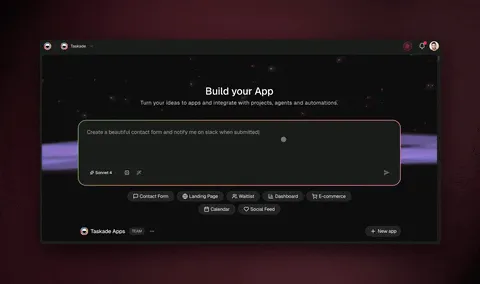
Building a Genesis app takes less time than reading this section. Here is the process, start to finish.
Step 1: Open Genesis. Go to taskade.com/ai/apps and click "Build App."
Step 2: Describe what you need. Be specific about the purpose, the users, and the data. Here is a prompt you can copy and use right now:
Build an expense tracker for my small business team.Features:
- Submission form with fields: description, amount, category
(Travel, Meals, Office, Software, Other), date, and receipt image upload
- Kanban board for managers to approve or reject expenses
- Monthly summary dashboard with totals by category and by employee
- AI agent that categorizes ambiguous expenses and flags duplicates
Automations:
- When an expense is approved, log it in Google Sheets
- On the first of each month, generate a summary report and email it
to the finance team
- If an expense exceeds $500, require additional manager approval
Design: Clean and professional, light theme, blue accents.
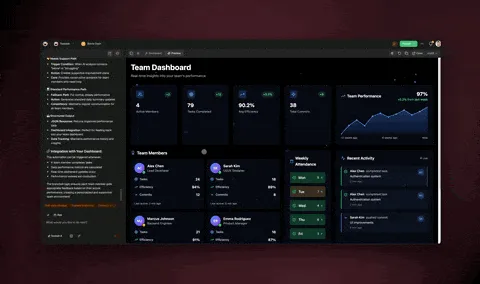
Step 3: Watch it build. Genesis generates the complete app in 2-10 minutes depending on complexity. You will see the UI, database schema, agent configuration, and automation flows come together.
Step 4: Test and iterate. Add sample data, test the form submission, check the dashboard. Then refine: "Make the dashboard show a pie chart for category breakdown" or "Add a notification to Slack when expenses exceed $500."
Step 5: Publish. Click Publish, choose your visibility, and share the URL with your team. The app is live immediately.
Total time: 10-15 minutes from zero to a deployed expense tracking system with AI categorization, approval workflows, and automated reporting. Building the equivalent with traditional tools would take days and cost hundreds in SaaS subscriptions.
For five more complete build walkthroughs, see 5 Genesis Apps You Can Build in 10 Minutes.
The Complete Vibe Apps Series
This directory is the pillar page. Each article below dives deep into a specific category or topic within the Genesis ecosystem:
| Article | Focus |
|---|---|
| What is Vibe Coding? | History, methodology, and the philosophy behind intent-driven app creation |
| Best Vibe Coding Tools | Side-by-side comparison of 7 AI app builders: Genesis, Cursor, Bolt, Replit, Lovable, Windsurf, V0 |
| The Ultimate Guide to Taskade Genesis | Complete technical reference: Workspace DNA, agents, automations, pricing, prompts |
| 5 Genesis Apps You Can Build in 10 Minutes | Step-by-step tutorials for client portal, booking system, dashboard, knowledge base, and lead capture |
| Build Without Permission | The Genesis Manifesto -- why living software changes who gets to build |
| The End of the App Store | How AI-generated apps reshape software distribution |
Comparison articles:
- Taskade Genesis vs Bolt.new
- Taskade Genesis vs Lovable
- Taskade Genesis vs Cursor
- Taskade Genesis vs Replit
- Taskade Genesis vs V0
- Taskade Genesis vs Windsurf
Explore the platform:
Frequently Asked Questions
What types of AI apps can I build without code?
You can build calculators, booking systems, event pages, finance tools, education platforms, dashboards, CRM systems, websites, portfolios, forms, chatbots, and more. The 12 categories in this directory represent the most popular types, but Genesis can build any application that can be described in words. If you can explain what the app should do, who will use it, and what data it should manage, Genesis can generate it. The limit is not the platform -- it is the specificity of your description.
How many AI apps are in the Taskade community?
The Taskade community has 471 indexed apps, of which 120+ are verified and publicly cloneable. These span 12+ categories, from business dashboards and booking systems to education tools and creative apps. All verified apps are available to clone in one click from the Community Gallery. The library grows weekly as builders publish new apps.
What is the most popular Genesis app category?
Dashboard and Analytics apps account for 28.2% of all Genesis traffic (19,100 PV/month from 151 apps). However, Calculator and Converter apps generate the highest traffic per app -- 1,088 PV/app, which is 8.6x higher than dashboards. This means calculators are the most efficient category for builders who want maximum traffic from a single app, while dashboards dominate through sheer volume.
Can I build an app for my industry?
Yes. Genesis apps span every industry -- real estate, healthcare, education, finance, hospitality, retail, SaaS, and more. The directory above includes apps across 12 categories with specific use cases for each. The Workspace DNA architecture (Memory, Intelligence, and Execution) is industry-agnostic, which means the same platform that builds a medical intake portal can build a real estate CRM or a restaurant ordering system.
How does vibe coding work for building apps?
Vibe coding means describing what you want in natural language. Open Taskade Genesis, type a description of your app, and Genesis generates a complete application with UI, database, AI agents, and automations. Iterate by chatting -- "add a chart," "change the layout," "send a Slack notification when a task is completed" -- and the app updates live. There is no code to write, no deployment to configure, and no hosting to manage.
Is there a cost per app or per user?
No. Taskade charges by plan, not by app or user. Published Genesis apps run without consuming AI credits and can serve unlimited users. The Free plan includes 11,000 one-time AI credits (1,000 when you verify your email + 10,000 on your first build) for building apps. The Pro plan at $10/month includes higher limits. You only use credits when building or iterating on apps -- once published, they run indefinitely at no additional cost.
What is Workspace DNA?
Workspace DNA is Taskade's three-layer architecture: Memory (Projects and structured databases), Intelligence (AI Agents with 15+ models from 3 providers), and Execution (Automations with 100+ integrations and durable execution). Every Genesis app inherits this DNA, meaning it comes pre-connected to your data, AI, and workflows. The three layers feed each other in a continuous loop -- Execution writes to Memory, Memory feeds Intelligence, Intelligence triggers Execution -- which is why Genesis apps improve over time instead of decaying.
How do I publish a Genesis app?
Click the Publish button inside the Genesis editor. Your app gets a live URL immediately. Choose from three visibility settings: Public (anyone can access and the app is discoverable), Secret (only people with the exact link can access), or Private (workspace members only). Client sign-in through App Users works on every plan, including Free. Business+ plans unlock additional publishing features including custom domains (e.g., app.yourcompany.com), password protection, white-label branding, custom favicons, and Google Analytics integration.
Can multiple people collaborate on a Genesis app?
Yes. Every Genesis app lives inside your Taskade workspace, which supports real-time multiplayer editing. Multiple team members can work on the same app simultaneously, seeing each other's changes live. You control who can do what with Taskade's RBAC system: Owner to Viewer. Permissions cascade from the organization level down to individual apps, and you can set different access levels for different team members on the same app.
What happens when I clone a community app?
Cloning creates a complete independent copy of the app in your workspace. You get the full UI, database schema, field configuration, and layout. From there you can customize everything -- change colors and branding, add or remove fields, connect your own data sources, add AI agents trained on your content, and wire up automations to your tools (Slack, Gmail, Google Sheets, and 100+ others). Your changes do not affect the original app, and the original creator does not have access to your copy.
Start Building
The directory above represents what 120+ builders have already created with Taskade Genesis. Every app listed here was built without code, without a development team, and without months of work. Most were built in under 15 minutes.
Pick a category that matches your need. Clone an app that is close to what you want. Customize it with your branding, data, and workflows. Or start from scratch with a prompt.
Your next step:
- Browse the Community Gallery to find an app to clone
- Open Genesis to build from a prompt
- Read the Ultimate Guide for a full technical reference
No credit card. No setup. Just build.