







Taskade started as a to-do list.
Simple. Clean. A place to organize tasks and collaborate with your team. That was 2017.
Today, Taskade is an AI infrastructure platform. A system where a single prompt creates complete applications with databases, AI agents, and automated workflows. Over 150,000 apps have been built on the platform — and the pace is accelerating.
This is the story of that evolution — and why it matters for everyone who builds.
TL;DR: Taskade evolved from a productivity tool (2017) to an AI infrastructure platform (2026) where one prompt creates living software. 150,000+ apps built, frontier AI models, 100+ integrations, free to start with Pro from $10/month billed annually. Code generators create files. Taskade Genesis creates deployed, intelligent systems. Try it free →

The Three Eras of Taskade
The evolution was not a pivot. It was a natural progression — each era building on the infrastructure of the previous one.
| Era | Years | Focus | Key Milestones | User Impact |
|---|---|---|---|---|
| Productivity | 2017-2022 | Collaboration | Lists, multiple views, real-time editing, video chat | Teams organize work in one place |
| AI | 2023-2024 | Assistance | AI writing, brainstorming, organization, Agents v1 | AI helps users work faster |
| Infrastructure | 2025-2026 | Creation | Genesis, Agents v2 (built-in tools), 100+ integrations | Users create software from prompts |
The Productivity Era (2017-2022)
Taskade launched as a collaborative workspace with a clear mission: give teams one place to think, plan, and execute together.
The feature set grew steadily:
- Lists and outlines for organizing thoughts and structuring projects
- Real-time collaboration with instant sync across devices
- Multiple project views — List, Board, Calendar, Table, Mind Map, Gantt, Org Chart
- Video chat built directly into the workspace (no app switching)
- Cross-platform apps for desktop, mobile, and browser
But we noticed something unexpected. Users were not just organizing tasks. They were building systems.
Wikis became knowledge bases. Lists became databases. Workflows became actual business processes. Project views became dashboards for client delivery.
The workspace wanted to be software.
That insight — that a structured workspace with enough flexibility becomes a platform — shaped everything that came next.
Productivity Era by the Numbers
| Metric | Value |
|---|---|
| Project views shipped | Multiple |
| Platforms supported | 5 (Web, Mac, Windows, iOS, Android) |
| Core feature set | Lists, views, video, templates |
| User positioning | "Collaboration tool for teams" |
The AI Era (2023-2024)
When large language models became production-ready, we saw the opportunity to move beyond static collaboration.
We added AI assistants to help with:
- Writing and editing — draft content, fix grammar, change tone
- Brainstorming — generate ideas, expand outlines, challenge assumptions
- Organization — sort tasks, categorize information, prioritize backlogs
- Research — summarize documents, extract key points, answer questions
This was useful. But it was still AI as a feature bolted onto a productivity tool. The assistant could help you write better or organize faster, but it could not build anything.
Then came AI Agents v1 — the first step toward autonomous intelligence inside the workspace. Agents could follow multi-step instructions, maintain context across conversations, and take basic actions within projects.
We asked a bigger question:
What if AI could build the workspace itself?
Not just assist within a pre-built structure, but generate the entire structure — databases, logic, agents, automations — from a single description of what you need.
The Infrastructure Era (2025-2026)
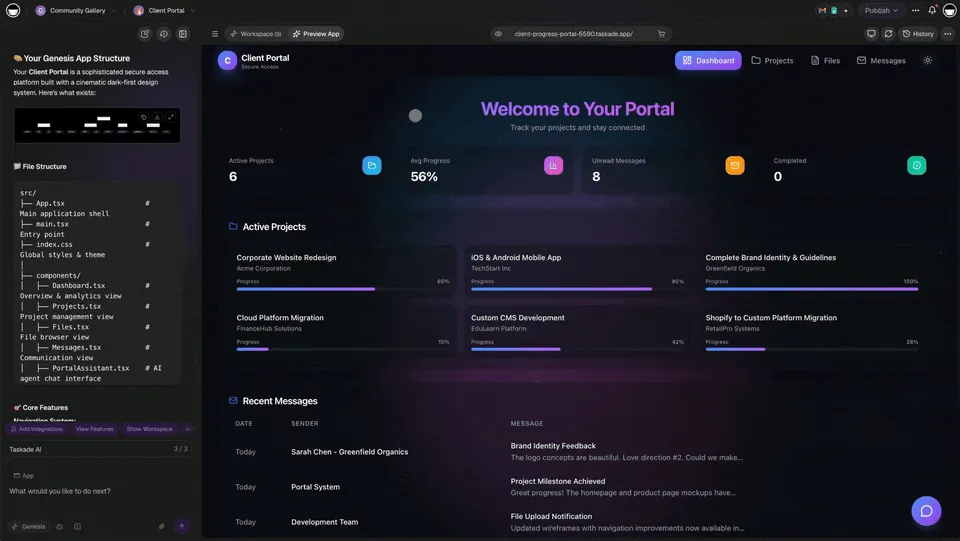
That question became Taskade Genesis.
Genesis is not an AI feature inside a productivity tool. It is a complete AI infrastructure platform where:
- One prompt creates a complete application
- Applications include databases, not just documents
- AI Agents v2 reason and take actions with built-in tools
- Workflows connect to 100+ external services
- Everything runs 24/7 as a living system
- Apps ship with custom domains and password protection
This is Workspace DNA — three pillars working together in a self-reinforcing loop:
| Pillar | Then (2022) | Now (2026) |
|---|---|---|
| Memory | Documents and lists | Projects and Databases with multiple structured views |
| Intelligence | AI writing assistant | Custom AI Agents with built-in tools and persistent memory |
| Execution | Manual workflows | Automations with 100+ integrations running 24/7 |
Memory feeds Intelligence. Intelligence triggers Execution. Execution creates new Memory. The loop accelerates.
What AI Infrastructure Means
The difference between AI productivity and AI infrastructure is the difference between using software and creating software.
Traditional productivity tools store information. Genesis creates living systems that think and act.
| Dimension | Traditional Productivity | AI Infrastructure (Genesis) |
|---|---|---|
| Creation | You build the workspace manually | AI builds the workspace from a prompt |
| Data | Static documents and spreadsheets | Dynamic databases with multiple project views |
| Updates | Manual changes by users | Automated workflows triggered by events |
| AI Role | AI suggests text improvements | Agents execute multi-step actions autonomously |
| Output | Files on a server | Living software with custom domains |
| Intelligence | Single model, single task | Frontier models, multi-agent collaboration |
| Integrations | Manual copy-paste between tools | 100+ native integrations with automated data flow |
This shift is fundamental. You are not using software anymore. You are creating software — with a sentence.

Taskade Genesis vs the Competitive Landscape
Where does Genesis fit compared to other platforms? The answer depends on what you are building.
| Platform | Category | Starting Price | AI Agents | Automations | App Deployment |
|---|---|---|---|---|---|
| Taskade Genesis | AI Infrastructure | Free | built-in tools, persistent memory | 100+ integrations | One prompt, custom domains |
| Bolt.new | Code Generator | $25/month | None | None | Manual deploy required |
| Lovable | Code Generator | $25/month | None | None | Manual deploy required |
| Bubble | No-Code Builder | $32/month | None | Limited | Visual builder |
| Retool | Internal Tools | $10/user/month | None | Limited | Dashboard builder |
| Cursor | AI Code Editor | $20/month | None | None | Code only, no deploy |
| Notion | Productivity | $10/month | Basic AI add-on | Requires Zapier | No app creation |
| Make (Integromat) | Automation | $9/month | None | Visual workflows | No app creation |
Key differentiator: Code generators create files. No-code builders require clicking. AI chat tools answer questions. Taskade Genesis creates deployed, intelligent living systems from conversation.
See detailed comparisons:
Examples of the Evolution
To-Do List to Living Task Manager
Then (2017): A simple checklist with checkboxes.
Now (2026): Minimalistic ToDo App with AI agents that prioritize tasks, send deadline reminders through automations, and reschedule overdue items automatically.
Spreadsheet to Living Dashboard
Then (2019): Manual data entry in rows and columns.
Now (2026): Finance Tracker Dashboard with automated data imports from 100+ integrations, AI-powered analysis that spots anomalies, and smart alerts when metrics cross thresholds.
Document to Living Portal
Then (2022): A shared Google Doc passed around by email.
Now (2026): BusinessPro Website with integrated forms, agent-powered chat support, workflow automation, and custom domain publishing.
What This Means for Different Users
The shift from productivity tool to AI infrastructure changes what is possible for every type of builder.
For Solo Founders and Indie Hackers
You no longer need a technical co-founder or a $50K development budget to launch a product. Describe your SaaS idea in a prompt, and Genesis builds a working application with databases, user management, and AI-powered features. 150,000+ apps have been built this way.
What to build first: A client portal, a booking system, or a simple SaaS product. Start with a prompt like "Build a client project tracker with invoicing and automated status updates."
Relevant resources:
For Agencies and Freelancers
Stop building the same client deliverables from scratch every time. Create reusable Genesis apps — dashboards, reporting portals, project trackers — and customize them per client. Automations handle status updates, deadline reminders, and client notifications.
What to build first: A client-facing project portal with automated weekly reports. Use Board view for project stages and Table view for deliverables tracking.
Relevant resources:
For Enterprise Teams
Skip the 6-month procurement cycle. Internal tools, workflow automations, and department dashboards can be created in minutes instead of months. Role-based access (Owner to Viewer) ensures data governance. 100+ integrations connect Genesis apps to your existing stack — Salesforce, Slack, Google Workspace, GitHub, and more.
What to build first: An internal ops dashboard that aggregates data from your CRM, project management tools, and communication channels.
Relevant resources:
- Integrations
- Browse Templates
- Business Plan — $25/month, unlimited seats
The Platform by the Numbers (2026)
| Metric | Value |
|---|---|
| Apps built | 150,000+ |
| Integrations | 100+ across 10 categories |
| AI models | Frontier models from top AI labs |
| Agent tools | built-in tools |
| Project views | List, Board, Calendar, Table, Mind Map, Gantt, Org Chart |
| Role-based access | Owner to Viewer |
| Starting price | Free ($10/mo Pro, billed annually) |
| Platforms | Web, Mac, Windows, iOS, Android, Chrome Extension |

What Comes Next
AI infrastructure is still in its early stages. The trajectory points toward increasingly autonomous systems.
As Genesis evolves, expect:
- More sophisticated agents with deeper reasoning chains and larger context windows
- Richer integrations across every tool category — CRM, payments, analytics, communication
- Better multi-agent collaboration where specialized agents work together on complex tasks
- Industry-specific templates for healthcare, legal, education, finance, and real estate
- Enterprise controls including advanced audit logs, compliance features, and SSO
The workspace became software. Now software is becoming alive.

Try It Yourself
Experience the evolution firsthand:
- Open Taskade Genesis and click "Create App"
- Describe any system you need in plain language
- Watch Genesis build it with Projects, AI Agents, and Automations
- Customize, add integrations, and share with your team
- Publish with a custom domain
Learn more: Create Your First App →
Start Building
Resources:
- Explore Community Apps — See what 150,000+ builders have created
- Create Your First App — Step-by-step tutorial
- Learn Workspace DNA — Understand the architecture
- Compare Plans — Free, Pro $10/mo, Business $25/mo
Explore the platform:
- AI App Builder — Build complete applications from one prompt
- AI Agent Builder — Create intelligent assistants with built-in tools
- AI Workflow Automation — Automate any process with 100+ integrations
- Browse Templates — Clone and customize pre-built apps
Read more:
- The Origin of Living Software
- SaaS Has Evolved Into Living Software
- How Workspace DNA Works
- Build Without Permission
- What Is Vibe Coding?
- The Ultimate Guide to Taskade Genesis
- 12 AI Websites You Can Build from a Single Prompt
- Free Bolt Alternative
- Free Lovable Alternative
Build with Genesis:
- Browse All Generator Templates — Apps, dashboards, websites, and more
- Browse Agent Templates — AI agents for every use case
- Explore Community Apps — Clone and customize

Frequently Asked Questions
How did Taskade evolve from a productivity tool to an AI infrastructure platform?
Taskade evolved through three eras: the Productivity Era (2017-2022) focused on collaboration with lists, views, and real-time editing; the AI Era (2023-2024) introduced AI writing and organization assistants; and the Infrastructure Era (2025-2026) launched Taskade Genesis where a single prompt creates complete applications with databases, AI agents, and automated workflows. Over 150,000 apps have been built on the platform.
What is Taskade Genesis and what can it build?
Taskade Genesis is an AI infrastructure platform that generates complete applications from natural language prompts. It creates projects with multiple views (List, Board, Calendar, Table, Mind Map, Gantt, Org Chart), deploys AI Agents v2 with persistent memory and built-in tools, and sets up autonomous automations with 100+ integrations. Users have built dashboards, portals, websites, and SaaS tools from a single prompt.
What AI models does Taskade support for building intelligent workflows?
Taskade supports frontier AI models from top AI labs. This multi-model approach lets you choose the best model for each task, whether it is content generation, data analysis, or complex reasoning. Multi-agent collaboration enables different agents to run different models simultaneously within the same workspace.
Can non-technical users build AI-powered applications with Taskade?
Yes. Taskade Genesis is designed for builders of all skill levels. You describe what you need in plain language and the platform generates the full application including databases, agents, automations, and interfaces. No coding required. Teams can manage access with role-based permissions (Owner to Viewer).
How does Taskade Genesis compare to code generators like Bolt and Lovable?
Code generators like Bolt ($25/month) and Lovable ($25/month) create code files that require deployment, hosting, and maintenance. Taskade Genesis (free to start, then $10/month billed annually) creates deployed, intelligent living systems with built-in AI agents, automations, and databases. Genesis apps are production-ready from the first prompt with no deployment step required.
What is Workspace DNA and why does it matter?
Workspace DNA is Taskade's three-pillar architecture: Memory (Projects and databases), Intelligence (AI Agents with built-in tools and persistent memory), and Execution (Automations with 100+ integrations). These three pillars form a self-reinforcing loop. Memory feeds Intelligence, Intelligence triggers Execution, and Execution creates new Memory. This is what makes Genesis apps living systems rather than static software.
What can enterprises build with Taskade Genesis?
Enterprises use Taskade Genesis to build internal tools, client portals, dashboards, and workflow automations without IT bottlenecks. The Business plan ($25/month, unlimited seats) includes role-based access control, custom domains, password protection, and 100+ integrations across categories including CRM, communication, payments, and development tools.
How many apps have been built with Taskade Genesis?
Over 150,000 apps have been built with Taskade Genesis since launch. These span categories including dashboards, client portals, websites, SaaS products, internal tools, and personal workspaces. Many are shared publicly in the Community Gallery where other users can clone and customize them.
What integrations does Taskade support for AI infrastructure?
Taskade supports 100+ integrations across 10 categories: Communication (Slack, Teams), Email and CRM (Salesforce, HubSpot), Payments (Stripe), Development (GitHub), Productivity (Google Workspace), Content (WordPress), Data and Analytics, Storage (Google Drive, Dropbox), Calendar (Google Calendar), and E-commerce (Shopify). All integrations work with AI agents and automations.
How much does Taskade Genesis cost compared to other AI platforms?
Taskade Genesis starts with a Free plan. Paid plans include Pro at $10/month (up to 10 seats) and Business at $25/month (unlimited seats), both billed annually. This is significantly lower than alternatives like Bolt ($25/month), Lovable ($25/month), Bubble ($32/month), and Retool ($10/user/month) while offering integrated AI agents, automations, and multi-model support.