






import IFrame from '@/components/ui/IFrame';
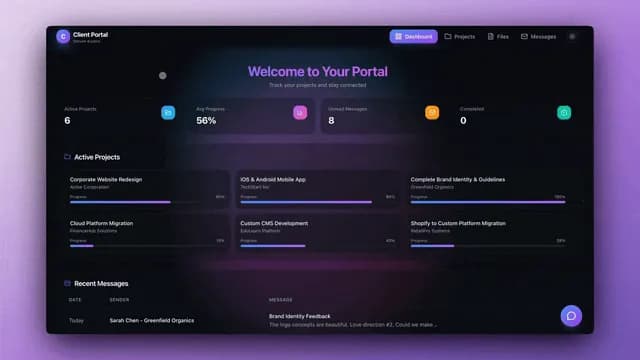
TL;DR: Ship a branded client portal in 5 minutes with Taskade Genesis. Custom domain, Genesis Auth (email sign-in), embedded AI agent, document sharing, billing integration, support tickets, automations, all in one platform. Live demo below is cloneable into your free workspace. Build your client portal free →
▲ ■ ● This is live. Click "Use this app" inside the iframe to clone this client portal into your free workspace.
Why Service Businesses Need a Client Portal in 2026
Every service business runs into the same wall around year two. Email threads scatter across inboxes. Documents live in Drive folders nobody can find. Status updates require Slack-tagging the project manager. Invoices go out through one tool, support tickets through another, project updates through a third. Clients ask the same five questions every week.
The fix is a client portal, a single branded surface where clients log in, see their projects, find their documents, submit tickets, pay invoices, and get answers from an AI agent. Building this in 2024 meant evaluating SuiteDash, Moxo, ClientPoint, custom Bubble apps, or hiring an engineer for $50K of custom work. Building this in 2026 takes 5 minutes in Taskade Genesis.
This guide walks through the build. The same architecture handles 3-client agencies and 300-client enterprise consultancies, the prompt scales, the platform handles the rest.
What a Modern Client Portal Includes
┌─────────────────────────────────────────────────────────────────┐
│         Modern Client Portal — Standard Components              │
├─────────────────────────────────────────────────────────────────┤
│                                                                 │
│  AUTHENTICATION      DOCUMENT SHARING      PROJECT STATUS       │
│  Genesis Auth        Per-client folders    Live dashboards      │
│  Email sign-in       Versioning            7 views              │
│  App Users           Permissions           Real-time updates    │
│                                                                 │
│  AI SUPPORT          BILLING               COMMUNICATION        │
│  Embedded agent      Stripe checkout       In-portal chat       │
│  Memory of client    Invoice history       Slack mirror         │
│  Cites docs          Recurring billing     Gmail integration    │
│                                                                 │
│  AUTOMATIONS         BRANDING              ANALYTICS            │
│  100+ integrations   Custom domain         Login activity       │
│  Slack alerts        Brand colors          Document views       │
│  Gmail follow-ups    White-label           Ticket trends        │
│                                                                 │
└─────────────────────────────────────────────────────────────────┘
Every component above ships in the Taskade Genesis-generated portal by default. You customize, you do not build.
Step 1: Generate the Portal in 5 Minutes
Open Taskade Genesis. The prompt:
Build a client portal for my agency. Each client gets a private folder with their documents, project status, deliverables, billing history, and support tickets. Include an AI assistant that answers client questions from their folder content. Automations: when a client submits a ticket, post to Slack and send Gmail acknowledgment; when an invoice is generated, create a Stripe checkout session and email the link; when a deliverable is published, notify the client via email. Use Genesis Auth for client login. Brand placeholder is "Aurora Consulting", replace with my brand later.
Taskade Genesis runs for ~5 minutes. EVE generates the multi-tenant Project structure (per-client folders), the support assistant agent with workspace memory, the four automations, the Genesis Auth configuration, and the App UI with brand placeholders. The output is a live URL.
Step 2: Add Your Brand and Custom Domain
Inside the generated portal, the brand placeholders are visible in three places: the logo (top-left), the brand color (accent throughout), and the brand name in email templates and login page. Replace each with your brand assets.
Custom domain configuration:
- Taskade Genesis Apps support custom domains on Business and above
- Add your domain in the Taskade Genesis App settings
- Update your DNS to point to the Taskade Genesis hosting endpoint
- SSL is automatic (Taskade Genesis handles certificate provisioning)
- The portal now lives at
clients.yourcompany.comwith your branding
Taskade Genesis Auth is built in and configurable on the same settings page. Clients sign in with their email right on your app's URL, with no Taskade account needed and no auth server to run.
Step 3: Configure Per-Client Folders
The Taskade Genesis-generated portal includes one example client folder. Replicate the structure for each real client:
- Create a Project folder named for the client
- Add sub-folders: Documents, Projects, Invoices, Tickets, Deliverables (the generated template includes these)
- Assign the client via App Users (beta), then match their folder to the signed-in email. They open only their folder
- Invite team members with appropriate roles (Editor for account managers, Viewer for stakeholders)
The role system sets what your own team can do:
| Role | Use case |
|---|---|
| Owner | Agency principal — full access |
| Editor | Operations lead and account managers — manage clients and edit their Projects |
| Checker | Internal stakeholder — comments only |
| Viewer | Read-only stakeholders — read without editing |
Step 4: Configure the AI Support Agent
The embedded agent comes pre-configured to read each client's folder and answer questions. Customize:
Agent name and persona, "Aurora Assistant" or whatever fits your brand voice
Greeting: First message clients see when they open chat
Tone: Professional, casual, technical, set via agent instructions
Tool access: By default, web search and project management tools. Add file operations if clients should be able to request specific docs.
Memory scope: Per-client memory. The agent remembers prior conversations with that client across sessions.
The agent automatically respects client folder permissions. It will not surface another client's documents even if asked. The internal-integration filtering on public agents adds an extra safety layer.
Step 5: Wire Billing via Stripe Integration
The Stripe checkout session action (v6.149) ships in the Taskade Genesis-generated portal. The default flow:
The flow runs without leaving the portal. Clients click "Pay Now"; Stripe handles the payment; the portal updates. No manual reconciliation, no separate billing tool.
Recurring billing is supported via Stripe subscription products, the checkout session can be configured for setup-mode or subscription-mode.
Step 6: Configure Communication Channels
The portal supports multiple communication patterns out of the box:
- In-portal chat: Clients message your team directly; agents handle common questions first, escalate to humans when needed
- Slack mirror: Portal conversations mirror to a Slack channel for team visibility
- Gmail integration: Important notifications send via Gmail with your domain
- Public agent embed: The support agent can be embedded on your marketing site too
For agencies running async-first operations, the in-portal chat + AI agent combination handles 60-80% of routine questions without team involvement.
What the Portal Looks Like (GIFs)
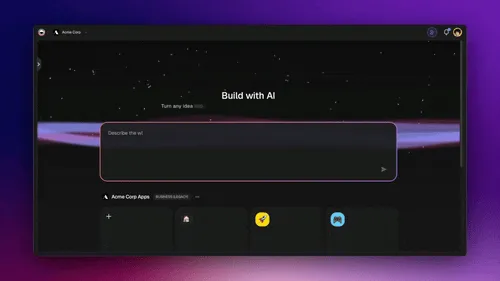
The Taskade Genesis Apps preview above shows the portal generation flow, prompt to live URL in minutes. The same flow produces client portals, internal dashboards, and customer-facing apps.
The Workspace DNA loop above shows what makes a portal active rather than passive, Memory (client folders) feeds Intelligence (support agent) which triggers Execution (Slack/Gmail/Stripe automations) which creates new Memory. The portal gets smarter as more interactions accumulate.
Pricing Comparison: Client Portal Tools
| Tool | Pricing | AI agent | Custom domain | Native automation | Stripe | 10-client all-in / yr |
|---|---|---|---|---|---|---|
| Taskade Genesis Pro | $10/mo flat | Yes (included) | Yes (Business+) | 100+ integrations | Native | $120 |
| SuiteDash Pinnacle | $99/mo | No | Yes | Zapier | Plugin | $1,188 |
| Moxo | $120/user/mo | No | Yes | Limited | Plugin | $14,400 (10 team) |
| ClientPoint | Custom enterprise | No | Yes | Custom | Custom | $5,000+ |
| HelloBonsai | $39/mo + $19/user | No | Yes | Limited | Native | $700+ |
| Plutio | $24-$45/mo | No | Yes | Native (limited) | Native | $290+ |
| Copilot | $39-$89/mo + $59/seat | Limited | Yes | Limited | Native | $1,500+ |
| Custom Bubble app | $119+/mo + dev cost | None | Yes | Plugins | Plugins | $5,000+ first year |
Taskade Genesis Pro at $10/month is the cheapest option with an AI agent included and the broadest native integration library. The cost advantage compounds, adding a 50th client costs $0 incremental on Taskade vs significant per-seat or per-client fees on competitors.
The Permission Model in a Portal Context
The model maps cleanly to agency reality. Owners run the business, and Editors run operations and accounts. Each role gets what it needs and no more. Clients sit outside that ladder. They sign in as App Users, and you match one folder to each client's login. That per-folder match is what makes the multi-tenant model work, so a client can fully interact with their folder without reaching another client’s data.
FAQ
How long does it take to build a client portal?
Taskade Genesis generates the initial portal in 5 minutes. Customization (branding, importing existing clients, configuring agents) takes a few hours. Compared to custom development (4-8 weeks) or platform configuration (1-2 weeks on SuiteDash/Moxo), Taskade Genesis is dramatically faster.
Can clients access the portal on mobile?
Yes. Taskade Genesis Apps are responsive and work well on mobile browsers. Clients can also install the portal as a PWA on iOS and Android home screens.
Does Taskade support white-label?
Yes. Taskade Genesis Apps support custom domains, brand colors, logos, and email templates with your domain. White-label removes Taskade branding entirely on Business and Enterprise tiers.
How does Genesis Auth work?
Taskade Genesis Auth is built into the platform. Clients sign in with their email right on your app's URL, with no Taskade account needed. End-user management is handled via the App Users (beta) surface in Taskade Genesis settings.
Can clients submit files to the portal?
Yes. Clients can upload documents, fill out forms, and submit support tickets. Uploaded files are OCR-indexed so the AI agent can reference them in responses.
Can the AI agent escalate to humans?
Yes. The agent can trigger automations on specific events, escalate to Slack, create a ticket, notify the account manager. Configure escalation triggers based on keywords, sentiment, or topic.
Does the portal work for B2B and B2C?
Yes. The same architecture handles both. B2B portals typically have richer billing flows and team-based client access. B2C portals lean more on the AI agent and self-service.
Can I export client data?
Yes. Taskade Genesis project export to Markdown (v6.150) and CSV exports support data portability. Client data can be exported at any time.
How does Taskade handle GDPR?
GDPR alignment is included. Data residency options are available on Enterprise. Right-to-deletion requests can be fulfilled through the workspace admin.
Can I integrate with my existing CRM?
Yes. Native bidirectional integrations with Salesforce (v6.131+), HubSpot, and other CRMs sync portal events to CRM records and vice versa.
Does the portal support electronic signatures?
Via integration with DocuSign or HelloSign (both available as automation actions). Native e-signature in the portal is on the roadmap.
Can multiple agencies use one Taskade workspace?
Yes for franchise/network setups. Workspaces are isolated by default; multi-workspace orchestration is possible with Enterprise tier.
Is there an SLA?
Enterprise tier offers SLA agreements. Standard tiers run on the same production infrastructure with reliable automation workflows, without a contractual SLA.
Can clients see project Gantt charts?
Yes. The project views include Gantt (with dependencies), Calendar, Board, List, Table, Mind Map, and Org Chart. Clients see whichever views you enable for them.
Does the portal scale to 1,000+ clients?
Yes. Taskade Genesis apps run on production infrastructure designed for high concurrency, so a portal serving many clients at once stays fast.
Ship your client portal in 5 minutes. Try Taskade Genesis free →, 11,000 one-time credits, embedded agents, 100+ integrations. Custom domains on Business and above. No credit card required.
▲ ■ ● Memory · Intelligence · Execution.