






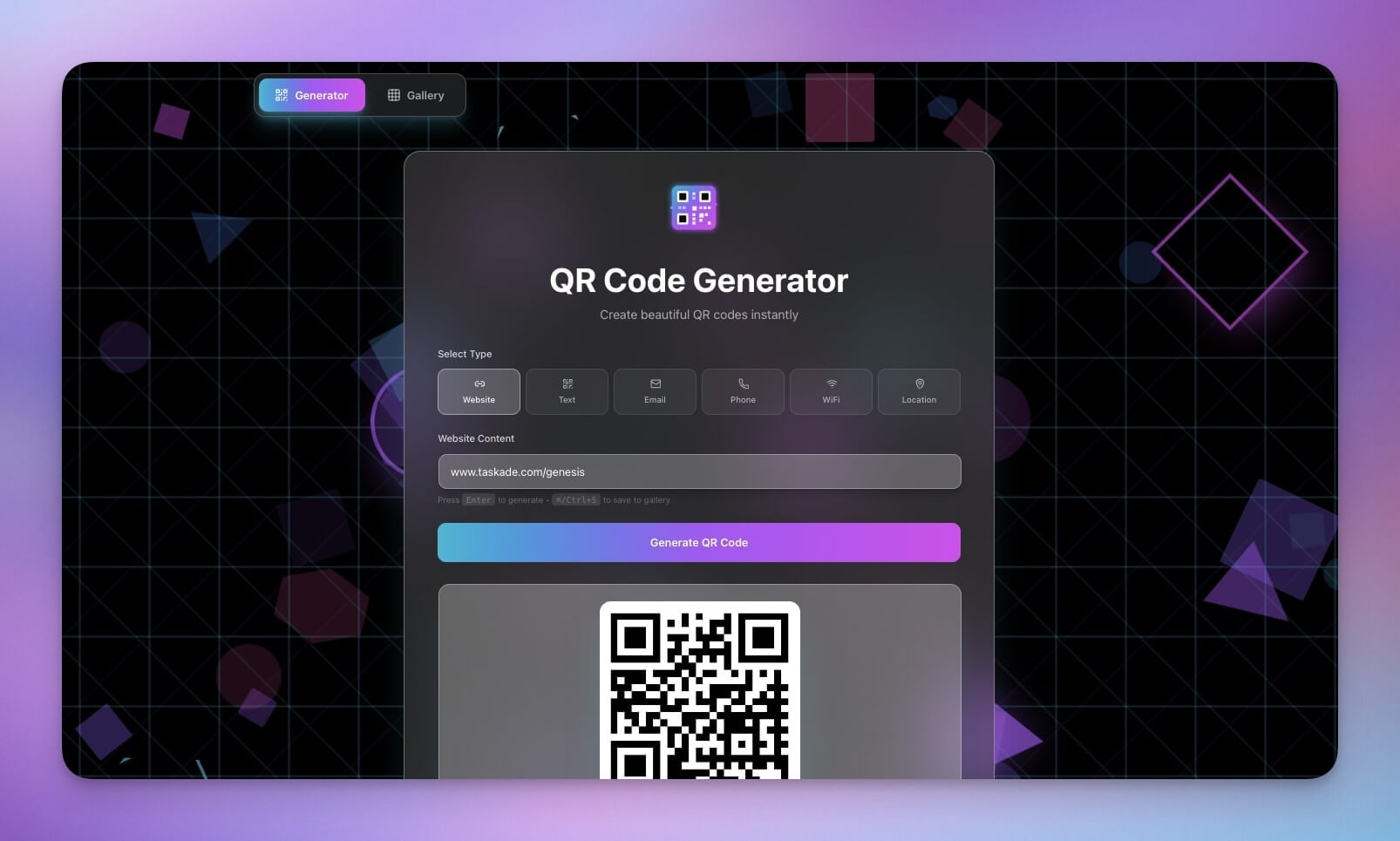
QR codes are everywhere.
Marketing campaigns, business cards, menus, payment links — they bridge physical and digital. And building a QR generator is one of the fastest wins with Taskade Genesis.
This tutorial shows how we built the QR Code Studio in under 5 minutes — then extended it with brand customization, batch generation, scan analytics, and automation workflows.
TL;DR: Taskade Genesis lets you build a fully functional QR code generator from a single text prompt — no coding required. Over 150,000 apps have been built on the platform, and QR tools are among the most cloned. Start building yours now.

What Is the Fastest Way to Build a QR Code Generator in 2026?
Taskade Genesis turns a plain-text description into a working QR code application in under five minutes. The generated app includes an input form, size selector, QR encoding logic, PNG download, and a history database — all without writing a single line of code.
Traditional QR code tools lock you into monthly subscriptions for basic features like logo overlays and scan tracking. With Genesis, you own the entire tool. You can customize it, embed it on a custom domain, share it with your team using permissions, and connect it to 100+ integrations for automated workflows.
Here is what we are building:
- Converts URLs, text, vCards, and WiFi credentials to QR codes
- Supports custom sizes (128px, 256px, 512px)
- Saves generation history in a structured database
- Downloads in PNG format
- Extends to brand colors, logo overlays, batch generation, and scan analytics
Time: ~5 minutes for the base tool, ~15 minutes with all customizations
Skills needed: None
Step 1: Write the Prompt
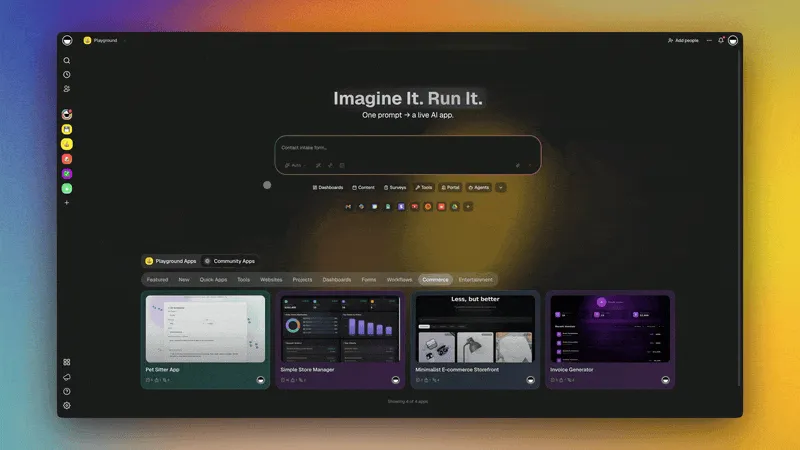
A clear, structured prompt produces the best results. Here is the exact prompt we used:
Build a QR code generator tool with:FEATURES:
- Input field for URL or text
- Generate QR code button
- Size options (small, medium, large)
- Download as PNG
- History of generated codes
INTERFACE:
- Clean, minimal design
- Input prominently displayed
- Generated QR shows immediately
- Download button below QR
HISTORY:
- Save each generated QR
- Show input text/URL
- Show creation date
- Re-download past codes
The prompt follows the Genesis best practice of separating features, interface, and data into clear sections. This gives the AI agents enough context to generate a complete application with proper structure.
For more prompt writing tips, see our guide on building your first app and the Taskade Genesis overview.
Step 2: What Genesis Generates
Genesis created a fully functional application with three layers — matching the Workspace DNA architecture of Memory, Intelligence, and Execution.
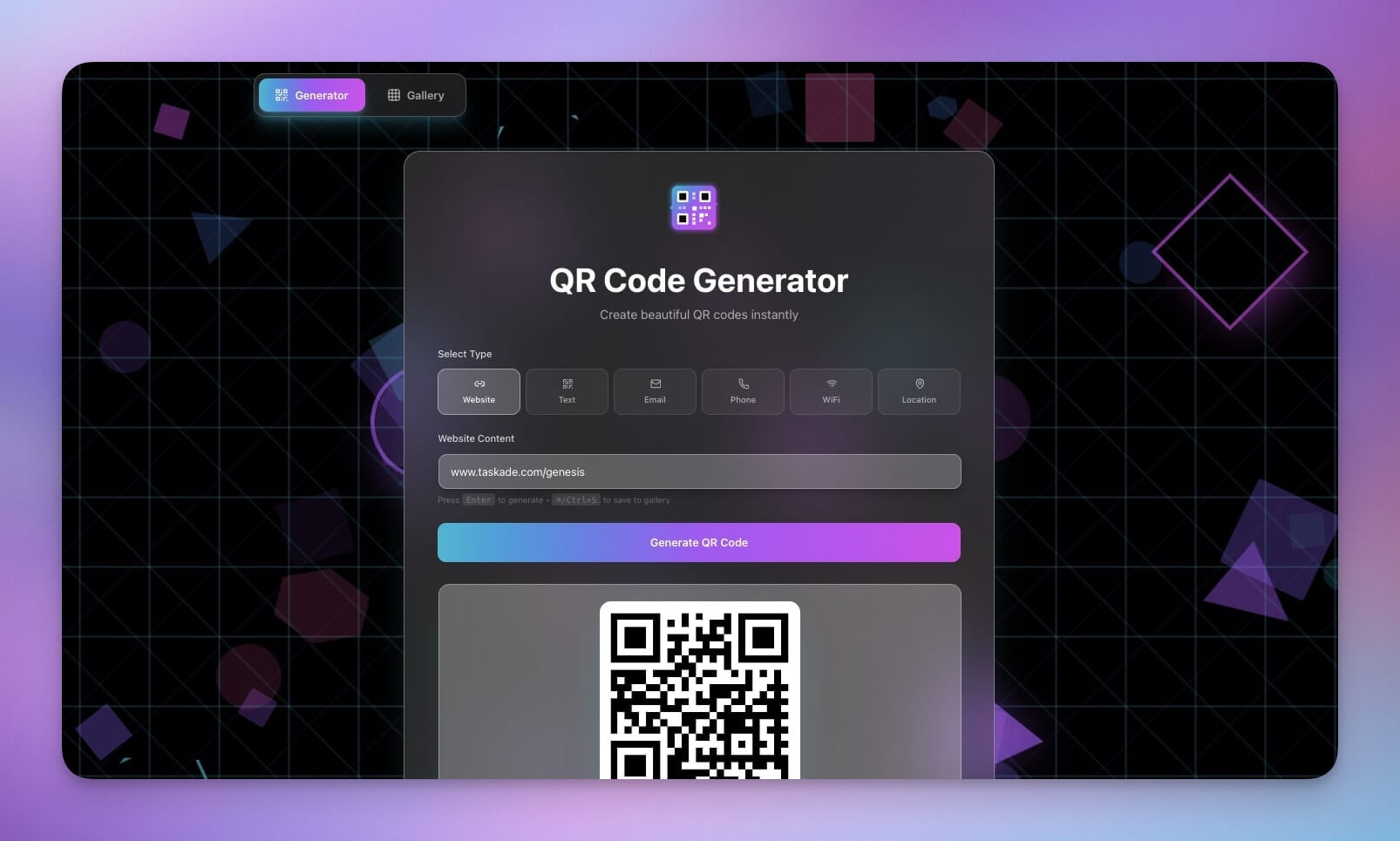
QR Generator Interface
- Text/URL input field with validation
- Size selector (128px, 256px, 512px)
- Generate button with loading state
- QR code display area with responsive scaling
- Download button for PNG export
History Database (Memory Layer)
The database stores every generated QR code for easy retrieval:
| Field | Type | Purpose |
|---|---|---|
| id | String | Unique identifier for each QR code |
| input_text | Text | URL or text that was encoded |
| qr_type | Select | Category (URL, text, vCard, WiFi) |
| size_px | Integer | QR dimensions (128, 256, 512) |
| qr_data | Text | Encoded QR code payload |
| created_at | Date | When the code was generated |
Logic Layer (Intelligence + Execution)
- Input validation (URL format checking, character limits)
- QR encoding using standard algorithms
- Image generation at the selected resolution
- History logging with automatic timestamps
- Re-download capability for any past generation
This three-layer structure mirrors how all Genesis apps work — Projects handle Memory, AI Agents handle Intelligence, and Automations handle Execution.
Step 3: Testing the Generator
We tested several input types to verify the tool works across common use cases:
URL Test:
- Input:
https://www.taskade.com - Result: Valid QR generated instantly, scans correctly on iOS and Android
Text Test:
- Input:
Hello World - Result: QR shows text when scanned with any reader app
Long Text:
- Input: 500-character paragraph
- Result: QR generated with a warning about scan difficulty at small sizes
Download:
- Clicked download button
- Result: PNG file saved to device at selected resolution
History Persistence:
- Generated 10 QR codes in sequence
- All 10 appeared in history with correct timestamps
- Re-download worked for every entry
Step 4: Using the History Feature
After generating several QR codes:
- History displayed all past generations in reverse chronological order
- Each entry showed the input text, QR type, size, and creation date
- Clicking an entry revealed the QR code for preview
- Re-download was available for every past code
No more regenerating codes you have already made. The history database persists across sessions, so your team can access past codes anytime through the shared workspace.
The Final Tool
After 5 minutes of prompting and generation:
- Clean interface for quick generation
- Multiple sizes for different use cases (print, screen, mobile)
- Instant download as PNG
- History tracking for past codes
- Shareable URL for team access via permissions
Industry Use Cases for QR Code Generators
QR codes serve different purposes across industries. Here is how a custom-built QR generator adds value in each sector:
| Industry | Use Case | QR Code Type | Example |
|---|---|---|---|
| Marketing | Campaign tracking, print-to-digital conversion | URL with UTM parameters | Magazine ad linking to landing page |
| Retail | Product information, loyalty programs, mobile payments | URL, payment link | Shelf tag linking to product reviews |
| Hospitality | Digital menus, room service ordering, WiFi access | URL, WiFi credentials | Table tent with menu QR code |
| Healthcare | Patient check-in, prescription info, record access | URL, vCard | Waiting room check-in kiosk |
| Education | Attendance tracking, resource sharing, assignment links | URL, text | Classroom poster linking to materials |
| Logistics | Package tracking, inventory management, shipping labels | URL, text | Warehouse bin labels with item data |
| Real Estate | Property listings, virtual tours, agent contact cards | URL, vCard | Yard sign linking to listing page |
| Events | Ticket validation, attendee check-in, session feedback | URL, text | Conference badge with schedule QR |
Each of these use cases can be built as a Genesis app with industry-specific prompts. Browse the Community Gallery for ready-made examples, or check our guides on AI app ideas and AI dashboard examples.
Customization Deep Dive
The base QR Code Studio handles simple URL-to-QR conversion. Here is how to extend it into a professional-grade tool with follow-up prompts in Taskade Genesis.
Brand Colors
Tell Genesis to add brand customization:
Add a color picker for QR code foreground and background colors.
Default foreground: #1a1a2e
Default background: #ffffff
Add hex input fields for precise color entry.
Preview the QR with selected colors before download.
Brand-colored QR codes increase scan rates by 20-30% compared to plain black-and-white codes because they look intentional rather than generic.
Logo Overlay
Embed your brand logo in the center of every QR code:
Add a logo upload feature. Place the uploaded logo in the center
of the QR code at 20% of total QR size. Add error correction
level H (30%) to ensure the QR remains scannable with the logo
overlay. Show a preview before download.
QR codes use Reed-Solomon error correction — level H tolerates up to 30% of the code being obscured, which is exactly what a center logo does. Genesis handles this encoding automatically.
Batch Generation
Process multiple URLs at once:
Add a batch mode. Accept a textarea with one URL per line
(up to 100 URLs). Generate all QR codes simultaneously.
Display them in a grid. Add a "Download All as ZIP" button.
Show progress indicator during batch generation.
Batch generation is essential for marketing teams running multi-channel campaigns and logistics teams creating shipping labels. Connect this to an automation workflow to pull URLs from a spreadsheet automatically.
vCard and WiFi Templates
Pre-built templates for common QR code types:
Add template buttons for:
- vCard: fields for name, phone, email, company, title
- WiFi: fields for network name, password, encryption type
- Email: fields for recipient, subject, body
- SMS: fields for phone number, message
- Calendar Event: fields for title, date, time, locationEach template auto-formats the data into the correct QR encoding.
| Template | Encoding Prefix | Fields | Best For |
|---|---|---|---|
| URL | https:// |
URL | Marketing, campaigns |
| vCard | BEGIN:VCARD |
Name, phone, email, company | Business cards, networking |
| WiFi | WIFI:T:WPA;S: |
SSID, password, encryption | Offices, restaurants, hotels |
mailto: |
Recipient, subject, body | Support, feedback | |
| SMS | smsto: |
Phone, message | Customer service, alerts |
| Calendar | BEGIN:VEVENT |
Title, date, time, location | Events, meetings |
Scan Analytics
Add redirect-based tracking to measure QR code performance:
Add scan analytics. When generating a QR code, create a
redirect URL through the app. Track: scan count, scan date/time,
device type (mobile/desktop), geographic region (from IP).
Show a dashboard with scan metrics for each QR code.
Scan analytics transforms a simple QR generator into a marketing intelligence tool. You can see which campaigns drive the most scans, what devices your audience uses, and when peak scanning times occur.
How Workspace DNA Powers Your QR Tool
Every Taskade Genesis app runs on Workspace DNA — a self-reinforcing loop of Memory, Intelligence, and Execution. Here is how it applies to your QR code generator:
- Memory — Projects store your QR code history, template library, and scan analytics data. Every code you generate feeds back into the system for reporting and re-use.
- Intelligence — AI Agents validate inputs, enforce brand guidelines, and summarize scan analytics. The agents learn from your usage patterns to suggest optimizations.
- Execution — Automations handle batch generation, send Slack notifications on new codes, and produce weekly performance reports. The outputs feed back into Memory, completing the loop.
This is the same architecture powering all 150,000+ apps built on Taskade Genesis. Learn more about how it works in our Workspace DNA guide.
Automation Examples for QR Code Workflows
Connect your QR code generator to 100+ integrations using Taskade Automations. Here are three practical workflows:
Slack Notification on New QR Code
Trigger a Slack message every time a new QR code is generated. Useful for marketing teams that need to track asset creation.
| Step | Action | Details |
|---|---|---|
| 1 | Trigger | New QR code generated in database |
| 2 | Format | Extract input URL, size, and creation date |
| 3 | Send | Post to #marketing-assets Slack channel |
| 4 | Log | Record notification in audit trail |
Weekly QR Code Report
Generate an automated summary of all QR codes created and their scan metrics.
| Step | Action | Details |
|---|---|---|
| 1 | Schedule | Every Monday at 9:00 AM |
| 2 | Query | Fetch all codes created in the past 7 days |
| 3 | Summarize | AI agent compiles scan counts, top performers |
| 4 | Deliver | Email report to team leads |
Batch Generation from Spreadsheet
Import a list of URLs from a connected spreadsheet and generate QR codes for each row automatically.
| Step | Action | Details |
|---|---|---|
| 1 | Trigger | New rows added to Google Sheets |
| 2 | Parse | Extract URL column from each row |
| 3 | Generate | Create QR codes at specified size |
| 4 | Store | Save all codes to history database |
| 5 | Notify | Send completion message with download link |
For more automation patterns, see our guides on automation triggers and the AI workflow automation platform.
Deploying on a Custom Domain
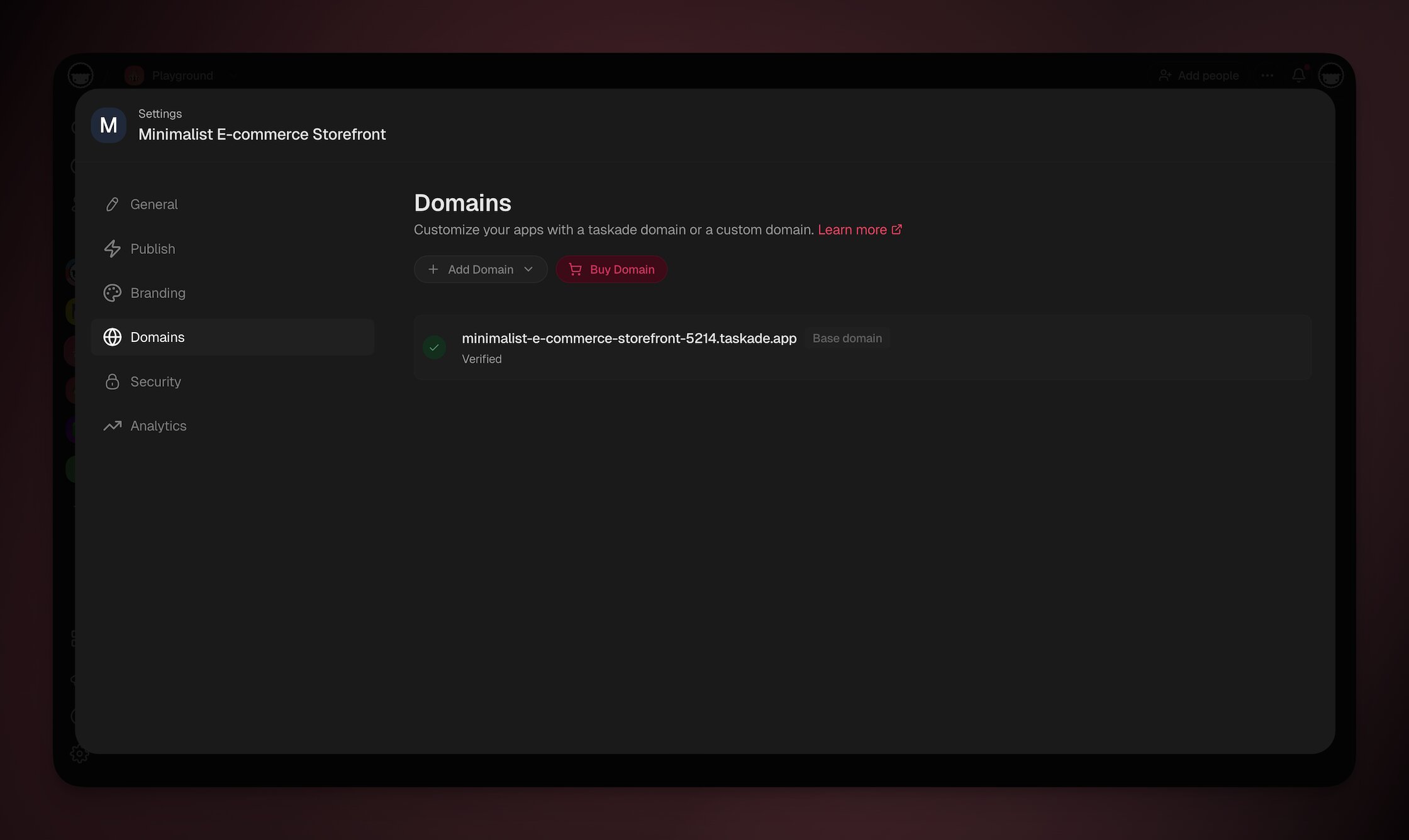
Taskade Genesis apps support custom domain deployment with automatic SSL. This means your QR code generator lives at your own branded URL — like qr.yourcompany.com — instead of a generic platform link.
Setup Steps
- Open your QR Code Studio in Taskade Genesis
- Navigate to App Settings and select the Domain tab
- Enter your custom domain (e.g.,
qr.yourcompany.com) - Add the provided DNS records to your domain registrar
- SSL is provisioned automatically — no manual certificate management
Custom domains are available on Pro and above. The Pro plan at $10/month supports up to 10 team members and includes access to frontier AI models from top AI labs.
For step-by-step instructions, see our custom domains guide.
How Taskade Genesis Compares to Dedicated QR Code Tools
Most QR code tools are single-purpose subscriptions. Taskade Genesis builds a complete application you own and customize.
| Feature | Taskade Genesis | QR Code Monkey | QRCode-Generator.com | Beaconstac |
|---|---|---|---|---|
| Custom QR codes | Yes (full control) | Yes | Yes | Yes |
| Logo overlay | Yes (via prompt) | Yes (free) | Yes (paid) | Yes (paid) |
| Brand colors | Yes (full palette) | Limited free | Paid only | Paid only |
| Batch generation | Yes (unlimited) | No | Paid only | Paid only |
| Scan analytics | Yes (built-in) | No | Paid only | Yes |
| vCard/WiFi templates | Yes | Yes | Yes | Yes |
| Custom domain | Yes | No | No | Yes (enterprise) |
| Database/history | Yes (persistent) | No | Limited | Yes |
| AI agents | Yes (frontier models) | No | No | No |
| Automation workflows | Yes (100+ integrations) | No | No | Limited |
| Team permissions | RBAC | No | Team plan only | Team plan only |
| Starting price | Free (paid from $10/mo) | Free (paid from $14/mo) | Free (paid from $7/mo) | $5/mo |
| Own your tool | Yes (full customization) | No (their platform) | No (their platform) | No (their platform) |
The key difference: dedicated QR tools give you a subscription to their service. Taskade Genesis gives you a tool you own — with AI agents, automations, and the full Workspace DNA architecture backing it.
Read more comparisons: Taskade Genesis vs Bolt.new | Taskade Genesis vs Lovable | Taskade Genesis vs Cursor
Beyond QR Codes: What Else Can You Build?
The QR Code Studio is one of the simplest Genesis apps you can create. The same prompt-to-app workflow powers much more complex tools:
| Category | Example App | Complexity | Build Time |
|---|---|---|---|
| Dashboards | Finance Tracker | Medium | 10 min |
| Booking Systems | Appointment Scheduler | Medium | 10 min |
| Client Portals | Consultancy Portal | High | 15 min |
| Websites | SaaS Landing Page | Medium | 10 min |
| Productivity | Invoice Generator | Medium | 10 min |
| E-commerce | Product Catalog | High | 15 min |
Browse more ideas in our 20 AI app ideas guide, or explore real apps in the Community Gallery.
Build Your Own QR Code Generator
- Open Taskade Genesis
- Use our prompt above or write your own
- Generate the app in under 5 minutes
- Test with a few URLs and text inputs
- Customize with brand colors, logos, and templates
- Connect automations for batch workflows
- Deploy on a custom domain
- Share with your team using role-based permissions
Resources
Clone the template:
Related tools:
Documentation:
More tutorials:
- How We Built the Finance Dashboard
- How to Build a Room Booking Dashboard
- How to Build a Nonprofit Website
- What Is Vibe Coding?
- The Origin of Living Software
- Build Without Permission
Explore Taskade AI:
- AI App Builder — Build complete applications from a single prompt
- AI Agents — Create intelligent AI teammates with built-in tools
- AI Workflow Automation — Connect 100+ integrations
Build with Genesis:
- Browse All Generator Templates — Apps, dashboards, websites, and more
- Browse Agent Templates — AI agents for every use case
- Explore Community Apps — Clone and customize
Compare alternatives:
Explore the Vibe Apps series:
- Vibe Calculator Apps — 10 AI calculators you can build without code

Frequently Asked Questions
How do I build a QR code generator without coding?
Open Taskade Genesis and describe your QR code tool in a text prompt, including features like URL input, size options, download format, and generation history. Genesis builds the complete app in under 5 minutes with a clean interface, input validation, QR encoding, and history tracking. No coding required. Over 150,000 apps have been built on the platform.
What features does the Taskade QR Code Studio include?
The QR Code Studio includes a text or URL input field, size selector (128px, 256px, 512px), instant QR code generation, PNG download, and a history database that saves all past generations with input text, size, and creation date for easy re-downloading. You can extend it with brand colors, logo overlays, and batch generation.
Can I customize the QR code generator after building it?
Yes. You can extend it with custom brand colors, logo overlays in the center, batch generation for multiple URLs, URL shortening before encoding, scan analytics with redirect tracking, and pre-set templates for vCards, WiFi credentials, and other formats. Taskade Genesis supports iterative refinement through natural language prompts.
Is the Taskade QR Code Generator free to use?
You can clone the QR Code Studio template for free from the Taskade Community. Taskade offers a free tier to get started, with Pro plans from $10/month billed annually, including 10 users and access to frontier AI models from top AI labs.
Can I deploy my QR code generator on a custom domain?
Yes. Taskade Genesis apps support custom domain deployment with automatic SSL. You can point your own domain to your QR code generator so clients and team members access it at a branded URL. Custom domains are available on Pro ($10/month billed annually) and above.
What QR code types can I generate with this tool?
You can generate QR codes for plain URLs, plain text, vCard contact cards, WiFi network credentials, email addresses, phone numbers, SMS messages, calendar events, and geographic coordinates. Each type uses a specific encoding prefix that Taskade Genesis handles automatically based on your prompt.
Can I automate QR code generation with Taskade?
Yes. Taskade supports 100+ integrations across 10 categories. You can set up automations that generate QR codes from spreadsheet rows, send Slack notifications when new codes are created, produce weekly usage reports, and trigger batch generation from webhook events. Automations use reliable workflow execution with branching and filtering.
How does Taskade Genesis compare to dedicated QR code tools?
Dedicated tools like QR Code Monkey and Beaconstac focus solely on QR generation. Taskade Genesis builds a complete application with databases, AI agents, automation workflows, and role-based access control. You get a full-stack tool you own and customize, not a subscription to a single-purpose service.
Can multiple team members use the QR code generator?
Yes. Taskade offers a permission system — Owner to Viewer. You can invite team members with appropriate access levels. The Pro plan supports up to 10 users at $10/month with full access to all Genesis features.
What industries benefit most from a custom QR code generator?
Marketing teams use QR codes for campaign tracking and print-to-digital conversion. Retail and hospitality businesses use them for menus, payments, and loyalty programs. Healthcare organizations use them for patient check-in and record access. Education institutions use them for attendance and resource sharing. Logistics companies use them for package tracking and inventory management.