






Nonprofits need enterprise tools on volunteer budgets. Donor tracking, event management, volunteer coordination, impact reporting — the same systems Fortune 500 companies pay thousands for — but with no IT department, no dev team, and no budget for per-seat licenses.
TL;DR: Taskade Genesis builds a complete nonprofit hub — public website, donor CRM, volunteer management, event tracking, and impact dashboards — from a single prompt in about 20 minutes. No coding, no hosting, no plugin management. Plans start free. Clone the Nonprofit Hub →

This tutorial walks through building the Nonprofit Org Website, then compares the approach against WordPress, Squarespace, Wix, and Donorbox so you can evaluate the best path for your organization.
What We Are Building
A nonprofit hub that handles everything from public-facing content to internal operations:
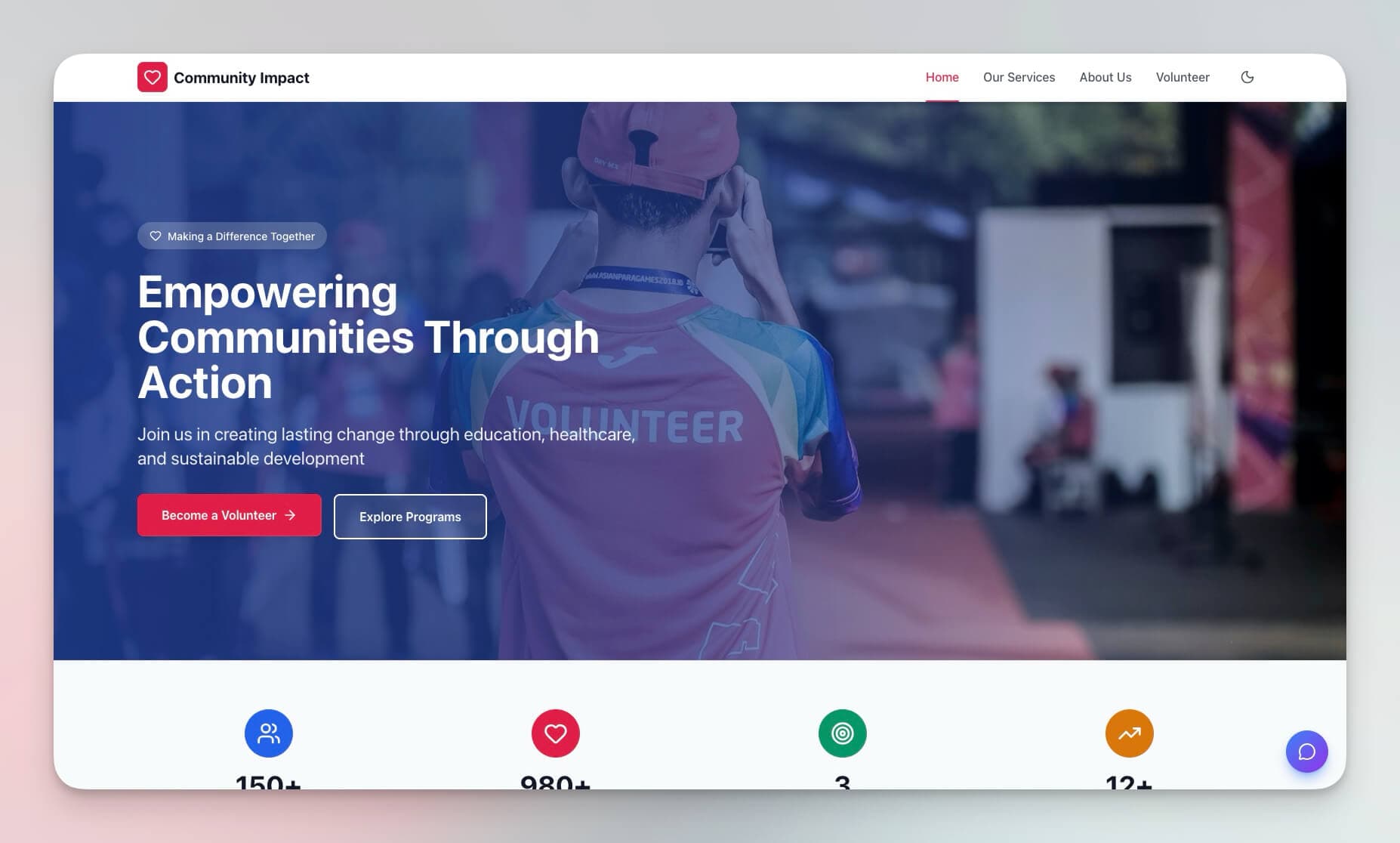
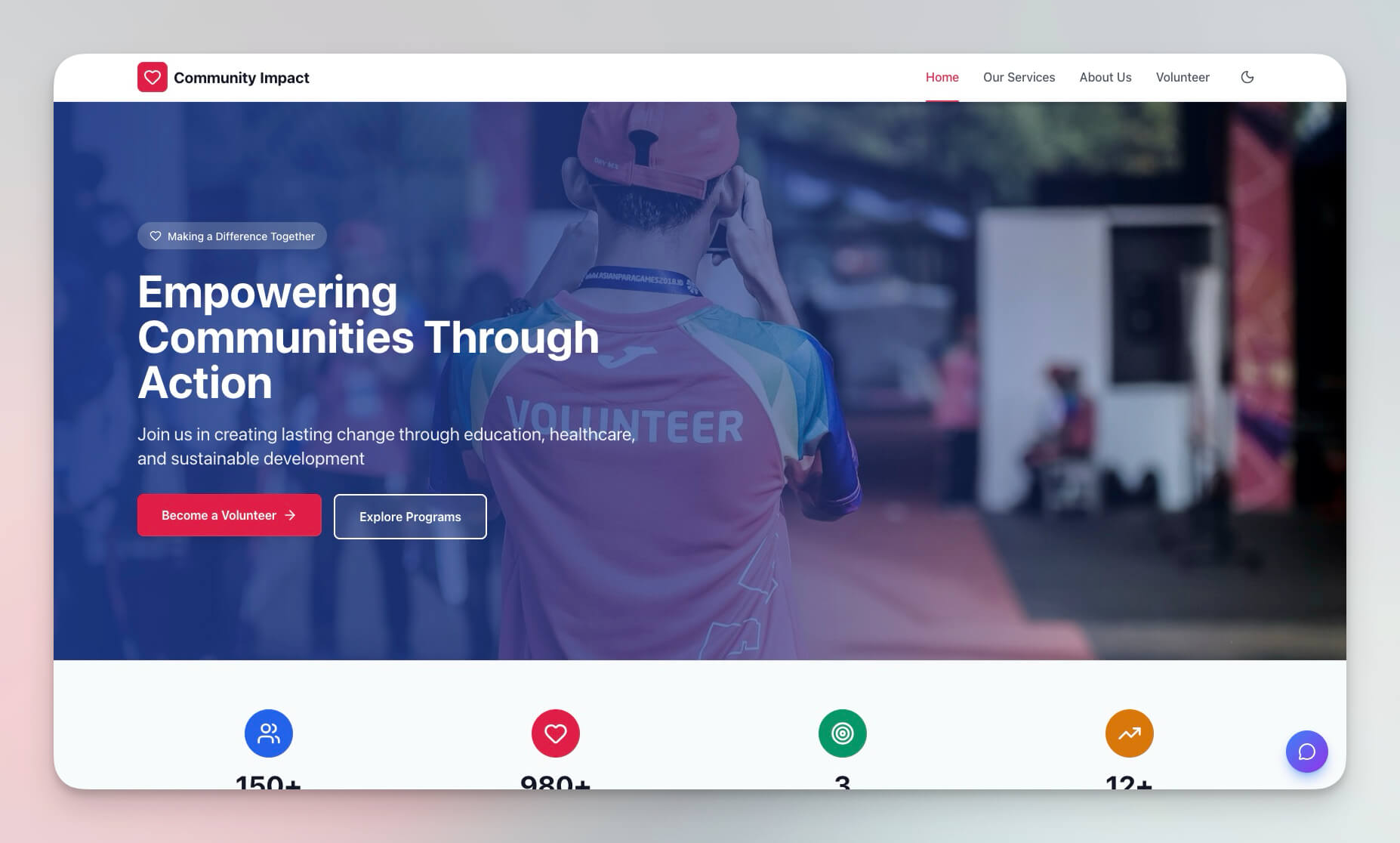
- Public website with mission statement and programs
- Donor relationship management with tiers and automated follow-ups
- Volunteer coordination with shift scheduling and hour tracking
- Event management with registration and post-event reporting
- Impact dashboards for board reports and grant applications
Time: ~20 minutes
Skills needed: None — describe your needs, Taskade Genesis builds the system
The Nonprofit Tool Problem
Most nonprofits cobble together 4-6 separate tools to manage operations. Each tool has its own login, its own pricing, and its own data silo.
| Function | Typical Tool | Typical Cost | Problem |
|---|---|---|---|
| Website | WordPress + hosting | $5-50/mo + plugins | Requires updates, security, developer time |
| Donor CRM | Salesforce Nonprofit | $36-300/user/mo | Expensive, complex, steep learning curve |
| Volunteer management | VolunteerHub | $50-200/mo | Another login, disconnected from donor data |
| Email automation | Mailchimp | $13-350/mo | Separate contact lists, sync headaches |
| Event management | Eventbrite | $0 + fees | No integration with donor or volunteer data |
| Reporting | Google Sheets | Free | Manual data entry, no automation |
Total cost for a typical nonprofit stack: $150-900/month before staff time
Taskade Genesis consolidates all six functions into one workspace. The website, donor database, volunteer system, event tracker, and reporting dashboard all share the same data and automation workflows.
Taskade Genesis vs WordPress vs Squarespace vs Wix vs Donorbox
| Feature | Taskade Genesis | WordPress | Squarespace | Wix | Donorbox |
|---|---|---|---|---|---|
| Starting price | Free (paid from $10/mo) | Free (hosting $5-50/mo) | $16/mo | $17/mo | Free (1.5% fee) |
| Setup time | ~20 minutes | 1-4 weeks | 2-7 days | 2-7 days | 1-2 hours |
| Website builder | Yes | Yes (themes + plugins) | Yes (templates) | Yes (drag-drop) | Landing page only |
| Donor CRM | Built-in | Plugin (CiviCRM) | Not included | Not included | Basic donor profiles |
| Volunteer management | Built-in | Plugin (various) | Not included | Not included | Not included |
| Event management | Built-in | Plugin (The Events Calendar) | Basic scheduling | Wix Events | Not included |
| AI agents | Yes (built-in tools) | Plugin (various AI) | Not included | Wix AI tools | Not included |
| Automation workflows | Built-in (100+ integrations) | Plugin (WP Automation) | Limited | Wix Automations | Zapier integration |
| Impact reporting | AI-generated reports | Manual or plugin | Manual | Manual | Donation reports only |
| Hosting management | None (managed) | Self or managed | Managed | Managed | Managed |
| Permission levels | Role-based access (Owner to Viewer) | User roles (5 levels) | Contributors (limited) | Roles (limited) | Not applicable |
| Maintenance required | None | Theme/plugin updates, security patches | Minimal | Minimal | Minimal |
Step 1: The Prompt
Open Taskade Genesis and describe your nonprofit:
Build a nonprofit website and management hub with:WEBSITE:
- Home page with mission statement
- Programs/initiatives section
- Impact stories/testimonials
- Donate button
- Contact form
DONORS:
- Donor database: name, email, donation history, total given, last donation date
- Donation logging with amount and campaign
- Thank you email automation
- Donor tiers (Friend, Supporter, Champion, Guardian)
VOLUNTEERS:
- Volunteer database: name, skills, availability, hours logged
- Shift scheduling
- Hour tracking
- Recognition system
EVENTS:
- Event calendar
- Registration tracking
- Volunteer assignments
- Post-event impact reporting
IMPACT:
- Metrics dashboard: people served, funds raised, volunteer hours
- Progress toward annual goals
- Exportable reports for board/grants
Genesis reads this prompt and builds the complete hub — website pages, databases, AI agents, and automation workflows — in a single generation.
Step 2: Generated Components
Website Pages
Genesis creates five public-facing pages:
| Page | Content | Purpose |
|---|---|---|
| Home | Mission statement, recent impact stats, CTA buttons | First impression and conversion |
| Programs | Initiative details with stories and metrics | Show what you do |
| Get Involved | Volunteer signup, donation links | Convert visitors to supporters |
| Events | Upcoming calendar with registration | Drive participation |
| Contact | Inquiry form with auto-response | Capture leads |
Donors Database
| Field | Type | Purpose |
|---|---|---|
| name | Text | Donor name |
| Contact | ||
| total_given | Formula | Sum of all donations |
| last_donation | Date | Most recent gift date |
| tier | Formula | Auto-calculated: Friend (<$100), Supporter ($100-499), Champion ($500-999), Guardian ($1,000+) |
| campaign | Multi-select | Which campaigns they supported |
| notes | Text | Relationship notes and context |
Volunteers Database
| Field | Type | Purpose |
|---|---|---|
| name | Text | Volunteer name |
| Contact | ||
| skills | Multi-select | Teaching, cooking, driving, admin, etc. |
| availability | Multi-select | Days and time slots |
| total_hours | Formula | Sum of all logged hours |
| joined | Date | Start date |
| status | Select | Active, On Break, Alumni |
Events Database
| Field | Type | Purpose |
|---|---|---|
| name | Text | Event title |
| date | Date | Event date |
| type | Select | Fundraiser, Service, Community, Training |
| registrations | Number | Confirmed attendees |
| goal | Number | Target (amount or participation) |
| actual | Number | Actual result |
| volunteers_needed | Number | Shift slots available |
Step 3: Website Customization
Customize the generated pages through conversation with the AI agent:
Home Page
The home page includes three key sections:
Mission Statement
"Empowering communities through education and support since 2015"
Recent Impact (auto-updated from dashboard data)
- 1,500 meals served this month
- 45 volunteers active
- $12,000 raised toward programs
Call to Action
Two primary buttons: [Donate Now] and [Volunteer With Us]
Programs Section
Each program page includes:
- Youth Education Program — description, 450 students served, 12 volunteer tutors
- Food Security Initiative — description, 1,500 meals/month, 8 distribution sites
- Senior Support Services — description, 200 seniors supported, 20 weekly visits
Every program displays live impact metrics pulled directly from the dashboard — no manual updating required.
Step 4: Donor Automations
Donor relationships require consistent communication. These automation workflows handle it without staff time.
Thank You Flow
TRIGGER: New donation logged
ACTIONS:
  Send personalized thank-you email (include amount and impact)
  Update donor total_given
  Recalculate donor tier
  IF tier changed -> Send tier upgrade congratulations
  Notify development team of new donation
Lapsed Donor Re-Engagement
TRIGGER: Last donation > 12 months ago
ACTIONS:
  Add to re-engagement list
  Send "we miss you" email with recent impact stats
  Notify development manager for personal outreach
Anniversary Recognition
TRIGGER: First donation anniversary date
ACTIONS:
  Send anniversary thank-you with personalized impact summary
  Include total lifetime giving and impact equivalents
  Suggest recurring giving option
Donor Tier Milestones
| Tier | Total Given | Benefits | Automation |
|---|---|---|---|
| Friend | $0-99 | Standard updates | Quarterly newsletter |
| Supporter | $100-499 | Priority updates + event invites | Monthly impact email |
| Champion | $500-999 | All above + annual report mention | Personal thank-you from director |
| Guardian | $1,000+ | All above + board meeting invite | Quarterly call from executive director |
Step 5: Volunteer Management
Shift Scheduling
TRIGGER: New event created
ACTIONS:
  Create volunteer shift slots based on volunteers_needed
  Match available volunteers by skills and availability
  Send signup opportunities to matched volunteers
  Track registrations against slots
  Send reminders 48 hours and 2 hours before shift
Hour Tracking and Recognition
TRIGGER: Shift completed (marked by team lead)
ACTIONS:
  Log hours to volunteer record
  Update total_hours
  Send thank-you message
  IF milestone reached (50h, 100h, 250h, 500h) -> Recognition notification
  IF 500+ hours -> Nominate for annual volunteer award
Step 6: Impact Dashboard
The dashboard provides real-time visibility into organizational performance across all programs.
Key Metrics
| Metric | Current | Goal | Progress |
|---|---|---|---|
| People Served | 1,500 | 2,000 | 75% |
| Funds Raised | $12,000 | $50,000 | 24% |
| Volunteer Hours | 450 | 1,200 | 37.5% |
| Active Volunteers | 45 | 60 | 75% |
| Events Held | 8 | 24 | 33% |
Report Generation
The AI agent generates formatted reports for different audiences:
- Board Reports — executive summary, financial overview, program outcomes, strategic recommendations
- Grant Applications — quantitative impact data, demographic breakdowns, budget utilization, outcome narratives
- Annual Impact Summary — year-over-year trends, milestone achievements, testimonials, financial transparency
- Donor Updates — personalized impact reports showing how each donor's contributions were used
All reports pull live data from the workspace — no manual compilation. The agent formats output for the target audience using persistent memory of past reporting preferences.
Role-Based Access for Nonprofit Teams
Different stakeholders need different levels of access. Taskade's permission system handles this:
| Role | Permission Level | Access |
|---|---|---|
| Executive Director | Owner | Full hub access + settings + billing |
| Board Members | Viewer | Dashboard metrics + reports (read-only) |
| Program Managers | Editor | Their program's data + volunteer assignments |
| Development Staff | Editor | Donor database + communication workflows |
| Volunteers | Editor (own shifts) | Their shifts + hour logging |
| Public Visitors | (Public link) | Website pages + event registration only |
The Final Hub
After 20 minutes:
- Professional website with mission, programs, and impact stories
- Complete donor management with tiers, automated thank-yous, and re-engagement
- Volunteer coordination with skill matching, scheduling, and recognition
- Event management with registration, volunteer assignments, and post-event reporting
- Impact dashboard for board reports, grant applications, and donor updates
- Automated communications across the entire supporter lifecycle
When to Choose WordPress, Squarespace, or Donorbox Instead
| Scenario | Best Choice | Why |
|---|---|---|
| Need extensive blog with thousands of posts and SEO plugins | WordPress | Mature ecosystem, Yoast SEO, thousands of themes |
| Want pixel-perfect design with no technical skills | Squarespace | Beautiful templates, drag-and-drop, built-in commerce |
| Need standalone donation processing with payment forms | Donorbox | Embeddable donation forms, recurring giving, peer-to-peer campaigns |
| Need e-commerce for merchandise sales | Wix or Squarespace | Built-in online stores with inventory management |
| Need a complete operational hub (website + CRM + volunteer + events + reporting) in one workspace | Taskade Genesis | All-in-one from a single prompt, AI-powered, no plugin management |
Customization Ideas
Extend your nonprofit hub after the initial build:
- Online donations — connect payment processing via integrations (Stripe, PayPal)
- Membership tiers — paid supporter levels with gated content and exclusive updates
- Grant tracking — application deadlines, submission status, reporting requirements
- Email campaigns — newsletter automation for different donor tiers
- Multi-language — translate content for broader community reach
- Public embedding — embed the donation page or volunteer signup on external sites
Build Your Own Nonprofit Hub
- Open Taskade Genesis and click "Create App"
- Customize the prompt above for your organization's mission and programs
- Add your mission statement, program descriptions, and team information
- Import existing donor and volunteer data
- Configure automations for donor follow-ups and volunteer scheduling
- Publish your website and invite your team
Learn more: Create Your First App →
Resources
Clone the template:
Related templates:
Learn Taskade:
- Workspace DNA — Memory + Intelligence + Execution
- Automations & Workflows — Set up triggers and actions
- Custom AI Agents — Build agents for reporting and outreach
More tutorials:
- How We Built the Finance Dashboard
- How to Build a Support Rating Dashboard
- How to Build a Room Booking Dashboard
Explore Taskade AI:
- AI Nonprofits Tools — Built for community impact
- AI Website Builder — Generate websites from prompts
- AI App Builder — Build complete applications
- Browse Community Apps — Clone and customize real apps
Build with Genesis:
- Browse All Generator Templates — Apps, dashboards, websites, and more
- Browse Agent Templates — AI agents for every use case
- Explore Templates — Clone and customize

Frequently Asked Questions
How do I build a nonprofit website and donor hub without coding?
With Taskade Genesis, describe your nonprofit's needs in a prompt — mission page, donor management, volunteer coordination, event tracking, and impact reporting. Genesis generates a complete nonprofit hub in about 20 minutes with databases, AI agents, and automated workflows. No coding, design skills, or IT team required.
What nonprofit management features does a Taskade Genesis app include?
A Genesis nonprofit hub includes a public-facing mission and programs page, donor relationship management with tier tracking, volunteer coordination with shift scheduling, event calendar with registration, and impact reporting dashboards. AI agents powered by frontier models can automate donor follow-ups, match volunteers to opportunities, and generate grant-ready impact reports.
Can nonprofits afford AI-powered management tools?
Yes. Traditional enterprise CRMs cost $50-200 per user per month, which is out of reach for most nonprofits. Taskade Genesis provides donor tracking, event management, and automated workflows at a fraction of the cost. Plans start free, with Pro from $10/month billed annually. One workspace replaces multiple expensive tools.
How do I manage different access levels for board members, staff, and volunteers?
Taskade uses a permission system (Owner to Viewer) for granular access control. Board members get view-only access to reports, executive staff edit operational data, program managers handle their areas, and volunteers see only what is relevant to their assignments.
How does Taskade Genesis compare to WordPress for nonprofit websites?
WordPress offers thousands of themes and plugins but requires hosting ($5-50/month), plugin management, security updates, and often a developer for customization. Taskade Genesis builds a complete nonprofit hub — website, donor database, volunteer management, and automation — from a single prompt in 20 minutes. No hosting, plugins, or maintenance required.
Can Taskade Genesis replace Donorbox for donation management?
Taskade Genesis handles donor relationship management — tracking donors, tiers, communication history, and automated follow-ups. For payment processing (credit card transactions, recurring donations), you would still connect a payment processor like Stripe or Donorbox. Genesis provides the CRM layer that Donorbox lacks.
What reports can a nonprofit generate with Taskade Genesis?
Nonprofits can generate board-ready impact reports, grant application data, fundraising progress summaries, volunteer hour logs, donor retention analytics, and annual impact statements. AI agents compile these reports automatically from your workspace data, formatted for different audiences — board members, grantors, or public stakeholders.
How do I track volunteer hours and recognition in Taskade?
Taskade Genesis creates a volunteer database with skills, availability, and hours logged. Automation workflows log hours after shift completion, update totals, send thank-you messages, and trigger milestone recognition. The system tracks individual and aggregate volunteer contributions across events and programs.
Can I publish a nonprofit website directly from Taskade Genesis?
Yes. Taskade Genesis apps support custom domains, password protection, and public embedding. You can publish your nonprofit website with a custom URL, share specific pages publicly for donors and volunteers, and keep operational dashboards private for staff.
Is Taskade Genesis suitable for small nonprofits with limited budgets?
Absolutely. Small nonprofits benefit most because Genesis eliminates the need for separate website builders, CRM tools, volunteer management software, and email automation platforms. A single Taskade workspace replaces 4-5 tools at a fraction of the combined cost. Start on the free tier, then build your first app once you earn credits through referrals and invites or buy a credit pack. Free starts with no AI credits.