

See the alternative working — clone in 60 seconds
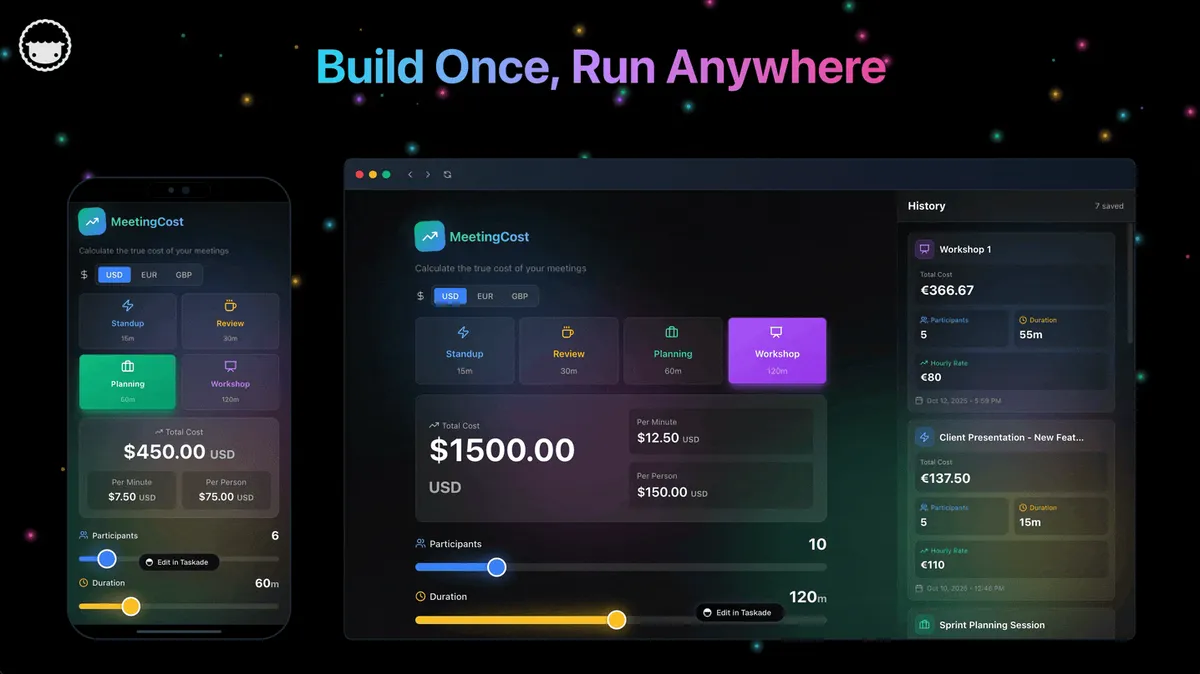
No signup, no credit card. Live AI dev workspace
| Capability | Cline | Taskade Genesis |
|---|---|---|
| Pricing (starting) | Free open source (you pay model API costs) | $0 Free · $10/mo Pro billed annually (10 seats) |
| Cloneable live demo | ❌ | ✅ |
| Built-in AI agents | Code agent only | ✅ built-in tools |
| Automation engine | No workspace automation | ✅ Durable runtime, 100+ integrations |
| Workspace DNA loop | ❌ | ✅ ▲ Memory · ■ Intelligence · ● Execution |
Overall winner: ✅ Taskade Genesis — for anyone whose goal is shipping a working app, not editing files inside an IDE. Cline remains a great pick for engineers who already live in VS Code and want an autonomous agent inside their editor.
Table of Contents
- Quick Comparison Table
- The fundamental difference
- What is Taskade Genesis?
- What is Cline?
- Feature-by-feature deep dive
- The Workspace DNA advantage
- Pricing and total cost of ownership
- What developers say
- When to choose each
- Frequently asked questions
- Without permission
TL;DR: Cline is an open-source VS Code coding agent with BYOK pricing. Engineers approve every diff and pay per token, with $50–$200/month bills for heavy users. Taskade Genesis ships a deployed app from one prompt with AI agents, automations, and 100+ integrations on flat $10/mo Pro. Try Taskade Genesis free →
The fundamental difference
Cline (formerly Claude Dev) is the engineer's autonomous coding agent inside VS Code. It plans, edits multiple files, runs terminal commands, controls a headless browser, and calls MCP servers — pausing to ask for approval at every step. The output is code in your local repository, exactly the way an engineer wants it.
Taskade Genesis starts one step further along the pipeline. You describe what you want and Genesis returns a deployed, working application with AI agents, real-time data, automation workflows, and team collaboration already wired in. Your workspace is the backend. Your projects are the database. Your agents are the runtime.
Cline asks: "What changes should I make to this codebase?" Genesis asks: "What app should exist?"
What is Taskade Genesis?
Taskade Genesis is the AI app builder inside the Taskade workspace. It is built on Workspace DNA — Memory (Projects), Intelligence (AI Agents), and Execution (Automations) — a self-reinforcing loop where what your team does becomes the substrate the agents reason over. Founded by John Xie, Dionis Loire, and Stan Chang in 2017, Taskade is a Y Combinator-backed platform with over a million users and a public Community Gallery of apps anyone can clone.
A single prompt to Genesis can produce a customer support portal, an ops dashboard, a CRM, a knowledge base, a form-driven intake system, or an internal tool — all with built-in AI agents, automations, custom domains, password protection, and the option to embed publicly with GenesisAuth. No DevOps. No CI/CD. No infrastructure to maintain.
Genesis is for everyone — founders, marketers, ops, product managers, customer success, and yes, engineers who want to skip plumbing and focus on the idea.
What is Cline?
Cline (github.com/cline/cline, ~40K+ GitHub stars as of early 2026) is an open-source autonomous coding agent that runs as a VS Code extension. It launched as Claude Dev in 2024 and rebranded to Cline. Claude Sonnet 4 is the default and recommended model, but Cline supports Anthropic direct, OpenAI, OpenRouter, AWS Bedrock, Google Vertex, GCP Gemini, Azure, Ollama, LM Studio, DeepSeek, Mistral, and others.
Cline at a glance: Free, Apache 2.0-licensed, BYO model API key. Plan + Act dual-mode workflow. Visible diff approval on every file edit. Terminal command execution with stdout streaming back into context. Headless browser tool via Puppeteer. MCP marketplace for installable tool servers. A community fork called Roo Code adds custom modes, multi-agent orchestration, and tighter token controls.
Cline's headline mechanic is transparency with a safety belt: Plan mode reasons about the task and proposes a strategy; Act mode executes file edits, terminal commands, browser actions, or MCP tool calls — but pauses for explicit human approval at every step. Every action is visible, reversible, and logged.
Cline is, deservedly, one of the most-loved developer agents on the market. It is also unapologetically a developer tool: you live in VS Code, you bring your own API key, you ship the resulting code yourself — and you watch your token bill closely.
Feature-by-feature deep dive
App generation
- Taskade Genesis turns a single prompt into a deployed application with UI, data model, AI agents, and automations connected. You can iterate visually or in natural language. The output runs immediately at a shareable URL.
- Cline edits files in a local repository and runs terminal commands. The output is source code that the user must build, deploy, and host. Cline does not deploy applications.
AI agents that take action
- Taskade ships AI Agents v2 — first-class digital teammates with persistent memory, built-in tools (web search, file analysis, project management, image generation, code execution, and more), custom tools you define, and the ability to be embedded publicly inside Genesis Apps for customers.
- Cline is a single-user, single-session in-IDE agent. It does not maintain persistent agents, host them, or expose them to a team or customer. When you close VS Code, the agent is gone.
Workflow automations and integrations
- Taskade includes production-grade durable Automations with branching, looping, and filtering across 100+ bidirectional integrations. Triggers pull external events in (Slack messages, Gmail, Sheets rows, Calendly events, webhooks). Actions push data out (Stripe checkouts, Shopify orders, Notion syncs, Salesforce updates, GitHub PRs).
- Cline has no native automation layer. It supports MCP servers, but every integration is something the user finds, installs, and wires up. There is no scheduled run, no trigger, no durable workflow.
Team collaboration
- Taskade is workspace-native: real-time multiplayer editing, comments, chat, video calls, and granular role-based access (Owner to Viewer).
- Cline is single-user. Collaboration happens through git pull requests after the fact.
Visibility and approval
Cline genuinely shines here. Plan mode produces a written strategy you can review before any code is touched. Act mode pauses for diff approval before each edit and asks before every terminal command. For engineers who want full visibility into an agent's behavior, this is hard to beat.
Genesis takes a different shape: instead of approving each step, you iterate on the live app. You see the deployed result, change a prompt, and the app updates. Different audience, different control surface — both legitimate.
Workspace memory and context
- Taskade's Workspace DNA gives every agent persistent context across projects, files, integrations, and the live state of your business.
- Cline rebuilds context every session by re-reading files into the model's context window. This is part of why long sessions get expensive.
Code ownership and openness
- Cline wins outright here. Apache 2.0 license, full code ownership, run on any model, run locally with Ollama for full privacy.
- Taskade is a managed platform. You don't own the code that powers a Genesis App, but you do own your data, your agents, your integrations, and you can export your projects to Markdown or text.
The Workspace DNA advantage
Cline's mental model is "the agent edits files inside the IDE, the human approves and ships them." Genesis's mental model is Workspace DNA: a self-reinforcing loop between three pillars.
- Memory (Projects) — Your team's docs, tasks, files, and structured data become the substrate every agent reasons over. The longer you work, the smarter the workspace gets.
- Intelligence (Agents) — Custom AI Agents with persistent memory, built-in tools, and custom tools you define, plus a hosted MCP server that Claude Desktop, Cursor, and VS Code connect into, while automations carry the work into the 100+ apps you already use. Agents are first-class teammates that live in the workspace, not floating chat sessions.
- Execution (Automations) — Durable workflows triggered by external events (Slack, Gmail, Stripe, GitHub, Calendly, webhooks, schedules) that read from Memory and act through Intelligence — then write the results back into Memory. The loop closes.
Cline is brilliant at one slice of this loop — applying a multi-step plan to an existing codebase under human approval. Genesis runs the entire loop continuously, so the longer you use it, the more your workspace itself becomes the thing that builds the next app.
Pricing and total cost of ownership
| Plan | Taskade Genesis | Cline |
|---|---|---|
| Free | Free Forever — limited AI credits, full app builder access | Free open source |
| Pro | $10 / month (annual) — unlimited apps, 10 seats | Pay model provider per token |
| Business | $25 / month — unlimited seats, higher AI capacity | N/A |
| Max | $100 / month — maximum AI generation capacity | N/A |
| Enterprise | $250 / month with custom SLA | N/A |
Cline's headline is "free." The reality is "free software, expensive tokens." Because Cline re-reads file context on every turn, long sessions on real codebases routinely consume $5–$15 per task and $50+ per long session — a recurring complaint on r/CLine and Hacker News. The Cline.bot cloud account exists for users who don't want to manage provider keys, but it doesn't change the underlying token math.
Genesis flips the model: a flat subscription includes AI credits, hosting, deployment, agents, integrations, and automations. There is no separate model bill, no DevOps line item, no infra cost. For teams that want a predictable monthly number rather than a metered one, Genesis is the more comfortable shape.
What developers say
Cline has earned a vocal, loyal community. Recurring themes across r/CLine, Hacker News, and X:
- "The closest thing to a real junior engineer." Plan mode + Act mode + visible diffs feel like working with a careful human collaborator.
- "Token costs are real." Burning $40 in an afternoon on a Next.js refactor surfaces in nearly every Cline thread.
- "Roo Code is Cline if you want token efficiency." The fork has built a meaningful following on better cost controls and customizable modes.
Genesis users are usually one step removed from those threads. They show up because they want to ship a portal, a dashboard, a CRM, an internal tool, or a customer-facing app — and they want to do it without thinking about deploys, databases, or auth. Browse the Community Gallery to see the apps people have shipped without ever opening an IDE.
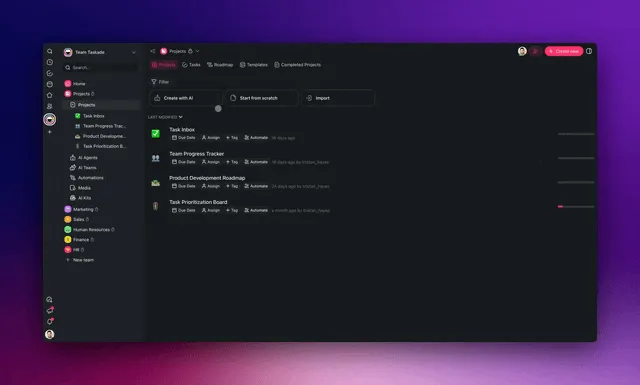
Use-case fit at a glance
| Job to be done | Cline fits | Genesis fits |
|---|---|---|
| Refactor a 50-file TypeScript monorepo | Better — visible diffs + Plan mode | Wrong tool |
| Fix a flaky test inside a private repo | Better — terminal + git context | Wrong tool |
| Run a model fully local with Ollama | Better — full BYOK + offline | Not supported |
| Ship a customer-facing intake portal this week | Possible but slow (you'll DevOps it) | Better — deployed at a URL |
| Internal CRM the ops team can edit | Wrong tool | Better — multi-user, role-based access |
| Slack-triggered Stripe + HubSpot workflow | Wrong tool (no automation engine) | Better — durable automation runs |
| AI agent embedded on the marketing site | Wrong tool | Better — public-embed Agents v2 |
| Audit every action the AI takes | Better — Plan/Act + diff approval | Different model — iterate on live app |
When to choose each
Choose Cline if:
- You are an engineer who lives in VS Code and wants an autonomous agent inside your editor.
- You want full visibility and approval over every file edit and terminal command.
- You want full code ownership, the option to run local models, and Apache 2.0 licensing.
- You are willing to manage API keys, model providers, and per-session token spend.
- The output you need is source code in your repo, not a deployed system.
Choose Taskade Genesis if:
- You want to ship a working app, not edit files inside an IDE.
- Your team includes non-engineers who need to build alongside engineers.
- You need AI agents that persist, have tools, and can be embedded for customers.
- You need workflow automations across Slack, Gmail, Stripe, Salesforce, Notion, and 100+ other integrations.
- You want one flat subscription that includes hosting, agents, automations, and team collaboration.
Use both if: Many engineering teams keep Cline (or Roo Code) for autonomous in-IDE refactors on existing repos and use Genesis to ship new internal tools, ops dashboards, customer portals, and AI-powered apps that need to actually run in front of users.
Frequently asked questions
How does Cline compare to GitHub Copilot, Cursor, and Claude Code?
Cline is closest in spirit to Claude Code (an autonomous coding agent) but lives in VS Code rather than the terminal. Cursor and GitHub Copilot are more about inline code suggestions plus chat; Cline is about taking multi-step actions in your repo with explicit approval. None of them deploy apps — Genesis is the layer above all of them.
Is Cline really free?
The extension is free and open source under Apache 2.0. The model API calls are not. Plan for $5–$50 per non-trivial session depending on the model and task length.
Does Cline include workflow automations?
No. Cline supports MCP servers but does not include a durable automation engine, scheduled runs, or first-party integrations. Taskade Genesis includes durable automations across 100+ bidirectional integrations.
Which AI models does Taskade Genesis use?
Taskade includes access to 15+ frontier models from OpenAI, Anthropic, and open-weight providers. You never wire up API keys.
Can I export my work from Genesis?
Yes — projects export to Markdown and text. The Genesis App itself is a deployed managed product, not source code, so the architecture trade-off is hosting and infrastructure included in exchange for not owning the codebase.
Build without permission
Cline gives engineers a careful autonomous teammate inside their IDE. Genesis gives everyone — engineers and non-engineers alike — a workshop where the apps come out finished, hosted, and ready for users.
- Build with Genesis → — One prompt, one deployed app
- Browse the Community Gallery — Clone apps shipped by other Genesis builders
- Read the Workspace DNA explainer — How Memory, Intelligence, and Execution work together
Explore Taskade Genesis
- AI App Builder — Build complete apps from one prompt
- Vibe Coding — Natural-language app creation
- AI Agent Platform — Digital teammates that work 24/7
- AI Website Builder — Sites in seconds
- Workflow Automation — AI-powered business automation
Learn the Genesis architecture
Your living workspace includes:
- First-app guide — 5-minute tutorial
- Custom AI Agents — The Intelligence pillar
- Projects & Databases — The Memory pillar
- Automations & Workflows — The Execution pillar
Build without code
- AI App Generator — Full apps from prompts
- AI Dashboard Generator — Business dashboards
- AI Website Generator — Sites in seconds
- AI Form Generator — Smart intake forms
- Browse Community Apps — Clone and customize
Related reading
- The Build Without Permission article — Our manifesto
- How Workspace DNA Works — The architecture
- Origin of Living Software — The future of apps
- Best Cursor Alternatives in 2026 — AI code editors compared
- Best Claude Code Alternatives in 2026 — AI coding agents compared
- Best Vibe Coding Tools in 2026 — AI coding tools compared
- Vibe Coding for Non-Developers — Build apps without code
- Vibe Coding for Teams — Ship 10x faster