






9 Best Mind Map Apps For Mac in 2026
There are plenty of guides out there to [**help you get started with mind mapping**](/blog/mind-map-ultimate-guide/). But the age of pen ...
On this page (20)
There are plenty of guides out there to help you get started with mind mapping. But the age of pen & paper mind mapping is over. You need the right tools fit for the digital world. We did the heavy lifting for you and compared the best mind mapping software out there.
TL;DR: The best mind map apps for Mac in 2026 include Taskade (AI-powered, 8 project views, real-time collaboration), MindNode (Apple-native), and XMind (advanced diagramming). Taskade stands out with built-in AI agents that auto-generate mind map branches and 100+ integrations. Try Taskade free -->
🧠 Why Use Mind Mapping Software
Mind mapping is a creative strategy designed for organizing information and ideas visually. The traditional approach uses analog, pen & paper methods. Today, mind mapping software takes over as one of the best productivity and ideation tools for teams and individuals.
Nothing beats the tactile feeling that a hand-drawn mind map gives you. But the best mind-mapping software beats traditional mind maps in several ways — it's faster, more customizable, and provides you with an infinite space to develop and connect your ideas.
So, what exactly should you look for if you’re in the market for mind-map software?
🧐 What Should You Look For in Mind Map Software?
Yes, there’s no shortage of mind-mapping software out there. But we believe that the best mind map software comes down to 3 things — ease of use, customizability, and cost.
Ease of Use
Brainstorming ideas is a difficult, time-consuming task. You don't need to make it even harder by using tools with a steep learning curve or bloated with features you won't need.
Your mind mapping tool should be simple, lightweight, and easy to navigate. The essence of mind mapping is to jot down ideas as quickly as they come, and the tools you choose should amplify this spontaneity, not hamper it. The best tools allow your thoughts to take center stage.
If the tool feels like it’s too complicated for you then you should probably give it a pass. There's no point in spending more time learning to use a tool than actually being productive with it.
Customizability
The perfect mind-mapping software should mimic or closely resemble the feeling of mind-mapping with paper. You should be able to use it the way that you want to, with the ability to highlight key points and create branches from your central idea.
It’s even better if you can effortlessly switch between views. Taskade allows you to effortlessly do this, giving you the ability to switch between outlining information or taking structured notes with the list view and getting a bigger picture of things via a mind map view.
At the end of the day, the mind-mapping tool that you choose should be customizable enough to allow you to be creative and generate better ideas.
Cost
When you're hunting for the right mind mapping software, price is always a tricky beast. You've got those freebies which can be pretty cool, but here's the catch: sometimes they come with annoying limits or might miss out on some slick features.
Then you've got those high-end ones, all shiny and loaded with features. They might tempt you to splurge a bit, promising a world of awesomeness but with no guarantee of productivity gains.
In the end, it's all about finding that sweet spot where the price feels right, and you get what you need without any fluff. After all, a good fit for your workflow doesn't have to break your budget.
🏆 The Best Mind Mapping Apps and Software for Mac
Let's dive in and take a look at the best mind mapping software for Mac users.
Taskade
Taskade is a collaborative project management platform and an online mind mapping software that was founded by John Xie, Dionis Loire, and Stan Chang in 2017. The Y Combinator-backed startup aims to help teams and individuals get work done faster and smarter.
Everything you do in Taskade is stored in a hierarchical tree-structured database. And that means every project, be it a mind map, Kanban board, outline, or an ordinary list (yes, it's not just about mind maps!), can be transformed according to your needs.
Taskade isn't just a place where you type things out in uninspiring blocks of text; it's a canvas for your creativity. It's a space where you can let your thoughts roam free.
And even if your muse has a bad day, you can still create great things. 🤖
Taskade features an AI Mind Map generator that will help you create spanning mind maps and expand branches in a matter of seconds. Generate questions, ideas, and solutions in individual nodes or start with a blank project and let AI do the heavy lifting for you.
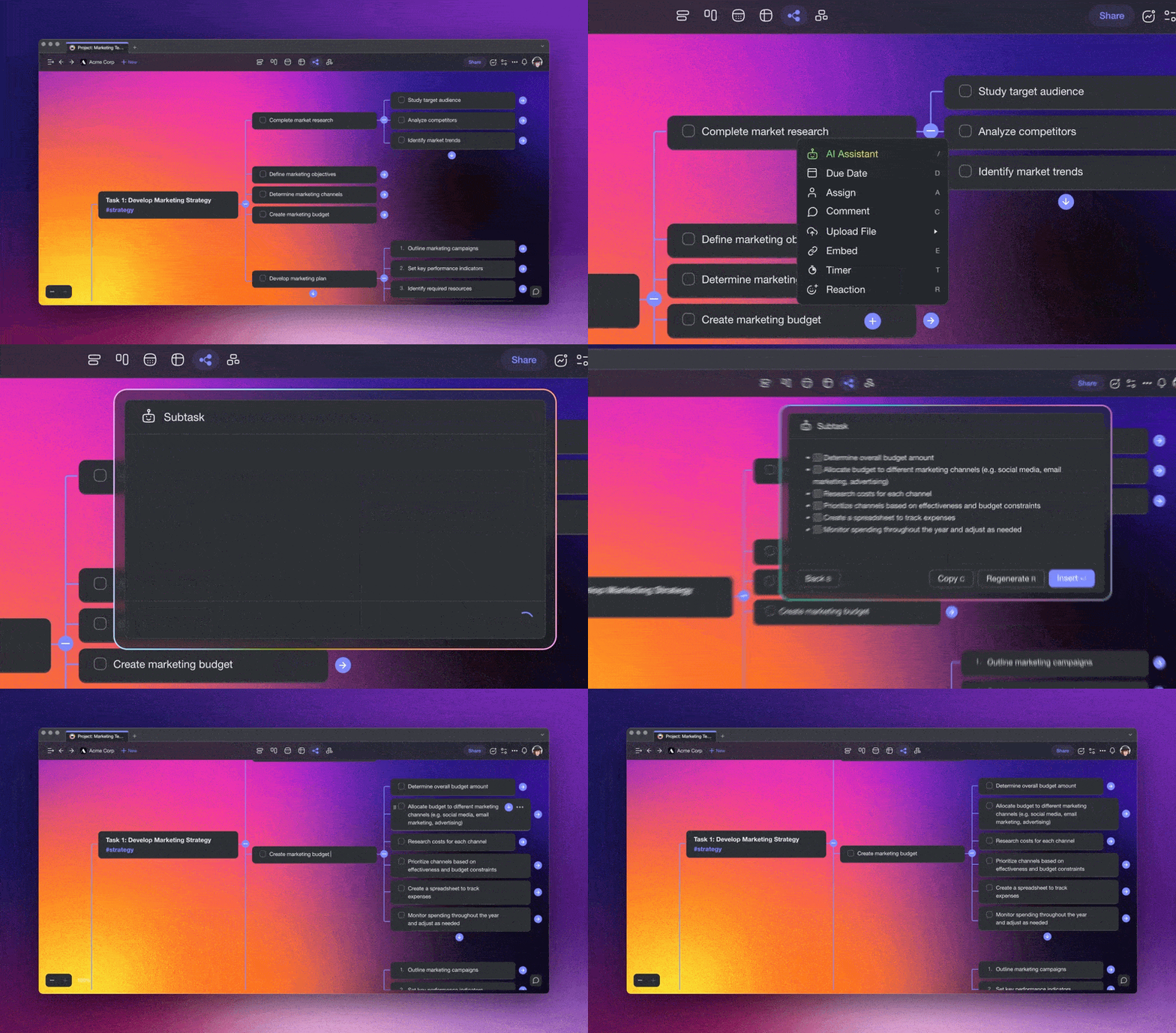
Using Taskade’s mind mapping magic, you can go beyond linear constraints — stitch together vibrant ideas, connect the dots, and simplify the chaos. It's not just about storing information; it's about painting a mosaic of knowledge.
Supercharge your mind maps with Taskade AI 🤖
Mind Mapping With Taskade 🧠
Taskade offers a structured approach when it comes to mind mapping. Outline your notes and map information out in a writing tool and switch back and forth between an outliner and a mind map to help you digest information better.
And the best part?
You can streamline your entire creative workflow with the power of AI Agents, custom GPTs on Taskade. Automate research, planning, and organization tasks so you can focus on the work that really matters — build, train, and deploy your AI creative team of the future.
Taskade Select Features 🌟
Extensive AI Integration. Taskade AI is fully integrated into the core Taskade workflow, so you can use it across all your workspaces, folders, and projects.
Real-Time Collaboration. Two (or more) heads are better than one! Mind maps in Taskade are designed for collaboration. You and your team can work and chat in the same window, without having to patch several apps together or switch between multiple windows.
Real-Time Communication. Chat and video conference with your team while collaborating on mind maps in real-time, in the same window, on the same page.
Project Views. Mind maps are just the beginning. Visualize your projects in several different ways and cycle between lists, org charts, Kanban boards, calendars, and more.
Zoom In, Zoom Out. Get a bird’s-eye view of your mind maps by zooming out on all project views, or zooming in to focus on a specific node or branch.
Fold/Unfold. Fold (collapse) a parent task/bullet element to hide its subtasks. Indent outline elements with ⌨️ Tab and unfold lists with ⌨️ Shift+Tab.
500+ Templates. Choose from hundreds of mind map templates and AI generators to kickstart projects in seconds. Customize existing templates or create new ones.
Multi-Select. Use the multi-select feature to format multiple nodes or bulk-assign them as tasks to other team members. You can also copy, paste, or indent the selected node.
Customize Sub-Tasks. Customize the format of your sub-tasks (nodes) at individual levels. Choose from headings, numbered lists, bullets, and more.
Recurring Tasks. Add due dates with start and end times to tasks within your project and set them to repeat daily, weekly, monthly, or even yearly.
Move Nodes. Move and copy selected nodes to other projects across any workspace or folder. You’ll receive a pop-up notification on completion.
User Roles & Permissions. Mind map together with your team. Manage collaborators and assign user roles/editing privileges with 7-tier RBAC (Owner, Maintainer, Editor, Commenter, Collaborator, Participant, Viewer).
Sort Nodes. Sort children nodes by completed/uncompleted status or their due dates. You can quickly access sorting options inside a convenient pop-up menu.
Search. Search within an active mind map projects or globally across workspaces and folders. Instantly browse and jump between mind maps anywhere in Taskade.
Keyboard Shortcuts. Navigate your mind maps, create new nodes and branches, reorder elements, and complete tasks using a set of handy keyboard shortcuts.

Team Calendar. Aggregate all tasks and projects with due dates in a shared calendar. The Taskade calendar integrates with Google (two-way sync), Apple, and Outlook.
Reorder Nodes. Unlike traditional mind mapping, mind maps in Taskade aren’t set in stone. Reorder nodes and find them a new home with intuitive drag-and-drop mechanics.
Project History. See all the changes made by you and other collaborators. Click on the entries to navigate to the edited items within the project.
Version History. Taskade saves snapshots of your projects so that you can restore a previous version of your mind maps with a single click.
Export and Print. You can export your mind maps as images, PDF files, or plain text and .md files, with branches converted to indented lists. Print them out or attach them to emails.
Cloud File Upload. Share files directly from Google Drive, Dropbox, Instagram, and Box in your projects with our integrations. Upload files directly into mind map branches.
Breakdown Larger Tasks. Organize your thoughts with Taskade’s unlimited hierarchy to break down large ideas or problems into spanning mind maps.
Quick Search. Keep your work in focus. Use CMD / CTRL + K to look up mind map nodes and jump between projects within your Taskade workspaces and folders.
For an exhaustive list of Taskade’s features, click here.
Taskade Pricing 💸
Visit Taskade's pricing page for a full breakdown of plans and AI features.
Mindnode
MindNode lets you create mind maps, brainstorm ideas, and solve problems visually. A user-friendly UI, customization options, and distraction-free mode make for a compelling mind mapping software candidate. Mind map alone, or expand on concepts with your team.
MindNode Select Features 🌟
Task management features
Side-by-side outlining
Stickers, themes, and visual tags
Distraction-free and dark mode
Multiformat mind map export
Quick Entry widgets
Customizable themes
Synchronization via iCloud
MindNode Pricing 💸
🟢 Free Editor
Create and edit nodes
Fold and reorganize
Import and export
Apple Watch support
🔵 MindNode Plus ($2.49/month or $19.99/year)
Everything in the Free plan +
Outlining, visual tags, and Focus Mode
Quick entry and multiple layout options
Images, stickers, themes, and styling
Mindomo
Mindomo is a dedicated, online mind mapping software for work, education, and personal use. This mind mapping app helps with brainstorming and organizing information. A solid choice for businesses, teachers, and academics who want to present information in a visual way.
Mindomo Select Features 🌟
Support for hyperlinks and attachments
Upload videos, icons, documents, and images
Printing and presentation mode
Undo/redo and keyboard shortcuts
Import and export features
A catalog of templates and layouts
Mindomo Pricing 💸
🟢 Free
Up to 3 mind maps
Sharing and publishing
Collaboration features
🔵 Premium ($5.5/month, one user)
Cloud, mobile, and desktop access
Unlimited mind maps, outlines, and charts
Business mind map templates
Mind map printing and export
File uploads and attachments
Password protection
🟣 Professional ($13.5/month, one user + guests)
Everything in the Premium plan +
Invite up to 5 guests with editing privileges
Mind map sharing with all features
Google, Dropbox, and OneDrive backup
12 mind map export formats
🟡 Team ($16.6/month per user)
Everything in the Professional plan +
3+ team members
Admin interface
Shared team folder
Scapple
Scapple is an artsy take on mind mapping from the creators of Scrivener. The idea behind Scapple is simple: to recreate the feel of pen & paper note-taking and organize thoughts in a visual way. This mind-mapping app is a good choice for planning, ideation, and note-taking.
Scapple Select Features 🌟
Freeform drag-and-drop mind mapping
Stacking and grouping notes
Customizable visuals
Export and print features
Synchronization with Scrivener
Drag-and-drop file import
Scapple Pricing 💸
- 🟢 Standard license ($18 one-time purchase)
Free 30-day trial (all features)
Educational license for $14
Works on Mac and Windows
XMind
XMind is a dedicated mind-mapping tool that lets you mind map solo or collaborate with a team. It packs essential mind-mapping features like folding/unfolding branches, free-positioning, color coding, and hyperlinking, all to help you connect information and break down problems.
XMind Select Features 🌟
Color themes and custom graphics
Outlining, distraction-free mode, and dark UI
Projects views including a timeline and an org chart
Import/export functionality
Sync across desktop and mobile devices
See how XMind compares to Taskade (click). 👈
XMind Pricing 💸
🟢 Free Trial
For personal use
Limited to 2 devices (Mac, PC)
Most features included in the Full version
Export images and PDFs are watermarked
🔵 Full Version ($39.99/6 months or $59.99/year)
All Trial features +
5 desktop (Mac, PC) + 5 mobile devices (iOS, Android)
Filter and show branch only
Password-protected mind maps
Insert links, attachments, audio, and images
Access to customizable themes
More export options
For commercial use
MindManager
MindManager is mind mapping software cut out for the corporate world. The platform offers a professional set of brainstorming, data visualization, and problem-solving tools. The MindManager app comes in several flavors depending on your needs.
MindManager Select Features 🌟
Project cost tracking
Mobile mind map preview
iCloud synchronization
Flowchart and Gantt workflows
Task management and tracking
25+ pre-made templates
Sharing and online publishing
MindManager Pricing 💸
🟢 $169 annual plan
🔵 $349 one-time purchase
ClickUp
ClickUp is a unified project management and productivity platform that combines to-do lists, wikis, spreadsheets, a CRM, and team communication. On ClickUp, you can build mind maps and concept maps from scratch and easily turn your thoughts into actionable items.
ClickUp Select Features 🌟
To-do list and task management
Mind map search and filtering options
Several project views/workflows
Communication, chat, and direct emails
Calendar, reminders, and scheduling
Goal and progress tracking
Screen recording and sharing
See how ClickUp compares to Taskade (click). 👈
ClickUp Pricing 💸
🟢 Free
100MB for file storage
5 spaces and 100 views
Two-factor authentication
50+ integrations and time tracking
Real-time collaboration
100 automations/month
🔵 Unlimited ($5/month per user billed annually)
Everything in the Free plan +
Unlimited storage, tasks, views, and spaces
Guest accounts and editing permissions
7-day activity view
Time tracking and additional views
1,000 automations/month
🟣 Business ($9/month per user billed annually)
Everything in the Unlimited plan +
Branding & customization
10,000 automations/month
Mind mapping and unlimited activity view
Google Single Sign-On (SSO)
🟡 Enterprise (custom)
Everything in the Business plan +
More Single Sign-On (SSO) options
Custom roles and permissions
Priority support and onboarding
Miro
Miro is a collaborative digital whiteboard with mind-mapping capabilities. The platform comes with a complete set of collaboration features like video chat, screen sharing, real-time collaboration, and more. Use Miro to brainstorm ideas, take individual notes, create concept maps, and turn loosely organized thoughts into actionable items.
Miro Select Features 🌟
Customizable templates & frameworks
Infinite canvas for unlimited design space
Screen sharing and presentation features
Visual cues like sticky notes, shapes, arrows, and more
Integrations with Google Drive, Zapier, and others
Real-time collaboration features
Video conferencing, chat, and comments
High-resolution mind map export
See how Miro compares to Taskade. 👈
Miro Pricing 💸
🟢 Free
Unlimited team members
3 active editable boards
Access to premade templates
A set of core integrations
🔵 Team ($20/month billed annually)
Everything in the Free plan +
Unlimited boards and editors
Video chat, meeting timer, and voting
High-resolution mind map exports
Access to custom templates
Additional integrations
🟣 Business ($16/month per user billed annually)
Everything in the Team plan +
Single Sign-On (SSO)
Adding external editors
🟡 Enterprise (custom pricing)
Everything in the Business plan +
Multi-team management features
Data governance and advanced security
Personalized onboarding and premium support
🟤 Consultant ($12/month per user billed annually)
Everything in the Team plan +
Private workspaces for clients
Control accesses
Ayoa
Ayoa is a visual-first online workspace and mind mapping software for teams and individuals. This mind mapping app offers a user-friendly UI, collaboration features, and several visual workflows, including mind maps, radial maps, boards, and flowcharts.
Ayoa Select Features 🌟
A range of mind mapping templates
Video chat and instant messaging
Public mind map sharing
Sync via Google, Evernote, and Dropbox
Calendar and progress tracking
Multi-device sync for desktop and mobile
Due dates and filtering options
Ayoa Pricing 💸
🟢 Free/Basic
5 boards/50 elements per board
Real-time collaboration and chat
Personal planner and whiteboards
🔵 Pro ($10/month per user annually)
Everything in the Basic plan +
Unlimited boards and elements
File storage (20MB per file)
Gantt timeline view
Task assignment, tags, and filters
Priority support
🟣 Ultimate ($13/month per user annually)
Everything in the Pro plan +
File storage (60MB per file)
Team pulse/live share
User groups and Zoom integration
Quick Comparison: Best Mind Map Apps for Mac
| App | Starting Price | AI Features | Collaboration | Project Views | Best For |
|---|---|---|---|---|---|
| Taskade | Free | Yes (11+ models) | Real-time | 8 views | AI-powered team mind mapping |
| MindNode | $2.49/mo | No | Limited | 2 views | Apple ecosystem users |
| Mindomo | $5.50/mo | No | Yes | 3 views | Education and business |
| XMind | $39.99/6mo | No | No | 4 views | Advanced diagramming |
| MindManager | $169/yr | Limited | Limited | 3 views | Enterprise planning |
| ClickUp | Free | Yes | Yes | 5+ views | All-in-one project management |
| Miro | Free | Yes | Yes | Whiteboard | Visual collaboration |
| Ayoa | Free | No | Yes | 4 views | Creative brainstorming |
Looking for more AI-powered tools? Explore Taskade AI agents, automation workflows, or browse community apps built with Genesis.
Workspace DNA: Mind Mapping That Remembers, Thinks, and Acts
Most mind mapping tools stop at the diagram. Taskade goes further with a Workspace DNA framework — Memory, Intelligence, and Execution — that turns every mind map into a living, actionable system.
Memory means every mind map, brainstorming session, and project plan persists inside your workspace. Switch between 8 project views — Mind Map, Board, List, Gantt, Calendar, Table, Org Chart, and Timeline — without losing a single node or connection. Intelligence is where things get powerful. AI agents equipped with 22+ built-in tools and frontier models from OpenAI, Anthropic, and Google can auto-expand branches, identify gaps in your thinking, suggest related concepts, and even generate entire mind maps from a single prompt.
Execution turns ideas into outcomes. Automations with 100+ integrations and Temporal durable execution can convert mind map nodes into assigned tasks, trigger notifications when branches are completed, and sync updates across your team's tools. The cycle is self-reinforcing: your maps feed the AI, the AI triggers actions, and actions create new knowledge.
With Taskade Genesis, you can build custom mind mapping apps through vibe coding — describe the tool you want in natural language and get a deployed app in seconds. Over 150,000 apps have been built this way. Browse community-created mind mapping tools or start from the Free plan, with Starter at $6/mo, Pro at $16/mo, and Business at $40/mo.
💬 Frequently Asked Questions About Mind Mapping Software for Mac
How do I make a mind map on Mac?
The best way to quickly get started with creating mind maps on Mac is by using dedicated mind-mapping software. Tools such as Taskade, XMind, and Scapple allow you to get started and create mind maps for free on your Mac.
How can I collaborate on mind maps?
Simply use Taskade's ready-made mind map brainstorming template to start brainstorming ideas with your team!
How can I create easy mind maps?
Here's how to create simple mind maps.
1. Write down a central idea or theme in the middle of your mind map
2. Create branches linking away from your central idea to break it down further
3. Expand on your branches and link similar concepts together
4. Color-code your mind map to mark out similar concepts
What is the most important step in mind mapping?
The most important step in mind mapping is identifying the central idea or main topic. This serves as the foundation for the entire mind map, ensuring all subsequent branches and subtopics are logically connected and organized around a core theme.