







The client portal and business app landscape offers a choice between Taskade Genesis's AI-powered full-stack development and Softr's specialized no-code platform for turning Airtable and Notion databases into polished web apps. This comprehensive comparison reveals which tool delivers better value for creating client portals, membership sites, and internal tools in 2026.
Quick Verdict: Softr excels at transforming Airtable and Notion into client portals in minutes, ideal for teams already using these tools, starting at $59/month. Taskade Genesis offers AI-powered app development at a flat $10/month with code export and integrated project management, winning for developers and teams who need flexibility beyond portal use cases. The choice depends on data source: Airtable/Notion vs custom development.
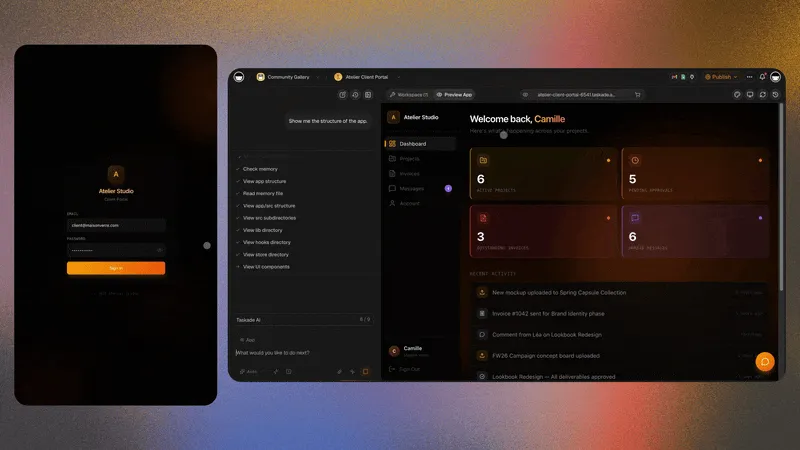
Quick Comparison: Taskade Genesis vs Softr
| Feature | Taskade Genesis | Softr |
|---|---|---|
| Pricing | $10/mo billed annually, unlimited apps | Free, Basic $59/mo, Pro $167/mo, Business $323/mo |
| Primary Data Source | Any database (AI-generated) | Airtable, Notion, Google Sheets |
| Development Method | AI prompts (natural language) | No-code visual builder |
| Monthly Cost (50 users) | $25/mo billed annually, $50 monthly (Business, unlimited members; portal end users don't consume seats) | $167 (Pro) or $323 (Business) |
| Code Access | ✅ Full export | ❌ Proprietary (no export) |
| Use Case Focus | General-purpose apps | Client portals, membership sites |
| Project Management | ✅ Tasks, workflows, kanban | ❌ None (portals-only) |
| Collaboration | ✅ Real-time multi-user editing | ✅ Team features (all paid plans) |
| App Limit | Unlimited | 1 (Free), 10 (Pro), unlimited (Business) |
| Custom Domains | ✅ Pro plan and up | ✅ $59/mo+ (Basic plan) |
| Learning Curve | Low (describe what you want) | Low (templates + point-and-click) |
| Vendor Lock-In | ❌ None (export code) | ⚠️ High (proprietary platform) |
| Best For | Developers, teams, custom apps | Client portals from Airtable/Notion |
What is Taskade Genesis?
Taskade Genesis is an AI-powered workspace that generates complete applications through natural language prompts, combining Memory + Intelligence + Execution for full-stack development and project management.
Core Approach: AI-First Development
Natural Language to Client Portals & Apps:
- Describe your portal in plain English → AI generates complete code
- Multi-model AI: Choose frontier models from top AI labs
- Generate frontend (React, Vue) + backend (Node.js, Python) + database schemas
- Full customization beyond portal templates
Example Client Portal Workflow:
You: "Build a client portal where customers can view project status, upload files, and submit support tickets"
Genesis AI:
→ Generates React frontend with dashboard
→ Creates REST API with file upload endpoints
→ Designs PostgreSQL schema (clients, projects, files, tickets)
→ Adds authentication and client-specific permissions
→ Exports complete codebase for customization
Key Capabilities
Full-Stack AI Development
- Frontend: React, Vue, Next.js (responsive by default)
- Backend: Node.js, Python, REST APIs, GraphQL
- Databases: PostgreSQL, MySQL, MongoDB, Supabase, Firebase
- Authentication: JWT, OAuth, role-based access control
- Support for 20+ languages and frameworks
Integrated Workspace Beyond Code
- Real-time collaboration with up to 10 team members on Pro, unlimited on Business
- Project management: kanban boards, Gantt charts, task tracking
- Built-in wiki for documentation (perfect for client docs)
- Video calls and screen sharing
- AI agents for workflow automation
Cross-Platform Access
- Web, desktop (Mac/Windows/Linux), mobile (iOS/Android)
- Offline editing with sync
- API access for custom integrations
Pricing: Pro $10/month billed annually (up to 10 seats) for a generous monthly AI credit allowance and unlimited apps; Business $25/month billed annually for unlimited team members
Real User Review (Reddit, r/SaaS): "Built client portal in Softr—loved the Airtable integration initially. Paid $167/month Professional plan. But when we needed custom features (e-signature, payment integration), hit walls. Rebuilt in Genesis for $48/month (8 team members) AND we own the code. Softr is great for simple portals; Genesis is better for custom apps."
👉 Build your client portal free →
Workspace DNA: Portals That Do More Than Display Data
Softr puts a nice face on your Airtable. Taskade Genesis puts a brain behind the face:
- Projects (Memory) — Your client portal's data doesn't live in a separate Airtable base with API rate limits. It lives inside a Genesis project — structured, real-time, and accessible across list, board, calendar, table, and five other views. Clients and team members see the same living data.
- Agents (Intelligence) — A Softr portal shows your clients their project status. A Taskade Genesis portal explains it. An embedded AI agent can answer client questions ("When is my deliverable due? Who's assigned?") using the actual project data — turning a static dashboard into an intelligent concierge.
- Automations (Execution) — When a client submits a support ticket through your portal, an automation categorizes it with AI, assigns it to the right team member, fires a Slack notification, and sends the client a confirmation email. One trigger, four actions, zero code.
- App Interface (Surface) — A professional app that feels custom-built, not template-constrained. No "powered by" footer. No Airtable dependency.
Softr mirrors your database. Taskade Genesis becomes the system your clients actually interact with.
What is Softr?
Softr is a no-code platform that transforms Airtable and Notion databases into professional web applications, with a strong focus on client portals, membership sites, and internal tools. Founded in 2019, Softr has become a go-to solution for teams that want to build polished apps on top of their existing Airtable/Notion workflows.
Core Technology: Airtable/Notion-Powered Apps
Data Sources:
- Airtable (primary integration, 3-minute setup)
- Notion databases
- Google Sheets
- Softr's native database
Visual Builder with AI:
- Pre-built templates (client portals, membership sites, directories)
- Drag-and-drop interface with blocks
- AI Co-builder (generate apps from prompts)
- AI Agents for data enrichment and automation
- Live preview as you build
Example Workflow:
1. Connect Airtable base with client data
2. Choose "Client Portal" template
3. Customize blocks (project list, file upload, support form)
4. Configure permissions (each client sees only their data)
5. Add custom domain
6. Publish in 20 minutes
Key Features
No-Code Portal Builder
- Pre-built blocks for lists, forms, charts, calendars
- User authentication and permissions
- Conditional visibility (show/hide based on user role)
- File uploads and management
- Payment integrations (Stripe)
Pricing Tiers (based on Softr's 2026 pricing):
- Free Plan ($0/month): 1 app, 10 users, Softr branding
- Basic Plan ($59/month): Custom domains, remove branding, 3 apps
- Professional Plan ($167/month): 10 apps, 50 users, advanced features
- Business Plan ($323/month): Unlimited apps, 500 users, white-label
Unique Features:
- Ask AI: Query live app data conversationally
- AI Agents: Data enrichment and workflow automation
- Fastest time-to-portal: 20 minutes from Airtable to published app
Limitations
- Optimized for Airtable/Notion (less flexible for other data sources)
- Per-user pricing scales quickly ($167 for 50 users → $323 for 500)
- No code export (vendor lock-in)
- Limited to portal/directory/membership use cases
- Not ideal for complex custom applications
Real User Review (ProductHunt): "Softr is incredible for our client portal—connected Airtable in 2 minutes, published portal in 20 minutes. But $167/month Professional plan for 50 users vs Genesis at $25/mo flat, billed annually, for unlimited members is a real gap. Softr wins on simplicity; Genesis wins on flexibility and ownership."
Pricing Breakdown: $10 Flat vs Portal Tiers
Taskade Genesis Pricing
Free Plan (Forever)
- 3 Genesis apps (On Free, you earn free AI credits as you go, and you can upgrade any time)
- Basic project features
- Up to 2 workspace members
- All platforms (web, mobile, desktop)
- Full code export
Pro Plan - $10/month (billed annually)
- A generous monthly AI credit allowance (frontier models from top AI labs)
- Unlimited apps and portals
- Up to 10 team members
- 50GB storage per workspace
- AI agents and automations
- Full code export and ownership
Business Plan - $25/month (billed annually)
- Everything in Pro
- Unlimited team members
- Custom domains and advanced security
💡 Cost Example: 50-user client portal = $25/month on Business, billed annually (unlimited members can build and access; published-app end users are managed separately from seats)
Softr Pricing
Free Plan - $0/month
- 1 app
- 10 users
- Softr branding
- Basic features only
Basic Plan - $59/month
- 3 apps
- Custom domains
- Remove Softr branding
- Basic user authentication
Professional Plan - $167/month
- 10 apps
- 50 users included
- Advanced features (conditional visibility, workflows)
- Payment integrations (Stripe)
Business Plan - $323/month
- Unlimited apps
- 500 users included
- White-label (fully branded)
- Priority support
- Advanced permissions
💡 Cost Example: 50-user client portal
- Professional plan: $167/month (50 users included)
- Genesis equivalent: $25/month on Business, billed annually (unlimited members; end users don't consume seats)
Total Cost Comparison
Team of 50 Users (Client Portal Use Case)
| Scenario | Taskade Genesis | Softr |
|---|---|---|
| Portal access | Business flat rate = $25/mo billed annually | Professional: $167/mo (50 users) |
| Code ownership | ✅ Export code | ❌ Locked to Softr |
| Project Management | Included | None (+$50/mo Notion/Linear) |
| Customization | Unlimited (AI code) | Limited (Softr blocks only) |
| Total | $25/mo | $217/mo (with PM tool) |
Winner: Genesis on cost at 50 users ($25/mo billed annually vs $167 for the portal alone, or vs $217 with a project management tool), plus customization and code ownership. Note the units differ: Softr's tier counts 50 portal end users, while Genesis Business covers unlimited workspace members and manages published-app end users separately. Softr still wins on Airtable-native setup speed.
Team of 10 Internal Users Building Portals
| Scenario | Taskade Genesis | Softr |
|---|---|---|
| Builder access | Pro flat rate = $10/mo billed annually (10 seats) | Basic: $59/mo or Pro: $167/mo |
| Number of apps | Unlimited | 3 (Basic) or 10 (Pro) |
| Code ownership | ✅ Export | ❌ Locked |
| Total | $10/mo | $59-167/mo |
Winner: Genesis at 10 builders ($10/mo billed annually vs $59-167), with unlimited apps and code ownership. Choose Softr Basic if your data already lives in Airtable and you want the fastest portal setup.
Feature Comparison: Portal Development
Development Speed
Taskade Genesis (AI-First)
- Time to Build Client Portal: 1-3 hours (AI generates custom code)
- Iteration Speed: Fast (natural language refinements)
- Learning Curve: Low (describe features in plain English)
- Customization: Unlimited (full code access)
Example: "Build client portal with project tracker, file uploads, and support tickets" → 2-3 hours with Genesis AI
Softr (No-Code Templates)
- Time to Build Client Portal: 20-60 minutes (connect Airtable, customize template)
- Iteration Speed: Very fast (drag-drop blocks, live preview)
- Learning Curve: Very low (point-and-click, familiar if using Airtable)
- Customization: Limited (restricted to Softr's blocks and features)
Example: Same client portal using Softr template → 20-40 minutes
Verdict: Softr is 3-5× faster for standard client portals. Genesis is better for custom portals requiring unique features.
Airtable/Notion Integration
Taskade Genesis
- AI generates code to connect to Airtable/Notion APIs
- Flexibility to transform and extend data
- Not optimized for live two-way sync (requires custom code)
- Better for migrating away from Airtable/Notion to real databases
Softr
- Native Airtable integration (connects in ~3 minutes)
- Live two-way sync (changes in Airtable reflect instantly in portal)
- Notion database support
- Optimized for Airtable-first workflows
Verdict: Softr dominates for Airtable/Notion-centric teams. Genesis offers more flexibility for custom data models.
Portal-Specific Features
Taskade Genesis
- AI generates any feature you describe
- Custom authentication flows
- Advanced permissions and multi-tenancy
- Unlimited portal customization
- Requires describing requirements in detail
Softr
- Pre-built portal templates (client portals, directories, membership sites)
- User authentication built-in (email/password, Google SSO)
- Granular permissions (user roles, conditional visibility)
- File uploads and management
- Payment processing (Stripe integration)
- All portal features ready out-of-the-box
Verdict: Softr's portal-specific features are battle-tested and ready. Genesis requires AI generation but offers unlimited customization.
Use Case Analysis: Which Tool Wins Where?
Best for Standard Client Portals
Winner: Softr
For typical client portal needs:
- Clients need to view project status
- Upload/download files
- Submit forms and requests
- See invoices and payments
- Data already in Airtable
Softr's templates and Airtable integration deliver this in 20-40 minutes.
Example: "Agency needs client portal to share deliverables and collect feedback" → Softr: 30 minutes; Genesis: 2-3 hours.
Best for Custom Portal Requirements
Winner: Taskade Genesis
For portals with unique features:
- Complex approval workflows
- Custom integrations (beyond Airtable/Stripe)
- Advanced multi-tenancy logic
- White-label resale (fully custom branding beyond Softr's white-label)
- E-signature, video calls, or other specialized features
Genesis AI generates code for any requirement.
Example: "SaaS company needs customer portal with usage analytics, API key management, and billing customization" → Genesis handles complexity; Softr would require workarounds or hit limits.
Best for Membership Sites
Winner: Softr (slight edge)
For paid communities and membership sites:
- Softr has templates for membership sites
- Stripe payment integration built-in
- User roles and content gating
- Directory and profile features
Genesis can build this but requires more setup.
Example: "Online course platform with member directory and gated content" → Softr's templates accelerate; Genesis offers more customization.
Best for Airtable-Centric Teams
Winner: Softr (by far)
If your team lives in Airtable:
- Connect base in 3 minutes
- Live sync (changes in Airtable → instant portal updates)
- No data migration required
- Team already comfortable with Airtable
Genesis would require exporting Airtable to real database (PostgreSQL, etc.), which is migration overhead.
Best for Code Ownership & Platform Independence
Winner: Taskade Genesis
For teams who:
- Want to own portal code
- Need to integrate deeply with existing systems
- Value platform independence
- Want to gradually customize over time
Genesis exports code; Softr locks you in permanently.
Code Ownership & Vendor Lock-In
Taskade Genesis
- ✅ Full code export (React, Node.js, Python)
- ✅ Host anywhere (AWS, Vercel, Netlify, your server)
- ✅ No vendor lock-in (switch platforms anytime)
- ✅ Modify code manually in any IDE
- ✅ Version control with Git
Softr
- ❌ No code export (proprietary platform)
- ❌ Must host on Softr forever
- ⚠️ High vendor lock-in (rebuilding elsewhere means starting from scratch)
- ❌ Cannot access code for deep customization
- ⚠️ Data export available (Airtable/CSV) but app logic locked
Vendor Lock-In Impact:
- If Softr raises prices from $167 to $300/month, you must pay or rebuild
- If Softr shuts down, your portal disappears
- If you outgrow Softr's capabilities (custom features), you must rebuild from scratch
- Cannot migrate to custom code gradually—it's all or nothing
Real User Experience (Indie Hackers): "Built our client portal on Softr, loved the quick launch. After 12 months, needed custom integrations and advanced permissions Softr couldn't support. Explored migration but realized we can't export code—must rebuild entirely. Wish we'd started with exportable code from Genesis."
Verdict: Genesis offers freedom; Softr creates permanent dependency.
Real User Experiences: Community Reviews
Taskade Genesis User Reviews
Case Study: Consulting Agency (Reddit, r/entrepreneur)
"Used Softr for our client portal initially—Airtable integration was seamless, launched in 30 minutes. But clients requested custom features (e-signature, video conferencing) that Softr didn't support. Rebuilt with Genesis in 1 week, now we have exactly what clients want. Cost: $10/month flat (Pro, billed annually, up to 10 seats) vs Softr's $167. Softr was great for MVP, Genesis for production."
Case Study: SaaS Startup (ProductHunt review)
"Genesis vs Softr came down to ownership. Softr is faster for basic portals (20 mins vs 2 hours). But we're building a product company—owning our code matters. Genesis exports React code we can continuously customize. Softr would lock us in forever. Worth the extra dev time."
Developer Perspective (Hacker News)
"For non-technical teams, Softr is easier—connect Airtable, drag blocks, done. But as a developer, I prefer Genesis—AI generates the portal code I need, I customize further, and I own everything. Softr's templates are beautiful but you're renting, not owning."
Softr User Reviews
Airtable Team Love (Reddit, r/Airtable)
"Our entire business runs on Airtable. Softr let us build client portal in literally 25 minutes—connected our base, chose template, tweaked colors, published. For Airtable-native teams, Softr is unbeatable. Genesis would require migrating out of Airtable. Not worth it for us."
Non-Technical Founder (ProductHunt)
"I'm a marketer who built our membership site in Softr without touching code. The templates just work. Genesis sounded overwhelming with AI prompts and generated code I'd need to understand. Softr's point-and-click was perfect for me."
Pricing Reality (Twitter)
"Softr Professional ($167/month for 50 users) seemed cheap vs custom development. But as we grew to 150 users, still on Professional at $167, which was a steal. Genesis would still be $25/mo flat, because Business does not charge per member. Softr's simplicity is what kept us, not the math."
Feature Limitations (Indie Hackers)
"Softr is amazing for 90% of portal use cases. But we needed custom approval workflows and advanced integrations—hit Softr's ceiling. The inability to export code meant starting over elsewhere. If you might outgrow Softr, use Genesis from day one."
Common Complaints
Taskade Genesis
- "Softr is way faster for simple Airtable portals—20 mins vs 2 hours"
- "AI prompts require more thought than choosing Softr templates"
- "Genesis feels over-engineered for basic client portals"
Softr
- "No code export = permanent lock-in, risky for business-critical portals"
- "Hit feature ceiling fast—custom integrations impossible"
- "Per-user pricing adds up if you have 100s of users (though Pro plan handles 50 users well)"
- "Can't publish to App Store/Play Store (web-only)"
Migration Strategies
Switching from Softr to Taskade Genesis
Step 1: Export Data
- Export data from Airtable (CSV/API)
- Document all Softr blocks and permissions
- Screenshot portal UI for reference
Step 2: Rebuild with Genesis AI
- Describe Softr portal to Genesis AI
- AI generates React frontend + backend + database
- Import data into PostgreSQL/MySQL
- Customize beyond Softr's limitations
- Time estimate: 1-2 weeks per complex portal
Step 3: Enhance Beyond Softr
- Add custom features impossible in Softr
- Integrate with systems beyond Airtable/Stripe
- Optimize for your exact requirements
Cost Impact:
- Cancel Softr ($167-323/month for 50-500 users)
- New cost: Genesis Business ($25/month billed annually, unlimited members)
- Example: 50 users = Softr $167 vs Genesis $25 = $142 savings/month, plus you gain code ownership + unlimited customization
Worth It?: If you've hit Softr's limits and need custom features or want code ownership, yes.
Switching from Taskade Genesis to Softr
Step 1: Migrate to Airtable
- Export database to CSV
- Import into Airtable base
- Recreate relationships in Airtable
Step 2: Rebuild in Softr
- Connect Airtable to Softr
- Choose client portal template
- Drag blocks to recreate UI
- Time estimate: 1-3 days per portal
Step 3: Accept Limitations
- Custom features may not be replicable
- No code access (permanent Softr dependency)
Cost Impact:
- Add Softr ($167-323/month depending on users)
- Cancel Genesis Business ($25/month billed annually)
- Example: 50 users = Genesis $25 vs Softr $167 = $142 more/month, and you lose code ownership + customization
Worth It?: Only if you strongly prefer Airtable workflows and don't need custom features.
Frequently Asked Questions
Can I use Softr without Airtable or Notion?
Yes, Softr offers a native database option. But the platform is optimized for Airtable/Notion workflows. Genesis is better if you're not using these data sources—it generates any database schema you need (PostgreSQL, MySQL, etc.).
Can I export my Softr portal to code?
No. Softr portals are proprietary and cannot be exported as code. You can export data (Airtable/CSV) but must rebuild portal logic elsewhere. Genesis exports complete code from day one.
Which is faster for building a basic client portal?
Softr (20-40 minutes if using Airtable). Genesis (2-3 hours with AI generation). Softr's Airtable integration + templates are unbeatable for speed.
Does Genesis integrate with Airtable like Softr?
Not natively. Genesis can generate code to connect to Airtable's API, but it's not optimized for live two-way sync like Softr. If your team lives in Airtable, Softr is better. If you want to migrate to real databases, Genesis is better.
Can I white-label Softr portals?
Yes, on Business plan ($323/month). Remove all Softr branding and use fully custom domains. Genesis always allows white-labeling since you export and own the code.
Which is better for membership sites?
Softr has slight edge with membership site templates and Stripe integration built-in. Genesis can build membership sites with AI but requires more setup. Choose based on customization needs.
How many portals can I build with each platform?
Genesis: Unlimited on Pro plan ($10/mo). Softr: 1 (Free), 3 (Basic $59), 10 (Pro $167), unlimited (Business $323). Genesis better value for agencies building many client portals.
Does Softr support payment processing?
Yes, Stripe integration is built-in (Professional plan and above). Genesis requires AI to generate Stripe integration code—more flexible but requires setup.
Can non-developers use Softr?
Yes, Softr is designed for non-developers and is very intuitive if you use Airtable/Notion. Genesis requires comfort with AI prompts and reviewing generated code—better suited for developers.
What happens if Softr shuts down?
Your portal disappears (no code export). You'd need to rebuild from scratch elsewhere. Genesis code is yours—even if you cancel, you keep all code to host anywhere.
Can I add custom JavaScript to Softr?
Limited custom code allowed (embed blocks), but you cannot access or modify underlying platform code. Genesis gives full code access for unlimited customization.
Which scales better for large user counts?
Softr Professional ($167) handles 50 users; Business ($323) handles 500 users—fixed pricing works well. Taskade Genesis is flat-rate too: Business is $25/month billed annually ($50 monthly) for unlimited workspace members, and published-app end users are managed separately from seats. Choose based on builder vs user count needs.
Final Verdict: Which Should You Choose?
Choose Taskade Genesis If...
✅ You value code ownership and want to export/host anywhere
✅ You need custom portal features beyond Softr's templates
✅ You're building complex portals with unique requirements
✅ You want platform independence (no vendor lock-in)
✅ You need project management + portal building in one tool
✅ You're not Airtable-centric (using PostgreSQL, MySQL, etc.)
✅ You're a developer or technical team
Best For: Developers, technical teams, agencies needing code ownership, custom portal requirements
Pricing: $10/month unlimited (includes project management)
Choose Softr If...
✅ Your data lives in Airtable or Notion
✅ You need a standard client portal quickly (20-40 minutes)
✅ You're a non-technical team
✅ You prefer templates and point-and-click over AI prompts
✅ You have 50-500 users (Softr's pricing tiers work well)
✅ You're okay with vendor lock-in for convenience
✅ You want battle-tested portal features out-of-the-box
Best For: Non-technical teams, Airtable/Notion-centric workflows, standard client portals, membership sites
Pricing: $59-323/month (depends on apps and users)
Next Steps
Try Taskade Genesis Free
No credit card required:
- Earn free AI credits with referrals and invites, and upgrade any time
- Full access to project management
- Export generated code
- Up to 2 workspace members
👉 Start free and customize everything
Upgrade to Pro for $10/Month, Billed Annually
Unlock a generous monthly AI credit allowance for portal building:
- A generous monthly AI credit allowance (frontier models from top AI labs)
- Unlimited apps and portals
- Full code export and ownership
- Integrated project management and docs
Try Softr
- Start with Free plan at Softr.io
- Connect Airtable or Notion
- Choose client portal template
- Build first portal in 20 minutes
Explore More Comparisons
- Softr Alternative: Living Client Portal You Own
- Best AI App Builders 2026: 15 Tools Compared
- Taskade Genesis vs Webflow
- Best Client Portal Software 2026
Learn Portal Development
- How to Build a Client Portal Without Code
- Airtable to Database Migration Guide
- 8 Best AI Membership Site Software
- Roles and Permissions in Taskade
Bottom Line: Softr is unbeatable for Airtable/Notion-powered client portals, especially for non-technical teams and 50-500 users ($167-323/mo). Taskade Genesis delivers superior value for developers who need code ownership, custom features, and integrated project management, with flat pricing that does not scale per seat ($10/mo Pro for up to 10 seats, $25/mo Business for unlimited members, both billed annually). Choose Softr for speed and Airtable integration, Genesis for flexibility and platform independence.
Used both tools? Share your experience on Twitter/X or join our community.
Related Comparisons
No-Code Platform Showdowns:
- Taskade Genesis vs Bubble - Code ownership vs visual programming
- Taskade Genesis vs Glide - Real database vs spreadsheet apps
- Taskade Genesis vs Retool - Full apps vs internal tool builder
- Taskade Genesis vs Webflow - Web apps vs marketing sites
AI App Builder Comparisons:
- Taskade Genesis vs Bolt.new - Unlimited vs pay-per-use
- Taskade Genesis vs Lovable - Full-stack vs UI-first design
Alternative Guides:
- Best Bubble Alternatives 2026 - No-code alternatives ranked
- Best Cursor Alternatives 2026 - IDE alternatives compared
Sources:
- Softr Pricing 2026
- Softr Review 2026 (Efficient.app)
- Softr Pricing Analysis (Adalo Blog)