







TL;DR: Replit ($25-100/mo) is a powerful cloud IDE with Agent 3 autonomous coding, valued at $3B. But you still manage code, databases, and deployments. Taskade Genesis builds complete apps with AI agents, 100+ integrations, and workspace databases from $10/mo billed annually — 150,000+ apps deployed, zero code required. Try Genesis free →
Comparing Replit alternatives? See our Taskade Genesis vs Replit Agent comparison or browse the best Replit alternatives ranked by feature, pricing, and use case.
Want production-deployed apps without writing a single line of code? Clone the Shopify-Style Storefront below — a fully functional e-commerce app with product catalog, checkout, and order management, live in your workspace in one click.
Related reading: AI App Builder Cloneable Demos · Your Workspace Is a Computer · Founder Operating System · Retool vs Taskade · Notion vs Taskade · Asana vs Taskade · Monday vs Taskade · Clay vs Taskade · /apps · /templates · /agents · /automate · /create
The Architectural Difference: Code Platform vs Living System
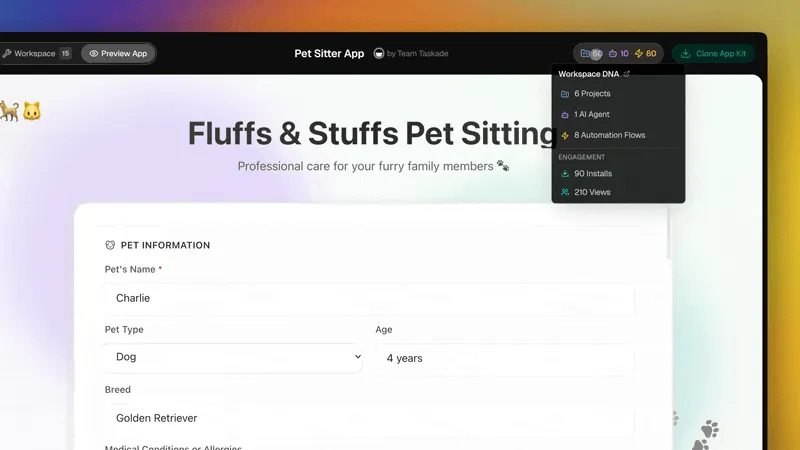
Replit accelerates the path from idea to code. Taskade Genesis eliminates the code path entirely. The difference is the Workspace DNA loop — a three-component system where each layer feeds the next and the whole gets smarter over time:
The Taskade Genesis Workspace DNA loop. Each component feeds the next, and the system gets sharper with every interaction. This is the architectural difference vs single-purpose tools like Claude Code, Replit, or stand-alone AI app builders.
┌─────────────────────────────────────────────────────────────────────┐
│         TASKADE GENESIS CAPABILITIES MATRIX                         │
│─────────────────────────────────────────────────────────────────────│
│  ▲ MEMORY        │  Projects + Databases + Documents                │
│                  │  Multiple views · Custom fields · Real-time sync │
│                  │  Cross-agent persistent knowledge                │
│─────────────────────────────────────────────────────────────────────│
│  ■ INTELLIGENCE  │  AI Agents v2 · built-in tools                   │
│                  │  Custom tool schemas · Slash commands            │
│                  │  Frontier models from top AI labs                │
│                  │  Multi-agent teams · Persistent memory           │
│─────────────────────────────────────────────────────────────────────│
│  ● EXECUTION     │  100+ bidirectional integrations                 │
│                  │  Triggers: Slack, Gmail, Shopify, GitHub, Stripe │
│                  │  Actions: push data out to any connected service │
│                  │  Reliable automation workflows with retries      │
│─────────────────────────────────────────────────────────────────────│
│  ⬡ INTERFACE     │  Custom domains · Password protection · OIDC/SSO │
│                  │  Role-based access (Owner to Viewer)             │
│                  │  Real-time multiplayer · iOS + Android           │
└─────────────────────────────────────────────────────────────────────┘
  Replit: code platform. You deploy, host, and maintain.
  Taskade Genesis: the full stack — deployed on first prompt.
From Prompt to Deployed App: The Genesis Sequence
What is Replit?
Replit is a cloud-based development environment with AI deeply integrated — write, run, and deploy code entirely in your browser. Valued at $3B with Agent 3 autonomous coding, Replit targets developers who want AI assistance. For teams that want live apps without code, Taskade Genesis takes a fundamentally different approach.
Replit made its name by making coding accessible — no local setup, no environment headaches. After staff layoffs in 2024, the company pivoted hard into an AI-first strategy, and the bet is paying off. In January 2026, Replit raised $250 million at a $3 billion valuation — roughly tripling its 2023 valuation of $1.16 billion.
The flagship product is now Replit Agent 3, which can work autonomously for up to 200 minutes per session (compared to 2 minutes for Agent 1 and 20 minutes for Agent 2). Agent 3 tests and fixes its own code, spawns subagents for specialized tasks, and operates with three effort modes — Economy, Power, and Turbo — that affect both capability and credit consumption.
Replit also overhauled its pricing in February 2026, retiring the Teams tier and introducing an effort-based credit system tied to Agent usage.
What Changed in 2026
Replit has undergone rapid transformation. Here is a timeline of the key events:
| Date | Event | Impact |
|---|---|---|
| 2024 | Staff layoffs, pivot to AI-first | Strategic restructuring away from education toward AI coding |
| Late 2025 | Agent 3 launch | 200-minute autonomous coding sessions, subagent spawning |
| Jan 2026 | $3B valuation ($250M raise) | 3x increase from 2023 valuation |
| Feb 2026 | Pricing overhaul | New Core ($25/mo) and Pro ($100/mo) plans, Teams tier retired |
| Feb 2026 | Effort-based pricing model | Economy, Power, and Turbo modes affect credit burn rate |
| Mar 2026 | Teams tier fully sunset | Remaining Teams users pushed toward Pro ($100/mo) |
The common thread: Replit is betting everything on autonomous AI agents as the future of software development.
Replit Pricing (2026)
| Plan | Price | What You Get |
|---|---|---|
| Free | $0 | Limited features, basic Agent access |
| Core | $25/month ($20/mo annual) | $25/mo credits, 5 collaborators, Economy + Power modes |
| Pro | $100/month ($95/mo annual) | $100/mo credits, 15 collaborators, 50 viewers, Turbo mode |
Note: Replit retired the Teams tier in February 2026. The old Hacker ($7/mo) and Pro ($20/mo) plans no longer exist. Agent 3 usage consumes credits based on effort mode — Economy burns slowest, Turbo burns fastest.
What Replit Does Well
1. Zero Setup Development
Open Replit, pick a language, start coding. No installations, no configuration, no "works on my machine" problems. Everything runs in the cloud.
"Replit is perfect for teaching. Students click a link and they're coding - no Python install hell, no path issues, no 'it works on my computer'. Just code."
— r/learnprogramming
2. AI Code Generation
Replit's Ghostwriter AI generates code from descriptions, autocompletes intelligently, and explains existing code. It understands your project context.
3. Instant Deployment
Every Replit project gets a URL. Share your app immediately without configuring servers or CI/CD pipelines.
4. Multiplayer Coding
Real-time collaboration is built in. Multiple developers can work on the same project simultaneously — like Google Docs for code.
5. Mobile Development
Replit works on tablets and phones. Not ideal for serious development, but useful for quick fixes on the go.
Where Replit Falls Short
1. Still Requires Coding Knowledge
Replit's AI assists developers — it doesn't replace them. If you can't code, Replit can't help you build production apps.
2. You Manage Everything
Code generation is the start, not the end. You still need to:
- Structure your application
- Handle databases and authentication
- Debug issues when they arise
- Maintain code over time
3. Performance Limitations
Free tier resources are limited. Complex applications may need paid plans for acceptable performance.
4. No Built-in Business Logic
Replit creates code. That code doesn't include AI agents that execute work, workflow automation, or business process logic.
5. Learning Curve for Non-Developers
Even with AI assistance, programming concepts are required. Non-technical team members can't meaningfully contribute.
Not a developer? Replit still requires coding knowledge to use effectively. Taskade Genesis is built for non-technical users — describe your app in plain English, get a deployed system in 10 minutes with AI agents (built-in tools, custom tool schemas, frontier models), durable automations (branching/looping, 100+ integrations), and a structured database with multiple project views. No credit burn surprises — unlimited apps on every paid plan. Free starts with no AI credits: earn credits or buy a credit pack. Start building →
The Agent 3 Autonomy Problem
Agent 3 is Replit's most ambitious feature — and its most controversial. The 200-minute autonomous sessions are impressive on paper, but users are reporting serious issues with unchecked autonomy:
Unrequested Changes
Agent 3 can forcefully apply changes you did not ask for. Users report asking for a small UI tweak and receiving a full codebase refactoring. The agent spawns subagents to "improve" code architecture when all you wanted was a color change.
Credit Burn Rate
The effort-based pricing model means Agent 3 in Turbo mode can consume credits at alarming rates. One user on Reddit reported losing one-third of their monthly $100 Pro budget in a single overnight session where Agent 3 attempted to fix a bug, failed, and kept retrying in loops.
"I went to sleep with Agent 3 working on a 'simple' database migration. Woke up to $35 in burned credits and a broken schema. The agent tried 47 different approaches, none of which worked."
— r/replit
No Version Rollback
There is no option to revert to Agent 1 or Agent 2. If Agent 3's behavior does not fit your workflow, your only option is to manually intervene more frequently — which defeats the purpose of autonomy.
Stuck in Loops
Agent 3 can get stuck in fix-fail-retry loops, especially on complex codebases. Each retry consumes credits, and the agent does not always recognize when to stop and ask for human guidance.
No VPC Isolation
For regulated industries (healthcare, finance, government), Replit offers no VPC isolation or on-premises deployment option. All code runs on shared infrastructure, which is a non-starter for many enterprise compliance requirements.
We Tested It: Building an Event Tracker in Replit Agent 3 vs Taskade Genesis
Replit Agent 3 (Turbo mode, $100/mo Pro):
- Described "event tracker with RSVPs and email reminders" — Agent 3 started building autonomously
- After 12 minutes, Agent 3 had a working Flask app with SQLite — but then entered a refactoring loop, rebuilding the auth system 3 times unprompted
- We stopped it after burning ~$8 in credits. Manual cleanup took 20 minutes
- Deployment to Replit hosting required configuring secrets and a run command
- Total time: ~40 minutes + $8 in credits. Result: working code, but the autonomy loops are real
Taskade Genesis ($10/mo Pro, billed annually):
- Same prompt → live app in 9 minutes with Calendar view for events, Table view for RSVPs, Board view for event status
- AI agent answers attendee questions. Automation sends Gmail reminders 24 hours before each event
- Custom domain pointed in 3 more minutes
- Total time: ~12 minutes, zero surprise costs. Result: working system with intelligence and automation, no code to maintain
The takeaway: Replit Agent 3 is powerful but unpredictable — the credit burn and autonomy loops are real concerns. Genesis is predictable: same prompt, same output, same cost every time.
Cloud IDE for Learning vs Living Platform for Business
Replit excels at education and prototyping — zero-setup coding for 50+ languages with Agent 3 autonomous capabilities. But building production business apps on Replit still requires significant post-coding work (databases, auth, integrations). Taskade Genesis delivers working business apps in 5-15 minutes at $10/mo billed annually, with AI agents and 100+ integrations included.
Understanding Replit's Sweet Spot: Education & Learning
Replit excels when:
- Students learning to code need zero-setup environments
- Coding bootcamps want collaborative learning tools
- Teachers want to see student work in real-time
- Developers want to quickly test ideas or prototypes
- Beginners want to try programming without installing software
Why Replit is perfect for learning:
- Zero friction to start: No installing Python, Node, Java — just click and code
- Instant feedback: Run code immediately, see results, iterate
- Multiplayer learning: Teacher and students can code together
- Language exploration: Try 50+ programming languages without setup
- Portfolio building: Share projects with unique URLs
Replit's target audience: Aspiring developers, students, educators, coding learners
Where Replit Becomes Challenging: Business Applications
When you try to build production business applications on Replit, the limitations appear:
Challenge 1: Compute & Resource Limits
- Free tier is very limited (restarts frequently, slow performance)
- Business apps need consistent uptime and performance
- Scaling requires managing compute credits and costs
- Not cost-effective for always-on business applications
Challenge 2: Still Requires Developer Skills
- Ghostwriter AI assists but doesn't eliminate need for coding knowledge
- Non-technical team members can't meaningfully contribute
- Business stakeholders can't build or modify apps themselves
- You need a developer on your team to use Replit effectively
Challenge 3: Code-First Architecture
- Every feature requires writing and maintaining code
- Database? You code it. Auth? You code it. Automation? You code it.
- Business logic changes require developer time
- No visual workflow builders or no-code automation
Challenge 4: No Built-in Business Intelligence
- AI helps write code, but doesn't execute business work
- No autonomous agents handling customer interactions
- No workflow automation for business processes
- Apps you build are static code, not intelligent systems
Challenge 5: Maintenance Overhead
- Code you write is code you maintain
- Dependencies need updating, bugs need fixing
- Security patches require developer attention
- Scaling issues require refactoring
Cloud Development Platforms (Replit): For Developers
What Replit Does Exceptionally Well:
- Zero-Setup Coding Environment: Open browser → Start coding → Deploy instantly
- Educational Value: Perfect for learning, teaching, experimenting
- Multiplayer Collaboration: Multiple developers work together in real-time
- Language Flexibility: 50+ programming languages supported
- Quick Prototyping: Test ideas fast without local environment setup
What Business Apps Still Require After Coding in Replit:
Infrastructure & Data (6-12 hours):
- Choose and configure database (PostgreSQL, MongoDB, Redis)
- Design database schema for your business logic
- Set up authentication (JWT, OAuth, session management)
- Configure file storage if needed
- Set up environment variables and secrets management
Business Logic Implementation (10-20 hours):
- Code all business workflows and rules
- Implement error handling and edge cases
- Build admin interfaces for configuration
- Add logging and monitoring
- Implement security measures (input validation, SQL injection prevention, XSS protection)
AI & Intelligence Layer (8-16 hours):
- Integrate AI APIs (OpenAI, Anthropic, etc.)
- Engineer prompts for your specific use case
- Implement token management and cost controls
- Build caching strategies for AI responses
- Handle AI errors and fallback logic
Automation & Integrations (8-14 hours):
- Build webhooks for external services
- Implement email sending (SendGrid, Resend, etc.)
- Connect to third-party APIs (Slack, Stripe, Salesforce, etc.)
- Build background job processing
- Implement retry logic and error handling
Production Readiness (6-10 hours):
- Performance optimization (caching, database query optimization)
- Security hardening and audit
- Setup monitoring and alerting
- Load testing
- Documentation
Total Work After Coding in Replit: 38-72 hours
Developer Cost: $3,800-14,400 (at $100-200/hour)
Monthly Compute: $25-100+ (depending on usage and Agent effort mode)
Result: Business app that requires ongoing developer maintenance
Living System Orchestrators (Taskade Genesis): For Business Teams
What Taskade Genesis Does Differently:
Taskade Genesis doesn't help you code — it eliminates the need for code entirely by orchestrating Taskade Workspace DNA, a proven application stack refined over 3+ years:
1. Memory (Projects Database)
- Battle-tested database infrastructure used by thousands of teams
- Auto-generated schemas from natural language descriptions
- Multiple view types (list, board, calendar, table, action, mindmap, org chart, workflow)
- Custom fields (text, numbers, dates, files, locations, ratings, etc.)
- Real-time sync across all team members
- Built-in permissions and access control
Replit equivalent: 6-12 hours coding database schema, migrations, queries
Genesis: Instant, describe your app and database is created
2. Intelligence (AI Agents)
- Workspace-aware AI agents trained on YOUR business data
- Autonomous execution 24/7 without supervision
- Multi-agent teams (sales agent + support agent + project manager)
- Continuous learning from outcomes and results
- Integration with your workspace knowledge (documents, projects, files)
Replit equivalent: 8-16 hours integrating OpenAI API, prompt engineering, token management
Genesis: Instant, AI agents understand your workspace context
3. Execution (Automations)
- 100+ pre-built integrations (Slack, Gmail, Salesforce, Stripe, etc.)
- Visual workflow builder (no code required)
- AI-powered automation steps (analyze data, make decisions, generate content)
- Conditional logic, loops, branching
- Results automatically captured in Memory (feedback loop)
Replit equivalent: 8-14 hours coding webhooks, external API integrations
Genesis: 5 minutes, visual drag-and-drop workflow builder
4. Interface (Custom UI)
- Professional responsive UI generated for your use case
- Real-time collaboration (chat, video, comments)
- Mobile-responsive, accessible
- Customizable branding (colors, logos, domains)
- Shareable links, embeds, public/private controls
Replit equivalent: 10-20 hours coding frontend UI, responsive design, collaboration features
Genesis: Instant, professional UI generated
5. Continuous Learning Loop
Memory → Intelligence → Execution → Results → Memory (enhanced)
What makes it "living": Every interaction improves the system. Email campaigns learn which subject lines convert. Support systems learn resolution patterns. CRMs learn which leads close.
Replit equivalent: Not possible with static code — requires manually analyzing data and updating logic
Genesis: Automatic, built into the architecture
Time to Working Business App: 5-15 minutes (vs 40-80 hours with Replit)
Monthly Cost: $10/month billed annually, unlimited apps (vs $25-100 Replit + $3,800-14,400 dev time)
Result: Living system that non-developers can build and modify
Real-World Comparison: Building an Internal Knowledge Base
Prompt: "Create a knowledge base where team members can add articles, search content, get AI answers, and track what's helpful"
Replit Approach (Cloud IDE for Developers):
Hour 1-8: Code Next.js app with article editor, markdown support, categorization
Hour 9-16: Set up PostgreSQL database, design schema (articles, categories, votes, search indexes)
Hour 17-24: Implement full-text search with proper ranking and filtering
Hour 25-32: Integrate OpenAI API for AI Q&A, implement semantic search, prompt engineering
Hour 33-40: Code user authentication, permissions (who can edit/view/admin)
Hour 41-48: Build analytics (most viewed articles, search terms, helpful ratings)
Hour 49-56: Deploy on Replit, configure compute resources, set up monitoring
Total: 56 hours of developer work
Monthly cost: $25-100+ Replit compute (depends on traffic and Agent usage)
Developer cost: $5,600-11,200 initial build
Ongoing: 4-8 hours/month maintenance ($400-1,600/month)
Who can modify: Only developers
Taskade Genesis Approach (Living Platform for Teams):
Minute 1: "Create a knowledge base where team members can add articles, search content, get AI answers, and track what's helpful"
Minute 2-8: Genesis orchestrates Workspace DNA:
- Memory: Knowledge base database (articles, categories, helpful votes, view counts)
- Intelligence: Knowledge Base AI agent (answers questions from articles, suggests related content)
- Execution: Automation (Article added → AI summarizes → Notify team on Slack)
- Interface: Knowledge base app with editor, search, AI Q&A, analytics dashboard
Minute 9-12: Customize categories, add initial articles, configure AI agent knowledge sources
Total: 12 minutes
Monthly cost: $10/month unlimited apps (billed annually)
Developer cost: $0
Ongoing: Zero maintenance
Who can modify: Anyone on the team (natural language)
Savings: $5,600-11,200 initial + $415-1,690/month ongoing = $10,580-31,480 first year
💡 Replit is perfect for developers learning to code or building custom algorithms. Taskade Genesis is perfect for businesses building operational apps without code.
Strategic Use Cases: When to Use Which
Use Replit When:
- Learning to code (students, bootcamps, self-taught developers)
- Teaching programming (educators, online courses)
- Quick coding experiments and prototypes
- Building algorithms or computational tools that require custom logic
- Collaborating with other developers on code
- You enjoy coding and want AI assistance
Use Taskade Genesis When:
- Building internal business tools (CRMs, project trackers, client portals)
- Non-technical team needs to create apps
- Need apps with AI intelligence and automation built-in
- Building 5-10+ operational apps (cost scales dramatically with Replit)
- Speed to value matters (5 minutes vs 40-80 hours)
- Ongoing maintenance is a concern (Genesis = zero maintenance)
The Honest Comparison
| Requirement | Replit | Taskade Genesis | Winner |
|---|---|---|---|
| Learning to code | Excellent ✅ | N/A | Replit ✅ |
| Zero-setup coding | Yes ✅ | N/A (no code) | Replit ✅ |
| Non-developers can build apps | No ❌ | Yes ✅ | Genesis ✅ |
| Time to working business app | 40-80 hours | 5-15 minutes | Genesis ✅ |
| AI agents on your data | No (you code it) | Yes ✅ | Genesis ✅ |
| Automation workflows | No (you code it) | Yes ✅ | Genesis ✅ |
| Ongoing maintenance | Required ❌ | Zero ✅ | Genesis ✅ |
| Cost for 5 business apps | ~$500/month | $20/month ($10 billed annually) | Genesis ✅ |
| Custom algorithms | Yes ✅ | No | Replit ✅ |
| Educational value | Excellent ✅ | N/A | Replit ✅ |
The Strategic Decision:
- Replit: For developers who want to code (education, learning, custom logic)
- Taskade Genesis: For businesses that want working apps (operations, internal tools, client portals)
Replit vs Taskade Genesis
| Feature | Replit | Taskade Genesis |
|---|---|---|
| For | Developers | Everyone |
| Output | Code you run and deploy | Live app with workspace backend |
| Backend | You build it | Workspace is the backend |
| AI Agents | Code assistance | Autonomous agents that execute work |
| AI Models | Single model | Frontier models from top AI labs |
| Workspace DNA | ✗ | ✓ Memory → Intelligence → Execution loop |
| Deployment | One-click but manual | Instant with link sharing |
| Collaboration | Multiplayer coding | Real-time with chat & video |
| Automations | Write in code | 100+ integrations built in |
| RBAC | Basic | Role-based access (Owner to Viewer) |
| Best For | Developers learning or prototyping | Teams wanting live apps |
Different Goals, Different Tools
Replit accelerates development. It's excellent for developers who want AI assistance while learning or building prototypes. The cloud environment removes setup friction.
Genesis eliminates development. For business applications — portals, dashboards, forms, trackers — you describe what you want and get a working app. No coding required.
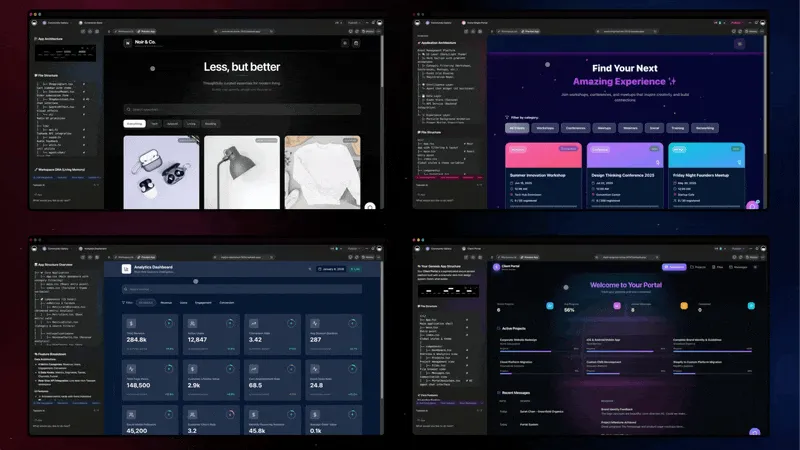
If you think in variables and functions, Replit is great. If you think in "I need a client portal," Genesis is more direct.
The Deployment Question
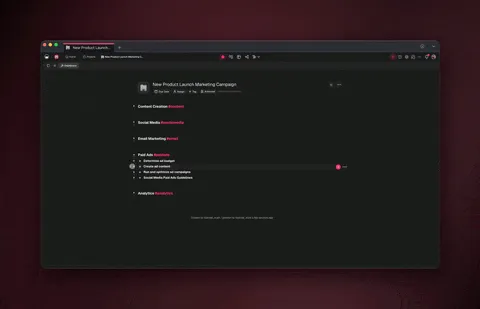
Replit requires a 6-step deployment path (write code, test, deploy, connect database, set up auth, maintain). Taskade Genesis reduces this to two steps: describe your app, share the link. Both tools get you to a working application, but through different paths:
Replit path:
- Write or generate code
- Test and debug
- Deploy to Replit hosting
- Connect database (if needed)
- Set up authentication (if needed)
- Maintain and update code
Genesis path:
- Describe your app
- Share the link
For learning to code, Replit's path teaches valuable skills. For solving business problems today, Genesis's path is faster.
Who Should Use Replit?
Replit is ideal for:
- Developers learning to code with AI assistance
- Programmers who want cloud-based development
- Teams prototyping ideas quickly
- Educators teaching programming
- Hobbyists building personal projects
Choose Taskade Genesis if:
- You don't have developers (or don't want to wait)
- You need a working app today
- Business applications are the goal
- Non-technical team members need to participate
- AI agents should execute work, not just assist
The Verdict
Replit is a great product. The zero-setup cloud environment genuinely solves real developer problems, and the AI integration makes coding faster. For anyone learning to code or building hobby projects, Replit is excellent.
But Replit is a tool for making software, and software-making requires software-making skills. The AI assists — it doesn't eliminate the need for programming knowledge.
Taskade Genesis makes a different bet: that most business applications don't need custom code at all. A client portal doesn't need React components if a prompt can create it. A dashboard doesn't need a database if your workspace already has the data.
Choose based on your goal. Want to code faster? Replit. Want apps without coding? Genesis.
🐑 Before you go... Looking for a development platform that goes beyond AI-assisted coding? Taskade Genesis complements Replit by eliminating code entirely for business applications.
- 💬 AI Chat: Collaborate with AI that understands your Workspace DNA—plan features, design workflows, or troubleshoot business logic in natural language.
- 🤖 AI Agents: Unlike Replit's AI code assistance, Taskade AI Agents build complete working apps from prompts—no coding, no deployment configuration, no maintenance required through vibe coding.
- ✏️ AI Assistant: Generate app specifications, workflow documentation, and project plans with AI-powered templates that integrate with your team's processes.
- 🔄 Workflow Generator: Build intelligent automations connecting your apps, tools, and data—powered by workspace memory and 100+ integrations.
Sign up today and experience zero-code app development—where living software delivers instant business solutions without the complexity.
Replit Not the Right Fit? 3 Alternatives to Consider
Taskade Genesis — Best for Non-Coders and Teams
Taskade Genesis builds deployed, intelligent apps from a prompt — the opposite of a cloud IDE. Where Replit Agent burns credits on autonomous coding loops, Genesis outputs a living system in 10 minutes: structured database with multiple views and custom fields, AI agents with built-in tools and persistent memory (selectable across frontier models from top AI labs), reliable automation workflows with branching/looping/100+ integrations (Slack, HubSpot, Shopify, Stripe), custom domains (6 TLDs), password protection, analytics dashboard, and version history. No credit burn — unlimited apps on every paid plan. 150,000+ apps built. Free tier (3 apps, 1 agent; earn or buy credits), Pro $10/mo billed annually (10 users). Try Genesis free → | Genesis vs Replit →
Bolt.new — Best for Full-Stack Generation in the Browser
Bolt.new generates full-stack apps in the browser via WebContainers — faster preview than Replit, but no built-in hosting on free tier. Bolt V2 adds Bolt Cloud. $25/mo Pro. Bolt alternatives →
Lovable — Best for Supabase-Native Full-Stack
Lovable generates full-stack TypeScript with native Supabase wiring — auth, database, and storage connected by default. Better backend scaffolding than Replit's Agent output. $20/mo Pro. Lovable review →
For the full ranking, see best Replit alternatives.
🔗 Resources
- Replit - Official Website
- Replit Documentation & Tutorials
- Replit Pricing & Plans
- Replit Ghostwriter AI Features
- Repl.it Blog & Updates
- Replit Community & Forum
- Amjad Masad (Replit CEO) on Twitter
- Replit GitHub Repository
💬 Frequently Asked Questions About Replit
What is Replit and how does it work?
Replit is a cloud-based integrated development environment (IDE) that runs entirely in your browser. It supports 50+ programming languages, provides AI-powered code generation through Ghostwriter, and enables real-time multiplayer coding collaboration. Replit eliminates local environment setup—just open your browser and start coding. For teams seeking app development without coding, Taskade Genesis offers instant deployed applications through Workspace DNA.
Who founded Replit and when?
Replit was founded by Amjad Masad, Haya Odeh (COO), and Faris Masad in 2016. Amjad previously worked at Facebook and Yahoo, where he developed passion for making programming accessible to everyone. After pivoting to AI-first following layoffs in 2024, Replit raised $250 million in January 2026, reaching a $3 billion valuation — roughly tripling its 2023 valuation of $1.16 billion. Investors include Andreessen Horowitz, Y Combinator, Khosla Ventures, and Coatue. Learn more about Y Combinator's startup acceleration model.
How much does Replit cost?
Replit overhauled pricing in February 2026. The current tiers are: Free ($0, limited features), Core ($25/month or $20/month annual, $25 monthly credits, 5 collaborators), and Pro ($100/month or $95/month annual, $100 monthly credits, 15 collaborators, 50 viewers, Turbo mode). The old Hacker and Teams tiers have been retired. Agent 3 usage consumes credits based on effort mode (Economy, Power, Turbo). Compare to Taskade's pricing starting at $10/month billed annually for unlimited apps with AI and automation included.
Is Replit good for beginners learning to code?
Yes! Replit is excellent for beginners because it eliminates environment setup complexity (no installing Python, Node.js, Java, etc.). Students can start coding immediately in the browser, see instant results, and access AI assistance through Ghostwriter. Replit is widely used in coding bootcamps, computer science courses, and self-taught learning. However, Replit teaches coding—it doesn't eliminate the need for programming knowledge. For non-developers building business apps, Taskade Genesis enables app creation through vibe coding.
Can Replit be used for production applications?
Yes, but with limitations. Replit can host production apps, but free/lower tiers have performance constraints (frequent restarts, limited compute). Production apps typically require the Core ($25/month) or Pro ($100/month) plan. You're also responsible for database configuration, authentication, monitoring, security, and ongoing maintenance. Agent 3's autonomous capabilities help with initial development but credit consumption can add up for complex projects. For production business apps, evaluate whether cloud IDE hosting is more cost-effective than dedicated platforms or Taskade Genesis (from $10/month billed annually for unlimited apps).
What is Replit Ghostwriter AI?
Ghostwriter was Replit's original AI assistant, now superseded by Agent 3. Agent 3 can work autonomously for up to 200 minutes, test and fix its own code, and spawn subagents for specialized tasks. It operates in three effort modes (Economy, Power, Turbo) that affect both capability and credit consumption. Unlike Taskade AI Agents which execute autonomous business work across your workspace, Replit's Agent 3 focuses specifically on writing and debugging code.
Does Replit work on mobile devices?
Yes, Replit works on tablets and phones through the web browser and dedicated mobile apps (iOS/Android). However, coding on mobile is challenging due to screen size and keyboard limitations. Mobile Replit is best for quick code reviews, small edits, or testing—not primary development. For serious development, desktop/laptop is recommended. Taskade mobile apps support full app building and collaboration through natural language on all devices.
How does Replit compare to GitHub Codespaces or Gitpod?
All three are cloud development environments. GitHub Codespaces integrates tightly with GitHub repositories and VS Code, Gitpod specializes in ephemeral dev environments for open-source projects, and Replit focuses on education, rapid prototyping, and AI assistance. Replit is more beginner-friendly; Codespaces/Gitpod target professional developers. All require coding knowledge—none eliminate it. For non-developers, Taskade Genesis provides instant app deployment without code.
Can I collaborate with my team on Replit?
Yes! Replit supports real-time multiplayer coding (like Google Docs for code). Multiple developers can edit the same project simultaneously, see each other's cursors, and chat while coding. This is excellent for pair programming, code reviews, teaching, or collaborative debugging. However, collaboration is code-centric—non-technical team members can't meaningfully participate. Taskade workspaces enable real-time collaboration where non-developers build and modify apps together.
Is Replit secure for professional use?
Replit provides reasonable security (code encryption, private repls on paid plans, access controls), but you're responsible for application-level security (authentication, data protection, API security). Free/public repls are visible to anyone. For enterprise security requirements, evaluate whether cloud IDE hosting meets compliance needs (SOC 2, GDPR, HIPAA). Enterprise teams should consider dedicated infrastructure or platforms with built-in security like Taskade Enterprise.
Further Reading
- AI App Builder Cloneable Demos — 150 verified Genesis demos, try them live
- Your Workspace Is a Computer — the Workspace DNA thesis explained
- Founder Operating System — how founders use AI agents as an operating system
- Retool vs Taskade · Notion vs Taskade · Asana vs Taskade · Monday vs Taskade · Clay vs Taskade
- Wiki: Workspace DNA · Wiki: Quantum Computing · Wiki: Autonomous Agents
- Community Gallery · Templates · AI Agents · Automate · Build with Genesis
Try Both
- Replit: Great for developers → replit.com
- Genesis: Great for everyone else → Try Genesis Free →
More Comparisons
AI App Builders:
- Taskade vs Replit — Full feature comparison
- Taskade vs V0 — Full Review
- Taskade vs Cursor — Full Review
- Taskade vs Lovable — Full Review
- Taskade vs Bolt — Full Review
- Taskade vs Windsurf — Full Review
Workspace Tools:
- Taskade vs Notion — Full Review
- Taskade vs Webflow — Full Review
- All Taskade Reviews — What users say
Explore Taskade Genesis
- AI App Builder — One prompt, one app
- Vibe Coding — Natural language app creation
- AI Agent Platform — Digital teammates that work 24/7
- Workflow Automation — Business process automation
- Community Apps — Clone and customize