






The Zettelkasten Method for Distributed Teams
Have you come here looking for knowledge? 🧠 That’s perfect timing as we’re just about to take a closer look at another interesting system for collecting and or...
On this page (21)
Have you come here looking for knowledge? 🧠 That’s perfect timing as we’re just about to take a closer look at another interesting system for collecting and organizing information. A brainchild of German sociologist Niklas Luhmann, the Zettelkasten method can make you (and your team) smarter, more productive, and effective at work.
While the Zettelkasten was originally created to support Luhmann’s scientific research, we decided to look at it from a slightly different angle. In this article, we answer the questions:
Since most of the available material on Luhmann’s system is in German (*****Das Leben ist kein Ponyhof… 🦄), we included a handful of extra resources in English for further reading. You’ll find them at the end of this article.
💡 Before you start… This article is part of our "knowledge management." series. Be sure to check other similar stories when you’re done reading:
📚 Tsundoku (積ん読): How to Beat Digital Hoarding in Remote Teams
📤 Knowledge Sharing 101: How to Build a Smarter Remote Team Today
And now, let’s start with the basics, shall we?
🗄️ What's the Zettelkasten Method?
As you know by now, the elegant term zettelkasten (zettel=note + kasten=box) comes from the German language and means a “box of notes,” just like this one: 👇
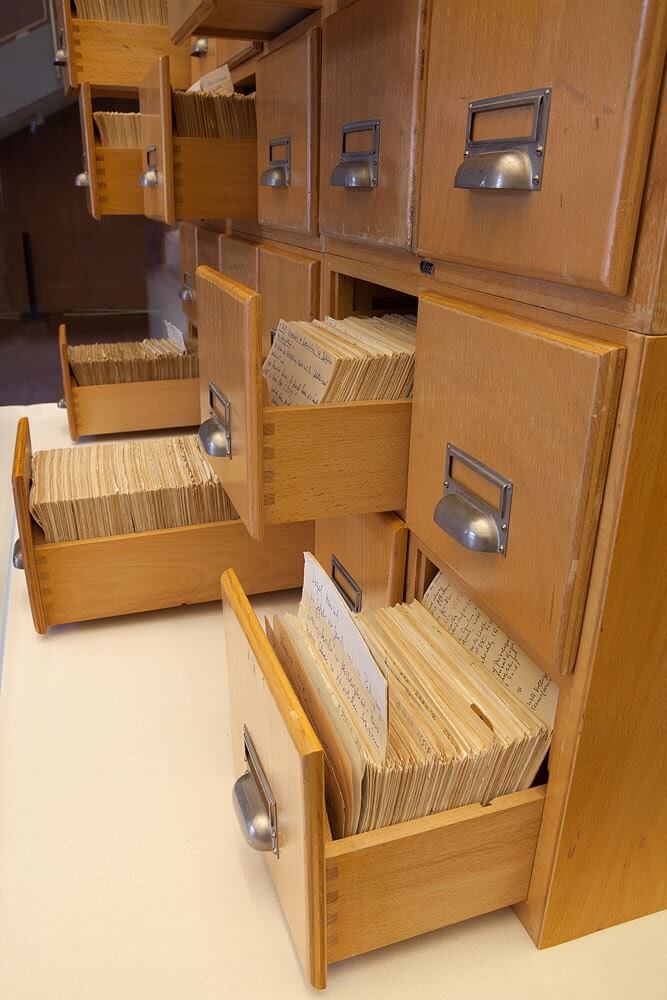
Luhmann’s Zettelkasten via Kunsthalle Bielefel
As a concept, the Zettelkasten method involves capturing, storing and organizing information using a simple (yay!) system of index cards. Luhmann, an accomplished academic and prolific author, created the Zettelkasten to catalog information he could later use in his writing process.
As noted by Manfred Kuehn(1) who’s an authority on the Zettelkasten: “Luhmann (...) described his system as his secondary memory (Zweitgedächtnis), alter ego, or his reading memory (Lesegedächtnis).”
To some extent, the Zettelkasten was meant to imitate the way the brain works and effectively take over “memorizing” all the information Luhmann collected during his research. You can think of the Zettelkasten as an early version of the “second brain” concept we discussed in “Building a Second Brain.”

Luhmann’s headshot composed of Zettelkasten cards via Luhmann-Archiv
How Does the Zettelkasten Work?
According to Kuehn (1), Luhmann’s system used “small (slightly larger than a 5 x 8 card, or Din-A 6, to be precise)” index cards. Every time Luhmann took note of something he found particularly interesting or connected to a book or article he was working on, he would transfer that information to a card, code it with a unique ID and file in his Zettelkasten.
🗃 Zettel Trivia: Many famous authors and artists used index cards in their work. The Russian-born American novelist Vladimir Nabokov wrote his last novel The Original of Laura (subtitled A Novel in Fragments) on a set of 138 cards that were put together and published after his death. He also used index cards for his (in)famous Lolita. (4)
The size of the cards was important for several reasons, the most practical being storage capacity. Over the course of 50 years, Luhmann filed 90.000 notes so it wouldn’t be practical or even remotely possible to store larger sheets of paper in the same volume.
The other reason why compact, crisp notes work better than other formats is the atomic nature of the system. Each card represents a single thought or idea. Even if it does connect to a broader concept or domain, the connections happen on a higher level, beyond the notes themselves.
Here’s one of Luhmann’s index cards digitized by Bielefeld University. Notice the index number in the top left corner of the card. The numbering pattern is visualized below.
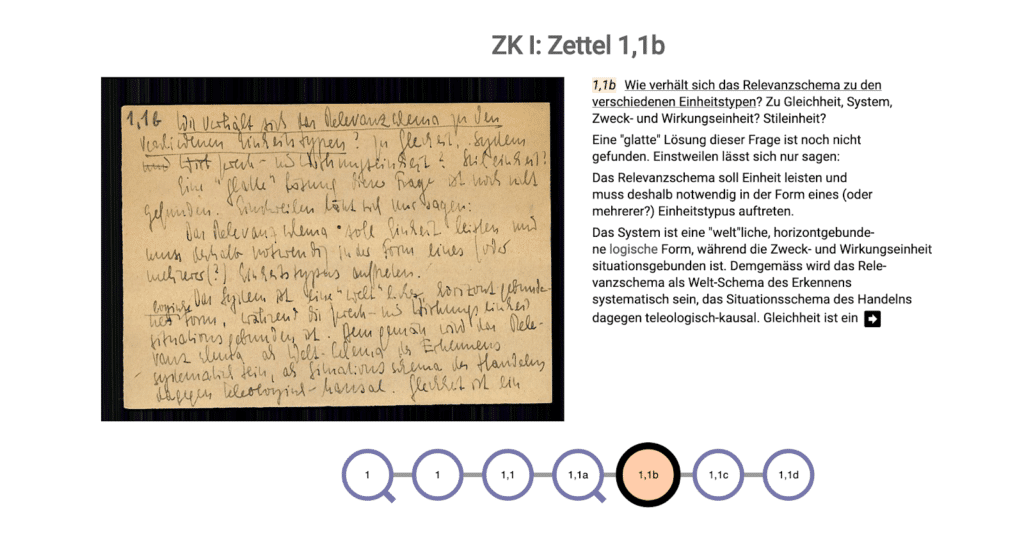
A digitized Zettelkasten note via Luhmann-Archiv
🗃 Zettelkasten Tip: As it is the case with most knowledge management systems, there’s no one *right* way to implement the Zettelkasten. While Luhmann used paper index cards and physical boxes to store them, you can pick any medium that works best for you. The same rule applies to naming and categorizing your notes.
Assigning Unique IDs
One of the most popular indexing methods recommended by the Zettelkasten community is to correlate note IDs with the date and time they are created.
For instance, the ID of a note created on January 25, 2020, could look like this: 25012020. When we break it down, we get the following formats—(DD/MM/YYYY) or 25/05/2020. This approach can be refined by adding hours, minutes (HH:MM), or optional suffixes for more granularity.
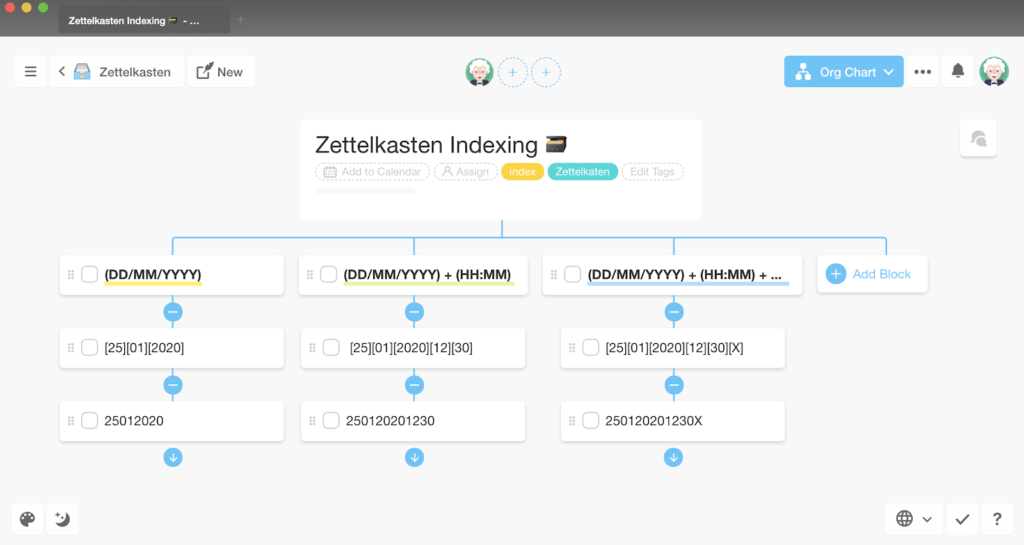
Simple, right?
Date-based indexing is great for a number of reasons. It gives your notes additional context of the time they were created. It also makes it much easier to “decipher” individual notes at a glance. Last but not least, it prevents any duplicates or inconsistencies in the numbering.
Connecting the Dots Notes
The power of Zettelkasten lies in the connections between individual notes. Depending on whether you decide to use a pen-and-paper or a digital system, you can mesh your Zettelkasten by:
Inserting a note ID of one note to another
Using hyperlinks to create direct connections
Keeping a master index with a list of all your notes
Adding granularity with tags, categories or areas of interest
Some Zettelkasten purists say the system doesn’t need tags and categories to be effective, but it really depends on your writing process. If you’re planning to create a collaborative Zettelkasten for your team (more on that in a moment) we recommend adding more granularity.
Branching
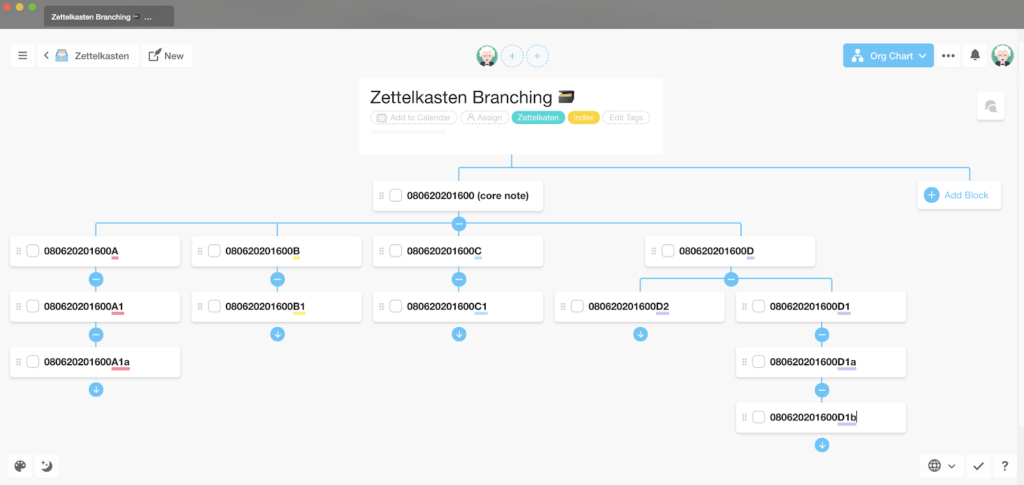
While every note in the Zettelkasten has a unique ID, branching makes it possible to connect notes together using their reference numbers alone.
Let’s say you just read about an interesting passage in a book and want to add it to your Zettelkasten. Following the date/time convention, that note could be indexed as 080620201600 (depending on when you’re adding it to your Zettelkasten).
So, what happens if another book expands on the concept and adds key details that complete what's already inside the catalog?
Of course, you may add the ID of a new note to the original, higher-level entry and do the same the other way around. But you can also branch off the original note and create an offshoot ID that would naturally lead to the original concept.
Take a look at the following tree diagram and see how you can branch one unique ID like 080620201600 into 080620201600A, 080620201600A1, 080620201600B, 080620201600C...
So, putting it all together, here’s a simple, 5-step Zettelkasten recipe:
🔎 Find an interesting piece of information. It can be work-related or personal, tied to a specific project or just trivia you think is worth keeping. If you’re using a digital Zettelkaten, your notes don’t have to be limited to text only. They can include images, videos, bits of code or even audio recordings.
➡ Transfer the information into your Zettelkasten. Stick to Luhmann’s format and keep your notes crisp. Keep only the essential information and dump the rest. If you’re not sure what to keep, you can use Tiago Forte’s progressive summarization technique we described in our "second brain" article.
🎰 Create a unique ID for your note. Creating note IDs is THE thing in Zettelkasten. You should create a progressive system that will let you number notes without limitations and help establish connections between them (read on to learn how).
🔗 Attribute the source. Including a link or a bibliographical note on the source will let you trace the original material in case you need it in the future. Attributions can include the author’s name, book title, particular chapter, or page number.
⛓ Build connections. Your Zettelkasten may not look like much at first. But as you continue to add new entries and create links between notes , it’ll grow exponentially. Remember: building a Zettelkasten is a marathon, not a sprint.
🪶 Extra tip: take fleeting notes: Fleeting notes are temporary, hand-written notes you can take throughout the day. They are mostly incidental, which means you can take fleeting notes whenever you come across a piece of information you don't want to forget, e.g. a quote, a passage from a book, or somebody's birthday. To goal is to regularly rewrite those notes and turn them into permanent notes that will stay in the system.
👍 5 Benefits of the Zettelkasten Method
As you can see, the Zettelkasten method is really simple. Even as your Zettelkasten grows, the rules for storing and organizing entries don’t change that much. But that’s not all.
Here are five more reasons why the system is worth your time:
🧠 It acts as your second brain. Thanks to the Zettelkasten, Luhmann didn’t need to rely on assistants during his academic career. He could rely on and interact with his Zettelkasten as he would with a conversation partner.
🌱 It *can* grow. Over his lifetime, Luhmann wrote down and filed around 90,000 paper cards. As long as you can come up with a long-running indexing system, your Zettelkasten isn’t really capped in terms of capacity.
🔐 It’s fail-proof. Unlike human memory, which is extremely fallible, the Zettelkasten is always there for you. No information is lost or fragmented. And if you use a digital Zettelkasten, extracting information happens instantaneously, either with full-text searches or direct links between notes.
🥳 It can surprise you. Opening your Zettelkasten is like returning to a great book you read many years ago. It’s a wonderful feeling to rediscover nuggets of knowledge you didn’t know were there in the first place. The more information you feed into the system, the more remarkable it becomes.
👩💻 Remote, Collaborative Zettelkasten
There’s no doubt that the Zettelkasten is an overly personal system that works best for, well… personal knowledge management (PKM). After all, it’s meant to double as your second brain and, to some extent, mimics the way your pinky friend meshes bits of information together.
Ready for a plot twist? Let's see if we can answer the following questions:
Can you use *one* Zettelkasten for a group of people?
If so, what are the benefits of applying the system on a wider scale?
Can it be used in 100% distributed organization where teams collaborate remotely?
Collective, collaborative approach to knowledge management is something we discussed some time ago in our article on Past, Present, and Future of Outlining Software. Tl;dr: It’s perfectly possible. And there are many good reasons why you should consider creating a collaborative Zettelkasten for your distributed team.
3️⃣ The 3 Rules of a Digital Zettelkasten
In order to make the process of creating a digital Zettelkasten easier, we’ll adopt a set of three principles—mobility, stability and combinability— proposed by Professor Sean Lawson(2) (originally from Bruno Latour’s Science in Action).
🔄 Mobility
Adding bits of information to the Zettelkasten has to be quick and intuitive. Whether that means saving digital “cards” into shared cloud storage or a collaborative note-taking app, it’s really up to you and your team. The same applies to running global searches and pulling up the information. If it’s too complex, nobody’s going to use it anyway, so err on the side of simplicity.
🗄 Stability
The information your team captures should always link back to the source. In other words, it can’t be added to the Zettelkasten without a context or proper reference. For instance, if your Zettelkasten catalog includes statistical data you want to use in your marketing project, it should link back to the original research and provide a bibliographical note on that.
🔎 Combinability
Permanent notes in a Zettelkasten should mesh together into a network of thoughts, concepts and ideas. To better understand how notes relate to each other, you can use tags, categories, and topics. While bundling notes is a contentious topic in the Zettelkasten community, there’s no reason why your team shouldn’t do so if it makes the system even more useful.
🐑 How to Create a Collaborative Zettelkasten in Taskade
And now for the fun part. 🎉
In this section, we'll show you how to create a collaborative, decentralized Zettelkasten for your distributed team in Taskade. Since some of the steps described below are similar to the BASB methodology we mentioned earlier, you can follow up with that article once you’re done here.
👩🔬 Remember: There is no one, *right* way to implement the Zettelkasten method. Feel free to experiment with your system any way you want.
Decide on an Indexing Method
As we explained before, the most intuitive method to index individual notes is to use date/time coding and add optional prefix/suffix combinations if needed.
For example, a note ID created on June 8th, 2020 at 8:00 would look like this [08] [06] [2020] [0800]. If a new note picks up on a broader concept or idea that’s already in your Zettelkasten, you can branch into [08][06][2020][0800][1] or [08][06][2020][0800][1a] and continue ad infinitum.
But that's not the only way you can identify your Zettelkasten entries.
Another straightforward indexing method would be to use a keyword variation across several notes. For instance, a long-running series of entries containing quotes from books could look like this:
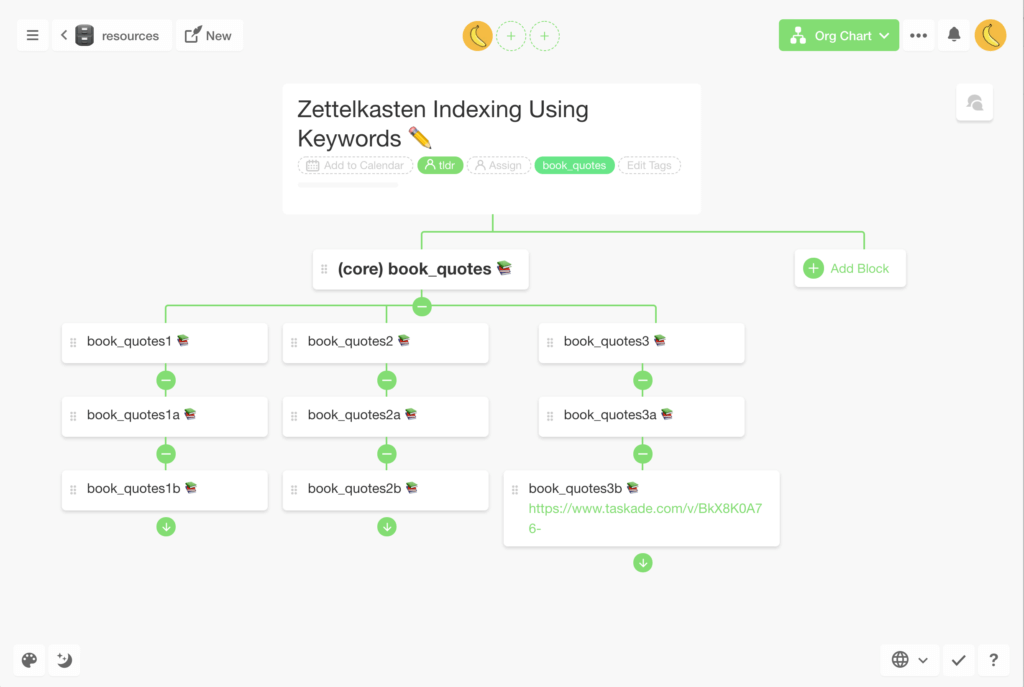
Notice how one keyword can easily branch using digits/numbers, letters, and emojis. Each "core" element of a note title, including unique emojis, can then be used as an anchor in a full-text searches.
While this approach doesn't offer the element of "surprise" Luhmann found in his Zettelkasten, it makes identifying and pulling up particular entries much easier compared to date-based indexing. Especially when you're using modern knowledge management tools.
Find a Home for Your Notes (Workspaces, Subspaces and Projects)
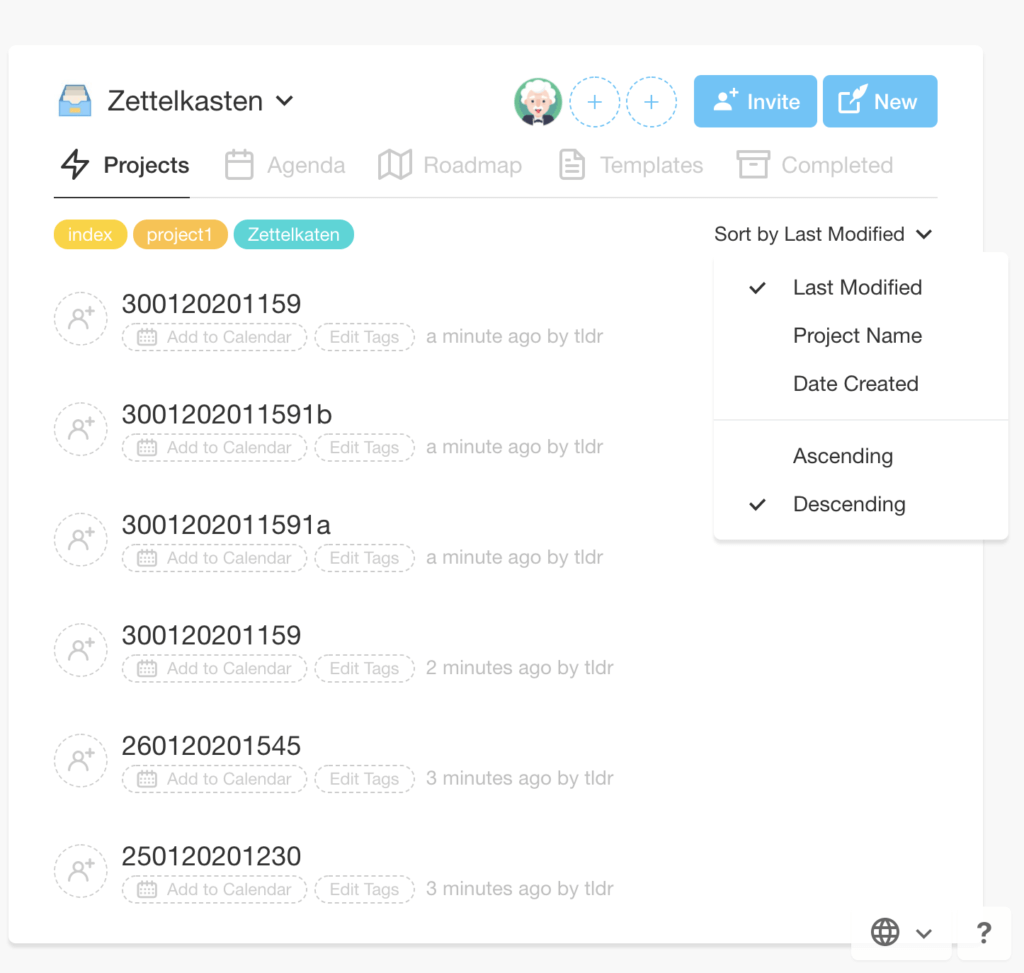
Taskade has three distinct methods of storing knowledge—Workspaces, Subspaces, and Projects. Once you have your Zettelkasten Workspace or Subspace in place, you can start creating notes in two ways:
- By adding Zettelkasten notes as new Projects with unique IDs:
- By creating batches of notes inside specific Projects:
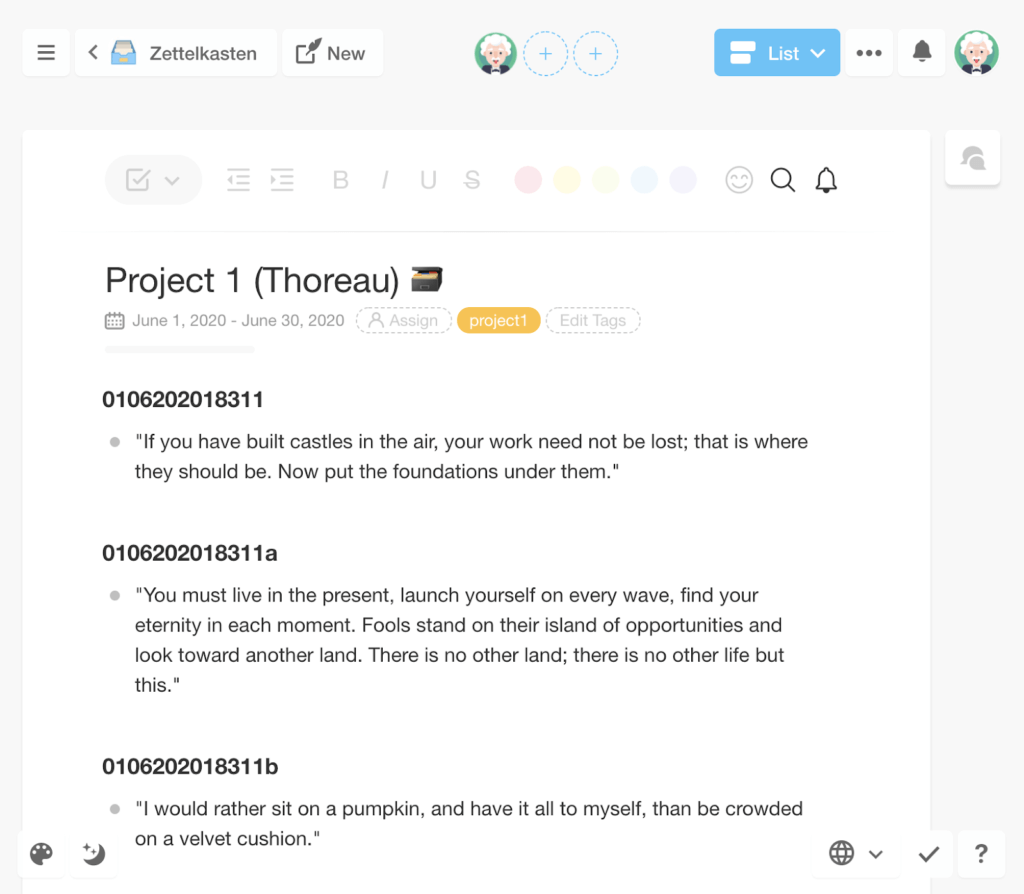
At first, you may want to encourage your team to experiment a bit and see what method of knowledge organization works best for them. In the long run, be sure to stick to one system so the identifiers, tags, and categories (if you use them) are consistent.
Create Connections
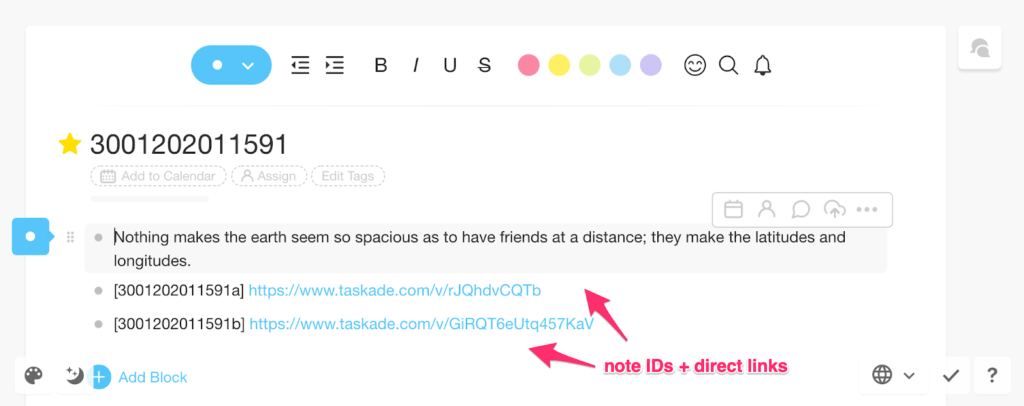
Your team can cross-link bits of knowledge in several ways, either by inserting note IDs into corresponding entries, creating direct links between notes, or keeping a master index that will list all the notes in the system.
Use Tags, Categories and Topics
If you decide to use tags or categories, Taskade’s #tag functionality will help your team sort and filter out groups of notes inside specific Projects or Workspaces.
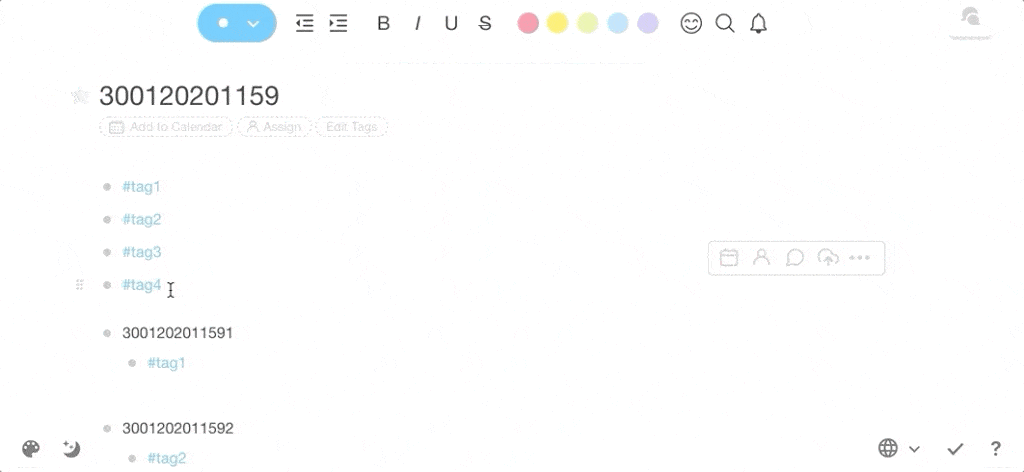
Find Your Notes
When it comes to extracting information from the Zettelkasten, the easiest way to do so is via a full-text search. In Taskade, you can run searches globally (across Workspaces, Subspaces and Project) or narrow them down to individual projects.
Search globally...
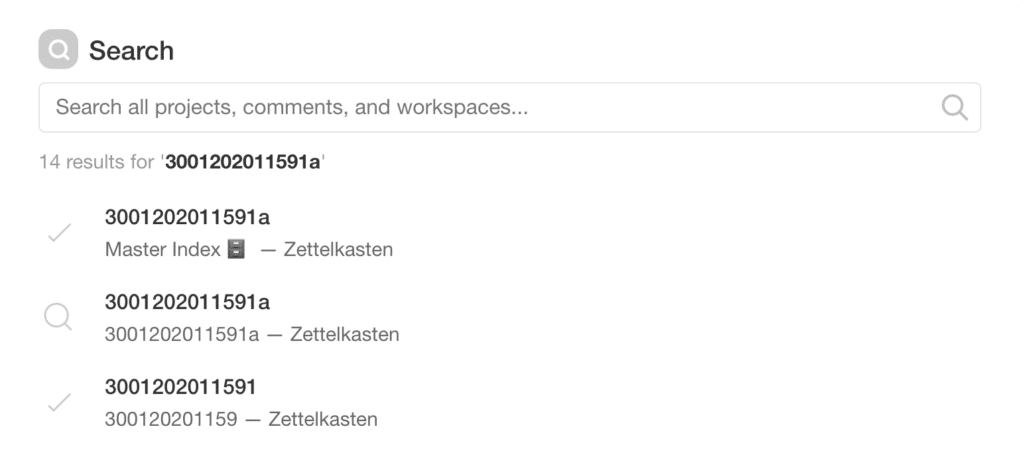
...or within the confines of specific Projects:
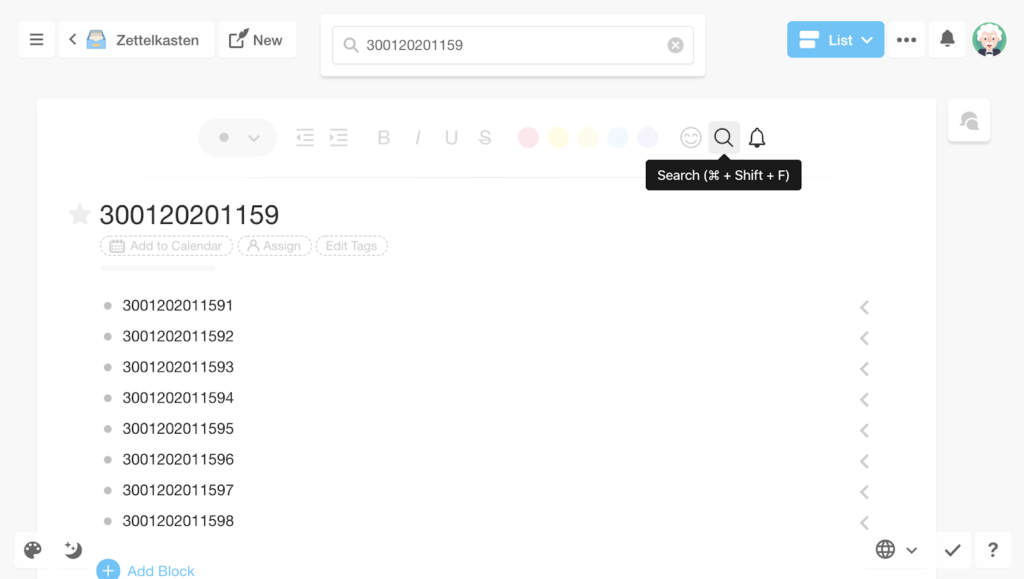
Collaborate!
In order for the Zettelkasten to be really effective, encourage your team to make it a constant part of their workflow. Every time a member of the team comes across a valuable insight or key information that may (or may not) contribute to what the team is working on, they should add it to the Zettelkasten so others can also tap and curate those nuggets of knowledge.
But that’s not all:
🔒 Set user roles and permissions for specific users in your organization and decide who can add, modify and read the contents of the Zettelkasten.
💬 Let your team discuss the contents of the Zettelkasten via unlimited chat, video or conference calls. Just so you don't have to shuffle multiple tools.
📝 Open the Zettelkasten to curation through user comments.
🎨 Add different types of media to your Zettelkasten. You can upload images, videos, spreadsheets, voice recordings and more!
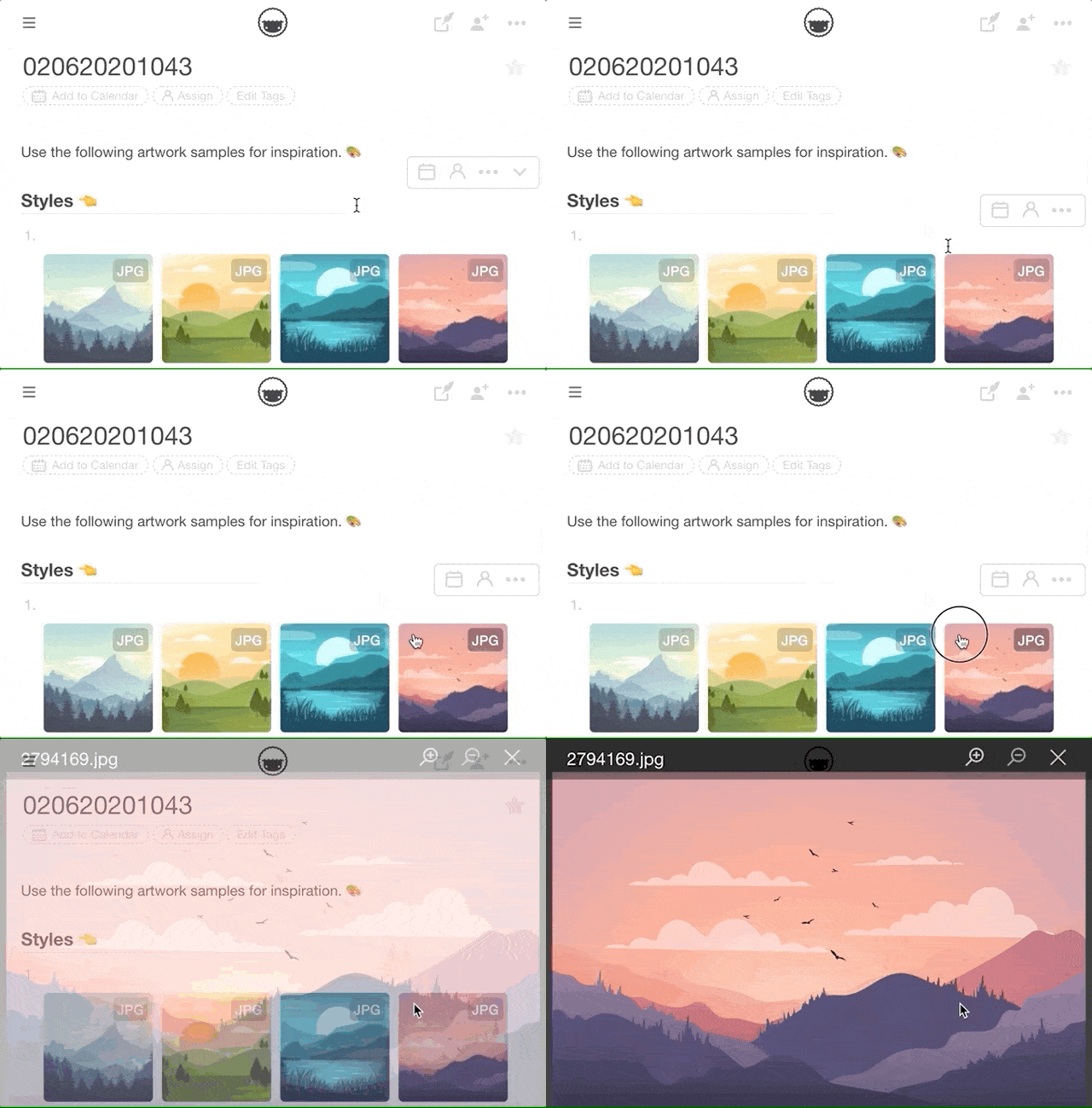
And that’s it!
👋 Parting Words
Although the Zettelkasten is deeply rooted in the pen-and-paper age, it offers what many modern similar knowledge management systems lack: simplicity. It’s surprising how a 100% analog process can be so flexible, intuitive, and fit into basically any medium.
Granted, it takes time to build and mesh a really useful repository of knowledge, but it’ll be well worth the effort. A collaborative, decentralized Zettelkasten is a great way to keep your distributed team connected, informed, and always on the same page.
So, can you use Zettelkasten with modern knowledge management tools? Absolutely! Jump over here to create a free Taskade account and start building your Zettelkasten today! 👈
🔗 Resources
Manfred Kuehn’s highly informative blog on notetaking.(1)
Sean Lawson’s take on Zettelkasten’s implementation.(2) (click)
A translation of Luhman’s “Communicating with Slip Boxes.” (click)
On Nabokov's collection of index cards.(4) (click).
*life's no bowl of cherries
Build a better second brain with Taskade AI! 🤖
🤖 Custom AI Agents: Develop AI agents to implement and manage a better, digital second brain for all your notes, tasks, and projects.
🪄 AI Generator: Outline notes and knowledge snippets to build a comprehensive and evolving second brain system in your workspace.
✏️ AI Assistant: Leverage the AI Assistant in the project editor to help you write, edit, and expand on your notes, powered by OpenAI GPT (frontier models).
🗂️ AI Prompt Templates Library: Access AI prompts specifically designed for kick-starting notes, projects, workflows, and more.
💬 AI Chat: Engage with AI Chat for advice on optimizing and expanding your notes, fostering a culture of productivity and continuous learning.
📄 Media Q&A: Analyze the structure and content of your notes, drawing insights and pathways to deeper knowledge.
And much more...
Frequently Asked Questions About the Zettelkasten Method
What is the Zettelkasten method of studying?
The Zettelkasten method is a note-taking and knowledge management system developed by sociologist Niklas Luhmann. It involves writing individual notes on index cards (or digital equivalents) and linking them through a network of references, enabling a structured web of interconnected ideas.
What are the disadvantages of Zettelkasten?
The disadvantages of Zettelkasten include the time and effort required to maintain the system, potential complexity in managing a large network of notes, and the need for discipline in consistently adding and linking new notes.
What is the concept of Zettelkasten?
The concept of Zettelkasten revolves around creating a personal knowledge database by writing atomic notes on individual ideas. Each note is linked to related notes, forming a web of knowledge that facilitates deep understanding and cross-referencing.
What apps to use for Zettelkasten?
Several apps can be used for Zettelkasten, including Taskade which offers integrated tools for project management and note-taking, making it a comprehensive solution for implementing Zettelkasten.
