






Virtual Meeting Checklist: Run Better Meetings With Your Remote Team
Virtual meetings are the perfect case study for Murphy’s law. Anything that can go wrong—hardware/software problems, poor participation, constant distractions—w...
On this page (11)
Virtual meetings are the perfect case study for Murphy’s law. Anything that can go wrong—hardware/software problems, poor participation, constant distractions—will go wrong. That is unless you have our virtual meeting checklist to save the day.
In today’s article, we tackle some of the most common remote meeting problems. We also suggest a handful of solutions that’ll make your virtual meetings much more digestible.
💡Before you start… This guide is part of our "remote meeting" series. Be sure to read other similar article to learn more.
Need help keeping track of your meetings? Try out our free action item tracker template!
✅ Your 8-Step Virtual Meeting Checklist
1. The Time-Zone Conundrum
“What’s the best time to run a virtual meeting?” Figuring out the sweet spot, especially for teams spread across multiple time zones, is a heck of a challenge.
And we’re not talking only about availability here.
An energizing, 30-minute meetup at 9 am (PT) may not seem like an alluring proposition for the rest of your team in the UK. Eight hours of layover means uneven participation and lower productivity on the other end.
On top of that, you need to account for the unpredictable. The time window for global calls is often small so even a benign technical holdup can force you to call things off.
Possible Solutions 🌟
🌎 Check local business hours. Build up time zone awareness. Always check your team members’ local time before sending invitations (see below)
🎯 Hit the sweet spot. Use one time zone for reference in team communication. Regularly rotate meeting times to make things fair to all team members.
🗓️ Plan Ahead. Block overlap time in a shared calendar. Set recurring reminders and encourage the team to adjust their workflows accordingly.
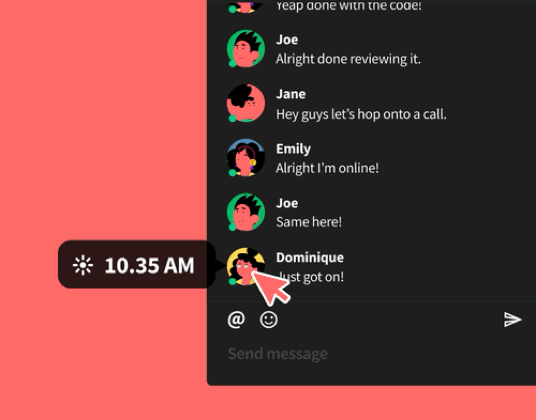
🐑 Taskade Tip #1: Check what your team members are up to using the local time indicator. Hover over your teammates’ profile icons to see their local time.
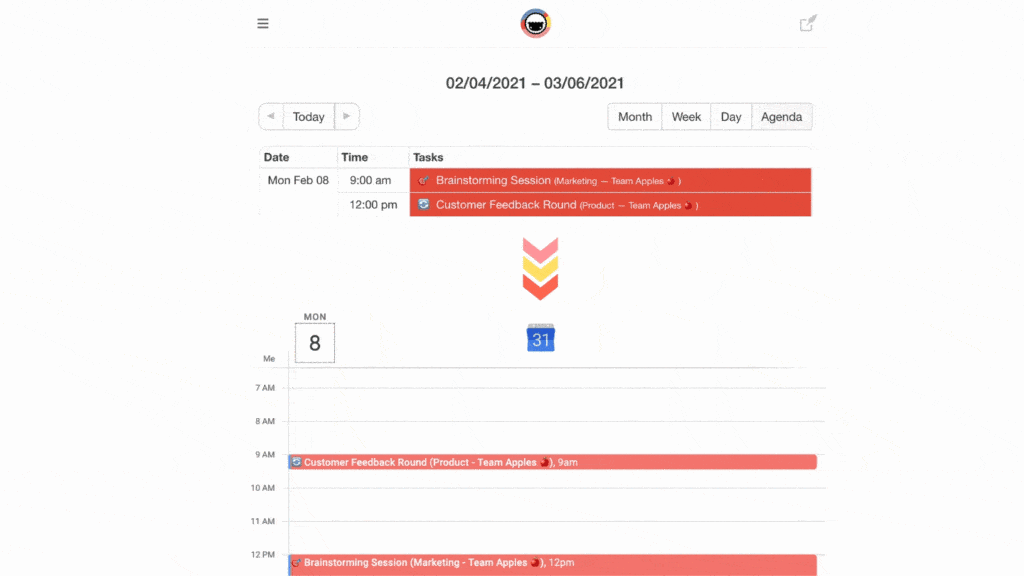
🐑 Taskade Tip #2: Use the Taskade calendar to schedule meetings and sync events with Apple, Google, and Outlook calendars.
Like so.👇
2. Notorious Latecomers
Do you know Mike? Of course you do, because Mike’s always late to team meetings and has a reputation for skipping at least one conference call each week.
And the best part? Every remote team has its own Mike. Just think about all the times you had to stall a video conference to wait for latecomers.
The clock’s ticking, people are wiggling nervously in their chairs, and you can hear somebody firing up Fortnite to kill time… not good.
While occasional slippage happens to everybody, notorious tardiness will cost your team time and money. It will also negatively impact productivity and team morale.
Possible Solutions 🌟
👉 Lead by example. Become religious about start and end times. Don’t reschedule at a moment’s notice. Send invitations well in advance.
🔗 Boost accountability. Assign accountability partners to employees to habitual latecomers. Offer support and 1-on-1 mentoring when needed.
📣 Give everybody a holler. Make your meetings impossible to miss. Create recurring events in your team’s calendar. Touch base a day before the meeting.
⏱️ Be reasonable. Account for emergencies and technical issues. Avoid scheduling back-to-back meetings. Leave 5-10 minutes for warmup.
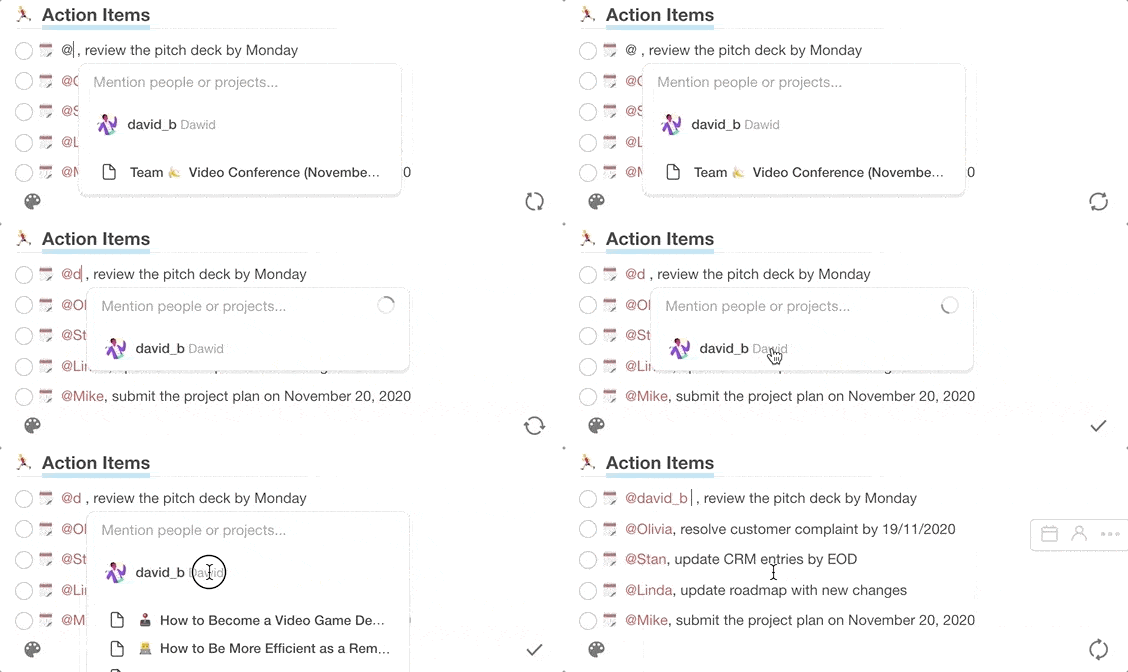
🐑 Taskade Tip #3: Taskade @mention functionality lets you notify individual team members about an action item, deadline, or an upcoming meeting they should attend.
3. Running Longwinded
Long, pointless meetings are one of the most common pain points among remote and co-located teams alike. They waste time, suck energy, and stall team momentum.
Here’s why your meeting may be too much to handle:
🤔 You don’t have a clear purpose.
📝 You haven’t prepared an agenda.
💬 You can’t control watercooler chit-chat.
🔄 You waste time on status updates.
A 2019 Doodle survey found that 44% of workers flunk work because of poorly organized meetings.(1) Don’t make your team’s life harder by talking their ears off.
Possible Solutions 🌟
📄 Always come prepared. Create an agenda for every meeting. Include key talking points and rehearse before attending to estimate length.
⏱ Schedule shorter meetings. Start by field-testing 15/30-minute meetings and see how it goes. Keep people productive, not busy.
👩🔬 Experiment. Try shaving 5,10, or 15 minutes off your typical meeting time. The less time you have, the less likely you are to go off the topic.
❌ Skip status updates. Avoid status meetings like fire. Keep people on the same page via project-management software or internal newsletter.
📥 Reduce the friction. Try defaulting to asynchronous channels (chat, email) whenever possible. People can get over most updates in their spare time.
☝️ Go skeleton crew. Small groups (5-8 participants) are more productive and make better decisions. Revise the attendance list and keep meetings lean.
🐑 Taskade Tip #4: Make "video presence" high on your virtual meeting checklist. Use Taskade video conferencing functionality to capitalize on the benefits of eye contact and nonverbal communication.
Watch our short video guide to get started.👇
4. Low Participation
You did your research, prepped the agenda, prettied up your presentation... only to face the same unmoved faces waiting for the meeting to end. Sounds familiar?
But hey, it’s not always your fault:
⏰ Wrong meeting time (see #1)
👎 Low team camaraderie
🚧 Lack of trust and transparency
🙊 Fear of public speaking
Pulling a killer team meeting is difficult enough in a conference room. But keeping people engaged during a video conference is a different kind of challenge.
Possible Solutions 🌟
Use Icebreaker Questions 🧊
Create a list of icebreaker questions for longer meetings. They’ll help you warm up the attendees and prime them for whatever comes next.
To make your job easier, we put together a free virtual meeting checklist with a few of icebreaker questions. Copy it to your workspace to get started!
Man the Ship 🚢
Prevent people from slipping into “passive observer” mode. Boost engagement through accountability and give everyone a role to fill.
🧙♂️ The facilitator (creating an agenda/guiding the meeting)
👷♀️ The timekeeper (observing breaks/start & end time)
👨🎨 The scribe (taking and distributing meeting notes)
👮 The enforcer (enforcing meeting rules/etiquette)
Regularly assign micro tasks—work in pairs, role-play, brainstorming sprints—to boost engagement and build up a productive flow.
Psst, assigned as the scribe? Use this meeting notes template to give you a headstart!
Encourage Contributions ✍️
Boost engagement before the meeting starts. Share the agenda with other participants and ask for feedback. Incorporate all suggestions and revise accordingly.
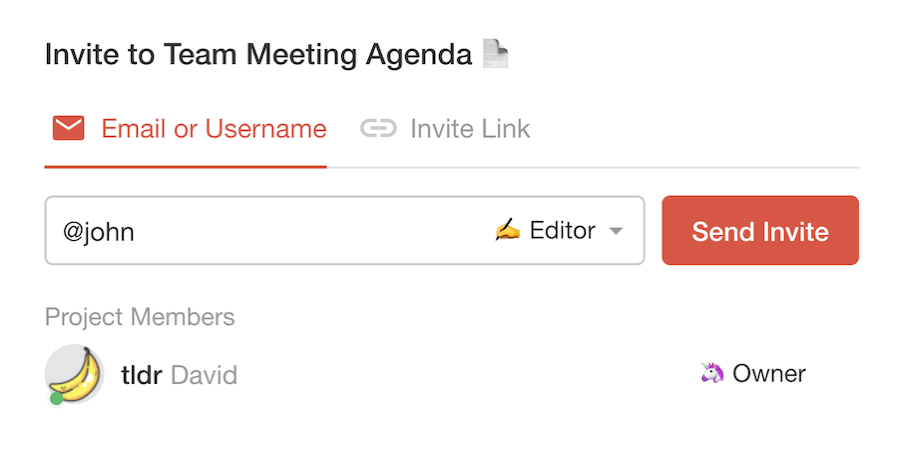
🐑 Taskade Tip #5: Invite your team to a collaborative agenda and assign privileges so they can edit it. Enter their email/username or copy and share the project link via text, chat, or email.
Go Interactive 👨💻
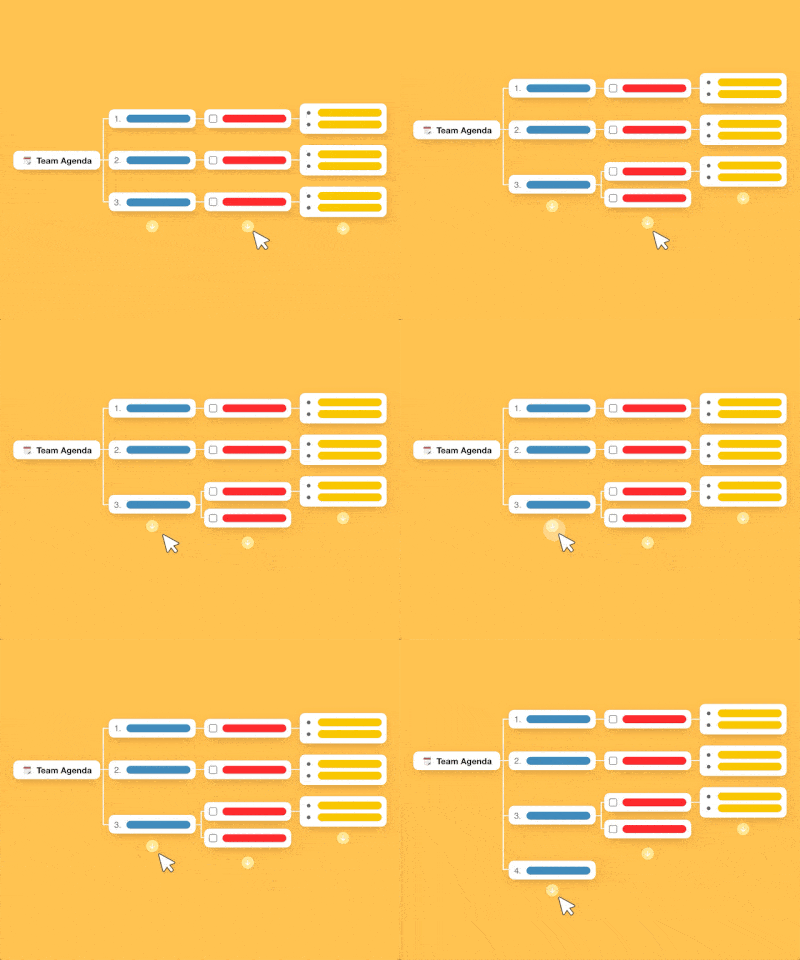
Use a digital whiteboard for brainstorming ideas. Employ mind-mapping techniques for exploring non-linear solutions to problems. Give visual aids whenever possible.
🐑 Taskade Tip #6: Taskade offers several ways of visualizing projects. Use the mindmap view to transform whatever you’re working on into a tree structure.
5. No Tangible Outcomes
What’s worse than a boring meeting? A meeting that leaves the team with more questions than answers and no obligations to fulfill.
“What was the purpose of that meeting?”
“What exactly do they expect me to do?”
“How does it connect to the project at hand?”
“Did I just waste 45 minutes of my life?”
A meeting that doesn’t drive change, yields decisions, or impacts the team in a meaningful way shouldn’t have happened in the first place.
Possible Solutions 🌟
✅ Use action items. Set clear action items to guide the team after the meeting. Make sure to define ownership and due dates for each task.
👊 Master the Art of CTAs. Think of remote team meetings like sales calls with a potential client. End every video conference with a call to action (CTA).
🔍 Track progress. Define the definition of success for each action item. Always follow up with owners to check progress and offer further guidance.
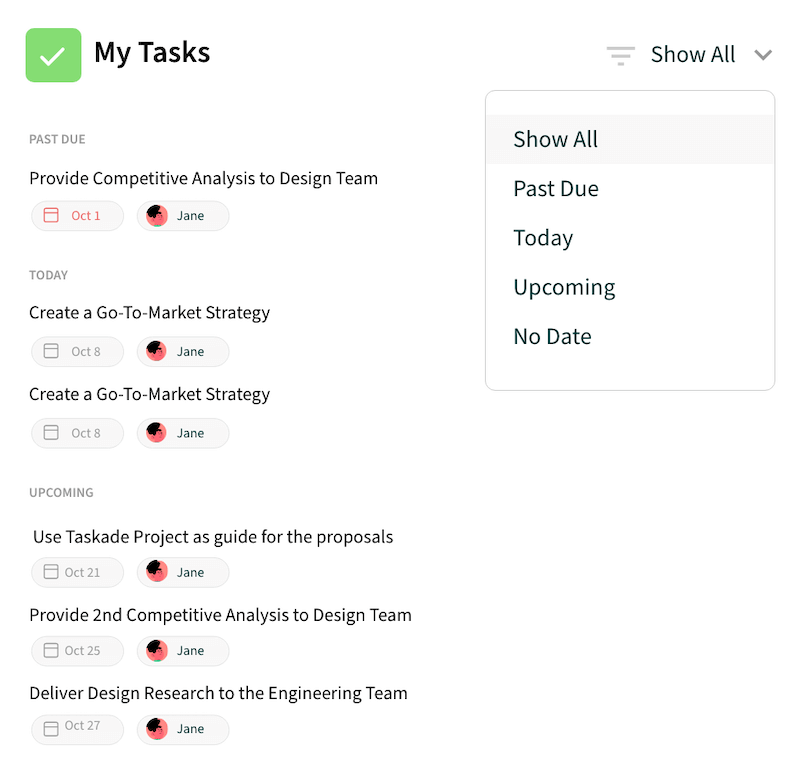
Taskade Tip #7: Taskade lets your team track all action items in My Tasks section. Check progress, duration, and filter by owner with a few clicks.
6. Technical Hiccups
We may be long past the fledgling days of remote work, but technical obstacles are still plaguing remote teams across the board.
📶 Poor network connectivity
🤔 Complicated software
🎙 Microphone feedback
🖥 Screen sharing problems
🎧 Background noise/static
🔇 Sound/video issues
A high-quality feed is the second best thing to face-to-face conversations. A video conference stalled by mounting technical problems is a recipe for disaster.
Possible Solutions 🌟
🐑 Downsize. Assemble a minimalist remote stack to prevent context switching. Use tools with unified functionality to reduce complexity.
🚀 Use a pre-flight checklist. Create a companion hardware/software virtual meeting checklist (see below) and share it with every agenda.
7. Constant Distractions
Here’s the thing. If people are constantly fidgeting, yawning, or looking away from their screens (Netflix anyone?), it’s entirely possible that you’re a bad speaker.
Just kidding! Many remote meetings go awry simply because there are too many distractions competing for participants’ attention.
🔊 Household/background noises
🔔 Smartphone notifications
📥 Incoming emails
👋 Social calls
🚸 Family obligations
💬 Social media
While some attendees will gladly give in to those distractions, others will lose focus trying to resist them. Either way, it’s a lose-lose situation on the productivity front.
Possible Solutions 🌟
🟢 Keep the camera rolling. Encourage nonverbal communication whenever possible. Ask the attendees to keep their cameras on at all times. Avoid sharp, lighting so it doesn’t distract meeting participants.
🔕 Turn off all notifications. Tell everybody to put their phones into DND (Do Not Disturb) mode. Ban social media and checking email during meetings.
🤫 Embrace silence. Give nonverbal cues when you want to speak. Mute your microphone when others are speaking. Don’t interrupt. If you have a dedicated home office space, keep the door shut and cancel all social calls.
👨💼 Look the part. Clean up your workspace, wear appropriate clothes and sit up straight. If possible, keep your webcam above eye level.
Taskade Tip #8: Use Taskade notification setting to tune out distractions. Ask other meeting participants to do the same before every meeting.
Frequently Asked Questions
What should be on a virtual meeting checklist?
A complete virtual meeting checklist includes: define the meeting objective, create and share an agenda, test audio and video, prepare any materials to screen-share, assign a notetaker, start on time, follow the agenda, document decisions and action items, and send a recap immediately after. Having this checklist prevents the common pitfalls of remote meetings.
How do you prepare for a virtual meeting?
Before the meeting, define a clear purpose, create a structured agenda, share it with participants at least 24 hours in advance, test your tech setup, prepare any visuals or documents, and review previous action items. Good preparation is the single biggest factor in whether a virtual meeting is productive or a waste of time.
What makes virtual meetings go wrong?
Common problems include no clear agenda, too many attendees, technical issues, dominant speakers, going over time, lack of documented outcomes, and no follow-up on action items. Most of these are preventable with a simple checklist and a commitment to meeting discipline.
How can remote teams reduce the number of meetings?
Replace status updates with async written check-ins, use shared workspaces for decisions that don't require real-time discussion, cancel recurring meetings that lack clear agendas, and set a policy that every meeting must have a documented purpose. Tools like Taskade enable async collaboration that replaces many meetings entirely.
🐑 Conclusion
You can’t predict every problem, but you can prepare for the unpredictable. Use the tips from this article to up your meeting game and overcome the common meeting pitfalls.
And if you're still looking for a frictionless communication and collaboration platform for your team, Taskade has your back.
Transform your remote meetings with Taskade AI! 🤖
🤖 Custom AI Agents: Create AI agents to help prepare and manage virtual meetings, ensuring each session is productive and engaging.
🪄 AI Generator: Generate comprehensive checklists and agendas for virtual meetings, adapting to various meeting types and objectives.
✏️ AI Assistant: Use the AI Assistant to outline meeting agendas, develop key points, and edit meeting minutes, powered by OpenAI GPT (frontier models).
🗂️ AI Prompt Templates Library: Explore AI prompts designed to simplify all aspects of team meetings, from setup to parting words.
💬 AI Chat: Consult AI Chat for last-minute meeting advice and troubleshooting, keeping every virtual session on track.
📄 Media Q&A: Evaluate and improve your virtual meeting notes, summarize key points, and extract valuable insights with AI-powered insights.
And much more...

✋ Before you go… Here’s a virtual meeting checklist with all the solutions from this article. Copy it to your workspace and share with the team.