






A Pocket Guide to Remote Team Brainstorming
Did you know that the term “brainstorming” has bounced around conference rooms since the 1940s? Despite its age, the technique is still a staple in every creati...
On this page (18)
Did you know that the term “brainstorming” has bounced around conference rooms since the 1940s? Despite its age, the technique is still a staple in every creative toolbox. Today, we’re taking it to another level with remote brainstorming.
In this article, we set out to explore several popular brainstorming techniques. We also show how you can implement them in your distributed organization.
💡 Before you start… This article is part of our series on “remote knowledge management.” Be sure to check other similar guides when you’re done reading.
🤯 What Is Brainstorming Exactly?
The Origins of the Term
The history of brainstorming started in the early 40s with Alex F. Osborn, a co-founder and manager of a successful advertising agency Barton, Durstine & Osborn (BBO).
Osborne developed brainstorming—originally called “think up” sessions— to help his team become more creative and come up with better ad campaign ideas.
“The early participants dubbed our efforts ‘Brainstorm Sessions’; and quite aptly so because, in this case, “brainstorm” means using the brain to storm a creative problem—and do so in commando fashion, with each stormer attacking the same objective.”
Alex F. Osborn, Your Creative Power(1)
The technique proved effective and Osborn later adapted it into a successful commercial product, most notably with his 1953 book Applied Imagination.
In the following years, brainstorming became a key business practice in the majority of U.S. corporations, including companies like Du Pont and General Electric.(2)
To this day, the technique is still the go-to solution for overcoming problems and unearthing revolutionary ideas in the worlds of business and science.
What Does “Brainstorming” Mean?
Conventionally, brainstorming refers to a technique or process of generating solutions and ideas. This can be done individually or, what’s the real treat, as a group activity.
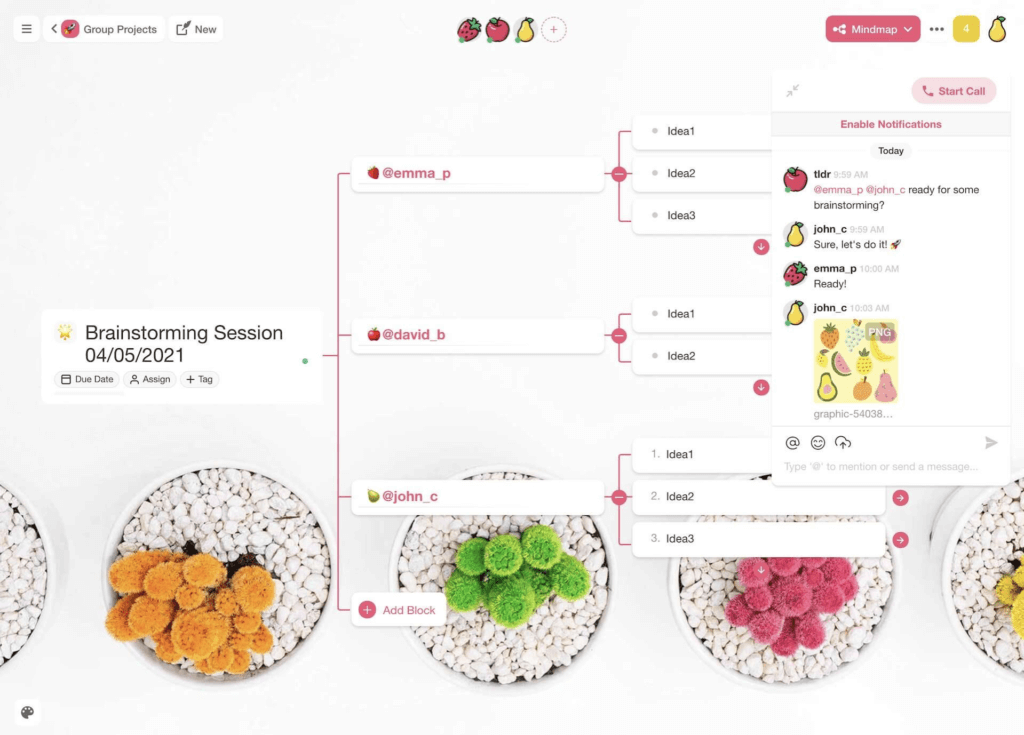
Taskade makes setting up brainstorming sessions a breeze
According to the Business Analysis Body of Knowledge® (BABOK® Guide):
“Brainstorming works by focusing on a topic or problem and then coming up with many possible solutions to it. This technique is best applied in a group as it draws on the experience and creativity of all members of the group.”(3)
While the technique is widely used in the creative space, it can be utilized in any type of business, including logistics, manufacturing, or product development.
And it does come with some cool benefits:
🌟 It enables creative thinking. Brainstorming removes typical workplace hindrances like bureaucracy and self-censorship. Nothing is off the table.
💯 It’s a game of numbers. A thousand bad ideas are often a prelude to one gold nugget. It takes time to unearth what lies beneath.
🤝 It boosts team camaraderie. Banning criticism helps group members open up. When done right, brainstorming can be a great team-building activity
📍 It helps connect the dots. Ideas generate new ideas in a process called “hitchhiking” or “piggybacking.” Brainstorming enables the state of flow.
🤹♀️ It’s flexible. Brainstorming is one of the most versatile ideation techniques. It can be used in a group or individually in all kinds of scenarios.
The Rules of Engagement
One of the problems with the modern take on brainstorming is that it deviates from the original concept. Hence, instead of a creative exercise, it’s more of an unpleasant chore.
In his second book Your Creative Power, Osborn argues that a successful group brainstorming session must follow four simple rules. Adhering to those rules will ensure a productive meeting and leave participants energized.
“The proof of a good brainstorm session is the number of ideas produced and the way the participants feel afterward. If, as they go back to their regular tasks, they tell each other, ‘Gee, but that was fun!’ the session was probably a success.”
Alex F. Osborn, Your Creative Power(1)
Here are the four cardinal rules of brainstorming:
🤫 Avoid criticism. Don’t evaluate or discuss ideas until the session is over. When in doubt, remember: “What happens in Vegas, stays in Vegas.”
🤯 Welcome crazy ideas. Keep an open mind and aggregate every idea. Solutions are often found in the most unexpected places.
👐 Go big. Quantity is more important than quality. Consider keeping the brainstorming session project open a day or week after the meeting is over.
👩🔬 Experiment. Branch out from existing ideas to create new value. Combine, reverse, or transform ideas. Create synergy and draw inspiration from others.
With those rules in mind, your typical brainstorming session would look like this. 👇
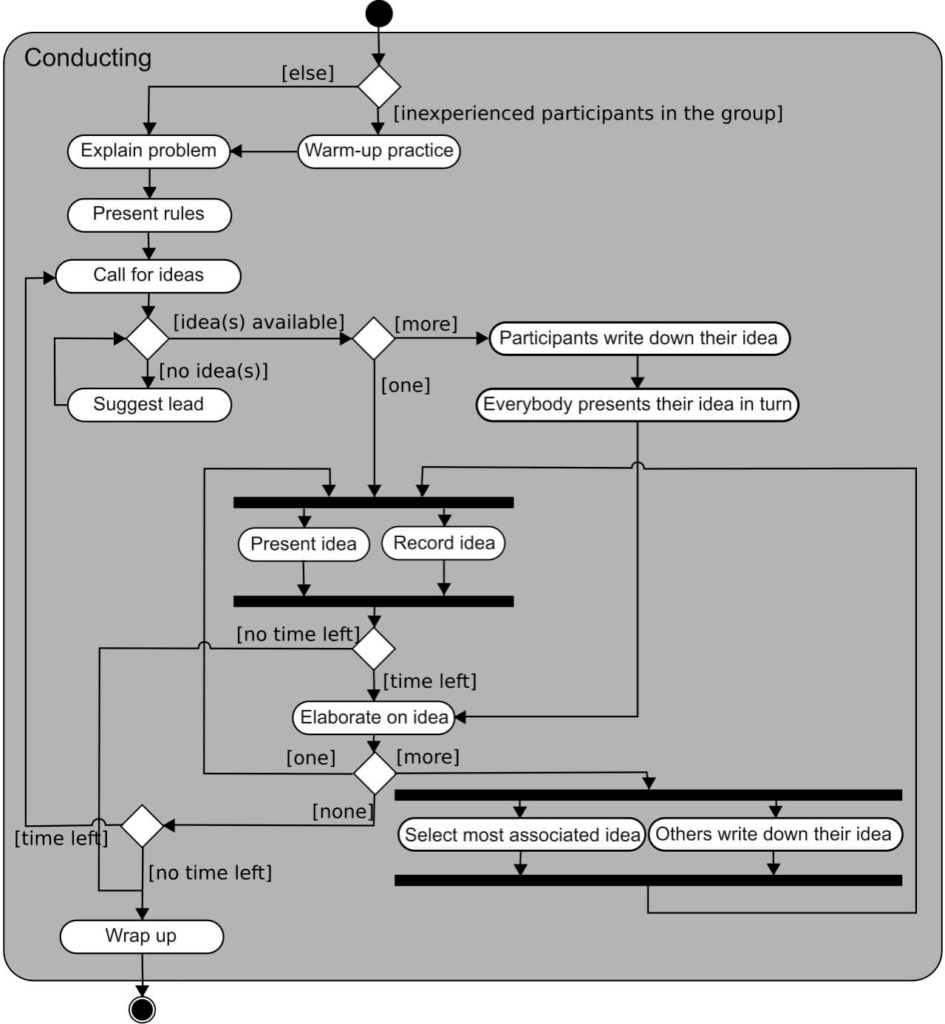
Brainstorming flowchart by Gwaur via Wikipedia(4)
But there’s more.
The Osborn Checklist
Whenever you feel team momentum weaning off, Osborn suggests using several modifiers—known as the Osborn Checklist—to keep the session going.
“When we have piled up a good measure of alternatives, we can use this as a check-list to help us pile up more. Always we should keep asking our imagination: “What else?” and again, “What else?”
Alex F. Osborn, Your Creative Power(1)
You can apply the following modifiers to existing ideas and come up with new ones. Your team can also use them to follow up during a concluding discussion.
🔂 Substitute. Who/what else can it be? Can we use a different resource/process? What other time/location is possible? Can we delegate it?
🔄 Combine. What solutions/ideas can we combine? How about an alloy or an ensemble? Can we create synergy with other possible solutions?
⏩ Adapt. What else is like this? Does the past offer parallels? What can we copy? Where can we find inspiration?
🔀 Modify. Can we find a new angle? Is it possible to change its meaning, color, texture, or shape? Are there any other changes we can implement?
⬆️ Put to other uses. Can this have other applications? How do we modify the/idea solution to use it in a different scenario?
⬇️ Minify/minimize. How to make it smaller, lighter, more flexible? What can we subtract? What can we omit? Can we break it down into smaller chunks?
🔎 Magnify. What can we add? How can we make it more valuable and robust? Can it be duplicated or multiplied? Should we add extra ingredients?
🔃 Rearrange. Can we replace parts of it? How can we modify the sequence or layout? Should we change the schedule or frequency?
⏮ Reverse. How to replace negatives with positives? Should we start from the end? Can we reverse roles/responsibilities?
Want to learn more? Be sure to check Bob Eberle’s S.C.A.M.P.E.R for a more systematized take on Osborn’s framework.
🧠 A Guide to Remote Brainstorming (+Templates)
In its old fash...erm, traditional form, brainstorming relies on analog, pen & paper input methods. Oh, and it also requires people to gather in the same space and time.
Putting together a productive face-to-face brainstorming session is hardly an option during the pandemic. Here’s everything you need to know how to do that remotely. 👇
Setting Things Up
Your remote brainstorming setup should include three components—a communication tool, a digital whiteboard, and a reference system for storing information.
The good news is Taskade lets your team brainstorm ideas synchronously—via video conferencing or chat—or asynchronously, e.g. by adding them to a digital whiteboard.
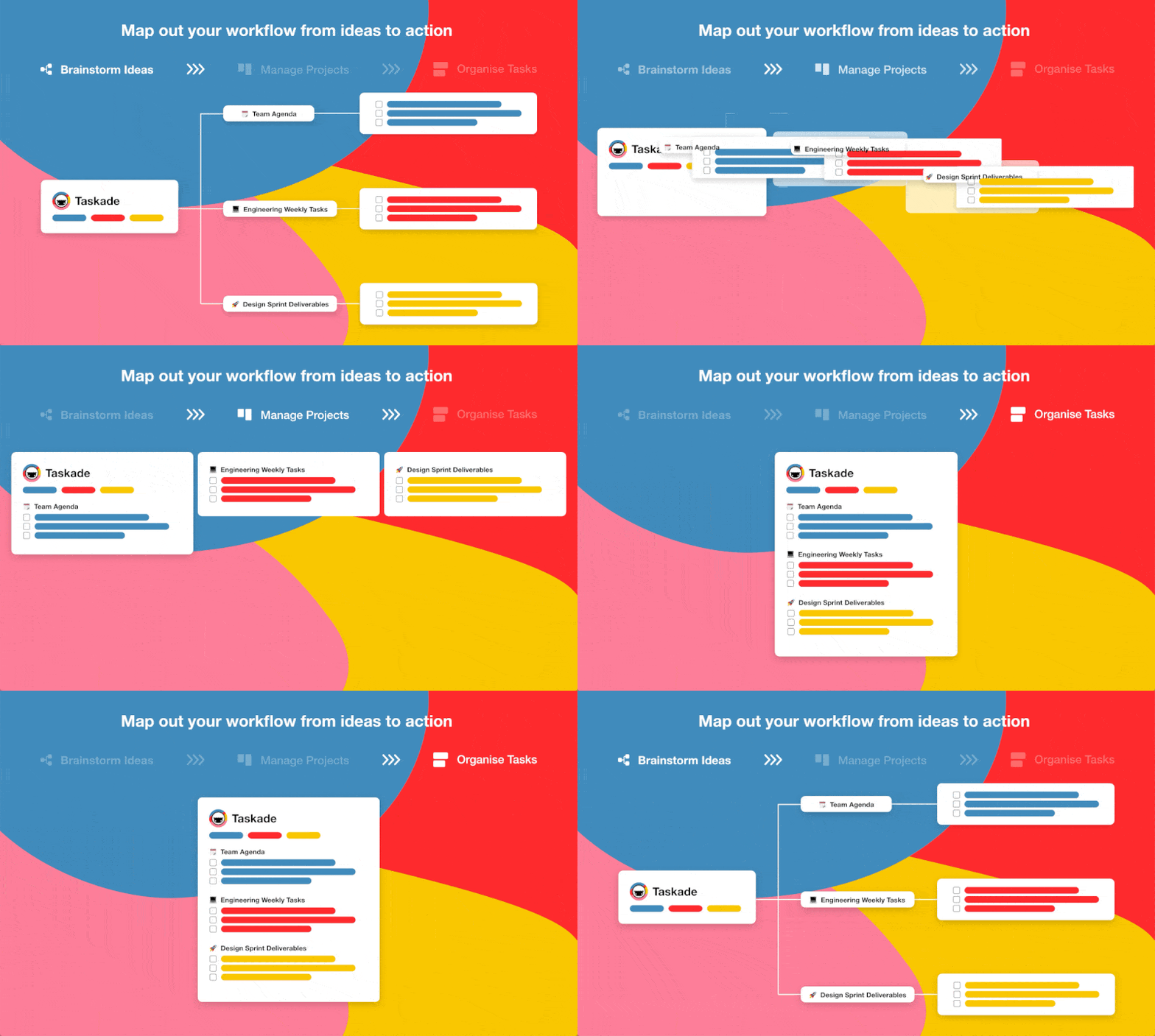
And the best part?
You can conduct remote brainstorming without shuffling apps or switching windows. All you need are willing participants and a shared Taskade Workspaces to get started.
Here’s how you can create and customize one for your team. 👇
Ready? Then let’s take a look at some of the most popular brainstorming techniques and learn how to reap their benefits in a fully distributed workplace.
1. Mind Mapping
Mind mapping is an ideation, note-taking, and planning technique popularized by Tony Buzan in the 70s. It’s also the most popular brainstorming format out there.
Its popularity has led to a rise in online mind mapping tools. Check out our list of the best mind map apps.
📑 Mind mapping instructions:
👉 Start in the center. Create a new Taskade Project and set it to the Mindmap view. Place a single keyword/image in the middle of the page. Commence the remote brainstorming session.
👉 Branch out. Let your team create new branches with associated ideas. You can add 2-3 seed ideas to help the participants get ahead.
👉 Add visuals. Use colors, emojis, and images. You can even assign the participants a specific color for a more personalized input.
👉 Discuss. Once the session is over, group and discuss the ideas via chat or on video. Convert the mind map into a list to make things more organized.
🎨 Free mind mapping template (set it to the Mindmap view):
2. Brainwriting (6-3-5)
Brainwriting was developed by a German marketer Bernd Rohrbach. It combines individual brainstorming, collaborating on ideas, and a group discussion.
📑 Brainwriting instructions:
👉 Set the stage. Create a new Taskade Project and set it to the Board view. Assign each participant one board by putting their names at the top. Commence the remote brainstorming session.
👉 Work for 5 minutes. Set a timer and let participants come up with at least three solutions/ideas. You can also narrow it down to one suggestion but with more details.
👉 Mix and match. Ask each participant to “pass” their board/card to the next person. The next participant should improve on/add to their partner’s idea.
👉 Repeat and discuss. Build up the list by repeating the process several times. Once the session is over, combine the boards and discuss the ideas.
🎨 Free brainwriting template (set it to the Board view):
3. Rapid Brainstorming/Ideation
Rapid ideation is a slight twist on the brainstorming concept. Apply time pressure to encourage participants to come up with plenty of ideas in the shortest time possible.
📑 Rapid brainstorming instructions:
👉 Set the rules. Decide whether you want your team to work individually, in pairs, or as a group. Define the time limit. 5-10 minutes should work well.
👉 Work until the time’s up. Ask participants to come up with as many solutions/ideas as possible. Collect and discuss the ideas when the time’s up.
🎨 Free rapid brainstorming template (set it to the Board view):
4. The Stepladder Technique
Developed by Steven Rogelberg, Janet Barnes-Farrell, and Charles Lowe, the stepladder technique prevents participants from getting influenced by each other.
📑 The stepladder technique instructions:
👉 Start with a list. Create a new Taskade Project and set it to the List view. Invite two participants to a remote brainstorming session and write down initial ideas.
👉 Invite more people. After 5 minutes, fold the original list and invite another person. Let the third member offer their own suggestions first.
👉 Discuss. Unfold the original list and let the three participants compare and discuss their solutions. Fold the list again before inviting another person.
👉 Rinse and repeat. Repeat the process by adding subsequent participants to the project. When done, unfold all lists and discuss the result.
🎨 Free stepladder technique template (set it to the List view):
5. Starbursting
📑 Starbursting instructions:
During a starbursting session, the group focuses on generating questions instead of ideas. Starbursting can be done using a star-shaped diagram or a traditional mind map.
👉 Choose the topic. Create a new Taskade Project and set it to the Mindmap or Org Chart view. Invite participants and put the session theme in the center.
👉 Add prompts. Branch out the central theme into six opening question prompts: “Who?”, “What?”, “How?”, “Where?”, “When?”, and “Why?”
👉 Generate more questions. Brainstorm a set of specific questions (3-5) for each prompt and write them down. Don’t try to answer them at this stage.
👉 Discuss and answer. Analyze each set of questions and discuss possible answers. You can conduct this part during a separate remote brainstorming session.
🎨 Free starbursting template (set it to the Mindmap or Org Chart view):
6. Reverse Brainstorming
📑 Reverse brainstorming instructions:
When you can’t think of a solution, think up a problem. Reverse brainstorming is one of the best ways to overcome a creative block and get the creative juices flowing.
👉 Choose the topic. Create a new Taskade Project and set it to the Mindmap or Org Chart view. Invite participants and put the session theme in the center.
👉 Get in a negative mood! Brainstorm all the ways a project/idea can go wrong. Problems, obstacles, and shortcomings are all welcome.
👉 Reverse the answers. Look at the potential problems and find preemptive solutions. Discuss how you can prevent them from happening.
🎨 Free reverse brainstorming (set it to the Mindmap or Org Chart view):
7. SWOT Analysis
Invented by a group of researchers at the Stanford Research Institute (SRI), the SWOT framework is a perfect tool for evaluating business ideas.
👉 Choose the topic. Create a new Taskade Project and set it to the Board view. Put Strengths, Weaknesses, Opportunities, and Threats in separate boards.
👉 Identify (S)trengths. Identify the areas that make your business/idea stand out. What makes it unique? What resources do you have that others don’t?
👉 Identify (W)eaknesses. What are the areas you need to improve? What skills/assets do you need to acquire? What are your limitations?
👉 Identify (O)pportunities. What external factors can help you succeed? How to use them to your advantage? How can you capitalize on your strengths?
👉 Identify (T)hreats. What are your shortcomings? What obstacles do you need to overcome? Can the situation change for the worse? How?
👉 Discuss and answer. Analyze each set of answers and discuss.
🎨 Free SWOT Analysis template (set it to the Mindmap or Org Chart view):
8. The 5 Whys Technique
The 5 Whys was created by the founder of Toyota Industries Sakichi Toyoda. It uses a simple but powerful iterative approach to finding the root cause of a problem.
👉 Choose the topic. Create a new Taskade Project, set it to the Org Chart view, and define the problem. Invite people with hands-on experience.
👉 Brief. If you’re running a cross-functional remote brainstorming session, introduce the participants so everybody knows who does what. Discuss the problem.
👉 Ask “why.” Ask why the problem occurs and try to identify the root cause. Repeat the process five times until you have arrived at the conclusion.
👉 Suggest solutions. Pair a possible solution with each of the five levels. Discuss with the team and assign responsibilities for fixing the problem.
🎨 Free 5 Whys template (set it to the Org Chart view):
Frequently Asked Questions
How do you brainstorm effectively with a remote team?
Use a shared visual workspace where everyone can contribute simultaneously, set a clear problem statement before starting, allow individual idea generation before group discussion, use techniques like mind mapping or reverse brainstorming, timebox the session, and document all ideas in a persistent workspace that the team can revisit.
What are the best brainstorming techniques for remote teams?
Effective remote brainstorming techniques include brainwriting (silent individual ideation followed by sharing), mind mapping, the 6-3-5 method, reverse brainstorming, SCAMPER, and round-robin contributions. The key is using techniques that prevent dominant voices from drowning out quieter team members.
What tools are best for remote brainstorming?
The best tools combine real-time visual collaboration with structure. Taskade offers collaborative mind maps for visual brainstorming, list views for organizing ideas, and AI agents that can generate, expand, and refine ideas alongside your team — all in a single workspace.
How do you avoid groupthink in remote brainstorming?
Start with independent idea generation before sharing, use anonymous contribution when possible, actively seek contrarian perspectives, assign a devil's advocate role, and ensure psychological safety so team members feel comfortable challenging popular ideas. Async brainstorming in shared workspaces also reduces conformity pressure.
🐑 Conclusion
Racking your brain doesn’t have to be difficult when you’re in good company.
Use remote brainstorming to help your team get out of the rut and find the next exciting idea or project to pursue. So, what are you waiting for?
🎯 Zero in on the problem/idea.
👋 Invite the participants.
💭 Introduce the topic.
🤯 Brainstorm ideas.
💬 Discuss, rinse, and repeat.
Oh, and did you know that we just updated our Org chart view? You can now break down projects, brainstorm ideas, and visualize solutions more easily.
Sign up to connect the dots with Taskade AI!** 🤖**
🤖 Custom AI Agents: Create and train custom AI agents to assist in generating and connecting ideas, automating tasks, and brainstorming ideas.
🪄 AI Generator: Generate comprehensive mind maps and other creative workflows, drawing from natural-language prompts and external resources.
✏️ AI Assistant: Tap into the power of AI for real-time brainstorming support, including generating ideas and organizing thoughts.
🗂️ AI Prompt Templates Library: Explore a wide range of business and personal prompts tailored for a variety of use cases and scenarios.
💬 AI Chat: Engage with AI as a brainstorming partner, exploring ideas, expanding on concepts, and overcoming creative blocks.
📄 Media Q&A: Analyze brainstorming documents and spreadsheets to extract key insights and summarize discussions.
And much more...

🔗 Resources
https://www.amazon.com/Your-Creative-Power-Alex-Osborn-ebook/dp/B004SGJ9JU
https://www.regent.edu/acad/global/publications/jti/vol2iss1/Besant_JTISU16A.pdf
https://book.akij.net/eBooks/2018/September/5b8a80dd494ce/BABOK_Guide_v3_Member.pdf
https://en.wikipedia.org/wiki/Brainstorming#/media/File:Activity_conducting.svg