



Taskadetaskade
PricingLoginSign up for free →Sign up for free →
Loved by 1M+ users·Hosting 100K+ apps·Deploying 500K+ AI agents·Running 1M+ automations·Backed by Y Combinator
TaskadeAboutPressPricingFeaturesIntegrationsChangelogContact us
GalleryReviewsHelp CenterDocsFAQ
VibeVibe AppsVibe AgentsVibe CodingVibe Workflows
Vibe MarketingVibe DashboardsVibe CRMVibe AutomationVibe PaymentsVibe DesignVibe SEOVibe Tracking
Community
FeaturedQuick AppsTools
DashboardsWebsitesWorkflowsProjectsFormsCreators
DownloadsAndroidiOSMac
WindowsChromeFirefoxEdge
Compare
vs Cursorvs Boltvs Lovable
vs V0vs Windsurfvs Replitvs Emergentvs Devinvs Claude Codevs ChatGPTvs Claudevs Perplexityvs GitHub Copilotvs Figma AIvs Notionvs ClickUpvs Asanavs Mondayvs Trellovs Jiravs Linearvs Todoistvs Evernotevs Obsidianvs Airtablevs Basecampvs Mirovs Slackvs Bubblevs Retoolvs Webflowvs Framervs Softrvs Glidevs FlutterFlowvs Base44vs Adalovs Durablevs Gammavs Squarespacevs WordPressvs UI Bakeryvs Zapiervs Makevs n8nvs Jaspervs Copy.aivs Writervs Rytrvs Manusvs Crewvs Lindyvs Relevance AIvs Wrikevs Smartsheetvs Monday Magicvs Codavs TickTickvs Any.dovs Thingsvs OmniFocusvs MeisterTaskvs Teamworkvs Workfrontvs Bitrix24vs Process Streetvs Toggl Planvs Motionvs Momentumvs Habiticavs Zenkitvs Google Docsvs Google Keepvs Google Tasksvs Microsoft Teamsvs Dropbox Papervs Quipvs Roam Researchvs Logseqvs Memvs WorkFlowyvs Dynalistvs XMindvs Whimsicalvs Zoomvs Remember The Milkvs Wunderlist
Genesis AIApp BuilderVibe CodingAgent Builder
Dashboard BuilderCRM BuilderWebsite BuilderForm BuilderWorkflow AutomationWorkflow BuilderBusiness-in-a-BoxAI for MarketingAI for Developers
AI Agents
FeaturedProject ManagementProductivity
MarketingTranslatorContentWorkflowResearchPersonalSalesSocial MediaTo-Do ListCRMTask AutomationCoachingCreativityTask ManagementBrandingFinanceLearning and DevelopmentBusinessCommunity ManagementMeetingsAnalyticsDigital AdvertisingContent CurationKnowledge ManagementProduct DevelopmentPublic RelationsProgrammingHuman ResourcesE-CommerceEducationLegalEmailSEODeveloperVideo ProductionDesignFlowchartDataPromptNonprofitAssistantsTeamsCustomer ServiceTrainingTravel PlanningAll Categories
Automations
FeaturedBusiness-in-a-BoxInvestor Operations
Education & LearningHealthcare & ClinicsStripeSalesContentMarketingEmailCustomer SupportHubSpotProject ManagementAgentic WorkflowsBooking & SchedulingCalendarReportsSlackWebsiteFormTaskWeb ScrapingWeb SearchChatGPTText to ActionYoutubeLinkedInTwitterGitHubDiscordMicrosoft TeamsWebflowRSS & Content FeedsGoogle WorkspaceManufacturing & OperationsAI Agent TeamsAll Categories
Wiki
GenesisAI AgentsAutomation
ProjectsLiving DNAPlatformIntegrationsProductivityMethodsProject ManagementAgileScrumAI ConceptsCommunityTerminologyFeatures
Templates
FeaturedChatGPTTable
PersonalProject ManagementSalesFlowchartTask ManagementEngineeringEducationDesignTo-Do ListMarketingMind MapGantt ChartOrganizationalPlanningMeetingsTeam ManagementStrategyGamingProductionProduct ManagementStartupRemote WorkY CombinatorRoadmapCustomer ServiceLegalEmailBudgetsContentConsultingE-CommerceStandard Operating Procedure (SOP)Human ResourcesProgrammingMaintenanceCoachingSocial MediaHow-TosResearchMusicTrip PlanningAll Categories
Generators
AI AppAI WebsiteAI Dashboard
AI FormAI AgentClient PortalAI WorkspaceAI ProductivityAI To-Do ListAI WorkflowsAI EducationAI Mind MapsAI FlowchartAI Scrum Project ManagementAI Agile Project ManagementAI MarketingAI Project ManagementAI Social Media ManagementAI BloggingAI Agency WorkflowsAI ContentAI Software DevelopmentAI MeetingAI PersonasAI OutlineAI SalesAI ProgrammingAI DesignAI FreelancingAI ResumeAI Human ResourceAI SOPAI E-CommerceAI EmailAI Public RelationsAI InfluencersAI Content CreatorsAI Customer ServiceAI BusinessAI PromptsAI Tool BuilderAI SEOAI Gantt ChartAI CalendarsAI BoardAI TableAI ResearchAI LegalAI ProposalAI Video ProductionAI Health and WellnessAI WritingAI PublishingAI NonprofitAI DataAI Event PlanningAI Game DevelopmentAI Project Management AgentAI Productivity AgentAI Marketing AgentAI Personal AgentAI Business and Work AgentAI Education and Learning AgentAI Task Management AgentAI Customer Relations AgentAI Programming AgentAI SchemaAll Categories
Converters
AI Featured ConvertersAI PDF ConvertersAI CSV Converters
AI Markdown ConvertersAI Prompt to App ConvertersAI Data to Dashboard ConvertersAI Workflow to App ConvertersAI Idea to App ConvertersAI Flowcharts ConvertersAI Mind Map ConvertersAI Text ConvertersAI Youtube ConvertersAI Knowledge ConvertersAI Spreadsheet ConvertersAI Email ConvertersAI Web Page ConvertersAI Video ConvertersAI Coding ConvertersAI Task ConvertersAI Kanban Board ConvertersAI Notes ConvertersAI Education ConvertersAI Language TranslatorsAI Business → Backend App ConvertersAI File → App ConvertersAI SOP → Workflow App ConvertersAI Portal → App ConvertersAI Form → App ConvertersAI Schedule → Booking App ConvertersAI Metrics → Dashboard ConvertersAI Game → Playable App ConvertersAI Catalog → Directory App ConvertersAI Creative → Studio App ConvertersAI Agent → Agent App ConvertersAI Image ConvertersAI Resume & Career ConvertersAI Presentation ConvertersAll Categories
Prompts
Blog WritingBrandingPersonal Finance
Human ResourcesPublic RelationsTeam CollaborationProduct ManagementSupportAgencyReal EstateMarketingCodingResearchSalesAdvertisingSocial MediaCopywritingContentProject ManagementWebsite CreationDesignStrategyE-commerceEngineeringSEOEducationEmail MarketingUX/UIProductivityInfluencer MarketingAnalyticsEntrepreneurshipLegalAll Categories
Blog
What Is Intelligence? From Neurons to AI Agents — A Complete Guide (2026)What Is Grokking in AI? When Models Suddenly Learn to Generalize (2026)Taskade vs Zoho: Can AI Workspaces Replace Enterprise SaaS? (2026)What Is Mechanistic Interpretability? How We're Learning to Understand AI (2026)
How Do Large Language Models Actually Work? Transformers Explained (2026)What Is an Agentic Workspace? The Complete Guide (2026)Vibe Apps Directory: The Complete Guide to No-Code AI App CategoriesWhat is FFmpeg? Complete History of the Open-Source Multimedia Framework (2026)What Is AI Safety? Complete Guide to AI Risks, Alignment & The Future (2026)What Are Micro Apps? The Trend Reshaping How Software Gets Built (2026)What Is Agentic Engineering? Complete History: From Turing to Karpathy, AutoGPT to Autoresearch & Beyond (2026)Will Vibe Coding Kill SaaS? The Garry Tan vs Zoho Debate Explained (2026)Build an AI Event Landing Page in MinutesVibe Learning Apps: Best AI LMS & Course Platforms Compared (2026)Vibe Utility Apps: 10 AI Converters & Dev Tools You Can CloneVibe Finance Apps: 10 AI Invoice Generators, Expense Trackers & Dashboards3 Finance Apps You Can Clone Today — Invoice, Meeting Costs & Licenses
AIAutomationProductivityProject ManagementRemote WorkStartupsKnowledge ManagementCollaborative WorkUpdates
Changelog
Mobile Agent Panel, Dark Mode Theming & White-Label 404 Pages (Mar 13, 2026)Linear & Monday Integrations, Agent Memory for All Models (Mar 12, 2026)App Kit Export & Import, Agent Memory & Custom Domain SSL (Mar 11, 2026)
Developer SDK, App Kit Sharing & Live Theming (Mar 10, 2026)Airtable Integration, Smarter Agent Models & Workspace File Management (Mar 9, 2026)Bulk Project Import & Real-Time Integration Triggers (Mar 7, 2026)Faster Project Files & Performance (Mar 5, 2026)
Wiki
GenesisAI AgentsAutomation
ProjectsLiving DNAPlatformIntegrationsProductivityMethodsProject ManagementAgileScrumAI ConceptsCommunityTerminologyFeatures
© 2026 Taskade.
PrivacyTermsSecurity
Made withTaskade AIforBuilders
Blog›Productivity›Mind Maps: Use Cases and…

Mind Maps: Use Cases and Examples of How You Can Utilize Mind Maps in Your Personal and Professional Life in 2024

You may be an expert, or perhaps you’re just starting out (no shame in that!). Mind mapping has many use cases and benefits. Today, we go through some of the us...

May 30, 2022·Updated July 24, 2025·7 min read·Taskade Team·Productivity·#brainstorming#mind-maps
On this page (7)
What is a Mind MapHow to Create a Mind MapHow to Create a Mind Map on TaskadeWhat Are Some Examples of What Mind Maps Can Be Used For?PersonalBusinessFrequently Asked Questions About Using Mind Maps

You may be an expert, or perhaps you’re just starting out (no shame in that!). Mind mapping has many use cases and benefits. Today, we go through some of the use cases for you to unleash the full power of mind mapping.

Check out some of these articles and mind map templates to help boost your productivity!

  1. 📘 Mind Map: The Ultimate Guide to Getting Started

  2. ⌚ A Complete Guide to the Flowtime Technique

  3. 🧠 Team Mind map Template

  4. 👌 All Other Mind Map Templates

What is a Mind Map

Mind maps are a powerful visual information management tool that helps to show the relationships between groups of information. Mind mapping is a way of thinking that helps you to structure your information and organizes your thoughts visually. What this does is that it helps you to digest information better.

In its simplest form, mind maps focus on a single main concept. Branches extend out infinitely of that concept in the middle as you continue to expand on the topic. What this does is that it shows a hierarchical structure of information from the middle, creating a circular, spider-like web.

Instead of having walls of text, mind mapping forces you to only state the key points that best describe a topic. This focus on keywords helps you to quickly browse through the mind map and digest the key ideas around the main topic of the mind map.

Mind maps are a tool that is related to the second brain movement which aims to improve human memory capabilities.

How to Create a Mind Map

It’s really simple to create a mind map! Follow the steps below to get started.

  1. Write down the main concept in the center of the mind map. 

  2. Branch out from the center of the mind map as you note down more relevant sub-topics.

  3. Explore more ideas and expand on your mind map.

  4. Connect relevant ideas with directional arrows to show idea flow. 

  5. Color-code your arrows to group them together.

  6. Zoom out and see how your main concept is actually a sum of all its parts!

We recommend that you create your mind maps on a large sheet of paper so that you won't be restricted by space. It’s also best to ready some bright colored pencils so that you can color-code and organize groups of related ideas.

What’s more, Taskade’s mind map view can help you kickstart start your mind mapping journey! It’s completely free to use, and different views on Taskade mean that you can write down your ideas in a list view first before switching to a mind map view to help you visualize your ideas.

How to Create a Mind Map on Taskade

Creating a mind map can be made even simpler by using Taskade’s wide range of mind mapping templates. Using a mind map template lets you visualize your data and organize your thoughts easily. 

Use our ready-made templates to improve your brainstorming sessions, and budgeting, or use them as a checklist to kick start your startup business strategy!

Interested? Here’s how to create a mind map on Taskade.

  1. Sign in to your Taskade account or sign up for free.

  2. Open the mind map template link and click on the ➕Use Template button.

  3. Choose the Workspace where you want to create your first mind map.

  4. Customize your mind map using Taskade’s editing and formatting features.

  5. Finally, click on the Share button next to your profile photo to start collaborating.

Create beautiful mind maps with Taskade today.

What Are Some Examples of What Mind Maps Can Be Used For?

There are a lot of ways that you can use mind maps. Mind maps are very versatile. You can use mind maps for many personal and professional purposes. 
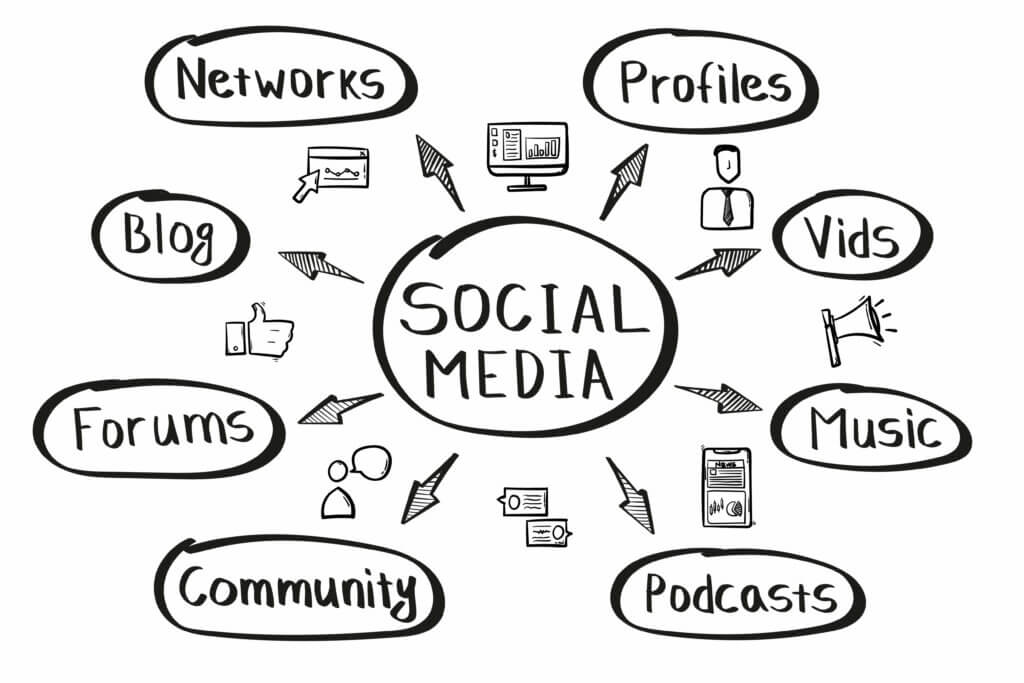
6150a5913f575154bc53efac

Mapping out social media with a mind map

Personal

Mind mapping might just be the missing component that you’re looking for to optimize your life. There are several ways that mind maps can help you to organize information and help boost your productivity. 

For example, if you’re toying with the idea of starting your own business, you can use our product branding & brainstorming template to brainstorm some ideas about your potential startup.

Here are some ways that you can use mind maps for personal tasks.

  • Brainstorming. Mind maps are useful for brainstorming. Simple branch out from the main topic as you brainstorm more ideas with your team.

  • Writing. Writing can be a tedious process if you start without a plan. Plan an outline using a mind map to help you organize your piece.

  • Taking notes. When note-taking, try using a mind map to summarize long-form notes so that you can better digest the information.

  • Studying for an exam. It’s hard to memorize complex concepts. Break them down into smaller parts with a mind map to help with memorization.

  • Planning an event. Planning an event can be simple. Use a mind map to break down the different components that make up a successful event.

Business

Besides personal use, mind maps can also be used for business settings. In a business setting, mind maps are tools that encourage you and your team to think outside the box and come up with clever solutions to complex problems.
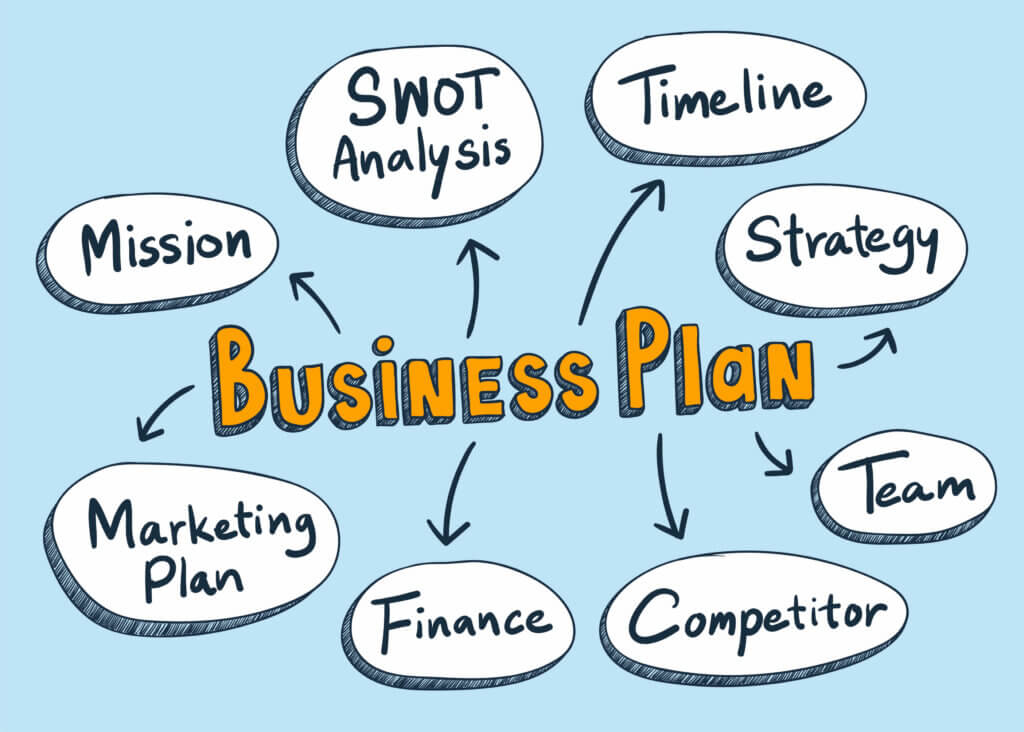
32721

Mind map of a business plan

Here's how you can use mind maps in a business setting:

  • Planning a marketing strategy. Marketing strategies are never easy to pull off. This is why you should use a mind map to break down your strategy into smaller and more executable steps.

  • Planning a business strategy. Business strategies require an intricate planning process. Use mind maps to help you break your strategy down into more manageable steps.

  • Onboarding new employees. Mind maps can be used as a quick way to summarize what your recruitment process is like. Use a mind map to onboard your new hires swiftly.

  • Software and product development. Developing a new product or software? Use a mind map to break down your process and ensure that everything is delivered on time.


Create mind maps the easy way with Taskade AI! 🤖

🤖 Custom AI Agents: Deploy AI agents to automate all kinds of tasks and projects while you focus on the work that really matters.

🪄 AI Generator: Generate nodes, entire mind maps, and other workflows in seconds. Describe what you're working on and let AI do the rest.

✏️ AI Assistant: Let the AI Assistant infuse your mind mapping with creative prompts, unusual connections, and innovative thinking techniques that break out of conventional patterns.

🗂️ AI Prompt Templates Library: Dive into a collection of AI prompts focused on creative tasks including storytelling and mind mapping.

💬 AI Chat: Collaborate with AI Chat as a creative partner, using its input to expand on ideas, explore alternatives, or simply enjoy a creative dialogue as your mind map takes shape.

📄 Media Q&A: Use AI to analyze documents, extract ideas, summarize key points, and turn them into mind maps without losing context.

And much more...

Taskade AI banner.

Frequently Asked Questions About Using Mind Maps

What three things must a mind map have?

A mind map must have a main central topic, sub-topics branching out of the central idea, and directional arrows to guide your flow of thought.

Use colored pencils to group similar ideas together!

How do you create a mind map?

Write down the main concept in the center of the mind map. Branch out from the center of the mind map as you explore note down more relevant sub-topics. Connect relevant ideas with color-coded arrows to group them together.

It’s best to create your mind maps with a big sheet of paper so that you can expand on them without limits.

Are mind maps useful for studying?

Mind maps are great tools to use for learning as you can use them to break down complex concepts into smaller digestible pieces of information. By creating mind maps, you can memorize more information by visualizing complex concepts as a sum of their individual parts.

0%

On this page

What is a Mind MapHow to Create a Mind MapHow to Create a Mind Map on TaskadeWhat Are Some Examples of What Mind Maps Can Be Used For?PersonalBusinessFrequently Asked Questions About Using Mind Maps

Related Articles

/static_images/AI event landing page built with Taskade Genesis
March 7, 2026Productivity

Build an AI Event Landing Page in Minutes

Step-by-step tutorial: build an event landing page with registration, scheduling, and attendee management — from a singl...

/static_images/AI utility app — color palette extractor built with Taskade Genesis
March 3, 2026Productivity

Vibe Utility Apps: 10 AI Converters & Dev Tools You Can Clone

10 AI-powered utility apps — QR generators, color extractors, translators, code tools, and more — ready to clone or buil...

/static_images/AI expense tracking and finance dashboard built with Taskade Genesis
February 28, 2026Productivity

Vibe Finance Apps: 10 AI Invoice Generators, Expense Trackers & Dashboards

10 AI-powered finance tools — invoice generators, expense trackers, budget dashboards, and ROI calculators — ready to cl...

/static_images/Invoice Generator app with payment tracking dashboard showing paid, pending, and overdue invoices
February 28, 2026Productivity

3 Finance Apps You Can Clone Today — Invoice, Meeting Costs & Licenses

Track payments, calculate meeting costs, manage licenses — three complete finance apps you can clone in minutes. AI-powe...

/static_images/AI appointment booking system built with Taskade Genesis
February 24, 2026Productivity

Vibe Booking Apps: Build an AI Appointment System in Minutes

Build AI-powered booking and scheduling systems without code. 5 working examples — appointment scheduling, class booking...

/static_images/AI pricing calculator dashboard built with Taskade Genesis
February 21, 2026Productivity

How to Build a Pricing Calculator (No Code, 5 Minutes)

Step-by-step tutorial: build a working pricing calculator with tiered plans, annual discounts, and feature comparisons —...

View All Articles
Mind Maps: Use Cases and Examples of How You Can Utilize Mind Maps in Your Personal and Professional Life in 2024 | Taskade Blog