







Before you ask: Yes, 2022 is another year of “too many meetings.” That means a high caffeine intake, low team engagement, and not enough time for meaningful work. The good news is, you can cut back on meeting duration/frequency and slay that time-gobbling dragon once and for all.
But first, let’s crunch some numbers.
💡 Did you know the U.S. workforce holds a whooping 55 million meetings every week?(1) The not-so-funny thing about this statistic is that roughly 60% of those lead nowhere.(2) No wonder we’re fed up with the broken meeting culture.
Having too many meetings on schedule must be one of the worst ways to spend time at work. So, what do you say we do something about it? Here's everything we cover in the article. 👇
🤯 Tell-Tale Signs You Have Too Many Meetings
Attending chains of unproductive video conferences can be mildly infuriating. Think storming a dragon’s lair only to find out that “… your princess is in another castle.” Not good.
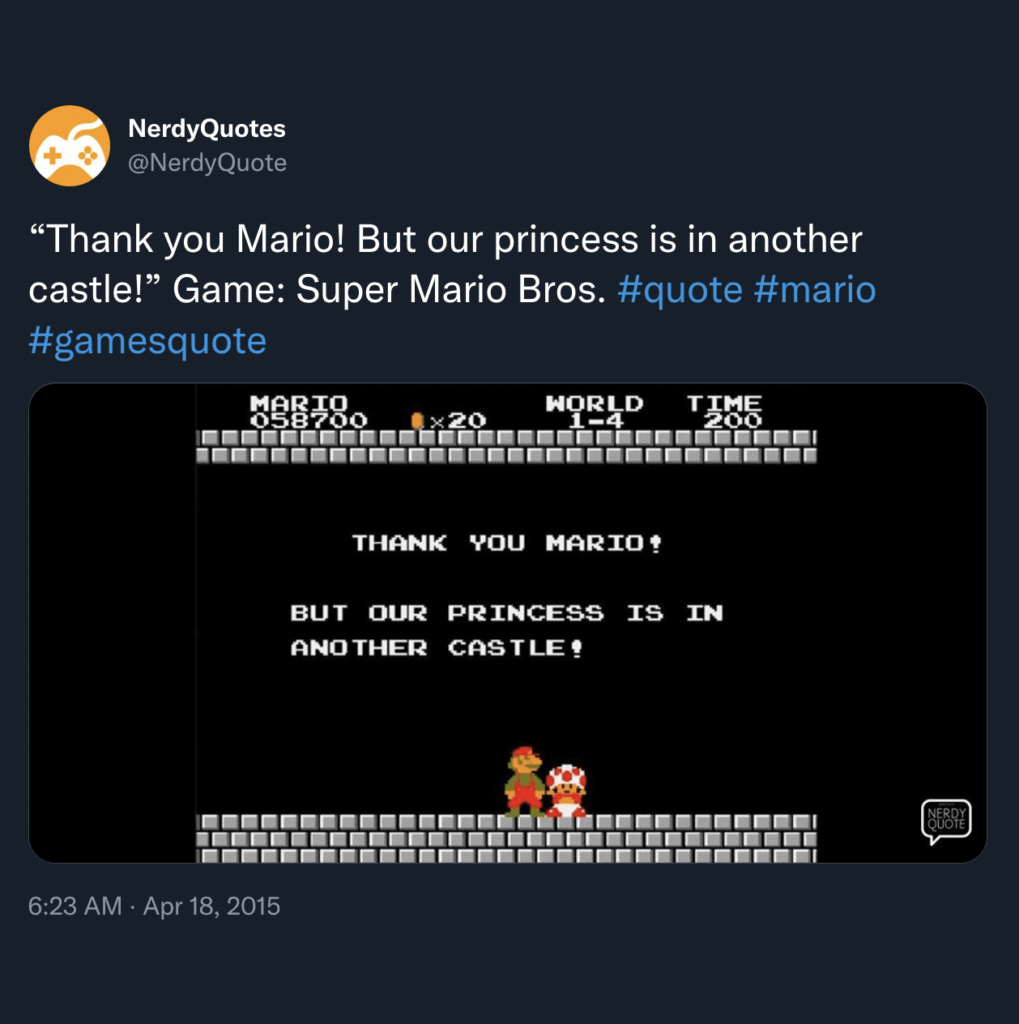
But after two years of the pandemic, we still fall for the same meeting scams. Meetings that lack purpose, meetings with no agenda, meetings that last hours on end... You get the idea. A bunch of people staring at each other is anything but productive.
Here are some meeting red flags:
🚩 Your team starts acting like grumpy (read: not happy) goblins.
🚩 Important stuff is notoriously deprioritized (because: meetings).
🚩 Missed deadlines are always on the post-mortem agenda.
🚩 Your calendar lights up like a Christmas tree, except it’s meetings.
🚩 Meeting duration becomes the new way to measure time.
While the pandemic has “enabled” remote work, it’s also exacerbated some nasty communication habits. The expectation to stay “in the loop” 24/7 is one of them.
👌 So, How Many Meetings per Day Is "Normal"?
The short answer is: “It’s complicated.”
There’s no secret recipe or formula that’d make things just right. Every team, be it remote or on-site, has a unique meeting cadence you figure out by trial and error.
Common sense cries: “The fewer, the better!” But let’s look at some more numbers.
The average knowledge worker attends 8 meetings/week.(3)
Executives spend 21.5 hours of a 40-hour workweek in meetings.(2)
If you could cut those figures by half… Now, that would be something!
Of course, the meeting cadence in your team depends on factors like time-zone distribution, project type, and urgency. But that’s not all. According to YC co-founder Paul Graham, you should also consider how many hats your team members wear.
🗓 “Those of us on the maker’s schedule are willing to compromise. We know we have to have a number of meetings. All we ask from those on the manager’s schedule is that they understand the cost.”
—Paul Graham, ”Maker's Schedule, Manager's Schedule”(4)
To clarify, as a leader, you’re operating mostly on a manager’s schedule. You simply have to accept the reality of having (a few) more meetings than the rest of your team.
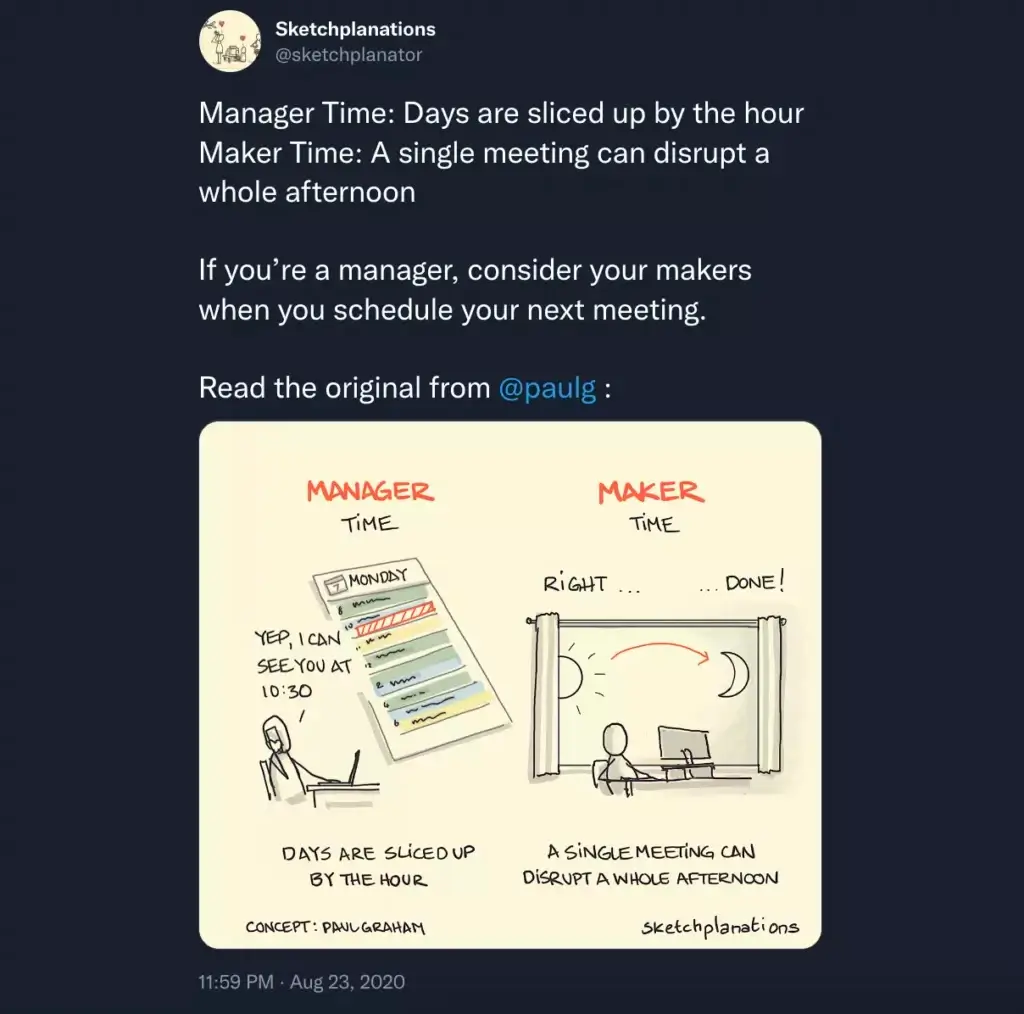
On the other hand, operating on a maker’s schedule means you spend more time making things happen—designing, writing, programming, [insert other].
Naturally, you want your team to spend most of their time in the maker’s schedule (right?). Even if that means you lose a track of them every once in a while.
⚔️ 6 (Easy) Steps to Deal With Too Many Meetings
Define Meeting Type and Objectives
First things first—let's find the dragon lair. 🌋
According to author Cameron Herold, your should start looking in your own backyard. After all: “The problem isn’t that meetings suck; it’s that we suck at running them.”(5)
Meetings without a purpose or direction are common offenders. If your team shows up, but nobody has a clue why they’re there or what’s on the agenda. The solution? Ask yourself these four simple questions before hitting “invite.”
“Why am I calling this meeting?”
“Can I sum up the agenda in five words?”
“Are we going to brainstorm or make decisions?”
“What meeting format would work best?”
If you can’t answer at least three questions from the list, don’t bother calling a meeting. If you can, it’s time to pick the most appropriate meeting format.
Here are the most popular meeting types to consider:
📣 Status Update Meeting: A quick sync up for briefing the team on project developments. Not our favorite, but you can snug a 15-minute call in the morning with little damage. Most status meetings should be an email.
🤝 Decision-Making Meeting: Decision-making meetings have higher stakes than other types. They’re also longer and more formal, with clear expectations and goals. You can arrive at decisions by consensus or majority vote.
🧩 Problem-Solving Meeting: This type of meeting means trouble. It can be negative client feedback, a missed deadline, or production problems. The goal is to come up with a feasible solution and figure out a way to implement it.
🧠 Brainstorming Meeting: An intensive session with the sole purpose of coming up with a bag of ideas in the shortest time possible. You can explore many variations of brainstorming like mind mapping or rapid ideation.
Defining meeting type and purpose early on will help you keep participants focused and more engaged from the get-go. And speaking of people...
Assign Key Meeting Roles
You're setting out to slay a dragon. But, who are you going to take with you?

If your team meets regularly, make sure to define and assign meeting roles. Just so everybody has a part to play. At a minimum, appoint a note-taker (or scribe), a facilitator, and a moderator. Let’s break those roles down by function. 👇
| 👑 Leader | 🧙♂️ Note-Taker | 🛡 Facilitator |
|---|---|---|
| Calls in the meeting | Takes meeting minutes | Moderates the discussion |
| Defines meeting objectives | Edits and distributes notes | Acts as a timekeeper |
| Assigns tasks/action items | Records decisions | Keeps attendees focused |
| Creates a meeting agenda | Keeps track of action items | Facilitates discussions |
Assigning roles is a great way to increase meeting velocity and engagement. Just don’t forget to rotate those roles within the team so people don’t get bored.
Default to Asynchronous Channels
We hate to break it to you, but not every meeting has to be one. This is especially true for status updates or non-urgent matters you can handle asynchronously.
A survey by SurveyMonkey found that 32% of workers think most/all meetings they attend can be replaced by an email; 27% quote lack of engagement as a key obstacle.(6)
The bottom line?
Outside of emergencies, you should prioritize asynchronous communication. It leaves a trace, ensures high-quality replies, and works wonders for globally distributed teams.
| Email 📨 | Collaboration Tools 🐑 | Chat 💬 |
|---|---|---|
| Send regular status updates | Share projects files | Discuss non-urgent tasks |
| Discuss non-urgent matters | Work and chat in real-time | Engage in water cooler chat |
| Explain complex topics | Run mind mapping sessions | Use during no-meeting time |
| Give instructions | Keep track of milestones | Give quick updates |
Never assume a meeting is always the best medium. Instead, learn how to switch between synchronous and asynchronous communication efficiently.
Increase Meeting Velocity
Nobody likes talking heads, so keep your meetings short and sweet.
How short?
In the ideal world, we’d like to keep all meetings under 15 minutes and leave it at that. But some discussions are genuinely important, and those can take a bit longer.
Here’s what TED have to say on their 18-minute rule:
⏰ “We ask that you keep talks within a time limit of 18 minutes to uphold TED's celebrated format of concise and enlightening talks. This short talk model works, since it only demands the audience's attention for a short period of time. In fact, some of our greatest TED Talks have been as short as 5 minutes long!”(7)
If some of the greatest minds in the world can squeeze their life stories into 18 minutes, you can run a meeting that doesn’t take an entire day.
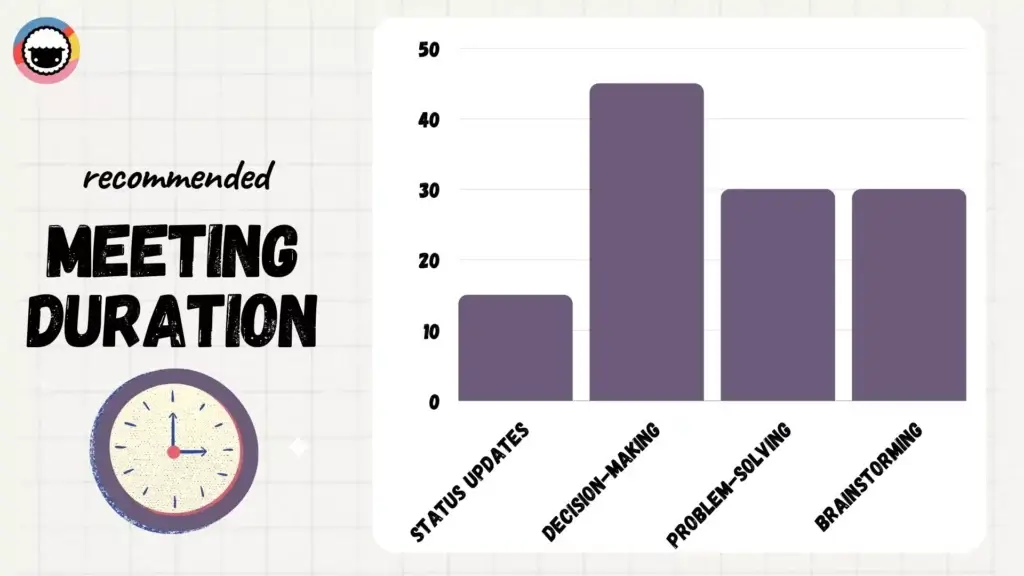
Here are some general guidelines:
📣 Status update meetings shouldn’t last more than 15 minutes.
🤝 Decision-making meetings are best closed in 45 minutes.
🧩 Problem-solving meetings yield the best results under 30 minutes.
🧠 The sweet spot for brainstorming meetings is 30 minutes.
We get it. Not everyone is a born (or trained) TED speaker. That’s why Taskade comes with a built-in countdown timer you can add to your projects. ⏰
/blog/pomodoro-timer-guide
Countdown timers help you track the time left in a task. You can assign several timers to individual talking points on your meeting agenda and keep an eye on everything.
Invite Meeting VIPs
We’ve all been there—doodling, glancing at the phone, dozing off, or wondering what to have for lunch. And then the inevitable questions pop up:
“What am I doing here anyway?” 🤔
A survey by Polly.ai found that 90% of workers multitask during meetings; we check email, scroll through social media, read news, or tackle other work-related tasks.(8)
To keep your meeting sparse (and productive), you need meeting VIPs.
Identify key stakeholders and decision-makers.
Invite people who are directly impacted by decisions made.
Bring subject matter experts or people who can contribute.
Bring the rest of the team up to speed by sending an email.
Mark attendees as optional so they can opt out.
“Ok, but how many people should I invite?”
Back in his Amazon days, Jeff Bezos preached that an optimal meeting size is just enough people to share two pizzas. In a more research-backed context, that's between 5 and 8 people.
💬 “The lesson is that, if you are on a big team that keeps screwing up, where members don’t care much about each other, and are fighting like crazy, try some subtraction or division.”
—Bob Sutton, “Why Big Teams Suck”(9)
Of course, different types of meetings can vary in size.
For instance, a higher headcount can aid brainstorming and problem-solving. On the other hand, a decision-making meeting may wrap quicker with fewer attendees.
Trust Your Notes
“Ok, the dragon is dead. So what now?”
Well, it’s time for bards to compose songs about your heroic deeds. Because you have been taking notes, have you? A set of well-redacted meeting minutes will help you avoid too many follow-ups (= fewer meetings) and make sure your team has all the details.
One of the most effective note-taking methods is outlining (check our outlining tutorial).
🌳 Outlining is the process of creating hierarchies to contain whatever you’re thinking or working on. An outline breaks complex processes into smaller, more manageable bits.
Here’s how you create one:
➕ Add the most important/general topics to the list.
🔡 Include a few more subtopics underneath.
👉 Indent lower-level elements to “nest” them.
🌳 Expand the outline in a hierarchical way.

You can quickly create pretty detailed notes using a meeting agenda as the starting point. All you have to do is track talking points during a meeting and fill in the gaps with more granular information. Alternatively, grab this free meeting notes template.
Your meeting minutes/notes should include:
🗓 Meeting start/end time
🎯 Purpose of the meeting
👥 List of attendees
✅ Action items and owners
👍 Decisions/outcomes
❌ Backlog agenda items
🗳 Voting results (if any)
And that’s it! 🎉
🐑 Parting Words
Attending too many meetings drains time, breaks the flow, and brings in a slew of interruptions that hurt your team’s velocity. Your job is to learn how to reduce meeting cadence and help your team stay in the maker’s schedule for as long as possible. Here's a quick recap:
Define meeting type and objective
Assign key meeting roles
Default to asynchronous channels
Increase meeting velocity
Invite meeting VIPs
Trust your notes
Use Taskade to get things done! 👇
Stay on top of the meeting game with Taskade AI! 🤖
🤖 Custom AI Agents: Create and train AI agents with multiple documents and resources to streamline and automate critical business tasks.
🪄 AI Generator: Tap into the power of AI to generate agendas, minutes, and follow-up tasks automatically, using natural-language prompts.
✏️ AI Assistant: Use powerful /AI commands for real-time assistance during meetings, including note-taking, task assignment, and prioritization.
🗂️ AI Prompt Templates Library: Explore AI prompts templates designed for personal and team productivity. Available anywhere in Taskade.
💬 AI Chat: Engage in a discussion with Taskade AI to facilitate post-meeting discussions, clarify any misunderstandings, or flesh out action items.
📄 Media Q&A: Analyze documents and meeting notes to extract key insights, analyze patterns, and develop ideas in seconds.
And much more...

🔗 Resources
https://www.booqed.com/blog/minutes-wasted-of-meeting-50-shocking-meeting-statistics
http://www.paulgraham.com/makersschedule.html?viewfullsite=1
https://help.ted.com/hc/en-us/articles/360038669354-Why-do-we-need-to-keep-talks-within-18-minutes-
https://www.linkedin.com/pulse/20140303152358-15893932-why-big-teams-suck/
Frequently Asked Questions
How do too many meetings hurt productivity?
Excessive meetings fragment the workday into short intervals where deep, focused work is impossible. Research shows that after a meeting, it takes an average of 23 minutes to regain focus. Teams with heavy meeting loads often have no uninterrupted blocks left for actual creative or analytical work.
How can teams reduce unnecessary meetings?
Audit your recurring meetings — cancel any without a clear, recurring purpose. Replace status updates with async written check-ins, use shared workspaces for decisions that don't require live discussion, set 'no meeting' days or blocks, and require every meeting invitation to include a purpose and agenda.
When is a meeting actually necessary?
Meetings are justified for real-time brainstorming, resolving complex or sensitive issues, team-building, and making decisions that require live debate. If the goal is purely information sharing, a written update in a shared workspace like Taskade is almost always faster and more inclusive.
What are alternatives to scheduling more meetings?
Use async updates in shared project spaces, recorded video messages for complex explanations, collaborative documents for feedback rounds, and AI agents for routine reporting. These alternatives respect everyone's time and are more inclusive for team members in different time zones.