






Outlining Software: Past, Present, and Future
We hate to break it to you, but your high school teacher was right. Outlines are much more interesting than they’re given credit for. In fact, you can use outli...
On this page (17)
We hate to break it to you, but your high school teacher was right. Outlines are much more interesting than they’re given credit for. In fact, you can use outlining software to build and cultivate robust productivity workflows like Getting Things Done® (GTD®)! 🙊
In this article, you’ll (re)learn the principles of outlining and dig into the history of early outlining software. And since Taskade is a proud descendant of that ilk, we’ll also show you how it can help you create your own productivity system. 🐑
💡 Before you start... This article is part of our series on knowledge management. Be sure to read check other similar guides on the blog to learn more.
📤 Knowledge Sharing 101: How to Build a Smarter Remote Team Today
📝 Stay Organized with Collaborative Note-Taking in Remote Teams
👑 A Case For Hierarchical Thinking: Solve Complex Problems The Easy Way
Let’s start with some questions first.
📄 What is an Outline?
At the most basic level, you can think of outlines as railroad tracks. They help you get from point A to point B in a more or less straight line. In writing, that can mean guiding your essay from Introduction to Conclusion in the most logical and structured way. 🛤
But the concept of an “outline” goes much deeper than the rabbit hole Alice fell into. 🐇 When we look at some of the synonyms of the word—blueprint, draft, drawing, framework, summary—it becomes apparent that outlines are in fact multi-purpose devices.
When we combine all these qualities, we can say that outlining is the process of creating (or visualizing) hierarchical structures that contain whatever you're thinking or working on.
It doesn’t matter if you want to create a marketing strategy, press release, or Getting Things Done® (GTD®) workflow. As long as your project requires a logical, organized structure, an outline will help you snap all the puzzles into place.
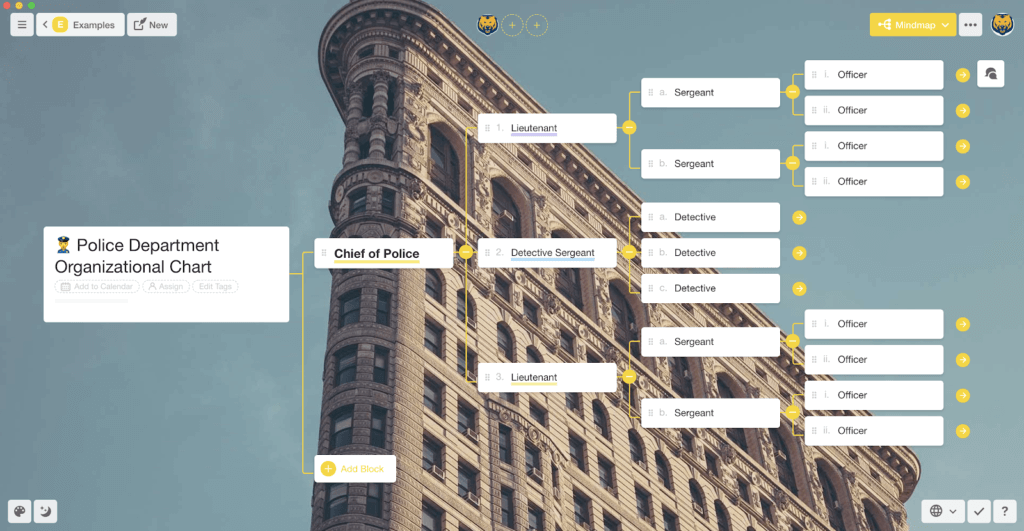
Organizational chart created in Taskade (Mindmap view)
🌳 The Family of Tree Structures
An alphanumerical outline is only a wee specimen in the data visualization space. In fact, there are many types of outlines we can collectively classify as “tree structures” or “tree diagrams.” Simple vertical outlines belong to that group.
Just like a tree branches out from a trunk, a tree structure “grows” from one central element into a series of substructures. The key difference, however, is that tree structures are usually upside-down, with the most important element at the top.
👩🏻🏫 History Lesson: Did you know that data visualization predates modern computers? According to Manuel Lima, the author of “The Book of Trees: Visualizing Branches of Knowledge”, early attempts at data viz may be as old as 900 years.
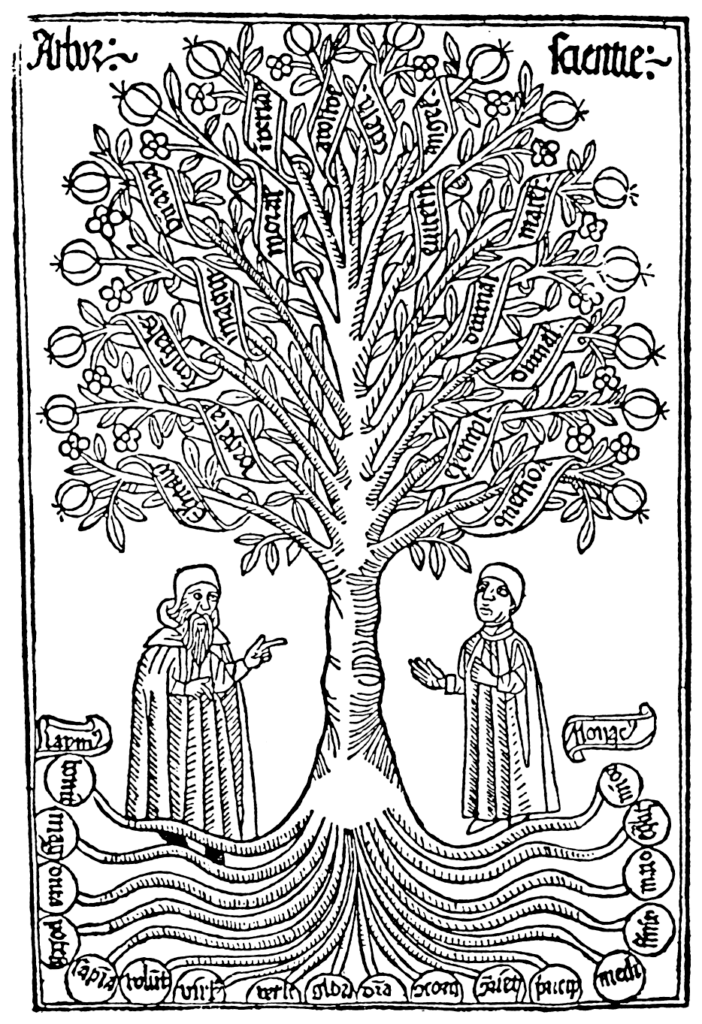
Arbor Scientiae (Tree of Science) by Raymond Lull
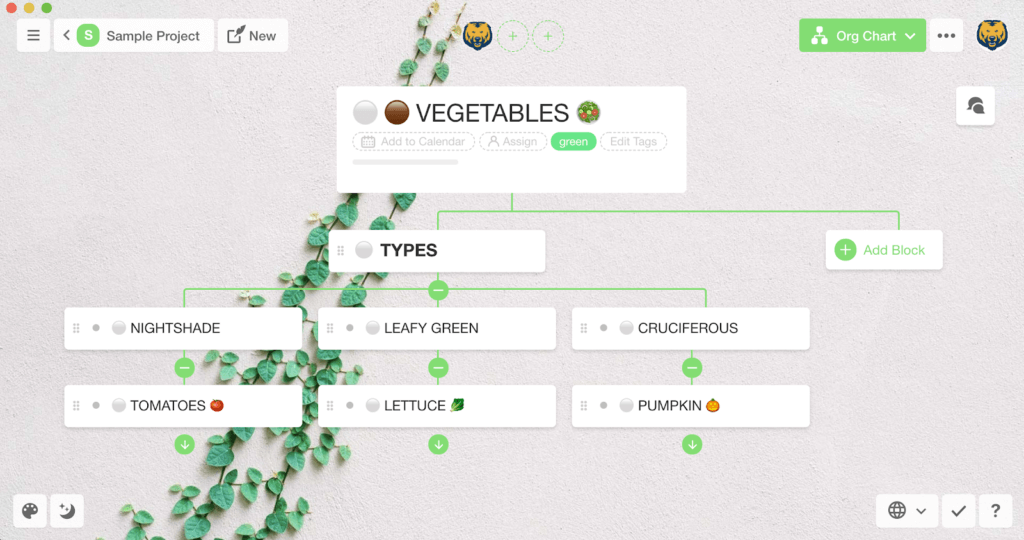
Take a look at the following example. ↘️
The diagram represents a simple division into types of vegetables. The starting point called the root node 🟤 spreads into branches 🟢. Each individual element of the diagram connected to a branch is called a node ⚪️.
Here’s the same group of elements visualized as an outline structure. Notice the vertical lines that connect the nodes and indicate their level in the hierarchy. This type of data visualization is also called a tree view 🎄:
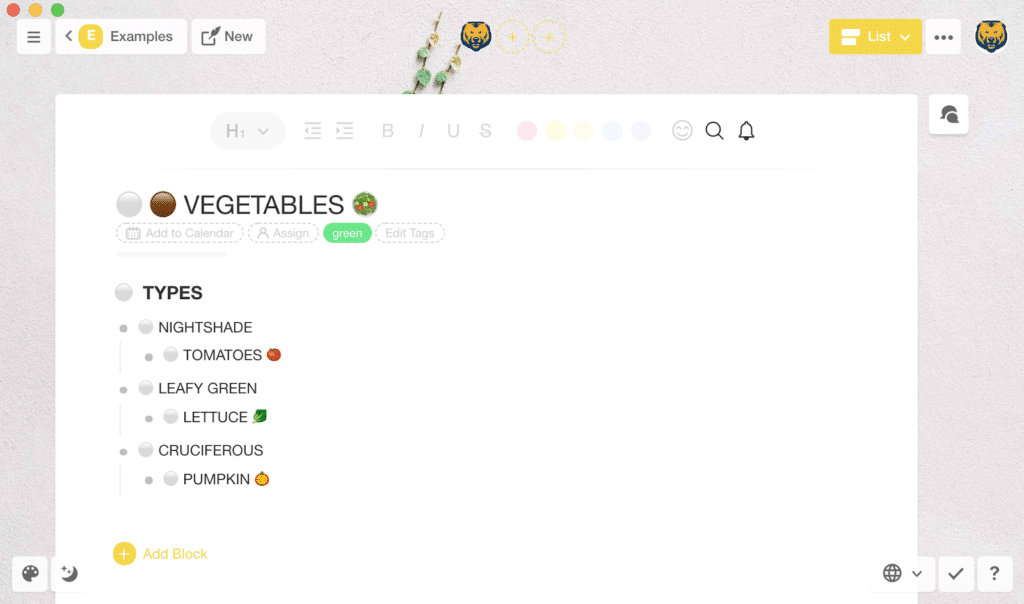
💡 Although the two representations are visually different, they’re based on the same data set and contained within one project.
One of the fundamental principles of tree structures is that all elements in a given group are interconnected. The relationship between individual nodes ⚪️ extends both vertically and horizontally, all the way from the root 🟤 down to leaf nodes 🟢 (terminal nodes without descending connections).
Drawing on genealogical terms, we usually refer to as:
1️⃣ Parents: High-level, superordinate nodes (above children)
2️⃣ Children: Elements subordinate to parent nodes
3️⃣ Siblings: Elements sharing one parent node
4️⃣ Uncles (a.k.a. ommers): Siblings of parent nodes
Now, the question that remains is “what the heck does it all have to do with productivity?” 🤔
It turns out, quite a lot.
Every productivity system, no matter how simple, is based on some form of data hierarchy. Even illegible to-dos scribbled on a piece of paper are governed by invisible rules. These rules are the reason why you prioritize some tasks and postpone others.
Since tree structures (outlines included) are the ultimate form of data organization, they’re a perfect framework for building robust productivity workflows.
⚙️ Reinventing Productivity with Outlining Software
Cultivating a productivity system on paper is...doable. All you have to do is pick a pen and paper planner at the local stationery and you’re all set, right?
But paper has its limitations.
There’s only so much information you can commit to a page before running out of space. It’s also difficult to quickly pull up information if you don’t maintain a clever referencing method. And yeah, a paper planner won’t notify you when a task is due. 🔔
Enter outliners.
🤔 What’s an Outliner?
In a nutshell, an outliner is a word processor, much like Notepad on Windows or TextEdit for Mac, that lets users create and edit text documents.
But there’s a twist.
Unlike garden-variety text editors, outliners are capable of organizing documents into hierarchical tree structures. Instead of dividing content into separate files, they bundle everything you’re working on into one document.
While most outliners don’t offer sophisticated and customizable UIs, they make up for it with powerful, extendable functionality improves the writing process.
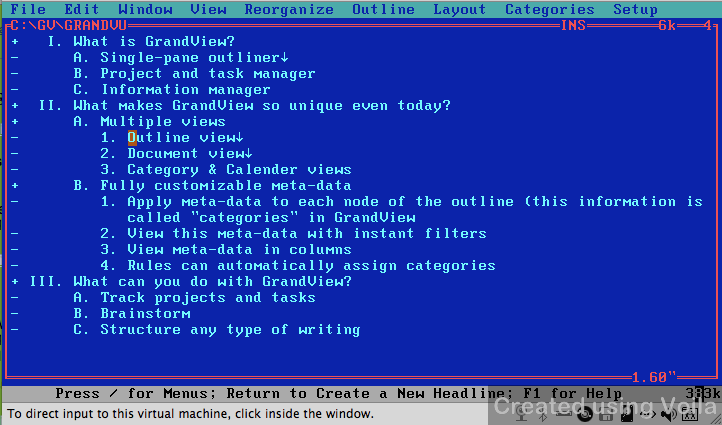
GrandView, an early outlining software distributed by Symantec till 1990s
🖥 The History of Outlining Software: Emacs + Org-Mode
If we were to pick one piece of software that pretty much blazed the trail for modern outliners, we would point to Emacs.
Dating back to the 1970s, Emacs came to life as a brainchild of the AI lab team at MIT. While the software was originally built on top of TECO (Text Editor & Corrector), MIT’s internal text-editor, the turning point in its development came when Richard Stallman published its most popular offshoot called GNU Emacs.
What made Emacs different from any other software of its ilk was its sandbox character. Emacs let users create macros and extensions and heavily modify the way it operated. Some of its features included support for programming languages, file management, and...hierarchical content organization.
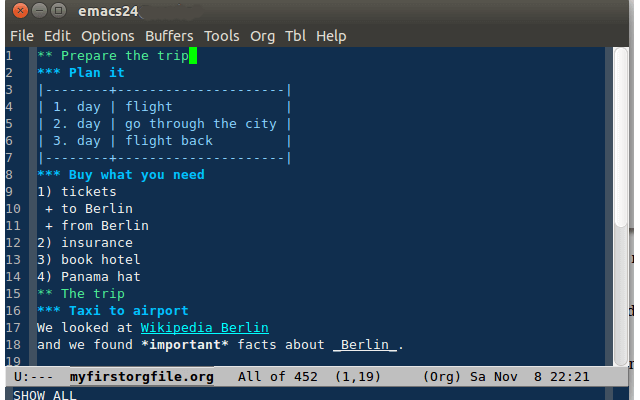
An outline created in Emacs Org-mode
😂Fun fact: Richard Stallman (a.k.a. RMS), one of the original Emacs developers, founded the Church of Emacs. Quoting from Stallman’s personal page: “Emacs was originally an extensible text editor written by Richard Stallman, but it became a way of life and religion. To join the Church of Emacs, you need only pronounce the Confession of the Faith: There is no system but GNU, and Linux is one of its kernels.”
📝 Extending Emacs Capabilities With Org-Mode
Emacs is not an outlining software per se and doesn’t support hierarchical content structure out of the box. It requires additional extensions called “modes” that modify the way it works and add extra functionality.
According to the official page, Org-mode (“org” stands for plain text files) is an Emacs mode designed for “keeping notes, maintaining TODO lists, planning projects, and authoring documents with a fast and effective plain-text system.”
As you would expect from an outliner, Org-mode adds support for things like:
📥 Capturing (collecting) “stuff” like projects, tasks, emails, or reminders
📝 Organizing, scheduling, and tagging stored information
🗓 Creating agendas and filtering out daily, weekly or monthly commitments
⌨️ Formatting documents with powerful editor commands
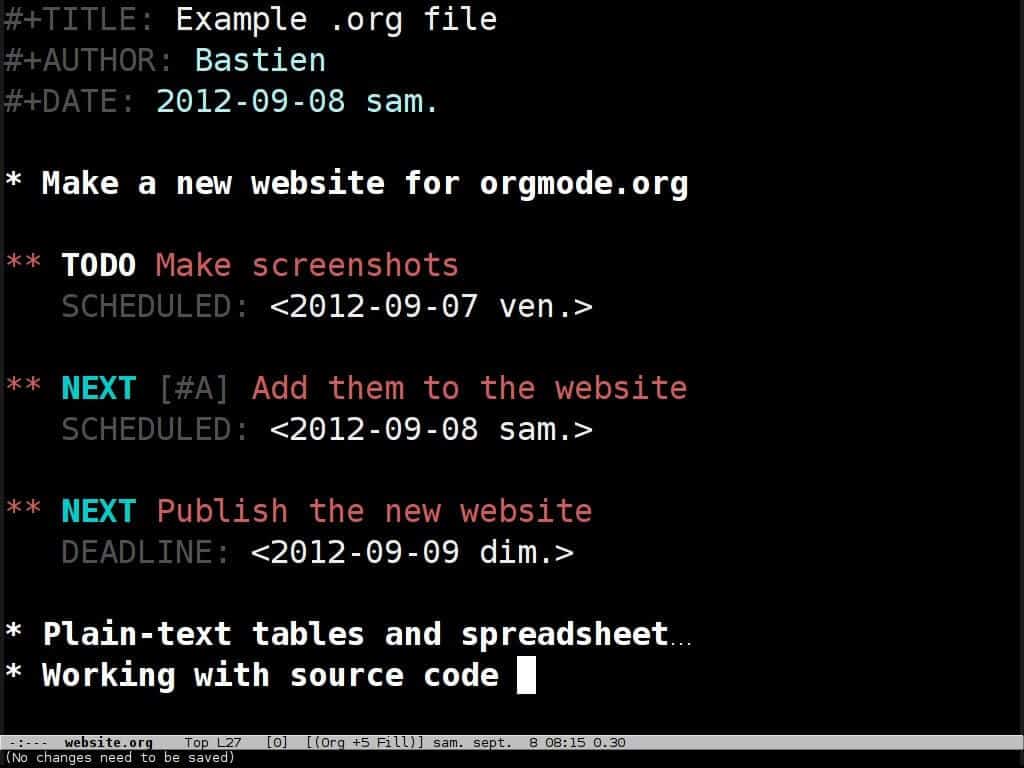
To-Dos in Emacs
For comparison, here’s a Taskade Weekly Agenda template visualized in Action View:
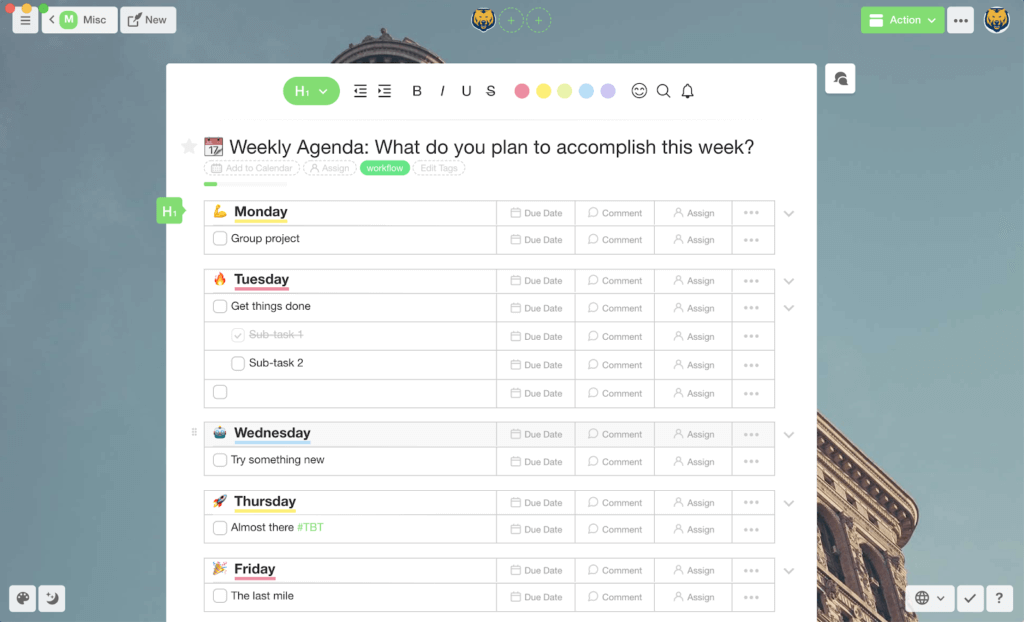
Although Emacs and Org-mode still receive regular updates, they have a pretty steep learning curve that may deter those looking for a simple way to get things done.
🤖 The Future Is Now: Outlining in Taskade
Taskade’s outliner heritage combined with modern, user-friendly UI makes it a perfect tool for distributed teams and individuals who want to do more with less.
To better illustrate Taskade outlining features, we’ll show you how you can easily apply them to David Allen’s Getting Things Done® (GTD®) system.
🧩 How Does GTD Work?
Getting Things Done® (GTD®) is a wildly popular productivity framework created by David Allen. As described by the official website, it’s a “personal productivity methodology that redefines how you approach your life and work.”
The method consists of five key steps:
📥 Capturing or collecting the “stuff” you want to organize. Whether it’s personal or business, projects, commitments, tasks, ideas, or emails, anything that requires your attention goes into your in-basket
🤔 Clarifying or defining all the things you store. What kind of action/commitment are you looking at? How does it fit in your workflow? Is it actionable?
🔀 Organizing your stuff into smaller containers. Anything that’s not actionable or will likely take more than two minutes to complete gets categorized and stored in a designated folder (basket)
♻️ Reflecting and reviewing your workflow. Once a week, you review everything in your collection baskets to see if there’s room for improvement
⚡️ Taking action. GTD encourages taking immediate action and tackling work on an ongoing basis
Every time you repeat the
process and capture “stuff”, you perform a mind dump and transfer all your commitments to the in-basket. This way, your projects and tasks don’t occupy your thoughts so you can engage them one at a time. 🧠 ➡️ 📥
Now, take a look at the following overview of the method visualized in the Taskade Organizational Chart view. It’s important to note GTD is essentially a decision tree and follows the same hierarchical structure we discussed earlier in the article.
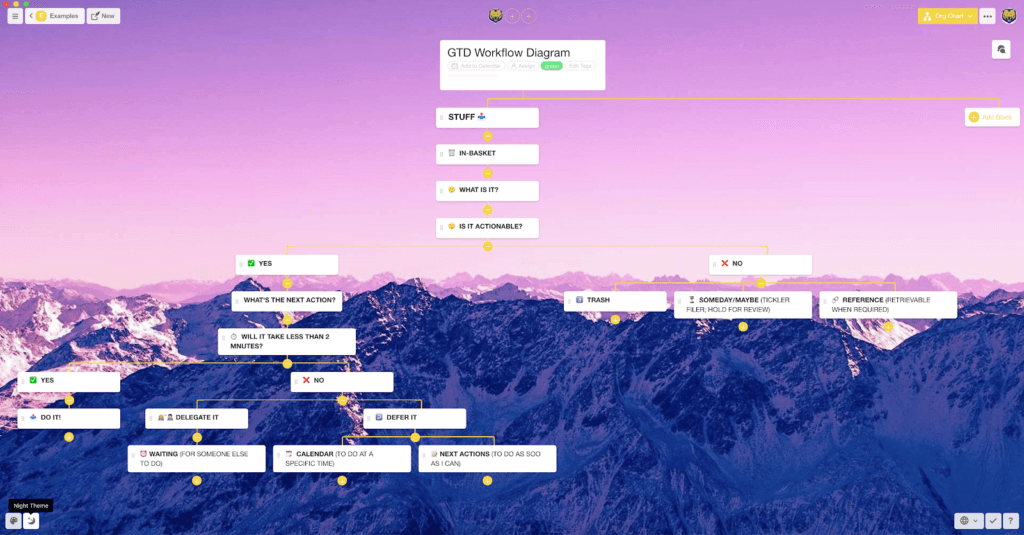
Getting Things Done (GTD) visualized in Taskade Organizational Chart view
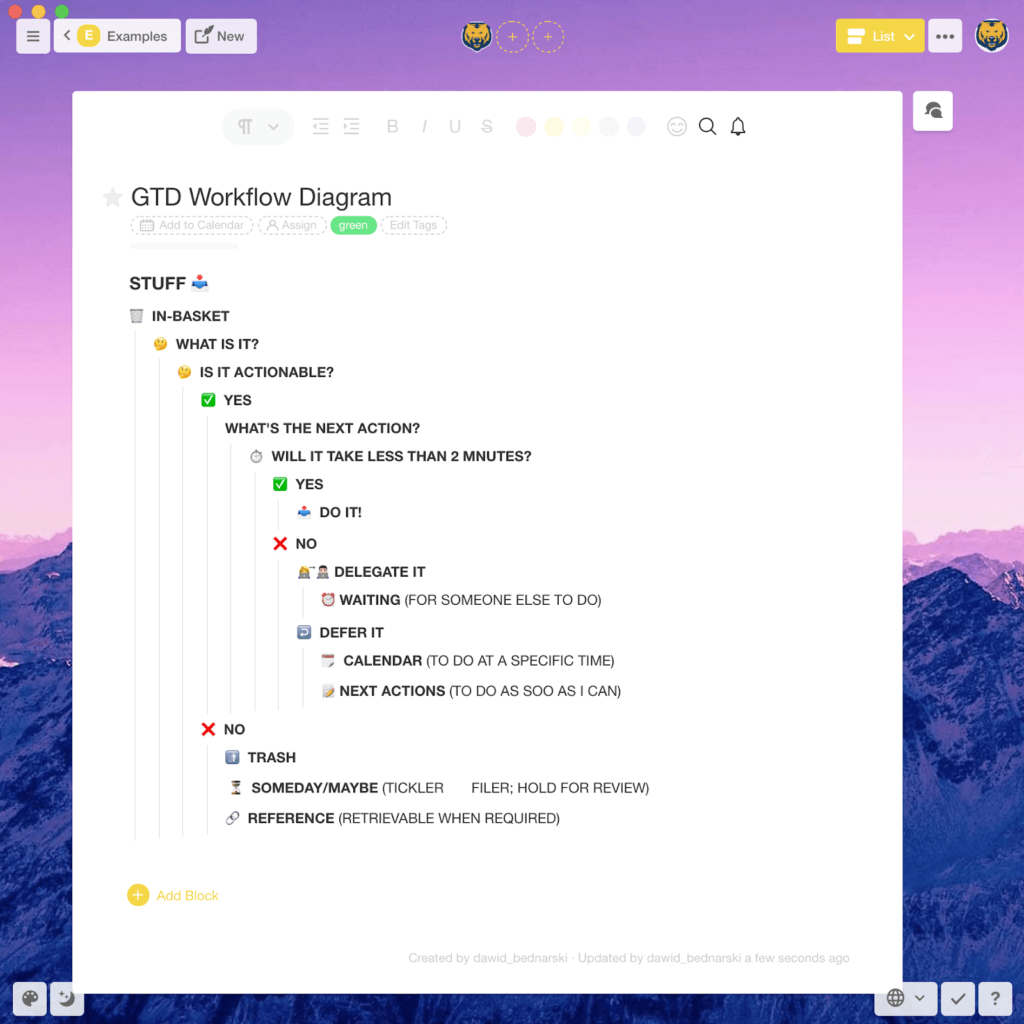
For reference, here’s the same workflow represented as a vertical outline (Taskade List view). Notice the guide lines indicating the hierarchy level of individual steps:
If you want to learn more about David Allen’s method, we recently published an article explaining why distributed teams need GTD workflows. It offers a more in-depth look at GTD and has a ton of useful tips to get started.
🐑+🗂 5 Ways You Can Use Taskade for Outlining GTD Workflows
Now that we know what makes GTD tick, let’s see how you can implement it using Taskade’s outliner features. 💁🏻♂️
1. Indentation and Folding/Unfolding
This is where the magic of outlining software begins. Unlike your garden-variety word processors which only care about a page and a paragraph, an outliner “knows” which tasks are the sub-tasks of other tasks. With Taskade, you can easily structure your GTD system using:
⏩ Indentation
Indentation is how you can tell a task/paragraph is the sub-task of another task. Press TAB on your keyboard to indent a task on Taskade, and SHIFT + TAB to outdent a task.
Having extra space to the left means a task is under the previous task. If the left end of two tasks aligns, they are on the same level of the hierarchy.
➡️ Fold / Unfold
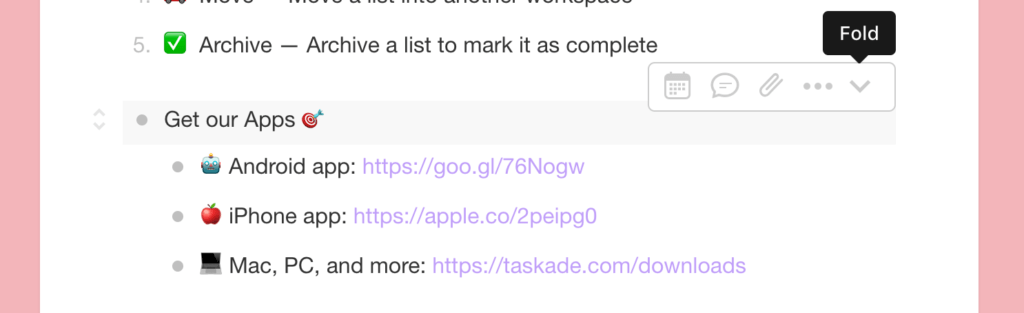
Fold (collapse) a task to hide its sub-tasks.
Unfold (expand) is the reverse operation of the fold. If you want to quickly reference something in another section, you can expand it.
⬇️

2. Workspaces and Projects
Good organization is one of the prerequisites of any productivity system. And Getting Things Done is no different. GTD uses containers that store all your commitments, depending on their category and type of action required.
Taskade organizes commitments in several ways:
🟠 Workspaces. A Workspace is used to store all your projects, ideas, notes, lists, or even that essay you've been putting off for weeks. You can think of it as the master in-basket that combines everything you’re working on
🟢 Folders. A Folder is a smaller container that’s essentially a child node to a Workspace. You can use it to partition and organize your system into finer elements
🟣 Projects. A project is the smallest type of container available in Taskade. It stores the content itself and is effectively the final element in a hierarchical structure
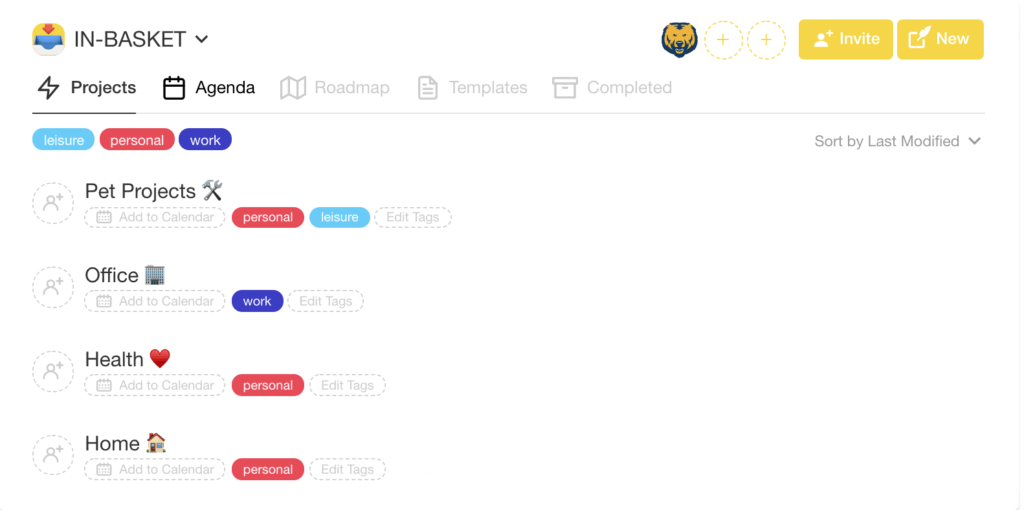
GTD in-basket divided into project containers
3. Next Action vs. To-Do Lists
According to David Allen, to-do lists are “incomplete inventories of still-unclear things”. They lack the context necessary to be efficiently engaged. So, Instead of relying on isolated tasks, GTD uses the concept of the Next Action instead.
For example, when you put “call Jane” 📞 on your to-do list, you might quickly forget why you wanted to call your friend and when you were supposed to do that. This task simply lacks essential information.
Why rack your brain trying to decipher cryptic to-do lists? A much better approach is to treat tasks as Next Actions. Simply add a touch of context and rephrase it to “call Jane and ask if you can borrow the car for the weekend.” 🚘
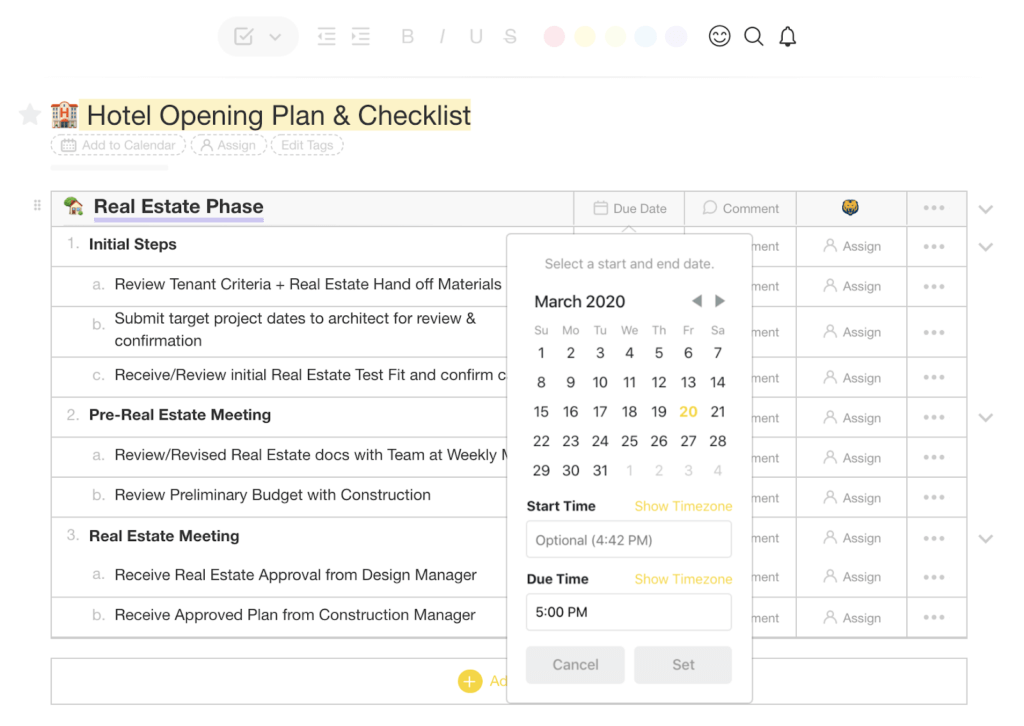
By implementing additional context in the Action View, Taskade encourages users to add as many details as possible and transform odd tasks into proper Next Actions.
4. #Tags, @Mention, and Categories
Taskade uses an intuitive #tagging mechanism to further specify the context for your GTD Next Actions. Want to get more personal? You can use @mention to assign tasks to other team members and filter them out when needed.
Not only does #tagging and @mention help bundle commitments together, but it also lets you search the contents of your workspaces for a specific category of items.
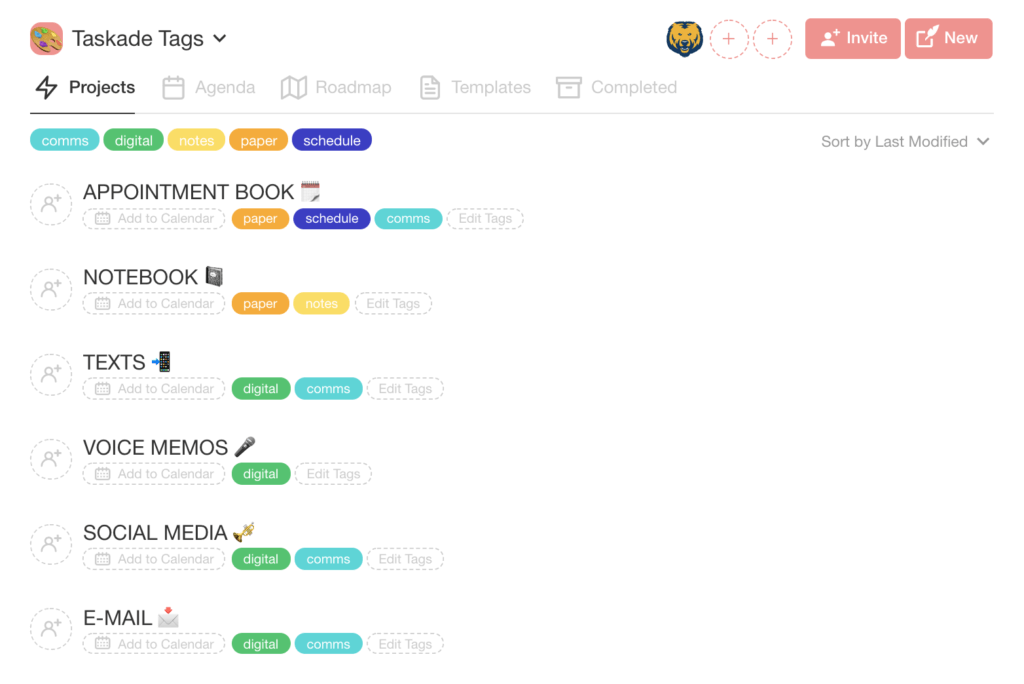
5. Keyboard Shortcuts
Finally, productivity systems like GTD need to be fast and intuitive to do their job properly. After all, who would want to use a workflow that requires a gazillion repetitive steps just to update a simple to-do list?
Where’s the fun in that? 😑
Taskade gives you the power of keyboard shortcuts that speed up the outlining process and supercharge your workflow in a blink. You can format tasks, edit Project blocks, add headings/subheadings, or insert Add-ons using a simple keyboard command.
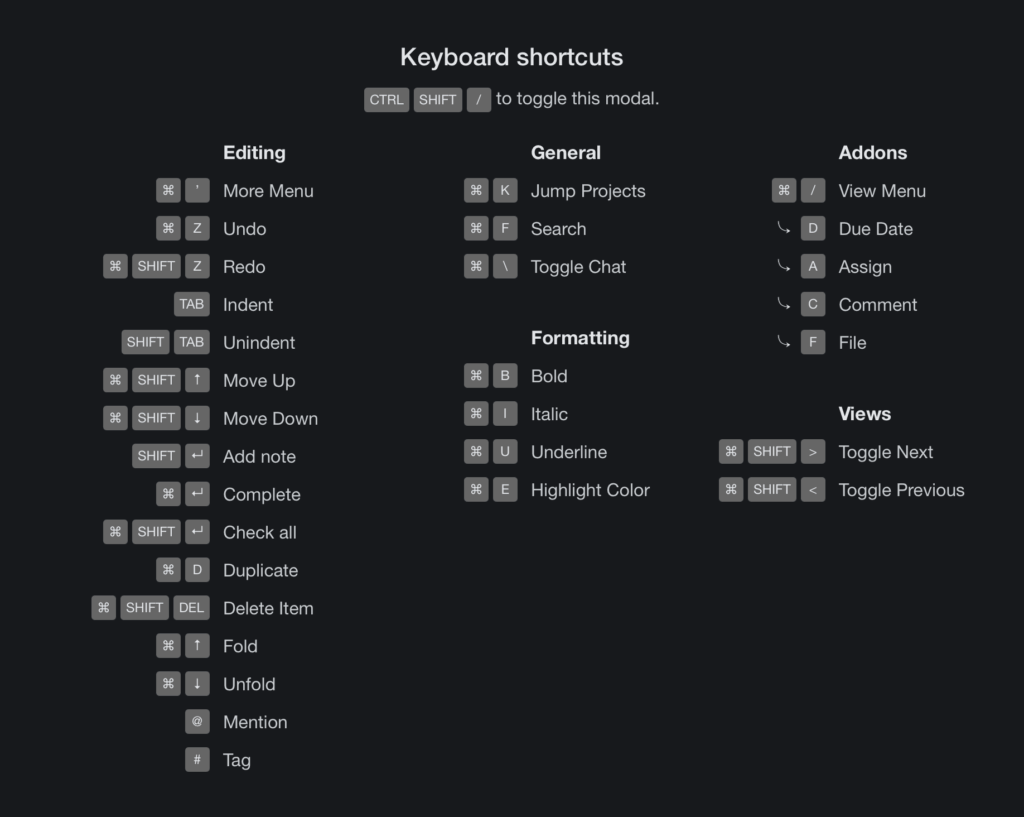
⚡️ The Benefits of Using Outlining Software
Outlining software is cool, no doubt about that. But exactly how cool is it?
1️⃣ For starters, outliners remove the physical limitations of paper planners. Regardless of the complexity of your project, you can outline, detail, and store an unlimited amount of content and never run out of space.
For instance, in Taskade 🐑 each Workspace and Folder consists of a single database. That means you can create and organize your projects without having to worry about hitting word limits or mixing tasks that belong to different categories.
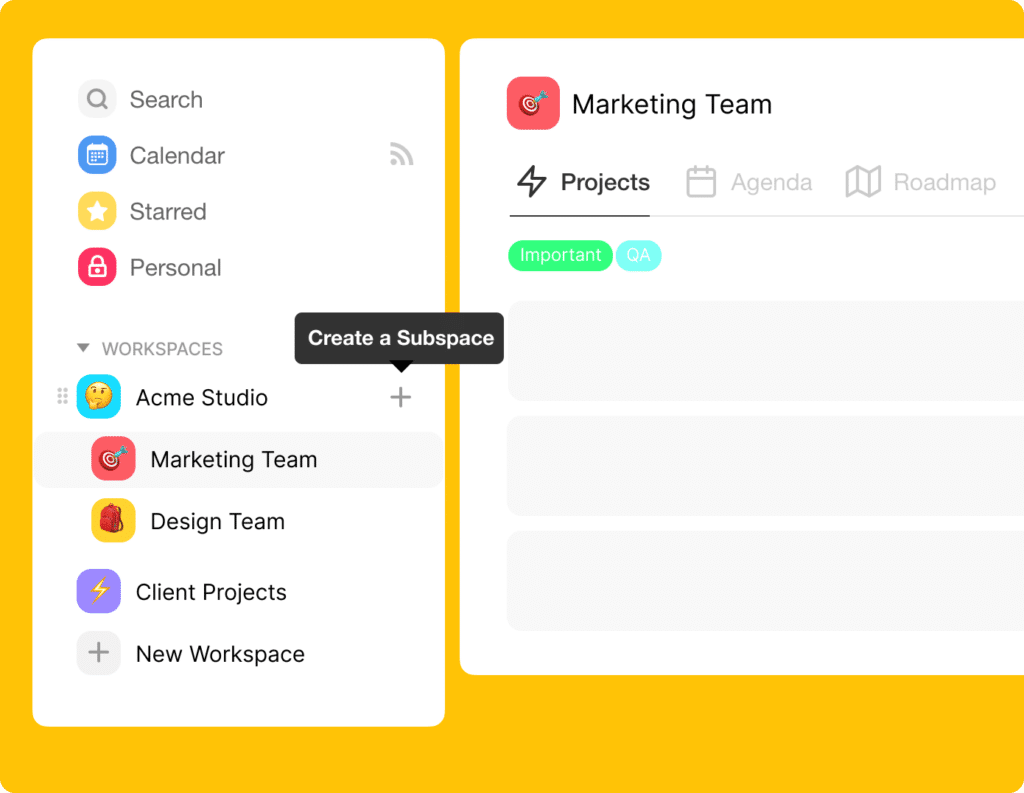
Creating a Taskade Folder
2️⃣ The best outliner apps let you assemble and reassemble entire workflows using intuitive drag-and-drop mechanics. Simply grab a piece of content and move it where it belongs. Whenever you reorder a task that’s a "Parent" node, “Children” are reordered too.
Now, try to do that on a piece of paper!
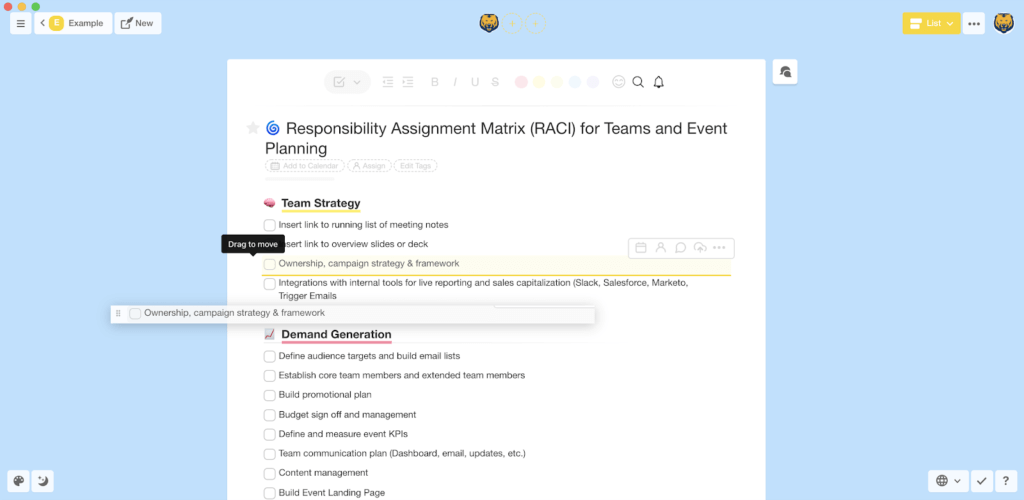
Drag-and-drop mechanics in Taskade
3️⃣ Another benefit of outlining software is the power of search and tagging. Instead of going back and forth in your notebook to find a particular entry, you can simply type what you’re looking for and zero in on it in seconds.


4️⃣ Finally, the outline mode gives you the ability to customize your workflows any way you want. Whether you feel like tweaking colors, changing bullet styles, adding headings/subheadings, or using emojis (who doesn’t love these?), you can do that in seconds with your mouse or a keyboard command.
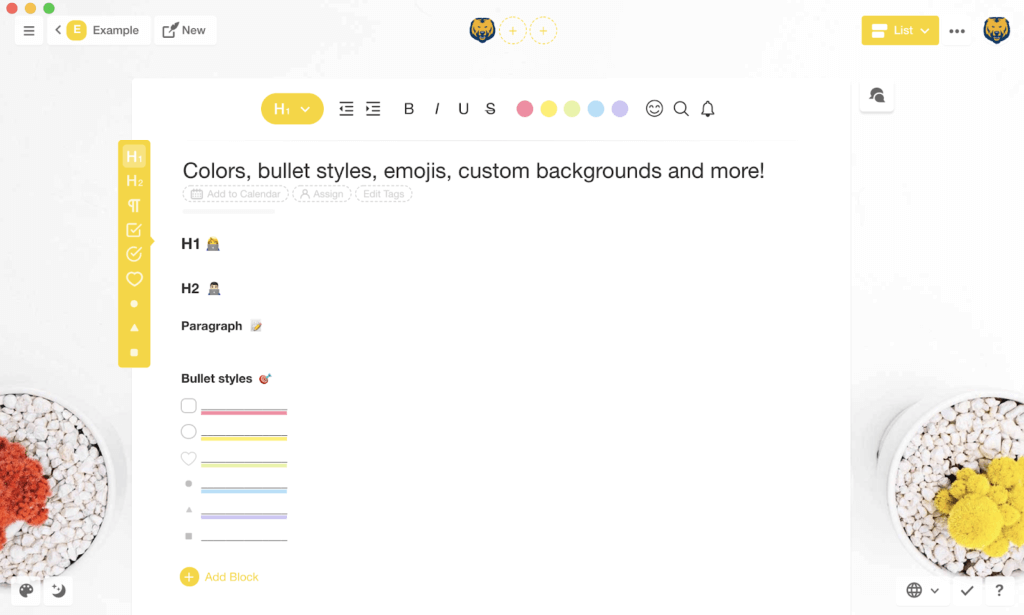
And that’s it!
🐑 Final Words
Setting up a complex productivity system takes time and effort. You’ll need to fine-tune every step of the process before you can fully tap into its benefits. Unless you have a robust tool to do so, you may quickly get discouraged and roll back to wrinkled to-do lists...
(if you can find them)
But Taskade has your back! With hundreds of free templates and the best-in-class outlining features, you can create your dream productivity setup in a flash. Sign up today and create your blueprint for success! 🥳

Frequently Asked Questions
What is outlining software and how has it evolved?
Outlining software lets you organize information in nested, hierarchical structures — making it ideal for brainstorming, note-taking, project planning, and GTD workflows. It evolved from Doug Engelbart's 1960s NLS system through Dave Winer's MORE (1986) and Ecco Pro (1993) to modern tools like Taskade that combine outlining with real-time collaboration, AI agents, and multiple project views. The core principle remains: structure complex information into manageable, nested levels.
What is the GTD method and how does outlining software support it?
Getting Things Done (GTD) is David Allen's productivity framework with five steps: Capture (collect everything), Clarify (decide what each item means), Organize (put items where they belong), Reflect (review regularly), and Engage (take action). Outlining software supports GTD by providing infinite nesting for organizing projects and actions, easy rearrangement of priorities, and the ability to view the same data at different zoom levels — from high-level projects down to specific next actions.
What are the best outlining apps available today?
Top outlining apps include Taskade (AI-powered outliner with 8 project views, real-time collaboration, and AI agents), Workflowy (minimalist infinite outliner), Dynalist (feature-rich outliner with backlinks), Obsidian (markdown-based with bidirectional linking), and Logseq (open-source outliner with block references). Taskade differentiates by combining outlining with task management, team chat, video conferencing, and AI that can generate and organize outlines automatically.
Why are outlines effective for organizing information?
Outlines mirror how the brain naturally processes information — hierarchically. Research in cognitive science shows humans understand complex topics better when information is chunked into nested categories (a concept called 'chunking'). Outlines reduce cognitive load by letting you focus on one level at a time, reveal relationships between ideas through parent-child structure, and allow progressive disclosure — seeing the big picture first, then drilling into details as needed.