






Remote Work Burnout in 2026? Follow These 5 Simple Steps to Recover
Have you always dreamed of working from home but now feel exhausted, dissatisfied, and isolated? Don’t worry, you’re not alone. While the shift to remote work h...
On this page (15)
Have you always dreamed of working from home but now feel exhausted, dissatisfied, and isolated? Don’t worry, you’re not alone. While the shift to remote work has panned out for many, some telecommuters are still suffering from remote work burnout.
TL;DR: Remote work burnout affects 29%+ of full-time remote workers, caused by blurred boundaries, isolation, and always-on culture. Fix it with structured routines, async communication, and AI-powered automations that eliminate busywork. Try Taskade free →
The COVID-19 pandemic has proved that remote work is the future of work. But it also showed that we need to adopt it gradually and with due preparations.
Technical hiccups, no emotional support, lack of solid time management and prioritization skills, distractions at home… All these problems can stack up quickly and turn your home office into a place you don’t want to hang around.
So, what’s the alternative? In this article, we explore the most common causes of remote work burnout and offer a handful of hotfixes to put you back on track.
💡 Before you begin… This guide is part of our “work from home” series. Be sure to follow-up with other similar articles on the blog for extra tips.
🤔 What’s the Deal With Remote Work Burnout?
According to the International Classification of Diseases (ICD-11) published by the World Health Organization, burnout is a “syndrome conceptualized as resulting from chronic workplace stress that has not been successfully managed.”(1)
The American Psychological Association defines work burnout as “physical, emotional, or mental exhaustion accompanied by decreased motivation, lowered performance, and negative attitudes toward oneself and others.”(2)
Typical signs of burnout include:
🌡 Higher absenteeism rates. Gallup’s recent report found that employees who experience burnout are 63% more likely to take sick days.(3)
👋 Low work satisfaction. The same report found that dissatisfied and chronically stressed workers are 2.6x more likely to seek greener pastures.
📉 Degrading performance. WHO estimates that workplace depression and anxiety costs an estimated $1 trillion in lost productivity globally.(4)
😕 Poor mental health. According to last year’s Flex Jobs and Mental Health America survey, 76% of workers blame depression and anxiety on job burnout.(5)
⏰ Missing deadlines. Failing to meet deadlines can be both the primary cause and a symptom of burnout. The former accounts for 30% of burnout cases.(6)
👥 Eroding relationships. 83% of professionals believe that working in a stressful environment can negatively impact personal relationships.(6)
Put together, (remote) work burnout is a progressive condition that slowly degrades your mental and physical state, work performance, and personal relations.
While your home office may seem like a perfect respite from the office grind, 29% of full-time remoters reported burnout in 2020 compared to 18% before the pandemic.(4)
🤯 The Causes of Remote Work Burnout
Problem #1: No Established Routine
While a regular 9-5 job compels you to stick to a more or less firm schedule, remote work is full manual mode. Each day, you get exactly 24 hours to balance work, personal obligations, chores, leisure, and some rest in-between.
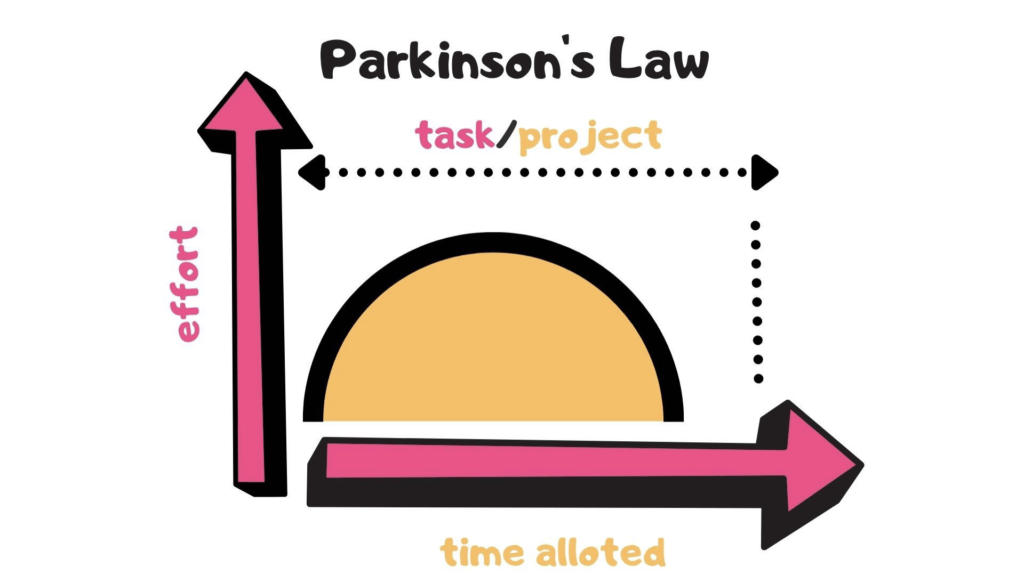
On top of that, many telecommuters fall for the vicious grip of the Parkinson’s Law—” work expands to fill the time allotted”—and end up knee-deep in overdue deadlines, late-night work sessions, and weekend crunch.
All that stacks up to a highly unpredictable and stressful environment.
How to Fix It 🔧
⏰ Structure your day. Look back at your work schedule and draw conclusions. When are you the most productive? How often do you take breaks? How much time (realistically) do you need to complete a daily batch of work? If you used to have a regular lunchtime at the office, turn that time into a family meal. Consider your natural predispositions. Are you a night owl or an early bird?
🗓 Make the most of scheduling tools. Don’t try to follow a makeshift schedule. Make a formal contract with yourself and put those obligations in your calendar. You can use Google, Apple, or Outlook calendars (all sync with Taskade!) to block time for work and personal duties. Be sure to color-code your calendar entries to clearly distinguish between work and leisure.
🎚 Allow a bit of flexibility. You don’t want to be too hard on yourself and push a rigid schedule overnight. Chances are you’ll get discouraged and get back to the old ways. Instead, be flexible, notice the patterns and adjust your schedule to accommodate incremental changes in a manageable way.
Problem #2: Too Many Distractions
Poor workplace ergonomics, messy desk, smartphone notifications... Many of the distractions at home stem from the work environment you’ve created.
Others, like kids at home, household noises, or social calls are part of the WFH reality. Unless you’re a hermit or live alone, you have to accept most of them.
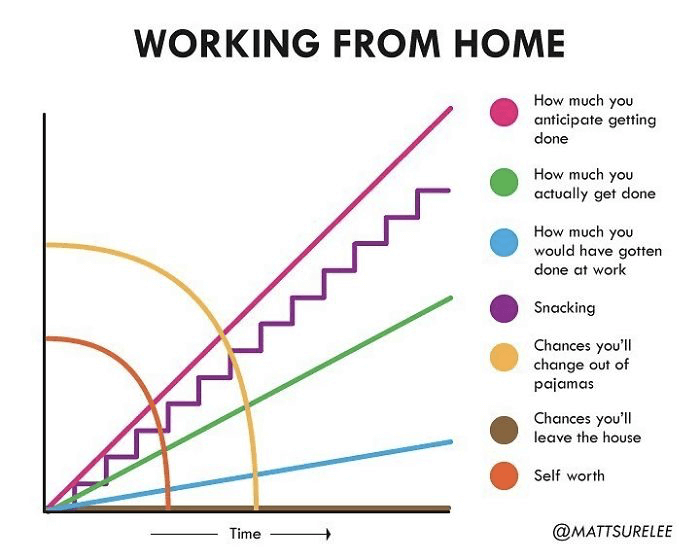
Working From Home by Matt Shirley(9)
Trying to tackle deep, meaningful work in such suboptimal conditions leads to stress, cognitive fatigue, and frustration, all of which impact mental health.
How to Fix It 🔧
🎯 Play when you play, work when you work. Be very clear about your work hours (see #1). Try to conclude each work session with a small reward (exercises, snacks, listening to music). Delaying gratification is challenging but waiting a bit longer for the reward will make it much more satisfying.
🍅 Use a Pomodoro timer. If you’re struggling to stay focused for more than 30 seconds at a time, use the Pomodoro technique. Set a timer for 25 minutes and work without interruptions. When the time’s up, take a five-minute break. Repeat the process four times and take a longer 15-minute break after that.
🔒 Install a browser extension. If you often engage in mindless wen browsing, install a website blocking extension. Most website blockers will let you create a blacklist of pages and lock them for a specific amount of time.
🧘♂️ Practice mindfulness meditation. Mindfulness meditation has plenty of benefits, including improved focus, increased self-awareness, and better sleep. It’s just the thing you need if you’re experiencing remote work burnout. Check our article (click) to learn how you can implement it into your daily routine.

Problem #3: Lack of Team Camaraderie
Here’s the thing. Even if your work buddies get on your nerves 50% of the time, the other 50% is quality time filled with social interactions and productive cooperation.
When you’re fresh to telecommuting, replicating those interactions is difficult. It takes time, incentive, and leadership support to build up companionship in a remote team.
If you feel alienated and detached from the people at your organization, chances are team camaraderie isn’t a priority and you may never feel right at home (pun intended).
How to Fix It 🔧
👩💻 Engage in virtual coworking. Virtual coworking sessions are great accountability boosters. You can either find an accountability partner for 1-on-1s or step up the game with team-wide deep work sessions.
☕️ Grab a (virtual) coffee. If you miss watercooler chit-chat, set some time aside each morning and invite a teammate for virtual coffee. Spend 5-10 minutes and discuss your plans for the day.
🤝Look for help. There’s nothing wrong with seeking mental health support, especially if you’ve been locked at your home office for the past 12 months. Talk to your manager/HR department and check your options. Some companies offer mental health support programs as part of the benefits package.
Problem #4: Poor Work Prioritization
Working with little to no supervision is great as long as you rock enough discipline and resilience to effectively prioritize work. If you don’t, you’re up for big trouble.
“Which task should I tackle first?”
“How long is it going to take?”
“Who do I ask for help?”
“Where can I find relevant documentation?”
Autonomy comes with great responsibility. Not only do you have to come up with an effective wfh workflow, but you also need to learn how to shift priorities when needed.
Prioritizing work is a multi-factor process. It involves variables like the urgency of a task, estimated completion time, and higher-ups’ approval.
When you work from home, you also have to consider things like personal obligations, family time, emergencies, unsolicited calls, and technical difficulties, just to name a few.
All those moving parts make work-from-home workflows volatile at best.
A fluctuating work schedule coupled with overambitious, unattainable goals will create more stress, resentment, and dissatisfaction that’ll push you down the burnout limbo.
How to Fix It 🔧
📈 Follow the Pareto Principle (80/20). The Pareto principle—also known as the 80/20 rule—states that 20% of your actions yield 80% of overall results. Make a list of the cornerstone tasks in your workflow. Underline two or three that bring in the most benefit and put them high on your to-do list.
📊 Use historical data. If you used to track work/projects at the office, you can tap into historical data and see how much time you need to complete a certain task. That’ll give you a rough estimate and block time in your schedule. You can use the Taskade Roadmap feature to visualize projects on a timeline.
✅ Get things done. David Allen’s Getting Things Done (GTD)® is the swiss army knife of time management systems. It’ll help you take back control of your workflow and effectively prioritize work at home. Jump over here to learn more.
🔄 Don’t overcomplicate. Streamline and automate your workflow whenever possible. For instance, Taskade comes packed with 500+ free templates that’ll help you schedule, brainstorm, research, and plan all kinds of projects. Simple grab one of the templates, copy it to your Workspace, and you’re ready to go!
Problem #5: Always On Mode
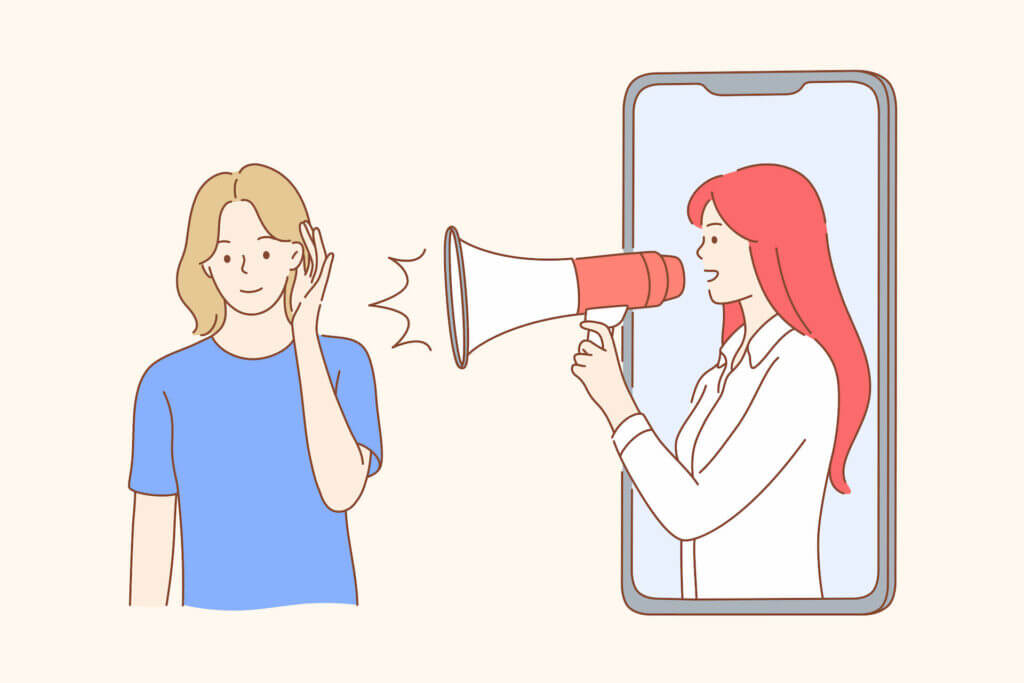
How many times have you checked work email outside business hours? When was the last time you ate lunch without fiddling with your phone?
If you’re like most remote workers, the answer is probably “way too often.”
According to Buffer’s State of Remote Work (2020) survey, 18% of remote workers report they struggle to unplug after work.(7) While the situation has improved since the 2019 results, it’s still one of the top pain points among telecommuters.
Research shows that the tendency to stay in “always-on” shouldn’t be blamed exclusively on individual employee’s preference. Tribal allegiance plays a role too.
“In five studies involving more than 2,000 working adults, we found that senders of after-hours work emails underestimate how compelled receivers feel to respond right away, even when such emails are not urgent.”
Laura M. Giurge and Vanessa K. Bohns via HBR(8)
The expectation to stay connected 24/7 is one of the key causes of remote work burnout. While social interactions are important, they shouldn’t come at the expense of your privacy. The keyword here is “balance.”
How to Fix It 🔧
⏱ Buffer time. Create a “slow” morning routine so you don’t log to work the moment you open your eyes. Grab a coffee, read a newspaper, eat breakfast with your family, and prime yourself for the day. Create a similar “cooldown” routine for the last 15 minutes of your workday and stick to it.
📨 Prioritize async. Use chat and email for most scenarios. Asynchronous communication comes with plenty of breathing room and gives you more control over your schedule. And the best part? Whenever you need to tackle deep, focused work, you can simply turn all notifications off.
🌗 Stick to your business hours. Talk to your team and set clear expectations from day one. Let others know when you’re available so they can adjust their workflows accordingly. Think twice before reaching out to your coworkers and always check the local time so you don’t catch them sleeping.
Burnout Prevention: Tool Features That Matter
| Feature | Taskade | Slack | Asana | Notion |
|---|---|---|---|---|
| Async-First Communication | Yes (in-project comments) | Channels (noisy) | Comments only | Comments only |
| Built-In Video Chat | Yes (no extra app) | Huddles | No | No |
| AI Agents for Routine Work | Yes (22+ tools) | No | No | No |
| Automations to Reduce Busywork | Yes (100+ integrations) | Workflows (paid) | Rules | Limited |
| Focus-Friendly Project Views | 8 views (List, Board, Mind Map, etc.) | N/A | 4 views | 4 views |
| Time Management (Pomodoro) | Built-in countdown timer | No | No | No |
| Calendar Integration | Google, Apple, Outlook sync | Google Calendar | Google, Outlook | Google Calendar |
| Templates for Routines | 500+ free | No | Paid | Community |
| Starting Price | $6/month (annual) | $6.67/user/month | $10.99/user/month | $8/user/month |

Workspace DNA: A System That Protects Your Team's Energy
Taskade's Workspace DNA architecture actively combats the conditions that cause burnout:
- Memory — All tasks, notes, and decisions persist in Taskade projects, so remote workers never waste energy hunting for context or re-explaining decisions. Searchable project history means less cognitive load.
- Intelligence — AI agents powered by 11+ frontier models from OpenAI, Anthropic, and Google handle shallow work — drafting updates, summarizing meetings, generating reports — freeing your team for meaningful deep work.
- Execution — Automations enforce healthy boundaries by scheduling break reminders, routing tasks based on capacity, and triggering end-of-day summaries. With Temporal durable execution and 100+ integrations, these workflows run reliably without human babysitting.
The loop: reduced busywork (Execution) preserves energy, preserved energy improves work quality (Memory), and better work feeds smarter agent recommendations (Intelligence).
Agentic AI and Vibe Coding: Build Your Burnout Prevention System
Instead of manually configuring wellness tools and workload balancers, let agentic AI do the setup. Vibe coding means describing what you need in plain language and letting AI build it.
With Taskade Genesis, try: "Build a team wellness dashboard that tracks workload per person, schedules break reminders, and flags anyone working more than 8 hours." Genesis deploys a complete app with embedded agents — over 150,000+ apps built this way.
AI agents with 22+ built-in tools and MCP connectors can also:
- Automate daily check-in prompts to gauge team energy levels
- Generate workload balance reports across projects and time zones
- Route overflow tasks to underutilized team members automatically
- Summarize weekly activity to help managers spot burnout patterns
Explore wellness and productivity apps in the Taskade Community or build your own.
Burnout Risk Factor Checklist
| Risk Factor | Warning Sign | Mitigation Strategy | Taskade Feature |
|---|---|---|---|
| Blurred Boundaries | Working past scheduled hours | Enforce end-of-day automations | Automations with time triggers |
| Meeting Overload | 3+ hours of meetings daily | Replace with async updates | In-project comments + AI agents |
| Context-Switching | Toggling 5+ tools daily | Consolidate into one workspace | 8 views in a single platform |
| Information Hunting | 30+ min finding documents | Centralize knowledge | Projects with search |
| Repetitive Busywork | Manual status reports | Automate with AI | AI agents with 22+ tools |
| Isolation | No team interaction for days | Schedule virtual coworking | Built-in video chat + Community |
👋 Parting Words
Remote work burnout can happen to everybody, especially during a 12-month social distancing marathon. The key is to recognize the symptoms and adjust your habits, work environment, and expectations accordingly.
Sure, you may be in the wrong line of business or on a different wavelength than your team members. But before you start looking for greener pastures, take a critical look at your workflow. It’s the small tweaks that matter in the long run.
Need some extra guidance? Here's a handy template with all the tips from this article. Copy it to your workspace to get started!
🧬 Burnout Prevention Tools Built with Genesis
Clone these wellness apps to help prevent and recover from burnout:
| App | What It Does | Clone |
|---|---|---|
| Breathe Circle | Guided breathing for stress relief | Clone → |
| Mood Tracker | Track emotional patterns and triggers | Clone → |
| Study/Work Timer + Music | Balanced work sessions with breaks | Clone → |
| Minimalistic ToDo | Simple task management without overwhelm | Clone → |
🔍 Explore All Community Apps →
Build your own wellness system with Taskade Genesis — describe what you need, and watch it come to life. Taskade supports frontier AI models from OpenAI, Anthropic, and Google, with plans starting at $6/month (Starter, annual).
Your living workspace includes:
- 🤖 Custom AI Agents — The intelligence layer
- 🧠 Projects & Memory — The database layer
- ⚡️ 100+ Integrations — The automation layer
Get started:
- Create Your First App → — Step-by-step tutorial
- Learn Workspace DNA → — Understand the architecture
🔗 Resources
https://www.gallup.com/workplace/323228/remote-workers-facing-high-burnout-turn-around.aspx
https://www.who.int/teams/mental-health-and-substance-use/mental-health-in-the-workplace
https://www.flexjobs.com/blog/post/flexjobs-mha-mental-health-workplace-pandemic/
https://www2.deloitte.com/us/en/pages/about-deloitte/articles/burnout-survey.html
Frequently Asked Questions
What are the signs of remote work burnout?
Key signs include chronic exhaustion despite adequate sleep, feeling detached or cynical about work, decreased productivity, difficulty concentrating, irritability, physical symptoms like headaches, and dreading the start of the workday. Remote-specific signs include camera fatigue, inability to disconnect after hours, and social withdrawal.
What causes burnout in remote workers?
Remote burnout is caused by blurred work-life boundaries, isolation from colleagues, always-on availability expectations, lack of physical movement, video meeting fatigue, difficulty disconnecting from a home office, and the absence of natural social interactions that provide mental breaks during an office day.
How can you recover from remote work burnout?
Set firm work-hour boundaries and stick to them, take regular breaks throughout the day, establish a physical separation between work and living spaces, reconnect with colleagues socially, prioritize exercise and outdoor time, and reduce meeting load by switching to async updates in shared workspaces.
How can teams prevent remote work burnout?
Teams prevent burnout by respecting time zones, limiting meetings to essential ones, encouraging time off, automating repetitive tasks with AI, maintaining manageable workloads, and creating a culture where disconnecting is expected — not penalized. Using efficient tools like Taskade reduces busywork that drains energy.
How does Taskade Genesis help prevent remote work burnout?
Taskade Genesis lets you build wellness dashboards, workload balancers, and break reminder systems from a single prompt. Over 150,000 apps have been built with Genesis. Teams can describe their burnout prevention needs in plain language and get a deployable app with AI agents that monitor workload patterns and suggest adjustments.
What is agentic AI and how does it reduce burnout-causing busywork?
Agentic AI refers to AI systems that act autonomously on your behalf. Taskade AI agents with 22+ built-in tools handle repetitive tasks like status updates, email drafts, meeting summaries, and task routing — eliminating the shallow work that drains energy and contributes to burnout. Over 3 million automations have been executed on the platform.
How does Workspace DNA help teams maintain sustainable work habits?
Workspace DNA combines Memory (persistent project context so you never lose track), Intelligence (AI agents that flag overloaded schedules and suggest rebalancing), and Execution (automations that enforce boundaries like no-meeting hours and break reminders). This architecture reduces the cognitive overhead that accelerates burnout.
Can AI agents monitor and prevent team burnout proactively?
Yes. Taskade AI agents can track task completion rates, flag team members with unsustainable workloads, suggest task redistribution, and automate routine status updates that otherwise consume productive hours. Combined with 100+ integrations, agents create a buffer between your team and burnout-inducing busywork.