Taskadetaskade
PricingLoginSign up for free →Sign up for free →
Loved by 1M+ users·Hosting 100K+ apps·Deploying 500K+ AI agents·Running 1M+ automations·Backed by Y Combinator
TaskadeAboutPressPricingFeaturesIntegrationsChangelogContact us
GalleryReviewsHelp CenterDocsFAQ
VibeVibe AppsVibe AgentsVibe CodingVibe Workflows
Vibe MarketingVibe DashboardsVibe CRMVibe AutomationVibe PaymentsVibe DesignVibe SEOVibe Tracking
Community
FeaturedQuick AppsTools
DashboardsWebsitesWorkflowsProjectsFormsCreators
DownloadsAndroidiOSMac
WindowsChromeFirefoxEdge
Compare
vs Cursorvs Boltvs Lovable
vs V0vs Windsurfvs Replitvs Emergentvs Devinvs Claude Codevs ChatGPTvs Claudevs Perplexityvs GitHub Copilotvs Figma AIvs Notionvs ClickUpvs Asanavs Mondayvs Trellovs Jiravs Linearvs Todoistvs Evernotevs Obsidianvs Airtablevs Basecampvs Mirovs Slackvs Bubblevs Retoolvs Webflowvs Framervs Softrvs Glidevs FlutterFlowvs Base44vs Adalovs Durablevs Gammavs Squarespacevs WordPressvs UI Bakeryvs Zapiervs Makevs n8nvs Jaspervs Copy.aivs Writervs Rytrvs Manusvs Crewvs Lindyvs Relevance AIvs Wrikevs Smartsheetvs Monday Magicvs Codavs TickTickvs Any.dovs Thingsvs OmniFocusvs MeisterTaskvs Teamworkvs Workfrontvs Bitrix24vs Process Streetvs Toggl Planvs Motionvs Momentumvs Habiticavs Zenkitvs Google Docsvs Google Keepvs Google Tasksvs Microsoft Teamsvs Dropbox Papervs Quipvs Roam Researchvs Logseqvs Memvs WorkFlowyvs Dynalistvs XMindvs Whimsicalvs Zoomvs Remember The Milkvs Wunderlist
Genesis AIApp BuilderVibe CodingAgent Builder
Dashboard BuilderCRM BuilderWebsite BuilderForm BuilderWorkflow AutomationWorkflow BuilderBusiness-in-a-BoxAI for MarketingAI for Developers
AI Agents
FeaturedProject ManagementProductivity
MarketingTranslatorContentWorkflowResearchPersonalSalesSocial MediaTo-Do ListCRMTask AutomationCoachingCreativityTask ManagementBrandingFinanceLearning and DevelopmentBusinessCommunity ManagementMeetingsAnalyticsDigital AdvertisingContent CurationKnowledge ManagementProduct DevelopmentPublic RelationsProgrammingHuman ResourcesE-CommerceEducationLegalEmailSEODeveloperVideo ProductionDesignFlowchartDataPromptNonprofitAssistantsTeamsCustomer ServiceTrainingTravel PlanningAll Categories
Automations
FeaturedBusiness-in-a-BoxInvestor Operations
Education & LearningHealthcare & ClinicsStripeSalesContentMarketingEmailCustomer SupportHubSpotProject ManagementAgentic WorkflowsBooking & SchedulingCalendarReportsSlackWebsiteFormTaskWeb ScrapingWeb SearchChatGPTText to ActionYoutubeLinkedInTwitterGitHubDiscordMicrosoft TeamsWebflowRSS & Content FeedsGoogle WorkspaceManufacturing & OperationsAI Agent TeamsAll Categories
Wiki
GenesisAI AgentsAutomation
ProjectsLiving DNAPlatformIntegrationsProductivityMethodsProject ManagementAgileScrumAI ConceptsCommunityTerminologyFeatures
Templates
FeaturedChatGPTTable
PersonalProject ManagementSalesFlowchartTask ManagementEngineeringEducationDesignTo-Do ListMarketingMind MapGantt ChartOrganizationalPlanningMeetingsTeam ManagementStrategyGamingProductionProduct ManagementStartupRemote WorkY CombinatorRoadmapCustomer ServiceLegalEmailBudgetsContentConsultingE-CommerceStandard Operating Procedure (SOP)Human ResourcesProgrammingMaintenanceCoachingSocial MediaHow-TosResearchMusicTrip PlanningAll Categories
Generators
AI AppAI WebsiteAI Dashboard
AI FormAI AgentClient PortalAI WorkspaceAI ProductivityAI To-Do ListAI WorkflowsAI EducationAI Mind MapsAI FlowchartAI Scrum Project ManagementAI Agile Project ManagementAI MarketingAI Project ManagementAI Social Media ManagementAI BloggingAI Agency WorkflowsAI ContentAI Software DevelopmentAI MeetingAI PersonasAI OutlineAI SalesAI ProgrammingAI DesignAI FreelancingAI ResumeAI Human ResourceAI SOPAI E-CommerceAI EmailAI Public RelationsAI InfluencersAI Content CreatorsAI Customer ServiceAI BusinessAI PromptsAI Tool BuilderAI SEOAI Gantt ChartAI CalendarsAI BoardAI TableAI ResearchAI LegalAI ProposalAI Video ProductionAI Health and WellnessAI WritingAI PublishingAI NonprofitAI DataAI Event PlanningAI Game DevelopmentAI Project Management AgentAI Productivity AgentAI Marketing AgentAI Personal AgentAI Business and Work AgentAI Education and Learning AgentAI Task Management AgentAI Customer Relations AgentAI Programming AgentAI SchemaAll Categories
Converters
AI Featured ConvertersAI PDF ConvertersAI CSV Converters
AI Markdown ConvertersAI Prompt to App ConvertersAI Data to Dashboard ConvertersAI Workflow to App ConvertersAI Idea to App ConvertersAI Flowcharts ConvertersAI Mind Map ConvertersAI Text ConvertersAI Youtube ConvertersAI Knowledge ConvertersAI Spreadsheet ConvertersAI Email ConvertersAI Web Page ConvertersAI Video ConvertersAI Coding ConvertersAI Task ConvertersAI Kanban Board ConvertersAI Notes ConvertersAI Education ConvertersAI Language TranslatorsAI Business → Backend App ConvertersAI File → App ConvertersAI SOP → Workflow App ConvertersAI Portal → App ConvertersAI Form → App ConvertersAI Schedule → Booking App ConvertersAI Metrics → Dashboard ConvertersAI Game → Playable App ConvertersAI Catalog → Directory App ConvertersAI Creative → Studio App ConvertersAI Agent → Agent App ConvertersAI Audio ConvertersAI DOCX ConvertersAI EPUB ConvertersAI Image ConvertersAI Resume & Career ConvertersAI Presentation ConvertersAll Categories
Prompts
Blog WritingBrandingPersonal Finance
Human ResourcesPublic RelationsTeam CollaborationProduct ManagementSupportAgencyReal EstateMarketingCodingResearchSalesAdvertisingSocial MediaCopywritingContentProject ManagementWebsite CreationDesignStrategyE-commerceEngineeringSEOEducationEmail MarketingUX/UIProductivityInfluencer MarketingAnalyticsEntrepreneurshipLegalAll Categories
Blog
How to Generate Creative Ideas: Idea Stacking, Visual Thinking & Storytelling Frameworks (2026)History of Apple: Steve Jobs' 50-Year Vision, From a Garage to a $3.7 Trillion AI Powerhouse (2026)Why One-Person Companies Are the Future of Work: AI Agents, Solo Founders, and the $1B Prediction (2026)Build Your Own AI CRM vs Paying Salesforce $300/Seat (2026)
The Great SaaS Unbundling: How AI Agents Break Per-Seat Pricing (2026)Garry Tan SaaS Prediction Scorecard: 3 Months Later (2026)History of Obsidian: From a Dynalist Side Project to the Second Brain Movement and the AI Knowledge OS Era (2026)State of Vibe Coding 2026: Market Size, Adoption & TrendsWhat is NVIDIA? Complete History: Jensen Huang, CUDA, GPUs, AI Revolution, Vera Rubin & More (2026)The SaaSpocalypse Explained: $285 Billion Wiped, AI Agents Rising (2026)AI-Native vs AI-Bolted-On: Why Software Architecture Decides Who Wins (2026)History of Mermaid.js: Diagrams as Code, From a Lost Visio File to 85K GitHub Stars (2026)The Complete History of Computing: From Binary to AI Agents — How We Got Here (2026)The BFF Experiment: From Noise to Life in the Age of AI Agents (2026)What Are AI Claws? Persistent Autonomous Agents Explained (2026)They Generate Code. We Generate Runtime — The Taskade Genesis Manifesto (2026)What Is Intelligence? From Neurons to AI Agents — A Complete Guide (2026)What Is Artificial Life? How Intelligence Emerges from Code (2026)What Is Grokking in AI? When Models Suddenly Learn to Generalize (2026)
AIAutomationProductivityProject ManagementRemote WorkStartupsKnowledge ManagementCollaborative WorkUpdates
Changelog
Agent Media Commands & Workflow Indicators (Mar 23, 2026)Salesforce Connector & App Page Redesign (Mar 20, 2026)Community Profiles, Content Sync & App Previews (Mar 19, 2026)
Task Sync Connector & Mobile Agent Chat (Mar 18, 2026)Project Management Connectors & Dark Mode Diagrams (Mar 17, 2026)3 New Connectors & Password Security (Mar 16, 2026)Mobile Agent Panel, Dark Mode Theming & White-Label 404 Pages (Mar 13, 2026)
Wiki
GenesisAI AgentsAutomation
ProjectsLiving DNAPlatformIntegrationsProductivityMethodsProject ManagementAgileScrumAI ConceptsCommunityTerminologyFeatures
© 2026 Taskade.
PrivacyTermsSecurity
Made withTaskade AIforBuilders
Blog›Productivity›How to Create a Priority List

How to Create a Priority List

Everyone has the same number of hours in a day, but what makes some of us achieve more than others? Is it just pure intellect, or is there an element of priorit...

September 13, 2022·Updated July 29, 2025·11 min read·Taskade Team·Productivity·#productivity-tips#task-management
On this page (14)
🚦 What Is a Priority List?🤔 Why Should You Create a Priority List?It Helps You Organize Your Most Important TasksIt Allows You To Stay FocusedHelps You Practice Task Delegation🏗️ How to Create a Priority List#1 Create a Master Task List#2 Organize Your Tasks🐸 Eat the FrogEisenhower Matrix#3 Tackle Your Tasks🐑 Using Taskade To Create A Priority List👋 Parting wordsFrequently Asked Questions About The Priority List

Everyone has the same number of hours in a day, but what makes some of us achieve more than others? Is it just pure intellect, or is there an element of prioritization and organization that comes into play? It's both, and a handful of tools and strategies to boot. Enter a priority list.

In today's article, you'll learn what a priority list, why it's so effective, and how it can help you get stuff done. We'll also show you how to create your first priority list three easy steps.

🚦 What Is a Priority List?
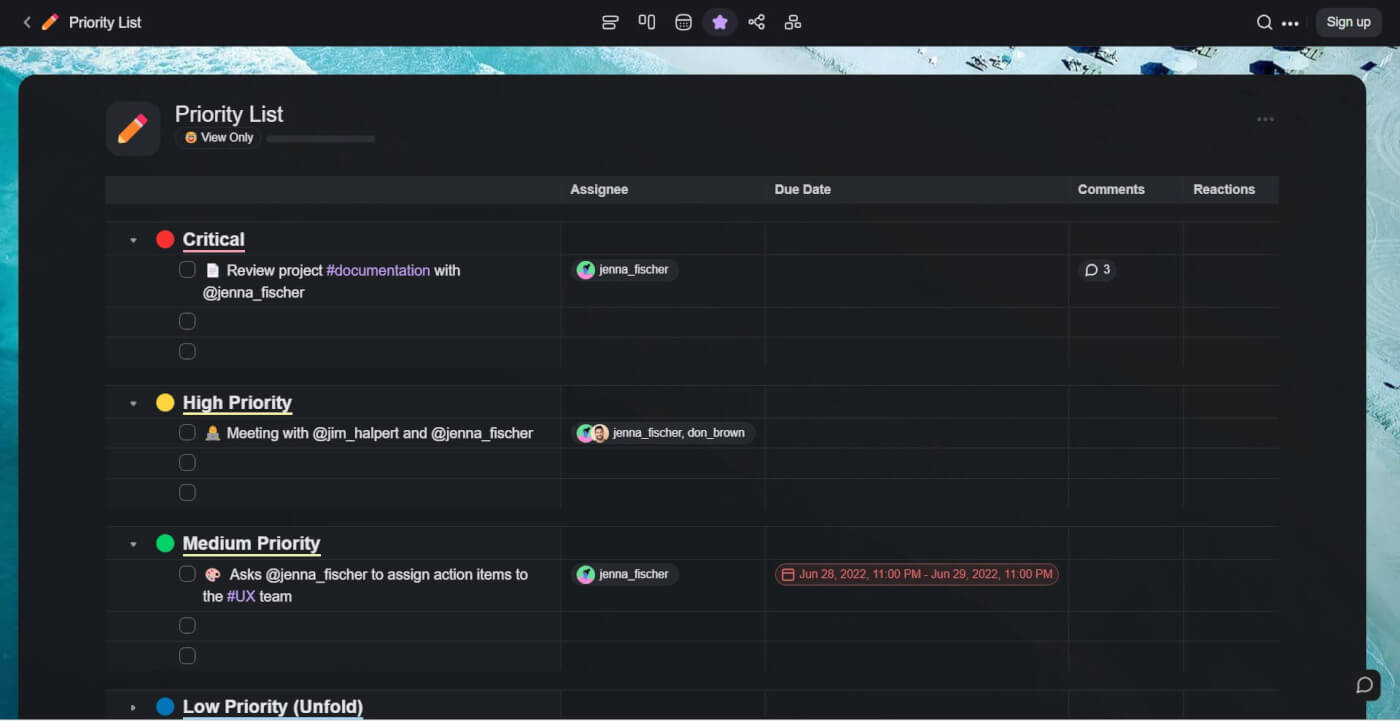
priority list

In a nutshell, a priority list is a task list containing all tasks you need to prioritize.

Simple, right?

And that makes a lot of sense. Productivity? It's all about those small steps. Think of it this way: you jot down an unassuming task list, and suddenly, you're off to a great start. But take a moment to prioritize that list? You're in the zone, making things happen.

Building on the foundation of a task list, a priority list is all about making intentional decisions on what to tackle first. By assigning importance and urgency to each task, you're not just making a to-do list; you're crafting a game plan. It's about taking charge and being proactive.

The only problem? Creating tasks is easy. But learning how to prioritize them efficiently requires real skill. The good news is, there are tools and techniques you can use to make things easier.

But before we got to the "how" part, let's discuss the "why" first. 👇

🤔 Why Should You Create a Priority List?

It Helps You Organize Your Most Important Tasks

A priority list organizes your tasks by importance. While a basic, assorted to-do list is helpful in many scenarios, adding due dates and specific actions to your list makes it more effective. This way, you're better equipped to manage your time and complete tasks efficiently.

Besides, learning how to manage and prioritize tasks is a good practice.

Stacking up action items and turning out monster to-do lists is counterproductive; a lengthy list of tasks might seem impressive but can lead to paralysis: where do you even start? After you become adept at crafting task lists, refining your ability to prioritize should naturally follow.

It Allows You To Stay Focused

Some say our attention spans are about the same as a goldfish's. It's a funny comparison, but it sure speaks volumes about how easily distracted we've become in today's world.

A priority list can help focus on the most important and urgent task at hand. This means that all your efforts are focused on ensuring that said task is completed to the best of your ability.

This is very much in line with the 80-20 rule, more commonly known as the Pareto Principle. The principle suggests that 80% of the results come from 20% of the efforts or causes. So, by honing in on that crucial 20%, you can achieve more while spending less time, energy, and resources.

The result?

You're less likely to get distracted with trifles that don't deserve your time and attention. This clarity not only enhances your efficiency but also reduces stress and offers a clearer path to achieving your objectives. It's a productivity win-win if we ever saw one.

Helps You Practice Task Delegation

Doing everything on your own is not a sustainable strategy. As you scale and take on more tasks and responsibilities, it’s inevitable that you’ll soon have to delegate tasks.

The most successful leaders are those who learn to bring out the best in others. Although you might have the urge to do everything on your own, there is an opportunity cost involved when it comes to time; you’re better off working on tasks that actually require your attention.

Delegate lower-priority tasks (or those that need an expertise different than your own) to other team members and maintain your focus on key objectives. As an added bonus, this will also send a clear signal to your team members and employees that you trust them to get work done.

🏗️ How to Create a Priority List

A priority list is a to-do list that has been arranged based on priority. But how do you get there in a relatively painless way? Here's how to create your first priority list in three steps.

#1 Create a Master Task List

Tasks can come from a variety of sources, so the first step you need to take is to aggregate all of your big and small commitments in a single to-do list. Having them all in one place makes it way easier to figure out the most important tasks and prioritize them more effectively.

Start by jotting down everything that comes to mind. Whether it's an important meeting, a minor chore, or even a personal errand, get it all out and into one, centralized list.

Prefer paper? That's fine, but you'll be missing out on some great benefits of digital to-dos like:

  • 🔔 Reminders and notifications for due dates

  • 🔄 Seamless syncing across devices

  • 🤝 Easy sharing and collaboration capabilities

...and a handful of other benefits. But we'll get to that in a moment. And now for the fun stuff.

#2 Organize Your Tasks

With all the tasks in place, you need to organize them by priority. There are many strategies you can use for that, but we prefer using either the Eat the Frog method or the Eisenhower Matrix.

Here’s a quick recap on how each of those productivity methods work.

🐸 Eat the Frog

The Eat the Frog method was created in the early 1900s and is often attributed to Mark Twain. Although there's no evidence that Twain coined the phrase, he is often quoted as saying:

If it's your job to eat a frog, it's best to do it first thing in the morning. And if it's your job to eat two frogs, it's best to eat the biggest one first.

These days, the method is known simply as Brian Tracy’s Eat the Frog. Tracy, a renowned motivational public speaker and self-development author, penned a book titled "Eat That Frog!" where he revitalized and popularized the method and broke it into 21 practical strategies.

The method itself is simple.

Your "Frog" refers to the toughest task that you have for the day. The one you are most likely to procrastinate on, but also the one that might have the greatest positive impact on your work.

If you start your day by eating your biggest, meanest frogs, nothing else can faze you for the rest of it. That's it — list your tasks, spot your frogs, and tackle them first. It's that simple.

Eisenhower Matrix

Dwight D. Eisenhower, the 34th President of the United States once said:

I have two kinds of problems, the urgent and the important. The urgent are not important, and the important are never urgent."

Eisenhower's quote laid the groundwork for the Eisenhower Matrix, a simple yet transformative tool designed to optimize productivity and decision-making. By separating tasks into four quadrants, the matrix provides a clear visual representation of where your focus should be:
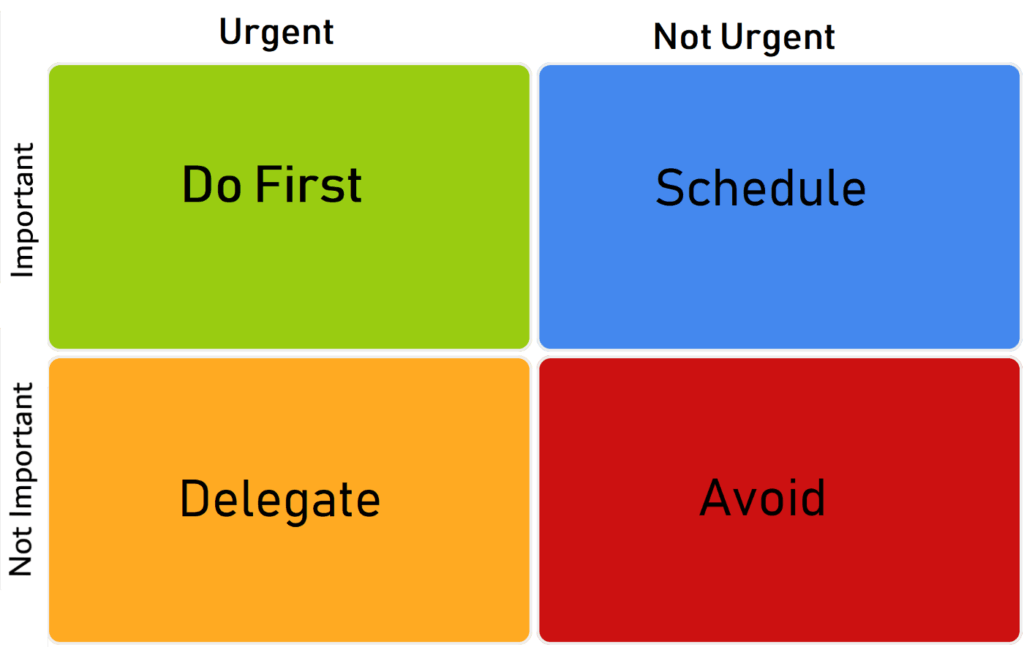
The Eisenhower Matrix representation.

Based on which quadrant a task belongs to, you take one of four routes:

  • Urgent + Important = Do first. Tasks you must complete immediately.

  • Urgent + Not Important = Delegate. Tasks to schedule for later.

  • Not Urgent + Important = Schedule. Tasks to delegate if possible.

  • Not Urgent + Not Important = Delete. Tasks to consider eliminating or postponing.

And that's it.

Both the Eat the Frog method and the Eisenhower matrix are simple tools you can use to prioritize your tasks quickly and efficiently. Choose one that works for you and stick to it.

#3 Tackle Your Tasks

Organized your tasks? Great. Now's the time to roll up your sleeves and get stuff done.

After you’ve organized your tasks, the next thing to do is to work on them methodically, one by one. While the temptation might be there to multitask, studies have shown that it's often counterproductive. Instead, focus on one task at a time and move on only when you're done.

Of course, no strategy or method is set in stone.

Watch your results, make adjustments, and continually refine your approach. Don't be afraid to experiment and try different approaches, as long as you stick to one rule: a task at a time.

By using a priority list to organize your tasks, you’ll be able to optimize your day and set yourself up for success. Remember, success lies in simplicity and consistency. Stay adaptable. Learn from experiences. Celebrate small victories. This is the secret sauce of productivity.

Ok, but can you make your priority lists even more powerful? Let's find out. 🚀

🐑 Using Taskade To Create A Priority List

We love traditional pen & paper lists. But they're not exactly the most efficient way to track and organize tasks. You can grapple with your stationery, or you can use a powerful and simple digital tool that will help you get the job done without a hassle. Enter Taskade.

So, where do we start?

There are several ways you can create a priority list with Taskade.

Let's start with a classic approach.

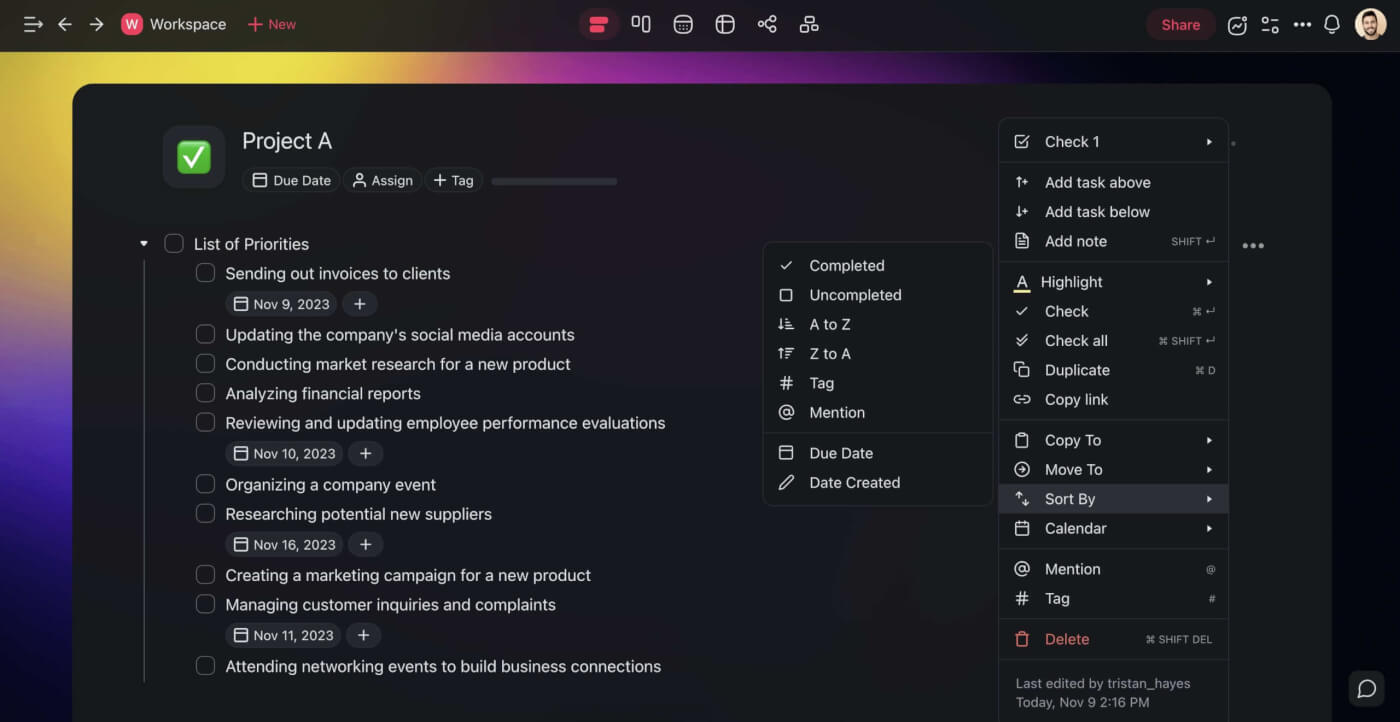
All you need to get started is a project nested inside a workspace or a folder. Once inside, simply type your tasks and organize them any way you like using keyboard shortcuts or the drag-and-drop interface. If your tasks have additional qualities, Taskade can automatically sort them by:

  • ✔️ Completed

  • 🔲 Uncompleted

  • ⬇ A to Z

  • ⬆ Z to A

  • Tag

  • @ Mention

  • 🗓 Due Date

Task sorting options in Taskade.

To better organize the list, consider adding #hashtags to prioritize and categorize the items. This will allow you to manage the list using custom filters for #priority, #location, #context, and more.

It's that simple.
Hashtags in Taskade.

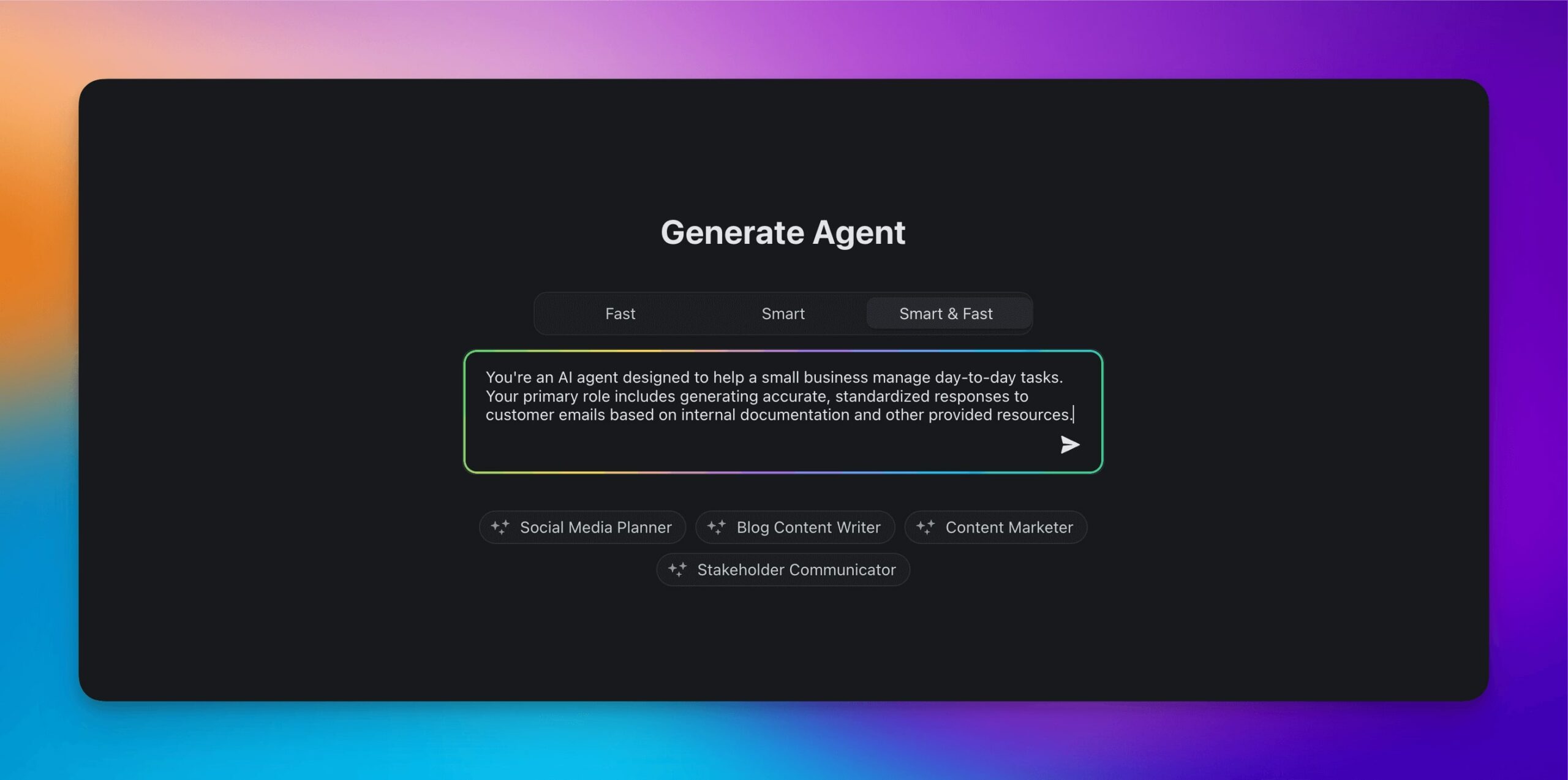
Ok, but we're in the age of AI, and that means we can easily automate a big chunk of the workflow using Taskade's built-ai AI assistant. Here's how it works.

The list is in place. The first thing we need to do is to organize it by priority. All you need to do is select your tasks and select the Prioritize bulk AI command. Taskade will use the power of natural language processing and machine learning to arrange the items by importance.
Taskade AI Prioritize feature.

If you ever get stuck, you can simply use the /subtask AI command to break big, complex priorities into a series of bite-sized items. Every task and subtask can be divided into a number of incremental items nested in infinite hierarchies, letting you work one check at a time.
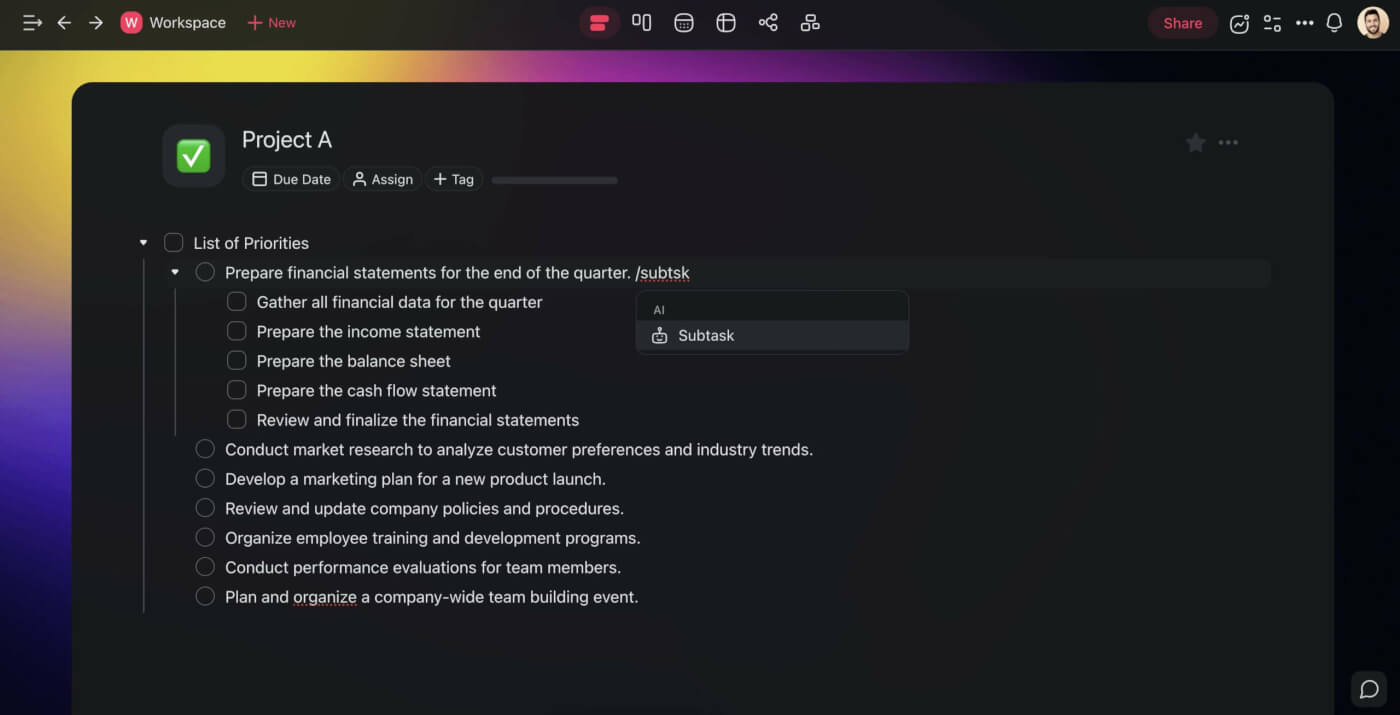
Taskade AI Subtask generator.

Of course, there are many other ways Taskade can help you work faster and smarter:

  • 🎨 Minimalist user interface optimized for productivity.

  • 🤖 Powerful artificial intelligence integration.

  • 🤝 Chat, video calls, and comments.

  • 🛠️ Custom templates to speed up work.

  • 📱 Syncing across multiple platforms and devices.

  • And much more!


🚀 Ready to supercharge your priority lists?
Create a free Taskade account today!


👋 Parting words

Now that you’ve learned how to create a priority list, why not get a headstart using our free task priority list template? Get into a habit of creating priority lists and ramp up your productivity levels today.

shared online to-do list apps is the key to success?

Frequently Asked Questions About The Priority List

What is ascending priority list?

An ascending priority list arranges tasks or items from the least important to the most important. This helps you focus on smaller, less critical tasks first, gradually working your way up to more significant tasks. It can be useful for building momentum and making progress.

What is a priority list schedule?

A priority item is a task or goal that holds significant importance and urgency. It needs immediate attention and should be addressed before other, less critical items. Identifying priority items helps focus efforts on what truly matters.

What does priority mean on a to-do list?

On a to-do list, priority indicates the level of importance and urgency of each task. High-priority tasks are those that need immediate attention, while low-priority tasks can be addressed later. This helps you focus on what needs to be done first, improving time management and productivity.

Taskade AI banner.

0%

On this page

🚦 What Is a Priority List?🤔 Why Should You Create a Priority List?It Helps You Organize Your Most Important TasksIt Allows You To Stay FocusedHelps You Practice Task Delegation🏗️ How to Create a Priority List#1 Create a Master Task List#2 Organize Your Tasks🐸 Eat the FrogEisenhower Matrix#3 Tackle Your Tasks🐑 Using Taskade To Create A Priority List👋 Parting wordsFrequently Asked Questions About The Priority List

Related Articles

/static_images/What is ClickUp? Complete History of Project Management & Work OS Platform
February 4, 2026Productivity

What is ClickUp? History of the 'One App to Replace Them All' Project Management Platform

The complete history of ClickUp from Zeb Evans' 2017 founding to $6B valuation. Learn how ClickUp grew from internal too...

/static_images/How to Generate Creative Ideas: Idea Stacking, Visual Thinking & Storytelling Frameworks
March 30, 2026Productivity

How to Generate Creative Ideas: Idea Stacking, Visual Thinking & Storytelling Frameworks (2026)

Creativity isn't talent — it's recombination. Learn Idea Stacking, Scorsese's visual literacy, Nolan's narrative archite...

/static_images/History of Obsidian note-taking app — from Dynalist to second brain movement to AI knowledge OS
March 24, 2026AI

History of Obsidian: From a Dynalist Side Project to the Second Brain Movement and the AI Knowledge OS Era (2026)

The complete history of Obsidian from Dynalist side project to 6M+ users, the second brain movement, Bases, and the Clau...

/static_images/AI event landing page built with Taskade Genesis
March 7, 2026Productivity

Build an AI Event Landing Page in Minutes

Step-by-step tutorial: build an event landing page with registration, scheduling, and attendee management — from a singl...

/static_images/AI utility app — color palette extractor built with Taskade Genesis
March 3, 2026Productivity

Vibe Utility Apps: 10 AI Converters & Dev Tools You Can Clone

10 AI-powered utility apps — QR generators, color extractors, translators, code tools, and more — ready to clone or buil...

/static_images/AI expense tracking and finance dashboard built with Taskade Genesis
February 28, 2026Productivity

Vibe Finance Apps: 10 AI Invoice Generators, Expense Trackers & Dashboards

10 AI-powered finance tools — invoice generators, expense trackers, budget dashboards, and ROI calculators — ready to cl...

View All Articles
How to Create a Priority List That Actually Works | Taskade Blog