



Taskadetaskade
PricingLoginSign up for free →Sign up for free →
Loved by 1M+ users·Hosting 100K+ apps·Deploying 500K+ AI agents·Running 1M+ automations·Backed by Y Combinator
TaskadeAboutPressPricingFeaturesIntegrationsChangelogContact us
GalleryReviewsHelp CenterDocsFAQ
VibeVibe AppsVibe AgentsVibe CodingVibe Workflows
Vibe MarketingVibe DashboardsVibe CRMVibe AutomationVibe PaymentsVibe DesignVibe SEOVibe Tracking
Community
FeaturedQuick AppsTools
DashboardsWebsitesWorkflowsProjectsFormsCreators
DownloadsAndroidiOSMac
WindowsChromeFirefoxEdge
Compare
vs Cursorvs Boltvs Lovable
vs V0vs Windsurfvs Replitvs Emergentvs Devinvs Claude Codevs ChatGPTvs Claudevs Perplexityvs GitHub Copilotvs Figma AIvs Notionvs ClickUpvs Asanavs Mondayvs Trellovs Jiravs Linearvs Todoistvs Evernotevs Obsidianvs Airtablevs Basecampvs Mirovs Slackvs Bubblevs Retoolvs Webflowvs Framervs Softrvs Glidevs FlutterFlowvs Base44vs Adalovs Durablevs Gammavs Squarespacevs WordPressvs UI Bakeryvs Zapiervs Makevs n8nvs Jaspervs Copy.aivs Writervs Rytrvs Manusvs Crewvs Lindyvs Relevance AIvs Wrikevs Smartsheetvs Monday Magicvs Codavs TickTickvs Any.dovs Thingsvs OmniFocusvs MeisterTaskvs Teamworkvs Workfrontvs Bitrix24vs Process Streetvs Toggl Planvs Motionvs Momentumvs Habiticavs Zenkitvs Google Docsvs Google Keepvs Google Tasksvs Microsoft Teamsvs Dropbox Papervs Quipvs Roam Researchvs Logseqvs Memvs WorkFlowyvs Dynalistvs XMindvs Whimsicalvs Zoomvs Remember The Milkvs Wunderlist
Genesis AIApp BuilderVibe CodingAgent Builder
Dashboard BuilderCRM BuilderWebsite BuilderForm BuilderWorkflow AutomationWorkflow BuilderBusiness-in-a-BoxAI for MarketingAI for Developers
AI Agents
FeaturedProject ManagementProductivity
MarketingTranslatorContentWorkflowResearchPersonalSalesSocial MediaTo-Do ListCRMTask AutomationCoachingCreativityTask ManagementBrandingFinanceLearning and DevelopmentBusinessCommunity ManagementMeetingsAnalyticsDigital AdvertisingContent CurationKnowledge ManagementProduct DevelopmentPublic RelationsProgrammingHuman ResourcesE-CommerceEducationLegalEmailSEODeveloperVideo ProductionDesignFlowchartDataPromptNonprofitAssistantsTeamsCustomer ServiceTrainingTravel PlanningAll Categories
Automations
FeaturedBusiness-in-a-BoxInvestor Operations
Education & LearningHealthcare & ClinicsStripeSalesContentMarketingEmailCustomer SupportHubSpotProject ManagementAgentic WorkflowsBooking & SchedulingCalendarReportsSlackWebsiteFormTaskWeb ScrapingWeb SearchChatGPTText to ActionYoutubeLinkedInTwitterGitHubDiscordMicrosoft TeamsWebflowRSS & Content FeedsGoogle WorkspaceManufacturing & OperationsAI Agent TeamsAll Categories
Wiki
GenesisAI AgentsAutomation
ProjectsLiving DNAPlatformIntegrationsProductivityMethodsProject ManagementAgileScrumAI ConceptsCommunityTerminologyFeatures
Templates
FeaturedChatGPTTable
PersonalProject ManagementSalesFlowchartTask ManagementEngineeringEducationDesignTo-Do ListMarketingMind MapGantt ChartOrganizationalPlanningMeetingsTeam ManagementStrategyGamingProductionProduct ManagementStartupRemote WorkY CombinatorRoadmapCustomer ServiceLegalEmailBudgetsContentConsultingE-CommerceStandard Operating Procedure (SOP)Human ResourcesProgrammingMaintenanceCoachingSocial MediaHow-TosResearchMusicTrip PlanningAll Categories
Generators
AI AppAI WebsiteAI Dashboard
AI FormAI AgentClient PortalAI WorkspaceAI ProductivityAI To-Do ListAI WorkflowsAI EducationAI Mind MapsAI FlowchartAI Scrum Project ManagementAI Agile Project ManagementAI MarketingAI Project ManagementAI Social Media ManagementAI BloggingAI Agency WorkflowsAI ContentAI Software DevelopmentAI MeetingAI PersonasAI OutlineAI SalesAI ProgrammingAI DesignAI FreelancingAI ResumeAI Human ResourceAI SOPAI E-CommerceAI EmailAI Public RelationsAI InfluencersAI Content CreatorsAI Customer ServiceAI BusinessAI PromptsAI Tool BuilderAI SEOAI Gantt ChartAI CalendarsAI BoardAI TableAI ResearchAI LegalAI ProposalAI Video ProductionAI Health and WellnessAI WritingAI PublishingAI NonprofitAI DataAI Event PlanningAI Game DevelopmentAI Project Management AgentAI Productivity AgentAI Marketing AgentAI Personal AgentAI Business and Work AgentAI Education and Learning AgentAI Task Management AgentAI Customer Relations AgentAI Programming AgentAI SchemaAll Categories
Converters
AI Featured ConvertersAI PDF ConvertersAI CSV Converters
AI Markdown ConvertersAI Prompt to App ConvertersAI Data to Dashboard ConvertersAI Workflow to App ConvertersAI Idea to App ConvertersAI Flowcharts ConvertersAI Mind Map ConvertersAI Text ConvertersAI Youtube ConvertersAI Knowledge ConvertersAI Spreadsheet ConvertersAI Email ConvertersAI Web Page ConvertersAI Video ConvertersAI Coding ConvertersAI Task ConvertersAI Kanban Board ConvertersAI Notes ConvertersAI Education ConvertersAI Language TranslatorsAI Business → Backend App ConvertersAI File → App ConvertersAI SOP → Workflow App ConvertersAI Portal → App ConvertersAI Form → App ConvertersAI Schedule → Booking App ConvertersAI Metrics → Dashboard ConvertersAI Game → Playable App ConvertersAI Catalog → Directory App ConvertersAI Creative → Studio App ConvertersAI Agent → Agent App ConvertersAI Audio ConvertersAI DOCX ConvertersAI EPUB ConvertersAI Image ConvertersAI Resume & Career ConvertersAI Presentation ConvertersAll Categories
Prompts
Blog WritingBrandingPersonal Finance
Human ResourcesPublic RelationsTeam CollaborationProduct ManagementSupportAgencyReal EstateMarketingCodingResearchSalesAdvertisingSocial MediaCopywritingContentProject ManagementWebsite CreationDesignStrategyE-commerceEngineeringSEOEducationEmail MarketingUX/UIProductivityInfluencer MarketingAnalyticsEntrepreneurshipLegalAll Categories
Blog
How to Generate Creative Ideas: Idea Stacking, Visual Thinking & Storytelling Frameworks (2026)History of Apple: Steve Jobs' 50-Year Vision, From a Garage to a $3.7 Trillion AI Powerhouse (2026)Why One-Person Companies Are the Future of Work: AI Agents, Solo Founders, and the $1B Prediction (2026)Build Your Own AI CRM vs Paying Salesforce $300/Seat (2026)
The Great SaaS Unbundling: How AI Agents Break Per-Seat Pricing (2026)Garry Tan SaaS Prediction Scorecard: 3 Months Later (2026)History of Obsidian: From a Dynalist Side Project to the Second Brain Movement and the AI Knowledge OS Era (2026)State of Vibe Coding 2026: Market Size, Adoption & TrendsWhat is NVIDIA? Complete History: Jensen Huang, CUDA, GPUs, AI Revolution, Vera Rubin & More (2026)The SaaSpocalypse Explained: $285 Billion Wiped, AI Agents Rising (2026)AI-Native vs AI-Bolted-On: Why Software Architecture Decides Who Wins (2026)History of Mermaid.js: Diagrams as Code, From a Lost Visio File to 85K GitHub Stars (2026)The Complete History of Computing: From Binary to AI Agents — How We Got Here (2026)The BFF Experiment: From Noise to Life in the Age of AI Agents (2026)What Are AI Claws? Persistent Autonomous Agents Explained (2026)They Generate Code. We Generate Runtime — The Taskade Genesis Manifesto (2026)What Is Intelligence? From Neurons to AI Agents — A Complete Guide (2026)What Is Artificial Life? How Intelligence Emerges from Code (2026)What Is Grokking in AI? When Models Suddenly Learn to Generalize (2026)
AIAutomationProductivityProject ManagementRemote WorkStartupsKnowledge ManagementCollaborative WorkUpdates
Changelog
Agent Media Commands & Workflow Indicators (Mar 23, 2026)Salesforce Connector & App Page Redesign (Mar 20, 2026)Community Profiles, Content Sync & App Previews (Mar 19, 2026)
Task Sync Connector & Mobile Agent Chat (Mar 18, 2026)Project Management Connectors & Dark Mode Diagrams (Mar 17, 2026)3 New Connectors & Password Security (Mar 16, 2026)Mobile Agent Panel, Dark Mode Theming & White-Label 404 Pages (Mar 13, 2026)
Wiki
GenesisAI AgentsAutomation
ProjectsLiving DNAPlatformIntegrationsProductivityMethodsProject ManagementAgileScrumAI ConceptsCommunityTerminologyFeatures
© 2026 Taskade.
PrivacyTermsSecurity
Made withTaskade AIforBuilders
Blog›Product Updates›AI Teams Roundtable,…

AI Teams Roundtable, Automation for Custom Fields, RSS Feeds, & YouTube!

Hi Taskaders, We're excited to announce AI Teams with the new Roundtable Mode — where every AI Agent collaborates in real time. Plus, discover new AI Automatio...

August 29, 2024·Updated January 3, 2026·6 min read·John Xie·Updates
On this page (10)
🤖 Supercharge AI Teams with Every Agent!✅ Custom Fields for AI Automation🛜 RSS Trigger for AI Automation🎥 YouTube Trigger for AI Automation🔗 Knowledge Backlinks🚥 Introducing Flow Paths in Automation⚡️ TLDR: Watch Video Summary🤝 Join Our Community & ConnectOther ImprovementsFrequently Asked Questions

Hi Taskaders,

We're excited to announce AI Teams with the new Roundtable Mode — where every AI Agent collaborates in real time. Plus, discover new AI Automations for Custom Fields, RSS Feeds, Youtube, and much more!

🤖 Supercharge AI Teams with Every Agent!
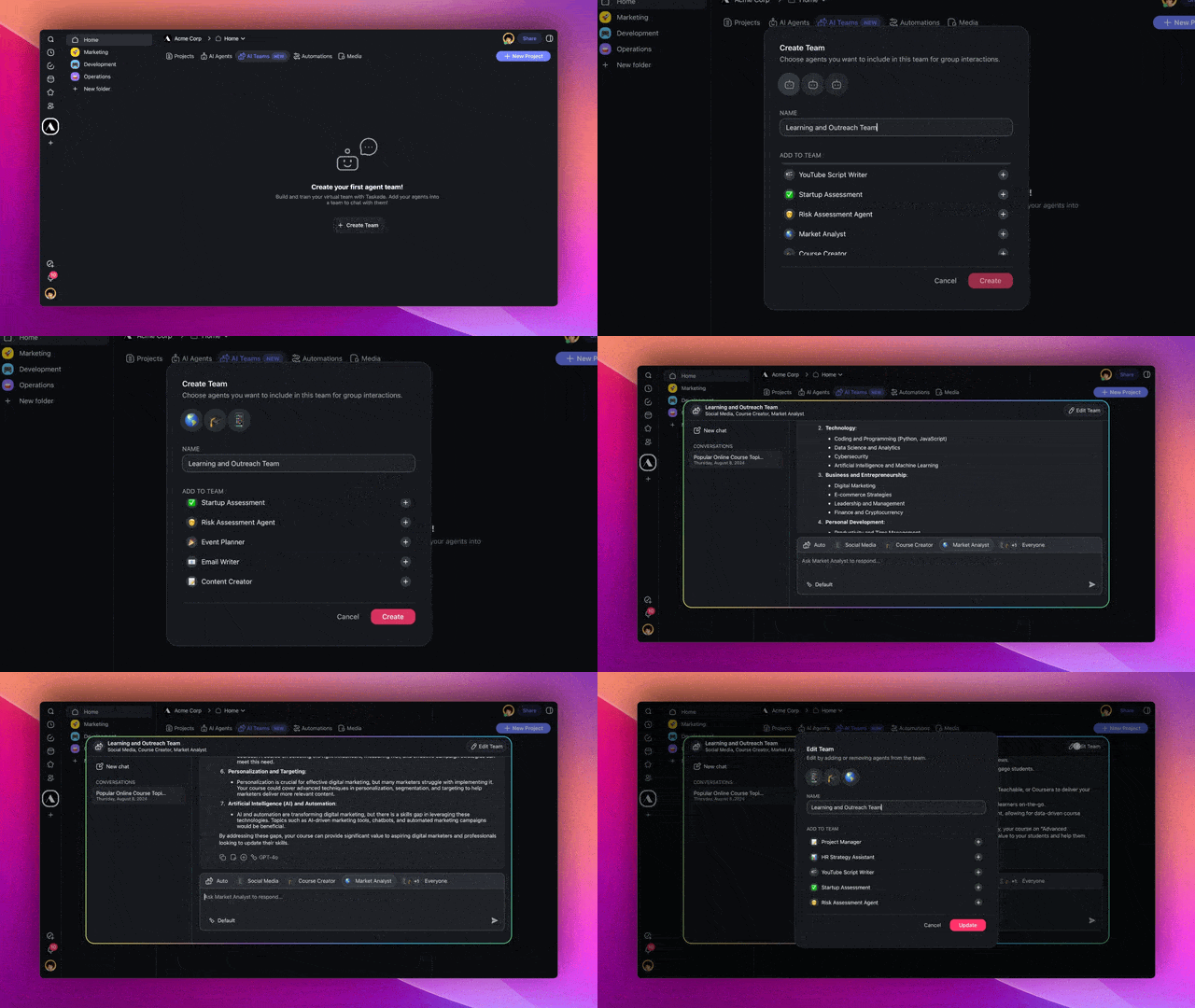
Autonomous AI Teams interface in a Taskade workspace.

Build your AI workforce with AI Teams! Put together a crew of AI Agents, each with their own tools and knowledge, customized by you. Learn more.

Choose how your AI Team collaborates:

  1. Automatic: Let Taskade pick the best agent for the job.

  2. Manual Selection: Decide which agent you want to respond.

  3. Roundtable Mode: Get everyone to respond for a full, real-time discussion.

It’s like having a room full of experts at your fingertips.

The most powerful AI collaboration is now live in Taskade!

How it works: Go to Workspace ➡ AI Teams tab ➡ Create Team.

✅ Custom Fields for AI Automation
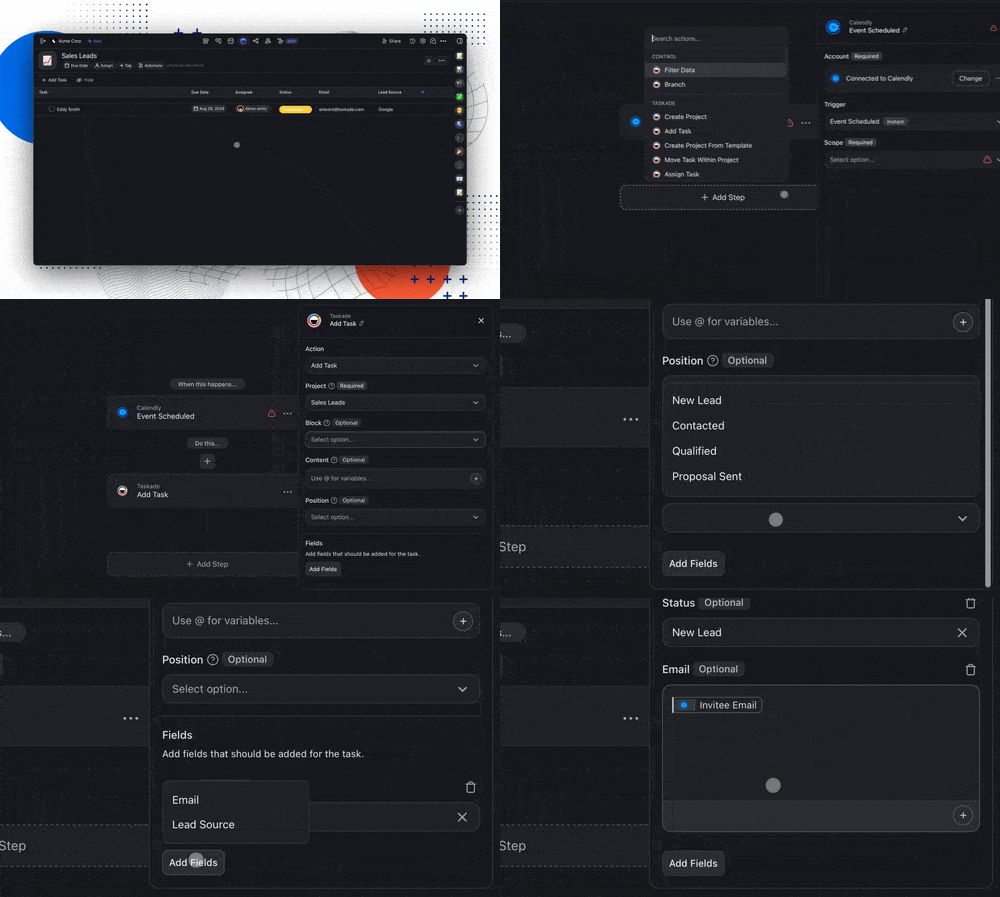
Custom fields for AI automation.

Now, you can automate and bring in data from third-party apps right into your projects. Use these custom fields to build a simple CRM, assign tasks, and keep track of everything—all within Table View! Learn more.

How it works: Go to your project ➡ Switch to Table View ➡ Click the ➕ button to add Custom Fields ➡ Set up automation with the Add Task action.

🛜 RSS Trigger for AI Automation
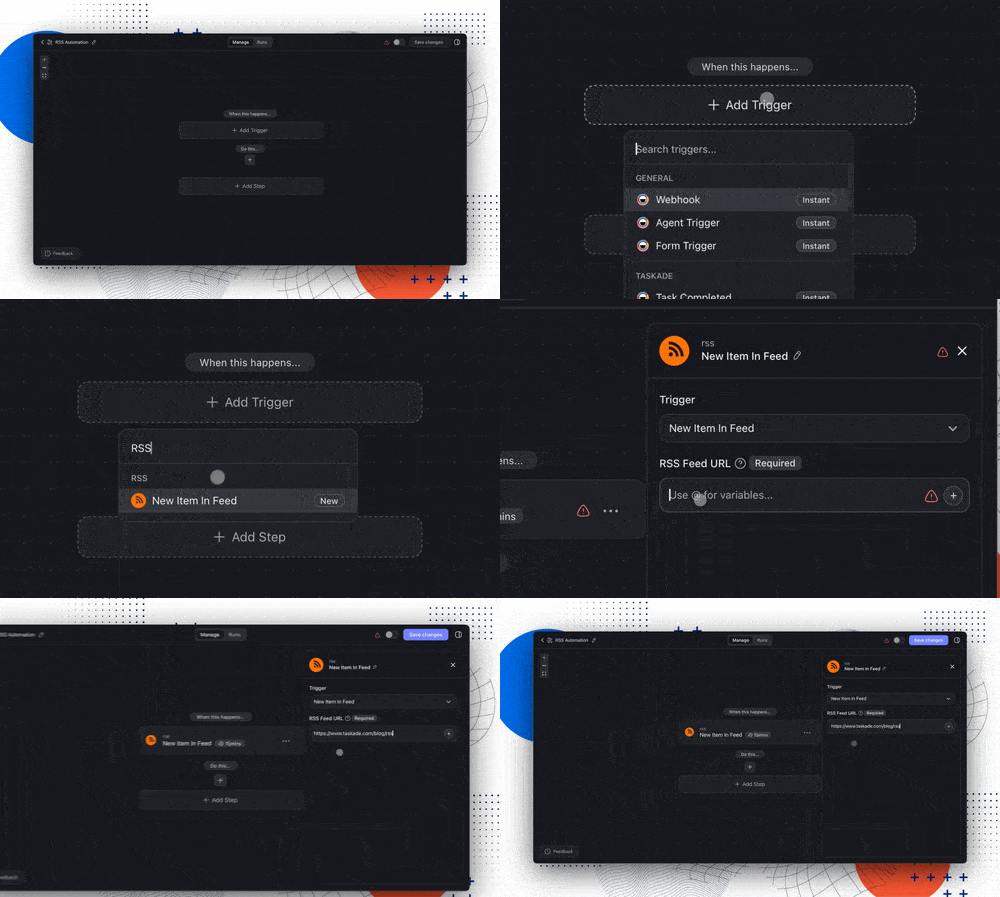
RSS trigger for AI automation.

The new RSS trigger lets you automatically turn updates from your favorite blogs, podcasts, and news sites into tasks. Monitor feeds, analyze articles, and extract just what you need using our AI and media actions. Learn more.

Use Cases:

  • Blog Posts: Automatically create summaries of new blog articles.

  • Podcasts: Track and analyze new podcast episodes for easy access.

  • News Updates: Stay informed by logging news stories into your projects.

How it works: Set up the trigger ➡ Add RSS feed URL ➡ Automate new content into tasks or projects.

🎥 YouTube Trigger for AI Automation
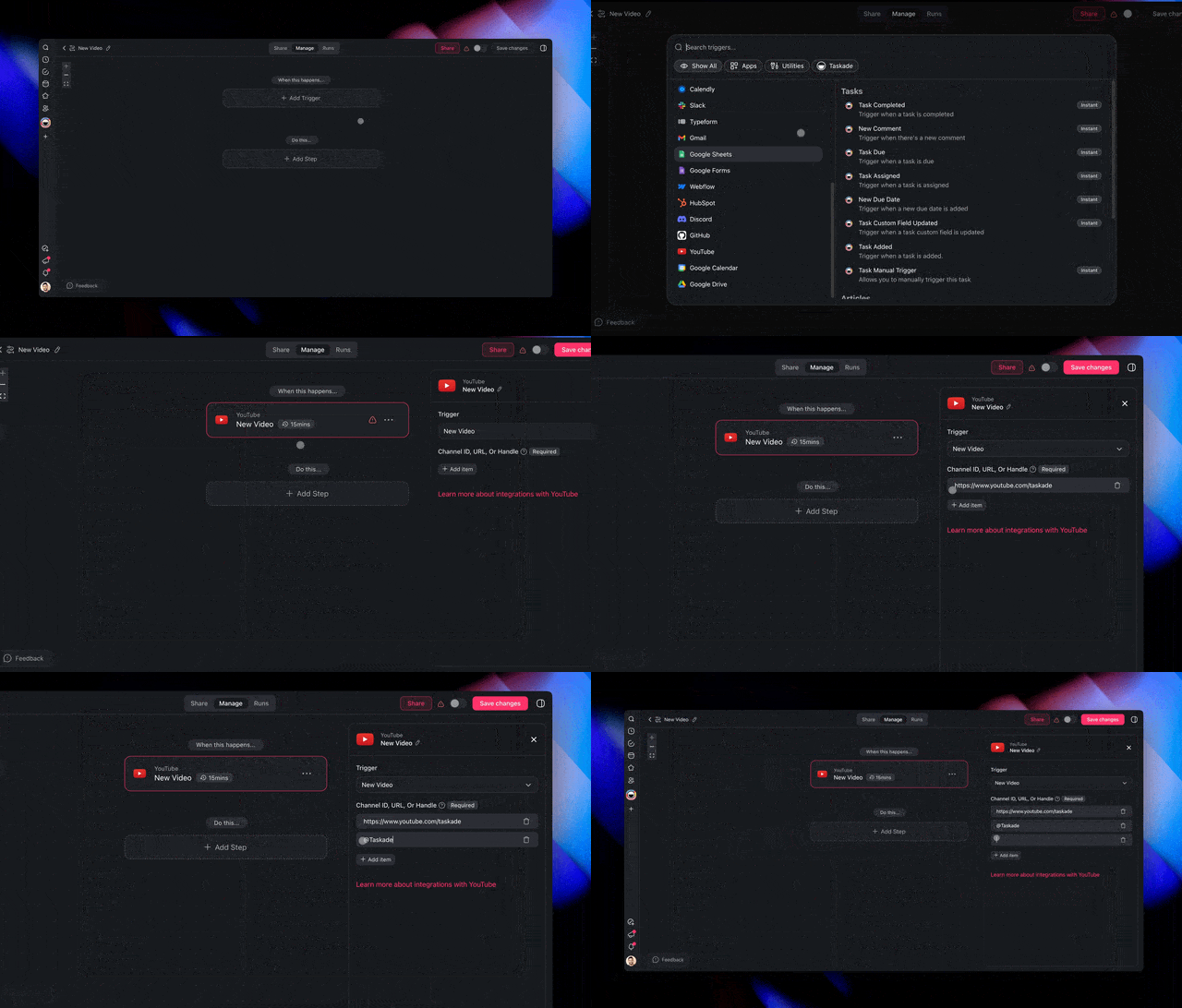
YouTube trigger for AI automation.

The new YouTube trigger lets you keep tabs on your favorite channels 24/7. Automatically create watch lists, summarize videos, or extract key information for later use. Learn more.

Use Cases:

  • Watch Lists: Automatically add new videos from your favorite creators.

  • Transcriptions: Get summaries of new content for review and analysis.

  • Project Management: Create tasks or projects based on new videos.

How it works: Set up the trigger ➡ Add the YouTube channel URL ➡ Automate tasks, transcriptions, project creations, and more.

🔗 Knowledge Backlinks
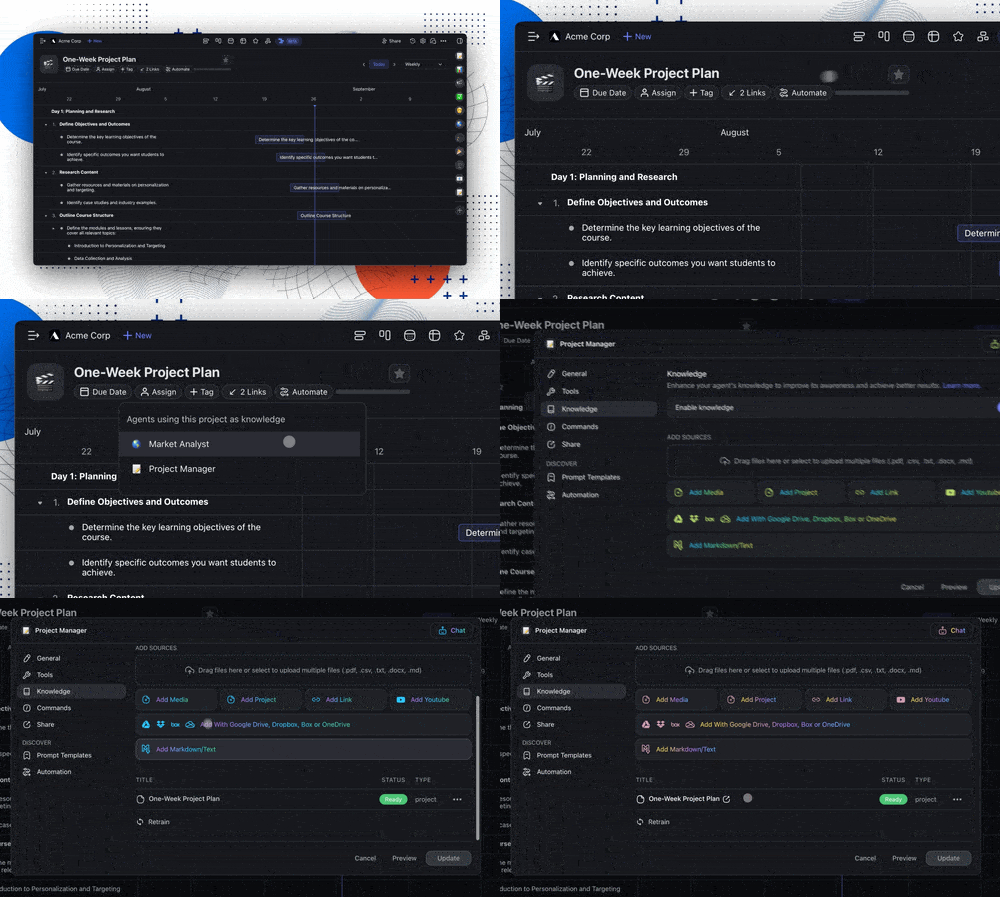
Knowledge backlinks in AI agent knowledge.

Now, when you add a project to an AI agent's knowledge, a backlink is automatically added to that project. This makes it easy to see which agents are using it as a dynamic knowledge source. Learn more.

Adding Taskade projects and links gives your agents real-time, dynamic knowledge, keeping them up-to-date. From tracking projects to syncing live web data, your agents stay current and ready to help.

🚥 Introducing Flow Paths in Automation
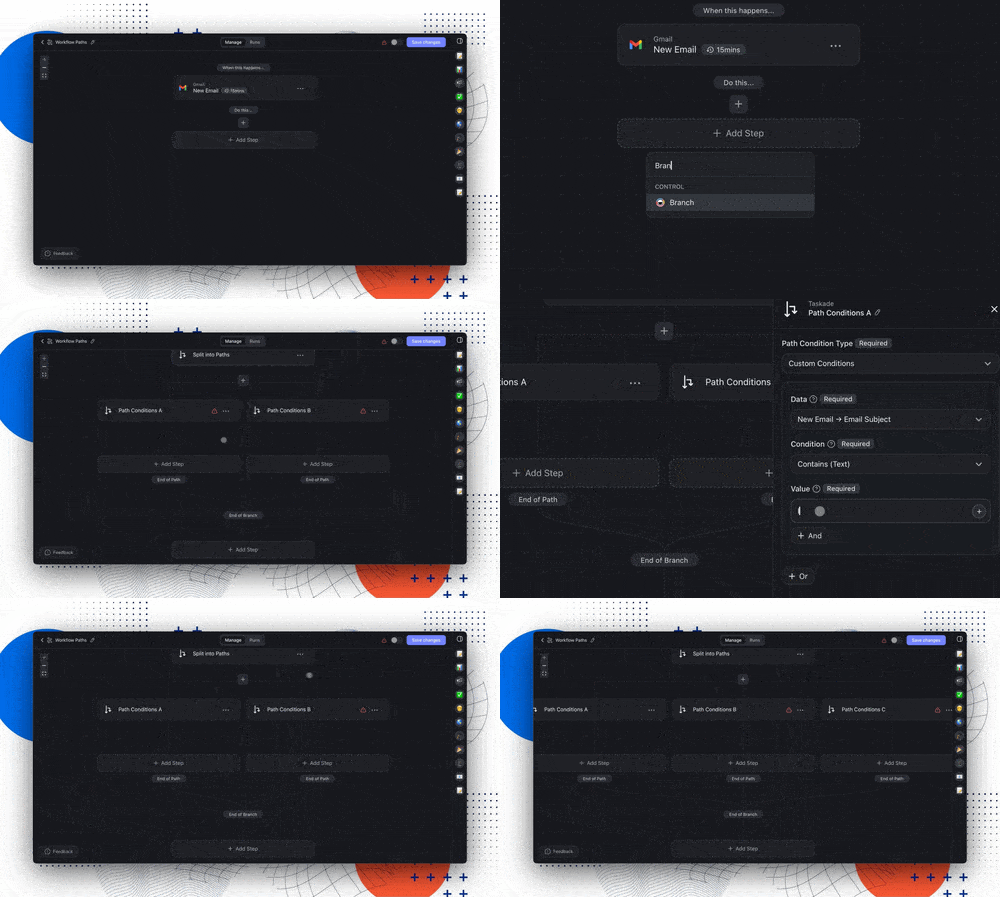
Flow paths in AI automation.

Taskade's new Flow Paths let you easily split workflows into different routes based on custom rules. It’s like a choose-your-own-adventure for your tasks—one condition leads one way, another takes a different route. This gives you more control and precision, making automation smarter and more flexible.

Now, you can create adaptable workflows without duplicating tasks or writing code. Whether you're managing projects or handling complex tasks, Flow Paths streamline your work like never before.

Exclusive Early Access: Want to try it first? Reply with "AI Automation" on our FB Group, Linkedin, Twitter/X, and Reddit posts to get an invite!

⚡️ TLDR: Watch Video Summary

In a hurry? Check our latest video summary for a step-by-step guide to the new changes:

🤝 Join Our Community & Connect

  1. Facebook Group 

  2. Official Subreddit

  3. Community Forum

  4. Youtube Channel

  5. Discord and Telegram


Other Improvements

  • New: Introducing Flow Paths for Automation, now in Beta. Get early access to unlock multi-path automation for greater workflow precision.

    • Exclusive Early Access: Get a first look on FB, Linkedin, Twitter/X, and Reddit. Reply to the posts with "AI Automation" for an invite!

    • Create flexible workflows that split into different paths based on custom conditions. 

    • Think of it as a choose-your-own-adventure for your tasks!

  • AI Team Enhancements:

    • Multi-Agent Collaboration: Assemble a group of AI agents to work together seamlessly, leveraging their collective expertise.

    • Roundtable Mode: Enable all agents in your team to respond for a comprehensive, real-time discussion.

    • Intelligent Response Selection: AI Teams automatically choose the best agent to respond, ensuring high-quality answers.

    • Dynamic Conversations: Interact with AI Teams just like individual agents, but with added team awareness for cohesive responses.

    • Simplified AI Team Setup: Easily create and manage AI Teams by selecting and assigning agents with a few clicks.

  • AI Agent Enhancements:

    • Project Backlinks: Automatically see which agents are linked to your project as dynamic knowledge sources.

    • Add from Response: Quickly add information to an agent's knowledge base directly from their responses.

    • Bulk Knowledge Upload: Add multiple files to an agent's knowledge base at once, speeding up the training process.

    • Markdown/Text Support: Create new knowledge sources by directly pasting markdown or plain text.

    • Knowledge Source Preview: Easily preview sources directly from the agent's knowledge panel.

    • Choose Your AI Model: Select the AI model for each task.

  • AI Automation Enhancements****:

    • Gmail Draft Automation—Draft emails in Gmail directly from Taskade automations, perfect for streamlining your email workflows.

    • AI Form Enhancements: Improved public form styling and functionality, including the ability to submit forms with no inputs.

    • RSS Feed Automation: Automate workflows triggered by new RSS feed updates, perfect for staying on top of your favorite blogs or news sources.

    • Custom Field Support: Add and manage custom fields in automations to tailor workflows to your specific needs.

    • YouTube Automation: Automate tasks like transcribing videos or notifying teams whenever a new video is posted.

    • Improved Error Handling: Enhanced error messaging and handling for smoother automation processes.

    • Looking for additional integrations? Let us know here.

  • Mobile App Updates: 

    • AI Agents Home: All your agents across workspaces in one place.

    • Multi-Chats with AI Agents: Simplify with separate chats.

    • Agent Command UI: Updated UI to match the web experience.

    • Persistent Push Notifications: Consistent notifications on mobile.

    • Bug Fixes: Improved toolbars, workspace filtering, and more.

  • Smoother automation setup with refined number fields.

  • Various bug fixes and performance improvements.

We can’t wait for you to try the new update — dive in and let us know what you think! Remember, our Help Center and Feedback Forum are always here for your questions and suggestions.

Here's to making this year the most productive yet with Taskade! 🚀

— Team Taskade 🐑

P.S. If you're loving Taskade, share your experience on our testimonials page to get featured, or dive into our Affiliate Partnership program today!🤖 AI Teams Roundtable, Automation for Custom Fields, RSS Feeds, & YouTube!

Taskade AI banner.

Frequently Asked Questions

What is AI Teams Roundtable Mode in Taskade?

Roundtable Mode lets every AI Agent in a team respond to the same query, creating a real-time multi-perspective discussion. Unlike Automatic mode (which picks the best agent) or Manual mode (which lets you choose), Roundtable gives you input from all agents simultaneously — like having a room full of experts debating the best approach.

Can I automate custom fields in Taskade Table View?

Yes. You can automate data flow from third-party apps into Taskade projects using custom fields. Use the Add Task automation action to populate custom field values automatically in Table View. This lets you build simple CRMs, assign tasks with metadata, and track everything within a single project — all powered by automation.

How does Taskade automate RSS feeds and YouTube content?

Taskade's RSS Trigger monitors blog feeds and news sites, while the YouTube Trigger tracks channels for new video uploads. Both triggers fire automation workflows that can summarize content, create tasks, send notifications, or feed data into AI Agents. You can track multiple sources simultaneously and process content automatically.

What collaboration modes do Taskade AI Teams support?

AI Teams support three collaboration modes: Automatic (Taskade picks the best agent for each task), Manual Selection (you choose which agent responds), and Roundtable (every agent responds for a full discussion). Each agent brings its own custom tools, knowledge, and commands, creating a versatile AI workforce.

0%

On this page

🤖 Supercharge AI Teams with Every Agent!✅ Custom Fields for AI Automation🛜 RSS Trigger for AI Automation🎥 YouTube Trigger for AI Automation🔗 Knowledge Backlinks🚥 Introducing Flow Paths in Automation⚡️ TLDR: Watch Video Summary🤝 Join Our Community & ConnectOther ImprovementsFrequently Asked Questions

Related Articles

/static_images/Taskade AI agent knowledge training interface showing file upload, cloud drive connection, and web URL ingestion for agent training
February 4, 2026Product Updates

Taskade Genesis: Train AI With Any File, Edit Apps Visually, Build With Maps (February 2026)

Train agents with any file format, cloud drive, or URL. Edit apps visually with element selector. Work with agent teams....

Taskade Genesis: Generate Images. Preview Agents. Build Mobile Apps.
January 28, 2026Updates

Taskade Genesis: Generate Images. Preview Agents. Build Mobile Apps.

Generate images from chat, preview AI agents before sharing, and explore the latest upgrades to Taskade Genesis....

Taskade Product Updates — Memory That Never Forgets: Projects as Databases
January 20, 2026Updates

Taskade Product Updates — Memory That Never Forgets: Projects as Databases

Memory That Never Forgets: Projects as Databases ...

Taskade Product Updates — The Execution Layer: Why Training Agents Matters
January 17, 2026Updates

Taskade Product Updates — The Execution Layer: Why Training Agents Matters

The Execution Layer: Why Training Agents Matters ...

Taskade Product Updates — Built for Builders: Launch Faster with 70 App Templates
January 15, 2026Updates

Taskade Product Updates — Built for Builders: Launch Faster with 70 App Templates

Built for Builders: Launch Faster with 70 App Templates ...

/static_images/Animated Taskade Genesis interface showing AI-powered workflows and 100+ app integrations
January 14, 2026Product Updates

Taskade Genesis: Build Live Apps From Your Tools (100+ Integrations)

Agents think. Projects remember. Automations execute. One prompt creates workflows that track leads, process payments, a...

View All Articles
AI Teams Roundtable, Automation for Custom Fields, RSS Feeds, & YouTube! | Taskade Blog